Retired Document
Important: This document may not represent best practices for current development. Links to downloads and other resources may no longer be valid.
Overview to the Mac mini
This chapter lists the features of the new Mac mini and provides information about a few software issues of interest to developers. The Mac mini does not ship with a monitor, keyboard, or mouse.
Features
Microprocessor: The Mac mini has a PowerPC G4 microprocessor running at a clock speed of 1.25 GHz or 1.42 GHz. For more information, see PowerPC G4 Microprocessor.
Memory: The computer comes with 256 MB of DDR333 (PC2700) SDRAM installed in an internal 184-pin DIMM expansion slot, with build-to-order options of 512 MB and 1 GB. The maximum supported memory is 1 GB. For more information, see RAM Expansion Modules.
Graphics: The video circuits provide built-in 2D and 3D acceleration using an ATI Radeon 9200 graphics processor with 32 MB 190 MHz DDR memory. For more information, see Video Display Subsystem.
Main memory bus: The speed of the memory bus is 167 MHz. For more information, see Main ICs and Buses.
Cache: The 512 KB on-chip L2 cache is included on the microprocessor IC and has the same clock speed as the microprocessor. For more information, see Level 2 Cache.
Hard disk storage: The built-in hard disk drive has a capacity of 40 GB or 80 GB, with an 80 GB build-to-order option. For more information, see Hard Disk Drive.
Combo drive: The Mac mini has a combination DVD-ROM/CD-RW drive. For more information, see Combo Drive.
SuperDrive : A SuperDrive (CD-RW/DVD-R) is available as a build-to-order option. For more information, see SuperDrive.
External video monitor: The Mac mini has a DVI port and includes a DVI to VGA adapter. A video adapter with composite and S-video connectors is available separately. For more information, see DVI to Video Adapter.
Video RAM: The video hardware includes 32 MB of DDR video memory, which supports 3D features and millions of colors in all resolutions. For more information, see Video Display Subsystem and DVI Port.
USB ports: The Mac mini has two USB 2.0 ports. For more information, see USB Ports.
FireWire 400 ports: The Mac mini has one IEEE-1394a FireWire 400 port supporting transfer rates of 100, 200, and 400 Mbps. For more information, see FireWire 400 Port.
Target Disk Mode: The computer can act like a FireWire storage device connected to another computer. See Target Disk Mode.
Modem: The Mac mini has a built-in fax modem with a V.92 56 Kbps data rate; an optional to configure without a modem is available. For more information, see Internal Modem.
Ethernet: The Mac mini has a built-in Ethernet port for a 10Base-T and 100Base-T operation. For more information, see Ethernet Port.
AirPort Extreme Card: An internal AirPort Extreme Card wireless LAN module is available as a build-to-order option. For more information, see AirPort Extreme Card.
Bluetooth: Fully-integrated Bluetooth is available as a build-to-order option to enable short-range wireless connections between desktop and laptop computers and a host of other peripheral devices. For more information, see Bluetooth Technology.
Sound: The Mac mini has an internal speaker with amplifier and a headphone/audio line-out jack. For more information, see Sound System.
Power source: The primary power source is an 85 W, 18.5 V power adapter.
Size and weight: The Mac mini is 2 inches (5.08 cm) high, 6.5 inches (16.51 cm) wide, and 6.5 inches (16.51 cm) deep; it weighs 2.9 pounds (1.32 kg).
Enclosure
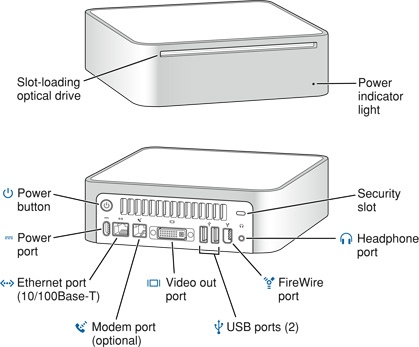
Figure 1-1 shows the front and rear views of the Mac mini.
System Software
The Mac mini comes with Mac OS X version 10.3.7 or later installed as the default system. Mac OS 9 applications can be run in Classic mode. Install the Classic environment from the “Additional Hardware and Apple Software Test” CD shipped with your computer. For more information about Mac OS X, see the reference listed in Mac OS X.
Computer Identification
Rather than reading the box flag or the model string and then making assumptions about the computer’s features, applications that need to find out the features of the computer should use IORegistry calls to test for the features they require. IORegistry calls are part of the I/O Kit API. For more information, see the references listed at I/O Kit.
Asset management software that reports the kind of computer it is run on can obtain the value of the model property from the IOService plane of the IORegistry. For the Mac mini, the value of the string in the compatible property is PowerMac10,1.
NMI without Programmer’s Switch
Current Macintosh computers do not have a programmer’s switch, which allowed users to generate a non-maskable interrupt (NMI). The paragraphs below describe how to generate an NMI from a remote session for systems that do not have a physical programmer's switch.
Starting with Mac OS X 10.1.2, the OS will promote and recognize the DB_NMI bit in the debug parameter of the “boot-args” property from Open Firmware. When the DB_NMI bit is set, the user can generate a non-maskable interrupt (NMI) by pressing the system's power button. This replaces the power button’s sleep or wake response. The system reads the state of the bit at boot time from the boot-args configuration variable. For more information about the debug flags, please see Inside Mac OS X: Kernel Programming.
To set the DB_NMI bit, enter the following command at the Terminal to display the current debug flag settings.
% nvram boot-args |
Add the parameter debug=0x4, as follows.
% sudo nvram boot-args="<current settings> debug=0x4" |
After the DB_NMI bit in the debug parameter is set, reboot the machine. After reboot, pressing the power button for approximately 1 second will generate an NMI.
The power button will retain this functionality until Mac OS X is restarted without the DB_NMI bit set. To clear this bit, issue the nvram command omitting debug=0x4 parameter, as follows, then restart the machine.
% sudo nvram boot-args="" |
Velocity Engine Acceleration
The Velocity Engine (an implementation of AltiVec) is the vector processing unit in the PowerPC G4 microprocessor. Some system software has been modified to take advantage of the accelerated processing that the Velocity Engine makes possible. System software has also been modified to support low-level operations using the Velocity Engine.
For complete information on the Velocity Engine, refer to the following Apple website:
Copyright © 2005 Apple Computer, Inc. All Rights Reserved. Terms of Use | Privacy Policy | Updated: 2005-04-05