Verifying and Modifying the Model
Even if you use an existing model or create a model with the wizard after selecting all the automated functions, you still need to do, or at least verify, the following things:-
Make sure that each entity has a primary key.
-
Specify the properties that you don't want displayed, particularly keys.
-
Add or modify relationships to the Studio, Movie, Talent, and Movie Role entities.
-
Generate source files for the Studio and Talent classes.
-
Open the model file.
In Project Builder's project browser, click Resources in the leftmost column
Select StudioManager . eomodeld .
Double-click the EOModeler document icon, displayed above the right side of the project browser.
When the model document is opened, the Model Editor (in table mode by default) lists the entities you selected from the Movies database, along with the names of their associated database tables and class names.
-
Add a column for client-side classes.
If no Client Side Class column appears in the Model Editor, choose Client-Side Class Name from the pop-up list at the bottom of the Model Editor.
The steps you should perform with EOModeler are described in more detail in the following sections.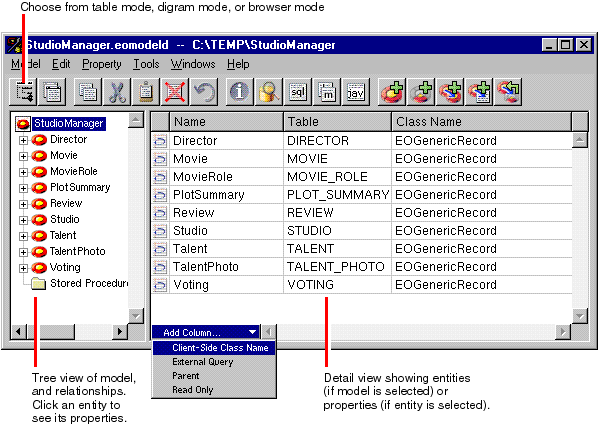
Assigning Primary Keys
Removing Primary and Foreign Keys as Class Properties
© 1999 Apple Computer, Inc. – (Last Updated 13 Sep 99)


