Retired Document
Important: OpenGL ES was deprecated in iOS 12. To create high-performance code on GPUs, use the Metal framework instead. See Metal.
Best Practices for Shaders
Shaders provide great flexibility, but they can also be a significant bottleneck if you perform too many calculations or perform them inefficiently.
Compile and Link Shaders During Initialization
Creating a shader program is an expensive operation compared to other OpenGL ES state changes. Compile, link, and validate your programs when your app is initialized. Once you’ve created all your shaders, the app can efficiently switch between them by calling glUseProgram.
Check for Shader Program Errors When Debugging
Reading diagnostic information after compiling or linking a shader program is not necessary in a Release build of your app and can reduce performance. Use OpenGL ES functions to read shader compile or link logs only in development builds of your app, as shown in Listing 10-1.
Listing 10-1 Read shader compile/link logs only in development builds
// After calling glCompileShader, glLinkProgram, or similar |
#ifdef DEBUG |
// Check the status of the compile/link |
glGetProgramiv(prog, GL_INFO_LOG_LENGTH, &logLen); |
if(logLen > 0) { |
// Show any errors as appropriate |
glGetProgramInfoLog(prog, logLen, &logLen, log); |
fprintf(stderr, “Prog Info Log: %s\n”, log); |
} |
#endif |
Similarly, you should call the glValidateProgram function only in development builds. You can use this function to find development errors such as failing to bind all texture units required by a shader program. But because validating a program checks it against the entire OpenGL ES context state, it is an expensive operation. Since the results of program validation are only meaningful during development, you should not call this function in Release builds of your app.
Use Separate Shader Objects to Speed Compilation and Linking
Many OpenGL ES apps use several vertex and fragment shaders, and it is often useful to reuse the same fragment shader with different vertex shaders or vice versa. Because the core OpenGL ES specification requires a vertex and fragment shader to be linked together in a single shader program, mixing and matching shaders results in a large number of programs, increasing the total shader compile and link time when you initialize your app.
OpenGL ES 2.0 and 3.0 contexts on iOS support the EXT_separate_shader_objects
Listing 10-2 Compiling and using separate shader objects
- (void)loadShaders |
{ |
const GLchar *vertexSourceText = " ... vertex shader GLSL source code ... "; |
const GLchar *fragmentSourceText = " ... fragment shader GLSL source code ... "; |
// Compile and link the separate vertex shader program, then read its uniform variable locations |
_vertexProgram = glCreateShaderProgramvEXT(GL_VERTEX_SHADER, 1, &vertexSourceText); |
_uniformModelViewProjectionMatrix = glGetUniformLocation(_vertexProgram, "modelViewProjectionMatrix"); |
_uniformNormalMatrix = glGetUniformLocation(_vertexProgram, "normalMatrix"); |
// Compile and link the separate fragment shader program (which uses no uniform variables) |
_fragmentProgram = glCreateShaderProgramvEXT(GL_FRAGMENT_SHADER, 1, &fragmentSourceText); |
// Construct a program pipeline object and configure it to use the shaders |
glGenProgramPipelinesEXT(1, &_ppo); |
glBindProgramPipelineEXT(_ppo); |
glUseProgramStagesEXT(_ppo, GL_VERTEX_SHADER_BIT_EXT, _vertexProgram); |
glUseProgramStagesEXT(_ppo, GL_FRAGMENT_SHADER_BIT_EXT, _fragmentProgram); |
} |
- (void)glkView:(GLKView *)view drawInRect:(CGRect)rect |
{ |
// Clear the framebuffer |
glClearColor(0.65f, 0.65f, 0.65f, 1.0f); |
glClear(GL_COLOR_BUFFER_BIT | GL_DEPTH_BUFFER_BIT); |
// Use the previously constructed program pipeline and set uniform contents in shader programs |
glBindProgramPipelineEXT(_ppo); |
glProgramUniformMatrix4fvEXT(_vertexProgram, _uniformModelViewProjectionMatrix, 1, 0, _modelViewProjectionMatrix.m); |
glProgramUniformMatrix3fvEXT(_vertexProgram, _uniformNormalMatrix, 1, 0, _normalMatrix.m); |
// Bind a VAO and render its contents |
glBindVertexArrayOES(_vertexArray); |
glDrawElements(GL_TRIANGLE_STRIP, _indexCount, GL_UNSIGNED_SHORT, 0); |
} |
Respect the Hardware Limits on Shaders
OpenGL ES limits the number of each variable type you can use in a vertex or fragment shader. The OpenGL ES specification doesn’t require implementations to provide a software fallback when these limits are exceeded; instead, the shader simply fails to compile or link. When developing your app you must ensure that no errors occur during shader compilation, as shown in Listing 10-1.
Use Precision Hints
Precision hints were added to the GLSL ES language specification to address the need for compact shader variables that match the smaller hardware limits of embedded devices. Each shader must specify a default precision; individual shader variables may override this precision to provide hints to the compiler on how that variable is used in your app. An OpenGL ES implementation is not required to use the hint information, but may do so to generate more efficient shaders. The GLSL ES specification lists the range and precision for each hint.
Follow these guidelines:
When in doubt, default to high precision.
Colors in the
0.0to1.0range can usually be represented using low precision variables.Position data should usually be stored as high precision.
Normals and vectors used in lighting calculations can usually be stored as medium precision.
After reducing precision, retest your app to ensure that the results are what you expect.
Listing 10-3 defaults to high precision variables, but calculates the color output using low precision variables because higher precision is not necessary.
Listing 10-3 Low precision is acceptable for fragment color
precision highp float; // Defines precision for float and float-derived (vector/matrix) types. |
uniform lowp sampler2D sampler; // Texture2D() result is lowp. |
varying lowp vec4 color; |
varying vec2 texCoord; // Uses default highp precision. |
void main() |
{ |
gl_FragColor = color * texture2D(sampler, texCoord); |
} |
The actual precision of shader variables can vary between different iOS devices, as can the performance of operations at each level of precision. Refer to the iOS Device Compatibility Reference for device-specific considerations.
Perform Vector Calculations Lazily
Not all graphics processors include vector processors; they may perform vector calculations on a scalar processor. When performing calculations in your shader, consider the order of operations to ensure that the calculations are performed efficiently even if they are performed on a scalar processor.
If the code in Listing 10-4 were executed on a vector processor, each multiplication would be executed in parallel across all four of the vector’s components. However, because of the location of the parenthesis, the same operation on a scalar processor would take eight multiplications, even though two of the three parameters are scalar values.
Listing 10-4 Poor use of vector operators
highp float f0, f1; |
highp vec4 v0, v1; |
v0 = (v1 * f0) * f1; |
The same calculation can be performed more efficiently by shifting the parentheses as shown in Listing 10-5. In this example, the scalar values are multiplied together first, and the result multiplied against the vector parameter; the entire operation can be calculated with five multiplications.
Listing 10-5 Proper use of vector operations
highp float f0, f1; |
highp vec4 v0, v1; |
v0 = v1 * (f0 * f1); |
Similarly, your app should always specify a write mask for a vector operation if it does not use all of the components of the result. On a scalar processor, calculations for components not specified in the mask can be skipped. Listing 10-6 runs twice as fast on a scalar processor because it specifies that only two components are needed.
Listing 10-6 Specifying a write mask
highp vec4 v0; |
highp vec4 v1; |
highp vec4 v2; |
v2.xz = v0 * v1; |
Use Uniforms or Constants Instead of Computing Values in a Shader
Whenever a value can be calculated outside the shader, pass it into the shader as a uniform or a constant. Recalculating dynamic values can potentially be very expensive in a shader.
Use Branching Instructions with Caution
Branches are discouraged in shaders, as they can reduce the ability to execute operations in parallel on 3D graphics processors (although this performance cost is reduced on OpenGL ES 3.0–capable devices).
Your app may perform best if you avoid branching entirely. For example, instead of creating a large shader with many conditional options, create smaller shaders specialized for specific rendering tasks. There is a tradeoff between reducing the number of branches in your shaders and increasing the number of shaders you create. Test different options and choose the fastest solution.
If your shaders must use branches, follow these recommendations:
Best performance: Branch on a constant known when the shader is compiled.
Acceptable: Branch on a uniform variable.
Potentially slow: Branch on a value computed inside the shader.
Eliminate Loops
You can eliminate many loops by either unrolling the loop or using vectors to perform operations. For example, this code is very inefficient:
int i; |
float f; |
vec4 v; |
for(i = 0; i < 4; i++) |
v[i] += f; |
The same operation can be done directly using a component-wise add:
float f; |
vec4 v; |
v += f; |
When you cannot eliminate a loop, it is preferred that the loop have a constant limit to avoid dynamic branches.
Avoid Computing Array Indices in Shaders
Using indices computed in the shader is more expensive than a constant or uniform array index. Accessing uniform arrays is usually cheaper than accessing temporary arrays.
Be Aware of Dynamic Texture Lookups
Dynamic texture lookups, also known as dependent texture reads, occur when a fragment shader computes texture coordinates rather than using the unmodified texture coordinates passed into the shader. Dependent texture reads are supported at no performance cost on OpenGL ES 3.0–capable hardware; on other devices, dependent texture reads can delay loading of texel data, reducing performance. When a shader has no dependent texture reads, the graphics hardware may prefetch texel data before the shader executes, hiding some of the latency of accessing memory.
Listing 10-7 shows a fragment shader that calculates new texture coordinates. The calculation in this example can easily be performed in the vertex shader, instead. By moving the calculation to the vertex shader and directly using the vertex shader’s computed texture coordinates, you avoid the dependent texture read.
Listing 10-7 Dependent Texture Read
varying vec2 vTexCoord; |
uniform sampler2D textureSampler; |
void main() |
{ |
vec2 modifiedTexCoord = vec2(1.0 - vTexCoord.x, 1.0 - vTexCoord.y); |
gl_FragColor = texture2D(textureSampler, modifiedTexCoord); |
} |
Fetch Framebuffer Data for Programmable Blending
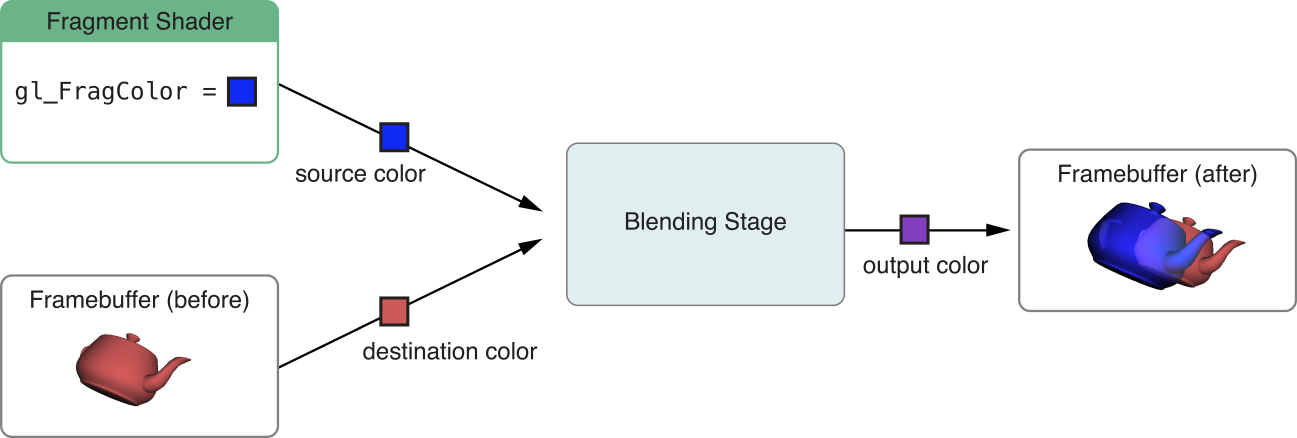
Traditional OpenGL and OpenGL ES implementations provide a fixed-function blending stage, illustrated in Figure 10-1. Before issuing a draw call, you specify a blending operation from a fixed set of possible parameters. After your fragment shader outputs color data for a pixel, the OpenGL ES blending stage reads color data for the corresponding pixel in the destination framebuffer, then combines the two according to the specified blending operation to produce an output color.
In iOS 6.0 and later, you can use the EXT_shader_framebuffer_fetch
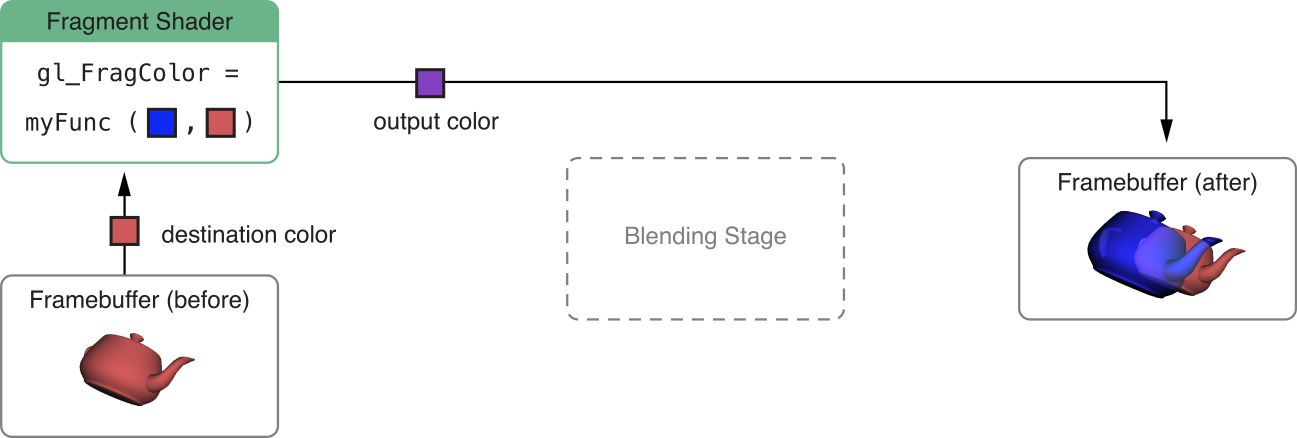
This extension enables many advanced rendering techniques:
Additional blending modes. By defining your own GLSL ES functions for combining source and destination colors, you can implement blending modes not possible with the OpenGL ES fixed-function blending stage. For example, Listing 10-8 implements the Overlay and Difference blending modes found in popular graphics software.
Post-processing effects. After rendering a scene, you can draw a full-screen quad using a fragment shader that reads the current fragment color and transforms it to produce an output color. The shader in Listing 10-9 can be used with this technique to convert a scene to grayscale.
Non-color fragment operations. Framebuffers may contain non-color data. For example, deferred shading algorithms use multiple render targets to store depth and normal information. Your fragment shader can read such data from one (or more) render targets and use them to produce an output color in another render target.
These effects are possible without the framebuffer fetch extension—for example, grayscale conversion can be done by rendering a scene into a texture, then drawing a full-screen quad using that texture and a fragment shader that converts texel colors to grayscale. However, using this extension generally results in better performance.
To enable this feature, your fragment shader must declare that it requires the EXT_shader_framebuffer_fetch extension, as shown in Listing 10-8 and Listing 10-9. The shader code to implement this feature differs between versions of the OpenGL ES Shading Language (GLSL ES).
Using Framebuffer Fetch in GLSL ES 1.0
For OpenGL ES 2.0 contexts and OpenGL ES 3.0 contexts not using #version 300 es shaders, you use the gl_FragColor builtin variable for fragment shader output and the gl_LastFragData builtin variable to read framebuffer data, as illustrated in Listing 10-8.
Listing 10-8 Fragment shader for programmable blending in GLSL ES 1.0
#extension GL_EXT_shader_framebuffer_fetch : require |
#define kBlendModeDifference 1 |
#define kBlendModeOverlay 2 |
#define BlendOverlay(a, b) ( (b<0.5) ? (2.0*b*a) : (1.0-2.0*(1.0-a)*(1.0-b)) ) |
uniform int blendMode; |
varying lowp vec4 sourceColor; |
void main() |
{ |
lowp vec4 destColor = gl_LastFragData[0]; |
if (blendMode == kBlendModeDifference) { |
gl_FragColor = abs( destColor - sourceColor ); |
} else if (blendMode == kBlendModeOverlay) { |
gl_FragColor.r = BlendOverlay(sourceColor.r, destColor.r); |
gl_FragColor.g = BlendOverlay(sourceColor.g, destColor.g); |
gl_FragColor.b = BlendOverlay(sourceColor.b, destColor.b); |
gl_FragColor.a = sourceColor.a; |
} else { // normal blending |
gl_FragColor = sourceColor; |
} |
} |
Using Framebuffer Fetch in GLSL ES 3.0
In GLSL ES 3.0, you use user-defined variables declared with the out qualifier for fragment shader outputs. If you declare a fragment shader output variable with the inout qualifier, it will contain framebuffer data when the fragment shader executes. Listing 10-9 illustrates a grayscale post-processing technique using an inout variable.
Listing 10-9 Fragment shader for color post-processing in GLSL ES 3.0
#version 300 es |
#extension GL_EXT_shader_framebuffer_fetch : require |
layout(location = 0) inout lowp vec4 destColor; |
void main() |
{ |
lowp float luminance = dot(vec3(0.3, 0.59, 0.11), destColor.rgb); |
destColor.rgb = vec3(luminance); |
} |
Use Textures for Larger Memory Buffers in Vertex Shaders
In iOS 7.0 and later, vertex shaders can read from currently bound texture units. Using this technique you can access much larger memory buffers during vertex processing, enabling high performance for some advanced rendering techniques. For example:
Displacement mapping. Draw a mesh with default vertex positions, then read from a texture in the vertex shader to alter the position of each vertex. Listing 10-10 demonstrates using this technique to generate three-dimensional geometry from a grayscale height map texture.
Instanced drawing. As described in Use Instanced Drawing to Minimize Draw Calls, instanced drawing can dramatically reduce CPU overhead when rendering a scene that contains many similar objects. However, providing per-instance information to the vertex shader can be a challenge. A texture can store extensive information for many instances. For example, you could render a vast cityscape by drawing hundreds of instances from vertex data describing only a simple cube. For each instance, the vertex shader could use the
gl_InstanceIDvariable to sample from a texture, obtaining a transformation matrix, color variation, texture coordinate offset, and height variation to apply to each building.
Listing 10-10 Vertex shader for rendering from a height map
attribute vec2 xzPos; |
uniform mat4 modelViewProjectionMatrix; |
uniform sampler2D heightMap; |
void main() |
{ |
// Use the vertex X and Z values to look up a Y value in the texture. |
vec4 position = texture2D(heightMap, xzPos); |
// Put the X and Z values into their places in the position vector. |
position.xz = xzPos; |
// Transform the position vector from model to clip space. |
gl_Position = modelViewProjectionMatrix * position; |
} |
You can also use uniform arrays and uniform buffer objects (in OpenGL ES 3.0) to provide bulk data to a vertex shader, but vertex texture access offers several potential advantages. You can store much more data in a texture than in either a uniform array or uniform buffer object, and you can use texture wrapping and filtering options to interpolate the data stored in a texture. Additionally, you can render to a texture, taking advantage of the GPU to produce data for use in a later vertex processing stage.
To determine whether vertex texture sampling is available on a device (and the number of texture units available to vertex shaders), check the value of the MAX_VERTEX_TEXTURE_IMAGE_UNITS limit at run time. (See Verifying OpenGL ES Capabilities.)
Copyright © 2018 Apple Inc. All Rights Reserved. Terms of Use | Privacy Policy | Updated: 2018-06-04