Retired Document
Important: OpenGL ES was deprecated in iOS 12. To create high-performance code on GPUs, use the Metal framework instead. See Metal.
Configuring OpenGL ES Contexts
Every implementation of OpenGL ES provides a way to create rendering contexts to manage the state required by the OpenGL ES specification. By placing this state in a context, multiple apps can easily share the graphics hardware without interfering with the other’s state.
This chapter details how to create and configure contexts on iOS.
EAGL Is the iOS Implementation of an OpenGL ES Rendering Context
Before your app can call any OpenGL ES functions, it must initialize an EAGLContext object. The EAGLContext class also provides methods used to integrate OpenGL ES content with Core Animation.
The Current Context Is the Target for OpenGL ES Function Calls
Every thread in an iOS app has a current context; when you call an OpenGL ES function, this is the context whose state is changed by the call.
To set a thread’s current context, call the EAGLContext class method setCurrentContext: when executing on that thread.
[EAGLContext setCurrentContext: myContext]; |
Call the EAGLContext class method currentContext to retrieve a thread’s current context.
OpenGL ES holds a strong reference to the EAGLContext object corresponding to the current context. (If you are using manual reference counting, OpenGL ES retains this object.) When you call the setCurrentContext: method to change the current context, OpenGL ES no longer references the previous context. (If you are using manual reference counting, OpenGL ES releases the EAGLContext object.) To prevent EAGLContext objects from being deallocated when not the current context, your app must keep strong references to (or retain) these objects.
Every Context Targets a Specific Version of OpenGL ES
An EAGLContext object supports only one version of OpenGL ES. For example, code written for OpenGL ES 1.1 is not compatible with an OpenGL ES 2.0 or 3.0 context. Code using core OpenGL ES 2.0 features is compatible with a OpenGL ES 3.0 context, and code designed for OpenGL ES 2.0 extensions can often be used in an OpenGL ES 3.0 context with minor changes. Many new OpenGL ES 3.0 features and increased hardware capabilities require an OpenGL ES 3.0 context.
Your app decides which version of OpenGL ES to support when it creates and initializes the EAGLContext object. If the device does not support the requested version of OpenGL ES, the initWithAPI: method returns nil. Your app must test to ensure that a context was initialized successfully before using it.
To support multiple versions of OpenGL ES as rendering options in your app, you should first attempt to initialize a rendering context of the newest version you want to target. If the returned object is nil, initialize a context of an older version instead. Listing 2-1 demonstrates how to do this.
Listing 2-1 Supporting multiple versions of OpenGL ES in the same app
EAGLContext* CreateBestEAGLContext() |
{ |
EAGLContext *context = [[EAGLContext alloc] initWithAPI:kEAGLRenderingAPIOpenGLES3]; |
if (context == nil) { |
context = [[EAGLContext alloc] initWithAPI:kEAGLRenderingAPIOpenGLES2]; |
} |
return context; |
} |
A context’s API property states which version of OpenGL ES the context supports. Your app should test the context’s API property and use it to choose the correct rendering path. A common pattern for implementing this behavior is to create a class for each rendering path. Your app tests the context and creates a renderer once, on initialization.
An EAGL Sharegroup Manages OpenGL ES Objects for the Context
Although the context holds the OpenGL ES state, it does not directly manage OpenGL ES objects. Instead, OpenGL ES objects are created and maintained by an EAGLSharegroup object. Every context contains an EAGLSharegroup object that it delegates object creation to.
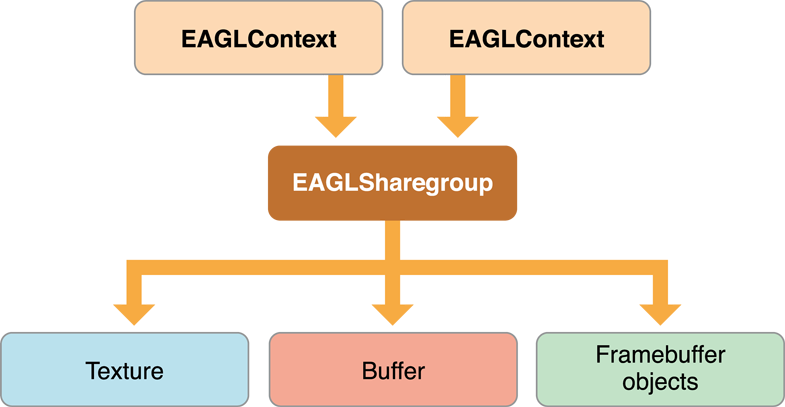
The advantage of a sharegroup becomes obvious when two or more contexts refer to the same sharegroup, as shown in Figure 2-1. When multiple contexts are connected to a common sharegroup, OpenGL ES objects created by any context are available on all contexts; if you bind to the same object identifier on another context than the one that created it, you reference the same OpenGL ES object. Resources are often scarce on mobile devices; creating multiple copies of the same content on multiple contexts is wasteful. Sharing common resources makes better use of the available graphics resources on the device.
A sharegroup is an opaque object; it has no methods or properties that your app can call. Contexts that use the sharegroup object keep a strong reference to it.
Sharegroups are most useful under two specific scenarios:
When most of the resources shared between the contexts are unchanging.
When you want your app to be able to create new OpenGL ES objects on a thread other than the main thread for the renderer. In this case, a second context runs on a separate thread and is devoted to fetching data and creating resources. After the resource is loaded, the first context can bind to the object and use it immediately. The
GLKTextureLoaderclass uses this pattern to provide asynchronous texture loading.
To create multiple contexts that reference the same sharegroup, the first context is initialized by calling initWithAPI:; a sharegroup is automatically created for the context. The second and later contexts are initialized to use the first context’s sharegroup by calling the initWithAPI:sharegroup: method instead. Listing 2-2 shows how this would work. The first context is created using the convenience function defined in Listing 2-1. The second context is created by extracting the API version and sharegroup from the first context.
Listing 2-2 Creating two contexts with a common sharegroup
EAGLContext* firstContext = CreateBestEAGLContext(); |
EAGLContext* secondContext = [[EAGLContext alloc] initWithAPI:[firstContext API] sharegroup: [firstContext sharegroup]]; |
It is your app’s responsibility to manage state changes to OpenGL ES objects when the sharegroup is shared by multiple contexts. Here are the rules:
Your app may access the object across multiple contexts simultaneously provided the object is not being modified.
While the object is being modified by commands sent to a context, the object must not be read or modified on any other context.
After an object has been modified, all contexts must rebind the object to see the changes. The contents of the object are undefined if a context references it before binding it.
Here are the steps your app should follow to update an OpenGL ES object:
Call
glFlushon every context that may be using the object.On the context that wants to modify the object, call one or more OpenGL ES functions to change the object.
Call
glFlushon the context that received the state-modifying commands.On every other context, rebind the object identifier.
Copyright © 2018 Apple Inc. All Rights Reserved. Terms of Use | Privacy Policy | Updated: 2018-06-04