Managing the Reordering of Rows
A table view has an editing mode as well as its normal (selection) mode. When a table view goes into editing mode, it displays the editing and reordering controls associated with its rows. The reordering control allows the user to move a row to a different location in the table. As shown in Figure 8-1, the reordering control appears on the right side of the row.
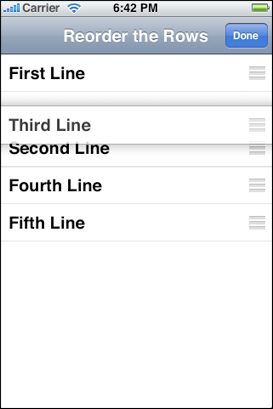
When a table view enters editing mode and when users drag a reordering control, the table view sends a series of messages to its data source and delegate, but only if they implement these methods. These methods allow the data source and delegate to restrict whether and where a row can be moved as well to carry out the actual move operation. The following sections show you how to move rows around in a table view.
What Happens When a Row is Relocated
A table view goes into editing mode when it receives a setEditing:animated: message. This normally happens when the user taps an Edit button in the navigation bar, but you can implement your own controls if you wish. In editing mode, a table view displays any reordering and editing controls that its delegate has assigned to each row. The delegate assigns the controls in tableView:cellForRowAtIndexPath: by setting the showsReorderControl property of UITableViewCell objects to YES. In order for reorder controls to appear, the data source must support reordering by implementing the tableView:moveRowAtIndexPath:toIndexPath: method.
When the table view receives setEditing:animated:, it sends the same message to the UITableViewCell object for each visible row. Then it sends a succession of messages to its data source and its delegate (if they implement the methods) as depicted in the diagram in Figure 8-2.
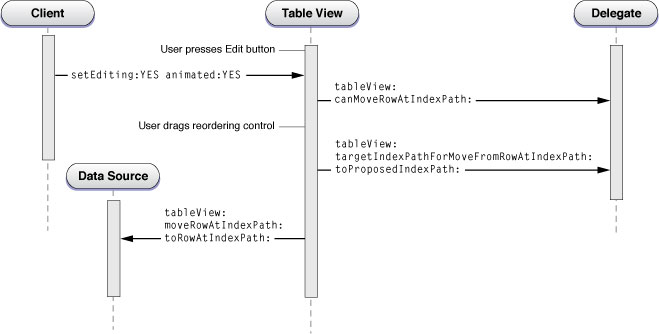
When the table view receives the setEditing:animated: message, it resends the same message to the cell objects corresponding to its visible rows. After that, the sequence of messages is as follows:
The table view sends a
tableView:canMoveRowAtIndexPath:message to its data source (if it implements the method). In this method the delegate may selectively exclude certain rows from showing the reordering control.The user drags a row by its reordering control up or down the table view. As the dragged row hovers over a part of the table view, the underlying row slides downward to show where the destination would be.
Every time the dragged row is over a destination, the table view sends
tableView:targetIndexPathForMoveFromRowAtIndexPath:toProposedIndexPath:to its delegate (if it implements the method). In this method the delegate may reject the current destination for the dragged row and specify an alternative one.The table view sends
tableView:moveRowAtIndexPath:toIndexPath:to its data source (if it implements the method). In this method the data source updates the data-model array that is the source of items for the table view, moving the item to a different location in the array.
Examples of Moving a Row
This section comments on some sample code that illustrates the reordering steps enumerated in What Happens When a Row is Relocated. Listing 8-1 shows an implementation of tableView:canMoveRowAtIndexPath: that excludes the first row in the table view from being reordered (this row does not have a reordering control).
Listing 8-1 Excluding a row from relocation
- (BOOL)tableView:(UITableView *)tableView canMoveRowAtIndexPath:(NSIndexPath *)indexPath { |
if (indexPath.row == 0) // Don't move the first row |
return NO; |
return YES; |
} |
When the user finishes dragging a row, it slides into its destination in the table view, which sends tableView:moveRowAtIndexPath:toIndexPath: to its data source. Listing 8-2 shows an implementation of this method.
Listing 8-2 Updating the data-model array for the relocated row
- (void)tableView:(UITableView *)tableView moveRowAtIndexPath:(NSIndexPath *)sourceIndexPath toIndexPath:(NSIndexPath *)destinationIndexPath { |
NSString *stringToMove = [self.reorderingRows objectAtIndex:sourceIndexPath.row]; |
[self.reorderingRows removeObjectAtIndex:sourceIndexPath.row]; |
[self.reorderingRows insertObject:stringToMove atIndex:destinationIndexPath.row]; |
} |
The delegate can also retarget the proposed destination for a move to another row by implementing the tableView:targetIndexPathForMoveFromRowAtIndexPath:toProposedIndexPath: method. The following example restricts rows to relocation in their own group and prevents moves to the last row of a group (which is reserved for the add-item placeholder).
Listing 8-3 Retargeting the destination row of a move operation
- (NSIndexPath *)tableView:(UITableView *)tableView |
targetIndexPathForMoveFromRowAtIndexPath:(NSIndexPath *)sourceIndexPath |
toProposedIndexPath:(NSIndexPath *)proposedDestinationIndexPath { |
NSDictionary *section = [data objectAtIndex:sourceIndexPath.section]; |
NSUInteger sectionCount = [[section valueForKey:@"content"] count]; |
if (sourceIndexPath.section != proposedDestinationIndexPath.section) { |
NSUInteger rowInSourceSection = |
(sourceIndexPath.section > proposedDestinationIndexPath.section) ? |
0 : sectionCount - 1; |
return [NSIndexPath indexPathForRow:rowInSourceSection inSection:sourceIndexPath.section]; |
} else if (proposedDestinationIndexPath.row >= sectionCount) { |
return [NSIndexPath indexPathForRow:sectionCount - 1 inSection:sourceIndexPath.section]; |
} |
// Allow the proposed destination. |
return proposedDestinationIndexPath; |
} |
Copyright © 2013 Apple Inc. All Rights Reserved. Terms of Use | Privacy Policy | Updated: 2013-09-18