Mapping Overview
In many cases, Core Data may be able to infer how to transform data from one schema to another (see Lightweight Migration. If Core Data cannot infer the mapping from one model to another, you need a definition of how to perform the transformation. This information is captured in a mapping model.
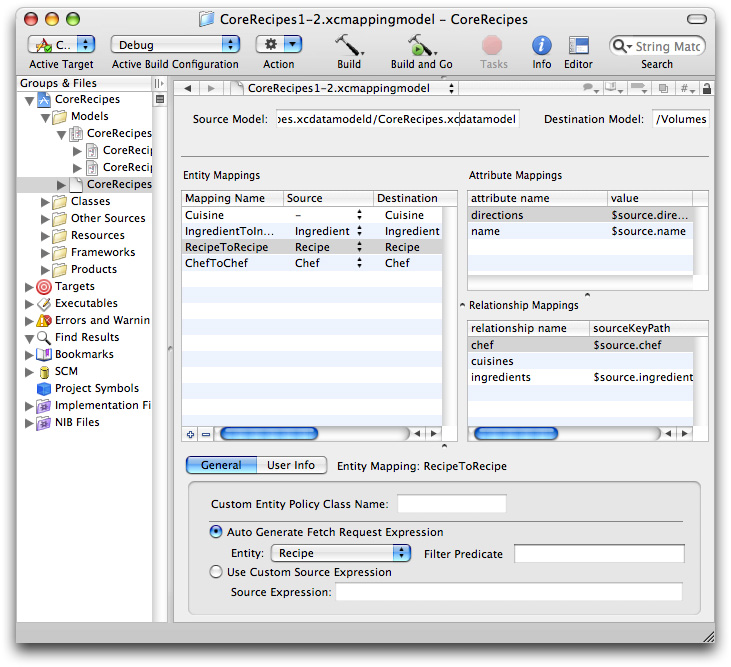
A mapping model is a collection of objects that specifies the transformations that are required to migrate part of a store from one version of your model to another (for example, that one entity is renamed, an attribute is added to another, and a third split into two). You typically create a mapping model in Xcode. Much as the managed object model editor allows you to graphically create the model, the mapping model editor allows you to customize the mappings between the source and destination entities and properties.
Mapping Model Objects
Like a managed object model, a mapping model is a collection of objects. Mapping model classes parallel the managed object model classes—there are mapping classes for a model, an entity, and a property (NSMappingModel, NSEntityMapping, and NSPropertyMapping respectively).
An instance of
NSEntityMappingspecifies a source entity, a destination entity (the type of object to create to correspond to the source object) and mapping type (add, remove, copy as is, or transform).An instance of
NSPropertyMappingspecifies the name of the property in the source and in the destination entity, and a value expression to create the value for the destination property.
The model does not contain instances of NSEntityMigrationPolicy or any of its subclasses, however amongst other attributes instance of NSEntityMapping can specify the name of an entity migration policy class (a subclass of NSEntityMigrationPolicy) to use to customize the migration. For more about entity migration policy classes, see Custom Entity Migration Policies.
You can handle simple property migration changes by configuring a custom value expression on a property mapping directly in the mapping model editor in Xcode. For example, you can:
Migrate data from one attribute to another.
To rename
amounttototalCost, enter the custom value expression for thetotalCostproperty mapping as$source.amount.Apply a value transformation on a property.
To convert
temperaturefrom Fahrenheit to Celsius, use the custom value expression($source.temperature - 32.0) / 1.8.Migrate objects from one relationship to another.
To rename
tradestotransactions, enter the custom value expression for the transactions property mapping asFUNCTION($manager, "destinationInstancesForEntityMappingNamed:sourceInstances:", "TradeToTrade", $source.trades). (This assumes the entity mapping that migrates Trade instances is named TradeToTrade.)
There are six predefined keys you can reference in custom value expressions. To access these keys in source code, you use the constants as declared. To access them in custom value expression strings in the mapping model editor in Xcode, follow the syntax rules outlined in the predicate format string syntax guide and refer to them as:
NSMigrationManagerKey: $manager
NSMigrationSourceObjectKey: $source
NSMigrationDestinationObjectKey: $destination
NSMigrationEntityMappingKey: $entityMapping
NSMigrationPropertyMappingKey: $propertyMapping
NSMigrationEntityPolicyKey: $entityPolicy
Creating a Mapping Model in Xcode
From the File menu, you select New File and in the New File pane select Design > Mapping Model. In the following pane, you select the source and destination models. When you click Finish, Xcode creates a new mapping model that contains as many default mappings as it can deduce from the source and destination. For example, given the model files shown in Figure 1-1 and Figure 1-2, Xcode creates a mapping model as shown in Figure 4-1.
Copyright © 2012 Apple Inc. All Rights Reserved. Terms of Use | Privacy Policy | Updated: 2012-01-09