Get ready for macOS Sonoma.
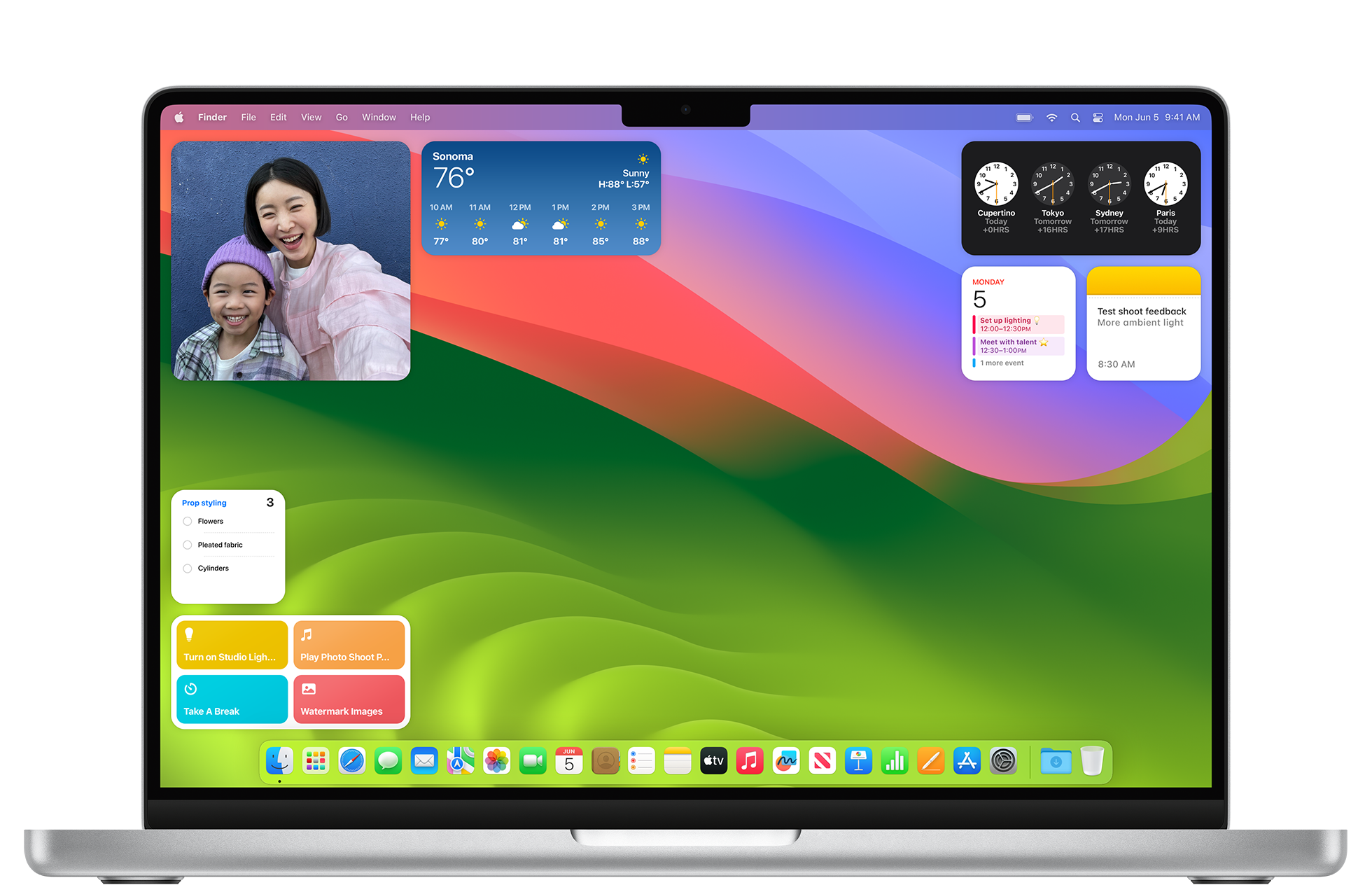

Widgets are becoming even more powerful in even more places. Now you can use WidgetKit to build support for interactivity and animated transitions, so people can take action right in your widget. Users can now place your widgets right on the desktop, interact with them with just a click and, through the magic of Continuity, access the extensive ecosystem of iPhone widgets right on their Mac. Widgets intelligently tint based on the color behind them to maintain legibility on the desktop and help people stay focused as they work.
Metal powers hardware-accelerated graphics on Apple platforms by providing a low-overhead API, rich shading language, tight integration between graphics and compute, and an unparalleled suite of GPU profiling and debugging tools. With the new game porting toolkit and Metal shader converter, now it’s even easier to bring your games to Mac.

Core ML brings new optimization tools for compression, faster loading, and more, so apps can deliver more powerful and efficient machine learning experiences. Use Create ML to easily build models to understand the content of images thanks to the addition of multi-label classification, interactive model evaluation, and new APIs for custom training data augmentations. The Vision framework introduces more robust image segmentation as well as 3D depth information for human body pose, while VisionKit makes it easy to integrate Visual Lookup and subject-lifting experiences into your app. The Natural Language framework enhances understanding of multilingual text using new transformer-based embedding models and the Speech framework allows for custom vocabulary in speech recognition, so you can personalize user experiences.

Now people can add your website to their Dock on Mac. Any website added to the Dock becomes a web app, with an app-like appearance and system integration similar to other apps. Create a web app manifest to communicate your website’s intended behavior for web app-related features in iOS, iPadOS, and macOS.

People can start screen sharing even more easily with the new ScreenCaptureKit Picker, in a more private and secure way. The Picker also makes it easy for your app to capture multiple windows or even multiple apps all at once, and users can start sharing right from the app they’re in. They’ll appreciate getting a preview of what’s being shared in the new Video effects menu, and being able to enable new video effects like Presenter Overlay and Reactions.

Based on industry standards for account authentication, passkeys replace passwords with cryptographic key pairs, making them easier to use and far more secure. Adopt passkeys to give people a simple, secure way to sign in to your apps and websites across platforms — with no passwords required. Now people can share passwords and passkeys from iCloud Keychain with their trusted contacts. Password manager apps can save and offer passkeys on iOS, iPadOS, and macOS. Enterprises can take advantage of passkeys thanks to Managed Apple ID support for iCloud Keychain. And administrators can manage which devices passkeys sync to using Access Management controls in Apple Business Manager and Apple School Manager.

Intelligently educate your users about the right features at the right time with TipKit. This new framework includes templates that match what people are accustomed to seeing in system apps, and are easily customizable to match the look and feel of your app. Add targeting to educate users on functionality related to their current context and manage the overall frequency to avoid showing the same tips again, even if the tips appeared on another device.
Discover even more new and updated technologies across Apple platforms, so you can create your best apps yet.