Animation Class Roadmap
Core Animation provides an expressive set of animation classes you can use in your application:
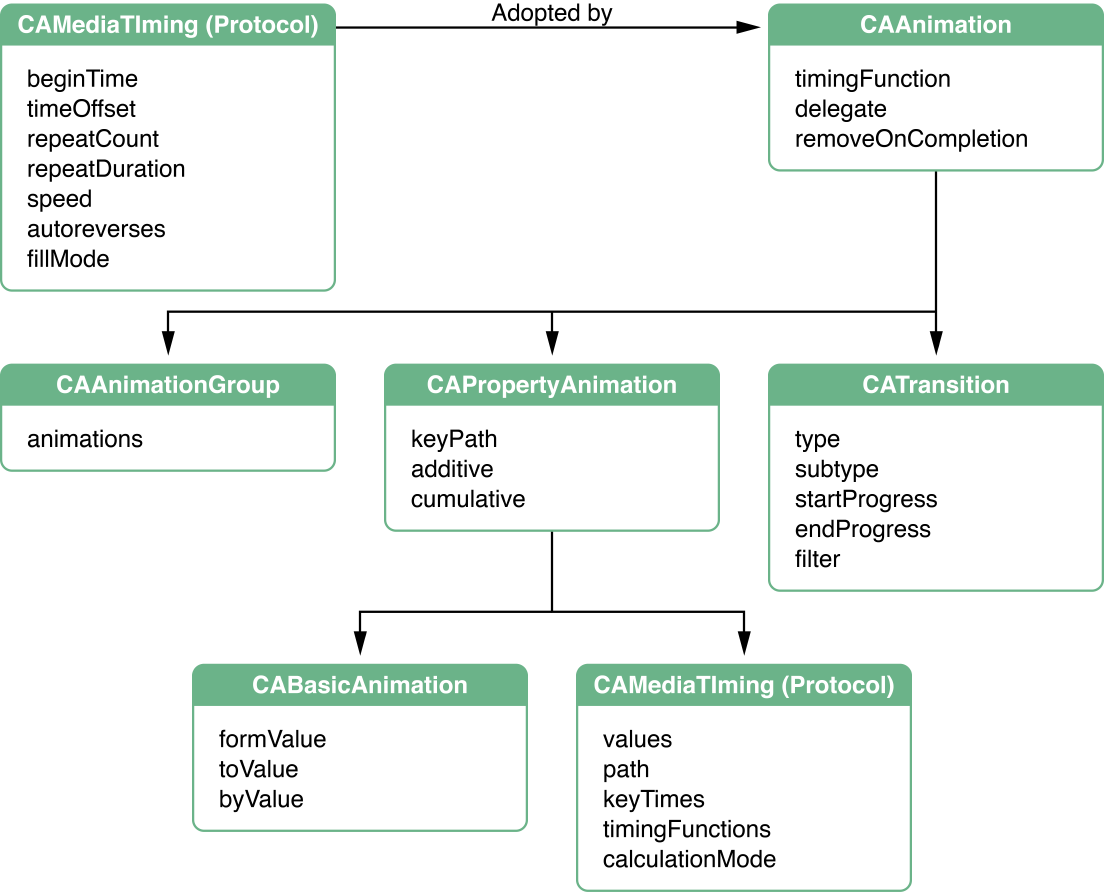
CAAnimationis the abstract class that all animations subclass.CAAnimationadopts theCAMediaTimingprotocol which provides the simple duration, speed, and repeat count for an animation.CAAnimationalso adopts theCAActionprotocol. This protocol provides a standardized means for starting an animation in response to an action triggered by a layer.The
CAAnimationclass also defines an animation’s timing as an instance ofCAMediaTimingFunction. The timing function describes the pacing of the animation as a simple Bezier curve. A linear timing function specifies that the animation's pace is even across its duration, while an ease-in timing function causes an animation to speed up as it nears its duration.CAPropertyAnimationis an abstract subclass ofCAAnimationthat provides support for animating a layer property specified by a key path.CABasicAnimationis a subclass ofCAPropertyAnimationthat provides simple interpolation for a layer property.CAKeyframeAnimation(a subclass ofCAPropertyAnimation) provides support for key frame animation. You specify the key path of the layer property to be animated, an array of values that represent the value at each stage of the animation, as well as arrays of key frame times and timing functions. As the animation runs, each value is set in turn using the specified interpolation.CATransitionprovides a transition effect that affects the entire layer's content. It fades, pushes, or reveals layer content when animating. On OS X, the stock transition effects can be extended by providing your own custom Core Image filters.CAAnimationGroupallows an array of animation objects to be grouped together and run concurrently.
Figure 1 shows the animation class hierarchy, and also summarizes the properties available through inheritance.
Copyright © 2010 Apple Inc. All Rights Reserved. Terms of Use | Privacy Policy | Updated: 2010-05-18