

-
“钱包”的新功能
了解 Apple 钱包凭证方面的最新设计更新和开发者工具。为你的凭证换上精美的新外观,充分展现丰富又生动的设计。探索新增的条形码格式和灵活的凭证操作 API。了解 Pass Designer 和 Pass Builder,看看这两款强大的新工具如何帮你化繁为简,轻松进行大规模的凭证设计、个性化定制及分发。
章节
- 0:01 - 简介
- 0:40 - Poster Generic
- 2:36 - 条形码
- 4:27 - 精选操作
- 5:46 - 开发者工具
- 5:47 - Pass Designer
- 10:40 - Pass Builder
- 13:50 - 个性化定制凭证模板
- 15:01 - 后续步骤
资源
- Pass Designer
- Creating a pass with Pass Designer
- Pass Builder
- Pass.Barcodes
- Learn more about Pass Designer
相关视频
WWDC25
WWDC24
-
搜索此视频…
嗨,我是 Shaun。 欢迎收看"Wallet 的新功能"。 自从推出以来, 通行证已成为人们 日常出行不可或缺的一部分。 从早晨取咖啡, 到刷门禁过闸, 再到办理值机和登机, 全程无需递出 任何实体卡片。
通行证帮助人们更快、 更私密、更安全地畅行于世界。 在 iOS 27 中,我们将 通行证推向了前所未有的高度。 iOS 27 引入了一种全新的 通行证样式,称为 Poster Generic。 四种全新条码类型, 让您在展示时更加灵活。 以及一种强大的全新方式, 可在通行证正面下方 呈现相关操作。
我们还为 Mac 和服务器平台推出了 全新的开发者工具套件,让设计、 个性化和构建出色通行证 比以往更加轻松。
今天内容很多, 让我们直接进入全新 通行证样式——Poster Generic。
Poster Generic 非常适合 会员卡、积分计划、 储值卡,以及任何希望 以大胆、色彩鲜艳的图案为主角的场合。
通行证正面由 背景图片组成, 主 Logo, 标题字段,
主字段,
页脚字段, 以及条码(如果提供的话)。 要采用此通行证样式, 请在通行证包的 pass.json 中 指定 posterGeneric 顶层样式键。
然后使用常规通行证字段结构 添加您的内容, 通行证将自动在 通行证正面进行布局排列。
需要注意的是, 通行证正面 仅支持一个页脚字段, 因此如果您包含多个, 只有第一个会显示。
Poster Generic 需要 iOS 27 或更高版本。
为了支持 iOS 26 及更早版本的用户, 我们建议在 pass.json 中 同时包含现有的 generic 顶层样式键, 以及 posterGeneric 样式键, 并在各自下方包含相关字段。
这样,尚未更新至 iOS 27 的用户, 仍然可以将 您的通行证添加到 Wallet。 接下来,在 iOS 27 中, 通行证支持四种新条码类型。
EAN-13、Code 39、Codabar 和 ITF。
这些通过您 pass.json 中 现有的 barcode 对象 和 barcodes 数组来指定。
例如,要以 Codabar 格式 呈现条码, 请将条码的 format 设置为 PKBarcodeFormatCodabar。
您可以在 Wallet Passes 文档中 找到完整的格式定义列表。 由于旧版 iOS 不支持这些新格式, 我们强烈建议按优先级顺序 提供条码数组。 通过提供多个条码, 系统将有最大概率渲染 您硬件可以扫描的条码, 无论您的用户 使用哪个操作系统版本。
如果您只提供一种 新条码类型且别无其他, 在 iOS 26 及更早版本上 通行证将无法渲染条码。
因此我们建议 以您首选的格式为先, 并提供优雅的降级方案。
我们确实认识到 在某些情况下, 支持多种条码类型 根本不可行。
如果您就是这种情况, 有两件事要做。 第一,在通行证字段中 显示凭证 ID, 以便手动输入, 并确保易于找到。
建议使用 primaryField, 或 headerField, 使其在通行证正面显眼突出。
第二,确保一线员工 接受手动输入工作流程的培训。 无法扫描的通行证, 不应导致用户被拦截。
处理好这一点, 可能决定了体验是流畅的 还是令人沮丧的。 接下来,让我们来谈谈特色操作。
随着 iOS 18 引入的 第二代活动票据, 您可以提供语义 URL 来展示额外的用户操作, 显示在通行证下方, 例如查看活动日程。 在 iOS 27 中,有一个全新的灵活 API, 允许您为所有 通行证样式提供操作。 在 pass.json 顶层, 定义 featuredActions 键, 它接受一个操作对象数组。 每个操作定义为 唯一 ID、操作类型, 以及一个值,如 URL。 例如, 要提供查看优惠的操作, 我将 identifier 设置为唯一 ID, 操作类型设置为 membershipBenefits, 并设置一个导航用户的 URL。 Wallet 会在通行证下方显示此操作, 带有适当的彩色图标 和本地化的行动号召。
每个通行证最多可以包含 两个特色操作。 我们建议只提供 最有意义的 且最相关的操作给您的用户, 并按优先级顺序 提供操作。
您可以在 Wallet Passes 文档中 找到支持的操作类型 及其期望值的完整列表。 过去十年,通行证 获得了大量特性和功能。 而要将通行证包中描述的内容 与设备上呈现的 视觉表现联系起来, 可能很困难。
因此,我们很高兴 宣布一款全新的 Mac App, 让通行证设计 比以往更加轻松。 它叫做 Pass Designer。
Pass Designer 是一款 所见即所得的编辑器, 让您在构建通行证时 能看到真实的 iOS 渲染效果。
Pass Designer 创建模板文件。
要将模板转换为个性化的、 签名好可供分发的通行证, 除了 Pass Designer, 我们还宣布了 一个新的 Swift on Server 包, 叫做 Pass Builder。 Pass Builder 可在 Mac 和 Linux 上运行。 它提供 Swift API, 以及一个命令行可执行文件, 叫做 buildpass。
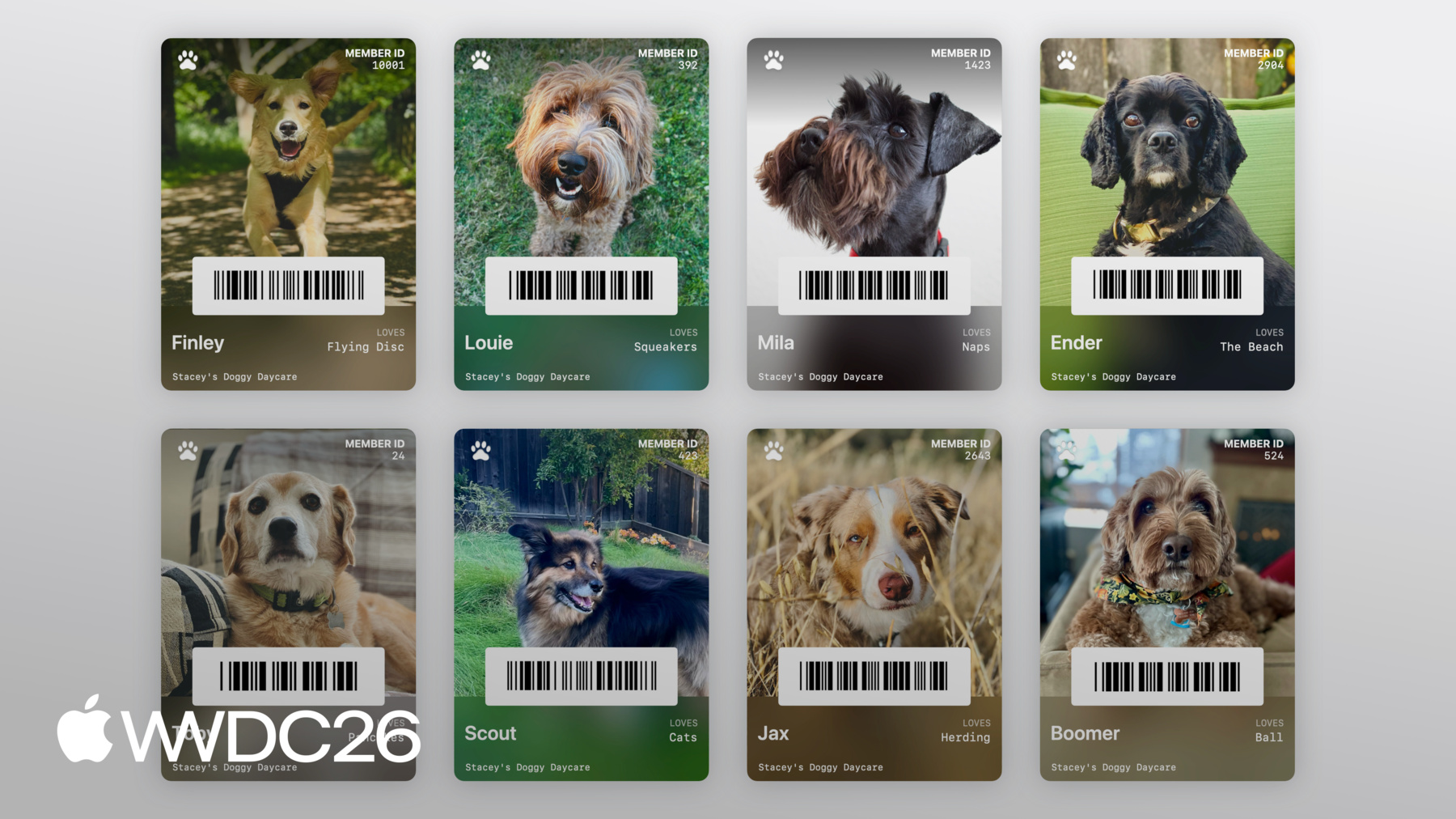
我的朋友 Stacey 经营一家狗狗日托, 我想帮她为每位 毛茸茸的客户制作会员卡。 我将使用 Pass Designer 设计一个模板, 然后在服务器上使用 Pass Builder 对模板进行个性化, 并大规模分发通行证。
让我们进入 Pass Designer。
好的,我们开始。 右侧是通行证的实时预览, 左侧是 编辑通行证的侧边栏。
侧边栏允许您配置 通行证的身份与签名配置、 通行证样式、图像、条码、字段, 以及语义, 如果通行证样式支持的话。 目前这是一块空白画布。 但我知道 Stacey 为每只狗 拍了一些精彩的竖版照片, 让我们用全新的 Poster Generic 样式 做个尝试, 看看那些照片 效果如何。 我将进入 Style, 将通行证样式更改为 Poster Generic。
然后,我将 在侧边栏中导航到 Images, 并从桌面拖入 Stacey 提供给我的示例照片。
看起来非常合适。 现在让我们添加一些字段。
我将在侧边栏中导航到 Header Fields, 并添加一个新的标题字段。
我将把键设置为 DOG_ID, 标签设置为 Member ID, 并添加一个占位符 ID 来查看效果。
很好。 现在让我们为狗狗名称 和最爱玩具添加一些主字段。 在侧边栏中, 我将导航到 Primary Fields, 并为名称添加一个主字段。
我将把键设置为 DOG_NAME。
这里有个 Poster Generic 通行证正面 的小技巧, 如果我省略第一个主字段的标签, 字段值将以 酷炫的粗体标题显示。
因此我将输入 占位符名称 Finley。 并为最爱玩具添加一个主字段。 所以我再次导航到 Primary Fields, 并添加一个新字段。
我将把键设置为 LOVES, 标签设置为 Loves, 并添加一个 占位符值 Flying Disc。 现在让我们让 Stacey 能够 轻松地为每只狗办理日托签到和签出, 通过将其会员 ID 编码为条码。
我将前往 Barcode & NFC。
并输入一个 占位符条码消息。 这可以用,但我觉得 不需要用这么大的空间放二维码。 让我们改用窄条码类型, 比如 PDF417。
我将点击 Format 选择器,
并选择 PDF417。 这看起来好多了。
现在让我们做些收尾工作, 添加一个 Primary Logo。
我将导航到 Images,
并从桌面拖入 Primary Logo。
并通过导航到 Style 来调整颜色, 并设置 Label Color。 最后的收尾, 在页脚添加 "Stacey's Doggy Day Care"。
我将导航到 Footer Fields, 并添加一个新字段。
并将文本值设置为 Stacey's Doggy Day Care。
现在这是一张可爱的通行证, 为一只非常可爱的狗。
最后一步, 是保存我们的模板。
Pass Designer 将模板 保存为 pkpasstemplate 文件。
我将前往 File, 然后 Save,保存模板。
现在,我不想 在 Pass Designer 中 为 Stacey's Doggy Day Care 的每位会员单独创建通行证。 相反,我想在服务器上 使用 Pass Builder 大规模 个性化这个模板。
我将 切换到 Swift 服务器, 用于 Stacey's Doggy Day Care。 首先,我将添加 PassBuilder, 作为依赖项, 添加到 Swift 包清单, 以及服务器目标。
现在我将在服务器源代码中 实现 createPass 函数, 以生成个性化通行证。 createPass 函数接收 一个从数据库加载的模型, 包含狗狗的名字、 会员 ID、最爱玩具, 以及每只狗 漂亮照片的 URL。 让我们先加载我之前制作的模板, 使用 PassPackage 类型。 PassPackage 提供了一种类型安全的方式 来访问和配置通行证包, 包括一个 pass 属性,用于 与 pass.json 的内容进行交互。 让我们个性化字段。
我将在 pass 的 fields 属性上调用 setValue, 以设置狗狗的名字、 会员 ID 和最爱玩具。
现在让我们将背景图像 设置为狗狗的照片。
我将创建一个 PassImage 实例, 传入狗狗照片的 URL, 并将其分配给 PassPackage 类型上的 background image 属性。 并配置条码, 以便狗狗能快速 办理日托签到和签出。
我将创建一个 Pass.Barcode, 编码消息为狗狗的会员 ID, 并使用 PDF417 格式。
最后,我认为 最好有一个特色操作, 供客户查看其会员资格, 让我们通过在 featuredActions 上 设置 Pass.Action 来添加它。 就这样,服务器 正在生成个性化通行证。
现在,我们需要 构建并签署通行证以供分发。
作为提醒, 要为 Wallet 构建并签署通行证, 您需要生成并写入 通行证内容的清单, 到您的通行证包中。 然后创建清单的 独立签名, 并将签名写入 您的通行证包。 然后压缩结果目录, 并添加 .pkpass 文件扩展名。 Pass Builder 为您 处理所有这些步骤。 您只需 提供证书即可。 回到服务器源代码。 使用 PassCertificate 类型, 我将加载 通行证签名证书, 以及 WWDR 中间证书。 接下来,我将创建 一个 PassSigner 实例, 传入证书。 最后,我将在 PassSigner 上 调用 signPass 函数, 传入我之前制作的 个性化包, 以及磁盘上的 URL, 以写入签名通行证供分发。
然后返回 URL。
现在,Stacey 的狗狗日托 为每位客户生成了精美的 Wallet 通行证。
Pass Builder 也可以 从其他编程语言使用。 swift-java 项目可以为 Swift API 生成原生 Java 绑定, 允许您从 Java 运行时 调用 Pass Builder。 我们还将提供 通行证包格式的 protobuf 定义, 允许您以首选编程语言 生成类型安全的模型。 然后您可以生成 自定义消息, 并调用 buildpass 命令行可执行文件, 来个性化和签署您的通行证。 有关使用 swift-java 的更多信息, 请查看《Explore Swift and Java interoperability》开发者讲座。 有关 buildpass 命令行的文档, 请参阅 Pass Builder 开发者文档。 两者均已链接在 讲座简介中。
以上就是 Pass Designer 和 Pass Builder 的简短端到端演示。 从设计模板, 到个性化, 再到签名分发。
您可以在讲座简介中找到 下载 Pass Designer、Pass Builder 源代码, 以及完整文档的链接。
今天我介绍了很多内容, 以下是后续步骤。 体验 Pass Designer。 使用 Pass Designer 尝试 全新的 Poster Generic 样式, 并查看 它是否适合您的通行证。
如果您计划采用 任何新条码类型, 请制定提供 优雅降级方案的计划。
花一点时间, 识别对您用户 最有意义和最相关的操作, 然后利用特色操作 将其实现。
这是构建 Wallet 通行证 的新篇章, 我们非常期待看到 您将要创建的所有精彩通行证。 感谢观看, 祝您 WWDC 愉快。
-
-
1:41 - Adopting Poster Generic
// Adopting Poster Generic "posterGeneric": { "headerFields": [ { "key": "memberID", "label": "Guest No.", "value": "102035" } ], "footerFields": [ { "key": "membershipType", "value": "Family Pass" } ] } -
2:11 - Adopting Poster Generic with Generic fallback
// Adopting Poster Generic and supporting Generic on iOS 26 and earlier "posterGeneric": { "headerFields": [ { "key": "memberID", "label": "Guest No.", "value": "102035" } ], "footerFields": [ { "key": "membershipType", "value": "Family Pass" } ] }, "generic": { "headerFields": [ { "key": "memberID", "label": "Guest No.", "value": "102035" } ], "footerFields": [ { "key": "membershipType", "value": "Family Pass" } ] } -
2:52 - Barcodes: Add new types for iOS 27
// Adopting new barcode types "barcodes": [ { "format": "PKBarcodeFormatCodabar" "message": "…" "messageEncoding": "…" } ] -
3:37 - Barcodes: Supporting iOS 26 and earlier
// Adopting new barcode types and supporting iOS 26 and earlier. "barcodes": [ { "format": "PKBarcodeFormatCodabar" "message": "123456789" "messageEncoding": "iso-8859-1" }, { "format": "PKBarcodeFormatQR" "message": "123456789" "messageEncoding": "iso-8859-1" } ] -
4:48 - Featured actions
// Featured actions "featuredActions": [ { "identifier": "my-offer-id", "type": "membershipBenefits", "url": "www.example.com/offers" } ] -
10:56 - Package.swift
// Package.swift import PackageDescription let package = Package( name: "MyServer", products: [ .library( name: "MyServer", targets: ["MyServer"] ), ], dependencies: [ .package(path: "./path/to/PassBuilder") ], targets: [ .target( name: "MyServer", dependencies: [ .product(name: "PassBuilder", package: "PassBuilder") ] ), … ] -
11:05 - CreatePass.swift
// CreatePass.swift import PassBuilder func createPass(for doggo: MemeberModel) async throws -> URL { var package = PassPackage(url: "template.pkpasstemplate") package.pass.fields.setValue(doggo.name, forKey: "DOG_NAME") package.pass.fields.setValue(doggo.favoriteToy, forKey: "LOVES") package.pass.fields.setValue(doggo.id, forKey: "MEMBER_ID") package.background = PassImage(url: doggo.photoURL) package.pass.barcodes = [ Pass.Barcode(message: doggo.id, format: .pdf417) ] package.featuredActions = [ Pass.Action(id: "action-1", type: "viewMembership", url: doggo.membershipURL) ] … } -
13:11 - CreatePass.swift
// CreatePass.swift

import PassBuilder

func createPass(for doggo: MemeberModel) async throws -> URL {
    var package = PassPackage(url: "template.pkpasstemplate")

    package.pass.fields.setValue(doggo.name, forKey: "DOG_NAME")
    package.pass.fields.setValue(doggo.favoriteToy, forKey: "LOVES")
    package.pass.fields.setValue(doggo.id, forKey: "MEMBER_ID")

    package.background = PassImage(url: doggo.photoURL)

    package.pass.barcodes = [
        Pass.Barcode(message: doggo.id, format: .pdf417)
    ]

    package.featuredActions = [
        Pass.Action(id: "action-1", type: "viewMembership", url: doggo.membershipURL)
    ]

    let passCertificate = try PassCertificate(url: "pass.p12", password: "s3cr3t")
    let wwdrCertificate = try PassCertificate(url: "wwdr.cer")

    let signer = PassSigner(
        passCertificate: passCertificate,
        wwdrCertifiate: wwdrCertificate
    )

    let destinationURL = URL(string: "/www/passes/" + doggo.id)
    try signer.signPass(package, writingTo: destinationURL)

    return destinationURL
}
-