

-
图像理解方面的新动向
借助 Vision 框架和 Foundation Models 框架的最新更新,解锁强大的图像理解能力。新的轻点分割请求为你带来图像分割的新方式,而且 Vision 框架现在还支持 watchOS。将 Apple Foundation Models 中全新的图像支持与 OCR、条形码扫描以及你自己的工具相结合,为你的 App 构建由 LLM 支持的视觉理解能力。
章节
- 0:00 - 简介
- 1:36 - 通过轻点分割分割图像
- 5:50 - Foundation Models 的图像输入
- 7:57 - 基于图像的工具调用
- 13:09 - watchOS 上的 Vision
- 14:39 - 后续步骤
资源
- Segmenting objects using taps, scribbles or rectangles
- Implementing saliency-based image cropping in iOS and watchOS
相关视频
WWDC26
WWDC25
WWDC24
-
搜索此视频…
你好,我是Megan Williams, 来自Vision框架团队。
今年,图像理解领域 有一些强大的进展, 你现在可以用它们在你的应用中 创造出色的体验。 我将介绍其中的一些, 从最新功能开始—— 哦,真奇怪,我的议程不见了。 让我看看能不能快速创建一个。 我已经记录了 想要讲的主题。 我相信AI可以帮我制作议程。 我将使用这张笔记的照片, 然后请大型语言模型 生成一个议程。 使用Foundation Models框架 来完成这件事非常简单。 幸运的是,今年Foundation Models 支持图像输入了。 太好了! 模型为我生成了一个议程。 现在我可以回到演示了。 今年,将图像理解引入你的应用 的方式比以往更多。 首先来看Vision的新功能, 轻点分割API 让你能够隔离 图像中的任何对象, 只需点击即可。 还有一种新的强大方式 来分析图像, 那就是使用大型语言模型。 我将介绍如何使用 Foundation Models框架来实现这一点。 然后我将展示如何为LLMs 创建基于图像的工具, 这将为图像理解 开启更多可能性。 最后,Vision现在也可以 在watchOS上使用了。 我将展示如何使用Vision 增强你的手表应用。 但首先,我将展示 一些你可以用 轻点分割API实现的出色功能。 Vision已经具备 多种图像分割能力。 例如,有人物分割功能, 它可以隔离 图像中的所有人物。 但是,如果我想分割 图像中的其他物体呢? 比如这个花瓶? 现在通过Vision的轻点分割API, 我可以选择图像中的 任何对象进行分割。 比如这个棋盘游戏、 一件衣服,甚至是地板。 我可以通过多种方式 选择要分割的对象。 我将演示其中几种。
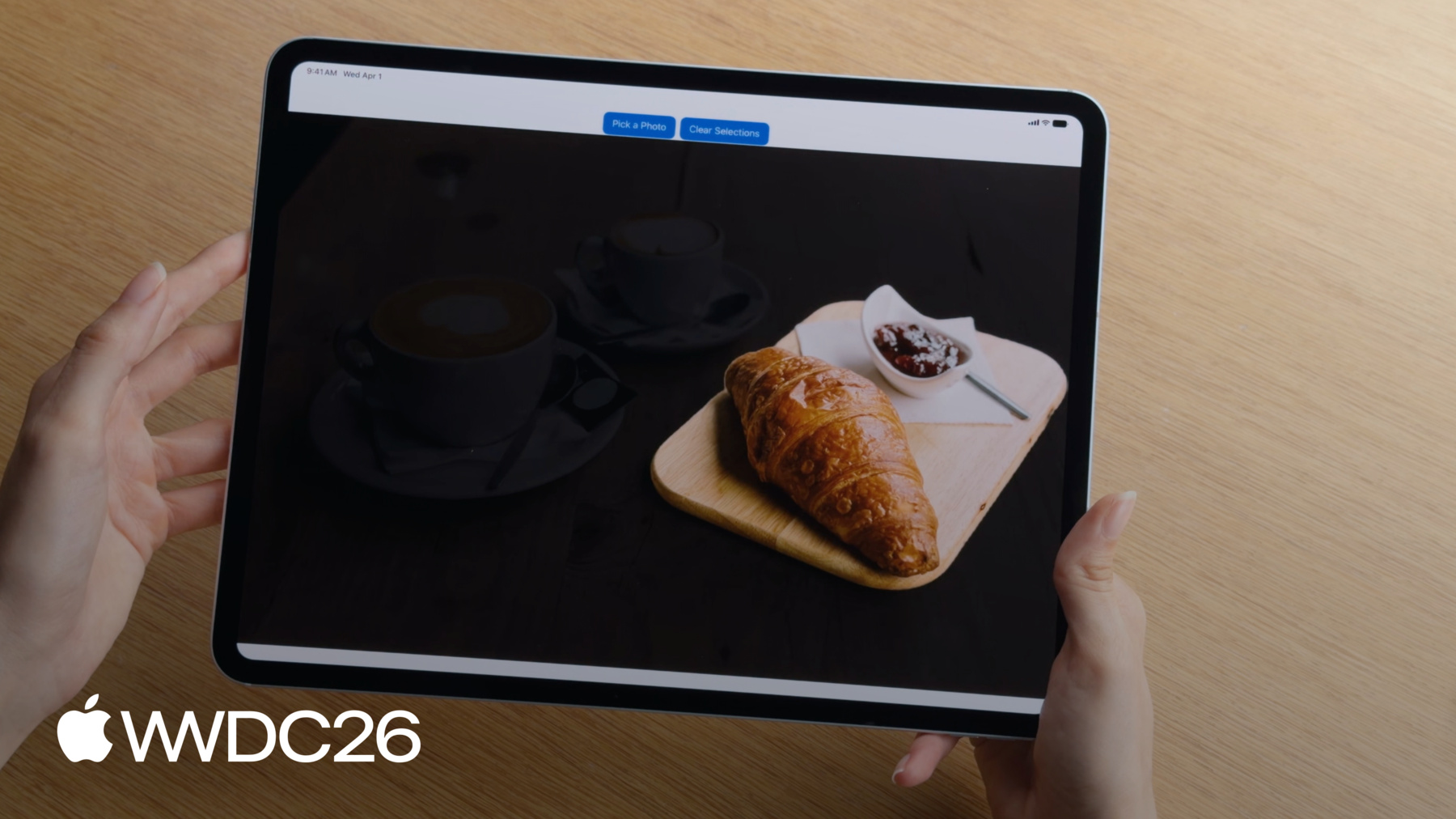
在我的应用中,我有一张咖啡馆的照片, 我想分割 桌子上的咖啡杯。 首先,我可以在杯子上选择一个点。 现在杯子被隔离出来了。 这对简单对象效果很好, 但如果我的主体比较复杂, 那么只选择一个点 可能还不够。 例如,也许我还想 把盘子也包含进来。 我可以改为绘制一个边界框, 围住所有我想要 分割的对象。 现在我能同时 获取杯子和盘子了。
我还可以在对象周围绘制套索。 我将使用套索 来分割这个牛角面包。
另一个很好的选项 是绘制涂鸦。 我可以在多个对象上涂鸦, 轻松同时分割所有这些对象。
一旦我获得了蒙版, 我可以通过添加或减少 更多点来优化蒙版。 我已经用一个初始点 分割了这个杯子, 现在我想把盘子也包含进来。 我只需点击盘子, 现在它也被包含进来了。
我还可以从蒙版中移除部分区域。 也许我只想要咖啡, 而不是杯子。 我可以在杯子上选择一个点, 将其从蒙版中排除, 现在我只得到了咖啡。
要使用该API, 你需要从图像开始。 你可以使用ImageRequestHandler 来保存你的图像。 在Vision中,图像通过 请求来处理。 要分割一个对象,你将使用 GenerateIterativeSegmentationRequest。
使用ImageRequestHandler 来执行请求。 这会生成 分割对象的蒙版。 蒙版是一个PixelBuffer,显示 哪些像素属于 被分割的对象。 这是代码。 我将从图像开始, 创建一个ImageRequestHandler。 现在我将创建请求,使用 我想要分割的 对象内部的一个点 作为起始种子。 然后我将使用ImageRequestHandler 对图像执行请求。 这会生成 对象的分割蒙版。 如果需要,我现在可以用 新的点来优化这个蒙版。 为此,我只需在请求中 包含该点。 然后再次执行请求。 还有一些其他 需要注意的事项。 Vision使用归一化坐标系, 坐标原点 位于左下角。 点应该归一化到 图像的宽度和高度, 坐标值介于0和1之间。
在绘制套索时, 还有一件重要的事, 那就是笔触宽度要足够宽。 细笔触可能 无法产生最佳效果。 线条宽度应至少为 图像总宽度的1%。
最后,我想提到, 在你首次对设备 执行分割请求之前, 你需要下载模型。 你可以使用downloadAssets API 开始下载。 如果你不确定 模型是否已下载, 你可以检查assetStatus来查看 模型是否准备好使用。 有了轻点分割功能, 你现在可以交互式地分割 图像中你想要的任何部分。 现在,我想介绍一种 分析图像的全新令人兴奋的方式, 那就是使用 Foundation Models框架。 我之前展示了一个 使用大型语言模型的示例, 使用我便利贴的照片 来整理一个议程。 但大型语言模型 可以做更多的事情。 我还可以请求模型 帮助为我的应用中的图像 生成描述。 模型在描述性任务上 往往表现出色。
它甚至可以帮助我 进行室内装饰, 并为我的客厅 提供一些有用的建议。
还有我个人最喜欢的, 我可以用大型语言模型 从我冰箱的照片中创建一个食谱。 可能性是无穷无尽的。 完成这件事的API非常简单。 00:06:40.681 --> 00:06:43.991 这是为图像生成描述的代码。
我正在使用Foundation Models 的提示构建器语法。 我有一个包含指令的文本提示, 用于告诉模型 如何处理图像。 然后我将把图像 作为附件包含在提示中。 现在我可以让模型 响应这个提示, 它将为我生成一段描述。 现在你可以用自己的提示 来尝试这个。 现在有多种方式来分析图像, 每种方式都有其自身的优势。 Foundation Models框架 利用大型语言模型, 它们几乎可以完成 你要求的任何事情。 相比之下,传统的图像处理框架, 如Vision, 使用固定的计算机视觉API集。 Vision API针对特定任务 进行了精细调整, 这些任务它们做得非常好。 而且Vision速度很快。 通常快到足以 实时分析视频帧。
但你不总是需要在Vision 和Foundation Models之间做选择, 来分析你的图像。 有一种方式 可以结合Vision的专业性, 与Foundation Models的通用性, 即使用工具调用。 我将演示如何让 大型语言模型访问 运行传统图像处理API的工具, 比如Vision中的那些, 从而将图像理解提升到新的高度。 但首先,我将快速回顾 工具调用的知识。 之前我展示了 如何向模型提供提示, 并让它生成响应。 通过工具调用, 你的模型现在可以调用工具 来运行外部代码, 并获取返回结果。 模型可以在其响应中 使用这个结果。
例如,我可以有一个天气工具, 它会获取 特定日期的天气预报。 我的提示是一个 关于天气的问题。 模型无法自行 回答这个问题, 所以它会调用天气工具。 当模型进行工具调用时, 它会生成工具 所需的参数。 在这种情况下, 参数将是日期, 即模型想要 获取天气的日期。 然后工具将获取 请求日期的天气, 并向模型报告结果。 现在模型可以回答 关于天气的问题了。 有关工具调用的更多信息, 请参阅《深入了解 Foundation Models框架》。
今年,工具调用 支持图像参数。 例如,现在你可以提供 一张植物的照片并提问。 如果模型无法 自行识别植物, 我可以创建自己的 植物识别工具, 并让模型访问它。 模型会对图像调用 该工具来识别植物。 模型不会将整个图像 作为参数传递, 而是会传递 图像的引用。 该工具将分析图像 并返回植物的名称。 现在模型可以 返回正确的信息了。 这是代码。 我的工具符合Foundation Models框架 中的工具协议。 工具必须定义输入参数。 对于我的植物识别工具, 我希望参数 是一个ImageReference。 这向模型表明参数 需要是一个引用, 引用当前聊天会话中 的现有图像。
工具还需要定义一个call方法, 当模型调用工具时, 该方法会被调用。 在call方法内部, 我可以从工具参数中 访问imageReference。 但现在我需要将这个引用 解析为实际的图像。 每个imageReference仅在 生成它的记录上下文中有效, 即生成该引用时所在的记录。 要访问这个记录, 请使用history会话属性。
使用记录,imageReference 被解析回imageAttachment。 现在附件被转换为pixelBuffer, 以便进行分析。 工具可以为模型 提供很多实用功能, 特别是在模型 表现不佳的任务中。 虽然你可以编写自己的工具, 但对于常见任务, Vision为你提供了一些工具。
一些模型难以读取 条形码和二维码。
我这里有一个活动传单, 我正在请求模型提取信息, 比如日期、地点 和网站注册信息。 在未启用工具的情况下, 模型可以找到地点和日期, 但它无法读取二维码。 Vision提供了一个条形码读取工具, 它将帮助模型。 现在模型可以调用 条形码读取工具了。 该工具将分析图像, 并从二维码中返回网站。 现在模型可以 正确读取所有信息了。
Vision为你提供了两个工具。 你已经见过条形码读取工具, 用于扫描条形码和二维码。 还有一个OCR工具, 它有助于帮助模型 读取非常精细或密集的文本。 它可以读取超过30种语言的文本。
要使用这些工具, 你只需导入Vision, 然后配置你的 语言模型会话, 使用你想要的工具。 现在模型将能够调用工具, 帮助回答你的提示。 同样重要的是, 你需要为附加的图像加上标签, 当你希望模型进行 基于图像的工具调用时。 这个标签是模型识别 要传递给工具的图像的方式。 你也可以使用Vision 创建自己的工具。 Vision支持超过30种 不同类型的图像分析。 我已经提到了图像分割, 但我还将重点介绍几个其他功能。
Vision还可以进行面部分析、 姿势估计、 检测和图像分类, 甚至轨迹分析和对象跟踪。 请查看《探索Vision框架中的 Swift增强功能》, 以查看完整列表。 今年,Vision可以在 比以往更多的平台上使用了。 你甚至可以使用Vision 来增强你的watchOS应用。 我有一个手表应用, 它显示信息, 关于我徒步时 可以看到的本地野生动物。 它包含了我可能遇到的 各种动物, 我可以选择一种动物 来了解更多信息。 该应用显示动物的照片, 但由于手表屏幕非常小, 很难看清楚。 Vision可以帮忙。 我可以使用Vision的显著性分析, 来识别照片中的 感兴趣主体。 然后我可以裁剪图像, 使主体更加突出。 这是使用Vision 生成裁剪的代码。 首先我将创建请求。 我正在使用 GenerateObjectnessBasedSaliencyImageRequest。 现在我将对图像执行请求。 这会生成一个显著性观察结果。 从这个观察结果中, 我可以访问显著对象的边界框, 即图像中检测到的对象。 我将取最突出的对象, 并将其用于裁剪。
我已经更新了应用, 只显示图像的显著部分。 现在当我选择一种动物时, 我可以获得一个放大视图。 这看起来好多了。
我在这个视频中介绍了很多内容。 下面是一个快速回顾。 Vision新的轻点分割API让你 可以交互式地分割图像中的对象。 Foundation Models现在支持 大型语言模型的图像输入, 这让你可以用新的方式分析图像, 这在以前是不可能的。 你可以创建使用 Vision等框架的工具, 使你的图像分析更加出色。 你还可以使用Vision增强 所有平台上的应用,包括watchOS。
你可以下载watchOS 和我之前展示的 轻点分割示例应用, 从开发者网站上下载。 别忘了观看《探索Vision框架中 的Swift增强功能》, 了解更多Vision API。 你还可以查看 《Foundation Models框架的新功能》, 了解大型语言模型 增强你的应用的其他方式。 感谢观看。
-
-
4:15 - Segment images (tap-to-segment)
// Generate a segmentation mask of an object with a seed point let handler = ImageRequestHandler(image) let request = GenerateIterativeSegmentationRequest(seed: point) let observation = try await handler.perform(request) let mask = observation?.pixelBuffer // Refine the mask with a new point request.addIncludedPoint(newPoint) let refinedObservation = try await handler.perform(request) -
6:41 - Generate an image caption with Foundation Models
// Generate an image caption with Foundation Models import FoundationModels let prompt = Prompt { "Generate a caption for this image" Attachment(image) } let response = try await session.respond(to: prompt) let caption = response.content -
9:55 - Create an image-based tool
// Create an image-based tool struct PlantIdentifierTool: Tool { @SessionProperty(\.history) var history @Generable struct Arguments { var image: ImageReference } func call(arguments: Arguments) async throws -> String { let imageReference = arguments.image let transcript = Transcript(history) guard let imageAttachment = imageReference.resolve(in: transcript) else { throw AppError.imageNotFound } let image = try imageAttachment.pixelBuffer() return classifyPlant(image) } } -
12:09 - Use Vision tools
// Use Vision tools import FoundationModels import Vision let session = LanguageModelSession(model: model, tools: [BarcodeReaderTool()]) let response = try await session.respond(generating: EventInfo.self) { "Get the date, location, and website from this flyer" Attachment(image) .label("flyer") } -
13:54 - Create a crop that highlights a prominent subject (watchOS / saliency)
// Create a crop that highlights a prominent subject
func generateImageCrop(in image: CGImage) async throws -> NormalizedRect? {
    let request = GenerateObjectnessBasedSaliencyImageRequest()
    let observation = try await request.perform(on: image)
    let prominentObjects = observation.salientObjects
    return prominentObjects.first
}
-