

-
了解 Music Understanding 框架
探索 Music Understanding 这个新框架,让你的 App 能在设备端从六个维度分析音频:调性、节奏、结构、速度、乐器活动和响度。你还将利用“Music Understanding Lab”示例 App 直观地查看各个结果。
章节
- 0:00 - 简介
- 1:39 - 音乐特征
- 3:19 - 框架集成
- 3:55 - “Music Understanding Lab”
资源
-
搜索此视频…
你好,我是 Conner, 来自计算音乐团队。 我很高兴向你介绍 一个叫做 Music Understanding 的框架。 它让你能够在所有 Apple 平台上 访问设备端的音乐智能。 它为你处理所有的 信号处理和模型推理 因此你不需要具备信号处理 或机器学习方面的专业知识就能使用它。 由于它完全在设备端运行, 你分析的音频会保持私密, 并且可以离线使用。 在 Apple,Final Cut Pro 团队 使用了 Music Understanding 框架 来支持其应用程序的两个功能。
在节拍检测功能中, Final Cut Pro 分析 一首歌曲的节奏 和结构,以揭示其节拍网格。
这帮助编辑可视化 并将编辑与歌曲段落、小节和节拍对齐。
而在 Final Cut Pro for iPad 中 蒙太奇功能分析节奏、速度和结构 以自动将剪辑与音乐同步。
我将首先介绍该框架的功能。 然后,我将进一步解释 如何使用该框架。 最后,我将介绍 API 并展示如何用它构建 一个示例应用程序 来理解音乐。
该框架提供围绕六个主要领域的分析:
调性, 节奏, 结构, 步调, 乐器活动, 以及响度。
节奏是歌曲的脉搏, 由单个节拍驱动。 这些节拍组成小节。 一分钟内的节拍数称为每分钟节拍数 即 bpm。 小节形成乐句, 你可以将其视为 音乐句子。 乐句组合成段落, 构成更完整的 音乐表述……
而这些段落 最终构成章节。 你可以将章节 视为副歌、主歌、前奏或过渡。 在一首歌曲中, 乐器如鼓, 低音, 或人声 可能在不同的时间演奏 并以不同的强度演奏。 这些乐器围绕一组共同的音符演奏 称为调性。 虽然歌曲可能有一致的脉搏或 bpm, 歌曲的不同部分 可能感觉更慢或更快。 这称为步调。
随着时间的推移,歌曲在某些时刻 可能听起来比其他时刻更响。 这些是 Music Understanding 框架 的构建块, 通过将其集成到你的应用程序中, 你将开启全新的可能性。
接下来,我将介绍 如何使用该框架。 从高层次来看, 应用程序与 MusicUnderstandingSession 进行交互, 使用 AVAsset 初始化 或自定义音频提供器。 要开始分析,客户端调用 analyze 并等待结果。 默认情况下,框架 会分析所有分析类型。 为了获得最佳性能, 你可以指定你感兴趣的 分析类型 以避免不必要的计算。
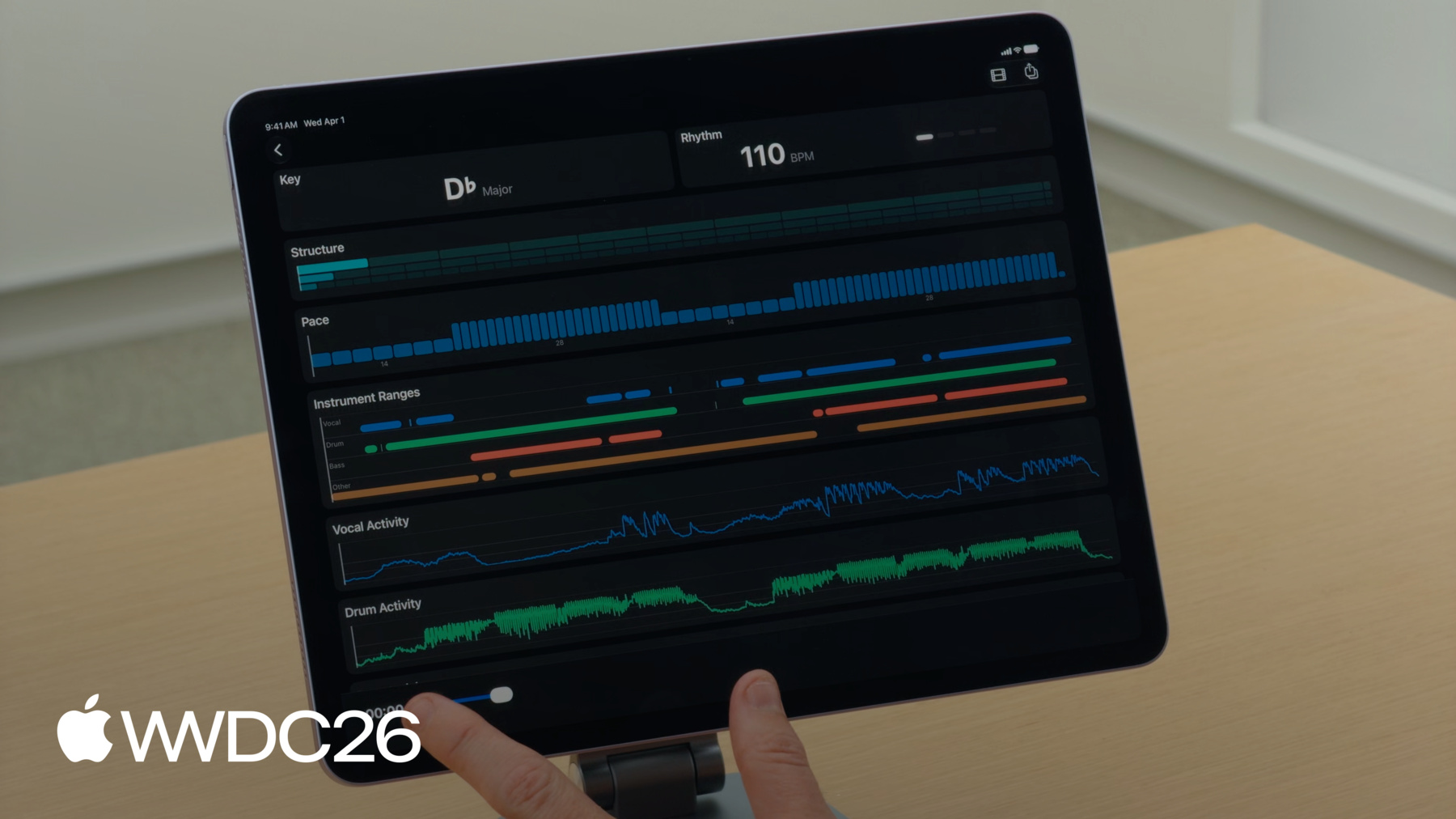
为了更深入地探索该框架, 我将介绍一个名为 Music Understanding Lab 的示例应用程序, 可在 developer.apple.com 上获取。 让我向你展示 Music Understanding Lab 的工作原理。 首先,我将在设备上选择一首歌曲。
该应用程序使用 Music Understanding 框架分析音频, 将其转化为视觉体验 每个结果都有专属图块。 当我点击播放时,注意, 节奏和结构图块会随着 歌曲播放而更新。 播放头将体验串联在一起, 让你跟随音乐律动。
我将首先介绍"选择歌曲..." 按钮是如何实现的。 使用 SwiftUI fileImporter, 我将选择一个文件以获取其 URL。 然后我将使用该 URL 创建一个 AVURLAsset。 请确保将 PreferPreciseDurationAndTimingKey 设置为 true 以确保最准确的结果。 接下来,我将 从资源创建会话 并调用 analyze 并等待 会话结果的返回。 在 SessionResult 结构体中, Music Understanding 分析的每个功能 都有其自己的结果字段。 这些都是可选值。 当你使用通用 analyze() API 时, 所有结果都将可用。 但是,如果你使用 有针对性的 analyze(for:) API, 框架将只返回 你请求的结果, 其余的将为 nil。
在整个 Music Understanding 框架中, 有两种标准类型 用于将时间与值相关联。 TimedValue 将一个值与 CMTime 关联。 与 TimedValue 类似, RangedValue 将 CMTimeRange 与一个值关联。 考虑到这些基于时间的类型, 我将讨论 Music Understanding 分析的功能 通过展示它们在 Music Understanding Lab 用户界面中的使用方式。 首先,我将从调性图块开始。 在这首歌曲中, 音乐调性是降 D 大调。 对于调性分析, Music Understanding 框架 返回一个 KeyResult 结构体。 该结果包含一个范围数组, 将 KeySignature 映射到 特定时间范围 使用 RangedValue。 KeySignature 包含一个主音 和一个调式。 主音可以是任何标准半音音高。 它代表根音,如 C 或 G, 歌曲围绕其构建…… 以及调式, 可以是大调或小调。
调性旁边是节奏图块。 图块在左侧显示 bpm 右侧有指示灯, 随着每个节拍的播放而亮起。 当你分析节奏时, 你会得到一个 RhythmResult。 在此结构体中,Music Understanding 为你提供时间戳 以 CMTime 数组的形式 表示每个节拍和小节。 该框架还提供整体全局速度 以 beatsPerMinute 表示。 注意,bpm 是可选的。 这是因为如果框架 处理的音频不足 以找到至少两个节拍, bpm 将被设置为 nil。 现在,我将介绍结构图块。 图块中有 3 行矩形 表示歌曲的结构层次。 每个矩形是 歌曲中的一个时间范围。 Music Understanding 支持 三个结构层次: 章节、段落和乐句。 顶行代表歌曲的章节。 每个块显示 一个章节的时间范围。 每个章节由 一个或多个段落组成, 显示在章节矩形下方, 每个段落由乐句组成。 播放时,当前章节、 段落和乐句会高亮显示。
当你请求结构分析时, 框架返回一个 StructureResult。 它有三个属性 分别对应章节、段落和乐句。 对于每个属性,你都会得到 一个 CMTimeRanges 数组。 下一个图块是步调。 它告诉你听众感受到的 音乐快慢。 歌曲中感觉更快或更有活力的部分 与较慢或活力较低的部分 相比,具有更高的值。 在此用户界面中, 较高的柱形代表更高的能量, 而较短的柱形代表较低的能量。 当你请求速度分析时, 你会得到一个 PaceResult。 此结构体有一个属性 包含一个范围值数组。
接下来,我将介绍 乐器活动图块。
Music Understanding Lab 显示多个图块 以可视化乐器活动。 可以是时间范围, 其中颜色编码的柱形表示 当前活跃的乐器 或者是详细的活动图。 图表绘制 0 到 1 之间的值 代表每种乐器的强度。 值越接近 1, 乐器在混音中越响。 当你请求乐器活动时, 框架返回 一个 InstrumentActivityResult。 它有两个属性, 一个用于范围 一个用于活动。 Ranges API 提供一个字典, 将每种 Instrument 映射到 CMTimeRanges 数组。 这非常适合你 只想知道 乐器是否存在的情况。 但有时你需要更多细节 而活动提供了这一点。 Activity 将乐器映射到 Float 的 TimedValue。 活动结果表示乐器 随时间演奏的强度, 是驱动音频响应式动画 的绝佳来源。 响度图块显示 在乐器活动下方。
框架提供测量值 以满刻度响度单位表示, 即 LUFS, 这是行业标准 用于模拟人耳 感知音量的方式。 在图块顶部 是一个综合响度值, 给出整首歌曲的平均响度。 下方是瞬时响度的图表, 显示响度如何随时间变化。 框架还提供峰值, 描述以分贝表示的 绝对最高音量。 当你请求响度分析时, 框架返回 一个 LoudnessResult 结构体。 Music Understanding 支持 integrated、 momentary 和 shortTerm 响度。 Integrated 提供一个单一值 代表音频的整体响度。 Momentary 和 shortTerm 每 100 毫秒提供 带时间戳的值。 Momentary 值在 400 毫秒 的窗口内计算。 它们用于检测响度中 短暂、突然的峰值。 ShortTerm 值在 3 秒 的窗口内计算, 提供随时间变化的响度趋势 的更平滑视图。 峰值精确地告诉你 音轨达到最大电平的位置 并以分贝为单位进行测量。 MusicUnderstandingSession 还提供 用于响度的流式 API。 值通过 AsyncSequence 传递 针对框架分析的 每 100ms 音频。
以下是如何使用它的示例。 我将像之前一样 初始化会话 但这次我将设置两个任务: 一个用于处理 传递来的响度结果, 另一个用于开始分析。
现在我将介绍 此示例中的 AudioProvider。 AudioProvider 遵循 AsyncSequence 并生成 AVReadOnlyAudioPCMBuffer 对象。 当 AudioProvider 发送了所有音频缓冲区后, 它必须发送最终的 nil 以表示完成。
我现在想关注 Music Understanding Lab 顶部的两个图标。 最右侧有一个分享按钮。 当你点击它时,将导出一个 包含所有分析数据的 JSON 文件。
所有 MusicUnderstanding 结果都支持编码。 要编码为 JSON, 只需创建一个 JSONEncoder 并编码会话结果。 导出按钮旁边会出现 一个带有胶片图标的按钮。
点击后,它会打开视频图块。 视频图块使用结构和步调 创建与音乐同步的视频。 我将介绍其工作原理。 视频图块显示一系列 与音乐感觉相匹配的视频剪辑。 该算法首先 识别歌曲章节时间范围。 然后它使用每个章节的步调 来确定在该时间范围内 显示多少个剪辑。
由于速度是每分钟事件率, 可以除以 60 秒 来确定每个剪辑的时长。 这会产生始终从 每个章节开始处开始的剪辑, 章节内的剪辑 与歌曲的能量相匹配。
然后我使用这些时序信息 构建一个与音乐同步的视频。 视频剪辑被重新计时 以匹配目标剪辑时长 在活力较低的部分 使用更长、更慢的剪辑, 在更有活力的部分 使用更短、更快的剪辑。 此概述让你了解这些 API 在实践中如何协同工作。 掌握了这些基础知识, 你已经准备好深入研究了! 借助 Music Understanding, 你可以将视觉效果与 歌曲的节拍、响度或速度同步 构建强大的视频编辑功能, 按节奏或调性组织音乐目录 来驱动 DJ 应用程序 或预先计算并捆绑分析数据 让你的游戏与音乐同步动画。 查看 Music Understanding 框架文档 在 developer.apple.com 上, 并下载"Music Understanding Lab" 以帮助启动 你自己应用程序的开发。
这项技术是为了解决 Apple 内部的实际挑战而构建的。 想法已经存在 但构建它们的工具还不存在。 这些工具现在在你手中。 创造一些精彩的东西。 感谢观看!
-
-
4:47 - Initialize the session
import MusicUnderstanding .fileImporter(isPresented: $isPresented, allowedContentTypes: [.audio]) { result in switch result { case .success(let url): let asset = AVURLAsset(url: url, options: [AVURLAssetPreferPreciseDurationAndTimingKey : true]) let session = try await MusicUnderstandingSession(asset: asset) let results = try await session.analyze() } } -
5:24 - Inside SessionResult
import MusicUnderstanding public struct SessionResult: Codable, Sendable { public let instrumentActivity: InstrumentActivityResult? public let key: KeyResult? public let loudness: LoudnessResult? public let pace: PaceResult? public let rhythm: RhythmResult? public let structure: StructureResult? } -
5:53 - TimedValue
import MusicUnderstanding public struct TimedValue<Value>: Codable, Equatable, Sendable where Value: Codable & Equatable & Sendable { public let time: CMTime public let value: Value } -
5:58 - RangedValue
import MusicUnderstanding public struct RangedValue<Value>: Codable, Equatable, Sendable where Value: Codable & Equatable & Sendable { public let range: CMTimeRange public let value: Value } -
6:27 - Key analysis
public struct KeyResult: Codable, Sendable { public let ranges: [MusicUnderstandingSession.RangedValue<KeySignature] } -
6:43 - KeySignature
public struct KeySignature: Codable, Hashable, Sendable { public let tonic: Tonic public let mode: Mode } -
6:48 - Using tonic
@frozen public enum Tonic: String, Codable, Hashable, Sendable { case aFlat, aSharp, a, bFlat, b, c, cSharp, d, dFlat, dSharp, eFlat, e, f, fSharp, g, gFlat, gSharp } -
6:59 - Using mode
public enum Mode: String, Codable, Hashable, Sendable { case major, minor } -
7:16 - Rhythm analysis
import MusicUnderstanding public struct RhythmResult: Codable, Sendable { public let beats: [CMTime] public let bars: [CMTime] public let beatsPerMinute: Float? } -
8:42 - StructureResult
import MusicUnderstanding public struct StructureResult: Codable, Sendable { public let sections: [CMTimeRange] public let segments: [CMTimeRange] public let phrases: [CMTimeRange] } -
9:26 - Analyzing pace
import MusicUnderstanding public struct PaceResult: Codable, Sendable { public let ranges: [MusicUnderstandingSession.RangedValue<Double>] } -
10:13 - InstrumentActivityResult
import MusicUnderstanding public struct InstrumentActivityResult: Codable, Sendable { public let ranges: [Instrument: [CMTimeRange]] public let activity: [Instrument: [MusicUnderstandingSession.TimedValue<Float>]] } -
11:45 - LoudnessResult
import MusicUnderstanding public struct LoudnessResult: Codable, Sendable { public let integrated: MusicUnderstandingSession.TimedValue<Float> public let momentary: [MusicUnderstandingSession.TimedValue<Float>] public let shortTerm: [MusicUnderstandingSession.TimedValue<Float>] public let peak: MusicUnderstandingSession.TimedValue<Float> } -
12:48 - Streaming API for loudness
import MusicUnderstanding public var loudnessResults: some AsyncSequence<LoudnessResult, any Error> & Sendable -
12:55 - Streaming API for loudness
import MusicUnderstanding let audioProvider = AudioProvider() let session = MusicUnderstandingSession(audioProvider: audioProvider) await withThrowingTaskGroup(of: Void.self) { taskGroup in group.addTask { for try await result in await session.loudnessResults { updateAudioLevel(result.momentary.value) } } group.addTask { try await session.analyze(for: [.loudness]) } } -
13:19 - Audio Provider
import MusicUnderstanding struct AudioProvider: AsyncSequence, AsyncIteratorProtocol { func makeAsyncIterator() -> Self { return self } mutating func next() async -> AVReadOnlyAudioPCMBuffer? { // Return the next audio buffer, or nil to signal completion } } -
13:55 - Encode to JSON
import MusicUnderstanding let session = try await MusicUnderstandingSession(asset: asset) let results = try await session.analyze() let encoder = JSONEncoder() try encoder.encode(results) -
14:47 - Suggestion for using pace
let timePerClip = 60 / paceValue
-