

-
将 MusicKit 整合到你的 App 中
使用 MusicKit 将 Apple Music 的强大功能融入你的 App。我们将介绍授权、订阅状态检查、音乐选择、播放控制以及跨平台歌曲共享。了解如何使用新的音乐选择器,方便用户浏览 Apple Music 目录和自己的个人音乐库。我们还将详细讲解 SystemMusicPlayer 和 ApplicationMusicPlayer 之间的区别,并展示如何观察播放状态。
章节
资源
相关视频
WWDC23
WWDC22
-
搜索此视频…
大家好,欢迎来到 WWDC 2026。 我是 Cathy, MusicKit 团队的一名工程师! 今天,我和我的同事 Alan 想为大家演示 如何将 MusicKit 集成到应用中。
MusicKit 是一个适用于 Apple 平台的 Swift 框架, 提供一组 API, 让您的应用可以访问和播放音乐。 专为 Swift 并发 和 SwiftUI 设计, MusicKit 简化了 与 Apple Music 的集成。 您可以构建丰富的 音乐增强体验, 让用户可以浏览 和播放 Apple Music 目录 以及个人媒体库 中的内容,无需离开应用。 今天 Alan 和我将介绍许多 MusicKit 的核心概念, 同时对我们共同制作的 健身应用进行增强。 首先,我将介绍如何配置 Xcode 并处理音乐访问权限。
然后,我将讲解 MusicKit 音乐条目是什么, 以及如何选择一个。
Alan 将在我的音乐选择工作基础上, 为播放准备所选歌曲。
最后,Alan 将深入讲解 音乐目录请求, 以进一步定制 我们共同开发的应用。 现在,我想先介绍一下 健身应用的使用流程, 然后再深入到 MusicKit 集成部分。 如果您想跟着操作, 可以在开发者文档网站 找到完整的示例代码。
我来运行应用, 介绍当前的使用流程。 当我开始一次骑行锻炼时, 会弹出一个包含秒表的界面, 以及一个结束训练的按钮。
这是一个好的开始,但我希望 能在锻炼时选择要播放的音乐, 所以我想 集成 MusicKit!
在开始编码之前, 我需要配置一些设置, 作为项目设置的一部分。 其中一项设置是 在开发者门户注册开发者令牌, 这是发起 MusicKit 请求 所必需的。 注册开发者令牌后, 系统会自动为您 生成令牌。
要启用自动令牌生成, 我需要导航到 注册 App ID 的页面。 我需要确保在"App Services"标签页中 勾选了 MusicKit 复选框。
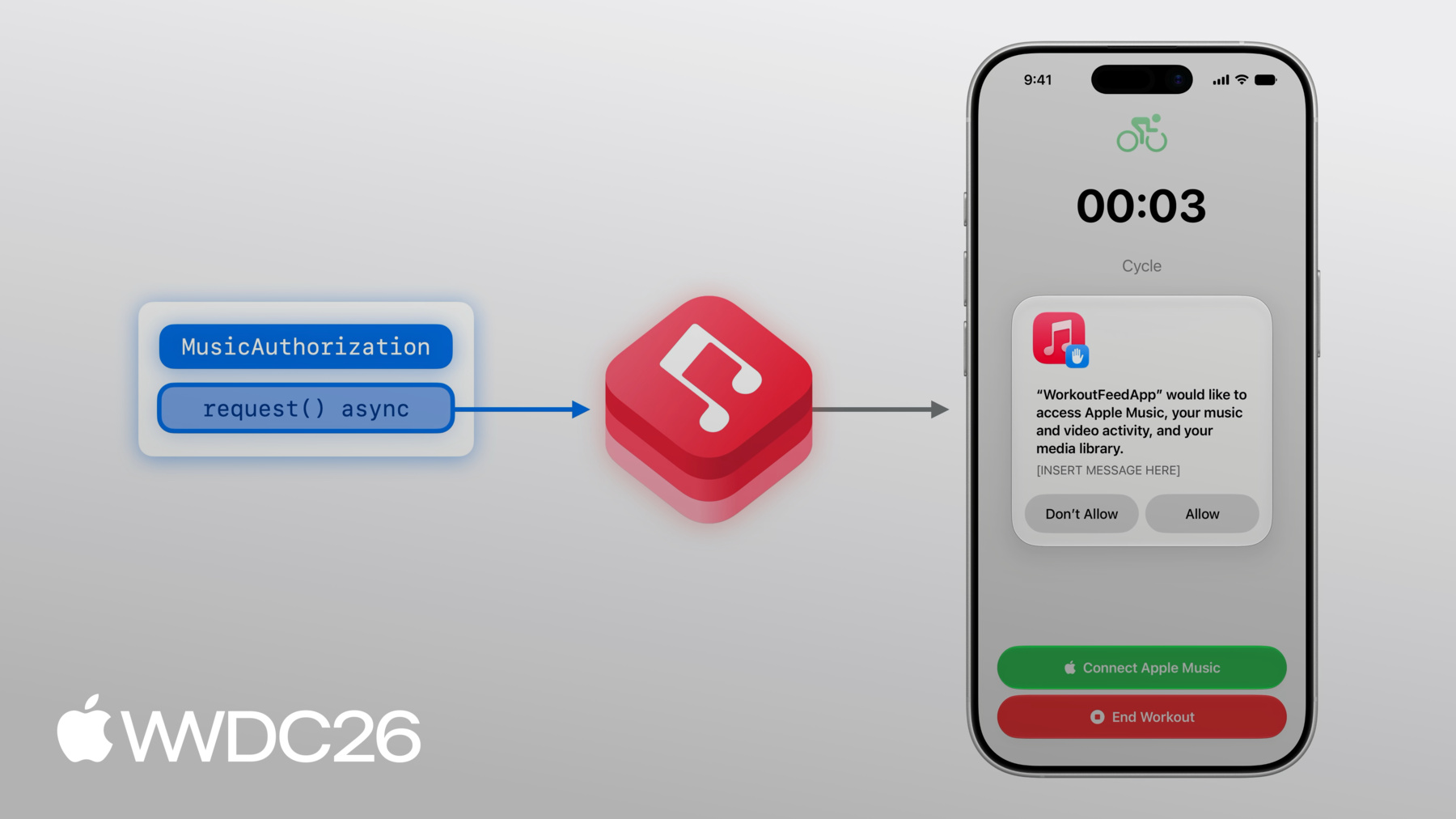
令牌与我的开发者账户关联, 因此我需要验证 Xcode 中 已登录相同的账户。 现在,回到应用! 我想在锻炼时 选择要播放的音乐, 但在选择音乐之前, 我必须授权 MusicKit 访问我的音乐内容。 要请求授权, 我将使用 MusicKit 的 MusicAuthorization request 方法, 这是一个异步方法, 用于返回应用的 音乐访问是否被批准。 MusicKit 随后会向用户 弹出权限提示。
我可以配置此提示的描述, 提供更多关于我的应用 将如何使用访问权限的说明, 这可以在项目设置中完成。
要提供访问音乐内容的原因, 我需要导航到 Xcode 项目的 "Signing & Capabilities"标签页, 并添加"Media Library"功能。 在文本框中,我可以描述 应用打算如何使用 用户的音乐库。 当您请求授权时, 这段描述将出现在 权限提示的底部。 如果用户没有订阅 但想收听 Apple Music 目录中的内容, 我希望为他们提供订阅的方式。 使用 MusicKit 并不要求 拥有 Apple Music 订阅, 但没有订阅时,应用只能 访问已购买或已同步的音乐。 如果没有有效的订阅, 我可以使用 MusicKit 的 subscription offer 视图修饰符, 让用户可以在不离开应用的情况下 订阅 Apple Music。 .musicSubscriptionOffer 是一个视图修饰符, 接受一个 isPresented 绑定参数, 当按钮被点击时, 视图中的值会改变。
呈现后,订阅优惠界面 会为用户提供步骤, 引导他们快速注册 Apple Music 订阅。 作为开发者, 您有机会获得佣金, 当有人通过您的应用 订阅 Apple Music 时, 这是 Apple 服务绩效合作伙伴计划 的一部分。 您可以为此计划 指定您的信息, 在 MusicSubscriptionOffer.Options 结构体中, 并将其传入视图修饰符。 options 结构体还允许您 设置消息标识符, 这会改变所呈现的界面。 由于我的最终目标是播放音乐, 我将设置 messageIdentifier 选项为 .playMusic。
您可以自定义消息标识符, 为您的使用场景 呈现不同的界面效果。
在主视图中, 我需要声明一个 @State 属性, 表示订阅状态。 我只希望在用户未订阅时 显示订阅按钮, 并且有可能成为订阅用户的情况下。 要更新订阅状态, 我可以添加一个 .task, 在授权被批准后运行。 在这里,我将获取当前值, 并监听任何可能发生的更新, 并相应地设置该值。
现在我已获得授权并完成订阅, 可以使用我的订阅 在 Apple Music 目录中 播放音乐 进行我的锻炼了! 首先,我需要选择一首要播放的歌曲。 具体来说,我要选择一个 MusicKit 歌曲对象。 MusicItems 是使用 MusicKit API 的 基础构建块, 所以我先从介绍它们开始。 然后,我将介绍如何使用 音乐选择器来选取音乐条目。 我先深入了解音乐条目。
以 Album 音乐条目为例, 它是一个值类型, 位于 MusicKit 的模型层。
每个音乐条目都有 Attributes, 这些是简单的内置属性。 以 Album 对象为例, 它的属性描述了 专辑的标题, 或专辑的 contentRating 是什么。
音乐条目还有 Relationships, 用于描述相关内容, 例如 Album 的曲目, 这是另一种 MusicKit 音乐条目类型。
Associations 也描述 一个类型的相关内容, 但 associations 与类型的关联 通常比 relationship 更弱。 Album 的一个 association 是 otherVersions, 它是其他专辑的集合。
目前我主要介绍了 Album,但 MusicKit 还有许多其他音乐条目类型, 例如 Genres、Stations 和 Playlists。
现在我已经介绍了 音乐条目是什么, 是时候开始使用它们了! 要选择锻炼时想听的音乐, 我可以使用音乐选择器, 它在一个统一的界面中 同时呈现 Apple Music 目录和音乐库, 整合在单一界面中。 音乐选择器在一处整合了 多种 MusicKit 请求, 提供多种方式发现 用户可能想要选择的音乐。 要选取一首 MusicKit 歌曲, 我需要添加 .musicPicker SwiftUI 视图修饰符! 我已经有了一个基础按钮, 但需要添加一些状态变量, 首先是一个用于控制 是否显示选择器的开关。 其次,selectedSong 属性 表示初始的歌曲选择。 我目前没有选择任何内容, 所以默认值可以为 nil。
现在,我可以添加这个修饰符了。
接下来,我要将 musicPickerButton 按钮添加到主视图中, 也就是我添加其他按钮的地方。 音乐选择器不需要订阅, 这就是为什么我将它设置为 无论订阅状态如何都显示。 如果没有订阅, 选择器只会显示 用户库中的音乐条目, 而不是库和目录两者都显示。 我现在来构建并运行! 我很喜欢 Olivia Dean,所以我要选择 我目前最喜欢的一首 Olivia Dean 歌曲。 为此,我要点击搜索栏, 搜索这首歌。 找到想要的结果后, 我可以点击加号按钮, 该按钮位于歌曲信息的右侧, 然后关闭选择器。 太好了,我为这次骑行选择了"Lady Lady", 但对于 30 分钟的锻炼, 我想听不止一首歌。
我需要在选择器中 允许多选, 方法是将选择对象 改为数组。
我先选 3 首歌, 不过我也可以选择 整张专辑或播放列表, 方法是进入其详情页面, 点击顶部的加号按钮。 好了,我已经选好歌曲, 现在可以关闭选择器了。
选好音乐后, 我想播放它。 我的同事 Alan 将接着介绍, 讲解如何为健身应用 添加播放功能。
谢谢你,Cathy。 让我们来播放一些音乐, 使用 MusicKit 的 MusicPlayers! MusicKit 提供两种不同的播放器, SystemMusicPlayer 和 ApplicationMusicPlayer。 两种播放器都是 MusicPlayer 的子类。 SystemMusicPlayer 控制系统的 Music 应用, 而 ApplicationMusicPlayer 则从您的应用中播放音乐。
使用 SystemMusicPlayer, 您只能设置队列。 除了当前播放的条目外, 您无法查看队列中的内容。
而使用 ApplicationMusicPlayer, 您拥有对队列的 完整读写访问权限。
两种播放器都允许您设置 队列是否会显示 在 Music 应用的"最近播放"中, 并且都允许您设置播放状态, 例如重复和随机播放模式。
最后,由于 SystemMusicPlayer 控制系统的 Music 应用, 即使您的应用进入后台或退出, 它仍会继续播放。 若要使用 ApplicationMusicPlayer 实现相同的后台播放行为, 需要启用"Audio Background Mode"功能, 在 Xcode 项目设置中开启。
队列由一组可播放的 音乐条目组成, 例如歌曲。 队列设置在 MusicPlayer 上。
MusicPlayer 的重复或随机播放行为 可通过其状态来配置。
要开始播放, 请在 MusicPlayer 上调用 play()。 要停止播放, 请调用 pause()。
首先,MusicPlayer 加载队列。
然后,MusicPlayer 需要加载音频资源, 播放器才能输出音乐!
这可能需要一点时间。
如果您事先知道要播放什么, 可以使用 prepareToPlay() 对 MusicPlayer 进行缓冲。 这可以减少调用 play() 时 输出音乐所需的时间。
队列可以从任何可播放的 音乐条目创建,例如歌曲, 或容器类型, 如专辑或播放列表。
使用容器类型的特殊队列初始化器, 可以让音乐播放器 延迟加载容器的条目, 进一步缩短加载时间! 使用 MusicKit 播放音乐时, 通常会出现 在 Music 应用中 用户的收听历史里。 affectsListeningHistory 是一个实例属性, 用于确定队列是否会显示 在 Music 应用中用户的 "最近播放"列表中。 它默认为"true",但遵循 Music 应用的"使用收听历史"设置。 适用于 Music 应用。 要观察和控制播放器, 两种 MusicPlayers 都有可观察的 播放状态和队列属性。
ApplicationMusicPlayer 拥有一个 您可以完全控制的队列。 这些是可观察的类,您可以 直接在 SwiftUI 视图中使用。
要了解更多关于 Swift 中观察的内容, 请查看"Discover Observation in SwiftUI"session,来自 WWDC 2023。 在健身应用中, 我想将封面 放在锻炼界面的中心位置。 我还会显示当前歌曲的标题和副标题, 以及一组控件。
要获取当前播放的歌曲, 我将引用播放器的队列。
然后,如果队列中当前播放的 歌曲有封面, 我将使用 MusicKit 的 ArtworkImage SwiftUI 视图来显示封面。
要显示歌曲信息, 我将使用标题和副标题, 来自当前播放的条目。
要控制播放/暂停, 我将添加一个按钮。 我将读取 ApplicationMusicPlayer 的状态, 并通过检查 playbackStatus 来判断是否正在播放。
当播放器正在播放时, 按钮调用"pause", 否则调用"play"。
最后,"Back"按钮调用 skipToPreviousEntry, 跳转到上一首歌曲, "Next"按钮调用 skipToNextEntry。
在音乐选择器中,我可以点击 我的跑步播放列表顶部的加号按钮, 来选择此播放列表中的所有歌曲。 然后,点击完成。 第一首歌现在正在播放, 我刚刚设置的 ArtworkImage 显示的是当前播放的歌曲! 我点击暂停,播放器暂停了。 点击下一首, 封面现在显示下一首歌曲!
我想让使用我应用的用户 更方便地 开始锻炼, 方法是推荐一些歌曲, 让他们可以在锻炼界面中点击, 快速开始收听!
目录请求让您的应用可以查询 Apple Music 并提供音乐内容, 独立于用户的音乐库, 例如为您的应用提供精选内容。
在 MusicKit 中, 结构化的音乐目录请求 允许您从 Apple Music API 获取内容。 MusicKit 提供多种结构化请求, 例如根据特定过滤条件获取条目、搜索音乐, 以及其他 Apple Music 精选 和个性化内容! 查阅 MusicKit 文档, 获取完整列表及使用方法。
MusicCatalogResourceRequest 是一种结构化目录请求, 用于请求特定资源。 在此示例中, 我们将发起一个歌曲请求。 请求包含一些配置, 例如 options, 如果您想设置 请求的行为方式。 我稍后会详细介绍 options。
您可以在请求上设置属性, 指定 relationships 和 associations, 您也希望一并获取, 作为此歌曲请求的一部分。 例如,您可能还想获取 歌曲的 Artists relationship。
此外,您还可以设置 响应中返回条目数量的限制。
当您调用异步的 response() 方法时, MusicKit 会完成请求。
该方法返回 MusicCatalogResourceResponse, 其中包含请求的结果, 以强类型的 MusicItemCollection 形式呈现。 MusicItemCollection 是一种 MusicKit 类型, 包含音乐条目的集合。 在此示例中,它包含 Songs。
MusicItemCollection 支持分页, 因此如果您的请求 返回了太多结果, hasNextBatch 将为"true", 您可以通过 异步的 nextBatch() 方法 获取下一页。 在发起资源请求时, 资源可用性取决于 账户设置 以及店面或所在地区。 例如,您在某个地区 请求的资源 在另一个地区可能有一个 ID 不同的等效资源。 此外,针对包含明确内容的资源, 可能存在等效的洁净版本, 当账户不允许显示 明确内容时使用。
我将创建一个 fetchSongs 方法, 其输入为一组歌曲 ID 的集合, 其中第一个 ID 被视为精选歌曲。 该方法使用 MusicCatalogResourceRequest 来查找与 ID 匹配的歌曲, 即 songIDs 参数中的 ID。
我还会添加 findEquivalents 选项标志, 以启用我刚才介绍的 资源等效行为。 然后,我将调用 response() 方法来获取内容。
要获取精选歌曲, 我将使用 item(for:) 方法, 使用输入 ID 集合中的第一个 ID。 目录请求不保证返回 所有请求的内容, 例如当某个资源不可用时。
最后,我将按顺序 获取其余歌曲。
现在我可以开始锻炼了! 我回到应用,开始另一次锻炼, 现在我有一排推荐歌曲, 您可以快速选择, 当您想立刻 开始锻炼时!
点击其中一个封面 就会立即开始播放!
这就是将 MusicKit 集成到 您的应用中所需了解的全部内容! 正如 Cathy 所介绍的, 请采用音乐选择器视图修饰符, 为您的应用提供统一且熟悉的 音乐选择体验!
Apple Music 目录拥有丰富的内容, 您的应用可以播放。 例如,添加一些背景音乐 来丰富您的应用体验! 并且,查看其他 MusicKit API, 例如浏览和修改 库内容的请求,这些内容涵盖在 "Explore more content with MusicKit"中, 来自 WWDC2022。 如果您有兴趣在 Android 或 Web 上集成, 请查看"Meet Apple Music API and MusicKit"。 感谢您的观看。
-
-
4:47 - Presents the Apple Music subscription offer
@State var showSubscriptionOffer = false let options = MusicSubscriptionOffer.Options( messageIdentifier: .playMusic ) @ViewBuilder var musicSubsriptionButton: some View { Button("Subscribe to Apple Music", systemImage: "music.note") { showSubscriptionOffer = true } .musicSubscriptionOffer(isPresented: $showSubscriptionOffer, options: options) } -
5:59 - Adds subscription button to main view
@State var subscription: MusicSubscription? var body: some View { VStack { // ... if let subscription, subscription.canBecomeSubscriber { musicSubscriptionButton } } .task(id: isAuthorized) { self.subscription = try? await MusicSubscription.current for await subscription in MusicSubscription.subscriptionUpdates { self.subscription = subscription } } } -
8:48 - Add .musicPicker() modifier
@State var showMusicPicker = false @State var selectedSong: Song? = nil @ViewBuilder var musicPickerButton: some View { Button("Pick some Music", systemImage: "music.note.list") { showMusicPicker = true } .musicPicker(isPresented: $showMusicPicker, selection: $selectedSong) } var body: some View { VStack { if let subscription, subscription.canBecomeSubscriber { musicSubscriptionButton } musicPickerButton } } -
14:49 - Artwork
@State var queue = ApplicationMusicPlayer.shared.queue var body: some View { VStack { if let artwork = queue.currentEntry?.artwork { ArtworkImage(artwork, width: 200, height: 200) } else { // Placeholder artwork RoundedRectangle(cornerRadius: 16) .fill(.quaternary) .frame(width: 200, height: 200) } } } -
15:06 - Current entry info
@State var queue = ApplicationMusicPlayer.shared.queue var body: some View { VStack { // ... if let currentSong = queue.currentEntry { Text(currentSong.title) .font(.title3.bold()) if let subtitle = currentSong.subtitle { Text(subtitle) .font(.subheadline) .foregroundStyle(.secondary) } } } } -
15:14 - Playback controls (play, pause)
let player = ApplicationMusicPlayer.shared @State var state = ApplicationMusicPlayer.shared.state var isPlaying: Bool { state.playbackStatus == .playing } var playPause: some View { Button ( isPlaying ? "Pause": "Play", systemImage: isplaying ? "pause.fill" : "play.fill" ) { if isPlaying { player.pause() } else { Task { try await player.play() } } } } -
15:38 - Playback controls (next, previous)
let player = ApplicationMusicPlayer.shared var controls: some View { HStack { Button("Back", systemImage: "backward.fill") { Task { try await player.skipToPreviousEntry() } } // ... Button("Next", systemImage: "forward.fill") { Task { try await player.skipToNextEntry() } } } } -
18:58 - Music catalog resource request
func fetchSongs(songIDs: [MusicItemID]) async throws -> (featured: Song?, other: [Song]) {
    var request = MusicCatalogResourceRequest‹Song>(matching: \.id, memberOf: songIDs)
    request.options = [.findEquivalents]

    let response = try await request.response()

    let featuredSongID = songIDs[0]
    let featuredSong = response.item(for: featuredSongID)

    let others: [Song] = songIDs[1...].compactMap { songID in
        return response.item(for: songID)
    }

    return (featuredSong, others)
}
-