

-
充分利用 Device Hub
了解 Device Hub 如何加速你的开发流程。我们将介绍 Device Hub 的具体功能,还将演示如何借助设备和模拟器快速诊断并复现问题。
章节
- 0:00 - 简介
- 1:04 - “Device Hub”概述
- 3:00 - 控制
- 4:39 - 组织
- 6:04 - 配置
- 8:08 - 复现故障
- 15:52 - devicectl
- 16:30 - 后续步骤
资源
相关视频
WWDC26
WWDC19
-
搜索此视频…
我是Matt,我是 设备团队的工程师。 稍后,我的同事Hassan 也会加入我们。 我们深知,让你的应用 在所有地方都呈现完美效果有多重要—— 在每一台设备上、每一种外观下、 每一种文字大小下,以及更多情景中。 我们也知道—— 这需要考虑很多因素。 因此,在本次讲座中, 我们将为你介绍Device Hub, 这是一款让这一切变得轻松的应用, 我们将逐一介绍 它所能做到的一切。 以下是我们的计划。 首先,介绍Device Hub—— 这是一款集设备与模拟器 管理于一体的应用。 然后是功能演示—— 我们将学习如何用它来整理、 控制和配置你的设备。 最后,你将看到它的实际应用。 我们将展示一个示例。 Hassan和我将在真实工作流程中 使用Device Hub。
让我们开始吧。 这就是Device Hub。 它是随Xcode 27一同发布的应用。 但你无需启动Xcode 才能使用它, 因为它专为所有 与设备打交道的人而设计, 无论你是在开发应用、 跨设备配置进行测试, 还是管理设备库存。
它提供一套统一的工具—— 无论你使用的是 真实设备还是模拟器。 你可以按需对其中任意一个 进行配置。
如果你正在开发应用, 你会立刻接触到Device Hub。 在Xcode中构建并运行到模拟器时, 它会自动启动。 它会呈现一个带有屏幕 实时交互视图的窗口。
这是处于紧凑模式下的Device Hub。 它是一个专注且轻量的窗口。 只显示屏幕和几个基本要素。
底部是设备控件。 包括主页按钮、 截图和旋转等功能。 这些控件是上下文相关的, 会根据你正在查看的设备而变化。 例如,在Apple TV上, 你会看到播放/暂停 和导航的控件。 在Apple Vision Pro上—— 你会看到环境控件 和相机移动控件。 在Apple Watch上,你会看到 侧边按钮和数字表冠。
但Device Hub远不止于此。 当这些基本功能不够用时, 点击顶部的展开按钮 即可切换到完整窗口。 在这里,你将访问到 更广泛的工具集。 完整窗口中 有很多内容。 让我们来逐一了解 它的所有功能。
它们分为三个区域: 控制、整理 和配置你的设备。 关于如何控制你的设备, 请听Hassan为你详细介绍。 我把时间交给Hassan。
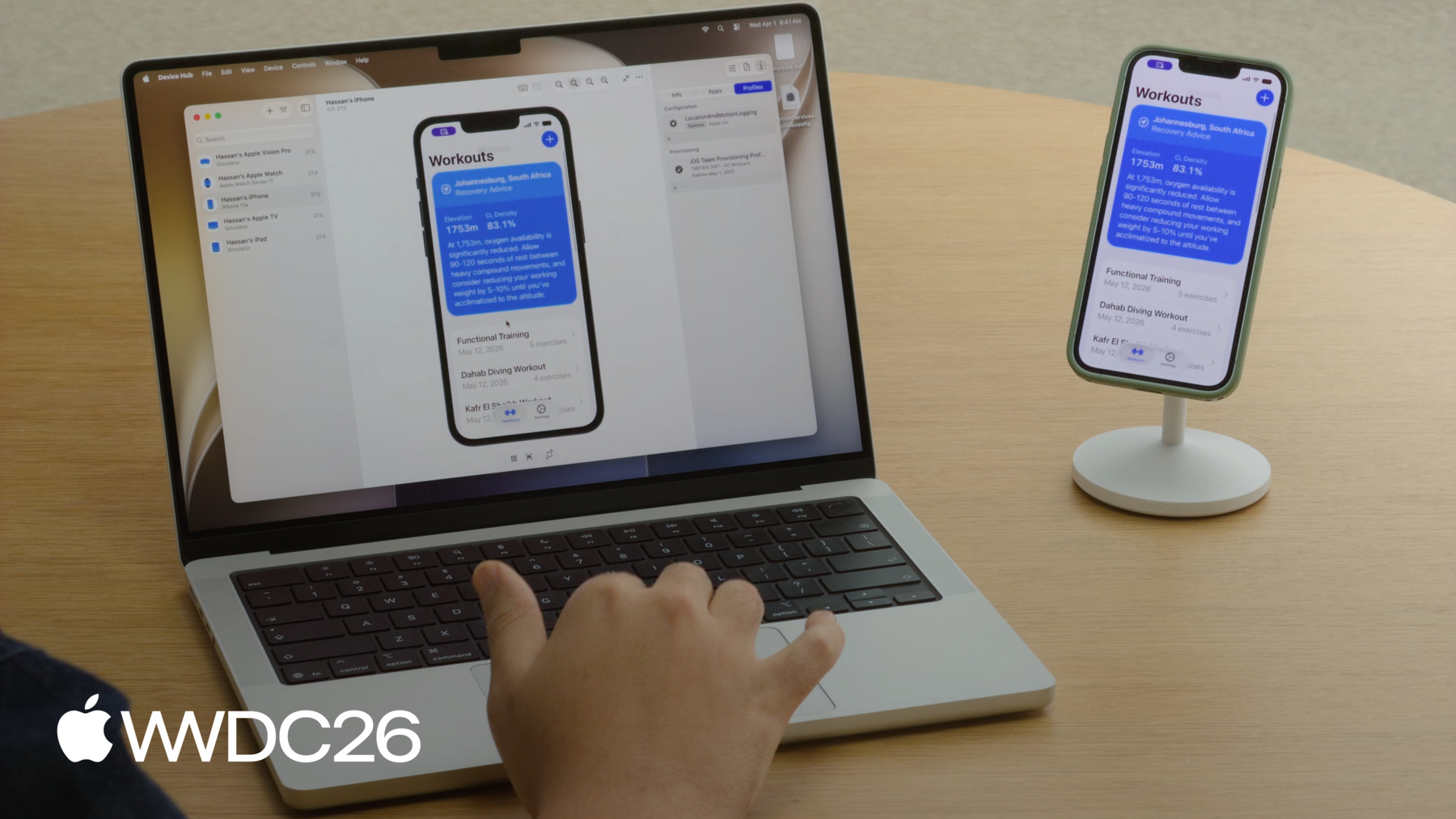
谢谢Matt! 在开发过程中, 我的设备可能散落各处, 而通过屏幕来操控设备 有助于我专注于工作。 Device Hub让这一切对我来说更轻松, 它为我提供了高级功能 来控制我的设备, 这些功能可以在 窗口中央的画布中找到。 这里有屏幕的实时显示。 你可以直接与之交互。 点击、拖动、滚动, 或使用自然的触控板手势。 无论是设备还是模拟器, 操作方式完全相同。 来看这里。 我已连接了我的Apple Watch。 看我如何使用Device Hub 来控制它。
底部有与紧凑窗口 相同的控件。 与紧凑窗口一样,这些控件也是 上下文相关的,会随设备变化而改变。 画布上方有一些 不在紧凑窗口中的控件。 这些控件允许你进行缩放, 或对齐到1:1的物理尺寸, 以实际尺寸查看你的应用。
调整大小模式允许你 自由变换应用的尺寸。 这将在"现代化你的UIKit应用" 讲座中进行讨论。 捕获键盘可将Mac的按键 直接路由到设备。 让测试按键命令 和硬件支持变得更加便捷。 还有一个按钮可让你 切换回紧凑模式。 好,这就是画布。 这是直接在Device Hub中 与设备交互的强大方式。 回到Matt,请他为你介绍 如何整理 和配置你的设备。 谢谢Hassan。 我使用数十台设备 和模拟器, 有时很难 追踪所有这些设备。 好在Device Hub提供了整理工具, 并支持快速访问。
这些工具可以在侧边栏中找到。 在侧边栏中,你可以看到完整的库存。 你的每一台设备和模拟器 都集中在一处。
使用顶部的筛选菜单 来改变显示的内容。 或者用它来通过多种不同选项 对库存进行排序和分组。
右键点击任意设备可执行快捷操作。 例如重启设备,或将iPhone和 Apple Watch模拟器配对在一起。 为了快速访问,你还可以 同时查看任意数量的设备, 可以使用标签页, 也可以使用独立的紧凑窗口。 例如, 假设你正在构建一个iOS应用, 你想确保它在几种 不同的手机尺寸上显示正确。 全选它们, 在侧边栏中双击, 每台设备都会打开一个紧凑窗口。 方便你跨屏幕尺寸 比较应用的显示效果。 因此,我可以使用侧边栏中的工具 来整理我的设备。 但是,测试不同的文字大小、 模拟不同的位置, 或安装不同的配置文件—— 这些仍然可能耗费大量时间。
因此,Device Hub提供了 对设备配置的深度控制。 它有五个不同的面板来实现这一点。
这些面板可以在右侧的 检查器区域中找到。
第一个标签页包含设备设置。 在这里你可以更改 设备的外观和行为。 第一个分区 包含外观选项。 包括深色模式、 文字大小等。 这些更改会立即生效。 因此无需深入翻找 设备的设置。 第二个分区让你测试应用 如何响应不同的条件, 例如位置变化。 第三个分区包含音频选项 以及声音电平和I/O。 中间的标签页 包含诊断报告。 当你的应用出现卡顿或崩溃时, 这里是你开始调查的地方。 它包含设备已记录的 所有内容—— 例如崩溃、卡顿 和其他诊断信息。
第三个标签页有三个面板: 设备信息、应用和配置文件。 让我们逐一了解。
信息面板包含存储、型号、序列号 等内容—— 这些是你一眼就需要看到的信息。
应用面板允许你安装、 卸载和管理应用, 包括下载和 替换应用的数据容器。
在配置文件面板中, 你可以管理 配置和预置描述文件。
至此,我们完成了 Device Hub的功能演示。 这是一款功能丰富的应用, 我们已经涵盖了大量内容。 从在侧边栏中 整理设备, 到通过画布控制设备, 再到使用检查器中的 五个面板配置设备。
现在,我将把时间交给Hassan, 向你展示Device Hub 如何融入我们的开发工作流程。 我们将演示一个场景: 在真实设备上发现一个Bug, 并在模拟器上重现它。 谢谢Matt! 现在让我们看看一切如何协同运作。
Matt和我一直在健身应用中 构建一个功能。
我们将为用户显示恢复建议, 这些建议基于 用户当前位置的海拔高度。 但这个功能有一个Bug! 例如,在横屏模式下 部分文字被截断了。
那么让我们来了解一下我的工作流程。 我最常使用Device Hub的 哪些功能? 当我遇到这样的问题时, 我会怎么做?
我重点关注三件事。 配对设备、确保有足够的日志, 以及捕获诊断信息。 我们的健身应用在 Apple Watch和iPhone上运行。 使用Device Hub,我可以无线将 这两者都与我的Mac配对。 我的iPhone已经配对了。 让我们来看看如何配对 Apple Watch。
我将点击侧边栏中的添加按钮, 然后选择"配对附近的设备"。
然后按照 屏幕上的指示操作。
我的Mac立刻出现在 我的Apple Watch上。 我将选择它,点击配对,
最后输入Device Hub中显示的 PIN码。
就这样。 我的Apple Watch已配对。 它出现在侧边栏中, 就像我的iPhone一样。 从现在起,每当它在附近时, Device Hub都能访问它。
接下来,由于我们正在开发 一个基于位置的功能, 我希望安装 CoreLocation日志配置文件。 让我们看看如何 添加配置描述文件。 我将进入配置文件面板,
拖放配置描述文件, 并在我的iPhone上确认安装。
然后,出于隐私原因, 我需要重启我的iPhone。
最后,Matt是我们的UI工程师, 所以他是调查此问题 最合适的人选。 我只是不知道 他需要什么来调试。 所以我将收集 尽可能多的诊断信息。 让我们看看如何操作。 在从Xcode构建并运行应用后, 我可以直接在Mac上 查看和操作这个应用。
我需要重现这个Bug, 所以我要旋转设备。
Bug出现了! 恢复建议被截断了! 首先,让我截取 这个Bug的截图, 这样Matt就能看到 我们的UI出了问题。
接下来,以防Matt需要深入调查, 我将启动sysdiagnose 来捕获系统级诊断信息。
这需要一些时间。 在它运行的同时,我将把 被截断的文字发给Matt。
我将直接在设备上选中它,
复制,
然后粘贴到Mac上的一个文件中。
Matt可能需要我应用的数据 才能重现这个Bug。 而处理应用数据容器 是我工作流程中的常见环节。
Device Hub为你提供了处理 应用数据容器所需的一切。
现在你可以在Finder中 检查已保存的状态, 恢复到已知基准, 或捕获快照以备后用。
这是我的应用存储的所有数据。
我将下载它,
这样Matt就能将其加载到他的模拟器中。
这应该足够了。 让我们把这些都发给Matt, 让他来看看。 Matt,这个UI问题就交给你了。
谢谢Hassan。 所以,当我遇到这样的UI问题, 不影响性能时, 我喜欢用模拟器来重现它们。 我通常会采取 几个步骤来完成这个任务。
首先,我需要选择 正确的模拟器, 然后匹配应用的数据, 最后镜像 设备的配置。 先从选择模拟器开始。
Hassan使用的是iPhone 17e, 而我没有这款设备。 但我有一个对应的模拟器。 它就在侧边栏里。 我将选择它, 并在信息面板中确认 显示的是iPhone 17e。
接下来,我要确保使用 与报告Bug的应用相同的数据, 以防其中某些数据存在问题。 以防其中有任何问题。 因此,我需要让我的应用 与他的应用数据一致。 我的应用版本是空的。 但Hassan给我发来了 他的数据容器, 所以我将进入应用检查器, 用他的数据替换我的。
现在,当我重新启动应用时, 我可以看到他的所有锻炼记录。
最后,我想镜像他的配置。 我希望我的模拟器设置 尽可能与他的设备匹配。
让我们进行匹配, 对齐可能影响UI的 外观或无障碍设置。 首先,查看他发来的截图, 我看到他的手机是横屏模式。 所以我也要镜像这一点。 我可以使用设备控件 旋转模拟器。
接下来,我看到他的位置 设置为约翰内斯堡。 看来在那个高海拔地区, 恢复建议会生成 一个很长的字符串。 因此,我将通过导航到设置检查器 来模拟他的位置, 并选择约翰内斯堡。
现在,我们似乎没有看到 和他一样的文字截断情况。 所以一定还有什么不同。 再仔细看看截图。
我可以看到他的文字大小相当大。 所以可能就是这个原因, 让我们也匹配一下。 我把它调大,果然!
现在我们可以看到截断现象了。 我猜如果旋转回去, 就不会出现这个问题。 所以,这个Bug似乎是 多种因素共同作用的结果。 设备必须处于横屏模式, 需要在特定位置, 而且他的文字大小 需要调到最大。 只有这些条件全部满足, 我们才能重现这个问题。 Device Hub让我完成了所有这些操作。 现在,既然已经重现, 就更容易去验证修复方案了。 这就是一个工作流程的示例: Hassan发现了一个Bug,我重现了它。 全程使用Device Hub。 感谢Hassan提供了这么好的诊断信息! 当然,Matt! 无论你使用的是 模拟器还是真实设备, Device Hub都为你提供 两者一致的体验。 从实时屏幕和硬件控件, 到应用管理、 外观设置等等。 当出现问题时, Device Hub为你提供所需的一切, 用于收集诊断信息 和调查问题。 但这还不是全部! 对于脚本和自动化,请使用devicectl。 这是一个命令行工具, 基于与Device Hub 相同的底层技术。 它非常适合在测试环境中 管理设备, 管理应用、 捕获诊断信息等。 例如,你可以使用devicectl 列出你的设备,
在设备上安装应用,
更改设置,例如 在深色和浅色模式之间切换, 或获取有关 某台设备的更多信息。 如果你需要结构化输出, 可以使用json-output选项, 轻松集成到脚本 或CI工作流程中。
还有更多内容等待探索。 下载Xcode 27, 亲自体验Device Hub。 如果你想集成到脚本或 CI工作流程中,请查看devicectl。 了解Device Hub如何帮助你 提升应用的可调整大小能力, 请观看"现代化你的UIKit应用"讲座。 请查看WWDC 2019的 "充分利用Simulator"讲座。 其他内容, 我们已在视频描述中 链接了Device Hub文档。
感谢观看。 我们迫不及待地想看到 你接下来构建的作品。
-