

-
跟随编程:使用 SwiftUI 构建强大的拖放功能
跟着我们的演示一起构建一款单人纸牌游戏,探索 SwiftUI 支持的最新拖放功能。我们将介绍如何使用新的重新排序 API 方便用户重新排列内容,通过实现拖移容器来批量移动项目,并根据你 App 的规则定制拖放生命周期。为了充分从这个讲座中获益,建议你观看 WWDC22 视频“Transferable 简介”。
章节
资源
相关视频
WWDC22
-
搜索此视频…
大家好,我是 Jack, UI Frameworks 团队的工程师。 在这个视频中,我想向大家介绍 一些新的拖放 API, 这些 API 将在 2027 年发布版本中提供。
自 iOS 16 起,SwiftUI 就提供了拖放功能, 通过 draggable 和 dropDestination 修饰符实现。 draggable 修饰符允许用户 移动内容,例如照片和文本, 在整个系统中 通过拖动手势进行操作。 你可以让你的数据 遵循 Transferable 协议, 为其提供传输表示, 使其能够在系统中被拖动, 并被其他应用接受。 例如,我可以让 我的卡片类型遵循 Transferable, 然后将其实例传递给 draggable 修饰符。 dropDestination 修饰符 允许你的应用和视图 接受各种类型的内容。 你可以决定视图能处理哪些数据, 通过指定要接受的 Transferable 类型来实现。 例如,如果我希望视图 接受卡片实例, 我可以将卡片类型 提供给 dropDestination 修饰符。 有关如何让内容 遵循 Transferable 的更多信息, 我建议观看 WWDC 2022 的视频 "Meet Transferable"。 SwiftUI 从三个主要方面 扩展了拖放功能。 新增了重新排序 API,
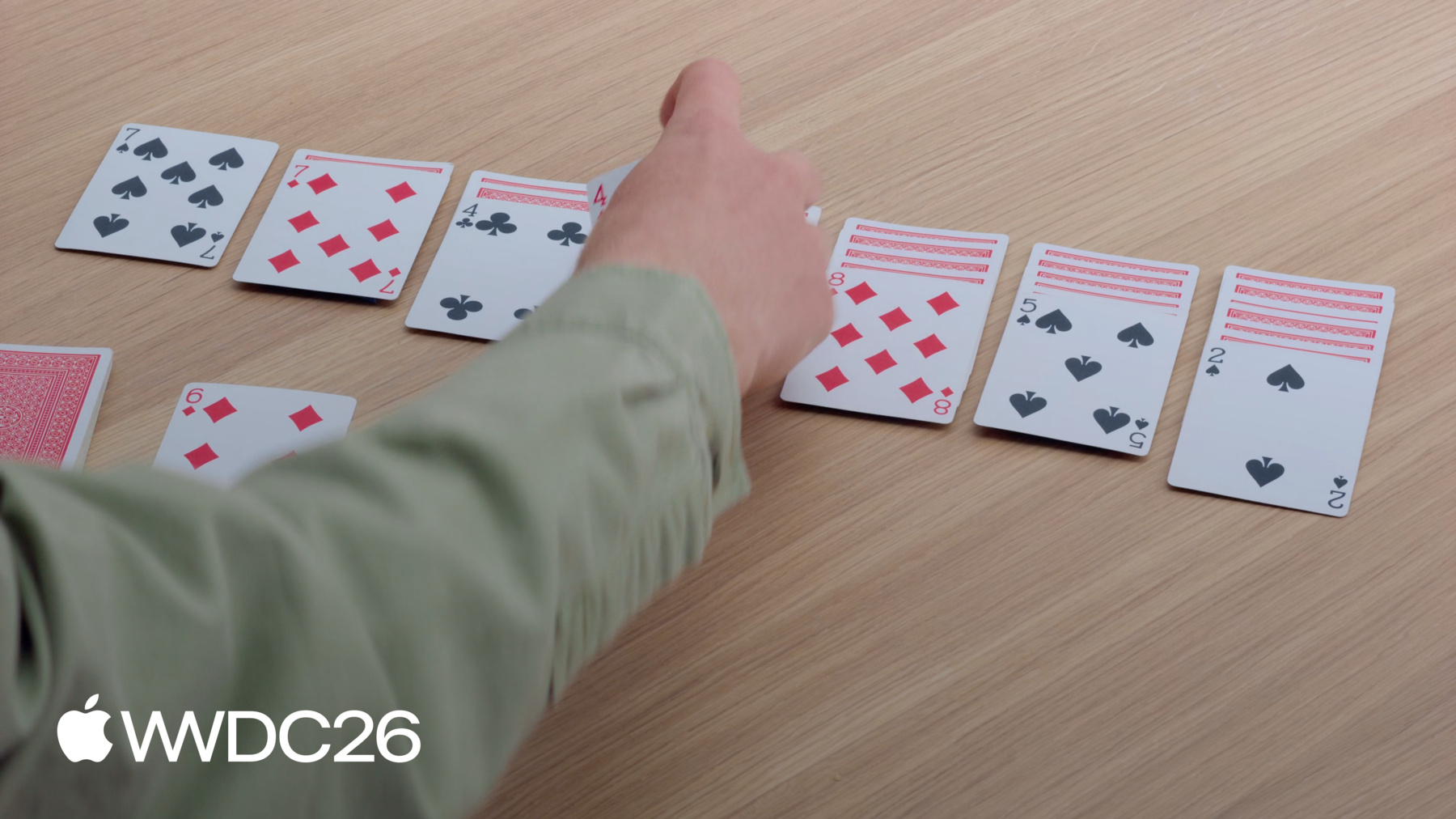
允许用户通过拖放 重新排列内容。 你可以使用 Drag Container API 让用户一次拖动多个项目, 使用 Drag Container API。 你现在还可以配置 数据传输的方式, 用于拖动操作和 dropDestination。 我将在一个接龙游戏中 实现拖放交互。 这个游戏看起来类似于 我摆放这些扑克牌的方式。 我可以在牌堆之间移动卡牌,
也可以从剩余牌堆中 抽取一张牌。
你不需要熟悉接龙游戏 就能理解我将要使用的 API。 如果你想跟着一起操作, 可以下载示例项目。 其中包含开始所需的 视图和游戏逻辑。 我将首先在应用中 采用新的可重排 API。 就像我接龙游戏中的牌一样, 你应用中的内容 可能以某种顺序存在。 但用户可能希望 更改顺序来整理内容, 以最适合自己的方式呈现。 当我让接龙游戏中的 卡牌可以重新排序时, 就能单独拖动它们了。 当我拖动一个视图时, 它将从视图层次结构 中的位置被提起, 并由一个空的 占位符取代其位置。 然后,我可以在应用中 拖动这张卡牌。 当我将卡牌移过其他卡牌时, 它们会为我腾出空间 放置正在拖动的那张。 占位符会更新以反映 放下后卡牌将去往的位置。 当我放下卡牌时, 它将移动到新位置。 我将在接龙游戏中 添加这项功能。 我将先在不加入游戏规则的情况下 实现重新排序。 然后,一切运行正常后, 我会对实现进行优化 以加入规则。 我已打开这个应用的 Xcode 项目。 其内容分为两个主要文件夹: Game 和 Views。 Game 文件夹包含 SwiftData 模型和更新它们的代码。 我将把大部分时间 花在 Views 文件夹,也就是 SwiftUI 所在的地方。 我将打开 GameView,其中包含 游戏区域的布局和视图。 但在向应用添加重新排序功能之前, 我将先在 Preview 中测试它。 在这个文件的底部, 有一个显示绿色背景上 四张卡牌的预览。 要启用重新排序, 我将 reorderable 修饰符 添加到创建卡牌的 ForEach 中。
然后,我在 HStack 上添加 reorderContainer 修饰符。
我指定容器的 item 类型为 CardValue, 与 ForEach 视图中使用的 类型匹配。 在闭包中,操作结束时 我会收到一个差异, 我通过更新 cards 数组来处理它。
现在,我可以与 Preview 交互 并重新排序卡牌了。 我可以将草花 A 从左侧拖动 并放置到末尾。 在接龙游戏中,我的目标是 通过在牌堆间移动卡牌来整理它们。 因此在我的应用中,我希望 所有牌堆都在同一个 reorderContainer 中。
我可以通过将 reorderContainer 修饰符添加到 包含牌堆的 HStack 来实现这一点。
我为容器的 item 类型 提供相同的 CardValue 类型。 由于有多个牌堆, 我需要一种唯一标识 每个牌堆的方式。 我使用 Card.Group 类型 来标识每个牌堆,并且 在闭包中,处理跨多个牌堆的差异。
最后,我需要转到 PileView 并添加 reorderable 修饰符。 由于同一容器中有 多个 reorderable 修饰符, 我需要为每个修饰符 提供唯一标识符。 现在,我可以拖动方块 4, 并将它放到 有黑桃 5 的牌堆上。
这很好,但我现在 还想进行一项优化。 在接龙游戏中, 你不能重新排序正面朝下的牌。 但现在, 我可以从牌堆中提起一张。 这是因为我让 PileView 中 整个卡牌数组都可以重新排序。 虽然我可以使用一些高级的 拖放 API 来控制这一点, 但还有一种更简单的解决方法。
我可以添加第二个 ForEach 视图, 不带 reorderable 修饰符, 并在两者之间对 cards 数组进行切片。
第一个 ForEach 视图 包含所有正面朝下的牌。
第二个带有 reorderable 修饰符的 包含所有正面朝上的牌。 经过这个更改, 我仍然可以重新排序正面朝上的牌,
但当我拖动正面朝下的牌时, 什么都不会发生。
现在,我已经在游戏中 实现了接龙的基本交互。 由于有了 reorderable 修饰符, 我现在可以拖动单张卡牌 来重新排序它们。 reorderContainer 修饰符 允许我将重新排序的范围 扩展到所有牌堆。 通过将正面朝下的牌 移入单独的 ForEach, 我能够阻止它们被重新排序。 这些 API 现已在所有 支持拖放的 Apple 平台上提供。
但我的接龙游戏仍然缺少
但我的接龙游戏仍然缺少 游戏玩法的关键部分, 那就是一次移动多张牌的能力。 在接龙游戏中,当我拖动 牌堆中间的一张牌时, 它会带着叠放在上面的牌一起移动。 但在你的应用中, 交互模型可能没有这么直接。 处理这个问题的一种方法是 为可拖动项添加选择功能。 在这个示例中,我将使用 简单的点击选择交互模型。 当我点击每张牌时, 它就会被添加到选择中。
一旦我对其中一张 已选中的牌执行拖动手势, 三张牌就会一起被提起。
我将在接龙游戏中 添加一次拖动多张牌的功能。 我将返回打开 GameView, 在那里我添加了 reorderContainer 修饰符。
Reorder container 隐式提供 了自己的 dragContainer 和 dropDestination 功能, 但我可以添加自己的 来自定义此行为。 我在 reorderContainer 修饰符 下方声明 dragContainer 修饰符。 为了让它们协同工作, 我需要确保它们使用 相同的类型 CardValue。
在闭包中, 我会收到一个 item 标识符, 我需要为想要移动的 项目提供可传输的数据。
我调用游戏逻辑 来查找叠放在 我要拖动的那张牌上方的牌。
当我拖动这张草花 4 (方块 3 下方的那张)时, 现在两张牌会在同一次拖动中移动。
当我将一叠牌一起拖动时, 它们合并成一叠, 第一张牌在最上面。 这是默认预览, 但我可以将其配置为多种选项, 包括 pile、list 和 stack。 我可以使用 dragPreviewsFormation 修饰符来配置。
我选择 stack,因为它紧凑, 且有叠牌的感觉。 当我现在拖动草花 4 时, 牌会整齐地叠成一摞。 但当我将牌拖过牌堆时, 它们会恢复到 默认外观。 因为它们位于 reorderContainer 的 dropDestination 上方, 它们使用的是该位置的放置形态。 要配置它,我可以使用 dropPreviewsFormation 修饰符。 因为我希望这在应用中 所有 dropDestination 上保持一致, 我在 GameView 的 根布局上声明这个修饰符。 现在,我拖动的牌在 整个游戏区域中保持相同的外观。
我在接龙游戏中实现了 一次拖动多张牌的功能。 我使用 Drag Container API 实现了一次提起多张牌的功能。 我添加了 dragPreviewsFormation 来自定义提起的牌的外观, 并通过设置相同的值 用于 dropPreviewsFormation 确保了外观的一致性。 dragContainer 修饰符现已 在 iOS、iPadOS 和 visionOS 27 上提供。 所有三个修饰符均可在 macOS 26 及更新版本上使用。
要实现游戏的剩余部分, 我将使用新的 Drag Configuration API。 在为卡牌视图 添加拖动功能时, 我应该考虑 该卡牌值希望如何移动。 在我的接龙游戏中, 我将把新牌拖入牌堆。 默认情况下,SwiftUI 会建议 以复制方式传输数据。 当你在应用之间移动数据 或插入新内容时,这很合适。 但在我的卡牌游戏中, 拖动一张牌不应该 在目的地创建副本。 相反,我希望卡牌从 牌堆中移入游戏牌堆。 与 reorderContainer 不同, 它设计用于处理移动操作, 这些视图是独立的 拖动源和 dropDestination。 我需要使用新的 Drag Configuration API 来实现这一点。 我将使用 Drag Configuration API 添加将牌移入牌堆而不重复的功能, 使用 Drag Configuration API。 在应用中,我的剩余牌堆 位于游戏区域左上角。 我希望能拖动 这张方块 6 到有黑桃 7 的牌堆上。
首先,我在 Xcode 中 打开 RemainderView,
其中包含游戏 这一部分的视图。 当前正面朝上的牌 已经有了自己的拖动修饰符。 默认情况下,这个视图 会以复制方式传输值。 我将 dragConfiguration 修饰符 添加到这个视图, 并指定我的意图是 以移动方式传输这张牌。
但最终是由 dropDestination 来决定数据如何传输。 在这种情况下,我的 dropDestination 是 GameView 中的 reorderContainer。 默认情况下,reorderContainer 只接受容器内的移动。 如果我想接受新项目, 必须提供自己的 dropDestination 修饰符。 我在 dragContainer 下方添加一个, 并指定我想接受 相同的卡牌类型。
我读取 reorderContainer 的 destination Value 以获取插入项, 如果它存在, 我调用游戏逻辑 在目的地插入新牌。
牌堆间的移动 仍然由闭包处理, 位于 reorderContainer 修饰符上。
dropDestination 就位后, 我现在可以配置它如何接收项目了。 我添加 dropConfiguration 修饰符, 它对数据的传输方式 拥有最终决定权。
在闭包中, 我会收到会话信息, 我可以利用这些信息 返回一个 dropConfiguration, 告诉 dropDestination 如何接受这张牌。 我在这个闭包中做三件事。 第一,我通过检查 拖动的位置来确定 哪个牌堆应该接收这些牌。 我使用该牌堆的标识符 创建一个目的地值,告知 SwiftUI 这些牌应该去往何处。
第二,我表达只支持 基于移动的传输的意图。 通常,你希望在无法移动时 支持复制作为备选, 但在卡牌游戏中, 复制没有意义。 第三, 我验证这个目的地值 是否符合游戏规则。 如果我返回禁止操作, SwiftUI 将阻止 dropDestination 接收这些牌。
完成所有这些更改后, 现在我准备好将一张牌拖入游戏了。 我可以从剩余牌堆中 拖出这张方块 6, 放到有黑桃 7 的牌堆上, 因为规则允许这样做。 这样做时,方块 6 就从剩余牌堆移入了游戏牌堆。 如果我尝试将这张方块 Q 放到有方块 7 的牌堆上, 这张 Q 会返回 到剩余牌堆, 因为这个移动无效。
我能够使用新的配置修饰符 将牌拖入牌堆。 我首先在源卡牌上 添加了 dragConfiguration, 在那里我指定了 以移动方式传输牌的意图。 然后,我使用 dropDestination 让 reorderContainer 能够接受新牌。 我对该目的地应用了 dropConfiguration, 使其在允许的出牌时 以移动方式接受牌。
我最初只用 reorderable 和 reorderContainer 修饰符构建这个应用。 但我能够完全 自定义重新排序功能, 通过在它们之上 组合拖放修饰符实现。 现在,我有了一个 完整的接龙游戏。 即使你不是在开发接龙游戏, 你也可以使用这些 API 来改善你的应用。 考虑让用户能够 重新排序应用中的内容。 记住,你也可以 赋予他们 使用 Drag Container API 一次拖动多个项目的能力。 通过拖放配置 对应用进行精细调整, 将使应用使用起来更加愉悦。 好了,如果你不介意的话, 我要继续工作了!
感谢观看!
-
-
3:40 - Add reorderable to the preview
#Preview { @Previewable @State var cards = [ CardValue(rank: .ace, suit: .clubs), CardValue(rank: .ace, suit: .diamonds), CardValue(rank: .ace, suit: .hearts), CardValue(rank: .ace, suit: .spades) ] HStack { ForEach(cards) { card in CardFaceView(card: card) } .reorderable() } .frame(maxWidth: .infinity, maxHeight: .infinity) .reorderContainer(for: CardValue.self) { difference in cards.apply(difference: difference) } .padding() .background(.green.gradient) } -
4:40 - Add reorder container to the GameView
struct GameView: View { var game: Game var body: some View { GeometryReader { proxy in let spacing: CGFloat = 10 let cardWidth = (proxy.size.width - 6 * spacing) / 7 VStack { HStack(alignment: .top, spacing: spacing) { Group { RemainderView(game: game) CardBackView() .hidden() ForEach(CardValue.Suit.allCases) { suit in DestinationView(game: game, suit: suit) } } .frame(width: cardWidth) } .padding(.bottom, 20) HStack(alignment: .top, spacing: spacing) { ForEach(0..<7) { index in PileView(game: game, index: index) .frame(width: cardWidth) } } .frame(maxHeight: .infinity, alignment: .top) // Add the reorder container modifier. .reorderContainer(for: CardValue.self, in: Card.Group.self) { difference in game.moveCards(difference: difference) } } } .padding() } } -
5:58 - Add reorderable to PileView
struct PileView: View { var game: Game var index: Int @Query var cards: [Card] var body: some View { ZStack(alignment: .topLeading) { CardPlaceholderView() PileLayout { let index = firstFaceUpIndex // Iterates over the face down cards. ForEach(cards[..<index]) { card in CardView(card: card) } // Iterates over the face up cards. ForEach(cards[index...], id: \.value) { card in CardView(card: card) } .reorderable(collectionID: Card.Group.pile(index)) } } } var firstFaceUpIndex: Int { cards.firstIndex { !$0.isFaceDown } ?? cards.endIndex } } -
7:50 - Add dragContainer to customize the reorderContainer modifier.
struct GameView: View { var game: Game var body: some View { GeometryReader { proxy in let spacing: CGFloat = 10 let cardWidth = (proxy.size.width - 6 * spacing) / 7 VStack { HStack(alignment: .top, spacing: spacing) { Group { RemainderView(game: game) CardBackView() .hidden() ForEach(CardValue.Suit.allCases) { suit in DestinationView(game: game, suit: suit) } } .frame(width: cardWidth) } .padding(.bottom, 20) HStack(alignment: .top, spacing: spacing) { ForEach(0..<7) { index in PileView(game: game, index: index) .frame(width: cardWidth) } } .frame(maxHeight: .infinity, alignment: .top) .reorderContainer(for: CardValue.self, in: Card.Group.self) { difference in game.moveCards(difference: difference) } // Add dragContainer to customize reorderContainer. .dragContainer(for: CardValue.self) { cardID in game.cardStack(startingAt: cardID) } } } .padding() } } -
8:45 - Add dragPreviewsFormation to customize how the dragged cards appear
struct GameView: View { var game: Game var body: some View { GeometryReader { proxy in let spacing: CGFloat = 10 let cardWidth = (proxy.size.width - 6 * spacing) / 7 VStack { HStack(alignment: .top, spacing: spacing) { Group { RemainderView(game: game) CardBackView() .hidden() ForEach(CardValue.Suit.allCases) { suit in DestinationView(game: game, suit: suit) } } .frame(width: cardWidth) } .padding(.bottom, 20) HStack(alignment: .top, spacing: spacing) { ForEach(0..<7) { index in PileView(game: game, index: index) .frame(width: cardWidth) } } .frame(maxHeight: .infinity, alignment: .top) .reorderContainer(for: CardValue.self, in: Card.Group.self) { difference in game.moveCards(difference: difference) } .dragContainer(for: CardValue.self) { cardID in game.cardStack(startingAt: cardID) } // Have dragged cards appear as a stack. .dragPreviewsFormation(.stack) } } .padding() } } -
9:14 - Add dropPreviewsFormation to customize how dragged cards appear over a destination
struct GameView: View { var game: Game var body: some View { GeometryReader { proxy in let spacing: CGFloat = 10 let cardWidth = (proxy.size.width - 6 * spacing) / 7 VStack { HStack(alignment: .top, spacing: spacing) { Group { RemainderView(game: game) CardBackView() .hidden() ForEach(CardValue.Suit.allCases) { suit in DestinationView(game: game, suit: suit) } } .frame(width: cardWidth) } .padding(.bottom, 20) HStack(alignment: .top, spacing: spacing) { ForEach(0..<7) { index in PileView(game: game, index: index) .frame(width: cardWidth) } } .frame(maxHeight: .infinity, alignment: .top) .reorderContainer(for: CardValue.self, in: Card.Group.self) { difference in game.moveCards(difference: difference) } .dragContainer(for: CardValue.self) { cardID in game.cardStack(startingAt: cardID) } .dragPreviewsFormation(.stack) } // Have a consistent appearance over drop destinations. .dropPreviewsFormation(.stack) } .padding() } } -
11:40 - Add a drag configuration to allow move.
struct RemainderView: View { @Query var cards: [Card] var game: Game var body: some View { Button { incrementCardIndex() } label: { ZStack { CardPlaceholderView() CardBackView() .opacity(cards.isEmpty ? 0 : 1) } } .buttonStyle(.plain) .disabled(cards.isEmpty) ZStack { CardPlaceholderView() if let currentCard { CardFaceView(card: currentCard.value) .draggable(containerItemID: currentCard.value) .opacity(currentCard.value == hiddenCard ? 0 : 1) } } .dragContainer(for: CardValue.self) { cardID in [cardID] } // Add the drag configuration to allow me. .dragConfiguration(DragConfiguration(allowMove: true)) } } -
12:05 - Add a drop destination modifier and configure it
struct GameView: View {
    var game: Game

    var body: some View {
        GeometryReader { proxy in
            let spacing: CGFloat = 10
            let cardWidth = (proxy.size.width - 6 * spacing) / 7
            VStack {
                HStack(alignment: .top, spacing: spacing) {
                    Group {
                        RemainderView(game: game)
                        CardBackView()
                            .hidden()
                        ForEach(CardValue.Suit.allCases) { suit in
                            DestinationView(game: game, suit: suit)
                        }
                    }
                    .frame(width: cardWidth)
                }
                .padding(.bottom, 20)
                HStack(alignment: .top, spacing: spacing) {
                    ForEach(0..<7) { index in
                        PileView(game: game, index: index)
                            .frame(width: cardWidth)
                    }
                }
                .frame(maxHeight: .infinity, alignment: .top)
                .reorderContainer(for: CardValue.self, in: Card.Group.self) { difference in
                    game.moveCards(difference: difference)
                }
                .dragContainer(for: CardValue.self) { cardID in
                    game.cardStack(startingAt: cardID)
                }
                .dragPreviewsFormation(.stack)
                .dragConfiguration(DragConfiguration(allowMove: true))
                // Add a drop destination to accept inserts
                .dropDestination(for: CardValue.self) { newCards, session in
                    if let destination = session.reorderDestination(
                        for: CardValue.self, in: Card.Group.self) {
                        game.insertCards(newCards, to: destination)
                    }
                }
                // Configure where cards will go when reordering,
                // and accept them by move.
                .dropConfiguration { session in
                    // Calculate which pile is being dragged over.
                    let alignedX = session.location.x - 0.5 * spacing
                    let pile = Int(alignedX / (cardWidth + spacing))
                    let destination = ReorderDifference<CardValue, Card.Group>
                        .Destination(position: .end, collectionID: .pile(pile))
                    // Check if the move is allowed.
                    let allowed = session.suggestedOperations.contains(.move)
                    && game.validateMove(session: session, destination: destination)
                    let operation: DropOperation = allowed ? .move : .forbidden
                    return DropConfiguration(operation: operation, destination: destination)
                }
            }
            .dropPreviewsFormation(.stack)
        }
        .padding()
    }
}
-