

-
探索 Spatial Preview 框架
了解新的 Spatial Preview 框架如何将 Mac 上的内容直接带到 visionOS。探索如何通过跨两个平台进行实时同步和双向编辑来构建动态工作流程。了解 SpatialPreview API、设备发现、2D 和 3D 会话集成,以及新的快速查看功能,为你的 Mac App 提升空间体验。
章节
资源
- Bridging an external USD runtime to Spatial Preview
- Working with content from your Mac app using Spatial Preview
- Reducing the rendering cost of RealityKit content on visionOS
- Spatial Preview
相关视频
WWDC26
WWDC22
-
搜索此视频…
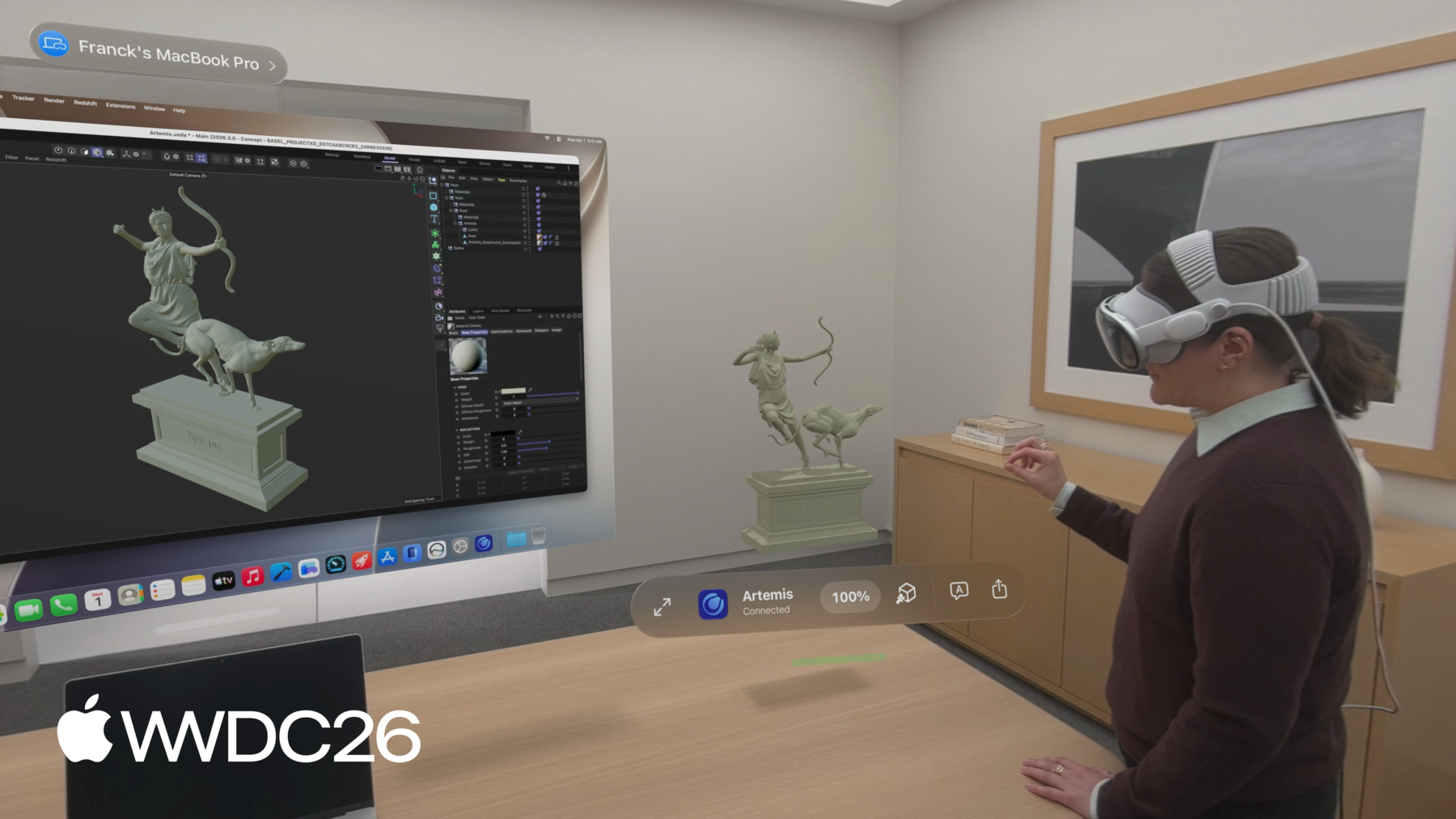
大家好 我是Quincy German visionOS团队的软件工程师 Apple Vision Pro上我最常用的功能之一 是Mac Virtual Display 它让我能通过Vision Pro提供的虚拟屏幕在Mac上工作 在macOS和visionOS 27中 将Mac内容预览到Vision Pro变得更简单 我很高兴为大家介绍Spatial Preview 这是一个框架 让人们在Mac上 处理内容时能充分利用 visionOS的空间计算能力 你可以通过macOS的Preview App 来体验Spatial Preview框架的实际效果 以及其他帮助人们处理空间内容的功能 包括3D内容编辑 照片级真实渲染 相机视角 以及空间媒体输出 如Apple沉浸式视频帧和空间照片 使用Mac Virtual Display 人们可以将内容无缝共享到Vision Pro 在visionOS上 QuickLook App接收这些内容 现在允许他们以沉浸式方式工作 比如环顾为这个客厅场景设置的不同相机角度 这些工具非常有助于感受3D设计的 比例和布局 比如这个作品 有了Spatial Preview 人们现在可以将Mac上的内容 延伸到周围的世界中 这些功能不只在Preview App中可用 它们也作为API向你开放 你可以为新的或现有的macOS应用 添加功能 充分发挥Vision Pro的强大能力 这些工具支持空间内容的动态工作流 包括跨设备的实时同步和编辑 通过实时同步 Cinema 4D和SketchUp 等应用正在改变创作流程 解锁实时协作3D工作流 比如实时迭代材质变更 在本节中 我将介绍你也可以做到的方法 我将首先概述这个框架 它专为开发内容创作工具 或任何处理空间内容的应用的开发者设计 接下来 我将通过一个示例工作流 演示如何就地共享和更新文档 例如Apple沉浸式视频帧 最后 我将展示如何创建应用 让人们实时完全沉浸在他们正在处理的 3D内容中 通过使用Universal Scene Description 这是一种用于描述3D场景的格式 本节结束时 你将拥有充分利用 空间预览框架所需的一切 让人们能在visionOS上 处理Mac上的内容 现在 让我们看看框架提供的组件 以了解设置起来有多简单
第一步是选择一个端点 指向要共享的目标设备 如果有人正在使用Mac Virtual Display 可以轻松使用已连接的设备 或者 你可以在应用中添加设备选择器UI 让人们从同一iCloud账户下 附近的任意Vision Pro中选择 接下来 为内容创建一个空间预览会话 预览会话有两种类型 文稿预览会话涵盖空间照片 视频以及PDF等文稿类型 USD预览会话处理3D内容
会话启动后 Vision Pro上的QuickLook 会被打开 你的应用提供给会话的内容 随即显示出来 在visionOS端无需任何代码来完成设置 现在你了解了空间预览会话的工作原理 让我们看一个如何通过 文稿预览发送和更新文档的示例 在这个示例中 我将提取一帧 Apple沉浸式视频的静帧 该视频由Mac上的Preview App生成 然后我将使用Mac Virtual Display端点 启动一个文稿预览会话 接着我将把图像提供给会话 使其显示在QuickLook中 让我们看看设置所需的代码
首先 创建一个已连接的空间端点观察器 从Mac Virtual Display获取 空间预览端点 然后 创建一个文稿预览会话 指定文稿类型和会话名称
使用返回的端点 在所选设备上 启动会话并提供内容URL 请记住 Mac Virtual Display并非始终处于活跃状态 因此请考虑将Spatial Preview设备选择器 作为UI中的一个视图来集成 以便选择其他设备 使用SwiftUI中的Sheet来控制其显示时机 然后继续创建文稿预览会话 就像之前看到的那样 使用在UI中选择的设备端点 开始使用Spatial Preview就这么简单 让我们来看看效果 将我编写的代码放入UI中的一个按钮 按下后会在visionOS上启动内容 我可以在沉浸式模式下查看它 这真的很酷 让我们更进一步 构建一个沉浸式建筑渲染图库
当你调用update contents时 你在重用启动会话时打开的同一场景 如果你创建一个新的文稿预览会话 并调用start 那将启动一个新场景 因此对于图库视图 我将使用 update contents来确保重用同一场景 在这个视图中 我将为图库中的所有 视频帧创建一排按钮 并让按钮在选中时 调用会话上的update contents来切换到不同的文件 我还设置了一个任务来观察会话状态 如果场景在visionOS上被关闭 我将在这里收到一个状态变更通知 表明会话已失效 当你完成一个会话后 调用close来结束它 visionOS会自动关闭该场景 现在 图库使用文稿预览会话的 Update Contents功能 在同一场景中实时切换沉浸式渲染图 这是让人们审阅设计渲染图 并更好地感受其正在处理的 内容实际比例的好方法 除了Apple沉浸式视频之外 许多其他内容类型也能很好地 与Spatial Preview配合使用 包括空间照片 PDF 标准图像和文件 以及3D内容 现在你已经了解了如何轻松发送和更新文档 让我们看看如何使用 USD Kit与Spatial Preview处理3D内容 如果你是USD新手 我建议先观看《了解USD基础知识》 要了解如何使用新的Swift USD Kit框架 我建议观看《探索USD Kit》 和《OpenUSD的新功能》 在本节中 我将介绍如何使用USD Kit 在visionOS上通过你的macOS应用处理3D内容 我将介绍如何轻松设置 USD预览会话并开始浏览3D场景 浏览相机视角并应用材质覆盖 然后我将介绍如何编辑内容 以及人们如何在visionOS上 与USD进行交互并做出更改 包括添加注释和移动对象 最后 我将介绍空间预览会话的事件 和可观察属性 包括动画播放和会话同步进度的事件 以及如何自定义会话中可用的功能 创建USD预览会话与文稿预览会话类似 不同之处在于内容是一个USD Kit Stage 当你调用session start时 visionOS上会打开一个场景 USD内容显示在一个体积视图中 然后人们可以选择进入沉浸式视图 以实际比例查看 让我们看看设置此功能的代码 与文稿共享一样 首先选择目标设备端点 然后使用USD Kit将USD内容加载到Stage中 将该Stage提供给USD预览会话 然后在所选设备端点上启动会话
内容以3D形式显示在 visionOS的这个有界视图中 我可以旋转场景来检视它 然后进入沉浸式模式以实际比例查看 这个场景中设置了一些相机 正如你之前看到的 选择其中一个将把我移动到该视角 我还可以通过将材质覆盖为线框模式 来更仔细地检查几何结构 这些都是使用Spatial Preview时 visionOS内置的功能 你的Mac应用无需额外设置 USD场景可能包含极高保真度的内容 这可能对Vision Pro来说渲染负担过重 默认情况下 Spatial Preview会在共享前 自动优化USD内容 包括网格精简 纹理降采样 以及必要时进行完整场景重建 所有这些都是为了确保 其在Vision Pro上运行流畅 如果场景需要重建 它将无法编辑 但人们仍然可以查看并添加注释
要退出此优化 请在创建会话时 传入unmodified参数 但是 如果禁用优化 复杂场景 可能无法共享到Vision Pro 且start函数将抛出错误 有关如何降低内容渲染成本的指导 请查看开发者文档 现在 让我们看看在macOS和visionOS上 编辑USD内容是如何工作的 在USD预览会话中 人们可以从任一设备进行更改 调用常规USD Kit API时 会使用实时USD Stage在macOS 和visionOS之间同步内容 如果有人想在Mac上对内容进行更改 并在visionOS上空间化地查看效果 或在visionOS的审阅会话中 捕获编辑内容 这非常有用 在深入代码之前 让我们先了解一下 USD Stage是什么以及一些USD术语 一个Stage由一层或多层Layer组成 Layer包含USD Prim USD Prim是一个对象 可以代表许多不同的特性 如3D变换或网格 Variant Set可以在Prim上替换为备用数据 我在这个客厅场景中设置了一些USD变体 使用Variant Set来改变家具的 位置和旋转 当我在USD Kit中选择这些变体之一时 Stage会发生变化 移动家具到 不同位置的编辑会被应用 并在macOS和visionOS之间同步 工具栏上的按钮在macOS上切换变体 产生的家具布局会在visionOS上得到体现 我也可以在QuickLook菜单中 选择一个变体 并在Mac上看到这个变化 这是在visionOS上快速迭代 Mac上内容的好方法 现在 让我们看看如何监听 来自visionOS的变更 USD Stage的变更会自动同步 你可以使用标准USD通知 观察会话中发生的更新 例如当有人添加注释时 在这里 我订阅了对象变更通知 它提供了关于哪些USD Prim路径 已发生变化的信息 我可以遍历这些路径 找到注释并在UI中更新它们
对于文字注释 除实际文字内容外 你还需要作者和注释唯一标识符等信息 以这种方式设置注释数据 可以让注释显示在visionOS上 只要它们是被指定为 文稿注释组的USD Prim的子项 为了让USD Prim在visionOS上 可通过手势编辑 需要在其上设置空间可编辑元数据 人们也可以在macOS上通过Preview 轻松地在其USD资产上进行设置 让我们看看实际效果 当我在macOS上应用注释时 它会出现在visionOS上 如果我在这里评论说 我喜欢布局A 这会反映回macOS上的应用中 由于这件家具具有空间可编辑元数据 我可以移动它 比如我想把这把椅子移到窗外 这也会在macOS上显示出来 让我们回顾一下你可以监听的事件 以及可以在USD预览会话中 配置的选项
你可以使用USD Preview Session Start上 设置的选项来控制 visionOS上QuickLook中可用的功能 默认情况下 注释 对象操控 和USD导出都已启用 你还可以通过空间预览API事件 订阅非USD事件 如动画播放时间 你可以使用Progress Reporter 监控会话的共享进度 如果你希望在大量数据同步到 Vision Pro时在macOS上显示加载进度条 这非常有用 例如 在这里 我挂载了USD预览会话 提供的时间和播放事件 现在我可以按下播放按钮 在两个应用中都能看到 这只蜂鸟在窗外飞翔的动画 当你在应用中采用Spatial Preview时 为创作者解锁了许多全新工作流 visionOS内置了SharePlay支持 因此协作者可以加入同一个实时会话 同时审阅和编辑空间内容 我的朋友Joy在这里标记了我的 房间布局中的一个问题 我将实时进行调整 每位参与者的视图立即更新 消除了传统资产审阅中的反复沟通
那么 你今天如何开始使用Spatial Preview呢 我们建议使用USD Kit Swift API 因为Spatial Preview与它无缝配合 如果你的Mac应用中已有USD 你可以设置桥接 在你的USD安装 和USD Kit之间传输编辑内容 欲了解更多信息 请查看 Spatial Preview开发者文档 接下来 探索如何充分利用 每种类型的预览会话 文稿预览会话和USD预览会话 它们可以轻松集成到你的Mac应用中 无论你是想预览和更新文档 还是以沉浸式方式处理3D内容 只需几行代码即可开始 你可以使用USD Kit和Spatial Preview 更深入地探索3D 以支持USD Stage的实时编辑 实现跨设备实时协作 包括通过SharePlay 最后 充分利用资产审阅工具 如材质覆盖 相机视角 对象操控 变体和注释 我和团队迫不及待地想看到 你的应用如何充分利用Spatial Preview 无论你是在开发创意应用 内容审阅工具 还是全新的应用类型 感谢收看
-
-
3:58 - Document Preview Session with Device Picker
// Send and update documents using the Spatial Preview framework import SwiftUI import SpatialPreview let deviceObserver = ConnectedSpatialEndpointObserver() let previewSession = DocumentPreviewSession(name: "Immersive.aivu", contentType: .aivu) func startPreview(contentURL: URL, endpoint: SpatialPreviewEndpoint) async throws { let endpoint = try await deviceObserver.endpoint try await previewSession.start(endpoint: endpoint) try await previewSession.updateContents(url: contentURL) } @State var showDevicePicker: Bool = false var body: some View { ... .sheet(isPresented: $showDevicePicker) { SpatialPreviewDevicePicker(isPresented: $showDevicePicker) { endpoint in showDevicePicker = false Task { try await startPreview(filename: filename, endpoint: endpoint) } } } } -
5:20 - Update Document Contents
// Send and update documents using the Spatial Preview framework import SwiftUI import SpatialPreview ForEach(contentURLs, id: \.self) { url in Button { Task { try await previewSession?.updateContents(url: url) } } } .task(id: previewSession.map { ObjectIdentifier($0) }) { for await state in Observations({ session.state }) { if state.isInvalidated { previewSession = nil break } } } try await previewSession?.close() -
7:36 - Edit USD Live
// Edit USD live using USDKit and Spatial Preview import SpatialPreview import USDKit let deviceObserver = ConnectedSpatialEndpointObserver() var usdSession: USDPreviewSession? func shareStage(to endpoint: SpatialPreviewEndpoint) async throws -> USDPreviewSession { let endpoint = try await deviceObserver.endpoint let stageURL = Bundle.main.url(forResource: "sampleScene", withExtension: "usdz") let stage = try USDStage.open(stageURL) usdSession = USDPreviewSession(stage: stage) try await usdSession?.start(endpoint: endpoint) } -
8:56 - Opt out of optimization
// Optimization import SpatialPreview let endpoint = try await deviceObserver.endpoint do { try await usdSession.start(endpoint: endpoint, parameters: .unmodified) } catch USDPreviewSession.Error.assetUnshareable { // Handle Asset Unshareable error } -
10:10 - USD Layout Variants
// LayoutVariants.usda #usda 1.0 over "furniture" ( variantSets = "Layout" variants = { string Layout = "LayoutA" } ) { variantSet "Layout" = { "LayoutA" { // Default furniture position and rotation } "LayoutB" { // Moves furniture prims to a different position and rotation } ... } } -
10:17 - Edit USD live using USDKit and Spatial Preview
// Edit USD live using USDKit and Spatial Preview import SpatialPreview import USDKit func applyLayoutVariant(named layoutVariantName: String) throws { let prim = stage.prim(at: SdfPath("/root/furniture")) try prim.variantSets?.setSelection("Layout", variantName: layoutVariantName) } -
10:49 - USD Stage Observations
// Edit USD live using Spatial Preview import SpatialPreview import USDKit let observerToken: ObservationToken observerToken = stage.addObserver(for: UsdStage.ObjectsDidChange.self) { notice in for path in notice.resyncedPaths { let prim = notice.stage.prim(at: path) guard prim.isValid else { continue } if prim.isAnnotation { // Handle annotation change break } } } -
11:13 - Annotation Spec
// Annotation spec example AppleTextAnnotation { // The textual representation of this annotation string text // The identifier for this specific author uniform string author // An identifier that is unique to your data tracking system uniform string identifier } /__documentAnnotationGroup__ -
11:33 - Metadata for Object Manipulation
// Metadata required for object manipulation in Quick Look customData = { dictionary apple = { bool spatialEditable = 1 } } -
12:16 - Session Options and Events
// Spatial Preview session options and events import SpatialPreview import USDKit session.start(endpoint: endpoint, options: [.annotations, .perObjectManipulation, .export]) func listenForEvents(session: USDPreviewSession) async { for await event in session.events { if case .timeChanged(let time) = event { playbackModel.timeCode = time } else if case .playbackStateChanged(let isPlaying) = event { playbackModel.playbackStateChanged(isPlaying) } } } -
12:38 - Observe Session Progress
// Observe Spatial Preview session progress

import SpatialPreview
import USDKit

@State private var sessionProgress: Double = 0

var body: some View {
    ...
    .task(id: usdSession.map { ObjectIdentifier($0) }) {
        guard let session = usdSession else { return }
        for await fraction in Observations({ session.progress.fractionCompleted }) {
            sessionProgress = fraction
        }
    }
    .overlay(alignment: .bottom) {
        ProgressView(value: sessionProgress)
            .padding()
    }
}
-