

-
在 visionOS 中协作处理结构化 3D 模型
了解如何在 visionOS 中生动呈现结构化 3D 模型。我们将介绍 USDZ 的准备工作,演示如何在分层装配中操作单个实体,并利用剖切面检查模型的内部组件。创建令人惊叹的分解视图动画,打造基于 Apple Vision Pro 的设计审查和协作体验。
章节
资源
相关视频
WWDC26
WWDC25
WWDC24
-
搜索此视频…
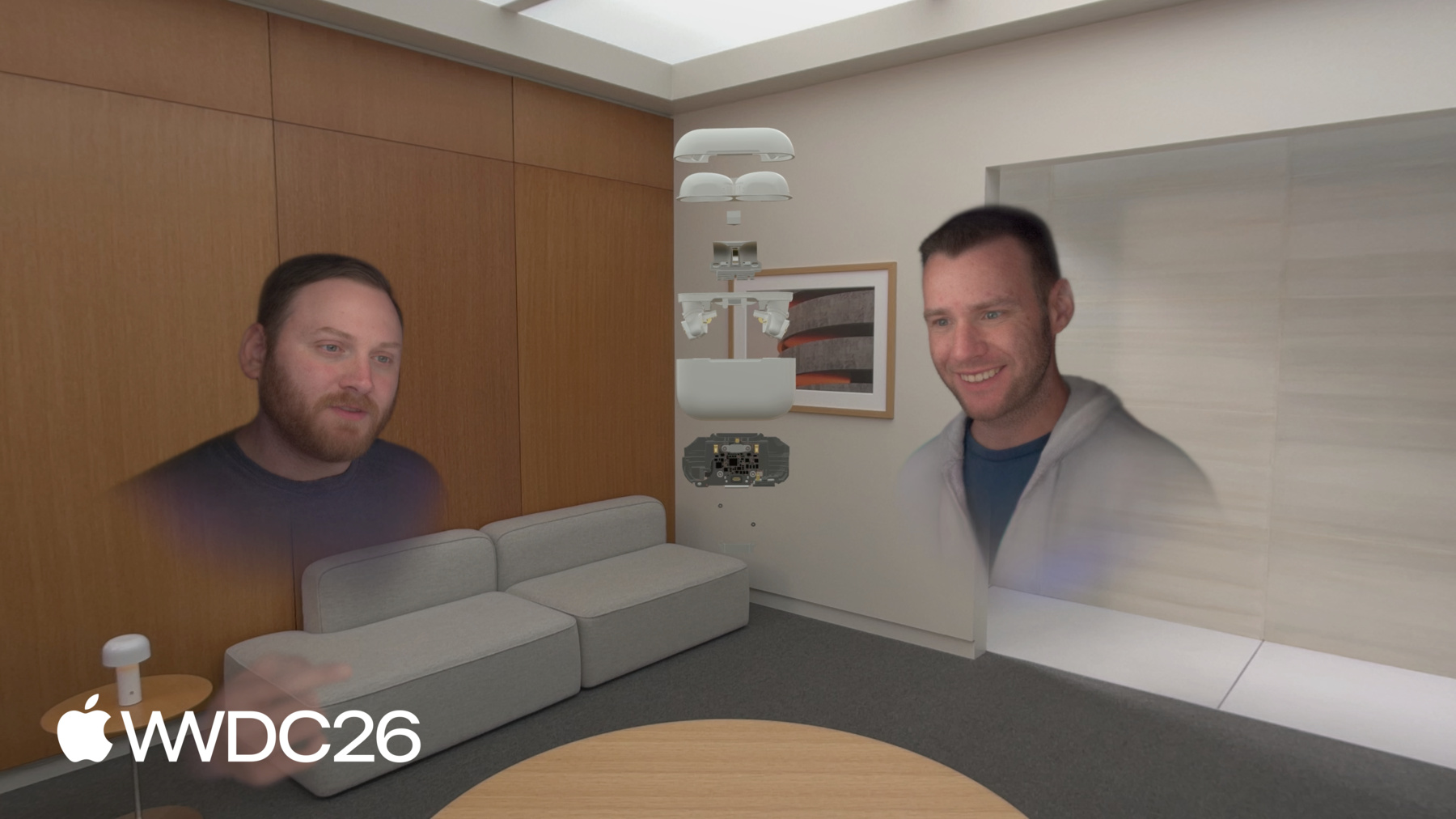
欢迎来到"在 visionOS 中协作 处理结构化 3D 模型"。 我是 Bill。 今天我要介绍如何在 Apple Vision Pro 上构建空间体验。 具体来说,是如何处理复杂的组件 和多维数据, 这在平面屏幕上 根本无法实现。 让我们先来感受 一下这是什么体验。 这是一个团队在 SharePlay 通话中 对 AirPods Pro 进行设计审查。 通话中的每个人都能以相同的保真度 在相同的空间中看到同一个资产。 外壳拉近。 它被解锁—— 就像放在工作台上一样, 只不过这个工作台 就在你所在的任何地方。 底部组件被取出。 一个人检查内部, 然后旋转它, 让同事能够 看到完全相同的内容。 一个指向——不是注释, 也不是截图, 只是一个指向关键部件的手势, 团队就明白了。 模型重新收起。 剖切功能启用, 横截面打开, 主逻辑板就呈现在眼前—— 在上下文中完整展示, 这在 2D 屏幕上是无法实现的。 剖切功能关闭。 完整组件展开。 有人伸手进去, 取出主板, 举起来展示给 团队其他人看。 三个人,一个模型, 以及他们理解它所需的工具。 这一切之所以成为可能, 归结为三点, 这三点是 Apple Vision Pro 真正擅长的。 实时协作: 多人同时处于 共享空间中 对丰富表现形式的操控: 因为任何具有足够维度的数据 都值得超越平面屏幕的呈现方式。 环境光照: 你的物理世界, 为每一个虚拟决策提供依据 这三项功能 不仅仅适用于 CAD。 任何需要推理复杂多维信息的场景—— 城市规划、物流、房地产, 生产设计—— 同样的原则都适用。 如需深入了解如何在 你的 App 中使 SharePlay 正常运行, 请参阅"Share visionOS experiences with nearby people" 来自 WWDC25。 构建示例代码有 4 个主要考虑因素。 我将首先分享准备 3D 资产 的一些重要方面, 以便人们能够 轻松地操控和使用它们。
复杂的空间资产是 由组件构成的结构化集合, 以组件形式进行组织。 我将向你展示如何 启用对这些组件的操控。
然后,我将介绍剖切功能。 它让组件的内部 变得和外部一样易于访问。
最后是自动展开, 资产会自动展开, 每个子组件分离并 移动到对应位置, 揭示完整的结构。
接下来进行资产准备。 没有结构的资产难以 推理,也难以在代码中使用。 没有结构, 代码就无法做出决策, 决定什么该隐藏或显示, 什么该设为可操控。 在准备资产时 有很多事情需要考虑, 我在这里重点关注的是 如何思考资产的结构, 哪些组件包含 哪些子组件。 换句话说, 就是模型的层级结构。 其他一些更具技术性 的考虑因素, 在其他地方有所介绍。
详情请查阅 "Optimize your 3D assets for spatial computing" 来自 WWDC 24。 3D 模型是一种部分与整体的关系。 将所有内容平铺到根节点, 即使是简单的操作 也会变得出乎意料地麻烦。 所有几何体都还在—— 只是没有组织结构。 这个发动机缸体在导出时 没有保留其结构。 所有内容都平铺到了根节点。 InteriorPart_01、InteriorPart_03、 25 号零件,依此类推。 没有子组件。 没有分组。 问题就在这里。 这个资产在视图窗口中 看起来完全正常。 几何体都在, 渲染也正确。 但是让它具有交互性 的结构呢? 不见了。 如果我想隔离一个活塞, 它就藏在这里某个地方。 是 InteriorPart_47 还是 InteriorPart_18? 我不知道, 我的代码也不知道。 看看这个更新后的资产, 它有一个深层嵌套的层级结构。 它很复杂——这是有意为之的。
在这里,我们隐藏了 发动机的外部 以及除一个活塞外的所有活塞。 我们可以单独看到 一个活塞和曲轴。 每个零件都是独立的节点—— 有名称、有组织、有分组。 如果我只想为活塞添加动画—— 隔离它、高亮显示它, 让人伸手将它取出—— 我可以做到。 它是有组织的, 我可以编写代码来找到它。 这就是层级结构 在发挥它应有的作用。 现在我们有了良好的层级结构, 我将向你展示如何让用户 能够将这个层级结构拆解开来。
良好的层级结构将赋予用户 选择单个零件的能力, 或使用 Apple Vision Pro 上 的自然输入系统移动它。 这可以通过正确使用 RealityKit 的 ManipulationComponent API 来实现。 我来向你展示具体操作方法。 这是它实际运行的演示。 这就是我在本次演示 开头向你展示的示例 App。 它展示了这个 AirPods Pro 资产, 我计划稍后在 设计审查会议中使用它。
注意当我们轻点"打开"时会发生什么。
刚才,这还是一个对象。 现在它的每个零件 都可以单独交互—— 抓取一个零件,其余的留在原处。 让我向你展示 我是如何实现这一点的。 要让人们能够 移动这个组件, 我们只需为它附加 一个 ManipulationComponent。 这就是我们的起点。 让对象可被操控, 以便人们可以调整其方向, 通过自然的手部动作 移动和缩放它。 要了解更多关于 ManipulationComponent 的信息, 请参阅"What's new in RealityKit" 来自 WWDC 25。 要让人们能够 移动这个组件, 我们只需为它附加 一个 ManipulationComponent。
为此,我们将 ManipulationComponent 下移到子级。 突然间,顶部外壳 可以被单独取走, 而底部外壳则保持不动。 一位协作者可以旋转 其中一个耳塞, 而另一个人 同时检查另一个, 同时进行。 从"用来观看的东西" 到"用来探索的东西", 这一转变完全取决于 该组件在树中所处的位置。 其他什么都没有改变。 一旦你把东西拆开, 你可以将 ManipulationComponent 重新移回根节点。 现在整个展开的部件 又作为一个整体移动了。 一起重新定位、旋转, 将某个部分移近—— 内部的相互关系 保持你离开时的状态。 层级结构没有改变。 几何体没有改变。 只是组件 在树中所处的位置。 这就是核心思想: 组件的位置决定行为。 让我们来看看实现这一点的代码。 从实体中移除 ManipulationComponent 和 InputTargetComponent。 这使该实体 不再可被操控。 然后代码遍历子实体。 添加 InputTargetComponent 和 ManipulationComponent 到每个子实体。 在示例代码中,我确保 将 ManipulationComponent 的 releaseBehavior 设置为 .stay。 这样当用户松开时, 实体会停留在他们放置的位置。 这里还有一个重要说明, 我特意没有展示 CollisionComponent 的添加。 但它对事件处理至关重要, 你的实体 必须有碰撞组件, 不要忘记添加它们。 当然,如果你要 打开一个组件, 你可能也想关闭它。 关闭组件 与打开过程相反。 从子实体中移除 Manipulation 和 InputTarget 组件, 从子实体中移除。 将 Manipulation 和 InputTarget 组件 重新添加回实体。 就是这样,现在树可以 作为一个元素被操控, 就像它处于关闭状态, 或者在打开时作为独立实体。
接下来是剖切功能。 任何足够复杂的资产 都有从表面看不到的层次。 建筑的内部结构, 面板背后的管线, 城市街区下面的基础设施。 剖切功能让人们可以 从字面意义上看穿资产, 这是 visionOS 27 中 RealityKit 的新功能。 让我先向你展示 它实际运行的演示, 然后带你了解 如何编辑剪切平面。 你会注意到组件未剪切地 悬浮在空间中, 剖切状态为 .off。 然后我打开剖切功能, 启用组件的剪切状态。 剪切平面位于组件内部, 垂直于其中一个主轴, 在本例中为 +z 向量。 它显示了内部结构。 剖切状态为 .on。 接下来剪切平面四处移动。 这是我将向你展示 如何实现的很酷的功能。 在此之前, 让我们先来看看 ClippingComponent。 ClippingComponent 有 4 个属性。 我将介绍示例代码中 使用的属性,让你了解其内容。 bounds 是你最常 用到的属性—— 一个在实体局部空间中的 轴对齐包围盒。 超出范围的任何内容 都会在每帧被渲染器丢弃。
shouldClipChildren 默认为 false。 如果你将它添加到父级组件, 而子级没有被剪切,这就是原因。 示例代码将其设置为 true。 shouldClipSelf 默认为 true, 这几乎总是你想要的。 我们的目标是使边界可编辑。 我将在快速查看之后 向你展示如何实现, 了解轴对齐包围盒。 包围盒的六个面 变成六个可交互的平面实体—— 每个轴一个, 正向和负向各一个。 每个面在这里 用不同颜色表示。
有人抓取 +x 面 并拉动它 来揭示更多内部结构, 或将其推回 恢复原状。 每个平面精确控制 边界中的一个标量值。 这就是完整的交互模型。 六个平面,六个数字。 在我们实现过程中 请牢记这一点。 为了管理剪切功能, 我们有一个三状态机。 剖切可以是 .off—— 组件未被剪切。 当剖切为 .on 时, 模型根据 包围盒被剪切, 在 .editing 状态下, 剪切平面可见且可交互。 人们可以通过移动它们 来改变剪切边界。 让我们来看它的实际效果。
在 .off 状态下, 组件不被剪切, 只有组件的外部 是可见的。 在 .on 状态下,剪切处于激活状态, 显示子组件的 内部工作原理和布局。 在 .editing 状态下,剪切平面开启, 人们可以移动这些平面。 随着平面移动, 剪切边界也随之改变, 模型内部布局的 更多或更少内容变得可见。 让我们来看看 实现这一切的技术细节。
涉及三个组件。 在关闭状态下, 我们有 ClippingBoundsCache, 这是示例代码中 的自定义组件。 它跟踪最后编辑的 剪切边界, 并在状态切换到 .on 时 将该值提供给 ClippingComponent。 当状态切换到 .on 时。 在 .on 状态下,ClippingComponent 被创建并添加到实体中。 这就是我们之前讨论的 RealityKit 组件。 超出其边界的几何体 将被丢弃。 在 .editing 状态下,我们添加另一个 名为 ClippingTransformSync 的自定义组件, 示例使用它来跟踪 组件的变换, 并在变换改变时 更新 ClippingControl。 ClippingControl 是我们用来 管理剪切平面 并使其可交互的实体。 它们是视觉提示, 让人们可以看到 剪切平面在哪里 并进行编辑。 涉及四个坐标系。 第一个是世界坐标系, 其他所有内容都位于其中。 Model 是模型所在的位置, 也是剪切组件 运行的坐标系。 对边界的更改 需要在这个坐标系中进行。 剪切控制坐标系 是我们放置编辑平面的地方, 这些平面允许人们改变 ClippingComponent 的包围盒。 剪切平面坐标系 是编辑平面所在的地方, 也是拖拽手势事件 被表达的地方。 对平面位置的更改 需要在这个坐标系中表达, 并被约束为沿模型坐标系 中表达的方向移动。
World 有两个子级。 Clipping Control 和 Model Clipping Control 包含编辑平面, Clipping Plane 是拖拽手势 被表达的坐标系。 任务是将以 Model 坐标系表达的 拖拽手势变化 进行约束后 转换回 Clipping Plane。 到目前为止,我们一直将 剪切功能作为一个整体来讨论, 但实际上有两个 值得分开的不同部分。 ClippingComponent 位于模型的坐标空间中, 因此要编辑这些边界, 我们需要以该坐标系 表达和约束变化。 视觉平面提供了 对移动效果的 直观理解。 平面也需要 随事件一起移动, 但它们是在 剪切平面坐标系中表达的, 因此对其位置的更新 需要在其坐标系中表达。 在两个坐标系中, 变化都需要被约束 为垂直于 包围盒平面的法向方向。 让我向你展示 这一切是如何组合在一起的。 从拖拽手势到 边界和平面位置的更新, 共有 4 个不同的步骤。 我为剪切平面添加 一个拖拽手势, 每个平面各一个。 再次说明,这是事件到达时 所在的坐标系。 我将其转换 到世界坐标系。 然后,我转换 到 Model 坐标系。 然后我将 delta 约束 到适当的方向—— +x、-y 等——取决于 用户正在移动哪个平面。 现在我有了所需的值, 在所需的坐标系中, 约束到正确的方向, 可以更新剪切边界了。 要更新平面的位置, 我需要将这个向量 转换到平面的坐标系中。 我们马上来看这个。 有关手势组件 的更多信息, 请查阅"Better Together: SwiftUI and RealityKit"来自 WWDC 25。 了解全局图后, 让我们逐步详细看看每个步骤。
手势在 Clipping Plane 坐标系中表达。 它看起来像这样。 拖拽 delta 的值为 0.5、-0.75 和 0.1。 这些值是拖拽 delta 在 Clipping Plane 坐标系中 的表达。 任务是将这个向量的表达 转换到 Model 坐标系。 拖拽 delta 向量被转换 从 Clipping Plane 坐标系 到世界坐标系。 请记住,向量本身没有改变, 只是表达向量的 坐标系改变了。 由于 Clipping Plane 和 World 不是同一个坐标系, 数字会发生变化。 是同一个向量, 只是不同的表达方式。 在我们更新剪切边界之前, 拖拽 delta 向量必须 在 Model 坐标系中。 因此,我们再做一次转换, 从世界坐标系 转换到 Model 坐标系。 同样,向量没有改变, 只是它所在的 坐标系改变了。 现在是数学魔法的时刻。 我们将拖拽 delta 投影到正确的方向上, 这只是一种花哨的数学说法, 表示拖拽 delta 在我们关心的方向上有多长。 让我们移除 AirPods Pro 外壳, 这样可以更清楚地看到这个过程。 投影听起来很复杂, 但它实际上只是 拖拽 delta 沿我们关心 的方向有多长。 就像测量拖拽 delta 向量 投射在 方向向量上的阴影。 这里是数学方程, 不要被吓到。 我会逐步分解它。 首先是找到我们 关心方向上的向量。 你可能以前做过这个, 就是向量除以其长度的平方。 在我们的情况下这很简单, 我们关心的方向 是平面的法线, 这里是 +x,即 {1, 0, 0}。 然后我们做点积, 这是一种向量乘法, 将拖拽 delta 与方向向量相乘。 这给了我们包围盒 想要改变的量, 但这只是一个数字, 我们还需要方向。 所以我们将我们关心的方向, 即平面的法线, 乘以上一步得到的量。 现在我有了在 Model 坐标系中 约束后的 delta。 这正是我所需要的, 用来更新 ClippingComponent 的包围盒。
这是被剪切的组件, 内部和外部一样清晰可见。 非常酷。 现在,我经历 同样的约束过程, 但这次是 到 Clipping Plane 坐标系。 我们必须转换 约束后的拖拽 delta, 从 Model 坐标系 转换到 Clipping Plane 坐标系。 然后我们将其投影 到平面的法线上, 和上次 一样的方式。 这给了我们 移动平面所需的值。 但是,由于它已被 投影到法线上, 变化被约束为 只在该方向移动, 而不是跟随用户 手部移动的任意方向。 这确保了手势 产生的变化感觉自然。 这里我们看到平面被打开, 等待人们与之交互。 我们在 .editing 状态下保持它们开启, 让人们知道可以伸手 移动这六个平面中的任何一个。
6 个平面,4 个坐标系。 每个之间的简单转换 使各个计算 更容易推理。 一旦你脑海中有了 坐标系的层级结构 以及非常酷的 投影数学技巧, 你就可以让这种交互 在你的 App 中感觉自然。
现在,让我们来谈谈 构成 3D 模型的 子组件的自动展开。 人们用它来揭示 模型的内部结构。 这个功能对于机械组件、建筑来说非常有用, 实际上任何资产, 只要理解 各部件与整体 的关系会有帮助的地方。 我希望模型 以直觉的方式展开。 但我不想强迫 用户选择那个方向。 我们要用一点数学 让代码做出决策。 我会带你了解这一点, 并向你展示它的确切工作方式。 当一个组件加载时, 其子级恰好位于 文件中定义的位置。 对于一个构建良好的资产, 这意味着它们可能是重叠的—— 彼此嵌套,就像 它们在真实物体中的存在方式。 这是正确的, 但对于探索来说并不实用。 展开沿单一轴 将子级分离开来, 让每个子级都有空间 被独立看到和抓取。 一次轻点,组件自动打开。 这个过程并不复杂, 让我们一步步来看。 我们可以将组件 沿 x 轴展开显示,如下所示。 它确实捕捉到了 零件在空间中分开 以揭示内部布局的感觉。 但是,我们希望展开 感觉更自然。 更像是设计审查中 人们所期望的那样。 让它沿 y 轴展开, 如下所示。 问题是,代码如何 选择沿哪个轴展开? 为此,我将简单介绍 两个概念:方差和加权。 低方差只是一种说法, 表示我们拥有的所有值 基本上在同一个位置。 例如,在这个飞镖靶图中 这些值可以是任何东西, 比如冰淇淋销量 与晒伤发生率的关系。 这只是一种 传达值的概念的方式, 无论是什么值, 都是彼此接近的。
高方差 将使值分散开来。 现在我们对方差有了了解, 让我们更仔细地看看。 我将移到一维 使事情更清晰一些。 这些值还是数字, 可以代表任何东西, 比如 6 根吉他弦的频率, 或者任何其他 每个样本有一个值的东西。 我们的每个点 都被放在数轴上, 同时有一个指示器 显示该值距平均值有多远。 距平均值的距离 称为偏差。 这是求方差的 第一步。 接下来,是对 每个偏差值进行平方, 然后将它们相加, 再除以数量 来求平均值。 这就是方差。 这是足够简单的数学, 通常让人困惑的 是"方差"和"偏差" 这两个术语。 从概念上讲,它只是一种 用数字来指定 我们的值集合 距平均值分散程度的方法。 现在考虑,这些值中 有些可能比其他值更重要。 这就是加权的用处。 我们用它来区分 各个值的重要性。 每个点现在都有一个半径 来表示权重因子, 圆越大, 该值越重要。 加权因子可以是任何东西, 比如渐变的饱和度, 或者任何其他 表达重要性的值。 我们保持抽象 来说明这个过程。 我们使用权重或重要性 来计算加权方差。 除了对偏差值 进行平方外, 我们还将每个值 乘以其权重。 就这样, 现在我们有了加权方差。 有了权重,每个值 可以有不同的重要性。 这正是我们要做的, 来确定沿哪个轴 展开我们的组件。 我们将计算 "体积加权位置方差", 这个词很长, 沿每个轴计算,并沿 方差最大的轴展开。
注意这个表格: 每个子组件一行。 它显示了它们的体积 和位置。 这些是我用来 寻找自然展开轴的值。 我将使用 x、y 和 z 值 来计算每个方向上的方差。 点的大小反映了 每个元素的体积。 我将使用体积 作为加权因子。
这里是 x 轴的 体积加权方差。 大多数子组件位于 x 轴上相同或非常接近的位置, 沿 x 轴。 这给我们留下了 沿 x 方向的小方差。 由于大多数子组件 在彼此的相同或附近位置, 体积加权因子对 x 轴没有太大影响。 两个耳塞 在 x 轴上分散开来, 并尽力 做出贡献, 但它们的体积不足以弥补 所有其他元素 处于同一位置的情况。 沿 z 轴的结果 甚至更小。 底部插件确实有一些体积 可以加权其贡献, 但它离平均位置太近, 影响不大。 铰链和盖板保持磁铁 的体积太小, 无法将方差拉得很远。 这将我们带到 y 轴, 这里明显的赢家。 较大的零件 沿 y 轴分布得更远, 较大的体积 为其距离提供了权重。 由于 y 轴明显胜出, 我们组建了一组 FromToBy 动画, 将子组件沿 y 轴移动到位置。
就这样, 模型的内部 被展示出来供人们交互。 我今天涵盖了很多内容, 从向你展示如何 准备资产层级结构, 操控其零件, 使用剪切平面 查看复杂组件的内部, 甚至沿轴展开零件, 为你提供组件 最细微部分的详细视图。 这个工作流程可以帮助你 构建设计审查 App, 从而大幅提升 人们的工作效率。
从 developer.apple.com 下载 并探索示例项目。 我强烈建议你 熟悉统计学中的概念, 向量数学 和线性代数。 这些是我们今天 大量依赖的数学知识, 希望你现在 觉得它们没有之前那么可怕了。
如果你想从 Mac App 实时控制模型, spatial preview 框架 可能是你的绝佳选择。 一定要查看该 session, "Discover the spatial preview framework" 以了解更多信息。 此外,你甚至可以 增强物理对象, 比如赛车模拟器驾驶舱, 将你的虚拟内容 叠加在模拟器上, 并用你在本 session 中学到的知识 探索其内部结构。 要了解更多 关于增强物理对象的信息, 请查看"Explore enhancements to visionOS object tracking" session。 再次感谢你今天的关注, 我期待看到你 用这些想法在 App 中创作的酷炫内容。
-
-
7:10 - Opening an assembly
func openAssembly() { components[ManipulationComponent.self] = nil components[InputTargetComponent.self] = nil for child in assemblyChildren { child.components.set(InputTargetComponent()) var manipulation = ManipulationComponent() manipulation.releaseBehavior = .stay child.manipulationComponent = manipulation } } -
7:11 - Closing an assembly
func closeAssembly() {
    for child in assemblyChildren {
        child.manipulationComponent = nil
        child.components[InputTargetComponent.self] = nil
    }

    components.set(InputTargetComponent())
    var manipulation = ManipulationComponent()
    manipulation.releaseBehavior = .stay
    manipulationComponent = manipulation
}
-