

-
构建灵敏还秒开的相机 App
了解如何打造一款能够瞬间启动的相机 App,帮助用户捕捉每个精彩瞬间。探索如何优化从 App 启动到首帧预览的整个相机启动流程。了解可加快启动速度的全新 API,以及实现流畅预览渲染和持续稳定性能的最佳做法,从而确保你的 App 为用户带来精妙的相机体验。
章节
资源
- Build a responsive camera app that launches quickly
- Performance and metrics
- AVCam: Building a camera app
相关视频
WWDC26
WWDC23
-
搜索此视频…
你好 我叫Jake 我是 Camera Performance Team的工程师 欢迎收看"构建快速启动 的响应式相机App" 启动缓慢时 用户会有明显感知 经过多年优化 原生Camera App的经验 我发现影响启动速度 最关键的因素 在于让相机启动感觉迅速 就是预览帧出现在 屏幕上的速度
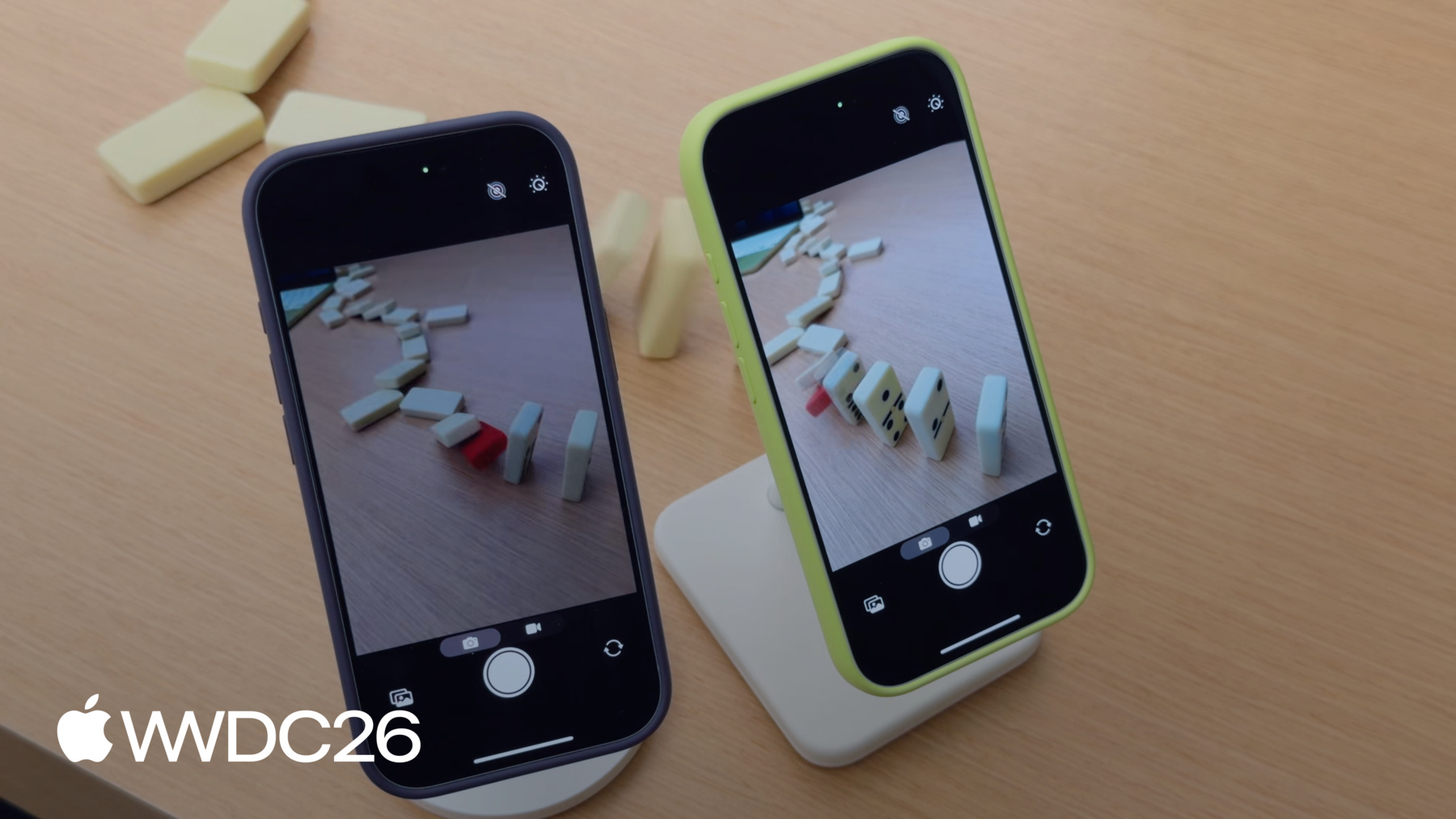
我想拍一张骨牌的 精彩瞬间 但我忘了提前启动相机 骨牌已经开始倒了 我在中间放了一块红色骨牌 因此必须及时启动并捕捉 红色骨牌倒下前的那一刻
App启动时有一段 预览空白期 等预览开始渲染时 红色骨牌早已倒下 让预览在App启动后 迅速开始渲染 能让用户捕捉到 瞬息万变的精彩画面 确保不错过关键时刻 我将帮你打造一款 注重性能的相机App 本视频将介绍 提升性能的4个主要方面 首先 讨论如何加速 相机启动体验 让预览顺畅运行
其次 介绍预览渲染 的最佳实践 以避免丢帧
第三 介绍有助于 维持性能的API 即使在复杂环境下也能维持
最后 介绍一个新API 专为提供确定性 文件写入性能而设计 适用于高数据率视频录制 先从快速启动说起
相机App的启动 分为4个阶段 第一 App启动 包括链接器加载二进制文件 运行静态初始化器的时间 以及创建UIScenes 以及App在创建 采集会话之前的所有操作
第二 会话配置和启动
初始化采集会话 提交配置 以及启动会话均需消耗 时间和系统资源
第三 会话启动后 所有AVCaptureOutput对象初始化 耗时取决于输出数量 及其质量设置
最后 预览开始串流 帧数据传入App 我将介绍每个阶段的 具体优化方法 App的UI在相机启动体验中 扮演重要角色 设计启动流程时 应将工作分为两个阶段 启动和显示预览 所需的关键资源 以及预览运行后 才需要的资源
以AVCam为例—这是 AVFoundation的经典示例相机App 它包含多个UI元素 相机预览 快门按钮 图片缩略图和模式选择器 相机预览是最关键的UI元素 在用户启动App的瞬间 因为这让相机感觉 已经随时可用 图片缩略图和模式选择器 在预览渲染前并不需要 因此可以等预览启动后 再创建 UI元素并非影响 启动时间的唯一因素 预览渲染前创建的任何资源 都会影响启动时间 在AVCam中应用这两个阶段 启动时只创建快门按钮和预览 启动完成后再淡入 其他UI元素 减少了App对启动的影响后 我将重点介绍AVCaptureSession 及相关对象对下一阶段的影响 即会话配置阶段
配置和启动 AVCaptureSession 需要大量系统资源 和内存分配 直接影响App启动
典型的AVCaptureSession 由AVCaptureDeviceInput组成 通常是摄像头或麦克风 AVCaptureConnection将 采集设备连接到输出 在此示例中 需要两个输出 一个用于预览 一个用于拍摄 AVCaptureVideoPreviewLayer 是用于显示预览的输出 AVCapturePhotoOutput 则是用于图像采集的输出 这些对象共同支撑App的相机体验
由于AVCaptureSession 协调所有采集对象 应尽早创建它 在主线程 完成UI设置后立即创建
创建AVCaptureSession 会阻塞主线程 为避免卡顿 应与UI初始化并行创建 启动时显示预览时 将AVCaptureSession的创建 分配到主线程之外执行 这样会话设置可在后台运行 同时App的UIScene正在创建
多次提交配置会延长启动时间 应预先提交单一配置 避免冗长的重新配置 拖慢启动速度 AVCaptureSession的startRunning 和stopRunning是阻塞调用 不要在主线程调用 否则App将卡顿 接下来介绍相机启动中 开销最大的部分 即初始化AVCaptureOutputs
初始化AVCaptureOutputs 会明显拖慢启动速度 渲染预览时 App只需初始化 一个预览层或一个输出 MovieFileOutput和PhotoOutput 等输出在预览时并不需要
为减少输出初始化时间 请采用Deferred start API 该API在iOS 26及更高版本可用 Deferred start让App可以将 输出初始化推迟到启动完成后 在这个启动序列中 所有AVCaptureOutputs会初始化 在第一帧预览渲染之前
Deferred start的思路是推迟 所有启动时不需要的输出 直到预览启动后再初始化 使用Deferred start后 启动序列将发生变化 App启动 配置会话并启动 现在只有预览输出在 第一帧显示前初始化 然后系统会在条件允许时 自动运行延迟初始化 或等待App发出信号 表明何时是合适时机
每个AVCaptureOutput 和AVCaptureVideoPreviewLayer 都有isDeferredStartEnabled属性 将其设为true即可延迟该输出 为优化启动 延迟所有输出 仅保留用于渲染预览的输出
有两种方式指定 Deferred start的运行时机 自动启动和手动启动 针对iOS 26及更高版本SDK 重新编译的App 默认使用自动模式 在此模式下automaticallyRunsDeferredStart 属性设为true 在自动模式下 系统会选择 最佳时机来初始化 延迟的输出 这发生在预览出现在 设备屏幕后不久
会话会发送两个委托回调 让App知道Deferred start 何时开始和结束 SessionWillRunDeferredStart在 输出初始化开始前触发 SessionDidRunDeferredStart 在完成后触发 现在演示如何采用此API
首先创建一个类来处理 Deferred start API 的委托回调
SessionWillRunDeferredStart在 Deferred start开始前调用 这是创建App所需 后台资源的好时机
SessionDidRunDeferredStart在 Deferred start完成后调用 此时所有采集输出 均已初始化并可使用 现在将Deferred start 添加到captureSession 在配置期间将 automaticallyRunsDeferredStart设为true 在AVCaptureSession上 注意 如果你的App是针对 iOS 26及更高版本重新编译的 此属性会自动设为true 接下来 在所有非启动必需 的输出上启用Deferred start 这里延迟照片采集输出 并使用视频预览层 渲染预览
然后将之前的 委托回调类 绑定到采集会话
会话已配置完毕 提交配置 并调用startRunning
对于需要更精细控制的App Deferred start API 还提供手动模式 通过runDeferredStartWhenNeeded实现 在手动模式下 App告知系统 何时开始Deferred start 适用于需要在初始化前 读取偏好设置或设置UI的App 在繁重的初始化开始之前 或使用VideoDataOutput 渲染预览的App 这将在本视频后面详细讨论
使用手动模式时 序列会发生变化
App完成启动工作后 例如创建非关键资源后 调用runDeferredStartWhenNeeded 在采集会话上 这告知系统 可以运行Deferred start了 要选择手动模式 将automaticallyRunsDeferredStart 在AVCaptureSession上设为false 在此示例中 我希望自己渲染预览 使用AVCaptureVideoDataOutput 因此禁用此输出上的 Deferred start 其余代码与 上一示例相同 接下来决定何时对 延迟输出运行Deferred start 为此追踪第一帧 是否已呈现
这里使用CAMetalLayer 第一帧呈现后 设置所有非关键UI元素 并告知AVCaptureSession对 延迟的输出运行Deferred start 第一帧呈现后 无需特殊处理
为验证Deferred start 加快了启动速度 我在实验室搭建了一个灯板 目标是比较预览中 LED图案位置的差异 右侧手机已启用Deferred start 左侧未启用 目标是在红色和绿色LED 同时出现时捕捉图案
我截取了其中一台设备 成功显示预览的瞬间 右侧启用Deferred start的手机 清晰地捕捉到了 不断扩展的图案
而未启用Deferred start的 手机完成启动时 绿色LED已近乎熄灭 错过了清晰的分隔效果
我还计时了两台手机的 启动序列 未启用Deferred start时 App启动接近一秒
启用Deferred start后 启动时间缩短了一半 速度提升了2倍 这是启动时间的 重大突破 预览比以往更快启动 对于复杂的采集会话 App可能看到更大的提升
延迟AVCapturePhotoOutput 有一个注意事项 预览启动早了很多 但首次拍摄的时间 仍保持不变 由于照片输出被延迟 系统必须完成其初始化 才能开始拍摄 预览很快就绪 但用户仍可能错过拍摄时机 为解决此问题 将 isResponsiveCaptureEnabled设为true 在AVCapturePhotoOutput上 此属性在开始拍摄 和处理开始之间添加缓冲 让用户即使在照片输出 未完全就绪时也能抓拍 绿色手机结合Deferred start 启用了响应式拍摄 骨牌倒下时 迅速启动 并拍摄了一张照片
绿色手机让我 完美拍到了骨牌 紫色手机则错过了时机
了解更多关于如何使用响应式拍摄 以及如何拍摄高分辨率精彩照片 请观看WWDC26的 "Implement high resolution photo capture"
预览运行后 保持稳定的 帧率和节奏至关重要 否则相机会感觉卡顿 接下来分享预览渲染的最佳实践
回顾之前介绍的 会话架构 渲染预览最简单的方式 是使用AVCaptureVideoPreviewLayer 它直接显示摄像头所见的画面 呈现在App的UI中 AVCaptureVideoPreviewLayer 专为预览渲染优化 无需在App中处理视频帧 AVCaptureVideoPreviewLayer会自动处理 包括棘手的HDR色调映射等情况 例如HDR色调映射 同时保持CPU和GPU开销较低 节省电量并为UI 留下更多余量 并针对低延迟预览优化 让App几乎实时显示摄像头画面 延迟极低 作为简化的代价 AVCaptureVideoPreviewLayer不支持 逐帧访问 对于需要更多预览渲染 控制权的App AVCaptureVideoDataOutput 是更好的选择 AVCaptureVideoDataOutput取代了 AVCaptureVideoPreviewLayer 在会话架构中成为 显示帧的主要输出 在设备上
AVCaptureVideoDataOutput对 预览流程提供更多控制 让App能够处理单个帧 还允许App在每帧上 叠加自定义UI
逐帧处理使与Metal的集成 以及帧数据分析更加方便 以及分析帧数据 仅需显示摄像头画面时 使用AVCaptureVideoPreviewLayer 记住 使用 AVCaptureVideoPreviewLayer的App 在针对iOS 26及更高版本重新编译时 会自动选择自动Deferred start
需要逐帧处理时 使用AVCaptureVideoDataOutput Deferred start不会自动适用于 AVCaptureVideoDataOutput 因此需采用手动Deferred start 以获得相同的启动提升 渲染预览时 保持逐帧工作简短 有助于避免丢帧 保持流畅体验
设备发热时 性能越来越难以维持 因为系统会降频以适应 监控会话的性能 并根据系统状况调整 以获得可持续的体验
接下来介绍让App监控性能 的API 并适应系统状况 回顾之前的架构 有采集会话 照片输出和预览层
这是相对基础的配置 但随着 App添加更多摄像头 或输入设备时复杂度会增加
随着复杂度增加 性能消耗也随之增加 了解采集会话的开销 有助于设计出 可持续的体验 hardwareCost API 返回0到1之间的值 表示会话硬件资源 的当前使用比例 超过1表示系统 无法支持该配置 以下几个因素会影响此开销 使用的摄像头数量 源设备的活跃格式 例如使用1080p或4K 源设备格式的帧率 hardwareCost假设 格式的最大帧率 因此如果你以 较低帧率运行 例如每秒30帧 而不是每秒60帧 使用帧率覆盖属性 来降低开销 最后是Binned格式的使用 Binned格式使用较少的 硬件带宽 因为这些格式会合并像素
systemPressureCost API 同样返回0到1之间的值 表示会话当前配置的开销 超过1时 该配置不可持续 为适应当前系统状态 监控AVCaptureDevice的 systemPressureState属性 随着系统压力状态升高 考虑降低采集设备的帧率 或限制GPU或Apple Neural Engine 的使用 或减少UI工作 初始会话设置后使用 hardwareCost和systemPressureState API 在初始会话设置后
提交配置后 检查 hardwareCost是否超出 设备的承载能力
一旦hardwareCost 达到或低于1 观察AVCaptureDevice的 systemPressureState 并注册状态变化处理程序 使用该处理程序通过 我刚介绍的技术进行适应 视频录制对性能问题也很敏感 一旦设备进入压力状态 传统的文件系统 输入/输出是不稳定的 因为系统需要处理 多个竞争操作 内存碎片化 和存储磨损 这意味着文件输入/输出 的行为是不确定的
高数据率视频录制 如ProRes 需要持续的高带宽输入/输出 才能流畅录制而不丢帧 为应对这一挑战 使用iOS 27新增的AVProVideoStorage 此类负责跟踪和管理 预分配的存储空间 用于高数据率视频录制 这是所有App共享的 系统级资源
AVProVideoStorage与现有的 电影录制API配合使用
App通过设置 usesProVideoStorage来选择使用 在AVCaptureMovieFileOutput上 或在AVAssetWriter上 当使用AVCaptureVideoDataOutput 录制内容时
系统处理分配 和文件输入/输出 使高数据率编解码器的 写入性能保持一致 相机设置已更新 让用户可以 控制分配多少存储空间 remainingCapacity方法 报告剩余存储量 该值在录制期间减少 停止减少的时候 是录制停止时
使用openSettings方法 将用户从你的App 引导至设置界面
使用AVProVideoStorage 首先检查是否支持该存储
AVProVideoStorage是单例 使用shared方法 获取此对象的实例
接下来创建MovieFileOutput AVCaptureSession AVCaptureConnections 并选择录制格式
使用AVCaptureMovieFileOutput上新增的 isProVideoStorageSupported方法 检查兼容性
录制前确认存储空间 未在调整大小 或处理文件创建 或删除请求 最后 在MovieFileOutput上 启用ProVideoStorage并开始录制 录制期间 视频写入 预分配的存储空间 录制完成后移动到 指定位置
如前所述 此功能 与AVAssetWriter配合同样出色
我介绍了优化相机App 启动速度的方法 预览渲染的最佳实践 维持性能的API 以及如何为ProRes录制 获得确定性文件写入速度 采用Deferred start 配合高质量照片输出 你将保持快速启动 并获得精彩的图像质量 分析相机App其他部分的性能 使用Instruments和Xcode 测量 识别 并解决性能问题 记住 大多数时候你在桌前 开发你的App 或在受控环境中 但用户在现实世界中使用你的App 在各种条件下测试 并测量性能 例如在炎热的晴天 最后 观看WWDC23的 "Create a more responsive camera experience" 以及WWDC26的 "Implement high resolution photo capture" 了解如何将拍摄响应性 集成到你的App中
性能不只是一项功能 它是出色相机体验 的基础 持续优化 持续拍摄 感谢观看
-
-
9:14 - Automatic deferred start delegate
import AVFoundation class DeferredStartDelegate: NSObject, AVCaptureSessionDeferredStartDelegate { func sessionWillRunDeferredStart(_ session: AVCaptureSession) { // This is called before deferred start begins for the deferred outputs } func sessionDidRunDeferredStart(_ session: AVCaptureSession) { // This is called after deferred start completes for all outputs } } -
9:46 - Adopt automatic deferred start
import AVFoundation let captureSession = AVCaptureSession() captureSession.beginConfiguration() captureSession.automaticallyRunsDeferredStart = true let videoPreviewLayer = AVCaptureVideoPreviewLayer(session: captureSession) videoPreviewLayer.isDeferredStartEnabled = false let photoOutput = AVCapturePhotoOutput() photoOutput.isDeferredStartEnabled = true captureSession.addOutput(photoOutput) captureSession.setDeferredStartDelegate(deferredStartDelegate, deferredStartDelegateCallbackQueue: sessionQueue) captureSession.commitConfiguration() captureSession.startRunning() -
11:30 - Adopt manual deferred start
import AVFoundation let captureSession = AVCaptureSession() captureSession.beginConfiguration() captureSession.automaticallyRunsDeferredStart = false let videoOutput = AVCaptureVideoDataOutput() captureSession.addOutput(videoOutput) videoOutput.isDeferredStartEnabled = false let photoOutput = AVCapturePhotoOutput() photoOutput.isDeferredStartEnabled = true captureSession.addOutput(photoOutput) captureSession.setDeferredStartDelegate(deferredStartDelegate, deferredStartDelegateCallbackQueue: sessionQueue) captureSession.commitConfiguration() captureSession.startRunning() -
11:53 - Manage runDeferredStartWhenNeeded
import AVFoundation import QuartzCore private var firstFramePresented = false guard let drawable = layer.nextDrawable() if (!firstFramePresented) { drawable.addPresentedHandler({ drawable in // Set up postponed UI elements captureSession.runDeferredStartWhenNeeded() }) firstFramePresented = true } -
14:07 - Enable responsive capture
import AVFoundation func configurePhotoOutput(for session: AVCaptureSession, device: AVCaptureDevice) { let photoOutput = AVCapturePhotoOutput() guard session.canAddOutput(photoOutput) else { return } session.addOutput(photoOutput) photoOutput.maxPhotoQualityPrioritization = .quality // Responsive capture lets the photo output capture immediately photoOutput.isResponsiveCaptureEnabled = photoOutput.isResponsiveCaptureSupported } -
20:16 - Monitor for system pressure
import AVFoundation let captureSession = AVCaptureSession() let device = activeVideoInput?.device captureSession.beginConfiguration() // ... captureSession.commitConfiguration() guard captureSession.hardwareCost <= 1.0 else { print("hardwareCost \(captureSession.hardwareCost) — cannot start session. Reconfiguring.") setupLowCostConfiguration() } captureSession.startRunning() let systemPressureObserver = device?.observe(\.systemPressureState, options: [.initial, .new], changeHandler: { /* Handle state change */ }) -
22:17 - Manage pro video storage
import AVFoundation func configureProVideoStorage() { guard AVProVideoStorage.isSupported else { return } let storage = AVProVideoStorage.shared guard storage.remainingCapacity != 0 else { storage.openSettings() return } } -
22:43 - Adopt AVProVideoStorage for deterministic file write speeds
import AVFoundation

guard AVProVideoStorage.isSupported else { return }
guard let pvs = AVProVideoStorage.shared else { return }

// Configure and set up AVCaptureSession, AVCaptureConnections and format
// ...
let movieOutput = AVCaptureMovieFileOutput()

guard movieOutput.isProVideoStorageSupported else { return }
guard !pvs.isBusy else { return }

let movieFileURL = FileManager.default.temporaryDirectory
            .appendingPathComponent(UUID().uuidString)
            .appendingPathExtension("mov")

movieOutput.usesProVideoStorage = true // Also available with AVAssetWriter
movieOutput.startRecording(to: movieFileURL, recordingDelegate: delegate)
-