

-
深入探索 SwiftUI 的惰性堆栈与滚动
了解 SwiftUI 惰性堆栈的内部工作原理。我们将探索 LazyVStack 和 LazyHStack 如何估算大小、惰性加载子视图并预取内容,从而提供流畅的滚动浏览体验。我们还将介绍高级性能优化方式、状态管理最佳做法,以及实现精准程序化滚动的技巧。为了充分从这个讲座中获益,我们建议你先熟悉一下使用堆栈的 SwiftUI 布局。
章节
资源
相关视频
WWDC26
WWDC22
WWDC20
-
搜索此视频…
大家好,我叫 Rens, 是一名 UI 框架工程师。 懒加载堆栈是不可或缺的组件, 适用于任何需要显示 长列表和自定义滚动内容的 SwiftUI App 。 它们作为 SwiftUI 的一部分 已有很长时间了。 与许多其他 SwiftUI 组件一样, 懒加载堆栈的强大之处 在于其简洁性。 不同的 SwiftUI 组件可以与 许多其他 SwiftUI 组件混合使用, 以构建复杂的App。 例如,从 2027 年的版本发布起, 你可以使用可重新排序功能 通过拖拽来重新排列视图。 你可以通过以下内容了解更多信息: "代码演练:在 SwiftUI 中构建 强大的拖放功能"。 SwiftUI 还支持在列表以外的视图 添加滑动操作。 当然,两者与懒加载堆栈配合使用 效果都很出色。 我认为现在是时候来回顾一下, 深入了解懒加载堆栈和滚动机制了。 我将解释它们的工作原理、 你可以用它们做什么, 以及应该避免哪些做法。 之后,你将对懒加载堆栈的 内部机制有更深入的理解, 以及懒加载堆栈的内部结构, 从而能够将其 App 到 你自己 App 中的懒加载堆栈中。
本视频假定你已具备 使用堆栈进行 SwiftUI 布局的基本知识。 如果你是 SwiftUI 新手,推荐观看 "SwiftUI 中的堆栈、网格与大纲"。
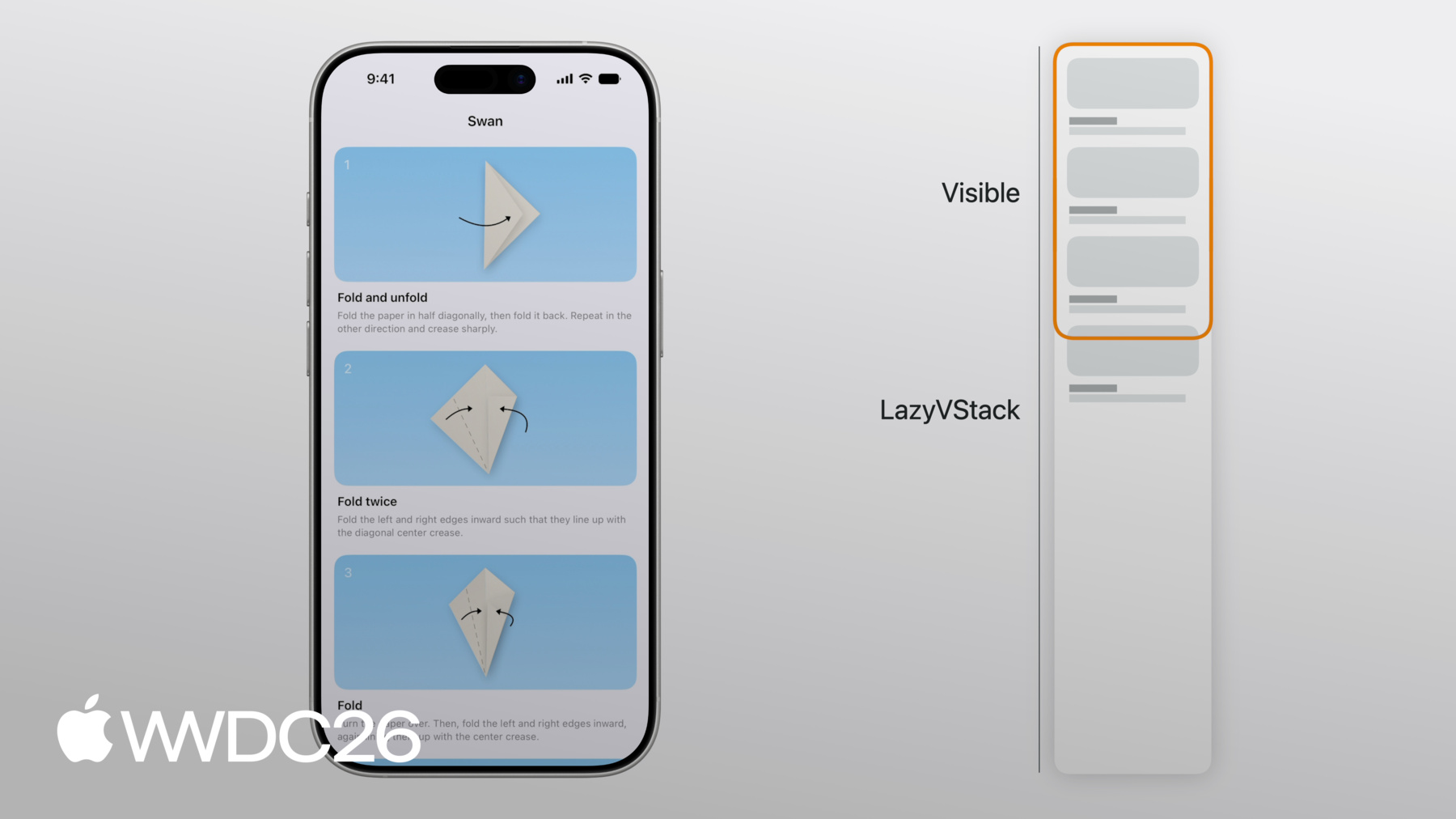
我一直在开发一个折纸 App , 它展示了如何制作 一些经典折纸作品的步骤说明。 在这个早期版本中, 它只显示折天鹅的步骤。 这是主视图的设置。 我有一个 ScrollView, 里面包含一个 LazyVStack, 其中又包含 每个步骤对应的 StepView。 懒加载堆栈允许滚动浏览 可能数量庞大的步骤, 而无需一次性立即加载所有视图。 现在我来重点介绍 LazyVStack。
其中三个折叠折纸天鹅的步骤 完全可见。 第 4 步的 StepView 也有一小部分可见。 现在,完整的 LazyVStack 比可见视图要大得多。 但是,与 VStack 不同, LazyVStack 不会对不可见的视图 进行求值或渲染。 LazyVStack 只是从上到下 排列其视图, 一旦填满可见区域就会停止。 如果你向下滚动,LazyVStack 会适时添加视图, 以确保可见区域 保持填充状态, 当视图滚出屏幕后, 它们会从懒加载堆栈中移除。
由于不是一次性加载所有视图, LazyVStack 比 VStack 效率更高。 但这也带来了正确性方面的代价。 由于 LazyVStack 不加载所有视图, 屏幕外子视图的高度 是通过估算得出的。 这个估算高度基于 已放置视图的平均大小, (即之前已排列好的视图), 以及估算的剩余子视图数量。 懒加载堆栈也无法感知 屏幕外视图的变化, 因为它们尚未加载。
同样,由于并非所有视图都已加载, 它无法找到所有视图中 最大的宽度。 因此,LazyVStack 的理想宽度 是其第一个子视图的宽度。 在我的折纸 App 中, 第一个视图具有无限弹性, 因此 LazyVStack 的宽度 等于屏幕宽度。
由于 LazyVStack 的高度 是估算的而非精确的, 它可能在滚动过程中发生变化, 因为懒加载堆栈会逐渐了解 滚动到屏幕上的新视图的布局。 例如, 如果你一路向下滚动, 最后几个视图比其他视图 略小, 懒加载堆栈就必须进行调整, 修正最初估算的尺寸 以反映这一情况。
可见区域上方的空间 同样不精确。 滚动位置, 也就是滚动视图的内容偏移量, 因此取决于可见条目 位置的估算值。 一个可见区域上方空间 不精确的典型例子, 是 iPhone 上的方向改变之后。
横屏模式下的 StepView 比竖屏模式下更矮。 副标题文字在横屏模式下 通常占用的行数更少。 在方向改变期间, 懒加载堆栈会保持 第 4 步的 StepView, 即最顶部可见视图的锚定位置。 LazyVStack 尚不了解 前几个 StepView 的确切布局变化, 因为它们尚未加载。 但当一路滚回顶部时, 懒加载堆栈必须对齐到 滚动视图的顶部。 这意味着它必须 沿途修正 可见区域上方的估算空间。 它会以相同的量更新 ScrollView 的内容偏移量, 从而使顶部的内容偏移量 同样归零。
懒加载堆栈 与外层滚动视图 协调位置 和内容偏移量。 这样, 当估算值更新时, 可见子视图的相对位置 在滚动视图中不会改变。
在同一个懒加载堆栈中 组合不同类型的视图或内容是很常见的。 对于我的折纸 App, 我认为如果 用户可以在完成后 与他人分享作品照片,会很酷。 我希望将这些照片显示在底部, 放在一个水平滚动视图中。 我为这些照片添加了 一个展示视图。 展示视图包含一个水平 滚动的 ScrollView, 其中包含一个 LazyHStack。 这意味着我的 App 现在 有一个 LazyHStack 嵌套在 外部 LazyVStack 中。
像这样将 LazyHStack 嵌套在 LazyVStack 中 对性能也有好处, 因为不是所有人都会滚动这个 嵌套滚动视图来查看额外的内容。
对于 LazyHStack, 其理想高度,进而 在垂直 ScrollView 中的高度, 是其第一个子视图的高度。 在我的折纸 App 中, 所有照片使用相同的高度。 但如果每张照片都有一个 行数不固定的用户描述标签, 较长的副标题就会被截断。 LazyHStack 无法提前知道 所有视图中最大的副标题是什么。 因为它并未加载所有视图。 最好的解决方案是 固定视图高度。 例如,对于文本, 你可以设置行数限制, 00:06:15.712 --> 00:06:17.902 并为较短的文字预留空间。
但我实际上在想, 我折纸 App 中的照片应该再大一点。 也许我应该直接将它们 垂直排列在步骤下方。 如果我将它们放在一个分区中, 甚至可以固定分区标题。 要固定分区标题, 请使用 pinnedViews 参数 在 LazyVStack 上。
我在展示视图内添加了新的 Section, 并带有一个标题视图。 如果我向下滚动, 展示区域的分区标题 会固定在顶部。
接下来我将讨论一些需要避免的模式, 以确保懒加载堆栈发挥最佳性能。 我将使用刚刚添加的 照片展示功能来演示。 为照片添加滚动过渡效果可能会很不错, 当它们滚入和滚出屏幕时呈现动画效果。 在这里,我使用了 .scrollTransition 修饰符 为我的步骤添加一个效果, 让它们在滚入或滚出屏幕时呈现动画。 然而,懒加载堆栈只根据视图 的原始位置加载屏幕上的视图, 基于它们的原始位置。 而这里的变换 会将它们推出原始框架。
这会导致它们在本应可见时消失, 因为懒加载堆栈 认为它们已在屏幕外。 在这里,当你向下滚动时, 粉色天鹅消失得太早了。 如果你在懒加载堆栈中为视图 应用滚动过渡,请确保 正常情况下不可见的视图 不会被推入可见区域。 在这里,我使用了不同的缩放效果。
这样可以正常工作。 一般来说,请确保正常情况下 不可见的视图 不会在变换中被推入可见区域。 懒加载堆栈不会察觉到这种情况。 由于需要向下滚动一点 才能到达展示区域, 我还会添加一个按钮 以快速滚动到那里。
但这个按钮不应该始终可见。 我希望它只在靠近 滚动视图顶部时可见。 当有人向下滚动时, 它应该消失。
在这里,我在滚动视图上使用了 .onScrollGeometryChange 来获取绝对内容偏移量。 当我向下滚动超过 100 点时, 按钮就会消失。 这可以工作,但由于懒加载堆栈的 内容偏移量是估算的, 按钮消失的确切位置 可能会随着估算值的变化而改变。 更好的方式是使用 子视图的相对位置, 即在滚动视图的可见区域内的相对位置。
一种实现方式是使用 .onScrollTargetVisibilityChange 修饰符。 该修饰符的闭包会在子视图的可见性 在滚动视图的可见区域发生变化时调用。 在这里,"滚动到展示区域"按钮的可见性 仅取决于哪些子视图可见, 可见阈值为 80%。
我已经详细介绍了 懒加载堆栈的布局。 我提到懒加载堆栈会添加子视图, 当它们即将进入 滚动视图的可见区域时。 然而,懒加载堆栈单独加载的子视图, 并不总是与你在代码中 定义的视图结构体直接对应。 让我们回到我的原始代码, 再看一下 ContentView。 在这个简单的例子中, StepView 实例与 LazyVStack 看到的子视图是一一对应的。 有一个 ScrollView,ScrollView 将 LazyVStack 作为子视图, 而 LazyVStack 则将 ForEach 作为子视图。 但当然, ForEach 并非只是单个视图。 它会为每个步骤 解析出一个 StepView。 在大多数情况下,这些就是 LazyVStack 加载的子视图。 但在这里,StepView 稍微复杂一些。 这一点很重要。 body 包含两个视图: StepDiagram 和 StepInstructions, 位于 body 的顶层。 它们也没有嵌套在 另一个布局中,例如 VStack。
在这种情况下, LazyVStack 仍然持有 ForEach, 它会为每个步骤 解析出一个 StepView。 但就像 ForEach 解析出多个 StepView 一样, 每个 StepView 现在 也会解析出两个视图。 LazyVStack 会分别 求值和加载 StepDiagram 以及 StepInstructions。 当然,懒加载堆栈还是需要 先对 StepView 进行求值, 才能创建其中任何一个。 视图也可以解析出 动态数量的子视图。 但这是你需要 特别注意的情况。 在这种情况下,StepView 使用了 detailLevel 环境值, 来检查它是否应该可见。 ForEach 再次为每个步骤 解析出一个 StepView。 但现在每个 StepView 会解析出 一个子视图或零个子视图。 在这种情况下, 在当前详细级别下第 2 步不可见, 但第 1 步和第 3 步是可见的。 这是可以工作的, StepView 的内容会被懒加载, 但 StepView 本身的存活时间 可能比你预期的更长。 这是因为 LazyVStack 使用 索引来定位可见的子视图。
它现在必须保留 较早的 StepView, 以防 detailLevel 环境值发生变化, 因为那会影响索引。
在 ForEach 中被多次创建的 叶子子视图(如 StepView)中, 避免创建动态数量的子视图。 使用 detailLevel 环境值 来过滤步骤的示例, 因此不是一个好做法。
假设有一个不相关的环境值, 比如 writingStyle, 被用于 StepView body 的内容中。 该环境值的更改现在可能 导致对已滚出屏幕的视图 进行 body 求值, 造成不必要的视图更新。 懒加载堆栈也不会释放 为 StepView 分配的状态。 应在数据层面进行过滤。 如果你使用 SwiftData, 请使用 Predicate 来过滤 Query。 在这里,我在 Predicate 中 使用了 detailLevel。 这使得子视图的数量 对 LazyVStack 立即清晰可见。 它不必构造视图 来计算视图数量或索引。 请注意,在视图 body 中 对可选值进行解包具有同样的效果。 在这里,我对一个 apiToken 环境变量进行可选解包。 如果该令牌不为 nil, 则 body 只返回内容。
该令牌是可以由 NetworkClient 模型对象处理的内容。 如果用户未经过身份验证, 层级结构中更高层的视图 可以显示 ContentUnavailableView, 而不是首先显示懒加载堆栈。
由于懒加载堆栈只在内存中 保留一小部分数据, 它们不需要对内容 执行完整的差异比对。 它们只对可见视图的变化 执行最小限度的检查。
懒加载堆栈并不总是 一次性加载整个子视图。 现在我来讨论预取机制, 这是懒加载堆栈的 一种内部机制, 用于提升App的 滚动性能。
当你向特定方向滚动时, 并且懒加载堆栈的可见部分 到达已放置内容的末尾时, 懒加载堆栈会在将视图 添加到屏幕之前就进行预取。 预取意味着懒加载堆栈 会提前完成部分工作, 即在视图可见之前 就开始渲染视图。 在滚动时,ScrollView 需要 以恒定的帧率进行绘制。 这意味着可用于 执行计算的时间是有限的, 最多到一个帧截止时间。 这些工作包括 ScrollView 更新内容偏移量, 你的视图在新位置进行渲染, 以及你的 App 在响应 内容偏移量变化时可能执行的工作。 当 ScrollView 包含懒加载堆栈时, 还包括对滚动到屏幕上的视图 进行求值的工作, 执行布局以及渲染它们。 但是,将新视图放置到 屏幕上的工作可能会很耗时。
如果这项工作耗时过长, 超过了截止时间, 就会导致掉帧。 这在滚动时表现为卡顿, 因此应该避免。
预取就是用来 防止此类掉帧的。 在滚动时,懒加载堆栈已经 在检查是否有足够的时间 来完成渲染新子视图的 部分工作, 在其滚动到屏幕上之前。 例如,懒加载堆栈可能 能够在视图出现之前 就完成对即将出现的视图的 body 求值和布局。 当视图最终出现时, 大部分工作 已经提前完成了, 分散在多个帧中完成。
在 LazyVStack 中显示 嵌套的 LazyHStack 的工作 也可以分散到 多个帧中完成。 当视图出现时, onAppear 会被调用。 因此通常你的视图 body 会在某一时刻被调用, 而 onAppear 只会稍晚一些, 在视图被放置到屏幕时调用。 如果滚动方向被反转, 视图的 body 甚至可能 作为预取的一部分被调用, 而 onAppear 则永远不会被调用。 在懒加载堆栈中使用 onAppear 对于很多场景都很有用, 包括数据加载。 其中一个使用场景是无限滚动。 在这里,折纸 App 会在 你滚动到末尾时从网络获取更多照片。 最后一个视图 ProgressView 带有 .onAppear 修饰符。 当该视图出现时, 就会获取新的一页内容。
但是,在每个视图的 onAppear 中加载所有内容并不是好主意。 在这个示例中,onAppear 被用于设置每个视图。 视图的尺寸和 大部分内容 在放置后完全改变。 预取之前完成的工作 将被丢弃, 并且必须在视图 出现时重新完成。 懒加载堆栈也可能 加载比所需更多的视图, 滚动也可能受到影响, 我稍后会展示。 应在初始化器中 设置视图, 使其在出现到屏幕之前 处于合理的状态。
即使不是必须的, 在视图出现之前 预加载内容也是有用的。 在这里,我使用了 task 修饰符 在视图出现时从 互联网远程加载图表。 但我实际上可以利用预取 来稍早加载它, 这样它在出现时 已经加载完成的概率更高。 例如,我可以使用一个 与缓存关联的 DiagramLoader 可观察对象。 当缓存中不包含 特定 ID 的数据时, 它可以在初始化时 立即加载数据。 由于它在初始化器中 就开始加载图表, 图表会被稍早地获取到。 已滚出屏幕的视图 不再被渲染或更新。 但它们不会立即 从内存中移除。 懒加载堆栈会在 若干次更新期间保留这些视图, 以防它们重新滚回屏幕。 当视图最终从 内存中删除时, 状态变量也会随之被删除。
由于与已滚出屏幕的视图 关联的数据将被删除, 不要依赖视图状态来存储 在滚动后需要持续保留的数据。 在这里,StepView 使用了 一个 isHighlighted 状态变量。 但如果视图被滚走, 该高亮状态将会丢失。 应将重要状态 移至模型对象, 或如此处所示,使用 binding 移至外层视图。
你通常将懒加载堆栈 放在滚动视图内。 我现在想给你一些技巧, 让懒加载堆栈中的滚动运行良好。 之前,我在折纸 App 中 添加了一个按钮, 用于滚动到 用户照片展示区域。
以编程方式滚动到 该分区的代码如下所示。 我正在使用 ScrollPosition binding 滚动到展示区域的分区标题。
编程式滚动在 懒加载堆栈中可以工作, 即使目标视图不在屏幕上。
滚动到屏幕外的视图 需要懒加载堆栈估算其位置。 在有动画的滚动中, 懒加载堆栈会在 每一帧更新这个估算位置。 尽管如此,仍有一些情况 可能会导致滚动 不流畅或不够快速。 例如,在这里, 在 StepView 中使用动态数量的视图 会对性能产生影响。 通过 ID 编程式滚动到视图 在性能上最优的情况是 ForEach 中的每个视图 始终解析出单个子视图。 在这种情况下,懒加载堆栈可以 查询 ForEach 来找到要滚动到的 ID, 而无需构造任何视图。 滚动到靠近末尾的子视图 性能也更好, 前提是懒加载堆栈 能够快速计算其子视图数量。 与之前一样,不要在视图 body 中通过条件语句过滤视图, 而应在数据层面进行过滤, 例如,使用 Query 上的 Predicate。
编程式滚动也会变得不那么流畅, 如果过多的视图在出现到 屏幕上后改变了其布局。 一种常见的导致此问题的模式 是使用 onGeometryChange, 将一个状态值设置后 在另一个布局阶段使用。
在这里,StepView 有一个 状态变量 subtitleHeight, 在副标题的 onGeometryChange 中进行更新。 视图随后会被再次求值, 并使用 subtitleHeight 来计算图表的 frame。 这会使滚动变得不可靠。 懒加载堆栈会测量 视图的原始高度, 但视图出现后高度发生了变化, 将其他内容向下推移。
在这种情况下,如果你无法使用 SwiftUI 的布局原语, 请改用自定义布局。 在这里,该自定义布局是 StepLayout。 要了解更多关于使用自定义布局的内容, 请查看"使用 SwiftUI 组合自定义布局"。
好了,我向你展示了 懒加载堆栈的许多方面。 我讲解了它们的布局, 视图结构体并不总是 解析为单个子视图的情况, 以及这对懒加载堆栈的影响, 懒加载堆栈如何预取视图 以获得更好的滚动性能, 以及它们如何支持 以编程方式滚动到屏幕外的视图。 一路上,我给出了一些技巧 和最佳实践, 供你在 App 中使用懒加载堆栈时参考。 例如,避免对懒加载堆栈 使用绝对内容大小 或内容偏移量, 因为这些值是估算的且不稳定。 避免在叶子视图中使用 条件视图内容来过滤数据, 因为这可能导致 SwiftUI 视图 存活时间比预期更长。 在 onAppear 被调用之前尽可能设置好 懒加载堆栈的子视图, 以确保预取效果最佳。 不要在懒加载堆栈的子视图 出现后改变其布局, 因为这可能会将懒加载堆栈 推离目标滚动位置。
了解 SwiftUI 组件 工作的一些内部机制, 有助于你更好地使用它们。 我想,在准备这个视频之后, 我现在也擅长折天鹅了。
-
-
1:23 - Origami app
// Origami app struct ContentView: View { var body: some View { ScrollView { LazyVStack { ForEach(steps) { step in StepView(step: step) } } } } } struct StepView: View { /* ... */ } -
5:11 - Horizontally scrolling showcase
// Horizontally scrolling showcase struct ContentView: View { var body: some View { ScrollView { LazyVStack { ForEach(steps) { step in StepView(step: step) } Showcase() } } } } struct StepView: View { /* ... */ } struct Showcase: View { var body: some View { ScrollView(.horizontal) { LazyHStack { ForEach(photos) { photo in PhotoView(photo: photo) } } } } } -
6:30 - Showcase section
// Showcase section struct ContentView: View { var body: some View { ScrollView { LazyVStack(pinnedViews: [.sectionHeaders]) { ForEach(steps) { step in StepView(step: step) } Showcase() } } } } struct StepView: View { /* ... */ } struct Showcase: View { var body: some View { Section { ForEach(photos) { photo in PhotoView(photo: photo) } } header: { /* ... */ } } } -
7:04 - Scroll effect
// Scroll effect struct ContentView: View { /* ... */ } struct StepView: View { /* ... */ } struct Showcase: View { var body: some View { Section { ForEach(photos) { photo in PhotoView(photo: photo) .scrollTransition { effect, phase in effect .rotationEffect(.degrees(phase.value * 20)) .scaleEffect(1 + phase.value * 0.2) } } } header: { /* ... */ } } } -
7:36 - Scroll effect
// Scroll effect struct ContentView: View { /* ... */ } struct StepView: View { /* ... */ } struct Showcase: View { var body: some View { Section { ForEach(photos) { photo in PhotoView(photo: photo) .scrollTransition { effect, phase in effect .scaleEffect(1 - abs(phase.value) * 0.1) } } } header: { /* ... */ } } } -
8:20 - Scroll to Showcase button
// Absolute offset struct ContentView: View { @State var isScrollToShowcaseVisible = false var body: some View { ScrollView { /* ... */ } .overlay(alignment: .bottom) { /* ... */ } .onScrollGeometryChange(for: Bool.self) { geo in geo.contentOffset.y <= 100 } action: { _, newValue in self.isScrollToShowcaseVisible = newValue } } } -
8:51 - Scroll to Showcase button
// Absolute offset struct ContentView: View { @State var isScrollToShowcaseVisible = false var body: some View { ScrollView { /* ... */ } .overlay(alignment: .bottom) { /* ... */ } .onScrollTargetVisibilityChange( idType: Step.ID.self, threshold: 0.8 ) { visibleIDs in isScrollToShowcaseVisible = shouldShowScrollButton(visibleIDs: visibleIDs) } } } -
9:29 - One resolved subview
// Origami struct ContentView: View { var body: some View { ScrollView { LazyVStack { ForEach(steps) { step in StepView(step: step) } } } } } struct StepView: View { /* ... */ } -
10:03 - Multiple resolved subviews
// Multiple subviews struct ContentView: View { /* ... */ } struct StepView: View { let step: Step var body: some View { StepDiagram(/* ... */) StepInstructions(/* ... */) } } -
10:52 - Dynamic number of subviews
// Dynamic number of views struct ContentView: View { /* ... */ } struct StepView: View { let step: Step @Environment(\.detailLevel) var detailLevel var body: some View { if step.isVisible(in: detailLevel) { VStack { /* ... */ } } } } -
11:46 - Filtering on the view level
// Dynamic number of views struct ContentView: View { /* ... */ } struct StepView: View { let step: Step @Environment(\.detailLevel) var detailLevel @Environment(\.writingStyle) var writingStyle var body: some View { if step.isVisible(in: detailLevel) { /* ... */ } } } -
12:15 - Filtering on the data level
// Filter at the data level struct ContentView: View { @Query var steps: [Step] init(detailLevel: DetailLevel) { _steps = Query(filter: #Predicate<Step> { step in step.detailLevel >= detailLevel }) } var body: some View { /* ... */ } } struct StepView: View { /* ... */ } -
12:35 - Optional unwrapping
// Optional unwrapping struct ContentView: View { /* ... */ } struct StepView: View { let step: Step @Environment(\.apiToken) var token var body: some View { if let token { /* ... */ } } } -
12:48 - Optional unwrapping
// Optional unwrapping struct ContentView: View { /* ... */ } struct StepView: View { let step: Step @Environment(NetworkClient.self) var networkClient var body: some View { /* ... */ } } -
15:28 - Loading more content
// Loading more content struct Showcase: View { @State var pager = ShowcasePager() var body: some View { ForEach(pager.pages) { page in PageView(page: page) } if !pager.atEnd { ProgressView() .progressViewStyle(.circular) .onAppear { pager.fetchPage() } } } } -
15:53 - Setting up lazy stack subview in onAppear
// onAppear struct StepView: View { let id: Step.ID @State var viewModel = StepViewModel() var body: some View { VStack { if let content = viewModel.content { /* ... */ } } .onAppear { viewModel.configure(with: id) } } } -
16:14 - Lazy stack subview ready before onAppear
// onAppear struct StepView: View { @State var viewModel: StepViewModel init(id: Step.ID) { _viewModel = State(initialValue: StepViewModel(id: id)) } var body: some View { /* ... */ } } -
16:23 - Loading diagram with task modifier
// Diagram loading struct StepView: View { let step: Step @State var diagramLoader = DiagramLoader() @State var diagram: Diagram? var body: some View { VStack { /* ... */ } .task { diagram = await diagramLoader.loadDiagram(id: step.id) } } } -
16:40 - Loading diagram in initializer
// Diagram loading struct StepView: View { let step: Step @State var diagramLoader: DiagramLoader init(step: Step) { self.step = step _diagramLoader = State(initialValue: DiagramLoader(id: step.id)) } var body: some View { /* ... */ } } @Observable class DiagramLoader { /* ... */ } -
17:16 - Highlight @State variable
// Highlighting struct ContentView: View { /* ... */ } struct StepView: View { let step: Step @State var isHighlighted = false var body: some View { /* ... */ } } -
17:33 - Highlight @Binding
// Highlighting struct ContentView: View { @State var highlighted: Set<Step.ID> = [] var body: some View { /* ... */ } } struct StepView: View { let step: Step @Binding var highlighted: Set<Step.ID> var body: some View { /* ... */ } } -
17:58 - Programmatically scroll to showcase
// Programmatically scroll to showcase struct ContentView: View { @State var scrollPosition = ScrollPosition() var body: some View { ScrollView { /* ... */ } .scrollPosition($scrollPosition) .overlay(alignment: .bottom) { Button { scrollToShowcase() } label: { /* ... */ } } } func scrollToShowcase() { withAnimation { scrollPosition.scrollTo(id: "showcase-header") } } } -
18:24 - Dynamic number of views
// Dynamic number of views struct ContentView: View { /* ... */ } struct StepView: View { let step: Step @Environment(\.detailLevel) var detailLevel var body: some View { if step.isVisible(in: detailLevel) { /* ... */ } } } -
18:53 - Filter at the data level
// Filter at the data level struct ContentView: View { @Query var steps: [Step] init(detailLevel: DetailLevel) { _steps = Query(filter: #Predicate<Step> { step in step.detailLevel >= detailLevel }) } var body: some View { /* ... */ } } struct StepView: View { /* ... */ } -
19:16 - Using onGeometryChange in lazy stack subview
// Don't change layout after views appear struct ContentView: View { /* ... */ } struct StepView: View { let step: Step @State var subtitleHeight: CGFloat? var body: some View { VStack { StepDiagram(diagram: step.diagram) .frame(height: diagramHeight(subtitleHeight: subtitleHeight)) Title(step.title) Subtitle(step.subtitle) .onGeometryChange(for: CGFloat.self, of: \.size.height) { _, value in subtitleHeight = value } } } } -
19:17 - Using custom layout in lazy stack subview
// Don't change layout after views appear

struct ContentView: View { /* ... */ }

struct StepView: View {
    let step: Step

    var body: some View {
        StepLayout {
            StepDiagram(diagram: step.diagram)
            Title(step.title)
            Subtitle(step.subtitle)
        }
    }
}

struct StepLayout: Layout { /* ... */ }
-