

-
使用 SwiftUI 构建高级图形效果
探索如何通过创造性地组合运用 SwiftUI 布局和图形 API 来打造丰富的自定体验。我们将介绍如何分解复杂的设计,并通过创意流程将简单的构建块串联起来。了解如何使用图层着色器进行绘制、利用时间线制作动画,并通过对齐参考线锚定视图。
章节
- 0:00 - 简介
- 1:40 - 设计分解
- 4:11 - 封面插图与着色器效果
- 11:07 - 用时间驱动动画
- 12:00 - 时间同步转录文本视图
- 13:18 - 利用对齐参考线实现时间戳的浮动
- 16:16 - 创意管道
- 17:13 - 后续步骤
资源
相关视频
WWDC24
-
搜索此视频…
你好! 我是Haotian UI Frameworks团队的工程师。 自诞生以来 SwiftUI在图形与布局方面 的能力持续增强 让它成为开发者在Apple设备上 打造丰富自定义体验的首选 在Apple设备上。 Apple也使用SwiftUI在自己的App中 构建各种高级效果。 "高级"这个词 听起来可能令人望而却步。 但关键在于 即使是高级效果 SwiftUI App也共享 相同的基本元素。 就像一条流水线。
数据流经 一系列标准管道。 它接收输入 进行转换 再传递下去。 SwiftUI的渐进式披露意味着 每个管道本身就能独立运作。 但你可以将它们连接 创建分支 或合并流程。 这就是发挥创意的时刻。 "高级"在于构建方式 而非复杂程度。 以下是大纲。 首先 我将拆解一个设计。 然后构建高级效果。 最后 分享如何在你的App中 融入这些技术 通过一条创意流水线。 这是我正在构建的设计。
我一直在开发 自己的播客App。 这是它目前的样子 一个简单的文字稿视图。 我要把它做得精美 就像Apple Music中的 实时歌词视图一样。 带有动态封面和随时间 同步滚动的文字稿。 从哪里开始?
从我已有的内容入手。 我现有的用户界面 已包含所需的全部数据 包括封面图片 播放信息 以及文字稿文本。 问题不在于需要什么数据 而是如何通过流水线 对其进行转换。 举几个例子。
从封面图片开始 我需要一个将图片转换为 可视化效果的管道 Shader管道正好适用。
可视化效果需要动起来 以反映播放状态。 为了实现动态视觉效果 我将时间管道接入流水线 这是两条管道合二为一。
时间管道的用途 还不止于此。 文字稿管道经过转换 加入了时间戳叠层 但它不知道 当前时间 因此无法正确滚动。
我可以连接同一条时间管道 形成时间同步滚动文本的流水线。 这样背景就有了 动态视觉效果 前景则有了 滚动文字稿。 是时候将这两条 并行管道连接起来了。 一旦你从全局来看 就会发现每一个modifier 每一个API都是 流水线中的一个阶段。 它就是这样流动的。
就如刚才展示的那样 我的播客App包含了 高级布局与图形效果。 我有全屏封面图片 应用了shader效果 以及时间驱动的动画。 另一方面 我有 时间同步的可滚动文字稿视图 并用浮动视图附件加以完善! 我将逐一讲解这些内容 并说明如何实现 从封面图片开始。
这是我们的原始素材。 一张封面图片。
封面图片很漂亮 但它要放在文字稿后面。 我用.blur modifier对其进行柔化 使它不那么抢眼。
现在封面图片已模糊处理 接下来 我来施展一些shader魔法。 你可能会问 什么是shader? 它和SwiftUI代码有何不同? 让我来解释。
这个图标最初是矢量图 然后由GPU光栅化为像素。
此时 我可以在GPU上运行 一个叫做shader的程序 来决定为这些像素 填充什么颜色。
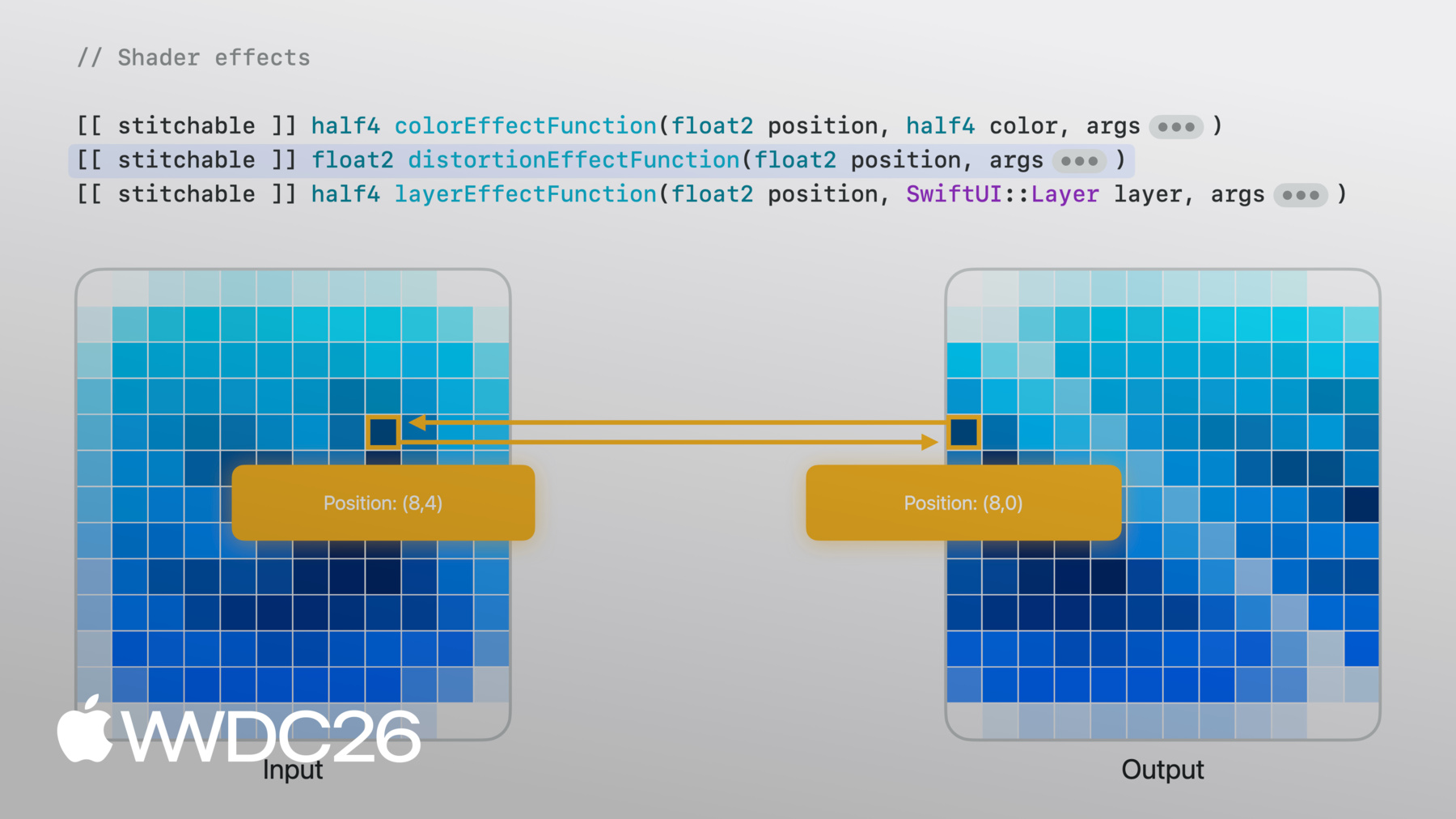
Shader函数并行运行。 每个像素独立执行 互不感知邻居的存在。 了解这一点后 就能理解 Metal shader 为何能通过SwiftUI的 shader效果API调用。 共有三种shader效果类型。 每种类型的方法签名不同 某些参数是必填的 不过你也可以追加额外参数 用于将SwiftUI中的信息 传递给shader。
colorEffect的工作方式是将 每个像素的颜色转换为新颜色 每个像素会得到 像素位置 以及原始视图在 该位置的像素颜色。 然后你根据这些信息 返回一个新颜色。 这适用于简单效果 例如将彩色图片 转换为黑白图片。
distortionEffect的工作方式不同。 它不是在某个位置 期望得到一种颜色 distortionEffect函数接收现有位置 然后给出一个新位置 SwiftUI将从原始图片的 该位置进行采样。 不涉及像素颜色 你告诉SwiftUI"我希望这个位置的颜色 跟随那个位置的颜色"。 这适用于几何效果 如此处展示的切变效果。
layerEffect是最灵活的。 layerEffect函数 仍按像素处理 但它提供了 整个视图的图层 让你能够采样 相邻像素或整个区域。 这适用于模糊等效果 其中输出像素颜色 取决于多个输入像素。
就我的用例而言 distortionEffect可行 但layerEffect能提供 最大的灵活性。 我将添加一个layerEffect modifier 然后添加一个名为 backgroundWarp的shader函数。
目前它只是从原始图层的 给定位置进行采样 返回同样的图片。 但现在我有了一个 可以继续构建的shader函数。
通过layerEffect 我可以从 原始视图的任意位置采样。 例如 我可以向shader函数传入 一个float2向量 并用它来偏移shader中 的采样位置。
为了匹配函数参数 我现在从SwiftUI端 传入一个float2向量。
随着偏移量增大 每个像素 都会以该偏移值运行shader 因此它们都会均匀地 从越来越远的位置采样。
当我将偏移量减回零时 图片恢复原样。
不过由于偏移量是均匀的 我只能得到固定模式下 偏移后的像素。 我需要更自然的效果 一种每个像素都不同的效果。
为了实现自然的变化 我使用NoiseTexture 这是一张预先计算好的 平滑随机值图片。
这次在SwiftUI端 我将视图尺寸与NoiseTexture 一起作为图片参数传入。
在Metal端 图片以texture2d的形式传入。
现在我来展示一些 非常底层的Metal代码。
我首先用当前像素位置 和尺寸来计算uv值 它代表我相对于 这张图片的位置 让我能在不使用绝对位置的情况下 对纹理进行采样。
现在来解析NoiseTexture。
它有RGB通道 红色和绿色通道 很有意思 因为每个通道都包含 不同的噪声图案。
移动uv时 红色和绿色值会随之变化。 这对不断变化的值 恰好非常适合 用作X和Y方向上的自然偏移 因为每个像素的值都不同。
回到Metal shader。
我创建一个带重复模式的采样器 使其能够平铺 然后在每个像素的UV位置 对噪声进行采样。 红色和绿色通道给我 一个二维偏移量 我将其缩放并加到位置上 从原始视图进行采样。 现在shader轻微扭曲了图片。
那是逐像素的变化 但我想要更丰富的效果。
于是我开始实验 如果不只采样一次噪声 而是采样两次会怎样。 第一次给我一个初始偏移量。 然后再次对噪声采样 但这次是在被初始偏移量 移动后的位置进行采样 就这样 我得到了这些自然流动的色块。
这种分层噪声方法是一种 著名技术 称为域变形。 下载示例App来探索 我是如何实现的 它还有预览功能 你可以 随意调整参数进行尝试。
现在我有了一个很酷的shader效果 但它还是静止的。 我需要让它动起来。 这就是时间发挥作用的地方。
不同于SwiftUI 基于transaction的动画 shader是无状态的。 它们不保留上一帧的记忆 输出仅取决于参数。 因此如果我想要动画 就需要 传入一个随时间变化的值。
TimelineView正是 我需要接入的管道。 通过动画调度 它每帧触发一次并附带时间戳。 我将时间戳传入shader 将其加到位置上 从噪声中采样 图案就开始流动了。
那就是由时间驱动的 shader动画。 对于我的文字稿视图 我也需要引入时间 让当前正在播放的 文字稿行 高亮显示并居中 在滚动视图中。
这是我的文字稿。 LazyVStack中的Text视图 放在ScrollView里。 每行都是独立的视图 这是熟悉的SwiftUI写法。 现在需要让它 跟随播放状态。
我用播放时间戳来判断 哪一行是当前行。 当前行粗体清晰 其余行淡出退后。 借助onChange modifier 监听当前行的变化 我滚动以保持当前行居中。
时间同步滚动视图 已可正常使用。 现在我想专注于当前行上 那个小小的时间戳。 每行都有一个时间戳 叠加在其上 但只有当前行的 时间戳可见。 这样它就不会干扰布局。 它始终存在 只是等待被显示。
让我们聚焦在这一行 一个子视图 附着在 容器的边缘。 如何实现? offset modifier无法做到这一点 除非知道两个视图的尺寸。
首先来聊聊对齐。 每个视图都有对齐方式。 把它看作布局系统用来 定位视图的参考点 由两个轴共同定义。
当我将子视图放入 overlay容器时 布局系统使用默认的 居中对齐将它们对齐。
可以把它想象成 一根针穿过两个视图 将它们固定在 各自的对齐点上。
我将overlay的对齐方式 改为.bottomLeading。
现在针穿过每个视图的 左下角点 它们在那里锁定在一起。
目前布局系统 请求左下角对齐 子视图返回其左下角点 让针穿过。
如果我要在代码中 明确表达这一点 我会在此编写一个对齐指南 表示bottom就是bottom。
现在 记住目标是 子视图的顶边应当 接触容器的底边。
如果我告诉子视图 当布局系统询问 bottom对齐时 不要使用默认的。 而是使用自定义覆盖 将bottom对齐移到顶边。
现在当针来穿过时 它会跟随那个点。
我通过编写纯语义覆盖 来得到这个结果 而无需手动偏移视图。 这个API还有更多功能。 我可以定义自己的自定义对齐方式 闭包给我提供ViewDimensions 让我能根据视图的实际尺寸 来计算点的位置。 查看"SwiftUI Alignment"的文档 了解完整内容。
就是这样。 最初那个简单的 文字稿视图 现在有了由shader和时间 驱动的动画背景 一个与播放同步 滚动的文字稿 以及一个通过对齐指南 定位的浮动时间戳。
全部来自简单的管道 组合在一起 并且能在所有Apple设备上运行。
让我们退一步来看。 我拿到一个设计 将它分解成各个层次 对于每一层 我找到了合适的API 将原始数据转化为视图。 每个阶段的输出 成为下一阶段的输入。
将这些阶段连接起来 就是我所说的创意流水线。 但这些是我为这个 播客App做出的选择。 对于你自己的App 这条流水线可以更具创意。 输入可以是陀螺仪数据 而不是音频。 Shader可以是涟漪效果 而不是扭曲效果。 前景可以是自由画布 而不是滚动视图。 每种组合都能 带来不同的效果。 这就是创意所在 而API始终如一。 输入什么 如何连接 那是你的自由。
所以去创造属于你的作品吧。 下载示例项目 尝试调整shader 改变噪声 调整速度 换一张图片。 在你自己的App中寻找机会 让一个小小的视觉效果 带来巨大的差异。 当你开始将这些管道 连接在一起时 你会惊讶地发现简单的东西 是如何迅速变得高级的。
感谢观看 再见!
-
-
4:18 - Cover art image
Image("CoverArt") -
4:24 - Blurred cover art image
Image("CoverArt") .blur(radius: 30) -
7:09 - Applying layer effect in SwiftUI
GeometryReader { proxy in CoverArtView() .layerEffect( ShaderLibrary.backgroundWarp(), maxSampleOffset: .zero ) } .ignoresSafeArea() -
7:21 - Writing layer effect shader in Metal
[[stitchable]] half4 backgroundWarp( float2 position, SwiftUI::Layer layer ) { return layer.sample(position); } -
7:39 - Metal shader with offset parameter
[[stitchable]] half4 backgroundWarp( float2 position, SwiftUI::Layer layer, float2 offset ) { return layer.sample(position + offset); } -
7:55 - SwiftUI layer effect with offset parameter
GeometryReader { proxy in CoverArtView() .layerEffect( ShaderLibrary.backgroundWarp( .float2(.init(x: 0, y: 0)) ), maxSampleOffset: .zero ) } .ignoresSafeArea() -
8:04 - SwiftUI layer effect with full-width offset
GeometryReader { proxy in CoverArtView() .layerEffect( ShaderLibrary.backgroundWarp( .float2(.init(x: proxy.size.width, y: 0)) ), maxSampleOffset: .zero ) } .ignoresSafeArea() -
8:37 - SwiftUI layer effect with noise sampling
GeometryReader { proxy in CoverArtView() .layerEffect( ShaderLibrary.backgroundWarp( .float2(proxy.size), .image(Image("NoiseTexture")) ), maxSampleOffset: .zero ) } .ignoresSafeArea() -
8:55 - Metal shader with noise sampling
[[stitchable]] half4 backgroundWarp( float2 position, SwiftUI::Layer layer, float2 size, texture2d<half> noiseTex ) { constexpr sampler s(address::repeat, filter::linear); float2 uv = position / size; half4 n = noiseTex.sample(s, uv); float2 offset = (float2(n.r, n.g) - 0.5) * 200.0; return layer.sample(position + offset); } -
10:22 - Metal shader with domain warping
[[stitchable]] half4 backgroundWarp( float2 position, SwiftUI::Layer layer, float2 size, texture2d<half> noiseTex ) { constexpr sampler s(address::repeat, filter::linear); float2 uv = position / size; half4 n = noiseTex.sample(s, uv); float2 q = float2(n.r, n.g); n = noiseTex.sample(s, uv + q); float2 offset = (float2(n.r, n.g) - 0.5) * 200.0; return layer.sample(position + offset); } -
11:16 - SwiftUI layer effect with static visual
GeometryReader { proxy in CoverArtView() .layerEffect( ShaderLibrary.backgroundWarp( .float2(proxy.size), .image(Image("NoiseTexture")) ), maxSampleOffset: .zero ) } .ignoresSafeArea() -
11:37 - SwiftUI layer effect with animated visual
@State private var startDate = Date.now TimelineView(.animation) { timeline in let elapsed = timeline.date.timeIntervalSince( startDate ) CoverArtView() .layerEffect( ShaderLibrary.backgroundWarp( .float2(proxy.size), .image(Image("NoiseTexture")), .float(elapsed) ), maxSampleOffset: .zero ) } -
12:15 - Basic transcript view
ScrollView { LazyVStack(alignment: .leading, spacing: 12) { ForEach(sampleTranscript) { line in .font(.title) .fontWeight(.bold) } } } -
12:33 - Time-synced transcript view
@State private var playback = PlaybackState() ScrollViewReader { scrollProxy in ScrollView { LazyVStack(alignment: .leading, spacing: 12) { ForEach(sampleTranscript) { line in Text(line.text) .transcriptLineStyle(isCurrent: line.id == playback.currentLineIndex ) } } } .onChange(of: playback.currentLineIndex, { _, i in scrollProxy.scrollTo(i, anchor: .center) }) } -
13:53 - Overlay with center alignment
Text(line.text) .overlay { Text(line.formattedTimestamp) } -
14:06 - Overlay with bottom leading alignment
Text(line.text) .overlay(alignment: .bottomLeading) { Text(line.formattedTimestamp) } -
14:32 - Overlay with alignment guide override
Text(line.text)
     .overlay(alignment: .bottomLeading) {
          Text(line.formattedTimestamp)
              .alignmentGuide(.bottom) { $0[.top] }
     }
-