

-
使用 MLX 探索 Swift 中的数值计算
使用 MLX Swift 将 NumPy 风格的计算原生引入 Swift。了解如何在一个类型安全的环境中统筹管理图像处理、张量运算和神经网络训练等任务,从而消除机器学习工作流程中的跨语言障碍。探索相关 API,尽享熟悉的编译器、工具和调试体验,同时充分发挥 GPU 加速的优势。
章节
- 0:00 - 简介
- 0:57 - MLX Swift 与 Apple 生态系统
- 3:04 - MLX Swift
- 4:28 - 曼德布洛特集合
- 6:34 - 热分布
- 8:12 - 采用 SOR 加快收敛速度
- 10:17 - 曲线拟合
- 12:17 - 完整的 MLX 工具包和生态系统
- 13:47 - 后续步骤
资源
- MLX Swift LM on GitHub
- MLX Swift Examples
- MLX Examples
- MLX Swift
- MLX LM - Python API
- MLX Explore - Python API
- MLX Framework
- MLX
相关视频
WWDC26
WWDC25
-
搜索此视频…
你好 我是David Koski 我在MLX Swift团队工作 数值计算 也称为数值分析 或科学计算 是一套用于解决 数学问题的技术和算法 这些问题往往难以 通过符号或手工求解 它们需要大量的计算 应用领域包括 化学仿真 生物学 物理学 和金融系统 其他领域包括 音频和信号处理 视觉应用包括渲染 光线追踪和分形 大规模梯度下降 可以进行任意曲线拟合 这是训练机器学习 模型的基础 今天我们将讨论 使用MLX Swift进行数值计算 Apple平台拥有丰富的 数值计算生态系统 每个现有框架在其 设计领域都表现出色 Accelerate为你提供 CPU上经过手动调优的向量原语 BNNS是神经网络的 基础构建块层 Metal Performance Shaders 让你直接访问GPU内核 Swift Numerics添加了 复数类型和泛型数值协议 那么何时使用MLX Swift呢 如果你的主要目标 是编写数学代码 同时注重性能 MLX Swift是一个 很好的解决方案 你所编写的代码 看起来就像你实现的数学公式 无需底层库的 编程开销 也不需要在纯Swift中 操作数组时繁琐的记录工作 它为何看起来像数学 核心思想很简单 数学家和数值分析师 使用向量和矩阵进行运算 不是对单个值 执行运算 而是一次性对 整个矩阵进行操作 MLX Swift以n维数组 作为核心抽象 就像NumPy和许多 其他框架一样 事实上 如果你用过NumPy 这个API会非常熟悉 大多数NumPy代码 只需少量修改即可转换为MLX Swift 这种表达方式 极具表现力且简洁明了 你编写时能理解 之后阅读时也能看懂 数组计算和惰性求值 使两件事成为可能 自动GPU执行 和自动微分 最棒的是 mlx-swift 和整个MLX生态系统 都是基于MIT许可证 的开源项目 我们欢迎提交Issue和PR 社区非常活跃 欢迎提问 修复Bug 让它变得更好 以下是今天的计划 我将先介绍MLX Swift 以及一些基本的矩阵向量运算 然后深入三个示例 展示 MLX Swift如何轻松 将数学转化为代码 Mandelbrot集的计算 求热分布的 稳态 以及最后的曲线拟合 首先 我们来谈谈MLX Swift 这里展示了一些MLX Swift操作 以幂迭代法为例 让我们逐步讲解 我们导入MLX 设置矩阵大小 和迭代次数 然后从正态分布中 采样随机矩阵和向量 接下来通过将B与 其转置相加构建对称矩阵 注意这与数学公式 有多相近 .T得到转置 加号执行矩阵加法 在循环内部 matmul执行 矩阵向量乘法 norm给出L2范数 同样 代码读起来就像数学 这里我们还看到MLX的 一个关键特性:惰性求值 对MLX数组对象的操作 会构建一个计算图 只有当你调用eval 或读取值时才会执行 在这样的循环中 每步调用eval以保持计算图小巧 惰性求值也是支持 MLX函数变换的基础 例如用于自动微分的grad
最后 我们恢复特征值 读取值会触发 计算的执行 与其他数组框架一样 MLX Swift代码读起来 几乎像数学公式 如果你实际上需要 矩阵的所有特征值 和特征向量 MLX Swift线性代数包 也提供了相应函数 让我们继续下一个示例 接下来是Mandelbrot集 它是一个经典分形 也是数组计算的 完美展示案例 我们对大量网格点 应用一个函数 其定义出人意料地简单 对于复平面上的 每个点c 迭代 z = z² + c 如果其模从未超过2 该点在集合内 并被染成黑色 如果发散 则根据 逃逸速度着色 分形之美在于它是自相似的 且无限精细 你可以永远平移和缩放 图案永不重复 我们先从使用标量的 纯Swift实现开始 你遍历每个像素 运行Mandelbrot迭代 并检查是否发散 它能正常工作 是符合Swift惯例的代码 但你需要管理大量 与问题本身无关的记录工作 而且它在CPU上运行 每次处理一个点 让我们来看MLX Swift
这是MLX Swift的实现 设置一个复数网格 即c 然后循环只需两行代码 z = z * z + c 同时应用于所有点 统计每个点保持有界 的迭代次数 就这样 代码是数学公式 的直接翻译 计算在整个网格点上执行 就像对单个点操作一样简单 默认使用GPU 带来快速的性能
纯Swift非常具有表现力 你可以自然地编写 数值计算代码 但你每次只处理一个标量 所以你需要自己 遍历每个点 繁琐的记录工作 会让数学逻辑变得模糊
MLX Swift专为 数值计算而构建 你对数组而非 标量进行操作 代码看起来就像你 想表达的数学公式 它在GPU上运行更快 并行处理所有点 快多少取决于 具体算法 但快10倍绝对是可能的 这一切都用更少 更简洁的代码实现 Mandelbrot是 典型的并行问题 每个点都是独立的 下一个示例不同 每个单元格与邻居交互 这种模式在物理学 图像处理和神经网络中随处可见 MLX用一个操作处理它 即卷积 想象一个有墙壁 和热源的房间 我们想知道内部 各处的稳态温度 求解这个问题的 最简单方法称为Jacobi迭代法 将温度建模为二维网格
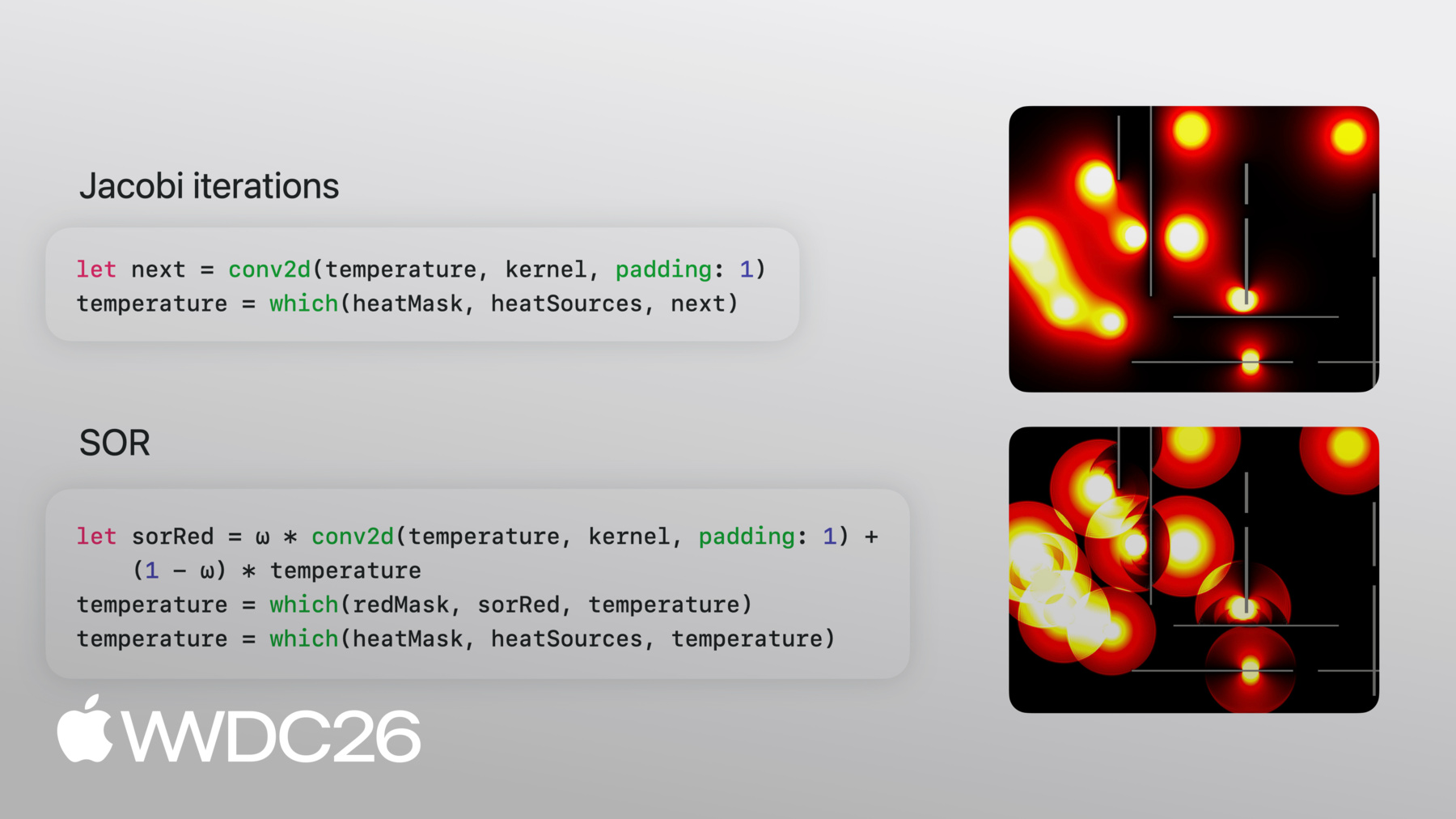
每次新迭代对 相邻值取平均 使用这样的模板 你不断重复此过程 热量向外扩散 直到达到稳态 注意更新只关注 一个小邻域 而且在每个点 使用相同的规则 这正是卷积的本质 让我们看看代码 这是MLX Swift中 求解器的核心代码 让我来逐步讲解 卷积核就是上一张幻灯片的模板 直接写出来 四个邻居各占四分之一 中心和角落为零 温度网格从热源 开始初始化 这是一个合理的初始值 循环内部只有两行 第一行是物理部分 conv2d将模板 一次性应用于整个网格 第二行处理 边界条件 这是一个逐元素的三元运算 凡是掩码标记为热源或墙壁的地方 保留固定值 其他地方取卷积 得到的新值 就这样 数学说对四个邻居取平均 我们用一次conv2d调用 实现了这一点 Jacobi迭代计算速度快 但收敛缓慢 热量每次只移动一个单元格 通常达到稳态 需要N²次迭代 其中N是网格的边长 就像快速排序比 冒泡排序做更少的工作 有些算法能用 更少的工作达到稳态 其中一种称为 逐次超松弛法(SOR) 该方程看起来 类似于Jacobi迭代 实际上它使用 相同的卷积核 它使用参数omega 将每次更新在 变化方向上推得更远 稍微过冲以 更快地到达目标 过冲会在迭代中 逐渐恢复 omega参数可以根据 数组的大小计算得出 使用最优值时 将在N次迭代内收敛 该技术的另一个关键 是原地更新 MLX通常生成新数组 而不是原地更新 但红黑棋盘格模式 通过交替处理单元格 可用于计算新值 达到相同的效果 来看代码 首先根据网格大小 计算最优omega 你可以看到 我们在这里如何使用omega 它与方程完全一致 我们使用棋盘格掩码 交替更新数组中的单元格 现在黑色单元格 运行相同的更新 但这次它们的红色邻居 已经有了最新的值 这正是我们需要的 原地更新效果 像之前一样在循环中重复 让我们看看差异 Jacobi和SOR的代码 几乎完全相同 而且都与数学公式 高度吻合 让我们看看它们的运行效果 你可以看到上方的Jacobi 缓慢扩散 而下方的SOR 快速填满区域 SOR运行时 呈现出明显的波纹图案 那是实时的过冲 和修正过程 最终两者都收敛到 相同的状态 还有一件事 我不得不将SOR放慢100倍 才能让它清晰可见 选择正确算法 的威力 前两个示例是 正向计算 从输入开始 计算输出 最后一个则相反 你有输出 即数据点 你想找到能产生 这些数据的参数 这是我们将应用 一个关键函数变换的地方 由MLX Swift提供 用于自动微分的grad 假设你有一些数据点 你想找到一个函数 来近似这些点 你决定所需函数的结构 可以是多项式 正弦之和 或任何你喜欢的形式 在这个例子中 我们将使用多项式 一个给我们抛物线的 二次函数 你想最小化损失 即函数输出与 实际数据之间 差值平方的均值 这与训练每个机器学习 模型的核心思想相同 只是规模更小
要最小化损失 我们需要关于参数的 梯度 以及用于更新参数的 优化循环 我们定义函数f 和损失函数 即均方误差 接下来我们创建theta 即要拟合的系数 并将损失函数变换 为一个能产生精确梯度的函数 关于参数的梯度 我们无需手动 编写任何导数 这些都是由MLX推导出来的 在优化循环中 我们在当前参数处 计算梯度 迈出一小步 并调用eval 清空计算图 每次迭代都如此 防止计算图无限增长 这就是梯度下降
这是效果展示 抛物线很快接近 并超过数据 然后逐渐收敛到 越来越接近的近似值 这个示例用的是简单多项式 我们本可以用线性代数包中的QR 直接拟合曲线 梯度适用于 任意复杂的函数 如果你需要的 不仅仅是梯度 MLX提供了一套 优化算法 如SGD Adam RMSprop等
今天我展示了数组计算 卷积和grad 但MLX包含完整的 数值计算工具包 以下是部分示例 线性代数 FFT N维卷积 归约运算 扫描运算 索引 随机数生成 以及更多功能 基于MLX Swift构建的 软件包生态系统已相当健全 核心mlx-swift仓库 就是本次Session中展示的框架 mlx-swift-lm是Swift语言 模型实现所在的地方 mlx-swift-examples包含 可供入门参考的示例程序 本次Session的示例 也将发布在那里 所有这些都是开源的 只需几行代码 就可通过Swift Package Manager安装 MLX不只支持Swift 它是一个具有四个前端的框架 Swift Python C++和C 第三方还构建了更多前端 以满足更多需求 它们共享相同的概念 相同的操作 以及相同的惰性求值模型 概念和模式在它们之间 只需少量修改即可迁移 因此你可以用Python原型设计 用Swift发布 Python还拥有更广泛的 研究生态系统 mlx-lm和mlx-vlm 这两个项目值得关注 如果你想了解Python端 已经构建了什么 我鼓励大家去看看 mlx-swift和mlx-swift-examples mlx-swift有完整的文档 以及可供探索的测试 帮助你了解其工作原理 mlx-swift-examples有 各种示例应用程序 展示了LLM集成 Stable Diffusion 模型训练和微调 以及本次演讲中 展示的示例 你有数值计算需求吗 或者只是想玩玩 有趣的仿真 和可视化 不妨试试 如果有什么想法被激发出来 我鼓励大家积极参与 做出贡献 有一些开放的Issue 你可以尝试修复 或者创建一个 新的示例程序 感谢收看
-
-
3:04 - Power iteration with MLX Swift arrays
import MLX let n = 100 let steps = 10 let B = MLXRandom.normal([n, n]) var v = MLXRandom.normal([n]) // get symmetric matrix A = Bᵀ + B let A = B.T + B // Power iteration → top eigenvector of A. // v ← A v / ‖A v‖ for _ in 0 ..< steps { let Av = matmul(A, v) v = Av / norm(Av) eval(v) } // recover the eigenvalue. // λ = vᵀ A v let lambda = matmul(matmul(v.T, A), v) print(lambda) -
5:09 - Mandelbrot set in plain Swift (scalar)
// Plain Swift, scalar-at-a-time var counts = Array2D<Int>(width: w, height: h) for y in 0 ..< h { for x in 0 ..< w { let c = Complex(xMin + Float(x) * xStep, yMin + Float(y) * yStep) var z = Complex<Float>.zero var limit = maxIterations for i in 0 ..< maxIterations { z = z * z + c if z.lengthSquared > radiusSquared { limit = i break } } counts[x, y] = limit } } -
5:27 - Mandelbrot set in MLX Swift (array)
// Compute the Mandelbrot set on a grid of complex numbers import MLX let x = linspace(Float(-2.0), 0.5, count: w) let y = linspace(Float(-1.25), 1.25, count: h).reshaped(h, 1) let c = x + y.asImaginary() var z = MLXArray.zeros(like: c) var counts = MLXArray.zeros(c.shape, dtype: .int16) for _ in 0 ..< maxIterations { z = z * z + c // iterate z ← z² + c counts = counts + (abs(z) .< 2) // count bounded iterations } -
7:27 - Jacobi iteration with conv2d
// Jacobi iteration: average the four neighbors // Convolution weights let kernel = MLXArray(converting: [ 0, 0.25, 0, 0.25, 0, 0.25, 0, 0.25, 0, ]).reshaped(1, 3, 3, 1) // Initial value var temperature = heatSources // Run this in a loop until convergence let next = conv2d(temperature, kernel, padding: 1) temperature = which(heatMask, heatSources, next) -
9:17 - Successive Over-Relaxation (SOR)
// Successive Over-Relaxation: blend the previous and next state let ω: Float = 2.0 / (1.0 + sin(Float.pi / Float(max(M, N)))) let redMask = checkerboard(rows: M, cols: N, phase: 0) let blackMask = checkerboard(rows: M, cols: N, phase: 1) // Update red cells using black neighbors let sorRed = ω * conv2d(temperature, kernel, padding: 1) + (1 - ω) * temperature temperature = which(redMask, sorRed, temperature) temperature = which(heatMask, heatSources, temperature) // Update black cells using (now-updated) red neighbors let sorBlack = ω * conv2d(temperature, kernel, padding: 1) + (1 - ω) * temperature temperature = which(blackMask, sorBlack, temperature) temperature = which(heatMask, heatSources, temperature) -
11:13 - Curve fitting with automatic differentiation
// Define a loss, then optimize it with autodiff
// x, y: data points as MLXArrays
func f(_ θ: MLXArray) -> MLXArray {
    θ[0] + θ[1] * x + θ[2] * x ** 2
}

func loss(_ θ: MLXArray) -> MLXArray {
    mean((f(θ) - y) ** 2)
}

var θ = zeros([numParams])
let gradLoss = grad(loss)

for _ in 0 ..< steps {
    let g = gradLoss(θ)         // ∇L(θ)
    θ = θ - learningRate * g    // parameter update
    eval(θ)                     // force evaluation
}
-