

-
使用 TextKit 提升 App 的文本体验
了解如何将内置文本视图的便利性与 TextKit 的控制优势相结合。我们将介绍如何借助新的 API,通过行号、可折叠部分等自定行为,轻松地扩展 UITextView 和 NSTextView。我们还将深入探索 TextKit 架构,并详细讲解文本附件的全新缓存和重用策略。为了充分从这个讲座中获益,我们建议你观看 WWDC21 视频“认识 TextKit 2”和 WWDC22 视频“TextKit 和文本视图的新功能”。
章节
- 0:00 - 简介
- 3:09 - TextKit 架构
- 9:17 - TextKit 新增功能
- 11:27 - 扩展框架文本视图
- 12:58 - 示例: 带行号的代码编辑器
- 17:52 - 示例: 可折叠的食谱章节
- 19:56 - 文本附件和视图提供者重用
- 23:00 - 后续步骤
资源
相关视频
WWDC26
WWDC22
WWDC21
-
搜索此视频…
你好,欢迎收看 《用 TextKit 提升应用的文字体验》。 我是 Tarun Uday, TextKit 团队的一名工程师。 TextKit 是 Apple 的下一代 文字引擎, 也是文字排版 和渲染的基础, 贯穿 Apple 所有平台。 SwiftUI、UIKit 和 AppKit 中的文字控件 都使用 TextKit 来排版 和渲染文字内容。 在这个视频中, 我想谈谈 我们从开发者那里 听到了一段时间的话题, 便利性与控制性之间的矛盾, 以及我们为解决 这一问题而构建的新 API。 如果你正在 Apple 平台上 构建文字编辑体验, 你有两条路可选。 第一条路是使用 框架文字视图。 即 AppKit 中的 NSTextView、UIKit 中的 UITextView,以及 SwiftUI 中的 TextEditor。 使用这些控件, 你可以免费获得大量功能。 文字输入、选择、 辅助功能、撤销与重做, 听写、内联预测等更多功能。 这些文字视图在内部使用 TextKit, 但内部实现基本上是隐藏的。 你自定义文字绘制方式的能力有限, 或自定义视口管理 其可视元素的方式。
第二条路是将 TextKit 用作文字引擎, 并直接在视图 或图层中渲染文字。 我们将其称为自定义文字视图, 以与之区分 预封装的框架文字视图。 你需要设置一个 NSTextLayoutManager, 在自己的视图或图层上 实现视口布局, 并自行处理所有渲染工作。 当你构建自定义文字视图时, 你可以完全控制存储、布局, 以及视口布局过程, 但你也放弃了框架文字视图 所提供的一切。 而且从头开始构建 生产级的文字编辑体验 需要大量工作。 但对于某些场景, 在框架文字视图的便利性 与自定义文字视图的 控制性之间做出选择是很困难的。 今天,我们将探讨 如何兼得两者的优势。 若要深入了解 TextKit 架构 和自定义文字视图, 请观看 WWDC21 的《认识 TextKit 2》。 若要了解框架文字视图 如何采用 TextKit 的详情, 请观看 WWDC22 的 《TextKit 和文字视图的新变化》。 虽然本演讲是独立的, 但这两个演讲将为我们今天涵盖的 所有内容提供更深厚的基础。 我将首先回顾 TextKit 的架构。 之后,我将介绍我们在 TextKit 中引入的一些新 API。 最后,我将通过一些示例向你展示 扩展文字视图的新方式。
理解 TextKit 架构 至关重要, 对于打造出色的自定义文字体验来说。 让我们从这里开始。
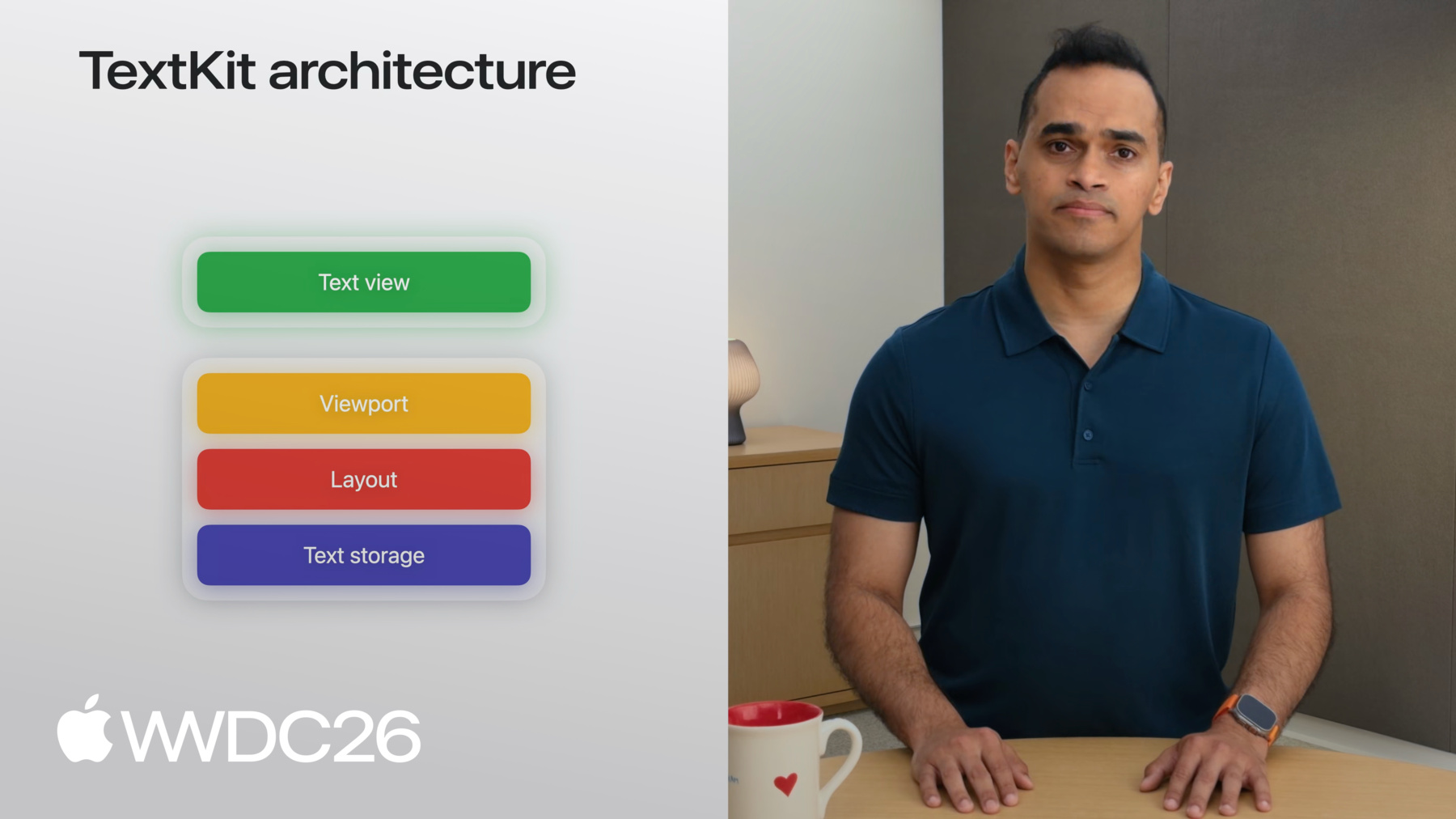
TextKit 使用四层架构 进行文字渲染。 底层是文字存储层。 它封装了所有待渲染的文字数据。 布局层位于 文字存储层之上。 它负责将文字分割成块 以供渲染。 接下来是视口层。 它跟踪布局中 哪些块是可见的。 最顶层是视图层。 这是文字在你的应用中 显示的地方。 存储层、布局层和视口层 在 Apple 所有 UI 框架中共享。 你可以使用这些共享层 在任何视图上渲染文字, 或由 UI 框架提供的 类视图可绘制可视元素上。 接下来,我将介绍每层的工作原理。 通过了解构成每层的各部分, 你可以自定义 TextKit, 在应用中创造独特的体验! 为此,我将以渲染一个 长 NSAttributedString 为例, 在自定义文字视图中。 文字内容存储负责 将这个属性字符串 分割成段落。 在此示例中, 文字内容存储 创建 NSTextParagraph 对象, 用于底层属性字符串 的每个段落。 NSTextContentStorage 和 NSTextParagraph 是与 NSAttributedStrings 配合使用的具体类型。 如果你有不同的 后端存储类型, 你可以编写相应 抽象类的子类: NSTextContentManager 和 NSTextElement。
好的,这就是文字存储层。 继续此示例, 接下来我们来看布局。 文字内容存储将属性字符串 分割成段落后, NSTextLayoutManager 会执行工作, 为段落的渲染做准备。 文字布局管理器高效地 测量字形的度量, 这些字形构成所表示的文字, 并动态创建一个 NSTextLayoutFragment, 用于存储段落的 计算布局信息。 这些对象是不可变的。 这意味着,如果段落被编辑, NSTextParagraph 和 NSTextLayoutFragment 将被重新创建。 例如,如果我将单词 sandwich 替换为 slider, 将为该段落创建一个 新的 NSTextParagraph, 以及相应的新 NSTextLayoutFragment, 并附带新的布局信息。 接下来,我将展示顶部两层, 视口层和视图层, 如何协同工作以高效 渲染大量文字! 文字视图是一个动态大小的视图, 随着文字被排版和绘入其中而增大, 并随着文字被删除而缩小。 视口是文字视图中 对用户可见的部分。 TextKit 将所有工作 围绕视口组织, 只渲染用户能看到的文字。 这意味着,使用 TextKit 时 你的核心任务之一 是增强用户的交互, 基于视口提供的布局信息。 为了促进将布局片段 渲染到文字视图上, TextKit 提供了一个专用类: NSTextViewportLayoutController。 NSTextViewportLayoutController, 我将简称其为视口控制器。 视口控制器与文字布局管理器 协调配合, 与文字视图一起高效布局 和渲染段落文字。 让我来演示一下。
文字视图知道滚动位置, 以及视口相对于 整个文档的大小, 并将此信息提供给 视口控制器。 视口控制器随后 请求文字布局管理器 提供所有与视口 相交的布局片段, 并将它们发送给 文字视图进行渲染。 这种由视口控制器 促进的协调, 在每次视口状态改变时重复。 即任何滚动、编辑 或选择事件, 这被称为视口布局过程。 视口布局过程是 TextKit 高效布局和渲染的核心。 就是这样! 要构建你自己的自定义文字视图, 请实例化 NSTextContentStorage、 NSTextLayoutManager, 并使用 NSTextViewportLayoutController 及其委托, 即 UI 框架提供的视图, 来渲染文字。 即使我将文字视图 称为视图, 这也可以是任何可绘制的可视元素, 由 UI 框架提供的。 例如, 在 UIKit 中,你可以选择 UIView 或 CALayer 来将文字渲染 到自定义文字视图中。 UI 框架还打包了 自己的文字视图类型, 为你方便地提供 这些 TextKit 层。 在 UIKit 中,你可以使用 UITextView 来实现 开箱即用的文字编辑体验。 AppKit 和 SwiftUI 有类似的视图。 有时,框架文字视图 可能无法满足你的应用需求。 也许你正在构建一个应用, 它有多种呈现方式 来展示相同的文字。 将多个文字布局管理器 连接到同一个文字内容存储, 在一个视图中的编辑 将通过共享的内容存储 传播到另一个。
这意味着你可以 呈现同一文档 在两个不同的视图中, 它们会自动保持同步。 借助 TextKit 提供的灵活性, 你可以构建自定义文字视图, 采用适合你场景的 分层配置。 现在,让我们来看看 一些新 API, 这些是我们在 TextKit 中 引入的新功能。 在上一节中,我们讨论了 从布局片段渲染文字 到视口上。 这就是视口布局过程。 而在 2027 年的版本之前, 我们没有办法引用 目标视图 即跨 TextKit 渲染文字的地方。 这意味着,虽然 TextKit 帮助你跟踪布局片段, 但它没有帮助你跟踪 绘制它们的视图。 首先,认识一下 NSTextViewportRenderingSurface。 这是一个新协议, 表示视口内的可视元素, 你可以绘制到其中: 实际渲染布局片段文字的视图, 并提供通用的 抽象以供使用。 你可以将 UIView、 NSView 或 CALayer 遵循此协议, 并在视口控制器的 委托方法中使用它, 以跟踪视口中 哪些视图是可见的。 渲染表面附带一个 配套键协议: NSTextViewportRenderingSurfaceKey。 渲染表面键是任何可以 唯一标识渲染表面的类, 跨越视口布局过程周期, 例如 NSTextLayoutFragment。 这意味着你可以使用 NSTextLayoutFragment 作为键,在映射表或字典中 缓存渲染表面。
视口布局过程在内部 广泛使用渲染表面键 到渲染表面的映射。
你可以为键分配 一个渲染表面, 在视口布局过程中, 通过使用 renderingSurfaceFor 委托方法。 这些在视口布局过程 开始时被清除。 你可以查询特定键的 渲染表面, 在 didLayout 过程中, 使用视口控制器的 renderingSurfaceFor 方法。 这些新 API 使你能够 使用和自定义 你自己的渲染表面, 在使用 TextKit 构建 自定义文字视图时。 现在我们已经了解了 TextKit 在 2027 版本中的工作原理, 让我们来看看文字视图 是如何驱动 Apple 默认 文字体验的。 UIKit 的 UITextView 和 AppKit 的 NSTextView 驱动着 Apple 平台上 数千种长文本体验, 包括"信息"、TextEdit、 "备忘录"和"日记"。 如果你有 SwiftUI 应用, 实现长文本体验 最方便的方式 是使用 TextEditor。 但你也可以在应用中 包含 UITextView
或 NSTextView, 通过使用 ViewRepresentable。 让我来展示。
首先,我将创建一个 名为 MyTextView 的视图。 我将填充 MyTextView 的 body, 用一个 ViewRepresentable, 我将其命名为 TextViewRepresentable。
TextViewRepresentable 将有条件地成为 macOS 上的 NSViewRepresentable, 否则为 UIViewRepresentable。 在 NSViewRepresentable 内部, 你只需调用 NSTextView 的初始化器, 或在 makeNSView 方法中 调用 NSTextView 子类的初始化器。 并在 UIViewRepresentable 内部 对 UITextView 做同样的事。 你可以在附带的示例应用中 查看具体示例。 为了向你展示如何使用 UITextView 的 TextKit 钩子来扩展 UITextView, 我将创建几个 不同的示例应用。 在我的第一个示例中,我想为 iPad 构建一个代码编辑器, 这样当我离开 Mac 时 也可以快速编写一些代码。 我将从 UITextView 子类开始, 初始化它,并将字体设置 为等宽系统字体。
好,这是个开始! 但如果看不到行号, 这并不是一个很好的代码编辑器体验。 那我们开始构建吧。 首先,我们创建一个视图, 能够容纳 TextView 和 lineNumberView。 我们将其命名为 ContainerView。 ContainerView 将持有 我们的 UITextView 子类, 以及一个用于显示行号的 UIView。 我有一个基本设置, 现在我想重新计算 并显示视口中布局片段的 NSTextParagraph 索引, 每当视口发生变化时。 为此, 我需要文字视图在 其视口控制器 完成视口布局过程时 收到通知。
现在这是可行的! 从我们 2027 年的版本开始, UITextView 和 NSTextView 现在 遵循 NSTextViewportLayoutControllerDelegate。 这意味着你可以子类化 UITextView 或 NSTextView, 并覆盖委托方法 以添加自己的行为。 接下来我就来做! 在我的 TextView 子类中, 我将覆盖委托方法。 首先,我将覆盖 WillLayout 方法来做一些设置工作。 稍后我会展示详细内容。 我将覆盖 configureRenderingSurface 方法, 以捕获待渲染段落的边界。 最后,我将覆盖 DidLayout 方法, 将累积的信息 回传给 ContainerView, 以便渲染行号。 在展示这些方法之前, 我将为子类添加一些状态。 我将从一个数组开始, 用于累积每个段落的边界, 文字视图排版这些段落, 一个整数用于跟踪 起始行号, 以及一个闭包, 我将用它将累积的信息 发送给 ContainerView, 以便渲染行号。 视口控制器委托方法 帮助文字视图了解 何时发生滚动 或编辑, 以便我们可以重绘行号。 接下来我将实现这些方法, 从 WillLayout 开始。 我先调用 super。 记住在所有这些委托方法中 都要这样做。 我将清空 lines 变量, 以便准备好 存储布局片段的边界。 我们还需要起始行号, 基本上是视口开始之前 所有段落的计数。
让我在单独的函数中实现, 并在 willLayout 方法 中调用它。
我先做一些简单的 nil 检查和变量命名。 我将使用 enumerateTextElementsFromTextLocation 方法 来枚举元素, 并递增计数, 直到到达 viewportRange。 就是这样! 示例代码通过缓存 改善了这一点, 这样你就不需要在 每次布局过程中支付此开销。 让我们回到委托方法, 看看如何获取 每个段落的边界。
我们将使用 下一个委托方法来实现: configureRenderingSurface for textLayoutFragment。 我再次先调用 super, 以获得默认的 文字视图行为, 然后将 lines 数组追加, 附加布局片段的 layoutFragmentFrame 变量。 这就是 configureRenderingSurfaceFor textLayoutFragment 方法的全部内容。 此方法将为视口中 每个段落触发。 让我们来看 DidLayout 方法。 此时, 我已拥有视口中 每个段落的边界信息, 并想将其传递给 ContainerView。 在触发闭包之前, 我需要将片段帧 从文字容器坐标 转换为视口坐标。 我通过减去视口原点来实现。 然后,我将起始行号 和调整后的帧 传递给 ContainerView。 回到 ContainerView, 我设置闭包。 对于每个帧,我计算 实际的行号, 通过将索引 加到起始行号, 并在行号视图中 的正确位置绘制它。 就是这样。 我们设置了变量, 收集了文字视图中 每个段落的边界, 并将其传递给 ContainerView 以显示。 让我们运行应用,看看效果如何。 完美, 我们只用几行代码就为 UITextView 添加了行号。 还有更多工作要做, 但这是构建代码编辑器的良好开端。 使用框架文字视图的 视口布局过程 是一种强大的方式 来访问和显示 各段落的信息。 让我再展示一个示例。 这次涉及修改多个段落的布局。 在这里,我设置了一个 UITextView 来显示我最喜欢的一些食谱。 但我真的很想 一次只看一个食谱。 也就是说,我想将每个 多段落的食谱 折叠成只显示标题。 为此,我将从上一个示例中 相同的三个视口委托方法开始。
但在此基础上, 如果段落被折叠, 我希望避免对其进行布局。 为此,我将让 TextView 遵循 NSTextContentStorageDelegate。
通过此遵循, 我将获得对 textContentManager: shouldEnumerate 的访问, 这将帮助我将 textElements 标记为折叠或未折叠。 记住,NSTextContentManager 只是 NSTextContentStorage 的抽象版本, 而 NSTextElement 是 NSTextParagraph 的抽象版本。
我们需要一些状态来持有 哪些部分被折叠。 我们将使用整数集合 来跟踪段落偏移量, 以唯一标识每个段落。
此外,我们添加一个方法来处理 用户点击切换按钮的情况。
这些就是你需要的所有部分。 使用文字内容存储委托方法 跳过布局, 处理视口中 进行布局的每个段落, 使用视口控制器 委托方法, 并处理用户交互, 即用户点击 某节展开按钮时。 你可以查看示例代码 了解详情。 让我们看看这实现了什么。 我可以点击旁边的三角形, 将任何食谱折叠成只显示标题,
而且我就在 UITextView 中完成了这一切。 好,让我们退一步来看。 到目前为止, 我们的示例都是关于文字、 段落、行号 和节标题。 但文字视图显示的 远不止文字。 想想"信息"中 的内联照片和贴纸。 或者"备忘录", 里面有绘图和文件扫描。 所有这些非文字内容 都存在于文字视图中, 由 TextKit 管理。 这些被称为文字附件。 文字附件遵循与 普通文字相同的架构。 让我聚焦于一个段落, 并用回形针符号 来表示附件, 以简化说明。 文字附件存储在 文字存储中, 就像任何其他字符一样, 通过使用 NSTextAttachment 对象来实现。 当布局管理器遇到 文字附件时, 它会请求一个 NSTextAttachmentViewProvider, 这是布局层中 相应的对象。 视图提供者提供 必要的信息, 以将附件渲染 到文字视图中。 这带来了一个挑战。 由于这些对象是不可变的, 如果我们要编辑 段落中的文字, 所有实例都必须 被丢弃并重新创建。 让我展示一个具体示例。 假设我正在构建一个 带内联动画的消息应用。 在我编辑时请仔细观察。 动画在每次编辑时 都会为对应段落重新开始。 我的视图提供者 在每次编辑时都被重新创建, 这会重新启动动画。 为了解决这个问题, 我们在 UITextView 上添加了新 API。 初始化文字视图后, 我使用 register forTextAttachmentViewProviderType 方法 为特定的视图提供者 注册重用策略, 对应 NSTextAttachmentViewProvider 的特定子类。 对于第一个参数, 我添加 onEditingInlineParagraphs 重用策略。 这在段落编辑过程中 保留视图提供者, 因此按键不会销毁 我的视图提供者。 对于第二个参数, 我提供视图提供者子类类型, 文字视图将负责处理 该特定类的所有对象! 在示例代码中,你可以看到 第二种重用策略: onScrollingOutOfViewport。 这会在附件 滚出屏幕时缓存其渲染表面,
并在其返回时恢复。 你可以根据场景 组合使用两种重用策略。 现在,在编辑时,UITextView 会重用视图提供者, 保持状态, 避免任何动画故障。
就是这样! 三个在 UITextView 中 使用 TextKit 的示例: 文字编辑器的行号, 食谱应用中的可折叠节, 以及简单文字视图中 内联文字附件的重用。 你可以下载示例应用 查看详情。
总结一下,要创建便利而强大的 富文本编辑器体验, 在 UIKit 上使用 UITextView, 在 AppKit 上使用 NSTextView 启动你的应用。 如果你有 SwiftUI 应用, 使用 ViewRepresentable 将这些文字视图包含到你的应用中。 对于那些想要对文字渲染 有更多控制权的人, 使用 TextKit 创建自定义文字视图, 并使用新的渲染表面 API。 查看示例代码, 了解可折叠节、 行号和内联附件重用的实际效果。 感谢观看!
-
-
9:47 - NSTextViewportRenderingSurface conformance
class MyView: UIView, NSTextViewportRenderingSurface {} -
10:25 - NSTextViewportRenderingSurfaceKey and NSMapTable
class MyView: UIView, NSTextViewportRenderingSurface {} var cache: NSMapTable<NSTextLayoutFragment, MyView> -
12:39 - UITextView/NSTextView in SwiftUI via ViewRepresentable
// Using a TextView in SwiftUI import SwiftUI struct MyTextView: View { var body: some View { TextViewRepresentable() } } #if os(macOS) struct TextViewRepresentable: NSViewRepresentable { func makeNSView(context: Context) -> NSTextView { NSTextView() } func updateNSView(_ nsView: NSTextView, context: Context) { } } #else struct TextViewRepresentable: UIViewRepresentable { func makeUIView(context: Context) -> UITextView { UITextView() } func updateUIView(_ uiView: UITextView, context: Context) { } } #endif -
13:33 - ContainerView with TextView and line number view
// Create a text view subclass for a code editor import UIKit class TextView: UITextView {} class ContainerView: UIView { let textView = TextView() let lineNumberView = UIView() textView.font = UIFont.monospacedSystemFont } -
14:42 - Three NSTextViewportLayoutControllerDelegate overrides
// Override viewport controller delegate methods class TextView: UITextView { // Set up override func textViewportLayoutControllerWillLayout(_ textViewportLayoutController: NSTextViewportLayoutController) { super.textViewportLayoutControllerWillLayout(textViewportLayoutController) //... } // Get paragraph bounds override func textViewportLayoutController (_ textViewportLayoutController: NSTextViewportLayoutController, configureRenderingSurfaceFor textLayoutFragment: NSTextLayoutFragment) { super.textViewportLayoutController(textViewportLayoutController, configureRenderingSurfaceFor: textLayoutFragment) //... } // Share accumulated info back to ContainerView override func textViewportLayoutControllerDidLayout (_ textViewportLayoutController: NSTextViewportLayoutController) { super.textViewportLayoutControllerDidLayout(textViewportLayoutController) //... } } -
15:59 - startingLineNumber(for:) using enumerateTextElements
func startingLineNumber(for viewportRange: NSTextRange?) -> Int { guard let viewportRange, let storage = textLayoutManager?.textContentManager as? NSTextContentStorage else { return 0 } let startLocation = storage.documentRange.location var count = 1 storage.enumerateTextElements(from: startLocation) { element in guard let range = element.elementRange else { return true } if range.location.compare(viewportRange.location) != .orderedAscending { return false } count += 1 return true } return count } -
17:02 - DidLayout: convert frames to viewport coordinates
// Override viewport controller delegate methods class TextView: UITextView { private var lines: [CGRect] = [] private var startingLineNumber = 0 var onDidLayout: ((Int, [CGRect]) -> Void)? // Share accumulated info back to ContainerView override func textViewportLayoutControllerDidLayout (_ textViewportLayoutController: NSTextViewportLayoutController) { super.textViewportLayoutControllerDidLayout(controller) let origin = controller.viewportBounds.origin onDidLayout?(startingLineNumber, lines.map {$0.offsetBy(dx: 0, dy: -origin.y) }) } } -
17:16 - Draw line numbers in ContainerView closure
// Draw line numbers in the ContainerView class ContainerView: UIView { let textView = TextView() let lineNumberView = UIView() func setup() { textView.onDidLayout = {startingLineNumber, lines in let attributes: [NSAttributedString.Key: Any] = [ .font: UIFont.monospacedSystemFont(ofSize: 11, weight: .regular), .foregroundColor: UIColor.secondaryLabel ] for (i, frame) in lines.enumerated() { let number = "\(startingLineNumber + i)" as NSString number.draw(at: CGPoint(x: 8, y: frame.minY), withAttributes: attributes) } } } } -
19:22 - Collapsible sections: full TextView class
// Add collapsible sections to your text view class TextView: UITextView, NSTextContentStorageDelegate { var collapsedSections: Set<Int> = [] // Set up override func textViewportLayoutControllerWillLayout(_ textViewportLayoutController: NSTextViewportLayoutController) { super.textViewportLayoutControllerWillLayout(textViewportLayoutController) //... } // Get paragraph bounds override func textViewportLayoutController (_ textViewportLayoutController: NSTextViewportLayoutController, configureRenderingSurfaceFor textLayoutFragment: NSTextLayoutFragment) { super.textViewportLayoutController(textViewportLayoutController, configureRenderingSurfaceFor: textLayoutFragment) //... } // Share accumulated info back to ContainerView override func textViewportLayoutControllerDidLayout (_ textViewportLayoutController: NSTextViewportLayoutController) { super.textViewportLayoutControllerDidLayout(textViewportLayoutController) //... } // Skip layout for paragraphs marked as collapsed func textContentManager(shouldEnumerate textElement: NSTextElement, options: NSTextContentManager.EnumerationOptions) -> Bool { //... } // Handle section collapse toggling func toggleSection(headerOffset: Int) { if collapsedSections.contains(headerOffset) { collapsedSections.remove(headerOffset) } else { collapsedSections.insert(headerOffset) } guard let textLayoutManager = textLayoutManager else { return } let textViewportLayoutController = textLayoutManager.textViewportLayoutController textViewportLayoutController.delegate?.textViewportLayoutControllerReceivedSetNeedsLayout?(textViewportLayoutController) } } -
22:06 - Text attachment view provider reuse policy
// Cache text attachment view providers

import UIKit

class ViewController: UIViewController {

    var textView: UITextView

    func setupTextView() {
        textView = UITextView()
        textView.register(
            [.onEditingInlineParagraphs],
            forTextAttachmentViewProviderType: AnimatedAttachmentViewProvider.self
        )
    }
}
-