

-
HealthKit 운동 영역을 사용해 운동 인사이트 제공하기
HealthKit을 사용하면 앱에서 심박수 및 사이클링 파워 영역과 같은 운동 인사이트를 더 쉽게 제공할 수 있습니다. 내장된 맞춤형 영역을 활용하거나 맞춤형 영역을 생성하는 방법을 알아보세요. 현재 운동 영역과 각 영역에서의 소요 시간을 사용하여 운동 중 및 운동 후에 의미 있는 지침을 제공하는 방법을 살펴보세요.
챕터
- 0:01 - 소개
- 2:17 - 운동 영역 접근하기
- 6:19 - 실시간 영역 업데이트
- 8:11 - 선호 영역
- 9:00 - 맞춤 영역
리소스
-
비디오 검색…
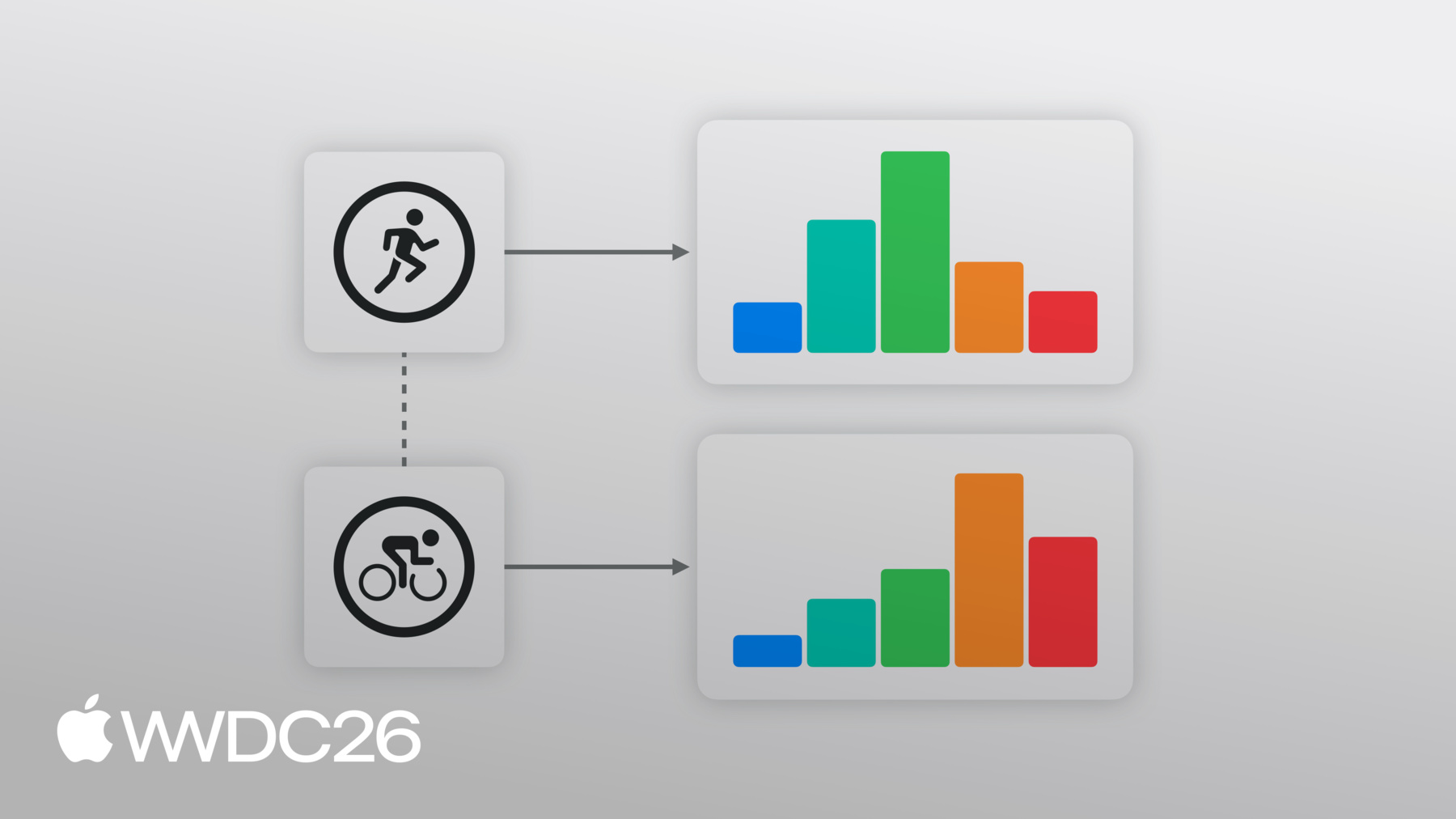
안녕하세요! 저는 Seth이고 HealthKit 팀의 엔지니어입니다. App Store에는 사람들이 계획하고, 추적하고, 피트니스 목표를 시각화하는 데 도움이 되는 건강 및 피트니스 앱이 많습니다. 사용자가 앱에 권한을 부여하면, 앱은 HealthKit의 중앙화된, 안전한 데이터베이스와 강력한 API를 활용하여 운동을 생성하고 기저 건강 데이터에 액세스할 수 있습니다. 운동 구역은 건강 데이터를 활용하여, 특정 강도 수준에서 소비한 시간을 추적하여 더 스마트하게 훈련할 수 있도록 도와줍니다. 심박수 구역은 개인에게 맞춤화된 훈련 자료입니다. 나이와 안정 시 심박수를 고려하여 계산됩니다. 일반적으로 사람들은 운동 중 노력 수준을 추적하기 위해 5개의 심박수 구역을 사용합니다. 각 심박수 샘플, 예를 들어 분당 135회처럼, 구역 3과 같은 특정 구역의 경계 내에 속합니다. 이는 강도 수준을 나타냅니다.
이 범위는 활동에서의 운동 강도를 계획하거나 추적하는 가이드가 될 수 있으며 달리기, 사이클링, 고강도 인터벌 트레이닝, 조정 등에 활용됩니다.
마찬가지로 사이클링 파워 구역은, 사이클링 애호가들이 개인화된 기능적 한계 출력을 기반으로 와트 단위로 출력을 측정하는 데 도움이 됩니다.
iOS 27 및 watchOS 27에서, 심박수 및 사이클링 파워 구역 지원이 HealthKit에 통합되었습니다.
저는 운동 세션을 생성하고, 추적하고, 요약을 제공할 수 있는 샘플 앱이 있습니다. 이 세션 전반에 걸쳐, 이 샘플 앱을 가이드로 삼아 앱에 운동 구역을 통합하는 방법을 보여드리겠습니다. 이 세션에서는, 샘플 앱에 심박수 구역 지원을 추가하는 방법을 시연할 것입니다. 앱에서 사이클링 파워 구역을 적용할 때, 비슷한 구조를 따른다는 것을 알 수 있습니다. 이 세션에서 다룰 내용은 - 완료된 운동에서 구역 데이터 액세스, 운동 세션 중 실시간 구역 변경 업데이트 등록, 사용자의 선호 구역 구성 액세스, 그리고 앱의 운동을 위한 맞춤 구역 구성을 제공하는 방법입니다. 운동 구역은 심박수 샘플과 같은 원시 데이터를, 실행 가능한 훈련 지침으로 변환합니다. 많은 운동 계획에는 각 운동에 대한 강도 목표가 있습니다. 지구력 훈련의 경우, 특정 임계값 이하를 유지하고 싶을 수 있습니다. 그러나 인터벌 트레이닝 운동에서는 특정 수준에 있거나, 그 이상을 일정 시간 유지해야 할 수 있습니다.
구역은 또한 회복 및 부하 균형에 도움이 됩니다. 예를 들어, 주로 높은 구역에서 소비된 운동, 구역 4나 구역 5처럼은 힘든 노력을 나타냅니다. 이 정보를 사용하여, 지침을 제공하거나 운동 강도를 분류할 수 있습니다.
이제 운동 구역이 HealthKit에 통합되었으므로, 사람들은 심박수 및 사이클링 파워 구역 정보를 공유할 수 있습니다. 앱과 직접 공유할 수 있습니다. 각 구역의 시간은 HealthKit에 의해 자동으로 계산됩니다. 운동 중 들어오는 샘플을 기반으로 합니다.
운동 구역은, 다른 HealthKit 데이터 유형과 유사한 승인 흐름을 따릅니다. 운동 구역 데이터에 액세스하기 전에, 관련 수량 유형에 대한 HealthKit 승인을 요청하세요. 이 경우 운동, 심박수, 그리고 사이클링 파워입니다.
HealthKit에서 완료된 운동의 심박수 구역을 검색하는 방법을 살펴보겠습니다.
현재 제 앱은 실시간 운동을 추적하고 운동이 완료되면 요약을 표시합니다. 사람들이 강도와 노력을 시각화하는 데 도움이 되도록, 완료된 운동에서 소비한 총 시간을 표시하고 싶습니다. 완료된 운동에서 각 심박수 구역의 시간을 보여주겠습니다. HealthKit API를 사용하여, 앱의 요약 뷰에서 각 심박수 구역의 시간을 그래프로 표시할 수 있습니다. 운동 후 구역 데이터를 검색하려면, zoneGroupsByType 딕셔너리에 액세스하세요. HKWorkout 또는 개별 HKWorkoutActivity에서, 적절한 HKQuantityType을 전달합니다. 여기서는 심박수 구역이 필요하므로, 심박수 수량 유형을 제공하겠습니다. iOS 27 및 watchOS 27에서, HealthKit는 심박수 및 사이클링 파워를 위한 운동 구역을 지원하며, 유사한 구조를 공유합니다. 사이클링 파워 구역을 받으려면, 관련 수량 유형을 업데이트하세요.
심박수 구역이 사용 가능한 경우, HKWorkoutZoneGroup 구조체를 반환합니다. 이것이 포함하는 내용을 살펴보겠습니다. HKWorkoutZoneGroup에는 두 가지 속성이 있습니다. Configuration과 구역 기간의 배열입니다. HKWorkoutZoneConfiguration은, 구역 집합과 구역이 생성된 방법을 설명합니다. 구역의 HKQuantityType을 포함합니다. 이 경우 심박수입니다. 소스(Source)는 운동 구역 임계값이 어떻게 구성되었는지 알려주는 열거형입니다. 시스템에 의해 자동으로 생성되었거나, 설정에서 사용자가 수동으로 설정했거나, 운동 시 앱에 의해 맞춤으로 제공되었는지를 나타냅니다. 소스(Source)에 대해서는 나중에 세션에서 자세히 다루겠습니다.
구성에는 또한 구역의 경계에 의해 정렬된 구역 배열도 포함됩니다. 각 구역에는 인덱스와 최소 및 최대 HKQuantity가 포함됩니다. 첫 번째 구역에는 하한이 없고, 마지막 구역에는 상한이 없습니다. 이는 전체 값 범위가 항상 포함되도록 보장합니다. 구역은 연속적이고 겹치지 않도록 보장됩니다.
HKWorkoutZoneGroup에는 또한 구역 기간의 배열도 포함됩니다.
이것은 배열로, 각 요소에는 구역과 각 구역에서 소비한 시간이 포함되며, 구역 임계값에 따라 정렬됩니다.
이 구역 기간을 사용하여 앱의 그래프를 채울 수 있습니다.
사용자가 앱에서 운동을 종료하면, 각 심박수 구역에서 소비한 시간을 차트로 표시할 수 있습니다.
운동 구역은 HKWorkout 및 HKWorkoutActivity에서 사용할 수 있습니다. 이는 앱이 전체 운동 기간 동안의 구역을 한 번에 표시하거나, 멀티스포츠 운동의 경우 개별 활동별로 나눌 수 있음을 의미합니다.
일부 운동 계획에서는 특정 구역에 있거나 그 이하에 머물도록 요구합니다. 이런 경우 앱이 현재 심박수 구역을 표시할 수 있다면 좋을 것 같습니다. 그리고 변경되면 사용자에게 알리며, 강도 수준을 조정할 수 있도록 하여, 목표 구역에 머물 수 있도록 합니다. 실시간 운동 구역 업데이트를 사용하여 앱에서 구역 변경을 처리할 수 있습니다.
실시간 운동 중, HealthKit는 들어오는 심박수 샘플을 수신합니다. HealthKit는 각 심박수 샘플을 처리하여 심박수 구역을 식별합니다. 구역 2에서 구역 3으로와 같은 변화가 있을 때, HealthKit는 샘플이 처리되는 동안 앱에 알림을 보냅니다.
HKLiveWorkoutBuilderDelegate는 앱이 실시간 운동에 대한 업데이트를 수신하기 위해 사용하는 프로토콜입니다. 운동은 HealthKit에 의해 추적됩니다. 중요한 일이 발생하면, 새 활동이 시작되거나 추적 중인 데이터 유형이 업데이트되는 경우, HealthKit는 해당 업데이트를 델리게이트에 전달합니다. 그러면 앱에서 변경 사항을 적용할 수 있으며, UI를 업데이트하는 등의 작업을 할 수 있습니다. 심박수 구역의 변경 사항을 처리하려면, didUpdateWorkoutZone 메서드를 사용하겠습니다. 각 업데이트에는 현재 구역과 이전 구역이 포함됩니다. 업데이트는 현재 구역이 변경될 때만 전송됩니다. 예를 들어 구역 2에서 구역 3으로, 그리고 구역 그룹도 포함되며, 전체 구역 구성과 각 구역의 현재 총 시간이 포함됩니다. 마지막으로, 처리된 마지막 샘플의 타임스탬프가 포함됩니다. 이는 현재 구역의 경과 시간 타이머를 표시하는 데 유용합니다. 델리게이트가 구역 업데이트를 처리한 후, 앱에서 변경 사항을 적용하여 새 현재 구역을 강조 표시합니다.
앱에 이를 적용하여 운동 내에서 구역 변경을 처리할 수 있습니다.
제 앱에서, 이제 사용자의 현재 구역을 강조 표시하고 현재 구역이 변경되면 알림을 보낼 수 있습니다.
기본적으로 HealthKit는 선호하는 운동 구역 임계값을 사용합니다. 건강 설정에서 구성됩니다. 선호 구역을 사용하면, 사람들이 앱과 기기에서 일관된 경험을 받을 수 있으며, 이 구역들은 HealthKit를 통해 기기 간에 동기화됩니다.
선호 구역에는 시스템이 계산한 구역이 포함됩니다. 이러한 구역은 사용 가능한 경우 사용자 지표를 기반으로 주기적으로 계산됩니다. 예를 들어, 심박수 구역은 자동으로 계산됩니다. 나이와 안정 시 심박수와 같은 요인을 기반으로 합니다.
선호 구역은 건강 설정에서 수동으로 구성할 수도 있습니다. 구역 운동을 시작하기 전에, 사용자에게 선호 구역 구성이 설정되어 있는지 확인하세요. 선호 구역 구성을 조회할 수 있습니다. HKHealthStore 또는 HKWorkoutBuilder에서 가능합니다. 맞춤 구역이 올바른 선택입니다. 앱에 특정 구역 정의가 있을 때, 건강 설정의 구역 선호도와 다른 경우, 독자적인 구역 모델을 가진 훈련 플랫폼과 같이 말이죠. 앱에서 이 두 개념을 사용하여, 맞춤 심박수 구역 집합을 제공할 수 있습니다. 직접 구성되지 않은 경우에 한해서요.
먼저 선호 심박수 zoneConfiguration이 설정되어 있는지 확인할 수 있습니다. 설정되지 않은 경우 구역 임계값 배열을 사용할 수 있습니다. 관련 HKUnit과 함께 HKQuantity 구역 경계 배열을 생성합니다.
경계와 심박수 수량 유형을 사용하여, 기본 HKWorkoutZoneConfiguration을 생성할 수 있습니다. 구역 경계 단위가 일치해야 합니다. 그리고 구역 구성의 수량 유형과 호환되어야 합니다. HealthKit는 제공된 경계를 기반으로 구역을 생성합니다. 첫 번째 구역은 0에서 시작하고 마지막은 제한이 없습니다. 3개에서 9개의 구역이 필요합니다.
다음으로 맞춤 구성을 HKWorkoutBuilder에 제공할 것입니다. 맞춤 구역은 빌더에 추가되어야 합니다. 앱에서 beginCollection을 호출하기 전에 추가해야 합니다. 맞춤 구역 구성을 사용할 때 몇 가지 중요한 점이 있습니다. 맞춤 구역 구성 사용 시 중요한 사항입니다. 맞춤 구역 구성은 운동 컨텍스트 내에서만 저장됩니다. 앱이 저장을 담당합니다. 필요한 경우 맞춤 구역 구성을 동기화해야 합니다.
운동 구역 구성에는 다양한 임계값이 포함될 수 있습니다. 그리고 구역의 수도 다를 수 있습니다. 이는 사이클링 파워 구역에서 일반적입니다. 예를 들어, 시스템은 기본적으로 6개 구역이지만, 일부 훈련 앱은 5개를 사용하고 다른 앱은 7개 또는 8개를 사용합니다. 앱이 다른 수의 구역으로 노력을 비교하는 경우 중요합니다. 다른 수의 구역.
앱이 여러 운동에서 구역별 시간을 비교하는 경우, 다른 양의 구역을 가진, 이 구역 정보는 즉시 비교할 수 없습니다. 예를 들어 5구역 운동의 구역 3은, 7구역 운동의 구역 3과는 다른 값을 반영할 수 있습니다. 각 구역은 다른 값 범위를 나타냅니다.
대신 구역을 정규화해야 합니다. 각 운동의 구역 수와 경계를 기반으로 합니다. 운동의 원래 샘플을 가져와서, 앱에 맞는 적절한 수의 버킷으로 정렬합니다. 이 경우 7개입니다!
운동 구역은 더 풍부하고 실행 가능한 피트니스 앱을 가능하게 합니다. 운동 후 요약 화면을 구축하든, 실시간 코칭 경험이든, 장기 훈련 대시보드든, HealthKit는 앱이 이 데이터에 액세스할 수 있는 간단한 인터페이스를 제공합니다.
시작하려면, 앱에서 운동 구역 API를 채택하세요. 제공된 샘플 앱을 가이드로 사용할 수 있습니다. 앱에서 구역 데이터를 차트 또는 그래프로 표시하여, 사람들이 운동 노력을 시각화할 수 있도록 합니다. 그리고 실시간 구역 변경을 처리하여 사람들에게 알리세요. 운동 내내 강도 수준이 조정될 때 말이죠.
여러분의 앱을 사용하여 제 피트니스 목표를 추구하는 것을 좋아합니다. 개발자 커뮤니티의 일원이 되어 주셔서 감사합니다. 사람들이 자신의 건강을 직접 관리할 수 있도록 해주셔서요. 시청해 주셔서 감사합니다.
-
-
3:54 - Reading Heart Rate Zones from a completed workout
// Read heart rate zones from the completed workout if let heartRateZoneGroup = workout.zoneGroupsByType?[HKQuantityType(.heartRate)] { let zones = ZoneDisplayData( zoneCount: heartRateZoneGroup.configuration.zones.count, currentZoneIndex: nil, durations: heartRateZoneGroup.zoneDurations.map(\.duration) ) -
7:57 - Handling Live Zone Updates
func workoutBuilder(_ workoutBuilder: HKLiveWorkoutBuilder, didUpdateWorkoutZone zoneUpdate: HKLiveWorkoutZoneUpdate) { guard let zoneGroup = zoneUpdate.zoneGroup else { return } if let currentIndex = zoneUpdate.currentZoneDuration?.zone.index { let data = ZoneDisplayData( zoneCount: zoneGroup.configuration.zones.count, currentZoneIndex: currentIndex, durations: zoneGroup.zoneDurations.map(\.duration) ) Task { @MainActor in self.heartRateZones = data } } } -
9:19 - Check if Preferred Zone has been set
if try await builder.zoneConfiguration(for: HKQuantityType(.heartRate)) == nil { -
9:24 - Create Zone Boundaries
let defaultHeartRateZoneThresholds = [91.0, 114.0, 136.0, 158.0] let bpmUnit = HKUnit.count().unitDivided(by: HKUnit.minute()) let boundaries = defaultHeartRateZoneThresholds.map( {HKQuantity(unit: bpmUnit, doubleValue:$0)} ) -
9:33 - Create Default Workout Zone Configuration
let heartRate = HKQuantityType(.heartRate) let defaultConfiguration = try HKWorkoutZoneConfiguration(quantityType: heartRate, zoneBoundaries: boundaries) -
9:58 - Set Custom Zone Configuration
try await builder.setCustomZoneConfiguration(defaultConfiguration, for: heartRate) } -
10:03 - Begin Data Collection
// Begin data collection let startDate = Date() try await builder.beginCollection(at: startDate)
-