

-
지갑의 새로운 기능
Apple 지갑 패스용 최신 디자인 업데이트와 개발자 도구를 살펴보세요. 풍부하고 생동감 넘치는 디자인을 위한 멋진 새 스타일로 패스를 새롭게 디자인해 보세요. 새로운 바코드 형식과 유연한 패스 동작 API를 알아보세요. 대규모로 패스를 디자인, 맞춤화, 배포하는 과정을 간소화하는 강력한 도구인 Pass Designer와 Pass Builder를 만나 보세요.
챕터
- 0:01 - 소개
- 0:40 - Poster Generic
- 2:36 - 바코드
- 4:27 - 추천 액션
- 5:46 - 개발자 도구
- 5:47 - Pass Designer
- 10:40 - Pass Builder
- 13:50 - 패스 템플릿 개인화
- 15:01 - 다음 단계
리소스
- Pass Designer
- Creating a pass with Pass Designer
- Pass Builder
- Pass.Barcodes
- Learn more about Pass Designer
관련 비디오
WWDC25
WWDC24
-
비디오 검색…
안녕하세요, 저는 Shaun입니다. "Wallet의 새로운 기능"에 오신 것을 환영합니다. 도입된 이후로, 패스는 사람들의 일상을 이동하는 데 필수적인 부분이 되었습니다. 아침 커피를 픽업하거나, 대중교통 게이트를 통과하거나, 체크인하고 비행기에 탑승하는 것까지, 실제 카드를 한 번도 꺼내지 않고도 가능합니다.
패스는 사람들이 더 빠르고, 더 프라이빗하고, 더 안전하게 이동할 수 있도록 돕습니다. iOS 27에서는 패스를 그 어느 때보다 더 발전시킵니다. iOS 27은 Poster Generic이라는 멋진 새 패스 스타일을 도입합니다. 네 가지 새로운 바코드 유형으로 제시 시점에서 더 많은 유연성을 제공합니다. 그리고 패스가 관련 액션을 표시할 수 있는 강력한 새 방법, 패스 화면 바로 아래에서 제공됩니다.
또한 Mac을 위한 완전히 새로운 개발자 도구 세트도 도입합니다. 그리고 서버 플랫폼에서도, 패스를 디자인하고, 개인화하고, 훌륭한 패스를 만드는 것을 그 어느 때보다 쉽게 만들어 줍니다.
다룰 내용이 많으니, 새로운 패스 스타일인 Poster Generic으로 바로 시작하겠습니다.
Poster Generic은 멤버십 카드, 로열티 프로그램, 스토어 카드, 그리고 대담하고 화려한 아트워크를 중심에 놓고 싶은 모든 곳에 적합합니다.
패스 화면은 배경 이미지로 구성됩니다. 기본 로고, 헤더 필드,
기본 필드,
푸터 필드, 그리고 마지막으로, 제공된 경우 바코드로 구성됩니다. 이 패스 스타일을 채택하려면, 패스 번들의 pass.json에서, posterGeneric 최상위 스타일 키를 지정합니다.
그런 다음 일반적인 패스 필드 구조로 콘텐츠를 추가하면, 패스가 패스 화면에 걸쳐 모든 것을 자동으로 배치합니다.
한 가지 유의할 점은, 패스 화면이 단일 푸터 필드만 지원한다는 것입니다. 따라서 두 개 이상 포함하면, 첫 번째만 표시됩니다.
Poster Generic은 iOS 27 이상이 필요합니다.
iOS 26 이하의 고객을 지원하려면, 기존 generic 최상위 스타일 키를 포함하는 것을 권장합니다. pass.json에서 posterGeneric 스타일 키와 함께, 각각에 관련 필드를 포함시킵니다.
그렇게 하면, iOS 27로 아직 업데이트하지 않은 고객도, 여전히 패스를 Wallet에 추가할 수 있습니다. 다음으로, iOS 27에서는 패스가 네 가지 새로운 바코드 유형을 지원합니다.
EAN-13, Code 39, Codabar, 그리고 ITF입니다.
이것들은 기존 바코드 객체를 사용하여 지정됩니다. pass.json의 barcodes 배열에서 지정합니다.
예를 들어, 바코드를 Codabar 형식으로 제시하려면, 바코드 형식을 PKBarcodeFormatCodabar로 설정합니다.
형식 정의의 전체 목록은 Wallet Passes 문서에서 확인할 수 있습니다. 이전 버전의 iOS는 이러한 새 형식을 지원하지 않으므로, 우선순위 순서로 바코드 배열을 제공하는 것을 강력히 권장합니다. 여러 바코드를 제공함으로써, 시스템이 하드웨어로 스캔할 수 있는 바코드를 렌더링할 최선의 기회를 제공하며, 고객이 사용하는 운영 체제 버전에 관계없이 작동합니다.
새로운 바코드 유형 중 하나만 제공하고 다른 것은 없다면, iOS 26 이하에서는 패스에 바코드가 렌더링되지 않습니다.
따라서 선호하는 형식을 앞에 두고, 적절히 폴백하는 것을 권장합니다.
이제 일부 상황에서는, 여러 바코드 유형을 지원하는 것이 단순히 선택지가 아닐 수 있다는 점을 인식합니다.
그런 상황이라면, 해야 할 두 가지가 있습니다. 첫째, 패스 필드에 자격증명 ID를 표시하여 수동으로 입력할 수 있도록 하고, 쉽게 찾을 수 있게 합니다.
primaryField 사용을 고려하세요. 또는 headerField를 사용하여, 패스 화면에서 눈에 띄게 합니다.
둘째, 프론트라인 직원이 수동 입력 워크플로에 대해 교육받았는지 확인합니다. 스캔할 수 없는 패스가 고객을 막는 결과를 초래해서는 안 됩니다.
이것을 제대로 처리하면, 원활한 경험과 불편한 경험의 차이를 만들 수 있습니다. 다음으로, 추천 액션에 대해 이야기해 보겠습니다.
iOS 18에 도입된 2세대 이벤트 티켓으로, 시맨틱 URL을 제공하여 추가 사용자 액션을 노출할 수 있습니다. 이벤트 일정 보기 같은 액션이 패스 아래에 표시됩니다. iOS 27에는 새로운 유연한 API가 있습니다. 모든 패스 스타일에 대한 액션을 제공할 수 있습니다. pass.json의 최상위 레벨에서, featuredActions 키를 정의하면, 액션 객체의 배열을 받습니다. 각 액션은 고유한 ID, 액션 유형으로 정의됩니다. 그리고 URL 같은 값으로 정의됩니다. 예를 들어, 혜택 보기 액션을 제공하려면, 식별자를 고유한 ID로 설정하고, 액션 유형을 membershipBenefits로 설정하고, 사용자를 이동시킬 URL을 설정합니다. Wallet은 이것을 패스 아래에 적절한 컬러풀한 아이콘과 함께 표시하며, 현지화된 클릭 유도 문안을 제공합니다.
각 패스는 최대 두 개의 추천 액션을 포함할 수 있습니다. 고객에게 가장 의미 있고 관련성 높은 액션만 제공하고, 액션을 우선순위 순서로 제공하는 것을 권장합니다.
지원되는 액션 유형의 전체 목록과 예상 값은 Wallet Passes 문서에서 확인할 수 있습니다. 지난 10년 동안 패스는 많은 기능과 기능성을 갖추게 되었습니다. 패스 번들에 설명된 내용과 기기에서 표시되는 시각적 표현을 연결하기 어려울 수 있습니다.
그래서 Mac을 위한 완전히 새로운 앱을 발표하게 되어 기쁩니다. 패스 디자인을 그 어느 때보다 쉽게 만들어 줍니다. 그것은 Pass Designer입니다.
Pass Designer는 위지위그(WYSIWYG) 편집기로, 빌드하는 동안 iOS에서의 실제 패스 렌더링을 제공합니다.
Pass Designer는 템플릿 파일을 만듭니다.
템플릿을 배포 준비가 된 개인화된 서명된 패스로 변환하려면, Pass Designer와 함께, 새로운 Swift on Server 패키지도 발표합니다. Pass Builder라고 합니다. Pass Builder는 Mac과 Linux에서 실행됩니다. Swift API를 제공합니다. 그리고 buildpass라는 명령줄 실행 파일도 제공합니다.
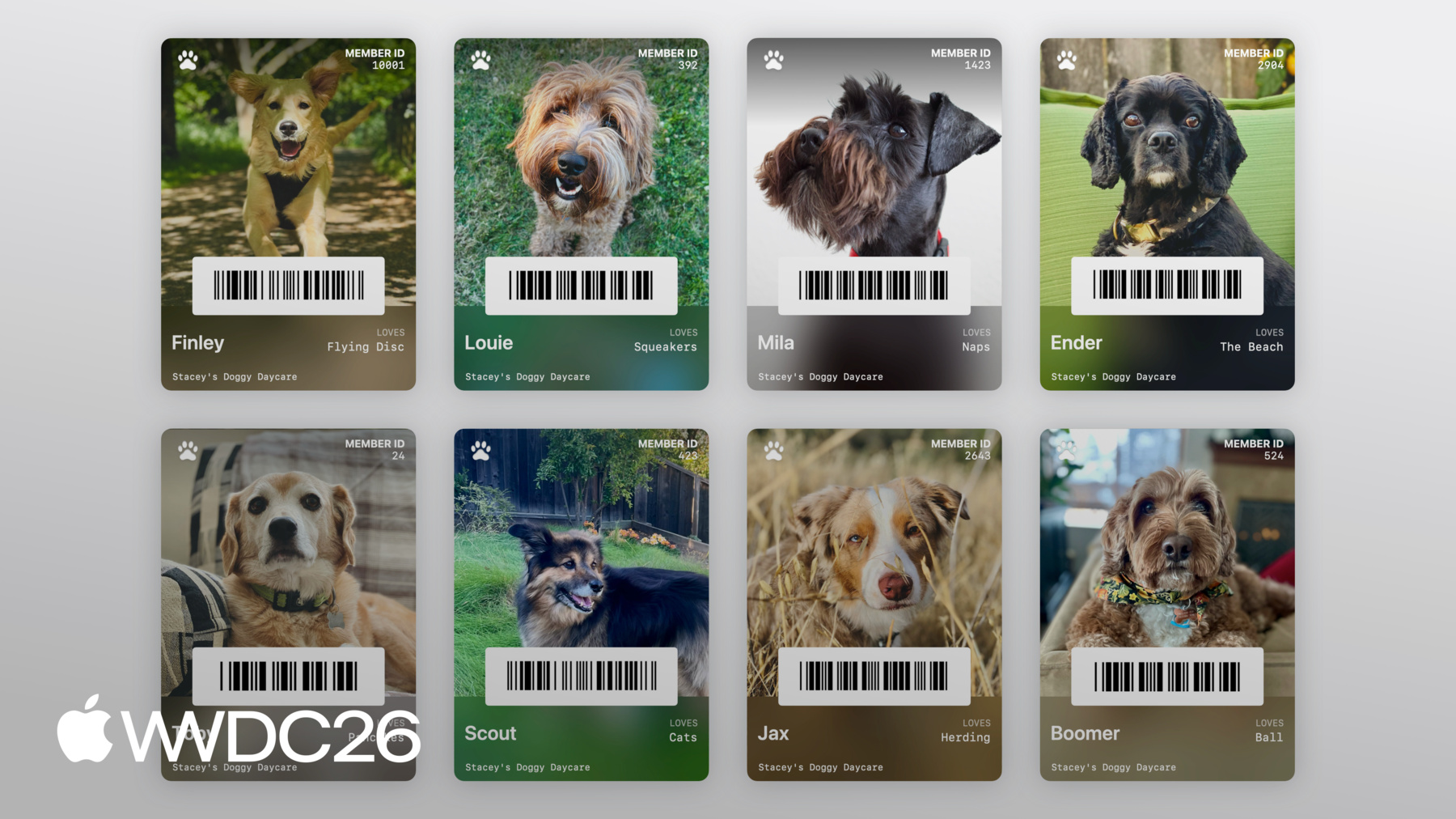
제 친구 Stacey는 강아지 탁아소를 운영합니다. 그리고 저는 그녀의 털복숭이 고객 각각을 위한 멤버십 카드를 만드는 것을 도와주고 싶습니다. Pass Designer를 사용하여 템플릿을 디자인하고, 그런 다음 서버의 Pass Builder를 사용하여 템플릿을 개인화하겠습니다. 대규모로 패스를 배포합니다.
Pass Designer로 바로 들어가 보겠습니다.
시작해 봅시다. 오른쪽에 패스의 라이브 미리보기가 있고, 왼쪽에 패스를 편집할 사이드바가 있습니다.
사이드바에서 패스 ID 및 서명 구성을 설정할 수 있습니다. 패스 스타일, 이미지, 바코드, 필드, 그리고 패스 스타일이 지원하는 경우 시맨틱도 설정할 수 있습니다. 지금은 빈 캔버스 같습니다. 하지만 Stacey가 각 강아지의 멋진 세로 사진을 찍는다는 것을 알고 있으니, 새로운 Poster Generic 스타일로 실험해 보고 그 사진들이 어떻게 보이는지 확인해 보겠습니다. 스타일로 이동하여, 패스 스타일을 Poster Generic으로 변경하겠습니다.
그런 다음, 사이드바에서 이미지로 이동하여 데스크탑에서 Stacey가 준 샘플 사진을 드래그해 넣겠습니다.
꽤 잘 맞는 것 같습니다. 이제 필드를 추가해 봅시다.
사이드바에서 Header Fields로 이동하여 새 헤더 필드를 추가하겠습니다.
키를 DOG_ID로, 레이블을 Member ID로 설정하고, 어떻게 보이는지 확인할 플레이스홀더 ID를 추가하겠습니다.
좋습니다. 이제 강아지 이름과 좋아하는 장난감을 위한 기본 필드를 추가해 봅시다. 사이드바에서 Primary Fields로 이동하여, 이름에 대한 기본 필드를 추가하겠습니다.
키를 DOG_NAME으로 설정하겠습니다.
Poster Generic 패스 화면의 유용한 트릭이 있습니다. 첫 번째 기본 필드에서 레이블을 생략하면, 필드 값에 멋진 굵은 타이틀이 표시됩니다.
그래서 플레이스홀더 이름으로 Finley를 입력하겠습니다. 그리고 좋아하는 장난감에 대한 기본 필드를 추가합니다. 다시 Primary Fields로 이동하여, 새 필드를 추가합니다.
키를 LOVES로, 레이블을 Loves로 설정하고, 플레이스홀더 값으로 Flying Disc를 추가합니다. 이제 Stacey가 각 강아지를 탁아소에 체크인/아웃하기 쉽도록, 멤버 ID를 바코드로 인코딩하겠습니다.
Barcode & NFC로 이동하겠습니다.
그리고 플레이스홀더 바코드 메시지를 입력합니다. 작동하지만, QR 코드에 그만큼의 공간이 필요하지 않다고 생각합니다. 대신 좁은 바코드 유형을 시도해 봅시다. PDF417 같은 것을요.
형식 선택기를 클릭하겠습니다.
그리고 PDF417을 선택합니다. 훨씬 더 좋아 보입니다.
이제 기본 로고를 추가하여 마무리 터치를 해봅시다.
이미지로 이동하여,
데스크탑에서 기본 로고를 드래그해 넣겠습니다.
스타일로 이동하여 색상을 조정하고, 레이블 색상을 설정합니다. 그리고 최종 마무리 터치로, 푸터에 "Stacey's Doggy Day Care"를 추가합니다.
Footer Fields로 이동하여 새 필드를 추가합니다.
그리고 텍스트 값을 Stacey's Doggy Day Care로 설정합니다.
이제 정말 귀여운 강아지를 위한 귀여운 패스가 완성되었습니다.
마지막으로 할 일은 템플릿을 저장하는 것입니다.
Pass Designer는 템플릿을 pkpasstemplate 파일로 저장합니다.
파일로 이동한 다음, 저장을 클릭하고 템플릿을 저장하겠습니다.
이제 Pass Designer에서 각 멤버에 대한 개별 패스를 Stacey's Doggy Day Care에 만들고 싶지는 않습니다. 대신, 이 템플릿을 대규모로 개인화하고 싶습니다. Pass Builder를 사용하여 서버에서요.
Swift 서버로 전환하겠습니다. Stacey's Doggy Day Care를 위한 서버로요. 먼저, PassBuilder를 추가하겠습니다. Swift 패키지 매니페스트에 의존성으로 추가하고, 서버 타겟에도 추가합니다.
이제 서버 소스에서 이 createPass 함수를 구현하여, 개인화된 패스를 생성하겠습니다. createPass 함수는 데이터베이스에서 이미 로드된 모델을 받습니다. 강아지 이름, 멤버십 ID, 좋아하는 장난감과 함께, 각 강아지의 멋진 사진 URL도 포함됩니다. 먼저 앞서 만든 템플릿을 로드하는 것부터 시작해 보겠습니다. PassPackage 타입을 사용하여요. PassPackage는 패스 번들에 액세스하고 구성하는 타입 안전한 방법을 제공합니다. pass.json의 내용과 상호작용할 수 있는 pass 속성도 포함합니다. 필드를 개인화해 봅시다.
pass fields 속성에서 setValue를 호출하여 강아지 이름을 설정하고, 멤버십 ID와 좋아하는 장난감도 설정합니다.
이제 배경 이미지를 강아지 사진으로 설정해 봅시다.
PassImage 인스턴스를 생성하여 강아지 사진 URL을 전달하고, 패스 패키지 타입의 background image 속성에 할당합니다. 바코드를 구성해 봅시다. 강아지가 탁아소에 빠르게 체크인/아웃할 수 있도록요.
Pass.Barcode를 생성하겠습니다. 인코딩된 메시지를 강아지 멤버십 ID로 설정하고, PDF417 형식을 사용합니다.
마지막으로, 고객이 멤버십을 볼 수 있는 추천 액션이 있으면 좋겠습니다. 클라이언트가 멤버십을 볼 수 있도록요. featuredActions에 Pass.Action을 설정하여 추가해 봅시다. 이것만으로도 서버가 개인화된 패스를 생성합니다.
이제 배포를 위해 패스를 빌드하고 서명해야 합니다.
다시 한번 말씀드리면, Wallet용 패스를 빌드하고 서명하려면, 패스 내용의 매니페스트를 생성하여 작성해야 합니다. 패스 번들에요. 그런 다음 매니페스트의 분리된 서명을 생성하고, 서명을 패스 번들에 작성합니다. 그런 다음 결과 디렉토리를 압축하고 .pkpass 파일 확장자를 추가합니다. Pass Builder가 이 모든 것을 대신 처리해 줍니다. 인증서만 제공하면 됩니다. 서버 소스로 돌아가서요. PassCertificate 타입을 사용하여, 패스 서명 인증서를 로드하겠습니다. 그리고 WWDR 중간 인증서도 로드합니다. 다음으로, PassSigner 인스턴스를 생성하겠습니다. 인증서를 전달하여요. 마지막으로, PassSigner에서 signPass 함수를 호출하겠습니다. 앞서 만든 개인화된 패키지를 전달하고, 디스크의 URL을 전달하여 배포용 서명된 패스를 작성합니다.
그런 다음 URL을 반환합니다.
이제 Stacey's Doggy Day Care는 모든 고객을 위한 멋진 Wallet 패스를 갖게 됩니다.
Pass Builder는 다른 프로그래밍 언어에서도 사용할 수 있습니다. swift-java 프로젝트는 Swift API를 위한 네이티브 Java 바인딩을 생성할 수 있습니다. Java 런타임에서 Pass Builder를 호출할 수 있습니다. 또한 패스 패키지 형식의 protobuf 정의도 제공합니다. 선호하는 프로그래밍 언어로 타입 안전한 모델을 생성할 수 있습니다. 그런 다음 커스터마이제이션 메시지를 생성하고, buildpass 명령줄 실행 파일을 호출하여, 패스를 개인화하고 서명합니다. swift-java 사용에 대한 자세한 정보는, "Swift와 Java 상호운용성 탐색" 개발자 세션을 확인하세요. buildpass 명령줄에 대한 문서는, Pass Builder 개발자 문서를 참조하세요. 두 링크 모두 세션 설명에서 확인할 수 있습니다.
이것으로 Pass Designer와 Pass Builder의 간략한 엔드투엔드 데모를 마칩니다. 템플릿 디자인부터, 개인화, 배포를 위한 서명까지 살펴봤습니다.
Pass Designer 다운로드 링크, Pass Builder 소스, 그리고 종합적인 문서를 세션 설명에서 찾을 수 있습니다.
오늘 많은 내용을 다루었으니, 다음 단계를 알려드립니다. Pass Designer를 확인해 보세요. Pass Designer를 사용하여 새로운 Poster Generic 스타일을 실험해 보고, 패스에 적합한지 확인해 보세요.
새로운 바코드 유형 중 하나라도 채택할 계획이라면, 적절한 폴백을 제공하기 위한 계획을 세우세요.
그리고 잠깐 시간을 내어 고객에게 가장 의미 있고 관련성 높은 액션을 파악하고, 추천 액션으로 구현해 보세요.
이것은 Wallet 패스 빌드의 새로운 장입니다. 여러분이 만들어 낼 모든 멋진 패스들을 볼 수 있기를 정말 기대합니다. 시청해 주셔서 감사합니다, 멋진 WWDC 되세요.
-
-
1:41 - Adopting Poster Generic
// Adopting Poster Generic "posterGeneric": { "headerFields": [ { "key": "memberID", "label": "Guest No.", "value": "102035" } ], "footerFields": [ { "key": "membershipType", "value": "Family Pass" } ] } -
2:11 - Adopting Poster Generic with Generic fallback
// Adopting Poster Generic and supporting Generic on iOS 26 and earlier "posterGeneric": { "headerFields": [ { "key": "memberID", "label": "Guest No.", "value": "102035" } ], "footerFields": [ { "key": "membershipType", "value": "Family Pass" } ] }, "generic": { "headerFields": [ { "key": "memberID", "label": "Guest No.", "value": "102035" } ], "footerFields": [ { "key": "membershipType", "value": "Family Pass" } ] } -
2:52 - Barcodes: Add new types for iOS 27
// Adopting new barcode types "barcodes": [ { "format": "PKBarcodeFormatCodabar" "message": "…" "messageEncoding": "…" } ] -
3:37 - Barcodes: Supporting iOS 26 and earlier
// Adopting new barcode types and supporting iOS 26 and earlier. "barcodes": [ { "format": "PKBarcodeFormatCodabar" "message": "123456789" "messageEncoding": "iso-8859-1" }, { "format": "PKBarcodeFormatQR" "message": "123456789" "messageEncoding": "iso-8859-1" } ] -
4:48 - Featured actions
// Featured actions "featuredActions": [ { "identifier": "my-offer-id", "type": "membershipBenefits", "url": "www.example.com/offers" } ] -
10:56 - Package.swift
// Package.swift import PackageDescription let package = Package( name: "MyServer", products: [ .library( name: "MyServer", targets: ["MyServer"] ), ], dependencies: [ .package(path: "./path/to/PassBuilder") ], targets: [ .target( name: "MyServer", dependencies: [ .product(name: "PassBuilder", package: "PassBuilder") ] ), … ] -
11:05 - CreatePass.swift
// CreatePass.swift import PassBuilder func createPass(for doggo: MemeberModel) async throws -> URL { var package = PassPackage(url: "template.pkpasstemplate") package.pass.fields.setValue(doggo.name, forKey: "DOG_NAME") package.pass.fields.setValue(doggo.favoriteToy, forKey: "LOVES") package.pass.fields.setValue(doggo.id, forKey: "MEMBER_ID") package.background = PassImage(url: doggo.photoURL) package.pass.barcodes = [ Pass.Barcode(message: doggo.id, format: .pdf417) ] package.featuredActions = [ Pass.Action(id: "action-1", type: "viewMembership", url: doggo.membershipURL) ] … } -
13:11 - CreatePass.swift
// CreatePass.swift

import PassBuilder

func createPass(for doggo: MemeberModel) async throws -> URL {
    var package = PassPackage(url: "template.pkpasstemplate")

    package.pass.fields.setValue(doggo.name, forKey: "DOG_NAME")
    package.pass.fields.setValue(doggo.favoriteToy, forKey: "LOVES")
    package.pass.fields.setValue(doggo.id, forKey: "MEMBER_ID")

    package.background = PassImage(url: doggo.photoURL)

    package.pass.barcodes = [
        Pass.Barcode(message: doggo.id, format: .pdf417)
    ]

    package.featuredActions = [
        Pass.Action(id: "action-1", type: "viewMembership", url: doggo.membershipURL)
    ]

    let passCertificate = try PassCertificate(url: "pass.p12", password: "s3cr3t")
    let wwdrCertificate = try PassCertificate(url: "wwdr.cer")

    let signer = PassSigner(
        passCertificate: passCertificate,
        wwdrCertifiate: wwdrCertificate
    )

    let destinationURL = URL(string: "/www/passes/" + doggo.id)
    try signer.signPass(package, writingTo: destinationURL)

    return destinationURL
}
-