

-
이미지 이해의 새로운 기능
최신 Vision 프레임워크와 Foundation Models 프레임워크 업데이트로 강력한 이미지 이해 기능을 활용하세요. 새로운 탭 분할 요청을 사용하여 이미지를 다양한 방식으로 분할할 수 있으며, Vision은 이제 watchOS를 지원합니다. Apple Foundation Models의 새로운 이미지 지원을 OCR, 바코드 스캐닝, 개발자의 자체 도구와 결합하여 앱에서 LLM 기반 시각적 이해 기능을 구현하세요.
챕터
- 0:00 - 서론
- 1:36 - tap-to-segment API로 이미지 분할하기
- 5:50 - Foundation Models용 이미지 입력
- 7:57 - 이미지 기반 도구 호출
- 13:09 - watchOS용 Vision
- 14:39 - 다음 단계
리소스
- Segmenting objects using taps, scribbles or rectangles
- Implementing saliency-based image cropping in iOS and watchOS
관련 비디오
WWDC26
WWDC25
WWDC24
-
비디오 검색…
안녕하세요, 저는 Megan Williams이며, Vision 프레임워크 팀 소속입니다.
올해 이미지 이해 분야에서 몇 가지 강력한 발전이 있었습니다, 이를 통해 앱에서 놀라운 경험을 만들어 낼 수 있게 되었습니다. 그 중 몇 가지를 소개하겠습니다, 새로운 기능부터 시작하여 - 아, 이상하네요, 제 어젠다가 없어졌네요. 빠르게 하나 만들 수 있는지 확인해 볼게요. 다루고 싶은 주제들을 메모해 두었습니다. AI가 어젠다 만드는 걸 도와줄 수 있을 것 같아요. 제 메모 사진을 사용하겠습니다. 그리고 대형 언어 모델에게 어젠다를 생성해 달라고 요청할게요. 이것은 Foundation Models 프레임워크로 꽤 쉽게 할 수 있습니다. 다행히, 올해 Foundation Models에서 이미지 입력을 지원하게 되었습니다. 훌륭해요! 모델이 저를 위한 어젠다를 만들어 주었습니다. 이제 발표로 돌아갈 수 있겠네요. 올해는 앱에 이미지 이해 기능을 도입하는 방법이 그 어느 때보다 다양해졌습니다. Vision의 새로운 기능부터 시작하여, tap-to-segment API를 통해 분리할 수 있습니다 이미지의 어떤 객체든 탭 하나로 분리할 수 있습니다. 또한 새롭고 강력한 방법도 있습니다 대형 언어 모델을 사용하여 이미지를 분석하는. Foundation Models 프레임워크를 사용하여 이를 수행하는 방법에 대해 설명하겠습니다. 그런 다음 LLM을 위한 이미지 기반 도구를 만드는 방법을 보여드리겠습니다 이미지 이해에서 더 많은 가능성을 열어주는. 마지막으로, Vision은 이제 watchOS에서도 사용 가능합니다. Vision을 사용하여 워치 앱을 향상시키는 방법을 보여드리겠습니다. 하지만 먼저, 여러분이 할 수 있는 멋진 것들을 몇 가지 보여드리겠습니다 tap-to-segment API를 사용하여. Vision에는 이미 여러 이미지 분할 기능이 있습니다. 예를 들어, 인물 분할 기능이 있는데, 이미지 안의 모든 사람을 분리해 줍니다. 하지만 이미지에서 다른 것을 분할하고 싶다면 어떻게 할까요? 이 꽃병처럼요? 이제 Vision의 tap-to-segment API를 사용하면, 이미지의 어떤 객체든 선택해서 분할할 수 있습니다. 이 보드 게임, 옷 한 벌, 심지어 바닥도요. 분할할 객체를 선택하는 방법에는 여러 가지가 있습니다. 그 중 몇 가지를 시연해 보겠습니다.
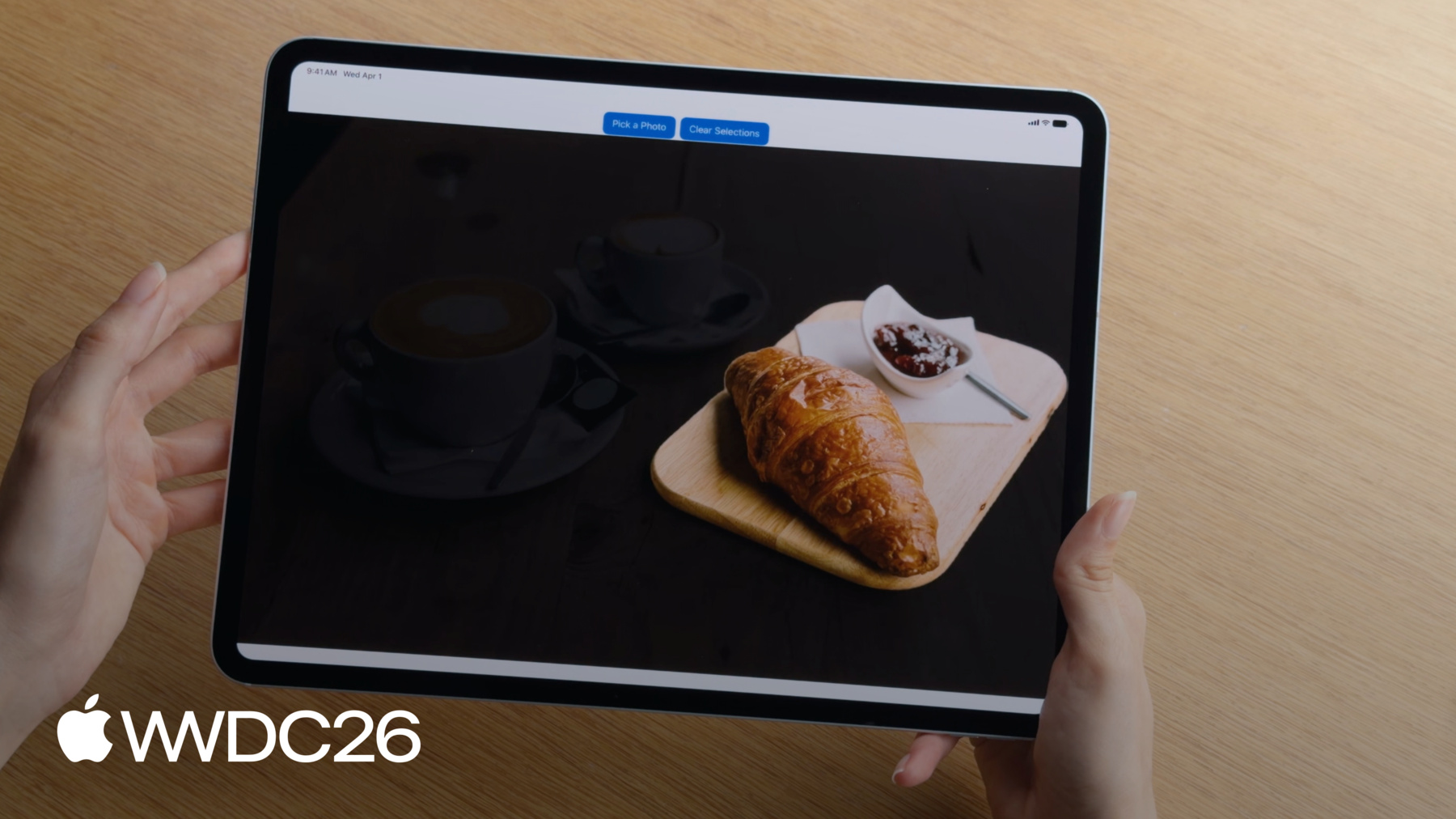
제 앱에는 카페 사진이 있는데 테이블 위의 커피잔을 분할하고 싶습니다. 먼저, 컵 위의 한 점을 선택할 수 있습니다. 이제 컵이 분리되었습니다. 이것은 단순한 객체에는 잘 작동하지만, 피사체가 복잡하다면, 하나의 점만 선택하는 것으로는 충분하지 않을 수 있습니다. 예를 들어, 접시도 함께 포함하고 싶을 수 있습니다. 대신 바운딩 박스를 그릴 수 있습니다 분할하고 싶은 모든 객체 주위에. 이제 컵과 접시를 모두 얻을 수 있습니다.
객체 주위에 올가미를 그릴 수도 있습니다. 올가미를 사용하여 이 크루아상을 분할하겠습니다.
또 다른 좋은 옵션은 스크리블을 그리는 것입니다. 여러 객체 위에 스크리블을 그려서 한 번에 모두 쉽게 분할할 수 있습니다.
마스크를 얻으면, 더 많은 점을 추가하거나 빼서 마스크를 정밀하게 조정할 수 있습니다. 이미 초기 점으로 이 컵을 분할했는데, 이제 접시도 포함하고 싶습니다. 접시를 탭하기만 하면 이제 접시도 포함됩니다.
마스크에서 특정 부분을 제거할 수도 있습니다. 컵이 아닌 커피만 원할 수도 있습니다. 마스크에서 제외할 컵 위의 점을 선택할 수 있고, 이제 커피만 얻게 됩니다.
API를 사용하려면 이미지로 시작합니다. 이미지를 보관하기 위해 ImageRequestHandler를 사용할 수 있습니다. Vision에서 이미지는 요청을 사용하여 처리됩니다. 객체를 분할하려면 GenerateIterativeSegmentationRequest를 사용합니다.
ImageRequestHandler를 사용하여 요청을 수행합니다. 이렇게 하면 분할된 객체의 마스크가 생성됩니다. 마스크는 표시하는 PixelBuffer입니다 어떤 픽셀이 분할된 객체에 속하는지. 코드를 살펴보겠습니다. 이미지로 시작하여 ImageRequestHandler를 만들겠습니다. 이제 분할하고자 하는 객체 내부의 점을 사용하여 요청을 만들겠습니다 시작 시드로 삼아서. 그런 다음 ImageRequestHandler를 사용하여 이미지에 요청을 수행합니다. 이렇게 하면 객체의 분할 마스크가 생성됩니다. 원하는 경우 새로운 점으로 이 마스크를 정밀하게 조정할 수 있습니다. 이렇게 하려면 요청에 점을 포함시키기만 하면 됩니다. 그런 다음 요청을 다시 수행합니다. 몇 가지 주의해야 할 사항이 더 있습니다. Vision은 좌표 원점이 있는 정규화된 좌표 시스템을 사용합니다 왼쪽 하단 모서리에. 점은 이미지 너비와 높이에 맞게 정규화해야 하며, 좌표 값은 0과 1 사이여야 합니다.
또한 올가미를 그릴 때, 스트로크 너비가 충분히 넓어야 합니다. 얇은 스트로크는 최선의 결과를 내지 못할 수 있습니다. 선 너비는 전체 이미지 너비의 최소 1% 이상이어야 합니다.
마지막으로, 분할 요청을 처음 수행하기 전에 기기에서 처음으로 수행하는 경우 모델을 다운로드해야 합니다. downloadAssets API를 사용하여 다운로드를 시작할 수 있습니다. 그리고 모델이 다운로드되었는지 확실하지 않은 경우, assetStatus를 확인하여 모델이 사용 준비가 되었는지 확인할 수 있습니다. tap-to-segment를 사용하면, 이제 이미지의 원하는 어떤 부분이든 대화식으로 분할할 수 있습니다. 이제 이미지를 분석하는 새롭고 흥미로운 방법에 대해 이야기하고 싶습니다 Foundation Models 프레임워크를 사용하여. 앞서 대형 언어 모델을 사용한 예를 보여드렸습니다 스티커 메모 사진을 사용하여 어젠다를 구성하는. 하지만 대형 언어 모델은 훨씬 더 많은 것을 할 수 있습니다. 모델에게 요청할 수도 있습니다 앱의 이미지에 대한 캡션을 생성하는 데 도움을 달라고. 모델은 설명 작업을 잘 수행하는 경향이 있습니다.
인테리어 장식에도 도움을 줄 수 있고, 거실을 위한 유용한 제안도 제공할 수 있습니다.
그리고 제가 가장 좋아하는 것은, 냉장고 사진으로부터 레시피를 만들기 위해 대형 언어 모델을 사용할 수 있습니다. 가능성은 무궁무진합니다. 이를 위한 API는 정말 간단합니다. 이미지 캡션을 생성하는 코드를 살펴보겠습니다.
Foundation Models의 프롬프트 빌더 구문을 사용하고 있습니다. 이미지 처리 방법에 대해 모델에 지침을 담은 텍스트 프롬프트가 있습니다. 그런 다음 이미지를 프롬프트에 첨부 파일로 포함합니다. 이제 모델에게 프롬프트에 응답하도록 요청할 수 있고, 모델이 캡션을 생성해 줍니다. 이제 직접 만든 프롬프트로 시도해 볼 수 있습니다. 이미지를 분석하는 방법이 이제 여러 가지가 되었으며, 각각의 장점이 있습니다. Foundation Models 프레임워크는 대형 언어 모델을 활용하여, 요청하는 거의 모든 것을 수행할 수 있습니다. 이에 비해 Vision과 같은 전통적인 이미지 처리 프레임워크는, 고정된 컴퓨터 비전 API 세트를 사용합니다. Vision API는 특정 작업에 맞게 세밀하게 조정되어 있으며, 이를 정말 잘 수행합니다. 또한 Vision은 빠릅니다. 실시간으로 비디오 프레임을 분석하기에 충분히 빠를 때가 많습니다.
하지만 이미지를 분석할 때 Vision과 Foundation Models 중에서 항상 하나를 선택해야 하는 것은 아닙니다. Vision의 전문성과 Foundation Models의 다재다능함을 도구 호출을 통해 활용하는 방법이 있습니다. 대형 언어 모델에게 액세스 권한을 부여하는 방법을 시연하겠습니다 전통적인 이미지 처리 API를 실행하는 도구에 대한, Vision에 있는 것들과 같이, 이미지 이해를 새로운 수준으로 끌어올리기 위해. 하지만 먼저 도구 호출에 대해 간단히 복습하겠습니다. 앞서 모델에 프롬프트를 제공하는 방법을 보여드렸습니다 그리고 응답을 생성하도록 했습니다. 도구 호출을 사용하면, 모델이 이제 외부 코드를 실행하기 위해 도구를 호출할 수 있으며 결과를 돌려받을 수 있습니다. 모델은 이 결과를 응답에 활용할 수 있습니다.
예를 들어, 날씨 도구가 있을 때, 특정 날의 날씨 예보를 가져오는. 제 프롬프트는 날씨에 관한 질문입니다. 모델은 스스로 질문에 답할 수 없어서, 날씨 도구에 도구 호출을 합니다. 모델이 도구 호출을 하면, 도구에 필요한 인수를 생성합니다. 이 경우, 인수는 날짜가 됩니다 모델이 날씨를 가져오고자 하는. 도구는 요청된 날짜의 날씨를 가져와서 모델에 보고합니다. 이제 모델은 날씨에 관한 질문에 응답할 수 있습니다. 도구 호출에 대한 자세한 내용은, "Foundation Models 프레임워크 심층 분석"을 확인해 보세요.
올해 도구 호출에서 이미지 인수를 지원합니다. 예를 들어, 이제 식물 사진을 제공하고 그에 대한 질문을 할 수 있습니다. 모델이 스스로 식물을 식별할 수 없다면, 나만의 식물 식별 도구를 만들고 모델에게 액세스 권한을 줄 수 있습니다. 모델은 이미지에서 도구를 호출하여 식물을 식별합니다. 전체 이미지를 인수로 전달하는 대신, 모델은 대신 이미지에 대한 참조를 전달합니다. 도구는 이미지를 분석하고 식물의 이름을 반환합니다. 이제 모델은 올바른 정보로 응답할 수 있습니다. 코드를 살펴보겠습니다. 제 도구는 Foundation Models 프레임워크의 도구 프로토콜을 따릅니다. 도구는 입력 인수를 정의해야 합니다. 제 식물 식별 도구의 경우, 인수를 ImageReference로 설정하고 싶습니다. 이는 모델에게 인수가 참조여야 한다고 알려줍니다 현재 채팅 세션의 기존 이미지에 대한.
도구는 또한 call 메서드를 정의해야 하며, 모델이 도구를 호출할 때 실행됩니다. call 메서드 내에서, 도구 인수에서 imageReference에 액세스할 수 있습니다. 하지만 이제 이 참조를 실제 이미지로 변환해야 합니다. 각 imageReference는 생성된 트랜스크립트 맥락에서만 유효합니다 생성된. 이 트랜스크립트에 액세스하려면 history 세션 속성을 사용하세요.
트랜스크립트를 사용하면 imageReference가 imageAttachment로 다시 변환됩니다. 이제 첨부 파일이 pixelBuffer로 변환되어 분석할 수 있습니다. 도구는 모델에게 많은 유용성을 제공할 수 있습니다, 특히 모델이 잘 수행하지 못하는 작업에서. 직접 도구를 작성할 수도 있지만, 일반적인 작업을 위해 Vision에서 일부 도구를 제공합니다.
일부 모델은 바코드와 QR 코드를 읽는 데 어려움을 겪습니다.
여기 이벤트 전단지가 있는데, 모델에게 정보를 추출해 달라고 요청하고 있습니다 날짜, 장소, 웹사이트 등록과 같은. 도구 없이는 모델이 위치와 날짜를 찾을 수 있지만, QR 코드는 읽지 못합니다. Vision은 모델을 도와줄 바코드 리더 도구를 제공합니다. 이제 모델은 바코드 리더에 도구 호출을 할 수 있습니다. 도구는 이미지를 분석하고 QR 코드에서 웹사이트를 반환합니다. 이제 모델은 모든 정보를 올바르게 읽을 수 있습니다
Vision은 두 가지 도구를 제공합니다. 이미 바코드 리더 도구를 보셨습니다 바코드와 QR 코드 스캔을 위한. OCR 도구도 있는데, 모델이 아주 작거나 촘촘한 텍스트를 읽는 데 도움이 됩니다. 30개 이상의 언어로 된 텍스트를 읽을 수 있습니다.
도구를 사용하려면 Vision을 가져오기만 하면 됩니다, 그런 다음 사용하고자 하는 도구로 언어 모델 세션을 구성합니다. 사용하고자 하는. 이제 모델이 도구를 호출하여 프롬프트에 답할 수 있습니다. 모델이 이미지 기반 도구 호출을 할 때 첨부된 이미지에 레이블을 붙이는 것도 중요합니다 모델이 이미지 기반 도구 호출을 하길 원할 때. 이 레이블은 모델이 도구에 전달할 이미지를 식별하는 방법입니다. Vision을 사용하여 직접 도구를 만들 수도 있습니다. Vision은 30가지 이상의 다양한 이미지 분석 유형을 지원합니다. 이미지 분할을 언급했지만 몇 가지 더 강조하겠습니다.
Vision은 얼굴 분석도 할 수 있고, 포즈 추정, 감지 및 이미지 분류, 심지어 궤적 분석과 객체 추적도 가능합니다. "Vision 프레임워크의 Swift 개선 사항 발견하기"를 확인해 보세요 전체 목록을 보려면. 올해 Vision은 그 어느 때보다 더 많은 곳에서 사용 가능합니다. Vision을 사용하여 watchOS 앱을 향상시킬 수도 있습니다. 하이킹 중에 볼 수 있는 지역 야생동물에 대한 정보를 보여주는 워치 앱이 있습니다. 마주칠 수 있는 다양한 동물들이 있고, 동물을 선택하면 더 자세한 내용을 알 수 있습니다. 앱에서 동물 사진을 보여주지만, 워치 화면이 너무 작아서, 보기가 어렵습니다. Vision이 도움이 될 수 있습니다. Vision의 현저성 분석을 사용하여 사진에서 관심 피사체를 식별할 수 있습니다. 그런 다음 이미지를 잘라내어 주요 피사체를 더 눈에 띄게 할 수 있습니다. Vision을 사용하여 잘라내기를 생성하는 코드를 살펴보겠습니다. 먼저 요청을 생성합니다. GenerateObjectnessBasedSaliencyImageRequest를 사용하고 있습니다. 이제 이미지에 요청을 수행합니다. 이렇게 하면 현저성 관찰이 생성됩니다. 이 관찰에서 현저한 객체의 바운딩 박스에 액세스할 수 있습니다 이미지에서 감지된. 가장 두드러진 객체를 선택하여 잘라내기에 사용하겠습니다.
이미지의 현저한 부분만 표시하도록 앱을 업데이트했습니다. 이제 동물을 선택하면 확대된 보기를 얻을 수 있습니다. 훨씬 더 잘 보이네요.
이 영상에서 많은 내용을 다루었습니다. 빠르게 요약하겠습니다. Vision의 새로운 tap-to-segment API로 이미지에서 객체를 대화식으로 분할할 수 있습니다. Foundation Models는 이제 대형 언어 모델을 위한 이미지 입력을 지원하여, 이전에는 불가능했던 새로운 방식으로 이미지를 분석할 수 있게 해줍니다 이전에는 불가능했던. Vision과 같은 프레임워크를 사용하는 도구를 만들어 이미지 분석을 더욱 향상시킬 수 있습니다. watchOS를 포함한 모든 플랫폼의 앱을 향상시키기 위해 Vision을 사용할 수도 있습니다.
watchOS와 앞서 보여드린 tap-to-segment 샘플 앱을 개발자 웹사이트에서 다운로드할 수 있습니다. "Vision 프레임워크의 Swift 개선 사항 발견하기"도 잊지 말고 시청하세요 더 많은 Vision API에 대해 알아보려면. "Foundation Models 프레임워크의 새로운 기능"도 확인해 보세요 대형 언어 모델이 앱을 향상시킬 수 있는 다른 방법들을 알아보려면. 시청해 주셔서 감사합니다.
-
-
4:15 - Segment images (tap-to-segment)
// Generate a segmentation mask of an object with a seed point let handler = ImageRequestHandler(image) let request = GenerateIterativeSegmentationRequest(seed: point) let observation = try await handler.perform(request) let mask = observation?.pixelBuffer // Refine the mask with a new point request.addIncludedPoint(newPoint) let refinedObservation = try await handler.perform(request) -
6:41 - Generate an image caption with Foundation Models
// Generate an image caption with Foundation Models import FoundationModels let prompt = Prompt { "Generate a caption for this image" Attachment(image) } let response = try await session.respond(to: prompt) let caption = response.content -
9:55 - Create an image-based tool
// Create an image-based tool struct PlantIdentifierTool: Tool { @SessionProperty(\.history) var history @Generable struct Arguments { var image: ImageReference } func call(arguments: Arguments) async throws -> String { let imageReference = arguments.image let transcript = Transcript(history) guard let imageAttachment = imageReference.resolve(in: transcript) else { throw AppError.imageNotFound } let image = try imageAttachment.pixelBuffer() return classifyPlant(image) } } -
12:09 - Use Vision tools
// Use Vision tools import FoundationModels import Vision let session = LanguageModelSession(model: model, tools: [BarcodeReaderTool()]) let response = try await session.respond(generating: EventInfo.self) { "Get the date, location, and website from this flyer" Attachment(image) .label("flyer") } -
13:54 - Create a crop that highlights a prominent subject (watchOS / saliency)
// Create a crop that highlights a prominent subject
func generateImageCrop(in image: CGImage) async throws -> NormalizedRect? {
    let request = GenerateObjectnessBasedSaliencyImageRequest()
    let observation = try await request.perform(on: image)
    let prominentObjects = observation.salientObjects
    return prominentObjects.first
}
-