

-
Music Understanding 프레임워크 만나 보기
앱이 기기에서 키, 리듬, 구조, 페이스, 악기 활동, 음량 등 여섯 가지 특성에 걸쳐 오디오를 분석할 수 있도록 해 주는 새로운 프레임워크인 Music Understanding을 살펴보세요. 또한 Music Understanding Lab 샘플 앱을 사용하여 각 결과를 시각화하세요.
챕터
- 0:00 - 소개
- 1:39 - 음악적 특징
- 3:19 - 프레임워크 통합
- 3:55 - Music Understanding 랩
리소스
-
비디오 검색…
안녕하세요. 저는 Conner입니다. Computational Music Team 소속입니다. Music Understanding라는 프레임워크를 소개하게 되어 기쁩니다. 이 프레임워크는 모든 Apple 플랫폼에서 온디바이스 음악 인텔리전스를 활용할 수 있게 해줍니다. 모든 신호 처리와 모델 추론을 자동으로 처리하므로 신호 처리나 머신 러닝 전문 지식 없이도 사용할 수 있습니다. 그리고 완전히 온디바이스에서 실행되기 때문에 분석하는 오디오는 비공개로 유지되며 오프라인에서도 동작합니다. Apple에서 Final Cut Pro 팀은 Music Understanding 프레임워크를 활용하여 앱의 두 가지 기능을 구현했습니다.
비트 감지 기능에서는 Final Cut Pro가 곡의 리듬을 분석하고 구조를 파악하여 비트 그리드를 표시합니다.
이를 통해 편집자들이 시각화하고 편집을 곡의 파트, 마디, 비트에 맞출 수 있습니다.
그리고 iPad용 Final Cut Pro에서는 몽타주 기능이 리듬, 속도, 구조를 분석하여 클립을 음악에 자동으로 동기화합니다.
먼저 프레임워크가 할 수 있는 것을 설명하겠습니다. 그다음에는 프레임워크를 어떻게 사용할 수 있는지 설명하겠습니다. 마지막으로 API를 살펴보고 샘플 앱 제작에 어떻게 활용되었는지 보여드리겠습니다. 음악 이해를 위한 샘플 앱입니다.
프레임워크는 여섯 가지 주요 영역에 대한 분석을 제공합니다:
키, 리듬, 구조, 속도, 악기 활동, 그리고 음량입니다.
리듬은 개별 비트로 구동되는 곡의 박자입니다. 이러한 비트들이 모여 마디를 이룹니다. 1분에 몇 개의 비트가 있는지를 나타내는 것이 분당 비트 수 즉 bpm입니다. 마디들은 프레이즈를 형성하며 음악적 문장으로 생각할 수 있습니다. 프레이즈들이 결합되어 세그먼트를 이루고 더 완성된 음악적 표현을 만들어냅니다...
그리고 이러한 세그먼트들이 결국 섹션을 구성합니다. 섹션은 코러스, 버스, 인트로, 또는 브릿지라고 생각할 수 있습니다. 곡이 진행되는 동안 드럼과 같은 악기, 베이스, 또는 보컬이 서로 다른 시간에 서로 다른 강도로 연주될 수 있습니다. 이러한 악기들은 공통 음표 집합 주위에서 연주됩니다. 이를 키라고 합니다. 곡이 일정한 박자 또는 bpm을 유지하는 동안 곡의 다른 부분들은 더 느리거나 빠르게 느껴질 수 있습니다. 이를 속도라고 합니다.
시간이 지남에 따라 곡이 어떤 구간에서는 더 크게 들릴 수 있습니다. 이것들이 Music Understanding 프레임워크의 구성 요소이며 앱에 통합하면 완전히 새로운 수준의 가능성이 열립니다.
다음으로 프레임워크를 사용하는 방법에 대해 설명하겠습니다. 개략적으로 설명하면 앱은 MusicUnderstandingSession과 상호작용하며 AVAsset을 사용하여 초기화하거나 커스텀 오디오 프로바이더를 사용합니다. 분석을 시작하려면 analyze를 호출하고 결과를 기다립니다. 기본적으로 프레임워크는 모든 분석 유형에 대해 분석합니다. 최고의 성능을 위해 관심 있는 분석 유형을 지정할 수 있습니다. 불필요한 계산을 피하기 위해서입니다.
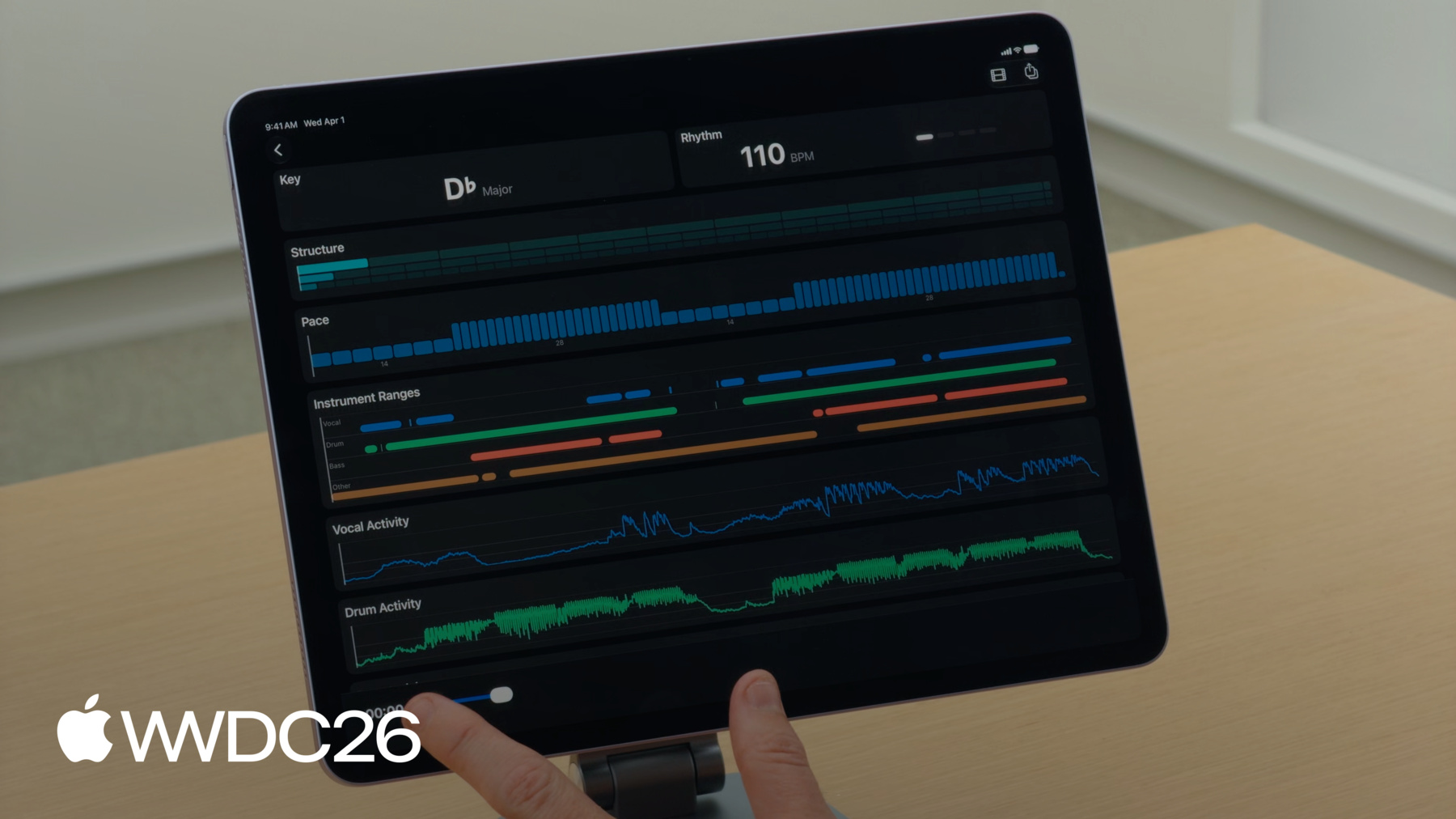
프레임워크를 더 깊이 탐구하기 위해 Music Understanding Lab이라는 샘플 앱을 살펴보겠습니다. developer.apple.com에서 이용 가능합니다. Music Understanding Lab이 어떻게 작동하는지 보여드리겠습니다. 먼저 기기에서 곡을 선택하겠습니다.
앱은 Music Understanding 프레임워크를 사용하여 오디오를 분석하고 시각적 경험으로 전환합니다. 각 결과에 대한 전용 타일과 함께 제공됩니다. 재생을 누르면 확인하실 수 있습니다. Rhythm과 Structure 타일이 곡이 재생되는 동안 업데이트됩니다. 재생 헤드가 경험을 하나로 연결해줍니다. 음악을 따라가며 감상할 수 있습니다.
먼저 '노래 선택...' 버튼의 구현 방법에 대해 설명하겠습니다. SwiftUI의 fileImporter를 사용하여 URL을 얻기 위해 파일을 선택합니다. 그런 다음 해당 URL을 사용하여 AVURLAsset을 생성합니다. PreferPreciseDurationAndTimingKey를 true로 설정해야 합니다. 가장 정확한 결과를 얻기 위해서입니다. 다음으로 에셋에서 세션을 생성하고 analyze를 호출하여 세션 결과의 반환을 기다립니다. SessionResult 구조체 내부에는 Music Understanding이 분석하는 모든 기능이 자체 결과 필드를 가지고 있습니다. 이것들은 모두 옵셔널입니다. 일반 analyze() API를 사용하면 모든 결과를 사용할 수 있습니다. 하지만 타겟 analyze(for:) API를 사용하면 프레임워크는 요청한 결과만 반환하고 나머지는 nil이 됩니다.
Music Understanding 프레임워크 전반에 걸쳐 시간과 값을 연결하는 데 사용되는 두 가지 표준 타입이 있습니다. TimedValue는 값을 CMTime과 연결합니다. TimedValue와 유사하게 RangedValue는 CMTimeRange를 값과 연결합니다. 이러한 시간 기반 타입을 염두에 두고 Music Understanding이 분석하는 기능에 대해 설명하겠습니다. Music Understanding Lab UI에서 어떻게 사용되는지 보여드리겠습니다. 먼저 Key 타일부터 시작하겠습니다. 이 곡에서 음악적 키는 D플랫 장조입니다. 키 분석에 대해 Music Understanding 프레임워크는 KeyResult 구조체를 반환합니다. 결과는 범위 배열을 포함하며 KeySignature를 특정 시간 범위에 매핑합니다. RangedValue를 사용합니다. KeySignature는 토닉을 포함하고 모드를 포함합니다. 토닉은 표준 반음계 음정 중 어느 것이든 될 수 있습니다. C나 G와 같이 곡이 구축되는 루트 음을 나타냅니다... 그 주위에 곡이 구성됩니다... 그리고 모드는 장조 또는 단조입니다.
키 옆에는 Rhythm 타일이 있습니다. 타일에는 왼쪽에 bpm이 표시되고 오른쪽에는 각 비트가 재생될 때마다 불이 켜지는 인디케이터가 있습니다. 리듬을 분석하면 RhythmResult가 반환됩니다. 이 구조체에서 Music Understanding은 타임스탬프를 제공합니다. 모든 비트와 마디에 대한 CMTime 배열 형태로 제공됩니다. 프레임워크는 또한 전체 글로벌 템포를 제공합니다. beatsPerMinute를 통해서입니다. bpm은 옵셔널임에 주목하세요. 프레임워크가 충분한 오디오를 처리하지 못했을 경우 최소 두 개의 비트를 찾지 못하면 bpm은 nil로 설정됩니다. 이제 Structure 타일에 대해 설명하겠습니다. 타일에는 3개 행의 직사각형이 있습니다. 곡의 구조적 계층을 나타냅니다. 각 직사각형은 곡의 시간 범위입니다. Music Understanding은 세 가지 구조 수준을 지원합니다: 섹션, 세그먼트, 프레이즈입니다. 상단 행은 곡의 섹션을 나타냅니다. 각 블록은 섹션의 시간 범위를 보여줍니다. 각 섹션은 하나 이상의 세그먼트로 구성되며 섹션 직사각형 아래에 표시됩니다. 각 세그먼트는 프레이즈로 구성됩니다. 재생 중에는 현재 섹션, 세그먼트, 프레이즈가 강조 표시됩니다.
구조 분석을 요청하면 프레임워크는 StructureResult를 반환합니다. 세 가지 속성이 있습니다. 섹션, 세그먼트, 프레이즈에 대한 것입니다. 각각에 대해 CMTimeRange 배열을 얻습니다. 다음 타일은 Pace입니다. 청취자가 음악을 얼마나 빠르게 느끼는지 알려줍니다. 더 빠르거나 활기차게 느껴지는 곡의 부분은 더 느리거나 덜 활기찬 부분에 비해 더 높은 값을 가집니다. 이 UI에서 더 높은 막대는 높은 에너지를 나타내고 더 짧은 막대는 낮은 에너지를 나타냅니다. 속도 분석을 요청하면 PaceResult가 반환됩니다. 이 구조체는 단일 속성을 가지며 범위 값 배열을 포함합니다.
다음으로 악기 활동 타일에 대해 설명하겠습니다.
Music Understanding Lab은 여러 타일을 표시합니다. 악기 활동을 시각화하는 것들입니다. 시간 범위로 나타내거나 색상으로 구분된 막대로 활성 악기를 표시하기도 합니다. 또는 상세 활동 그래프로 나타냅니다. 그래프는 0과 1 사이의 값을 표시하며 각 악기의 강도를 나타냅니다. 값이 1에 가까울수록 믹스에서 악기가 더 크게 들립니다. 악기 활동을 요청하면 프레임워크는 InstrumentActivityResult를 반환합니다. 두 가지 속성이 있습니다. 범위에 대한 것 그리고 활동에 대한 것입니다. Ranges API는 딕셔너리를 제공합니다. 각 Instrument를 CMTimeRange 배열에 매핑합니다. 악기가 존재하는지 여부만 알고 싶은 경우에 유용합니다. 악기가 있는지 없는지 확인할 때 좋습니다. 하지만 때로는 더 많은 세부 정보가 필요하며 activity가 그것을 제공합니다. Activity는 악기를 Float의 TimedValue에 매핑합니다. 활동 결과는 악기가 시간에 따라 얼마나 강하게 연주되는지 표현하며 오디오 반응형 애니메이션을 구동하기에 매우 좋은 소스입니다. Loudness 타일은 악기 활동 아래에 표시됩니다.
프레임워크는 측정값을 제공합니다. Loudness Units Full Scale, 즉 LUFS로 이것은 업계 표준으로 인간의 귀가 음량을 인식하는 방식을 모델링합니다. 타일의 상단에는 단일 통합 음량 값이 있으며 전체 곡의 평균 음량을 나타냅니다. 그 아래에는 순간 음량 그래프가 있어 시간에 따라 음량이 어떻게 변하는지 보여줍니다. 프레임워크는 또한 피크 값을 제공합니다. 데시벨 단위로 절대적으로 가장 높은 오디오 볼륨을 나타냅니다. 음량 분석을 요청하면 프레임워크는 LoudnessResult 구조체를 반환합니다. Music Understanding은 통합, 순간, shortTerm 음량을 지원합니다. 통합은 단일 값을 제공하며 오디오의 전반적인 음량을 나타냅니다. Momentary와 shortTerm은 100밀리초마다 타임스탬프가 찍힌 값을 제공합니다. Momentary 값은 400밀리초의 윈도우로 계산됩니다. 음량의 짧고 갑작스러운 급증을 감지하는 데 유용합니다. ShortTerm 값은 3초 윈도우로 계산되며 시간에 따른 음량 추세를 더 부드럽게 보여줍니다. 피크 값은 트랙이 최대 레벨에 도달하는 정확한 위치를 알려주며 데시벨로 측정됩니다. MusicUnderstandingSession은 또한 음량을 위한 스트리밍 API를 제공합니다. 값은 AsyncSequence를 통해 전달됩니다. 프레임워크가 분석하는 100ms의 오디오마다 제공됩니다.
사용 방법의 예시를 살펴보겠습니다. 이전에 했던 것처럼 세션을 초기화합니다. 하지만 이번에는 두 가지 태스크를 설정합니다: 하나는 전달되는 음량 결과를 소비하는 것이고 다른 하나는 분석을 시작하는 것입니다.
이제 이 예시의 AudioProvider에 대해 설명하겠습니다. AudioProvider는 AsyncSequence를 준수하며 AVReadOnlyAudioPCMBuffer 객체를 yield합니다. AudioProvider가 모든 오디오 버퍼를 보냈을 때 완료 신호를 위해 최종 nil을 반드시 보내야 합니다.
이제 Music Understanding Lab 상단의 두 아이콘에 집중하겠습니다. 오른쪽 끝에는 공유 버튼이 있습니다. 탭하면 모든 분석 데이터가 담긴 JSON 파일이 내보내집니다.
모든 MusicUnderstanding 결과는 코더블입니다. JSON으로 인코딩하려면 JSONEncoder를 생성하고 세션 결과를 인코딩하면 됩니다. 내보내기 버튼 옆에는 필름 스트립 아이콘이 있는 버튼이 있습니다.
탭하면 Video 타일이 열립니다. Video 타일은 structure와 pace를 활용하여 음악에 동기화된 비디오를 만듭니다. 작동 방식을 설명하겠습니다. Video 타일은 음악의 느낌과 맞는 비디오 클립 시리즈를 표시합니다. 알고리즘은 곡 섹션의 시간 범위를 먼저 식별합니다. 그런 다음 각 섹션의 속도를 사용하여 해당 시간 범위에 표시할 클립 수를 결정합니다.
속도는 분당 이벤트 비율이므로 60초로 나누어 클립당 시간을 결정할 수 있습니다. 이를 통해 클립은 항상 각 섹션의 시작에서 시작하게 되고 섹션 내의 클립들은 곡의 에너지와 일치합니다.
그런 다음 이 타이밍 정보를 사용하여 음악에 동기화된 비디오를 구성합니다. 비디오 클립은 목표 클립 길이에 맞게 재타이밍됩니다. 에너지가 낮은 부분에서는 더 길고 느린 클립이 사용되고 에너지가 높은 부분에서는 더 짧고 빠른 클립이 사용됩니다. 이 개요를 통해 이러한 API들이 실제로 어떻게 함께 작동하는지 알 수 있습니다.
이 기본 사항을 이해했다면 이제 시작할 준비가 되었습니다! Music Understanding을 사용하면 비주얼을 곡의 비트, 음량, 또는 속도에 동기화하여 강력한 비디오 편집 기능을 구축하거나 음악 카탈로그를 템포나 키로 정리하여 DJ 앱을 구동하거나 분석 데이터를 미리 계산하고 번들로 묶어 게임을 음악에 맞춰 애니메이션할 수 있습니다. Music Understanding Framework 문서를 확인해 보세요. developer.apple.com에서 확인하시고 "Music Understanding Lab"을 다운로드하여 자신만의 애플리케이션 개발을 빠르게 시작하세요.
이 기술은 Apple에서 실제 과제를 해결하기 위해 개발되었습니다. 아이디어는 있었지만 그것을 구현할 도구가 없었습니다. 이제 그 도구들이 여러분의 손에 있습니다. 멋진 것을 만들어 보세요. 시청해 주셔서 감사합니다!
-
-
4:47 - Initialize the session
import MusicUnderstanding .fileImporter(isPresented: $isPresented, allowedContentTypes: [.audio]) { result in switch result { case .success(let url): let asset = AVURLAsset(url: url, options: [AVURLAssetPreferPreciseDurationAndTimingKey : true]) let session = try await MusicUnderstandingSession(asset: asset) let results = try await session.analyze() } } -
5:24 - Inside SessionResult
import MusicUnderstanding public struct SessionResult: Codable, Sendable { public let instrumentActivity: InstrumentActivityResult? public let key: KeyResult? public let loudness: LoudnessResult? public let pace: PaceResult? public let rhythm: RhythmResult? public let structure: StructureResult? } -
5:53 - TimedValue
import MusicUnderstanding public struct TimedValue<Value>: Codable, Equatable, Sendable where Value: Codable & Equatable & Sendable { public let time: CMTime public let value: Value } -
5:58 - RangedValue
import MusicUnderstanding public struct RangedValue<Value>: Codable, Equatable, Sendable where Value: Codable & Equatable & Sendable { public let range: CMTimeRange public let value: Value } -
6:27 - Key analysis
public struct KeyResult: Codable, Sendable { public let ranges: [MusicUnderstandingSession.RangedValue<KeySignature] } -
6:43 - KeySignature
public struct KeySignature: Codable, Hashable, Sendable { public let tonic: Tonic public let mode: Mode } -
6:48 - Using tonic
@frozen public enum Tonic: String, Codable, Hashable, Sendable { case aFlat, aSharp, a, bFlat, b, c, cSharp, d, dFlat, dSharp, eFlat, e, f, fSharp, g, gFlat, gSharp } -
6:59 - Using mode
public enum Mode: String, Codable, Hashable, Sendable { case major, minor } -
7:16 - Rhythm analysis
import MusicUnderstanding public struct RhythmResult: Codable, Sendable { public let beats: [CMTime] public let bars: [CMTime] public let beatsPerMinute: Float? } -
8:42 - StructureResult
import MusicUnderstanding public struct StructureResult: Codable, Sendable { public let sections: [CMTimeRange] public let segments: [CMTimeRange] public let phrases: [CMTimeRange] } -
9:26 - Analyzing pace
import MusicUnderstanding public struct PaceResult: Codable, Sendable { public let ranges: [MusicUnderstandingSession.RangedValue<Double>] } -
10:13 - InstrumentActivityResult
import MusicUnderstanding public struct InstrumentActivityResult: Codable, Sendable { public let ranges: [Instrument: [CMTimeRange]] public let activity: [Instrument: [MusicUnderstandingSession.TimedValue<Float>]] } -
11:45 - LoudnessResult
import MusicUnderstanding public struct LoudnessResult: Codable, Sendable { public let integrated: MusicUnderstandingSession.TimedValue<Float> public let momentary: [MusicUnderstandingSession.TimedValue<Float>] public let shortTerm: [MusicUnderstandingSession.TimedValue<Float>] public let peak: MusicUnderstandingSession.TimedValue<Float> } -
12:48 - Streaming API for loudness
import MusicUnderstanding public var loudnessResults: some AsyncSequence<LoudnessResult, any Error> & Sendable -
12:55 - Streaming API for loudness
import MusicUnderstanding let audioProvider = AudioProvider() let session = MusicUnderstandingSession(audioProvider: audioProvider) await withThrowingTaskGroup(of: Void.self) { taskGroup in group.addTask { for try await result in await session.loudnessResults { updateAudioLevel(result.momentary.value) } } group.addTask { try await session.analyze(for: [.loudness]) } } -
13:19 - Audio Provider
import MusicUnderstanding struct AudioProvider: AsyncSequence, AsyncIteratorProtocol { func makeAsyncIterator() -> Self { return self } mutating func next() async -> AVReadOnlyAudioPCMBuffer? { // Return the next audio buffer, or nil to signal completion } } -
13:55 - Encode to JSON
import MusicUnderstanding let session = try await MusicUnderstandingSession(asset: asset) let results = try await session.analyze() let encoder = JSONEncoder() try encoder.encode(results) -
14:47 - Suggestion for using pace
let timePerClip = 60 / paceValue
-