

-
앱에 MusicKit 통합하기
MusicKit을 사용하여 Apple Music의 강력한 기능을 앱에 도입해 보세요. 승인, 구독 상태 확인, 음악 선택, 재생 제어, 스토어프론트 간 곡 공유를 다룹니다. 새로운 음악 선택기를 사용하여 사용자가 Apple Music 카탈로그와 개인 보관함을 살펴볼 수 있도록 하는 방법을 알아보세요. 또한 SystemMusicPlayer와 ApplicationMusicPlayer의 차이점을 자세히 살펴보고, 재생 상태를 관찰하는 방법을 안내합니다.
챕터
- 0:00 - 소개
- 2:11 - 프로젝트 설정 및 승인
- 7:10 - Music 항목과 뮤직 피커
- 10:54 - 음악 플레이어 및 재생
- 16:26 - 카탈로그 요청
- 20:11 - 다음 단계
리소스
관련 비디오
WWDC23
WWDC22
-
비디오 검색…
안녕하세요, WWDC 2026에 오신 것을 환영합니다. 저는 Cathy로, MusicKit 팀의 엔지니어입니다! 오늘 저의 팀원 Alan과 함께 앱에 MusicKit을 통합하는 방법을 시연해 드리겠습니다.
MusicKit은 Apple 플랫폼을 위한 Swift 프레임워크로, 일련의 API를 제공하여 앱에서 음악에 접근하고 재생할 수 있게 해줍니다. Swift 동시성과 SwiftUI를 염두에 두고 설계된 MusicKit은 Apple Music과의 통합을 간소화합니다. 풍부하고 음악이 강화된 경험을 구축할 수 있어, 사용자가 Apple Music 카탈로그를 탐색하고 재생하거나 개인 미디어 라이브러리를 앱에서 바로 이용할 수 있습니다. Alan과 저는 오늘 많은 핵심 MusicKit 개념을 다루면서 저희가 만든 운동 앱을 발전시켜 나가겠습니다. 먼저, Xcode 구성 방법과 음악 접근 처리 방법을 설명하겠습니다.
그런 다음, MusicKit 음악 항목이 무엇인지 그리고 어떻게 선택하는지 설명하겠습니다.
Alan은 제 음악 선택 작업을 바탕으로 선택한 곡들을 재생을 위해 준비할 것입니다.
마지막으로, Alan은 음악 카탈로그 요청에 대해 깊이 알아보고 저희가 만든 앱을 더욱 커스터마이즈하겠습니다. 이제 MusicKit 통합에 들어가기 전에 운동 앱의 흐름을 살펴보겠습니다. MusicKit 통합에 들어가기 전에. 따라오실 분들은 개발자 문서 사이트에서 완성된 샘플 코드를 찾을 수 있습니다.
앱을 실행하고 현재 흐름을 살펴보겠습니다. 자전거 운동을 시작하면, 스톱워치가 있는 화면이 팝업으로 나타납니다. 세션을 종료하는 버튼과 함께요.
좋은 시작이지만, 운동 중에 음악을 선택해서 재생하고 싶으니 MusicKit을 통합하고 싶습니다!
코딩을 시작하기 전에, 몇 가지 설정을 구성해야 합니다 프로젝트 설정의 일부로요. 그 설정 중 하나는 개발자 토큰 등록입니다 개발자 포털에서, MusicKit 요청을 하는 데 필요한 것입니다. 개발자 토큰을 등록하면, 자동으로 생성됩니다.
자동 토큰 생성을 활성화하려면, 해당 페이지로 이동합니다 App ID를 등록하는 곳으로요. App Services 탭에서 MusicKit 체크박스가 선택되어 있는지 확인해야 합니다.
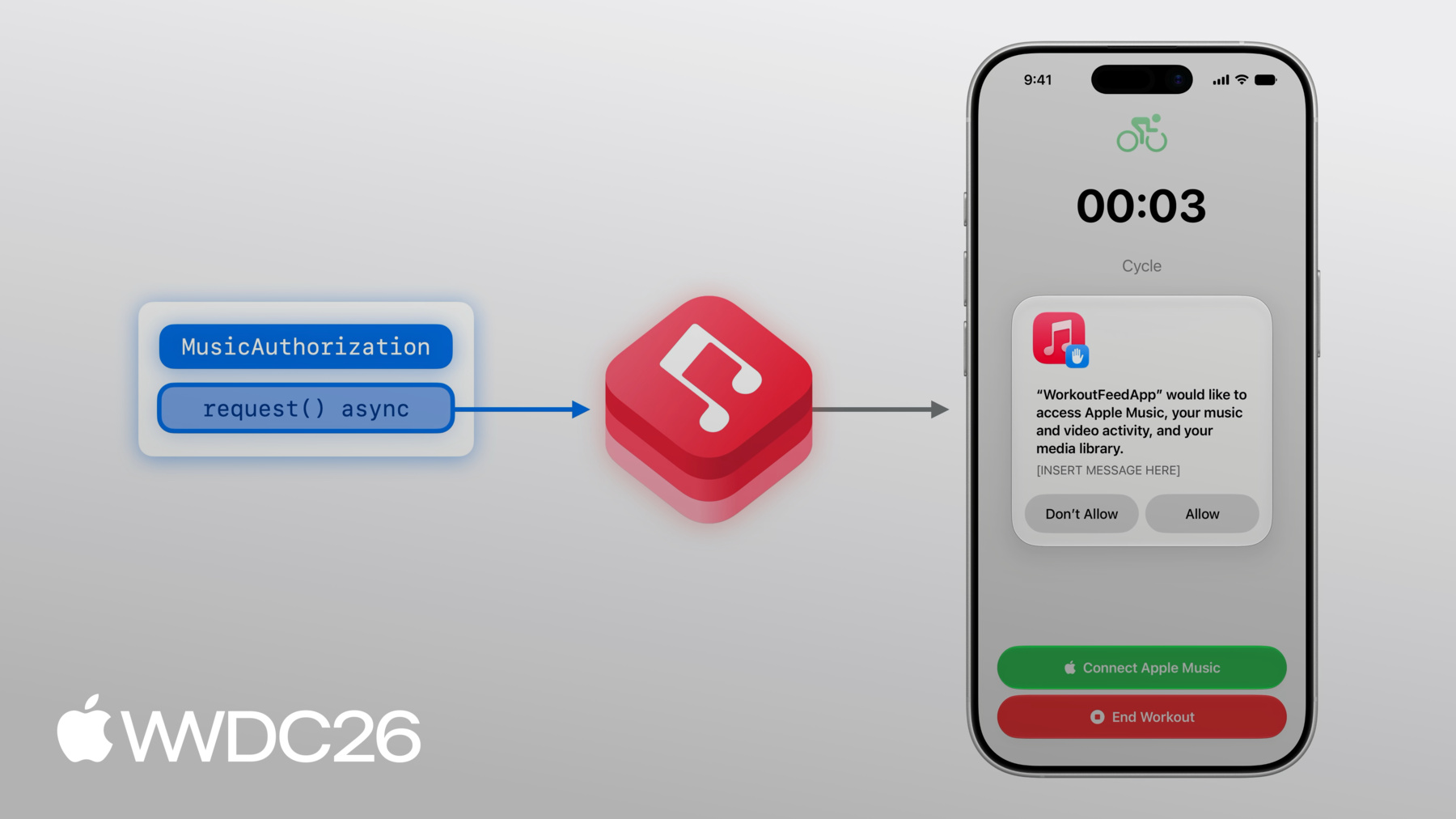
토큰은 제 개발자 계정과 연결되어 있어, Xcode에서 동일한 계정에 로그인되어 있는지 확인해야 합니다. 이제 앱으로 돌아가겠습니다! 운동 중에 재생할 음악을 선택하고 싶지만, 음악을 선택하기 전에, MusicKit이 음악 콘텐츠에 접근할 수 있도록 권한을 부여해야 합니다. 인증을 요청하려면, MusicKit의 MusicAuthorization request 메서드를 사용합니다. 이것은 비동기 메서드로 앱의 음악 접근이 승인되었는지 여부를 반환합니다. MusicKit은 권한 알림으로 사용자에게 묻게 됩니다.
이 알림의 설명을 구성할 수 있습니다 앱이 접근을 어떻게 사용할지에 대한 더 많은 맥락을 담아서, 프로젝트 설정에서 할 수 있습니다.
음악 콘텐츠에 접근하는 이유를 제공하려면, Xcode 프로젝트의 Signing & Capabilities 탭으로 이동하여, Media Library 기능을 추가합니다. 텍스트 상자에서 앱이 사용자의 음악 라이브러리를 어떻게 사용할 것인지 설명할 수 있습니다. 이 설명은 인증을 요청할 때 권한 알림의 하단에 나타납니다. 구독하지 않은 사람이 Apple Music 카탈로그의 콘텐츠를 듣고 싶어하는 경우, Apple Music 카탈로그의 콘텐츠를 듣고 싶다면, 구독할 수 있는 방법을 제공하고 싶습니다. Apple Music 구독은 MusicKit을 사용하는 데 필수가 아닙니다. 그러나 구독 없이는 구매하거나 동기화된 음악에만 접근할 수 있습니다. 활성 구독이 없는 경우, MusicKit의 구독 제안 뷰 수식어를 사용할 수 있습니다 앱을 떠나지 않고 Apple Music을 구독할 기회를 제공하기 위해서요. .musicSubscriptionOffer는 뷰 수식어입니다 isPresented 바인딩 파라미터를 받으며, 버튼이 탭될 때 이 뷰에서 변경됩니다.
표시되면, 구독 제안 UI가 사용자에게 단계를 제공하여 Apple Music 구독에 빠르게 가입할 수 있게 합니다. 개발자로서, 커미션을 받을 가능성이 있습니다 누군가가 앱을 통해 Apple Music을 구독할 때, Apple Services Performance Partner Program의 일환으로요. 이 프로그램에 대한 정보를 지정할 수 있습니다 MusicSubscriptionOffer.Options 구조체에서, 그것을 뷰 수식어에 전달합니다. Options 구조체를 통해 메시지 식별자도 설정할 수 있어, 어떤 UI가 표시될지 변경합니다. 궁극적인 목표가 음악 재생이므로, messageIdentifier를 설정하겠습니다 옵션으로 .playMusic으로요.
메시지 식별자를 커스터마이즈하여 사용 사례에 맞는 다른 UI 처리를 적용할 수 있습니다.
메인 뷰에서, 구독 상태를 나타내는 @State 속성을 선언해야 합니다. 구독 상태를 나타내는. 구독하지 않은 경우에만 구독 버튼을 표시하고 싶으며, 구독할 가능성이 있는 경우에만요. 구독 상태를 업데이트하려면, 인증이 부여될 때 실행되는 .task를 추가할 수 있습니다. 여기서, 현재 값을 가져오고 업데이트도 수신하여 발생하는 업데이트를 수신하여 값을 적절히 설정합니다.
이제 인증되고 구독되었으니, 구독을 사용하여 Apple Music 카탈로그의 음악을 재생할 수 있습니다 운동 중에! 먼저, 재생할 곡을 선택해야 합니다. 구체적으로, MusicKit 곡 오브젝트를 선택하겠습니다. MusicItem은 MusicKit API를 사용하기 위한 기본 구성 요소이므로, 먼저 이것들을 설명하겠습니다. 그런 다음, 음악 피커를 사용하여 음악 항목을 선택하는 방법을 설명하겠습니다. 먼저 음악 항목에 대해 알아보겠습니다.
Album 음악 항목은, 예를 들어 값 타입으로 MusicKit의 모델 레이어에 있습니다.
각 음악 항목에는 Attribute가 있으며, 이는 단순한 내장 속성입니다. Album 오브젝트는, 예를 들어, 다음을 설명하는 속성을 가집니다 앨범의 제목, 또는 앨범의 contentRating이 무엇인지.
음악 항목에는 관련 콘텐츠를 설명하는 Relationship도 있으며, Album의 tracks처럼, 다른 MusicKit 음악 항목 타입입니다.
Association도 타입의 관련 콘텐츠를 설명하지만, 관계보다 타입과의 연결이 일반적으로 더 약합니다. Album의 Association 중 하나는 otherVersions이며, 다른 앨범들의 컬렉션입니다.
지금까지 Album에 집중했지만, 다른 MusicKit 음악 항목 타입도 많습니다. Genres, Stations, Playlists 등이 있습니다.
이제 음악 항목이 무엇인지 설명했으니, 이를 사용할 시간입니다! 운동 중에 들을 음악을 선택하기 위해, 음악 피커를 활용할 수 있습니다. 이것은 Apple Music 카탈로그와 음악 라이브러리 모두를 단일하고 통합된 인터페이스로 제공합니다. 음악 피커는 한 곳에서 여러 종류의 MusicKit 요청을 활용하여, 누군가가 선택하고 싶은 음악을 여러 방식으로 발견할 수 있게 합니다. MusicKit 곡을 선택하려면, .musicPicker SwiftUI 뷰 수식어를 추가해야 합니다! 이미 기본 버튼이 있지만, 몇 가지 상태 변수를 추가해야 합니다. 피커를 표시할지 여부를 위한 토글부터 시작해서요. 다음으로, selected song 속성은 초기 곡 선택을 나타냅니다. 선택된 것이 없으므로, 기본값으로 nil이 될 수 있습니다.
이제 수식어를 추가할 수 있습니다.
이제, musicPickerButton 버튼을 메인 뷰에 추가하겠습니다 다른 버튼들을 추가한 곳에요. 음악 피커는 구독이 필요하지 않으므로, 구독 여부와 관계없이 항상 표시됩니다. 구독이 없는 경우, 피커는 음악 항목을 라이브러리에서만 표시합니다 라이브러리와 카탈로그 모두가 아닌, 사람의 라이브러리에서만요. 이제 빌드하고 실행해보겠습니다! Olivia Dean을 정말 좋아해서, 현재 즐겨 듣는 Olivia Dean 곡을 선택하겠습니다. 그러기 위해, 검색창을 탭하고 곡을 검색하겠습니다. 원하는 결과를 찾으면, 플러스 버튼을 탭할 수 있습니다 곡 정보 오른쪽의, 그리고 피커를 닫습니다. 좋아요, 자전거 여행을 위해 "Lady Lady"가 선택되었네요. 하지만 30분 운동을 위해서는 한 곡 이상 듣고 싶습니다.
피커에서 다중 선택을 허용해야 합니다 선택 오브젝트를 배열로 변경하여.
3곡을 먼저 선택하겠습니다. 하지만 앨범이나 플레이리스트 전체를 선택할 수도 있습니다 세부 페이지로 이동하여 상단의 플러스 버튼을 누르면 됩니다. 좋아요, 곡들을 선택했으니 피커를 닫겠습니다.
음악을 선택했으니, 재생하고 싶습니다. 팀원 Alan이 여기서 이어받아 운동 앱에 재생 기능 추가를 설명하겠습니다.
감사합니다, Cathy. MusicKit의 MusicPlayer를 사용하여 음악을 재생할 시간입니다! MusicKit은 두 가지 다른 플레이어를 제공합니다, SystemMusicPlayer와 ApplicationMusicPlayer입니다. 두 플레이어 모두 MusicPlayer의 서브클래스입니다. SystemMusicPlayer는 시스템 Music 앱을 제어하고, ApplicationMusicPlayer는 앱에서 재생합니다.
SystemMusicPlayer를 사용하면 큐만 설정할 수 있습니다. 현재 재생 중인 항목을 제외하고는 큐에 무엇이 있는지 볼 수 없습니다.
반면, ApplicationMusicPlayer의 큐에는 전체 읽기 및 쓰기 접근이 가능합니다. ApplicationMusicPlayer의 큐에 대한.
두 음악 플레이어 모두 큐가 Music 앱의 최근 재생에 표시될지 Music 앱의 최근 재생에 표시될지 설정할 수 있고 재생 상태도 설정할 수 있습니다. 반복 및 셔플 모드와 같은 것들을요.
마지막으로, SystemMusicPlayer는 시스템의 Music 앱을 제어하므로, 앱이 백그라운드로 가거나 종료되어도 계속 재생됩니다. ApplicationMusicPlayer를 사용하여 동일한 백그라운드 동작을 원한다면, Audio Background Mode 기능을 활성화합니다 Xcode 프로젝트 설정에서요.
큐는 재생 가능한 음악 항목의 컬렉션으로 구성됩니다, 곡과 같은. 큐는 MusicPlayer에 설정됩니다.
MusicPlayer의 반복 또는 셔플 동작은 상태로 구성할 수 있습니다.
재생을 시작하려면, MusicPlayer에서 play()를 호출합니다. 재생을 멈추려면, pause()를 호출합니다.
먼저, MusicPlayer가 큐를 로드합니다.
그런 다음, MusicPlayer는 오디오 에셋을 로드해야 합니다 플레이어가 음악을 출력하기 전에!
이것은 약간의 시간이 걸릴 수 있습니다.
미리 재생할 것을 알고 있다면, MusicPlayer를 버퍼링하세요 prepareToPlay()를 사용하여. play()를 호출할 때 음악 출력에 필요한 시간이 줄어듭니다.
큐는 곡과 같은 재생 가능한 음악 항목이나 앨범이나 플레이리스트 같은 컨테이너 타입에서 만들 수 있습니다.
컨테이너 타입을 위한 특별한 큐 이니셜라이저를 사용하면 음악 플레이어가 컨테이너의 항목을 지연 로드할 수 있어, 로드 시간이 더 줄어듭니다! MusicKit을 사용하여 음악을 재생하면, 일반적으로 Music 앱의 사용자 청취 기록에 나타납니다. affectsListeningHistory는 인스턴스 속성으로 큐가 표시될지 여부를 결정합니다 Music 앱의 최근 재생 선반에. 기본값은 "true"이지만 Music 앱의 청취 기록 사용 설정을 존중합니다. Music 앱의 설정을. 플레이어를 관찰하고 제어하기 위해, 두 MusicPlayer 모두 관찰 가능한 속성을 가집니다 재생 상태와 큐에 대한.
ApplicationMusicPlayer는 완전한 제어가 가능한 큐를 가집니다. 이것들은 SwiftUI 뷰에서 직접 사용할 수 있는 관찰 가능한 클래스입니다.
Swift에서의 관찰에 대해 더 알아보려면, Discover Observation을 확인하세요 WWDC 2023의 SwiftUI 세션에서. 운동 앱에서, 운동 중에 아트워크를 전면에 배치하고 싶습니다.
현재 곡의 제목과 부제목, 그리고 컨트롤 세트도 표시하겠습니다.
현재 재생 중인 곡을 가져오기 위해, 플레이어의 큐를 참조하겠습니다.
그런 다음, 큐의 현재 재생 중인 곡에 아트워크가 있는 경우, MusicKit의 ArtworkImage SwiftUI 뷰를 사용하여 아트워크를 표시하겠습니다.
곡 정보를 표시하기 위해, 제목과 부제목을 사용하겠습니다 현재 재생 중인 항목의.
재생/일시정지를 제어하기 위해, 버튼을 추가하겠습니다. ApplicationMusicPlayer의 상태를 읽어 playbackStatus를 확인하여 현재 재생 중인지 파악합니다.
버튼은 플레이어가 현재 재생 중일 때 "pause"를 호출합니다 그렇지 않으면 "play"를 호출합니다.
마지막으로, Back 버튼은 skipToPreviousEntry를 호출하여 이전 곡으로 이동하고 Next 버튼에서는 skipToNextEntry를 호출합니다.
음악 피커에서, 실행 중인 플레이리스트 상단의 플러스 버튼을 탭하여 이 플레이리스트의 모든 곡을 선택할 수 있습니다. 그런 다음, 완료를 탭하겠습니다. 첫 번째 곡이 지금 재생되고 있으며, 방금 추가한 ArtworkImage가 현재 재생 중인 곡을 반영합니다! 일시정지를 탭하면, 플레이어가 일시정지됩니다. 다음을 탭하면, 아트워크가 다음 곡을 표시합니다!
앱을 사용하는 분들이 더 편리하게 운동을 시작할 수 있도록 운동 뷰에서 탭할 수 있는 곡들을 제안하고 싶습니다 빠르게 청취를 시작할 수 있도록!
카탈로그 요청을 통해 앱이 Apple Music을 조회하고 음악 콘텐츠를 제공할 수 있습니다 사람의 라이브러리와 독립적으로, 앱을 위한 큐레이션된 콘텐츠처럼요.
MusicKit에서, 구조화된 음악 카탈로그 요청은 Apple Music API에서 콘텐츠를 가져올 수 있게 합니다. MusicKit은 여러 가지 구조화된 요청을 제공합니다. 특정 필터를 기반으로 항목 가져오기, 음악 검색, 그리고 기타 Apple Music 큐레이션 및 개인화된 콘텐츠 등! 전체 목록 및 사용 방법은 MusicKit 문서를 탐색하세요.
MusicCatalogResourceRequest는 구조화된 카탈로그 요청으로 특정 리소스를 위한 것입니다. 이 예에서, 곡에 대한 요청을 하겠습니다. 요청에는 옵션과 같은 몇 가지 구성이 포함됩니다. 요청의 동작을 설정하고 싶다면요. 옵션에 대해서는 잠시 후에 더 이야기하겠습니다.
요청에 관계를 지정하는 속성을 설정할 수 있습니다 그리고 함께 이행하고 싶은 관계를 이 곡 요청의 일부로요. 예를 들어, 곡의 Artists 관계도 함께 원할 수 있습니다.
그리고, 응답에서 반환할 항목 수에 제한을 설정할 수 있습니다.
비동기 response() 메서드를 호출하면, MusicKit이 요청을 이행합니다.
이 메서드는 MusicCatalogResourceResponse를 반환합니다 요청의 결과를 포함하는 강력한 타입의 MusicItemCollection으로. MusicItemCollection은 MusicKit 타입으로, 음악 항목의 컬렉션을 포함합니다. 이 예에서, Song을 포함합니다.
MusicItemCollection은 페이지네이션을 지원하여, 요청이 너무 많은 결과를 생성했다면, hasNextBatch가 "true"가 되고 다음 페이지를 가져올 수 있습니다 비동기 nextBatch() 메서드를 사용하여. 리소스 요청을 할 때, 리소스 사용 가능 여부는 계정 설정에 따라 달라집니다 그리고 스토어프론트 또는 지역에 따라. 예를 들어, 한 지역에서 요청하는 리소스는 다른 지역에서 다른 ID를 가진 동등한 리소스를 가질 수 있습니다. 또한, 명시적 콘텐츠를 위한 리소스는 동등한 클린 리소스를 가질 수 있습니다 계정이 명시적 콘텐츠를 허용하지 않을 때.
곡 ID의 컬렉션을 입력으로 받는 fetchSongs 메서드를 만들겠습니다. 첫 번째 ID는 추천 곡으로 처리됩니다. 이 메서드는 MusicCatalogResourceRequest를 사용합니다 songIDs 인수의 ID와 일치하는 곡을 위해 songIDs 인수에서요.
findEquivalents 옵션 플래그도 추가하겠습니다 방금 이야기한 리소스 동등성 동작을 활성화하기 위해. 그런 다음, response() 메서드를 호출하여 콘텐츠를 가져오겠습니다.
추천 곡을 캡처하기 위해, item(for:) 메서드를 사용하겠습니다 입력 ID 컬렉션의 첫 번째 ID를 사용하여. 카탈로그 요청은 요청된 모든 것을 반환한다고 보장하지 않습니다, 리소스가 사용 불가능한 경우처럼요.
마지막으로, 다른 곡들을 순서대로 가져오겠습니다.
이제 운동할 준비가 됐습니다! 앱으로 돌아가서 다른 운동을 시작하면, 빠르게 선택할 수 있는 곡들의 선반이 생겼습니다 지금 당장 운동을 시작하고 싶을 때!
이 아트워크 중 하나를 탭하면 즉시 재생이 시작됩니다!
MusicKit을 앱에 통합하는 데 필요한 모든 것이 여기 있습니다! Cathy가 이야기했듯이, 음악 피커 뷰 수식어를 채택하여 앱에서 통합되고 친숙한 음악 선택 경험을 제공하세요!
Apple Music 카탈로그에는 앱이 재생할 수 있는 풍부한 콘텐츠가 있습니다. 예를 들어, 앱 경험을 풍부하게 할 배경 음악을 추가해보세요! 그리고 다른 MusicKit API도 확인해보세요, 라이브러리 콘텐츠 탐색 및 수정을 위한 요청 등 "Explore more content with MusicKit"에서 다루는 내용, WWDC2022에서. Android나 웹에서의 통합에 관심 있으시다면, "Meet Apple Music API and MusicKit"을 확인하세요. 시청해 주셔서 감사합니다.
-
-
4:47 - Presents the Apple Music subscription offer
@State var showSubscriptionOffer = false let options = MusicSubscriptionOffer.Options( messageIdentifier: .playMusic ) @ViewBuilder var musicSubsriptionButton: some View { Button("Subscribe to Apple Music", systemImage: "music.note") { showSubscriptionOffer = true } .musicSubscriptionOffer(isPresented: $showSubscriptionOffer, options: options) } -
5:59 - Adds subscription button to main view
@State var subscription: MusicSubscription? var body: some View { VStack { // ... if let subscription, subscription.canBecomeSubscriber { musicSubscriptionButton } } .task(id: isAuthorized) { self.subscription = try? await MusicSubscription.current for await subscription in MusicSubscription.subscriptionUpdates { self.subscription = subscription } } } -
8:48 - Add .musicPicker() modifier
@State var showMusicPicker = false @State var selectedSong: Song? = nil @ViewBuilder var musicPickerButton: some View { Button("Pick some Music", systemImage: "music.note.list") { showMusicPicker = true } .musicPicker(isPresented: $showMusicPicker, selection: $selectedSong) } var body: some View { VStack { if let subscription, subscription.canBecomeSubscriber { musicSubscriptionButton } musicPickerButton } } -
14:49 - Artwork
@State var queue = ApplicationMusicPlayer.shared.queue var body: some View { VStack { if let artwork = queue.currentEntry?.artwork { ArtworkImage(artwork, width: 200, height: 200) } else { // Placeholder artwork RoundedRectangle(cornerRadius: 16) .fill(.quaternary) .frame(width: 200, height: 200) } } } -
15:06 - Current entry info
@State var queue = ApplicationMusicPlayer.shared.queue var body: some View { VStack { // ... if let currentSong = queue.currentEntry { Text(currentSong.title) .font(.title3.bold()) if let subtitle = currentSong.subtitle { Text(subtitle) .font(.subheadline) .foregroundStyle(.secondary) } } } } -
15:14 - Playback controls (play, pause)
let player = ApplicationMusicPlayer.shared @State var state = ApplicationMusicPlayer.shared.state var isPlaying: Bool { state.playbackStatus == .playing } var playPause: some View { Button ( isPlaying ? "Pause": "Play", systemImage: isplaying ? "pause.fill" : "play.fill" ) { if isPlaying { player.pause() } else { Task { try await player.play() } } } } -
15:38 - Playback controls (next, previous)
let player = ApplicationMusicPlayer.shared var controls: some View { HStack { Button("Back", systemImage: "backward.fill") { Task { try await player.skipToPreviousEntry() } } // ... Button("Next", systemImage: "forward.fill") { Task { try await player.skipToNextEntry() } } } } -
18:58 - Music catalog resource request
func fetchSongs(songIDs: [MusicItemID]) async throws -> (featured: Song?, other: [Song]) {
    var request = MusicCatalogResourceRequest‹Song>(matching: \.id, memberOf: songIDs)
    request.options = [.findEquivalents]

    let response = try await request.response()

    let featuredSongID = songIDs[0]
    let featuredSong = response.item(for: featuredSongID)

    let others: [Song] = songIDs[1...].compactMap { songID in
        return response.item(for: songID)
    }

    return (featuredSong, others)
}
-