

-
Spatial Preview 프레임워크 알아보기
새로운 Spatial Preview 프레임워크를 사용하여 Mac의 콘텐츠를 visionOS로 직접 가져오는 방법을 확인해 보세요. 두 플랫폼 전반에서 실시간 동기화 및 양방향 편집을 통해 동적 워크플로를 구축하는 방법을 알아보세요. Mac 앱의 공간적 기능을 향상할 수 있는 SpatialPreview API, 기기 탐색, 2D 및 3D 세션 통합, 새로운 훑어보기 기능에 대해 알아보세요.
챕터
리소스
- Bridging an external USD runtime to Spatial Preview
- Working with content from your Mac app using Spatial Preview
- Reducing the rendering cost of RealityKit content on visionOS
- Spatial Preview
관련 비디오
WWDC26
WWDC22
-
비디오 검색…
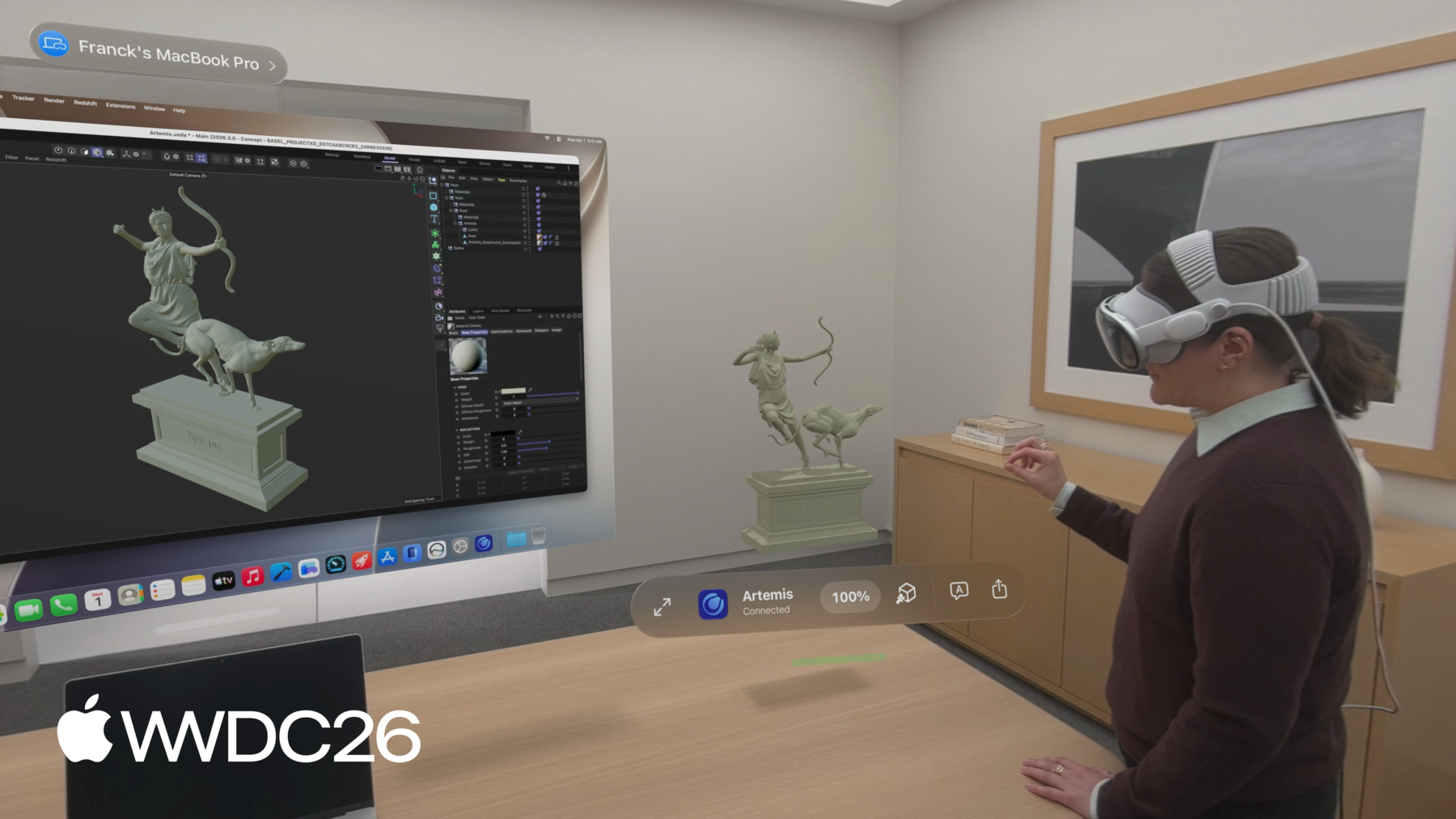
안녕하세요, 저는 Quincy Jermyn이고 visionOS 팀의 소프트웨어 엔지니어입니다 Apple Vision Pro에서 제가 가장 많이 사용하는 기능은 Mac Virtual Display인데요 Vision Pro가 제공하는 가상 화면으로 Mac 작업을 할 수 있는 기능입니다 macOS와 visionOS 27에서 Mac의 콘텐츠를 Vision Pro로 미리 보기가 더욱 쉬워졌습니다 Spatial Preview를 소개하게 되어 기쁩니다 사람들이 공간 컴퓨팅 기능을 활용할 수 있게 해주는 프레임워크로 Mac에서 콘텐츠를 다루면서 visionOS의 기능을 이용할 수 있습니다 Spatial Preview 프레임워크의 동작을 macOS용 Preview 앱에서 확인하세요 공간 콘텐츠 작업을 위한 다양한 기능과 함께 제공되며, 여기에는 다음이 포함됩니다 3D 콘텐츠 편집, 사실적인 렌더링 카메라 시점, 그리고 공간 미디어 출력 Apple Immersive Video 프레임, 공간 사진 등이 있습니다 Mac Virtual Display를 활용해 Vision Pro로 콘텐츠를 원활히 공유할 수 있습니다 visionOS의 Quick Look 앱이 이 콘텐츠를 수신하여 몰입형으로 작업할 수 있게 해줍니다 이 거실 장면을 위해 설정된 다양한 카메라 각도로 이동하는 것처럼요 이런 도구들은 3D 디자인의 크기와 배치를 파악하는 데 매우 유용합니다 이 디자인처럼요!
Spatial Preview를 통해 이제 Mac의 콘텐츠를 주변 공간으로 확장할 수 있습니다 이 기능들은 Preview 앱에서만 사용할 수 있는 것이 아닙니다 개발자 여러분을 위한 API로도 제공되어 새로운 macOS 앱이나 기존 앱에 기능을 추가할 수 있습니다 Vision Pro의 강력한 기능을 활용하기 위해서죠
이 도구들은 공간 콘텐츠를 통한 동적인 워크플로우를 지원하며 디바이스 간 실시간 동기화와 편집도 포함됩니다 실시간 동기화를 통해 Cinema4D, SketchUp, Blender 같은 앱들이 크리에이티브 프로세스를 혁신하고 있습니다 실시간 협업 3D 워크플로우를 실현하고 있으며 재질 변경 사항을 라이브로 반복 작업하는 것도 가능합니다 이번 세션에서는 여러분도 이렇게 할 수 있는 방법을 알려드리겠습니다!
먼저 프레임워크 개요를 설명드리겠습니다 콘텐츠 제작 도구를 개발하는 개발자를 위해 설계되었으며 공간 콘텐츠를 다루는 모든 앱에 적용됩니다 다음으로 Apple Immersive Video 프레임 등의 문서를 공유하고 업데이트하는 예시 워크플로우를 단계별로 살펴보겠습니다 마지막으로 앱을 만드는 방법을 소개합니다 사람들이 작업 중인 3D 콘텐츠에 실시간으로 완전히 몰입할 수 있는 Universal Scene Description을 활용하는 앱인데 3D 장면을 표현하는 데 사용되는 포맷입니다 이 세션을 마치면 Spatial Preview 프레임워크를 활용하는 데 필요한 모든 것을 갖추게 됩니다 Mac의 콘텐츠를 visionOS에서 작업할 수 있도록 해주는 기능이죠
이제 프레임워크가 제공하는 구성 요소를 살펴보겠습니다 설정이 얼마나 쉬운지 직접 확인해 보세요
첫 번째 단계는 공유할 디바이스를 가리키는 엔드포인트를 선택하는 것입니다 Mac Virtual Display를 활발히 사용 중이라면 이미 연결된 디바이스를 쉽게 사용할 수 있습니다 또는 앱에 Device Picker UI를 추가하면 동일한 iCloud 계정의 근처 Vision Pro 중에서 선택할 수 있습니다 다음으로 콘텐츠를 위한 Spatial Preview Session을 생성하세요 Preview Session에는 두 가지 유형이 있습니다 Document Preview Session은 공간 사진, 동영상 같은 유형을 다루며 PDF 같은 문서 유형도 포함합니다 USD Preview Session은 3D 콘텐츠를 처리합니다
세션이 시작되면 Vision Pro에서 Quick Look이 실행되고 앱이 세션에 제공한 콘텐츠가 표시됩니다 visionOS에서 이를 설정하기 위한 코드는 필요하지 않습니다!
Spatial Preview Session의 작동 방식을 전반적으로 살펴봤으니 Document Preview로 문서를 전송하고 업데이트하는 예시를 살펴보겠습니다 이 예시에서는 Apple Immersive Video의 스틸 이미지를 사용합니다 Mac의 Preview 앱에서 생성된 이미지입니다 그런 다음 Mac Virtual Display 엔드포인트를 사용하여 Document Preview Session을 시작하고 세션에 이미지를 제공해 Quick Look에 표시합니다 설정 코드를 살펴보겠습니다
먼저 ConnectedSpatialEndpointObserver를 생성합니다 Mac Virtual Display에서 Spatial Preview Endpoint를 가져오기 위해서죠 그런 다음 DocumentPreviewSession을 생성하고 문서 유형과 세션 이름을 지정합니다
반환된 엔드포인트로 선택한 디바이스에서 세션을 시작하고 콘텐츠 URL을 제공합니다
Mac Virtual Display가 항상 활성화되어 있지 않을 수 있으므로 SpatialPreviewDevicePicker를 통합하는 것을 고려하세요 다른 디바이스를 선택하기 위한 UI의 뷰로 사용하면 됩니다 SwiftUI의 시트를 사용하여 표시 시점을 제어하세요 그런 다음 앞서 보신 것과 동일하게 Document Preview Session을 생성하되 UI에서 선택한 디바이스 엔드포인트를 사용합니다 이렇게 간단하게 Spatial Preview를 시작할 수 있습니다 결과를 확인해 보겠습니다 제가 작성한 코드를 UI의 버튼에 넣으면 버튼을 누를 때 visionOS에서 콘텐츠가 실행됩니다 몰입형 모드로 볼 수 있어서 정말 멋집니다! 한 단계 더 나아가보겠습니다 몰입형 건축 렌더링의 갤러리를 만들어 보겠습니다
updateContents를 호출하면 세션 시작 시 실행된 동일한 장면을 재사용합니다 새로운 Document Preview Session을 만들고 start를 호출하면 새로운 장면이 실행됩니다 갤러리 뷰에서는 동일한 장면을 재사용하기 위해 updateContents를 활용하고 싶습니다
이 뷰에서 갤러리의 모든 비디오 프레임에 대한 버튼 행을 만들고 버튼을 누르면 세션에서 updateContents를 호출하여 선택된 파일로 전환되게 합니다
세션 상태를 관찰하는 태스크도 설정합니다 visionOS에서 장면이 닫히면 세션이 무효화되었다는 상태 변경을 수신합니다 세션이 끝나면 close를 호출하여 종료하세요 visionOS가 해당 장면을 자동으로 닫습니다 이제 갤러리는 동일한 장면 내에서 몰입형 렌더링 사이를 실시간으로 전환합니다 DocumentPreviewSession의 updateContents 함수를 사용해서죠 디자인 렌더링을 검토하는 데 훌륭한 방법입니다 실제 규모에서 작업 중인 콘텐츠를 더 잘 파악할 수 있는 훌륭한 방법입니다 Apple Immersive Video 외에도 많은 다른 콘텐츠 유형이 Spatial Preview와 잘 작동합니다 공간 사진, PDF 일반 이미지와 파일, 그리고 3D 콘텐츠도 포함됩니다! 문서를 전송하고 업데이트하는 것이 얼마나 쉬운지 보셨으니 이제 USDKit과 Spatial Preview로 3D 콘텐츠를 다루는 방법을 알아보겠습니다
USD가 처음이라면 "Understand USD fundamentals" 영상으로 시작하시길 권장합니다 새로운 Swift USDKit 프레임워크 사용법을 알아보려면 "Discover USDKit and what's new in OpenUSD"를 시청하세요 이 섹션에서는 USDKit을 사용하여 macOS 앱에서 visionOS의 3D 콘텐츠를 다루는 방법을 다룹니다 USD Preview Session 설정이 얼마나 쉬운지 살펴보고 3D 장면 탐색을 시작하는 방법도 소개합니다 카메라를 통해 보거나 재질 오버라이드를 적용하는 것도요 그 다음 콘텐츠 편집 방법과 visionOS에서 사람들이 USD와 상호작용하고 변경하는 방법을 다룹니다 주석 추가, 개체 이동 등이 포함됩니다 마지막으로 Spatial Preview Session의 이벤트와 관찰 가능한 속성을 살펴봅니다 Spatial Preview Session의 애니메이션 재생 이벤트, 세션 동기화 진행 상황 이벤트 그리고 세션에서 사용 가능한 기능을 커스터마이즈하는 방법도 포함됩니다 USD Preview Session 생성은 Document Preview Session과 유사하지만 콘텐츠가 USDKit 스테이지라는 점이 다릅니다 session start를 호출하면 visionOS에서 장면이 열리고 USD 콘텐츠가 볼류메트릭 뷰로 표시됩니다 그런 다음 몰입형 뷰로 전환하여 실제 크기로 볼 수 있습니다 설정 코드를 살펴보겠습니다 문서 공유와 마찬가지로 대상 디바이스 엔드포인트를 선택하는 것부터 시작합니다 그런 다음 USDKit을 사용하여 USD 콘텐츠를 스테이지로 로드하고 해당 스테이지를 USDPreviewSession에 제공한 후 선택한 디바이스 엔드포인트에서 세션을 시작합니다
콘텐츠가 visionOS에서 이 경계 뷰의 3D로 표시됩니다 장면을 회전하여 살펴볼 수 있고 몰입형으로 전환하면 실제 크기로 볼 수 있습니다 앞서 보셨듯이 이 장면에는 카메라가 몇 개 설정되어 있어서 여기서 하나를 선택하면 해당 시점으로 이동합니다 재질을 와이어프레임 모드로 오버라이드하여 지오메트리를 더 자세히 살펴볼 수도 있습니다 이 모든 기능은 Spatial Preview를 사용할 때 visionOS에 내장된 것입니다 Mac 앱에서 추가 설정이 필요하지 않습니다 USD 장면은 매우 고품질의 콘텐츠를 포함할 수 있어서 Vision Pro에서 렌더링하기엔 너무 복잡할 수 있습니다 기본적으로 Spatial Preview는 공유 전에 USD 콘텐츠를 자동으로 최적화합니다 메시 단순화, 텍스처 다운샘플링 필요한 경우 전체 장면 재구성도 포함됩니다 모두 Vision Pro에서 원활하게 실행되도록 하기 위해서입니다 장면을 재구성해야 하는 경우 편집은 불가능하지만 보기와 주석 추가는 가능합니다
이 최적화를 비활성화하려면 세션 생성 시 .unmodified 파라미터를 전달하세요 단, 최적화를 비활성화하면 복잡한 장면은 다음 기기로 공유가 불가능할 수 있으며 start 함수에서 오류가 발생합니다 콘텐츠의 렌더링 비용을 줄이는 방법에 대한 지침은 개발자 문서를 참고하세요
이제 macOS와 visionOS에서 USD 콘텐츠 편집이 어떻게 작동하는지 보겠습니다 USD Preview Session에서 사람들은 어느 디바이스에서든 변경할 수 있습니다! 라이브 USD 스테이지가 콘텐츠를 복제하는 데 사용됩니다 일반 USDKit API를 호출할 때 macOS와 visionOS 간에 동기화됩니다 Mac에서 콘텐츠를 변경하고 visionOS에서 공간적으로 보고 싶거나 visionOS에서 공간으로 확인하거나 visionOS의 검토 세션에서 편집 내용을 캡처하는 데 매우 유용합니다
코드로 들어가기 전에 USD 스테이지가 무엇인지와 USD 용어에 대해 살펴보겠습니다 스테이지는 하나 이상의 레이어로 구성되며 레이어에는 USD 프림이 포함됩니다 USD 프림은 다양한 기능을 표현할 수 있는 개체입니다 3D 변환이나 메시 같은 것들이죠 variantSet은 프림의 대체 데이터를 교체할 수 있습니다
이 거실 장면에 몇 가지 USD 배리언트를 설정해두었는데 variantSet을 사용하여 가구의 위치와 회전을 변경합니다 USDKit에서 이 배리언트 중 하나를 선택하면 스테이지가 변경되고 가구를 다른 위치로 이동시키는 편집 내용이 macOS와 visionOS 사이에 적용되고 동기화됩니다 여기 툴바의 버튼들은 macOS에서 배리언트 사이를 전환하며 그에 따른 가구 배치가 visionOS에 반영됩니다 Quick Look 메뉴에서 배리언트를 선택하면 Mac에서도 이 변경이 반영됩니다 Mac에서 visionOS의 콘텐츠를 빠르게 반복 작업하기에 좋은 방법입니다 이제 visionOS에서 오는 변경 사항을 수신하는 방법을 알아보겠습니다 이 USD 스테이지에 대한 변경 사항은 자동으로 동기화됩니다 세션에서 발생하는 업데이트를 관찰할 수 있습니다 표준 USD 알림을 사용하여 누군가가 주석을 추가하는 경우처럼요 여기서는 ObjectsDidChange 알림을 구독합니다 어떤 USD 프림 경로가 변경되었는지 정보를 제공하는 알림이죠 해당 경로를 반복하여 주석을 찾고 UI에서 업데이트합니다
텍스트 주석의 경우 작성자 같은 정보가 필요합니다 실제 텍스트 메모 외에도 주석의 고유 식별자도 필요합니다 이런 방식으로 주석 데이터를 설정하면 visionOS에 주석이 표시됩니다 documentAnnotationGroup으로 지정된 USD 프림의 자식 요소인 경우에 한해서요
visionOS에서 USD 프림을 편집 가능하게 하려면 제스처를 사용하기 위해 spatialEditable 메타데이터가 설정되어야 합니다 사람들은 macOS의 Preview를 사용하여 USD 에셋에 이를 쉽게 설정할 수 있습니다
실제로 확인해 보겠습니다 macOS에서 주석을 적용하면 visionOS에 표시되고 여기서 "I like layout A"라고 댓글을 달면 macOS의 앱에도 반영됩니다 가구에 spatialEditable 메타데이터가 있어서 이동할 수 있습니다 이 의자를 창 밖으로 이동하고 싶다면 macOS에도 표시됩니다 수신할 수 있는 이벤트와 USD Preview 세션 내에서 설정할 수 있는 옵션을 살펴보겠습니다
visionOS의 Quick Look에서 사용 가능한 기능을 제어할 수 있습니다 USD Preview 세션 시작 시 옵션 세트를 사용하여 설정합니다 기본적으로 주석, 개체 조작, USD 내보내기 모두 활성화되어 있습니다 Spatial Preview API 이벤트를 통해 애니메이션 재생 시간 같은 비USD 이벤트도 구독할 수 있습니다
ProgressReporter를 사용하여 세션의 공유 진행 상황을 모니터링할 수 있습니다 macOS에서 로딩 바를 표시하고 싶을 때 유용합니다 대용량 데이터가 Vision Pro로 동기화되는 동안이요 예를 들어 여기서는 USD Preview Session이 제공하는 시간 및 재생 이벤트를 연결했습니다 이제 재생 버튼을 누르면 두 앱 모두에서 창 밖의 벌새가 애니메이션으로 움직입니다 앱에 Spatial Preview를 도입하면 크리에이터를 위한 새로운 워크플로우를 다양하게 열 수 있습니다 SharePlay 지원이 visionOS에 내장되어 있어서 협업자들이 동일한 라이브 세션에 참여하여 공간 콘텐츠를 동시에 검토하고 편집할 수 있습니다!
여기서 제 친구 Joy가 방 레이아웃의 문제를 지적해서 실시간으로 조정하겠습니다 모든 참여자의 뷰가 즉시 업데이트되어 기존 에셋 검토에서의 앞뒤 반복 과정이 없어집니다
그렇다면 오늘 Spatial Preview를 어떻게 시작할 수 있을까요? USDKit Swift API 사용을 권장합니다 Spatial Preview와 완벽하게 연동되기 때문입니다 Mac 앱에 이미 USD가 있다면 USD 설치와 USDKit 사이에서 편집을 전달하는 브리징을 설정할 수 있습니다 더 자세한 정보는 Spatial Preview 개발자 문서를 확인하세요
다음으로 각 Preview 세션 유형을 활용하는 방법을 알아보세요 Document Preview Session과 USD Preview Session이 있습니다 Mac 앱에 쉽게 통합할 수 있습니다 문서를 미리 보고 업데이트하거나 3D 콘텐츠를 몰입형으로 작업하려는 경우 모두 몇 줄의 코드만으로 시작할 수 있습니다 USDKit과 Spatial Preview를 사용하면 3D를 더 깊이 활용할 수 있습니다 USD 스테이지의 실시간 편집을 지원하여 SharePlay를 통해 디바이스 간 실시간 협업이 가능합니다 마지막으로 재질 오버라이드 같은 에셋 검토 도구를 활용하세요 카메라 시점, 개체 조작, 배리언트, 주석 등이 있습니다 저와 팀은 여러분의 앱이 Spatial Preview를 어떻게 활용할지 기대됩니다 크리에이티브 앱이든 콘텐츠 검토 도구든 완전히 새로운 것이든 시청해 주셔서 감사합니다!
-
-
3:58 - Document Preview Session with Device Picker
// Send and update documents using the Spatial Preview framework import SwiftUI import SpatialPreview let deviceObserver = ConnectedSpatialEndpointObserver() let previewSession = DocumentPreviewSession(name: "Immersive.aivu", contentType: .aivu) func startPreview(contentURL: URL, endpoint: SpatialPreviewEndpoint) async throws { let endpoint = try await deviceObserver.endpoint try await previewSession.start(endpoint: endpoint) try await previewSession.updateContents(url: contentURL) } @State var showDevicePicker: Bool = false var body: some View { ... .sheet(isPresented: $showDevicePicker) { SpatialPreviewDevicePicker(isPresented: $showDevicePicker) { endpoint in showDevicePicker = false Task { try await startPreview(filename: filename, endpoint: endpoint) } } } } -
5:20 - Update Document Contents
// Send and update documents using the Spatial Preview framework import SwiftUI import SpatialPreview ForEach(contentURLs, id: \.self) { url in Button { Task { try await previewSession?.updateContents(url: url) } } } .task(id: previewSession.map { ObjectIdentifier($0) }) { for await state in Observations({ session.state }) { if state.isInvalidated { previewSession = nil break } } } try await previewSession?.close() -
7:36 - Edit USD Live
// Edit USD live using USDKit and Spatial Preview import SpatialPreview import USDKit let deviceObserver = ConnectedSpatialEndpointObserver() var usdSession: USDPreviewSession? func shareStage(to endpoint: SpatialPreviewEndpoint) async throws -> USDPreviewSession { let endpoint = try await deviceObserver.endpoint let stageURL = Bundle.main.url(forResource: "sampleScene", withExtension: "usdz") let stage = try USDStage.open(stageURL) usdSession = USDPreviewSession(stage: stage) try await usdSession?.start(endpoint: endpoint) } -
8:56 - Opt out of optimization
// Optimization import SpatialPreview let endpoint = try await deviceObserver.endpoint do { try await usdSession.start(endpoint: endpoint, parameters: .unmodified) } catch USDPreviewSession.Error.assetUnshareable { // Handle Asset Unshareable error } -
10:10 - USD Layout Variants
// LayoutVariants.usda #usda 1.0 over "furniture" ( variantSets = "Layout" variants = { string Layout = "LayoutA" } ) { variantSet "Layout" = { "LayoutA" { // Default furniture position and rotation } "LayoutB" { // Moves furniture prims to a different position and rotation } ... } } -
10:17 - Edit USD live using USDKit and Spatial Preview
// Edit USD live using USDKit and Spatial Preview import SpatialPreview import USDKit func applyLayoutVariant(named layoutVariantName: String) throws { let prim = stage.prim(at: SdfPath("/root/furniture")) try prim.variantSets?.setSelection("Layout", variantName: layoutVariantName) } -
10:49 - USD Stage Observations
// Edit USD live using Spatial Preview import SpatialPreview import USDKit let observerToken: ObservationToken observerToken = stage.addObserver(for: UsdStage.ObjectsDidChange.self) { notice in for path in notice.resyncedPaths { let prim = notice.stage.prim(at: path) guard prim.isValid else { continue } if prim.isAnnotation { // Handle annotation change break } } } -
11:13 - Annotation Spec
// Annotation spec example AppleTextAnnotation { // The textual representation of this annotation string text // The identifier for this specific author uniform string author // An identifier that is unique to your data tracking system uniform string identifier } /__documentAnnotationGroup__ -
11:33 - Metadata for Object Manipulation
// Metadata required for object manipulation in Quick Look customData = { dictionary apple = { bool spatialEditable = 1 } } -
12:16 - Session Options and Events
// Spatial Preview session options and events import SpatialPreview import USDKit session.start(endpoint: endpoint, options: [.annotations, .perObjectManipulation, .export]) func listenForEvents(session: USDPreviewSession) async { for await event in session.events { if case .timeChanged(let time) = event { playbackModel.timeCode = time } else if case .playbackStateChanged(let isPlaying) = event { playbackModel.playbackStateChanged(isPlaying) } } } -
12:38 - Observe Session Progress
// Observe Spatial Preview session progress

import SpatialPreview
import USDKit

@State private var sessionProgress: Double = 0

var body: some View {
    ...
    .task(id: usdSession.map { ObjectIdentifier($0) }) {
        guard let session = usdSession else { return }
        for await fraction in Observations({ session.progress.fractionCompleted }) {
            sessionProgress = fraction
        }
    }
    .overlay(alignment: .bottom) {
        ProgressView(value: sessionProgress)
            .padding()
    }
}
-