

-
visionOS에서 구조화된 3D 모델에 대해 협업하기
visionOS에서 구조화된 3D 모델을 생동감 있게 구현하는 방법을 알아보세요. USDZ 준비를 다루고, 계층 구조 어셈블리 내 개별 엔티티를 조작하는 방법과 단면 평면을 사용해 모델 내부 구성요소를 검사하는 방법을 안내합니다. Apple Vision Pro에서 디자인 검토 및 협업 경험을 위한 멋진 분해도 애니메이션을 만들어 보세요.
챕터
리소스
관련 비디오
WWDC26
WWDC25
WWDC24
-
비디오 검색…
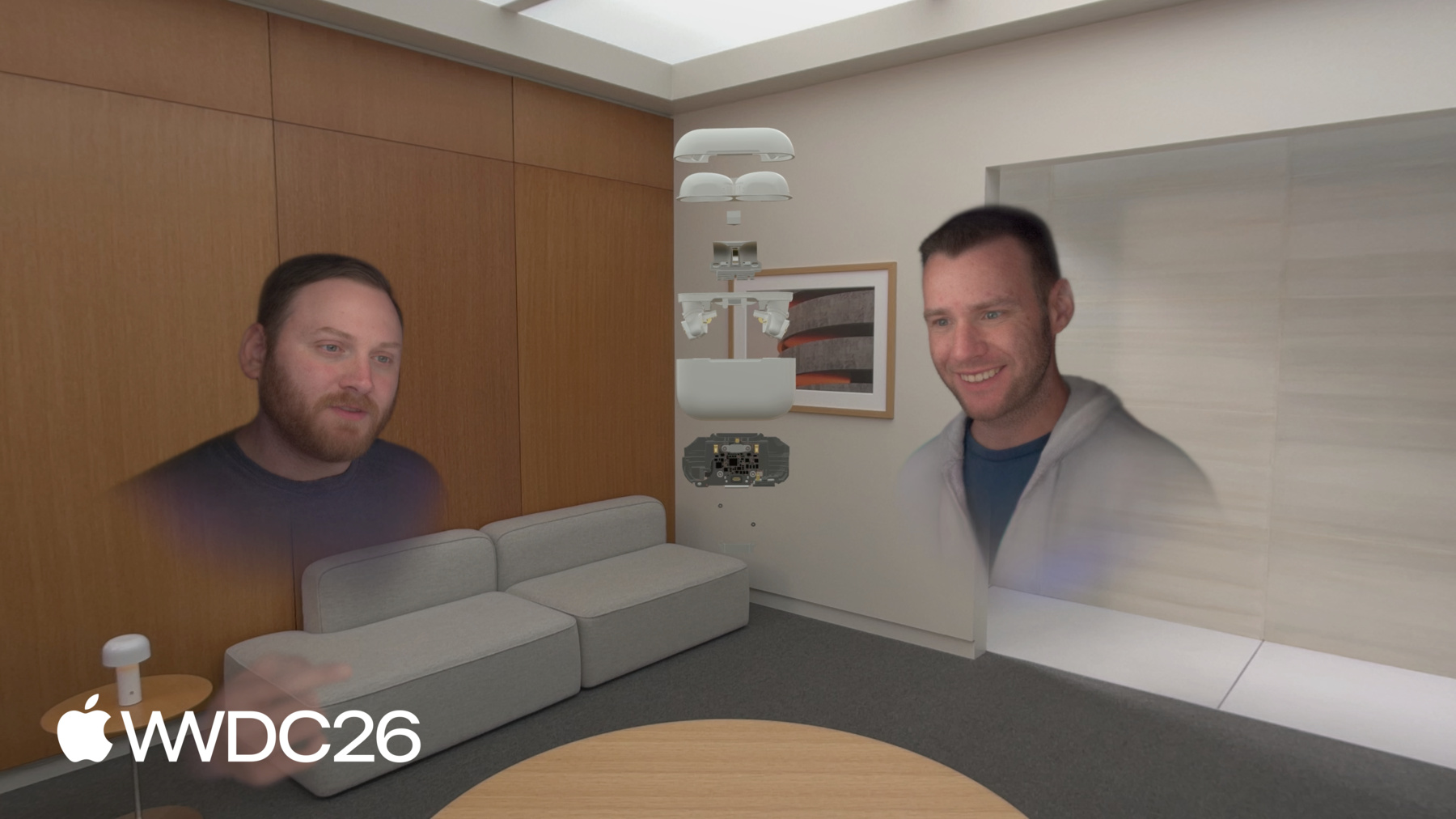
visionOS에서 구조화된 3D 모델로 협업하기에 오신 것을 환영합니다. 저는 Bill입니다. 오늘은 Apple Vision Pro에서 공간 경험을 구축하는 방법에 대해 이야기하겠습니다. 구체적으로, 복잡한 어셈블리와 다차원 데이터를 다루는 방법, 즉 평면 화면에서는 불가능한 방식으로 작업하는 방법을 소개합니다. 먼저 어떤 느낌인지 살펴보겠습니다. 여기 SharePlay 통화 중인 팀이 보입니다, AirPods Pro 디자인 검토 중입니다. 통화 중인 모든 사람이 동일한 에셋을, 동일한 화질로, 동일한 공간에서 봅니다. 케이스가 가까이 당겨집니다. 잠금이 해제됩니다. 작업대에서처럼, 다만 작업대는 어디에 있든 바로 그곳입니다. 하단 어셈블리가 들어 올려집니다. 한 사람이 내부를 살펴보고, 회전시킵니다 동료가 정확히 같은 것을 볼 수 있도록. 한 가지 지점 — 주석도 아니고, 스크린샷도 아닙니다, 단지 중요한 부분을 향한 제스처만으로 그룹이 이해합니다. 모델이 다시 닫힙니다. 클리핑이 활성화됩니다. 단면이 열리고, 메인 로직 보드가 바로 보입니다. 맥락 속에서 노출되는 방식으로, 2D 화면에서는 불가능한 방식으로. 클리핑이 비활성화됩니다. 전체 어셈블리가 펼쳐집니다. 누군가 손을 뻗어, 메인 보드를 꺼냅니다, 그리고 나머지 팀원들에게 들어 보입니다. 세 사람, 하나의 모델, 그리고 이해하는 데 필요한 도구들. 이 모든 것을 가능하게 하는 것은 세 가지로 요약됩니다 Apple Vision Pro가 정말 잘하는 것. 실시간 협업: 여러 사람이 공유 공간에서, 같은 순간에 풍부한 표현의 조작: 충분한 차원을 가진 모든 데이터는 평면 화면 이상을 가질 자격이 있으니까요. 환경 조명: 물리적 세계, 모든 가상 결정을 기반으로 삼는 그리고 그 세 가지 기능은 CAD에만 유용한 것이 아닙니다. 복잡하고 다차원적인 정보를 추론해야 하는 곳이라면 어디든 도시 계획, 물류, 부동산, 프로덕션 디자인 동일한 원칙이 적용됩니다. 앱에서 SharePlay를 작동시키는 기술적인 심층 분석을 위해 "근처 사람들과 visionOS 경험 공유하기"를 참조하세요 WWDC25에서. 샘플 코드를 구축하는 데 4가지 주요 고려 사항이 있습니다. 먼저 3D 에셋을 준비하는 중요한 측면들을 공유하겠습니다 사람들이 쉽게 조작하고 작업할 수 있도록.
복잡한 공간 에셋은 구성 요소들의 구조화된 컬렉션으로, 어셈블리로 구성됩니다. 이 어셈블리들을 조작할 수 있게 하는 방법을 보여드리겠습니다.
그런 다음, 클리핑에 대해 살펴보겠습니다. 어셈블리 내부를 외부만큼 접근하기 쉽게 만드는 기능입니다.
마지막으로 자동 확장, 에셋이 스스로 펼쳐지고, 모든 하위 어셈블리가 분리되어 제자리로 이동하며, 전체 구조를 드러냅니다.
에셋 준비로 넘어갑니다. 구조 없는 에셋은 추론하기 어렵고 코드에서 사용하기도 어렵습니다. 구조 없이는 코드가 결정을 내릴 수 없습니다 무엇을 숨기거나 보여줄지, 무엇을 조작 가능하게 할지. 에셋을 준비할 때 고려해야 할 것들이 많습니다, 여기서 집중할 것은 에셋의 구조를 어떻게 생각할지입니다, 어셈블리가 어떤 하위 어셈블리를 포함하는지. 다시 말해 모델의 계층 구조입니다. 더 기술적인 측면의 다른 고려 사항들은, 다른 곳에서 다루고 있습니다.
자세한 내용은 "공간 컴퓨팅을 위한 3D 에셋 최적화"를 확인하세요 WWDC 24에서. 3D 모델은 부분-전체 관계입니다. 모든 것을 루트로 평탄화하면, 단순한 작업도 놀랍도록 힘들어집니다. 모든 지오메트리가 여전히 있습니다. 단지 정리되지 않은 것뿐입니다. 이 엔진 블록은 구조를 보존하지 않고 내보내졌습니다. 모든 것이 루트까지 평탄화됩니다. InteriorPart_01, InteriorPart_03, 파트 25, 계속해서. 하위 어셈블리 없음. 그룹화 없음. 그리고 이게 문제입니다. 이 에셋은 뷰포트에서 완전히 정상으로 보입니다. 지오메트리가 모두 있고 정확하게 렌더링됩니다. 하지만 인터랙티브하게 만들 구조는? 사라졌습니다. 피스톤 하나를 분리하고 싶다면, 어딘가에 있겠죠. InteriorPart_47이었나요 아니면 InteriorPart_18이었나요. 모르겠습니다, 코드도 마찬가지입니다. 이 업데이트된 에셋을 보세요, 깊은 중첩 계층 구조를 가지고 있습니다. 복잡하지만 그것은 의도적입니다.
여기서 엔진의 외부를 숨겼습니다 그리고 피스톤 하나를 제외한 나머지도. 피스톤과 크랭크샤프트만 단독으로 볼 수 있습니다. 각각이 자체 노드입니다. 이름 붙여지고, 정리되고, 그룹화됩니다. 피스톤만 애니메이션하고 싶다면 격리하고, 강조하고, 사람이 손을 뻗어 꺼낼 수 있도록 할 수 있습니다. 정리되어 있으니, 찾을 수 있는 코드를 작성할 수 있습니다. 계층 구조가 정확히 해야 하는 역할을 하는 것입니다. 좋은 계층 구조를 가졌으니, 사람들이 이 계층 구조를 분해할 수 있게 하는 방법을 보여드리겠습니다.
좋은 계층적 구조는 사람들에게 능력을 제공합니다 개별 부품을 선택하거나, Apple Vision Pro의 자연스러운 입력 시스템을 사용해 이동할 수 있는. RealityKit의 ManipulationComponent API를 올바르게 사용해 달성할 수 있습니다. 어떻게 하는지 보여드리겠습니다. 실제 작동하는 데모입니다. 이 프레젠테이션 시작 부분에서 보여드린 샘플 앱입니다. 이 AirPods Pro 에셋을 선보입니다 나중에 디자인 검토 세션에서 사용할 예정입니다.
열기를 누르면 어떻게 되는지 보세요.
잠시 전에는 하나의 물체였습니다. 이제 모든 부분이 개별적으로 인터랙티브합니다 한 조각을 잡고, 나머지는 그대로. 어떻게 작동하게 했는지 보여드리겠습니다. 사람들이 이 어셈블리를 움직일 수 있게 하려면, ManipulationComponent를 연결하기만 하면 됩니다. 그것이 우리의 출발점입니다. 물체를 조작 가능하게 만들어 사람들이 방향을 잡고, 자연스러운 손 동작으로 이동하고 크기를 조절할 수 있게 합니다. ManipulationComponent에 대해 더 알아보려면 WWDC 25의 "RealityKit의 새로운 기능"을 참조하세요. 사람들이 이 어셈블리를 움직일 수 있게 하려면, ManipulationComponent를 연결하기만 하면 됩니다.
그러기 위해 ManipulationComponent를 자식들로 이동합니다. 갑자기 상단 인클로저를 꺼낼 수 있게 됩니다 하단 인클로저는 그대로 있으면서. 협업자가 이어버드 하나를 회전시킬 수 있습니다 다른 사람이 나머지를 살펴보는 동안 동시에. "바라볼 물체"에서 "탐험할 물체"로의 전환, 그것은 전적으로 그 컴포넌트가 트리에서 어디에 위치하느냐에 따라 일어납니다. 다른 것은 아무것도 변하지 않았습니다. 물건을 분리한 후에, ManipulationComponent를 다시 루트로 올릴 수 있습니다. 이제 전체가 다시 하나의 물체로 이동합니다. 함께 위치를 재조정하고, 회전시키고, 한 섹션을 가까이 가져오고 내부 관계는 그대로 유지됩니다. 계층 구조는 변하지 않았습니다. 지오메트리도 변하지 않았습니다. 단지 컴포넌트가 트리에서 어디에 위치하는지만. 그게 바로 핵심입니다. 컴포넌트 배치가 동작을 결정합니다. 작동하게 하는 코드를 살펴보겠습니다. 엔티티에서 ManipulationComponent와 InputTargetComponent를 제거합니다. 그러면 이 엔티티는 조작 불가능해집니다. 그런 다음 코드가 하위 엔티티를 순회합니다. InputTargetComponent를 추가하고 ManipulationComponent를 각 하위 엔티티에 추가합니다. 샘플 코드에서는 ManipulationComponent의 releaseBehavior를 .stay로 설정합니다. 그러면 사람이 놓을 때 엔티티가 놓은 위치에 그대로 있게 됩니다. 한 가지 중요한 점이 더 있습니다, CollisionComponent 추가는 의도적으로 보여주지 않습니다. 하지만 이벤트 처리를 위해 꼭 필요합니다 엔티티에 콜리전 컴포넌트가 있어야 합니다, 잊지 마세요. 물론, 어셈블리를 열 예정이라면 닫는 것도 원할 것입니다. 어셈블리 닫기는 역순으로 동일한 과정을 따릅니다. 하위 엔티티에서 Manipulation과 InputTarget 컴포넌트를 제거합니다. 하위 엔티티에서. Manipulation과 InputTarget 컴포넌트를 추가합니다 다시 엔티티에. 그것뿐입니다, 이제 트리를 하나의 요소로 조작할 수 있습니다 닫혀 있거나 독립적인 엔티티로 열려 있거나.
다음은 클리핑입니다. 충분히 복잡한 에셋은 표면에서 볼 수 없는 레이어를 가집니다. 건물의 내부 구조, 패널 뒤의 배선, 도시 블록 아래의 인프라. 클리핑은 사람들이 에셋을 말 그대로 통해 볼 수 있게 하며, visionOS 27의 새로운 RealityKit 기능입니다. 먼저 실제 작동하는 데모를 보여드리고, 그런 다음 클리핑 평면을 편집하는 방법을 안내하겠습니다. 여기 공간에 클리핑되지 않은 어셈블리가 있는 것을 볼 수 있습니다, 클리핑 상태는 .off입니다. 그런 다음 클리핑을 켜고 어셈블리의 클리핑 상태를 활성화합니다. 클리핑 평면은 어셈블리 내부에 주요 축 중 하나에 수직으로 있습니다, 이 경우 +z 벡터입니다. 내부 구조가 보입니다. 클리핑 상태는 .on입니다. 다음으로 클리핑 평면이 이동합니다. 정말 멋진 것, 어떻게 하는지 보여드리겠습니다. 그전에 ClippingComponent를 살펴봅시다. ClippingComponent는 4개의 속성을 가집니다. 샘플 코드에서 사용하는 것들을 살펴보겠습니다. bounds는 가장 많이 다루게 될 속성입니다. 엔티티 로컬 공간의 축 정렬 경계 상자입니다. 그 밖의 모든 것은 프레임마다 렌더러가 버립니다.
shouldClipChildren의 기본값은 false입니다. 부모 어셈블리에 추가했는데 자식이 클리핑되지 않는다면 그 이유입니다. 샘플 코드에서는 true로 설정합니다. shouldClipSelf의 기본값은 true로, 대부분의 경우 원하는 값입니다. 우리의 목표는 bounds를 편집 가능하게 만드는 것입니다. 빠른 설명 후에 어떻게 하는지 보여드리겠습니다 축 정렬 경계 상자에 대해. 경계 상자의 여섯 면이 여섯 개의 인터랙티브 평면 엔티티가 됩니다. 축마다 하나씩, 양수와 음수. 각 면은 여기서 다른 색상으로 표현됩니다.
누군가 +x 면을 잡아서 당겨 내부를 더 드러내거나, 다시 밀어 복원합니다. 각 평면은 bounds에서 정확히 하나의 스칼라 값을 제어합니다. 그것이 전체 상호작용 모델입니다. 여섯 평면, 여섯 숫자. 구현하면서 이것을 염두에 두세요. 클리핑을 관리하기 위해 3상태 머신이 있습니다. 클리핑이 .off일 수 있습니다. 어셈블리가 클리핑되지 않습니다. 클리핑이 .on일 때 모델이 경계 상자에 따라 클리핑됩니다, .editing 상태에서는 클리핑 평면이 보이고 인터랙티브합니다. 사람들이 클리핑 평면을 이동해 클리핑 bounds를 변경할 수 있습니다. 실제 작동하는 것을 살펴보겠습니다.
.off 상태에서는 어셈블리에 클리핑이 없고, 어셈블리의 외부만 보입니다. .on 상태에서 클리핑이 활성화됩니다 하위 어셈블리의 내부 구조와 배치를 보여줍니다. .editing 상태에서 클리핑 평면이 켜지고 사람들이 평면을 이동할 수 있습니다. 평면이 이동하면서 클리핑 bounds가 변경되고 모델의 내부 배치가 더 많이 또는 적게 보이게 됩니다. 이 모든 것이 작동하게 하는 기술적인 세부 사항을 살펴보겠습니다.
세 가지 컴포넌트가 관여합니다. off 상태에서 ClippingBoundsCache가 있습니다, 샘플 코드의 커스텀 컴포넌트입니다. 마지막으로 편집된 클리핑 bounds를 추적합니다 그리고 그 값을 ClippingComponent에 제공합니다 상태가 .on으로 전환될 때. .on 상태에서 ClippingComponent가 생성되어 엔티티에 추가됩니다. 이것이 앞서 논의한 RealityKit 컴포넌트입니다. bounds 밖의 지오메트리는 버려집니다. .editing에서 ClippingTransformSync라는 또 다른 커스텀 컴포넌트를 추가합니다, 샘플은 이것을 사용해 어셈블리의 변환을 추적하고 변환이 변경될 때 ClippingControl을 업데이트합니다. ClippingControl은 클리핑 평면을 관리하기 위해 사용하는 엔티티입니다 인터랙티브하게 만드는. 사람들이 볼 수 있는 시각적 어포던스입니다 클리핑 평면이 어디에 있는지, 그리고 편집할 수 있는. 네 가지 좌표 프레임이 관여합니다. 첫 번째는 월드 좌표 시스템으로, 다른 모든 것이 여기에 있습니다. Model은 모델이 있는 곳이고, 클리핑 컴포넌트가 작동하는 좌표 프레임입니다. bounds의 변경은 이 프레임에서 이루어져야 합니다. 클리핑 컨트롤 프레임은 편집 평면을 배치하는 곳입니다 사람들이 ClippingComponent의 경계 상자를 변경할 수 있게 하는. 클리핑 평면 좌표 프레임은 편집 평면이 위치하는 곳입니다 드래그 제스처 이벤트가 표현되는 곳. 평면 위치의 변경은 이 프레임으로 표현해야 하며 모델 프레임에서 표현된 방향으로 이동하도록 제약해야 합니다.
World는 두 개의 자식을 가집니다. Clipping Control과 Model Clipping Control은 편집 평면을 포함합니다 그리고 Clipping Plane은 드래그 제스처가 표현되는 좌표 프레임입니다. 과제는 Model 프레임에서 표현된 드래그 제스처의 변화를 얻는 것입니다 제약하고 Clipping Plane으로 다시 변환하여. 지금까지 클리핑을 단일한 것으로 이야기했습니다, 하지만 분리할 가치가 있는 두 가지 구별된 부분이 있습니다. ClippingComponent는 모델의 좌표 공간에 있습니다 따라서 이 bounds를 편집하려면 변화가 표현되어야 합니다 그 좌표 프레임에서 제약되도록. 시각적 평면은 시각적 이해를 제공합니다 움직임이 무엇을 하는지. 평면도 이벤트에 따라 이동해야 합니다, 하지만 클리핑 평면 좌표 시스템에서 표현됩니다, 따라서 위치 업데이트는 그들의 좌표 프레임에서 표현해야 합니다. 두 프레임 모두에서 변화는 제약되어야 합니다 경계 상자 평면의 법선 방향으로. 이 모든 것이 어떻게 맞아 떨어지는지 보여드리겠습니다. 드래그 제스처에서 4가지 명확한 단계가 있습니다 bounds와 평면 위치 업데이트까지. 클리핑 평면에 드래그 제스처를 추가합니다, 각 평면마다 하나씩. 다시 말하지만, 이것이 이벤트가 들어오는 좌표 프레임입니다. 그것을 World 좌표 프레임으로 변환합니다. 거기서, Model 프레임으로 변환합니다. 그런 다음 델타를 적절한 방향으로 제약합니다. +x, -y, 등등 — 사람이 어떤 평면을 움직이느냐에 따라. 이제 필요한 값이 있습니다, 필요한 좌표 프레임에서, 올바른 방향으로 제약되어, 클리핑 bounds를 업데이트할 수 있습니다. 평면의 위치를 업데이트하려면 이 벡터를 평면의 좌표 프레임으로 변환해야 합니다. 잠시 후에 살펴보겠습니다. 제스처 컴포넌트에 대한 자세한 정보는 WWDC 25의 "Better Together: SwiftUI와 RealityKit"을 확인하세요. 큰 그림을 염두에 두고, 각 단계를 자세히 살펴보겠습니다.
제스처는 Clipping Plane 좌표 프레임에서 표현됩니다. 이런 모습일 것입니다. 드래그 델타는 0.5, -0.75, 0.1 값을 가집니다. 이 값들은 드래그 델타의 표현입니다 Clipping Plane 좌표 프레임에서. 과제는 이 벡터의 표현을 변경하는 것입니다 Model 좌표 프레임으로. 드래그 델타 벡터가 변환됩니다 Clipping Plane 좌표 프레임에서 World 좌표 프레임으로. 명심하세요, 벡터는 변하지 않았습니다, 단지 벡터가 표현된 좌표 프레임만 바뀐 것입니다. Clipping Plane과 World가 같은 좌표 프레임이 아니므로, 숫자가 변합니다. 같은 벡터입니다, 단지 다른 표현일 뿐입니다. 클리핑 bounds를 업데이트하기 전에, 드래그 델타 벡터는 Model 좌표 프레임에 있어야 합니다. 따라서 World 좌표 프레임에서 한 번 더 변환합니다 Model 좌표 프레임으로. 다시 말하지만, 벡터는 변하지 않았습니다, 단지 표현되는 좌표 프레임만. 이제 수학적 마법이 등장합니다. 드래그 델타를 올바른 방향으로 투영합니다, 이것은 드래그 델타가 얼마나 긴지를 말하는 고급스러운 수학적 방법으로 우리가 관심 있는 방향으로. AirPods Pro 케이스를 제거해 과정을 더 잘 볼 수 있게 합시다. 투영은 복잡하게 들리지만, 실제로는 그냥 우리가 관심 있는 방향을 따라 드래그 델타가 얼마나 긴지입니다. 방향 벡터에 드래그 델타 벡터의 그림자를 재는 것과 같습니다 방향 벡터에 드리운. 수학 방정식입니다, 겁먹지 마세요. 조각조각 분해해 드리겠습니다. 첫째, 우리가 관심 있는 방향으로 벡터를 찾습니다. 전에 해봤을 수도 있습니다, 벡터를 길이 제곱으로 나누는 것입니다. 우리의 경우 간단합니다, 우리가 관심 있는 방향은 평면의 법선입니다, +x, 즉 {1, 0, 0}입니다. 그런 다음 내적을 계산합니다, 벡터 곱셈의 한 유형으로, 드래그 델타와 방향 벡터로. 그것이 경계 상자가 변경되어야 하는 양을 제공합니다, 하지만 단순한 숫자일 뿐입니다, 방향도 필요합니다. 따라서 우리가 관심 있는 방향, 평면의 법선을 곱합니다, 마지막 단계에서 찾은 양으로. 이제 Model 좌표 프레임에서 제약된 델타가 생겼습니다. 그것이 정확히 필요한 것입니다 ClippingComponent의 경계 상자를 업데이트하기 위해.
여기 클리핑된 어셈블리입니다, 내부가 외부만큼 보입니다. 꽤 멋지네요. 이제 같은 제약 과정을 거칩니다. 하지만 이번에는 Clipping Plane 좌표 프레임으로. 제약된 드래그 델타를 변환해야 합니다 Model 좌표 프레임에서 Clipping Plane 좌표 프레임으로 그런 다음 평면의 법선으로 투영합니다, 이전에 했던 것과 같은 방식으로. 이것으로 평면을 이동할 값을 얻습니다. 하지만 법선에 투영되었으므로 변화는 그 방향으로만 이동하도록 제약됩니다, 사람이 손을 움직인 곳이 아닌. 그러면 제스처로 인한 변화가 자연스럽게 느껴집니다. 여기 평면이 켜진 것을 볼 수 있습니다 사람들이 인터랙트하기를 기다리며. .editing 상태에서 켜두어 사람들이 손을 뻗을 수 있다는 것을 알 수 있게 합니다 이 여섯 평면 중 어느 것이든.
6개의 평면, 4개의 좌표 프레임. 각각 사이의 단순한 변환으로 개별 계산을 더 쉽게 추론할 수 있습니다. 좌표 시스템의 계층 구조를 머릿속에 가지고 있으면 그리고 정말 멋진 수학 투영 트릭을 알면, 앱에서 이 인터랙션을 자연스럽게 만들 수 있습니다.
이제, 3D 모델을 구성하는 하위 어셈블리의 자동 확장에 대해 이야기합시다 3D 모델을 구성하는. 사람들은 이것을 사용해 모델의 내부 구조를 드러냅니다. 이 기능은 기계 어셈블리, 건물에 유용할 수 있습니다, 실제로 이해가 중요한 모든 에셋에서 부분들이 전체와 어떻게 관련되는지가 도움이 됩니다. 모델이 직관적인 방식으로 확장되기를 원합니다. 하지만 사람에게 그 방향을 선택하도록 강요하고 싶지는 않습니다. 코드가 결정을 내릴 수 있도록 약간의 수학을 사용할 것입니다. 그것을 안내해 드리고, 정확히 어떻게 작동하는지 보여드리겠습니다. 어셈블리가 로드될 때, 자식들은 파일에 정의된 위치에 정확히 위치합니다. 잘 구성된 에셋이라면 서로 겹쳐 있을 것입니다. 실제 물체에서 존재하는 방식으로 서로 중첩되어 있습니다. 그것은 맞지만, 탐색에는 유용하지 않습니다. 확장은 자식들을 단일 축을 따라 펼칩니다, 각각에게 독립적으로 보고 잡을 수 있는 공간을 줍니다. 한 번 탭하면 어셈블리가 스스로 열립니다. 그 과정은 복잡하지 않습니다, 조각조각 살펴봅시다. x축을 따라 펼친 어셈블리를 이렇게 표시할 수 있습니다. 공간에서 조각들이 떨어지는 아이디어를 포착합니다 내부 구조를 드러내기 위해. 하지만 확장이 더 자연스럽게 느껴지기를 원합니다. 디자인 검토에서 사람이 기대하는 것처럼 더. 그리고 이처럼 y축을 따라 확장되도록. 문제는, 코드가 어떤 축을 따라 확장할지 어떻게 선택하느냐입니다? 그를 위해 분산과 가중치, 두 가지 개념으로 잠깐 우회하겠습니다. 낮은 분산은 단순히 말하는 방법입니다 우리가 가진 모든 값들이 기본적으로 같은 위치에 있다는 것을. 예를 들어, 이 다트보드 다이어그램에서 값들은 무엇이든, 아이스크림 판매량에서 일광 화상 발생까지. 값들이 — 어떤 값이든 — 서로 가까이 있다는 아이디어를 전달하는 방법입니다.
높은 분산은 값들이 퍼져 있습니다. 분산에 대한 감각을 얻었으니, 좀 더 자세히 살펴봅시다. 1차원으로 이동해 좀 더 명확하게 만들겠습니다. 다시 말하지만 이 값들은 단순한 숫자입니다, 무엇이든 나타낼 수 있습니다, 기타 6개 줄의 주파수, 또는 그 외 무엇이든 샘플당 단일 값을 가지는. 각 점이 수직선에 배치됩니다 값이 평균에서 얼마나 떨어져 있는지 나타내는 표시와 함께. 평균에서의 거리를 편차라고 합니다. 이것이 분산을 찾는 첫 번째 단계입니다. 다음은 각 편차 값을 제곱하는 것입니다 그런 다음 더하고, 개수로 나누어 평균을 찾습니다. 그것이 분산입니다. 충분히 단순한 수학입니다, "분산"과 "편차"라는 기술 용어들이 보통 사람들을 걸리게 합니다. 개념적으로, 단순히 수치적으로 명시하는 방법입니다 우리의 값 집합이 평균에서 얼마나 퍼져 있는지. 이제 고려해 보세요, 이 값들 중 일부가 다른 것보다 중요할 수 있습니다. 그것이 가중치가 들어오는 곳입니다. 개별 값들의 중요성을 구별하기 위해 사용합니다. 각 점이 이제 가중치를 나타내는 반지름을 가집니다, 원이 클수록 값이 더 중요합니다. 가중치 요인은 무엇이든 될 수 있습니다, 그라디언트의 채도, 또는 중요성을 표현하는 다른 어떤 값이든. 과정을 설명하기 위해 추상적으로 유지합니다. 가중 분산을 계산하기 위해 가중치 또는 중요성을 사용합니다. 편차 값을 제곱하는 것에 추가하여 각각을 가중치와 곱합니다. 그리고 짜잔, 이제 가중 분산이 생겼습니다. 가중치로 각 값이 다른 중요성을 가질 수 있습니다. 그것이 정확히 우리가 할 것입니다 어셈블리를 어떤 축을 따라 확장할지 파악하기 위해. "부피 가중 위치 분산"을 계산할 것입니다. 꽤 긴 말입니다. 각 축을 따라, 그리고 가장 큰 분산을 가진 축을 따라 확장합니다.
여기 표를 주목하세요. 하위 어셈블리마다 한 행씩. 부피와 위치를 보여줍니다. 이것이 확장할 자연스러운 축을 찾기 위해 사용할 값들입니다. x, y, z 값을 사용해 각 방향의 분산을 계산합니다. 점들은 각 요소의 부피를 반영하도록 크기가 조정됩니다. 부피를 가중치 요인으로 사용합니다.
여기 x축의 부피 가중 분산이 있습니다. 대부분의 하위 어셈블리가 동일한 위치에 있거나 매우 가까이 있습니다 x축을 따라. 그러면 x를 따른 분산이 작아집니다. 대부분의 하위 어셈블리가 서로 가까이 있으므로 부피 가중치 요인이 x축을 따라 차이를 만들지 않습니다. 두 이어버드가 퍼져 있습니다 x축 위에서 최선을 다해 기여하려 하지만, 그들의 부피가 보충하기에 충분하지 않습니다 같은 위치에 있는 다른 모든 요소들을. z축의 결과는 훨씬 더 작습니다. 하단 인서트가 기여에 가중치를 줄 부피를 가지고 있지만, 평균 위치에 너무 가까워 큰 차이를 만들지 못합니다. 힌지와 뚜껑 보유 마그넷은 부피가 너무 작아 분산을 크게 끌어올리지 못합니다. 그래서 y축이 명확한 승자입니다. 큰 부품들이 y축을 따라 더 멀리 떨어져 있습니다 그리고 더 큰 부피가 거리에 가중치를 제공합니다. y가 명확한 승자이므로 FromToBy 애니메이션 세트를 조합합니다 하위 어셈블리들을 y축을 따라 위치로 이동시키기 위해.
그리고 됩니다, 모델 내부가 사람들이 인터랙트할 수 있도록 노출됩니다. 오늘 많은 것을 다루었습니다. 에셋 계층 구조를 준비하는 방법, 부품을 조작하는 방법, 클리핑 평면을 사용해 복잡한 어셈블리를 통해 보는 방법, 그리고 축을 따라 부품을 펼쳐 확장하는 방법까지 어셈블리의 가장 작은 부분도 자세히 볼 수 있도록 이 워크플로우는 디자인 검토 앱을 구축하는 데 도움이 됩니다 사람들의 생산성을 크게 향상시킬 수 있는 developer.apple.com에서 샘플 프로젝트를 다운로드하고 탐색하세요 강력히 권장합니다 통계의 개념들과 친숙해지길, 벡터 수학, 그리고 선형 대수 오늘 크게 의지한 수학의 영역들입니다.
이전보다 조금 덜 무섭게 느껴지길 바랍니다.
Mac 앱에서 실시간으로 모델을 제어하고 싶다면, spatial preview framework가 좋은 선택이 될 수 있습니다. 더 알아보기 위해 세션을 확인해 보세요. "spatial preview framework 탐색" 또한 물리적 물체를 증강할 수도 있습니다 레이스 카 시뮬레이터 조종석처럼 가상 콘텐츠를 시뮬레이터 위에 오버레이합니다 이 세션에서 배운 것으로 내부 구조를 탐색합니다. 물리적 물체 증강에 대한 자세한 정보는 "visionOS 객체 추적 향상 탐색" 세션을 확인해 주세요. 오늘 관심 가져주셔서 다시 한번 감사드립니다. 이 아이디어들로 앱에서 멋진 것들을 만드는 걸 기대합니다.
-
-
7:10 - Opening an assembly
func openAssembly() { components[ManipulationComponent.self] = nil components[InputTargetComponent.self] = nil for child in assemblyChildren { child.components.set(InputTargetComponent()) var manipulation = ManipulationComponent() manipulation.releaseBehavior = .stay child.manipulationComponent = manipulation } } -
7:11 - Closing an assembly
func closeAssembly() {
    for child in assemblyChildren {
        child.manipulationComponent = nil
        child.components[InputTargetComponent.self] = nil
    }

    components.set(InputTargetComponent())
    var manipulation = ManipulationComponent()
    manipulation.releaseBehavior = .stay
    manipulationComponent = manipulation
}
-