

-
빠르게 실행되는 반응성이 뛰어난 카메라 앱 빌드하기
완벽한 순간을 절대 놓치는 일이 없도록 즉시 실행되는 카메라 앱을 빌드하는 방법을 알아보세요. 앱 시동부터 첫 번째 미리보기 프레임까지, 전체 카메라 실행 시퀀스를 최적화하는 방법을 살펴보세요. 더 빠른 실행을 지원하는 새로운 API와 원활한 미리보기 렌더링 및 지속 가능한 성능 유지를 위한 모범 사례에 대해 알아보고 앱에서 세련된 카메라 경험을 선사해 보세요.
챕터
- 0:00 - 소개
- 2:02 - 빠른 시작
- 6:52 - 지연 시작 도입
- 15:06 - 안정적인 미리보기
- 18:04 - 지속적인 성능 유지
- 21:14 - 결정론적 파일 작성
리소스
- Build a responsive camera app that launches quickly
- Performance and metrics
- AVCam: Building a camera app
관련 비디오
WWDC26
WWDC23
-
비디오 검색…
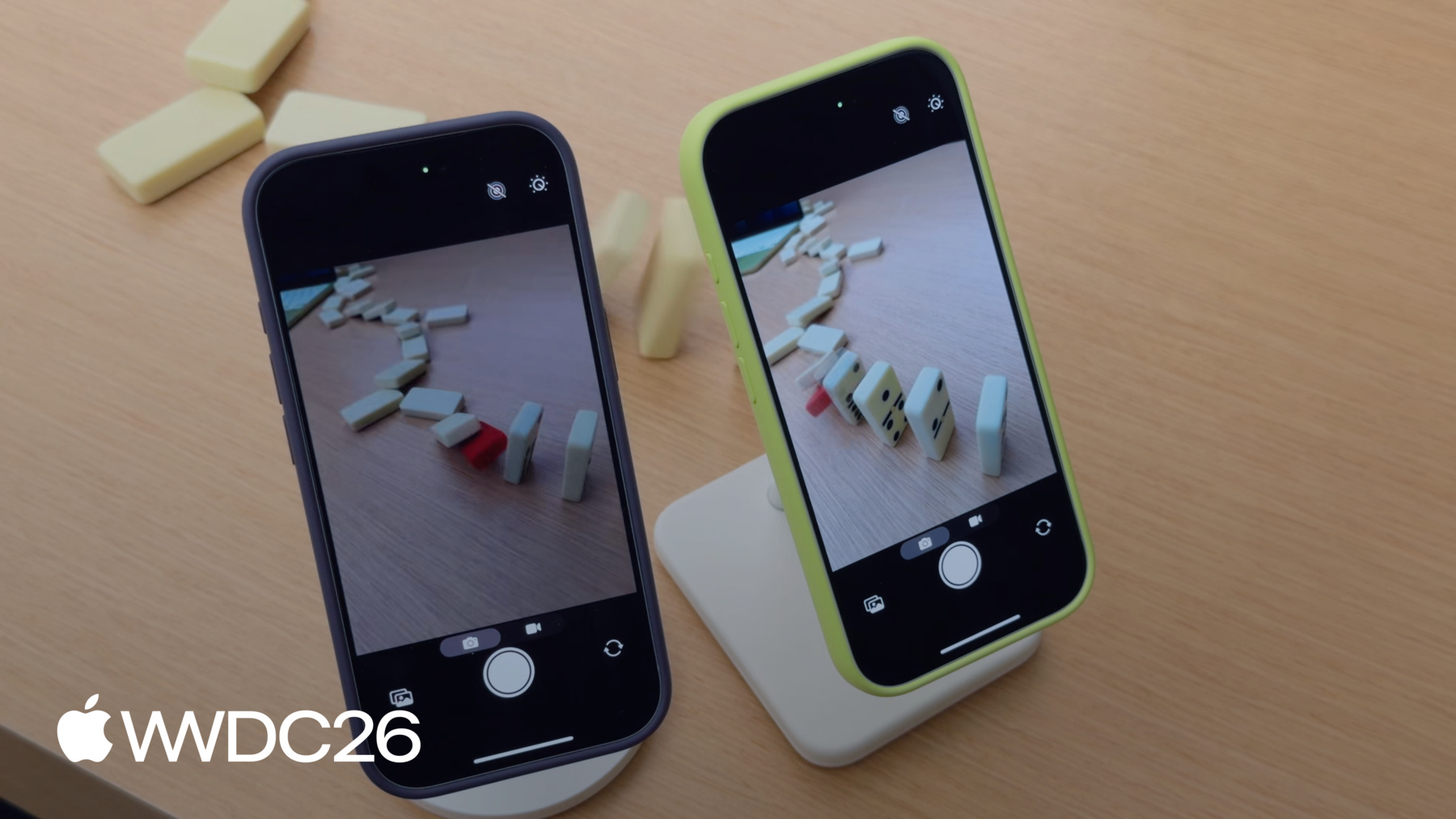
안녕하세요, 저는 Jake입니다. 저는 카메라 성능 팀의 엔지니어입니다. 환영합니다 빠르게 실행되는 반응형 카메라 앱 빌드하기. 실행이 느리면, 사람들은 알아챕니다. 네이티브 카메라 앱을 수년간 최적화하면서, 저는 카메라 실행을 빠르게 느끼게 하는 가장 중요한 요소가 카메라 실행을 빠르게 느끼게 만드는 프리뷰 프레임이 화면에 얼마나 빨리 나타나느냐라는 것을 배웠습니다. 도미노 멋진 장면을 찍고 싶었는데, 도미노가 이미 쓰러지기 시작하기 전에 카메라를 실행하는 것을 깜빡했습니다. 중간에 빨간 도미노를 놓았기 때문에, 빨간 도미노가 쓰러지기 직전의 순간을 실행하고 촬영하는 것이 필수적입니다. 빨간 도미노가 쓰러지기 전에
앱이 실행될 때, 빈 프리뷰 화면의 구간이 있습니다. 프리뷰가 렌더링되기 시작할 때쯤에는 이미 빨간 도미노를 놓쳐버렸습니다. 앱이 실행된 직후 짧은 시간 안에 프리뷰가 렌더링되면 사용자가 빠른 순간 포착 사진을 찍을 수 있어 그 순간을 놓치지 않게 됩니다. 성능을 위해 설계된 카메라 앱을 빌드하는 데 도움을 드리겠습니다. 이 영상에서는 성능을 향상시키기 위한 네 가지 주요 주제를 다루겠습니다. 먼저, 카메라 실행 경험을 가속화하는 방법에 대해 설명하겠습니다. 그래서 프리뷰가 문제 없이 실행되고 작동합니다. 그런 다음, 렌더링을 위한 모범 사례에 대해 프리뷰에 대해 이야기하겠습니다, 프레임이 드롭되지 않도록. 셋째, 성능을 유지하는 데 도움이 되는 API들을 다루겠습니다, 심지어 어려운 환경에서도. 마지막으로, 고속 데이터 비디오 캡처에 결정론적 파일 쓰기 성능을 제공하도록 설계된 새로운 API를 소개하겠습니다. Fast
Launch로 시작하겠습니다. 카메라 앱 실행 시퀀스에는 네 가지 단계가 있습니다. 앱 실행 시퀀스. 첫째, 앱이 실행됩니다. 이는 링커가 바이너리를 로드하고, 실행하는 데 걸리는 시간을 포함합니다. 정적 이니셜라이저를 실행하고, UI 씬을 생성하는 시간, 그리고 캡처 세션을 생성하기 전에 앱이 수행하는 모든 작업을 포함합니다. 둘째, 세션이 구성되고 시작됩니다. 캡처 세션 초기화, 구성 커밋, 세션 시작 모두 시간과 시스템 리소스를 필요로 합니다. 셋째, 세션이 시작되면 모든 AV 캡처 출력 객체가 초기화됩니다. 이 시간은 출력 수와 품질 설정에 따라 달라집니다. 마지막으로, 프리뷰가 스트리밍을 시작하고 프레임이 앱으로 흘러들어옵니다. 각 단계에 대한 구체적인 최적화 방법을 살펴보겠습니다. 앱의 UI는 카메라 실행 경험에서 중요한 역할을 합니다. 실행 경험. 실행 흐름을 설계할 때, 작업을 두 단계로 분리하세요. 프리뷰 실행 및 표시에 필수적인 리소스, 그리고 프리뷰가 실행된 후에 생성할 수 있는 리소스. 예를 들어, AVCam을 살펴보면, AV 용 클래식 샘플 카메라 앱입니다. Foundation. 여러 UI 요소가 있습니다. 카메라 프리뷰, 셔터 버튼, 이미지 웰, 그리고 모드 피커. 카메라 프리뷰는 앱을 실행한 순간 사용자에게 가장 중요한 UI 요소입니다. 이것이 카메라가 사용할 준비가 됐다는 느낌을 주기 때문입니다. 이미지 웰 과 모드 피커는 프리뷰가 렌더링되기 전에 필요하지 않으므로, 이 작업은 프리뷰가 시작된 후까지 기다려야 합니다. UI 요소만이 실행 시간에 영향을 미치는 것은 아닙니다. 프리뷰가 렌더링되기 전에 생성된 모든 리소스는 실행 시간에 영향을 미칩니다. 적용하여 이 두 단계를 AVCAM에 적용하면, 실행 시 셔터 버튼과 프리뷰를 생성하지만, 다른 모든 UI 요소는 페이드인으로 실행이 완료된 후에 나타납니다. 이제 앱의 실행에 대한 영향이 줄어들었으므로, AV 캡처가 어떻게 세션과 관련 객체들이 다음 단계인 세션 구성에 영향을 미치는지 살펴보겠습니다.
AV 캡처를 구성하고 시작하는 것은 세션은 많은 시스템 리소스와 할당을 필요로 하며 앱 실행에 직접적인 영향을 미칩니다. 실행. 일반적인 AV 캡처 세션은 AV 캡처 디바이스 입력으로 구성되며, 주로 카메라 또는 마이크입니다. AV 캡처 연결은 캡처 디바이스를 출력에 연결합니다. 이 예시에서, 두 개의 출력이 필요합니다, 하나는 프리뷰용 그리고 하나는 캡처용. AV 캡처 비디오 프리뷰 레이어는 프리뷰를 표시하기 위한 출력입니다. AV 캡처 포토 출력은 이미지 캡처를 위한 출력 역할을 합니다. 이러한 객체들이 함께 앱의 카메라 경험을 구동합니다.
AV Capture Session이 모든 캡처 객체를 조율하기 때문에, 메인 스레드의 UI 설정이 완료되는 즉시 먼저 생성하고 싶습니다. AV 캡처 세션 생성은 메인 스레드를 차단합니다. 멈춤 현상을 피하려면, UI 초기화와 병렬로 생성하세요. 실행 시 프리뷰를 표시할 때, AV 캡처 세션 생성을 메인 스레드 외부로 디스패치하세요. 이를 통해 앱의 세션 설정이 백그라운드에서 실행될 수 있습니다. UI 씬이 생성되는 동안. 여러 구성을 커밋하면 실행 시간이 늘어납니다. 단일 구성을 미리 커밋하여 실행 중 긴 재구성을 피하세요. 실행 시작 및 중지 실행은 A B 캡처 세션에서 차단 호출입니다. 메인 스레드에서 호출하지 마세요, 앱이 멈추게 됩니다. 다음으로, 카메라 실행에서 가장 비용이 많이 드는 부분을 살펴보겠습니다. 실행. AV 캡처 출력 초기화. AV 캡처 출력 초기화는 실행 속도를 눈에 띄게 저하시킵니다. 프리뷰를 렌더링하려면, 앱은 프리뷰 레이어만 필요합니다. 또는 하나의 출력이 초기화된. 무비 파일 출력 및 포토 출력과 같은 출력들은 프리뷰에 필요하지 않습니다. 출력
초기화에 소요되는 시간을 줄이려면, iOS 26 이상에서 사용 가능한 Deferred Start API를 채택하세요. Deferred Start는 앱이 실행이 완료될 때까지 출력 초기화를 미룰 수 있게 해줍니다. 이 실행 시퀀스에서, 모든 AV 캡처 출력이 첫 번째 프리뷰 전에 초기화됩니다. 프레임이 렌더링됩니다. Deferred Start의 아이디어는 실행에 필요하지 않은 출력들을 프리뷰가 시작될 때까지 미루는 것입니다. Deferred Start를 사용하면, 실행 시퀀스가 변경됩니다. 앱이 실행되고, 세션을 구성하고, 시작합니다. 이제 첫 번째 프레임이 표시되기 전에 프리뷰 출력만 초기화됩니다. 시스템은 조건이 허용될 때 자동으로 지연된 초기화를 실행하거나 조건이 허용될 때, 또는 앱이 적절한 시점을 알릴 때까지 기다립니다. 모든 AVCapture 출력, AV Capture Video Preview 레이어에는 isdeferred start enabled 속성이 있습니다. 해당 출력을 지연하려면 true로 설정하세요. 실행을 최적화하려면, 프리뷰 렌더링에 사용되는 출력을 제외한 모든 출력을 지연하세요. Deferred Start가 실행되는 시점을 지정하는 방법은 두 가지가 있습니다. 자동 시작과 수동 시작. iOS 26 이상 SDK에 대해 재컴파일된 앱은 기본적으로 자동 모드를 사용합니다. automatically runs deferred start 속성은 이 모드에서 true로 설정됩니다. 자동 모드에서, 시스템이 지연된 출력을 초기화할 최적의 시점을 선택합니다. 이는 기기에 프리뷰가 나타난 후 곧 발생합니다. 세션은 두 개의 델리게이트 콜백을 보냅니다. 앱이 지연 시작의 시작 및 종료 시점을 알 수 있도록. Session will run deferred start fires 출력 초기화 시작 전에 발생하고, session did run deferred start fires 완료 후에 발생합니다. 이제 이것을 채택하는 방법을 보여드리겠습니다.
먼저, Deferred Start API의 델리게이트 콜백을 처리하는 클래스를 생성하겠습니다. Session Will Run Deferred Start는 Deferred Start 시작 전에 호출됩니다. 앱에 필요한 백그라운드 리소스를 생성하기에 좋은 위치입니다.
Session Did Run Deferred Start는 완료 후에 호출됩니다. Deferred Start 완료. 이 시점에서, 모든 캡처 출력이 초기화되어 사용할 준비가 됩니다. 이제 캡처 세션에 Deferred Start를 추가하겠습니다. 구성 중에, 설정하세요. automatically runs deferred start를 true로 AV capture session에서 앱이 iOS 26 이상에 대해 재컴파일되었다면, 이는 자동으로 true로 설정됩니다. 다음으로, 실행에 필요하지 않은 모든 출력에 Deferred Start를 활성화하세요. 여기서, 포토 캡처 출력을 지연하고 비디오 프리뷰 레이어를 사용하여 프리뷰를 렌더링합니다. 그런 다음, 앞서 만든 델리게이트 콜백 클래스를 캡처에 연결하겠습니다. 세션. 세션이 이제 구성되었으므로, 구성을 커밋하고 start running을 호출하겠습니다. 세밀한 제어를 원하는 앱의 경우, Deferred Start API는 수동 모드도 제공합니다. 필요 시 Run Deferred Start 기능과 함께. 수동 모드에서, 앱이 시스템에 Deferred Start를 시작할 시점을 알립니다. 이는 환경 설정을 읽거나 UI를 설정하고 싶은 앱에 유용합니다. 무거운 초기화가 시작되기 전에. 또는 프리뷰 렌더링에 비디오 데이터 출력을 사용하는 앱에 유용하며, 이에 대해서는 이 영상의 나중 부분에서 더 자세히 설명하겠습니다. 수동 모드에서, 시퀀스가 변경됩니다.
앱이 중요하지 않은 리소스 생성과 같은 시작 작업을 완료하면, 호출하세요. run deferred start when needed를 캡처 세션에서. 이는 시스템에 Deferred Start를 실행할 수 있다고 알립니다. 수동 모드를 선택하려면, 설정하세요. AV 캡처의 automatically runs deferred start를 세션을 false로. 이 예시에서, AVCapture를 사용하여 직접 프리뷰를 렌더링하고 싶습니다. video data output. 따라서 이 출력에서 Deferred Start를 비활성화하겠습니다. 나머지 코드는 이전 예시와 동일하게 유지하겠습니다. 다음으로, 지연된 출력에서 Deferred Start를 실행할 시점을 결정해야 합니다. 지연된 출력에서. 그렇게 하기 위해, 첫 번째 프레임이 표시되었는지 추적하겠습니다. 여기서, CA meta를 사용하고 있습니다. 레이어. 첫 번째 프레임이 표시되면, 중요하지 않은 UI 요소를 설정하겠습니다. until AV 캡처 세션에서 run deferred start를 지연된 출력에서. 첫 번째 프레임이 표시된 후에는, 특별한 처리가 필요하지 않습니다.
실행이 다음과 같이 더 빠른지 확인하려면 Deferred Start로, 연구소에서 라이트보드를 설치했습니다. 목표는 프리뷰에서 LED 패턴의 위치 차이를 비교하는 것입니다. 오른쪽 폰은 Deferred Start가 활성화되어 있습니다. 왼쪽 폰은 그렇지 않습니다. 빨간색과 초록색 LED가 모두 화면에 있을 때의 패턴을 촬영하고 싶습니다.
저는 한 기기가 프리뷰를 성공적으로 보여주는 순간을 스크린샷 찍었습니다. 오른쪽의 Deferred Start 폰이 확장되는 패턴을 명확하게 포착하고 있습니다.
Deferred Start 없는 폰이 실행을 완료할 때까지, 초록색 LED가 거의 꺼져가며 선명한 구분을 놓치게 됩니다.
또한 두 폰 모두에서 실행 시퀀스를 시간 측정했습니다. Deferred Start 없이, 앱 실행은 거의 1초였습니다. Deferred Start로? 결과는? 실행이 절반으로 줄었습니다. 이는 두 배 빠른 실행입니다. 이것은 실행 시간에 있어 엄청난 진전입니다. 프리뷰가 그 어느 때보다 빠르게 실행됩니다. 복잡한 복잡한 캡처 세션의 경우, 앱은 더 큰 개선을 볼 수도 있습니다. AV 캡처 포토 출력 지연에는 단점이 있습니다. 프리뷰는 훨씬 빨리 시작되지만, 첫 번째 캡처까지의 시간은 동일합니다. 포토 출력이 지연되기 때문에, 시스템이 캡처가 시작되기 전에 초기화를 완료해야 합니다. 프리뷰는 빠르게 나타나지만, 사용자는 여전히 사진을 놓칠 수 있습니다. 이 문제를 해결하려면, 설정하세요. is responsive capture enabled를 true로 AV capture photo output에서 이 속성은 버퍼링을 추가합니다. 캡처 시작과 처리가 시작되는 시점 사이에, 포토 출력이 완전히 준비되지 않았더라도 사람들이 그 순간을 포착할 수 있게 합니다. 초록색 폰은 Deferred Start와 함께 Responsive Capture를 활성화합니다. 도미노가 쓰러지면서, 빠르게 실행하고 사진을 찍습니다.
초록색 폰으로 도미노의 완벽한 사진을 찍었지만, 보라색 폰은 그 순간을 놓쳤습니다.
Responsive Capture를 사용하는 방법에 대해 자세히 알아보려면 그리고 멋지고 고해상도 이미지를 캡처하는 방법을 보려면, 시청하세요. Implement High Resolution Photo Capture from WWDC26.
프리뷰가 실행되면, 안정적인 프레임레이트와 케이던스를 유지하는 것이 필수적입니다. 그렇지 않으면, 카메라가 느리게 느껴집니다. 다음으로, 렌더링을 위한 모범 사례를 공유하겠습니다. 프리뷰. 앞서 다룬 세션 아키텍처를 재검토하면, 프리뷰를 렌더링하는 가장 쉬운 방법은 AV Capture Video Preview Layer입니다. 카메라가 보는 것을 정확히 보여줍니다. 앱의 UI에 직접. AV Capture Video Preview Layer는 렌더링에 최적화되어 있습니다. 프리뷰. 앱에서 비디오 프레임을 처리할 필요가 없습니다. AV Capture Video Preview Layer는 이를 자동으로 처리하며, 까다로운 상황을 HDR 톤 매핑과 같은 경우에 처리합니다. 또한 CPU 및 GPU 오버헤드를 낮게 유지하여, 전력을 절약하고 UI에 더 많은 여유를 줍니다. 그리고 저지연 프리뷰에 맞게 조정되어, 앱이 카메라가 보는 것을 보여줍니다. 매우 적은 지연으로. 단순성의 트레이드오프로, AV Capture Video Preview Layer는 프레임별 접근을 허용하지 않습니다. 프리뷰 렌더링에 더 많은 제어를 원하는 앱의 경우 프리뷰 렌더링에 대해, AV Capture Video Data Output이 더 나은 선택입니다. AV Capture Video Data Output은 AV Capture의 역할을 대체합니다. Video Preview Layer의 세션 아키텍처에서 그리고 기기에서 프레임을 표시하는 기본 출력이 됩니다. AV Capture Video Data Output은 더 많은 제어를 제공합니다. 프리뷰 흐름에 대한, 앱이 개별 프레임을 처리할 수 있게 합니다. 또한 앱이 각 프레임에 커스텀 UI 오버레이를 적용할 수 있게 합니다. 그리고 프레임별 frame 처리를 통해 Metal과의 통합과 프레임 데이터 분석이 더 쉬워집니다. AV Capture를 사용하세요. Video Preview Layer는 카메라 피드를 단순히 표시하면 될 때 사용하세요. 그리고, AV Capture를 사용하는 앱은 Video Preview Layer는 자동으로 선택됩니다. automatic deferred start가 when iOS 26 이상에 대해 재컴파일될 때. 사용하세요. AV capture video data output은 프레임별 처리가 우선순위일 때 사용하세요. Deferred Start는 AVCapture와 함께 자동으로 적용되지 않습니다. video data output, 따라서 수동 Deferred Start를 채택하여 동일한 실행 이점을 얻으세요. 렌더링할 때 프리뷰, 프레임별 프레임워크를 짧게 유지하세요. 이는 프레임 드롭을 방지하고 경험을 유연하게 유지합니다. 기기가 가열될수록, 시스템이 적응하기 위해 스로틀링을 하기 때문에 성능을 유지하기가 더 어려워집니다. 세션의 성능을 모니터링하고 지속 가능한 경험을 위해 시스템 조건에 맞게 조정하세요.
다음으로, 앱이 성능을 모니터링하고 시스템 조건에 적응할 수 있는 API들을 살펴보겠습니다. 앞서 다룬 아키텍처를 재검토하면, 캡처 세션, 포토 출력, 그리고 프리뷰 레이어가 있습니다. 이는 상당히 기본적인 설정이지만, 앱이 더 많은 카메라 또는 입력 기기를 추가함에 따라 복잡성이 증가합니다. 복잡성이 증가함에 따라, 성능 비용도 증가합니다. 캡처를 이해하는 것이 세션 비용을 이해하면 지속 가능한 경험을 설계하는 데 도움이 됩니다. 하드웨어 비용 API는 0에서 1 사이의 값을 반환합니다. 세션의 하드웨어가 얼마나 사용되고 있는지 알려줍니다. 1 이상의 값은 시스템이 해당 구성을 지원할 수 없음을 의미합니다. 이 비용에 기여하는 몇 가지 요소가 있습니다. 사용된 카메라 수, 1080p 또는 4K 사용과 같은 소스 기기의 활성 포맷, , 소스 기기의 프레임 레이트 포맷? 하드웨어 비용은 포맷의 최대 프레임 레이트를 가정합니다. 따라서 60fps 대신 30fps와 같이 더 낮은 프레임 레이트로 실행 중이라면 프레임 레이트 사용 override 속성을 사용하여 비용을 줄이세요. 그리고 마지막으로, binned 포맷 사용. Binned 포맷은 하드웨어 대역폭을 적게 사용합니다. 대역폭 이러한 포맷들이 픽셀을 그룹화하기 때문입니다. 시스템 pressure cost API도 0에서 1 사이의 값을 반환합니다. 세션의 현재 구성 비용을 나타냅니다. 1을 초과하면, 구성이 지속 불가능한 상태입니다. 현재 시스템 상태에 맞게 조정하려면, 모니터링하세요. 시스템 AV의 pressure state 속성 캡처 디바이스 시스템 pressure state가 증가하면, 고려하세요. 캡처 디바이스의 프레임 레이트를 줄이거나, 스로틀링 GPU 또는 Apple Neural Engine 사용을 줄이거나, UI 작업을 최소화하세요. 하드웨어 비용 및 시스템 초기 세션 설정 후 pressure state API를 사용하세요. 구성을 커밋한 후, 하드웨어 비용이 디바이스의 기능을 초과하지 않는지 확인하세요. 하드웨어 비용이 1 이하일 때, AV를 관찰하세요. Capture device의 system pressure state 그리고 상태 변경에 대한 핸들러를 등록하세요. 이 핸들러를 사용하여 방금 다룬 기술들로 적응하세요. 비디오 캡처는 디바이스가 압박 상태에 들어가면 성능 문제에도 민감합니다. 전통적인 파일 시스템 입출력은 가변적입니다. 시스템이 경쟁하는 작업들을 처리하고 있기 때문입니다. 경쟁하는 작업들, 메모리 단편화, 그리고 디바이스 스토리지 마모. 이는 파일 입출력 동작이 비결정적임을 의미합니다.
높은 데이터 레이트 비디오 캡처, 예를 들어 ProRes , 에는 지속적인 높은 대역폭 입출력이 필요합니다. 프레임 드롭 없이 원활하게 녹화하려면. 이 과제를 해결하려면, 사용하세요. AV Pro Video Storage, iOS 27에서 새로 추가됨. 이 클래스는 사전 할당된 스토리지를 추적하고 관리합니다. 높은 데이터 레이트 비디오 캡처를 위한. 모든 앱이 공유하는 시스템 전체 리소스입니다. AV Pro Video Storage는 기존 무비 녹화 API들과 함께 작동합니다. 앱들은 usespro를 설정하여 선택합니다. video storage on AV CaptureMovie file output. 또는 AV asset writer로 AV 캡처 비디오 사용 시 data output으로 콘텐츠를 녹화할 때. 시스템이 할당 및 파일 입출력을 처리하므로, 높은 데이터 레이트 코덱에 대해 쓰기 성능이 일관되게 유지됩니다. 카메라 설정이 업데이트되어 사람들이 제어할 수 있습니다. 얼마나 많은 스토리지를 할당할지. remaining capacity 메서드는 남은 스토리지 용량을 알려줍니다. 그 값은 녹화 중에 감소하다가 녹화가 중지되면 감소를 멈춥니다. open settings 메서드를 사용하여 앱에서 사람들을 설정 UI로 이동시키세요. 사용하려면 AV Pro Video Storage, 먼저 스토리지가 지원되는지 확인하세요.
AV Pro Video Storage는 싱글톤이므로, shared를 사용하여 이 객체의 인스턴스를 얻으세요. 다음으로, Movie File Output, AV를 생성하세요. Capture Session, AV Capture Connections, 그리고 녹화를 위한 포맷을 선택하세요. 새로운 isProVideoStorage supported 메서드를 사용하여 AVCaptureMovie file output에서 호환성을 확인하세요. 녹화 전에, 스토리지가 크기 조정 중이 아닌지 확인하세요. 또는 파일 생성 또는 삭제 요청을 처리 중이 아닌지. 마지막으로, Pro를 활성화하세요. Video Storage를 Movie File Output에서 그리고 녹화를 시작하세요. 캡처 중에, 녹화는 사전 할당된 스토리지에 기록됩니다. 그리고 캡처가 완료되면 지정된 위치로 이동합니다. 앞서 언급했듯이, 이 기능은 AV Asset Writer와도 잘 작동합니다.
카메라 앱을 실행에 맞게 최적화하는 방법, 렌더링 모범 사례, 지속 성능을 위한 API, 그리고 ProRes에 대한 결정론적 파일 쓰기 속도를 얻는 방법을 다루었습니다. ProRes 캡처. 고품질 포토 출력으로 Deferred Start를 채택하세요. 실행을 빠르게 유지하고 아름다운 이미지 품질도 얻을 수 있습니다. 카메라 앱의 다른 부분에서 성능을 분석하세요. Instruments와 Xcode를 사용하여 성능 문제를 측정, 식별 및 수정하세요. 그리고 기억하세요, 대부분의 시간을 책상에서 앱을 개발하거나 통제된 환경에서 개발합니다. 하지만 사람들은 앱을 실제 환경에서 사용합니다. 모든 환경에서 성능을 테스트하고 측정하세요, 예를 들어 뜨거운 맑은 날. 마지막으로, WWDC23의 Create a More Responsive Camera Experience를 시청하세요. 그리고 WWDC26의 고해상도 포토 캡처 구현을 시청하세요. 캡처를 앱에 통합하는 방법을 배우세요. 앱에 반응성을 통합하는 방법. 성능은 단순한 기능이 아닙니다, 훌륭한 카메라 경험의 토대입니다. 계속 최적화하고 계속 촬영하세요. 시청해 주셔서 감사합니다.
-
-
9:14 - Automatic deferred start delegate
import AVFoundation class DeferredStartDelegate: NSObject, AVCaptureSessionDeferredStartDelegate { func sessionWillRunDeferredStart(_ session: AVCaptureSession) { // This is called before deferred start begins for the deferred outputs } func sessionDidRunDeferredStart(_ session: AVCaptureSession) { // This is called after deferred start completes for all outputs } } -
9:46 - Adopt automatic deferred start
import AVFoundation let captureSession = AVCaptureSession() captureSession.beginConfiguration() captureSession.automaticallyRunsDeferredStart = true let videoPreviewLayer = AVCaptureVideoPreviewLayer(session: captureSession) videoPreviewLayer.isDeferredStartEnabled = false let photoOutput = AVCapturePhotoOutput() photoOutput.isDeferredStartEnabled = true captureSession.addOutput(photoOutput) captureSession.setDeferredStartDelegate(deferredStartDelegate, deferredStartDelegateCallbackQueue: sessionQueue) captureSession.commitConfiguration() captureSession.startRunning() -
11:30 - Adopt manual deferred start
import AVFoundation let captureSession = AVCaptureSession() captureSession.beginConfiguration() captureSession.automaticallyRunsDeferredStart = false let videoOutput = AVCaptureVideoDataOutput() captureSession.addOutput(videoOutput) videoOutput.isDeferredStartEnabled = false let photoOutput = AVCapturePhotoOutput() photoOutput.isDeferredStartEnabled = true captureSession.addOutput(photoOutput) captureSession.setDeferredStartDelegate(deferredStartDelegate, deferredStartDelegateCallbackQueue: sessionQueue) captureSession.commitConfiguration() captureSession.startRunning() -
11:53 - Manage runDeferredStartWhenNeeded
import AVFoundation import QuartzCore private var firstFramePresented = false guard let drawable = layer.nextDrawable() if (!firstFramePresented) { drawable.addPresentedHandler({ drawable in // Set up postponed UI elements captureSession.runDeferredStartWhenNeeded() }) firstFramePresented = true } -
14:07 - Enable responsive capture
import AVFoundation func configurePhotoOutput(for session: AVCaptureSession, device: AVCaptureDevice) { let photoOutput = AVCapturePhotoOutput() guard session.canAddOutput(photoOutput) else { return } session.addOutput(photoOutput) photoOutput.maxPhotoQualityPrioritization = .quality // Responsive capture lets the photo output capture immediately photoOutput.isResponsiveCaptureEnabled = photoOutput.isResponsiveCaptureSupported } -
20:16 - Monitor for system pressure
import AVFoundation let captureSession = AVCaptureSession() let device = activeVideoInput?.device captureSession.beginConfiguration() // ... captureSession.commitConfiguration() guard captureSession.hardwareCost <= 1.0 else { print("hardwareCost \(captureSession.hardwareCost) — cannot start session. Reconfiguring.") setupLowCostConfiguration() } captureSession.startRunning() let systemPressureObserver = device?.observe(\.systemPressureState, options: [.initial, .new], changeHandler: { /* Handle state change */ }) -
22:17 - Manage pro video storage
import AVFoundation func configureProVideoStorage() { guard AVProVideoStorage.isSupported else { return } let storage = AVProVideoStorage.shared guard storage.remainingCapacity != 0 else { storage.openSettings() return } } -
22:43 - Adopt AVProVideoStorage for deterministic file write speeds
import AVFoundation

guard AVProVideoStorage.isSupported else { return }
guard let pvs = AVProVideoStorage.shared else { return }

// Configure and set up AVCaptureSession, AVCaptureConnections and format
// ...
let movieOutput = AVCaptureMovieFileOutput()

guard movieOutput.isProVideoStorageSupported else { return }
guard !pvs.isBusy else { return }

let movieFileURL = FileManager.default.temporaryDirectory
            .appendingPathComponent(UUID().uuidString)
            .appendingPathExtension("mov")

movieOutput.usesProVideoStorage = true // Also available with AVAssetWriter
movieOutput.startRecording(to: movieFileURL, recordingDelegate: delegate)
-