

-
SwiftUI로 지연 스택과 스크롤 자세히 살펴보기
SwiftUI에서 지연 스택의 내부 작동 방식을 알아보세요. LazyVStack과 LazyHStack이 어떻게 크기를 추정하고, 하위 뷰를 지연 로드하며, 콘텐츠를 프리페치하여 부드러운 스크롤 경험을 선사하는지 살펴봅니다. 또한 고급 성능 최적화, 상태 관리 모범 사례, 프로그래밍 방식의 정밀한 스크롤을 위한 팁도 다룹니다. 이 세션을 최대한 활용하려면 스택을 사용한 SwiftUI 레이아웃에 대한 기본 지식을 숙지하시는 것이 좋습니다.
챕터
리소스
관련 비디오
WWDC26
WWDC22
WWDC20
-
비디오 검색…
안녕하세요, 저는 Rens이고 UI Frameworks 엔지니어입니다. 레이지 스택은 필수적인 컴포넌트입니다. 길고 커스텀 스크롤 콘텐츠를 표시하는 모든 SwiftUI 앱에서 말이죠. 그리고 레이지 스택은 오랫동안 SwiftUI의 일부였습니다. 다른 많은 SwiftUI 컴포넌트처럼 레이지 스택의 강점은 그 단순함에서 나옵니다. 다양한 SwiftUI 컴포넌트들은 다른 많은 SwiftUI 컴포넌트와 혼합하여 복잡한 앱을 만들 수 있습니다. 예를 들어, 2027 릴리즈부터는 reorderable을 사용하여 뷰를 드래그하고 재정렬할 수 있습니다. 더 자세한 내용은 "Code-along: Build powerful drag and drop in SwiftUI"에서 확인하세요. 그리고 SwiftUI는 리스트 밖의 뷰에도 스와이프 액션을 추가할 수 있게 해줍니다. 물론, 두 기능 모두 레이지 스택과 함께 사용하면 훌륭하게 동작합니다. 지금이 레이지 스택과 스크롤링을 새로 살펴보기에 좋은 시점인 것 같습니다. 어떻게 동작하는지, 무엇을 할 수 있는지, 그리고 무엇을 피해야 하는지 설명하겠습니다. 이후에는 레이지 스택의 내부를 더 잘 이해하게 될 것이며 여러분 자신의 앱의 레이지 스택에 이를 적용할 수 있게 될 것입니다.
이 영상은 스택을 사용한 SwiftUI 레이아웃에 대한 기본적인 이해를 전제로 합니다. SwiftUI를 처음 접하신다면 "Stacks, Grids, and Outlines in SwiftUI"를 추천합니다.
저는 종이접기 앱을 개발하고 있었는데 인기 있는 종이접기 작품을 만드는 방법을 보여주는 앱입니다.
이 초기 버전에서는 학의 만드는 단계만 보여주고 있습니다. 메인 뷰의 설정을 보여드리겠습니다. ScrollView 안에 LazyVStack이 있고 그 안에 각 단계에 대한 StepView가 포함되어 있습니다. 레이지 스택은 잠재적으로 많은 수의 단계를 스크롤하여 볼 수 있게 해주며 모든 뷰를 즉시 한 번에 로드하지 않아도 됩니다. 이제 LazyVStack에 집중해 보겠습니다.
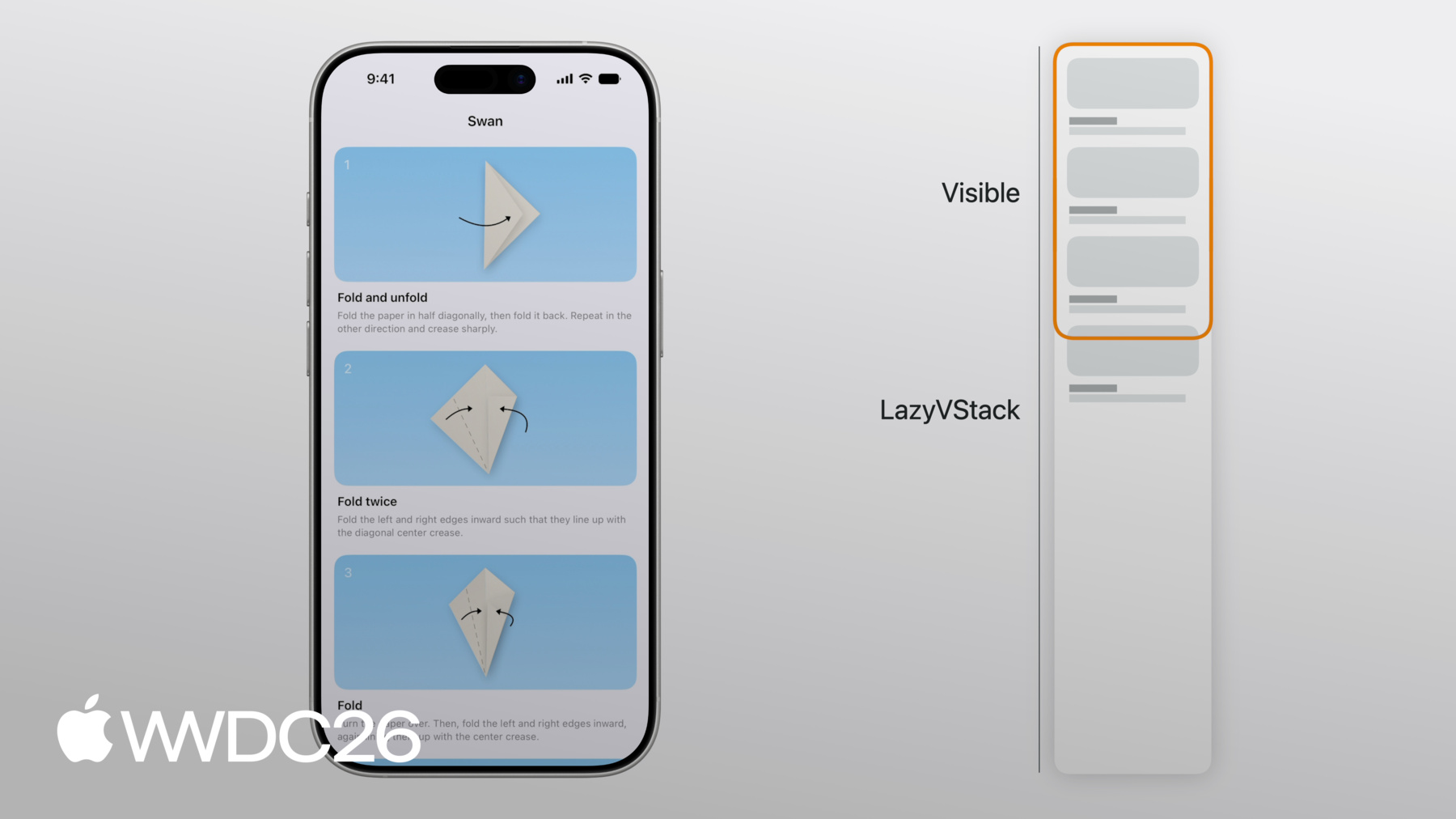
종이접기 학을 만드는 단계 중 세 단계가 완전히 보입니다. 4단계 StepView의 일부도 보이고 있습니다. LazyVStack 전체는 보이는 뷰보다 훨씬 큽니다. 하지만 VStack과 달리 LazyVStack은 보이지 않는 뷰를 평가하거나 렌더링하지 않습니다. LazyVStack은 단순히 뷰를 위에서 아래로 배치하고 보이는 영역이 채워지면 멈춥니다. 아래로 스크롤하면 LazyVStack은 적절히 뷰를 추가하여 보이는 영역이 계속 채워지도록 합니다. 그리고 뷰가 화면 밖으로 스크롤되면 레이지 스택에서 제거됩니다.
모든 뷰를 한 번에 로드하지 않음으로써 LazyVStack은 VStack보다 더 효율적일 수 있습니다. 하지만 정확성 비용이 있습니다. LazyVStack은 모든 뷰를 로드하지 않기 때문에 화면 밖의 서브뷰 높이는 추정값을 사용합니다. 이 추정 높이는 이전에 배치된 뷰들의 평균 크기를 기반으로 하며 이전에 배치된 뷰들과 남은 서브뷰의 예상 수를 기반으로 합니다. 레이지 스택은 화면 밖의 뷰 변경사항을 인지하지 못하며 로드되지 않기 때문입니다.
마찬가지로, 모든 뷰가 로드되지 않기 때문에 모든 뷰의 최대 너비를 찾을 수 없습니다. 그래서 LazyVStack의 이상적인 너비는 첫 번째 서브뷰의 너비입니다. 제 종이접기 앱의 경우 첫 번째 뷰는 무한히 유연하므로 LazyVStack의 너비는 화면 너비와 같습니다.
LazyVStack의 높이는 정확하지 않고 추정값이기 때문에 레이지 스택이 화면에 새로운 뷰가 스크롤되면서 레이아웃에 대해 더 많이 알게 됨에 따라 스크롤 중에 변경될 수 있습니다. 예를 들어 끝까지 스크롤하면 마지막 뷰들이 다른 뷰들보다 약간 작을 경우 레이지 스택은 조정해야 합니다. 이를 반영하여 원래의 추정 크기를 조정합니다.
보이는 영역 위의 공간도 정확하지 않습니다. 스크롤 위치, 즉 스크롤 뷰의 콘텐츠 오프셋은 보이는 아이템의 추정 위치에 따라 달라집니다. 보이는 영역 위의 공간이 정확하지 않은 한 가지 예로 iPhone에서 방향 전환 후가 있습니다.
StepView는 세로 모드보다 가로 모드에서 덜 높습니다. 자막 텍스트는 일반적으로 가로 모드에서 줄 수가 줄어듭니다. 방향 전환 중에 레이지 스택은 4단계의 StepView를 유지하여 가장 위에 보이는 뷰를 고정합니다. LazyVStack은 아직 정확한 레이아웃 변경 사항을 인지하지 못합니다. 처음 몇 개의 StepView가 로드되지 않았기 때문입니다. 하지만 맨 위로 다시 스크롤하면 레이지 스택은 스크롤 뷰의 맨 위에 정렬해야 합니다. 이는 추정된 공간을 수정해야 함을 의미하며 보이는 영역 위의 공간을 수정해 나갑니다. 같은 양만큼 ScrollView의 콘텐츠 오프셋을 업데이트하여 맨 위의 콘텐츠 오프셋도 0이 되도록 합니다.
레이지 스택과 이를 감싸는 스크롤 뷰는 위치와 콘텐츠 오프셋을 조율합니다. 이런 방식으로 추정값이 업데이트될 때 보이는 서브뷰의 상대적 위치가 스크롤 뷰에서 변경되지 않습니다.
같은 레이지 스택에 다양한 유형의 뷰나 콘텐츠를 조합하는 것은 일반적입니다. 제 종이접기 앱에서 멋진 기능이 있을 것 같아서 작업이 완료되면 사람들이 다른 사람들과 자신의 작품 사진을 공유할 수 있게 하고 싶습니다. 이 사진들을 하단에 수평 스크롤 뷰로 표시하고 싶습니다. 이 사진들을 위한 Showcase 뷰를 추가했습니다. Showcase 뷰는 수평으로 스크롤되는 ScrollView가 있으며 그 안에 LazyHStack이 있습니다. 이는 제 앱에 이제 LazyHStack이 중첩되어 있음을 의미합니다. 외부 LazyVStack 안에 말이죠.
이렇게 LazyVStack에 LazyHStack을 중첩하면 성능 면에서도 좋을 수 있습니다. 모든 사람이 이 중첩된 스크롤 뷰를 스크롤하여 추가 뷰를 보지는 않으니까요.
LazyHStack의 이상적인 높이, 따라서 수직 ScrollView에서의 높이는 첫 번째 서브뷰의 높이입니다. 제 종이접기 앱의 경우 모든 사진은 같은 높이를 사용합니다. 하지만 모든 사진에 가변적인 줄 수의 사용자 설명 레이블이 있다면 긴 자막은 잘릴 것입니다. LazyHStack은 모든 뷰 중 가장 큰 자막이 무엇인지 미리 알 수 없습니다. 모두 로드하지 않았으니까요. 가장 좋은 해결책은 뷰 높이를 고정하는 것입니다. 예를 들어, 텍스트의 경우 줄 제한을 설정할 수 있고 00:06:15.712 --> 00:06:17.902 그리고 짧은 텍스트를 위한 공간을 예약할 수 있습니다.
하지만 저는 실제로 종이접기 앱의 사진들이 좀 더 크면 좋겠다고 생각하고 있습니다. 단계 아래에 수직으로 추가하는 게 나을 것 같습니다. 섹션에 추가하면 섹션 헤더를 고정할 수도 있습니다. 섹션 헤더를 고정하려면 pinnedViews 파라미터를 사용하세요. LazyVStack에서 말이죠.
Showcase 뷰 안에 헤더 뷰와 함께 새 Section을 추가했습니다. 아래로 스크롤하면 Showcase 섹션 헤더가 상단에 고정됩니다.
이제 레이지 스택이 최상의 성능을 내도록 피해야 할 패턴들을 논의하겠습니다. 방금 추가한 사진 쇼케이스를 사용하여 설명하겠습니다. 사진들이 화면 안으로 또는 밖으로 스크롤될 때 스크롤 전환 효과를 추가하면 좋을 것 같습니다. 여기서는 .scrollTransition 수정자를 사용하여 단계들이 화면에 들어오거나 나갈 때 효과를 줍니다. 하지만 레이지 스택은 화면에 있는 뷰만 로드하며 원래 위치를 기준으로 합니다. 그리고 여기서 변환은 뷰들을 원래 프레임 밖으로 밀어냅니다.
그로 인해 보여야 할 때 사라지게 됩니다. 레이지 스택이 화면 밖에 있다고 판단하기 때문입니다. 여기서 아래로 스크롤하면 분홍색 학이 너무 일찍 사라집니다. 레이지 스택의 뷰에 스크롤 전환을 적용한다면 원래 보이지 않을 뷰들이 보이는 영역으로 밀려 들어가지 않도록 해야 합니다. 여기서는 다른 스케일 효과를 사용합니다.
이것은 잘 동작합니다. 일반적으로, 원래 보이지 않을 뷰들이 변환에서 보이는 영역으로 밀려 들어가지 않도록 해야 합니다. 레이지 스택은 이를 인지하지 못합니다. Showcase까지 아래로 조금 스크롤해야 하기 때문에 그곳으로 빠르게 이동할 수 있는 버튼도 추가하겠습니다.
하지만 버튼이 항상 보여서는 안 됩니다. 스크롤 뷰의 맨 위 근처에 있을 때만 보이도록 하고 싶습니다. 누군가 아래로 스크롤하면 사라져야 합니다.
여기서는 스크롤 뷰에 .onScrollGeometryChange를 사용하여 절대 콘텐츠 오프셋을 가져옵니다. 100포인트 이상 스크롤되면 버튼이 사라집니다. 이것은 동작하지만 레이지 스택의 콘텐츠 오프셋이 추정값이기 때문에 버튼이 사라지는 정확한 위치가 추정값이 변경되면 달라질 수 있습니다. 대신, 스크롤 뷰의 보이는 영역에서 서브뷰의 상대적 위치를 사용하는 것이 더 좋습니다.
그렇게 하는 한 가지 방법은 .onScrollTargetVisibilityChange 수정자를 사용하는 것입니다. 해당 수정자의 클로저는 서브뷰의 가시성이 변경될 때 호출됩니다. 스크롤 뷰의 보이는 영역에서 말이죠. 여기서 "Scroll to Showcase" 버튼의 가시성은 어떤 서브뷰가 보이는지에만 의존하며 임계값은 80%입니다.
이제 레이지 스택의 레이아웃을 자세히 살펴보았습니다. 레이지 스택은 서브뷰를 추가한다고 했습니다. 스크롤 뷰의 보이는 부분으로 진입하려 할 때 말이죠. 하지만 레이지 스택이 개별적으로 로드하는 서브뷰들은 코드에서 정의한 뷰 구조체와 항상 직접적으로 대응하지는 않습니다. 원래 코드로 돌아가서 ContentView를 다시 살펴보겠습니다. 이 간단한 경우, StepView 인스턴스와 LazyVStack이 보는 서브뷰 간에 1대1 대응이 있습니다. ScrollView가 있고 ScrollView는 LazyVStack을 서브뷰로 가지며 LazyVStack은 ForEach를 서브뷰로 가집니다. 물론 ForEach는 단일 뷰가 아닙니다. 각 단계마다 하나의 StepView로 해석됩니다. 대부분의 경우, 이것들이 LazyVStack이 로드하는 서브뷰들입니다. 하지만 여기서 StepView는 조금 더 복잡합니다. 그리고 그것이 중요합니다. body에는 두 개의 뷰, StepDiagram과 StepInstructions가 있으며 body의 최상위 레벨에 있습니다. 그것들은 VStack 같은 다른 레이아웃에 포함되어 있지도 않습니다.
이 경우 LazyVStack은 여전히 ForEach를 가지며 각 단계마다 StepView로 해석됩니다. 하지만 ForEach가 여러 StepView로 해석되는 것처럼 각 StepView도 이제 두 개의 뷰로 해석됩니다. LazyVStack은 StepDiagram을 평가하고 로드합니다. 그리고 StepInstructions를 별도로 로드합니다. 물론, StepView는 여전히 레이지 스택이 그 중 하나를 생성하기 위해 평가되어야 합니다. 뷰는 동적인 수의 뷰로도 해석될 수 있습니다. 하지만 그것은 주의해야 할 사항입니다. 이 경우, StepView는 detailLevel 환경 값을 사용하여 표시 여부를 확인합니다. ForEach는 다시 각 단계마다 StepView로 해석됩니다. 하지만 각 StepView는 이제 하나의 서브뷰나 0개의 서브뷰로 해석됩니다. 이 경우, 2단계는 현재 세부 수준에서 보이지 않지만 첫 번째와 세 번째 단계는 보입니다. 이것은 동작하며 StepView의 내용은 지연 로드되지만 StepView 자체는 예상보다 더 오래 살아있을 수 있습니다. LazyVStack이 보이는 서브뷰를 인덱스로 참조하기 때문입니다.
이제 이전 StepView들을 계속 유지해야 합니다. detailLevel 환경 값이 변경될 경우를 대비하여 인덱스에 영향을 미칠 수 있기 때문입니다.
ForEach에서 여러 번 생성되는 리프 서브뷰, 예를 들어 StepView에서는 동적인 수의 서브뷰를 생성하지 마세요. detailLevel 환경 값을 사용하여 단계를 필터링하는 예시는 따라서 좋은 방법이 아닙니다.
writingStyle 같은 관련 없는 환경 값이 StepView body의 내용에 사용된다고 가정해 봅시다. 이 환경 값이 변경되면 뷰들에 대한 body 평가가 발생할 수 있으며 화면 밖으로 스크롤된 뷰들도 불필요하게 업데이트됩니다. 레이지 스택도 StepView에 할당된 상태를 해제하지 않습니다. 대신, 데이터 수준에서 필터링하세요. SwiftData를 사용하고 있다면 Predicate를 사용하여 Query를 필터링하세요. 여기서는 Predicate에서 detailLevel을 사용합니다. 이렇게 하면 LazyVStack에 서브뷰 수가 즉시 명확해집니다. 뷰 수나 인덱스를 계산하기 위해 뷰를 구성할 필요가 없습니다. 뷰 body에서 옵셔널을 언래핑하는 것도 동일한 효과가 있음을 주의하세요. 여기서는 apiToken 환경 변수를 옵셔널로 언래핑하고 있습니다. body는 반환합니다 00:12:49.622 --> 00:12:53.527 토큰이 nil이 아닌 경우에 해당합니다.
토큰은 NetworkClient 모델 객체가 처리할 수 있는 것입니다. 누군가 인증되지 않은 경우 계층 구조 위의 뷰가 ContentUnavailableView를 보여줄 수 있습니다. 처음부터 레이지 스택을 표시하는 대신 말이죠.
레이지 스택은 데이터의 일부만 메모리에 유지하기 때문에 내용의 전체 diff를 수행할 필요가 없습니다. 보이는 뷰의 변경 사항에 대해서만 최소한의 확인을 수행합니다.
레이지 스택이 서브뷰를 한 번에 모두 로드하지 않는 경우도 있습니다. 이제 프리페칭에 대해 설명하겠습니다. 레이지 스택이 사용하는 내부 메커니즘으로 앱의 스크롤 성능을 향상시킵니다.
특정 방향으로 스크롤할 때 레이지 스택의 보이는 부분이 배치된 콘텐츠의 끝에 도달하면 레이지 스택은 화면에 추가하기 전에 미리 뷰를 프리페치합니다. 프리페칭은 레이지 스택이 뷰 표시 작업의 일부를 미리 수행함을 의미합니다. 새 서브뷰가 보이기 전에 말이죠. 스크롤하는 동안 ScrollView는 일정한 비율로 프레임을 그려야 합니다. 따라서 사용 가능한 시간이 제한되어 있습니다. 연산을 수행하기 위한 시간, 프레임 마감 시간까지 말이죠. 이 작업에는 ScrollView가 콘텐츠 오프셋을 업데이트하는 것이 포함됩니다. 뷰들이 새 위치에서 렌더링되고 앱이 콘텐츠 오프셋 변경에 반응하여 하는 작업들이 포함됩니다. ScrollView에 레이지 스택이 포함된 경우 화면에 스크롤된 뷰를 평가하는 작업 레이아웃 수행 및 렌더링도 포함됩니다. 하지만 화면에 새 뷰를 배치하는 작업은 비용이 많이 들 수 있습니다.
작업이 너무 오래 걸려 마감 시간을 초과하면 프레임이 드롭됩니다. 이는 스크롤 중에 버벅임으로 보이므로 피해야 합니다.
프리페칭은 이러한 프레임 드롭을 방지하기 위해 사용됩니다. 스크롤 중에 레이지 스택은 새 서브뷰 렌더링 작업의 일부를 수행할 시간이 충분한지 미리 확인합니다. 새 서브뷰가 화면에 스크롤되기 전에 말이죠. 화면에 스크롤되기 전에 말이죠. 예를 들어, 레이지 스택은 body를 평가할 수 있습니다. 화면에 나타나려는 뷰의 레이아웃을 나타나기 전에 미리 처리할 수 있습니다. 뷰가 실제로 나타날 때 대부분의 작업이 이미 완료된 상태입니다. 여러 프레임에 걸쳐 분산되어 있습니다.
LazyVStack 안에 중첩된 LazyHStack을 표시하는 작업도 여러 프레임에 걸쳐 분산될 수 있습니다. 뷰가 나타나면 onAppear가 호출됩니다. 일반적으로 뷰의 body는 한 시점에 호출되고 onAppear는 뷰가 화면에 배치될 때 조금 후에 호출됩니다. 스크롤 방향이 반전되면 뷰의 body가 프리페칭의 일부로 호출될 수도 있으며 onAppear는 전혀 호출되지 않을 수 있습니다. 레이지 스택에서 onAppear를 사용하는 것은 데이터 로딩을 포함한 여러 가지에 유용합니다. 그러한 사용 사례 중 하나가 무한 스크롤입니다. 여기서 종이접기 앱은 끝까지 스크롤하면 웹에서 더 많은 사진을 가져옵니다. 마지막 뷰인 ProgressView에 .onAppear 수정자가 있습니다. 해당 뷰가 나타나면 새 페이지를 가져옵니다.
하지만 각 뷰의 onAppear에서 모든 것을 로드하는 것은 좋은 방법이 아닙니다. 이 예제에서 onAppear는 각 뷰를 설정하는 데 사용됩니다. 크기와 뷰 내용의 많은 부분이 배치된 후에 완전히 변경됩니다. 프리페칭이 이전에 수행한 작업은 버려지고 뷰가 나타날 때 다시 수행해야 합니다. 레이지 스택은 필요 이상으로 많은 뷰를 로드할 수도 있으며 스크롤에도 영향을 줄 수 있습니다. 나중에 보여드리겠습니다. 대신, 이니셜라이저에서 뷰를 설정하여 화면에 나타나기 전에 적절한 상태가 되도록 하세요.
필수적이지 않더라도 뷰가 나타나기 전에 콘텐츠를 로드하는 것이 유용할 수 있습니다. 여기서는 task 수정자를 사용하여 뷰가 나타날 때 인터넷에서 다이어그램을 원격으로 로드합니다. 하지만 실제로 프리페칭을 활용하여 조금 더 일찍 로드할 수 있습니다. 뷰가 나타날 때까지 로드될 가능성이 높아집니다. 예를 들어, 캐시에 연결된 DiagramLoader observable 객체를 사용할 수 있습니다. 캐시에 특정 ID의 데이터가 없으면 초기화될 때 즉시 데이터를 로드할 수 있습니다. 이니셜라이저에서 다이어그램 로딩을 시작하므로 다이어그램이 조금 더 일찍 가져와집니다. 화면 밖으로 스크롤된 뷰는 더 이상 렌더링되거나 업데이트되지 않습니다. 하지만 즉시 메모리에서 제거되지는 않습니다. 레이지 스택은 몇 번의 업데이트 동안 이것들을 유지합니다. 다시 화면에 스크롤될 경우를 대비하여 말이죠. 뷰가 최종적으로 메모리에서 삭제될 때 상태 변수도 함께 삭제됩니다.
화면 밖으로 스크롤된 뷰와 연결된 데이터는 삭제되므로 스크롤 후에도 살아있어야 하는 데이터에는 뷰 상태를 의존하지 마세요. 여기서 StepView는 isHighlighted 상태 변수를 사용합니다. 하지만 뷰가 스크롤되어 나가면 해당 하이라이트 상태는 사라집니다. 대신, 중요한 상태를 모델 객체로 이동하거나 여기서처럼 binding을 사용하여 외부 뷰로 이동하세요. 일반적으로 레이지 스택은 스크롤 뷰 안에서 사용합니다. 이제 레이지 스택에서 스크롤이 잘 동작하도록 하는 팁을 드리겠습니다. 앞서 종이접기 앱에 버튼을 추가했습니다. 사용자 사진이 있는 쇼케이스로 스크롤하기 위한 버튼입니다.
섹션으로 프로그래밍 방식으로 스크롤하는 코드는 이와 같습니다. ScrollPosition binding을 사용하여 쇼케이스의 섹션 헤더로 스크롤합니다.
프로그래밍 방식의 스크롤은 레이지 스택에서 동작합니다. 대상 뷰가 화면에 없어도 말이죠.
화면 밖의 뷰로 스크롤하려면 레이지 스택이 위치를 추정해야 합니다. 애니메이션 스크롤에서 레이지 스택은 매 프레임마다 이 추정 위치를 업데이트합니다. 그럼에도 불구하고 몇 가지 사항이 스크롤이 부드럽고 빠르게 동작하지 못하게 할 수 있습니다. 예를 들어, 이 경우에도 StepView에서 동적인 수의 뷰를 가지면 성능에 영향을 줍니다. ID가 있는 뷰로의 프로그래밍 방식 스크롤은 ForEach의 각 뷰가 항상 하나의 서브뷰로 해석될 때 가장 성능이 좋습니다. 이 경우 레이지 스택은 스크롤할 ID를 찾기 위해 ForEach에 쿼리할 수 있습니다. 어떤 뷰도 구성하지 않고 말이죠. 끝 근처의 서브뷰로 스크롤하는 것도 더 성능이 좋습니다. 00:18:50.076 --> 00:18:52.770 레이지 스택이 서브뷰를 빠르게 셀 수 있다면 말이죠.
이전과 마찬가지로 뷰 body의 조건문으로 뷰를 필터링하는 대신 데이터 수준에서 필터링해야 합니다. 예를 들어, Query에 predicate를 사용하여 말이죠.
프로그래밍 방식의 스크롤도 덜 부드러워집니다. 너무 많은 뷰가 화면에 나타난 후 레이아웃을 변경하면 말이죠. 이렇게 하는 일반적인 패턴은 onGeometryChange를 사용하는 것입니다. 상태 값을 설정하여 다른 레이아웃 패스에서 사용하는 방식이죠.
여기서 StepView에는 subtitleHeight 상태 변수가 있으며 자막의 onGeometryChange에서 업데이트됩니다. 그런 다음 뷰가 다시 평가됩니다. 그리고 subtitleHeight는 다이어그램의 프레임을 계산하는 데 사용됩니다. 이는 스크롤을 덜 안정적으로 만듭니다. 레이지 스택은 뷰의 원래 높이를 측정하지만 뷰가 나타난 후에 높이가 변경되어 다른 콘텐츠를 아래로 밀어냅니다.
이런 경우 SwiftUI의 레이아웃 기본 요소를 사용할 수 없다면 대신 커스텀 레이아웃을 사용하세요. 여기서 그 커스텀 레이아웃은 StepLayout입니다. 커스텀 레이아웃 사용에 대해 더 알아보려면 "Compose custom layouts with SwiftUI"를 확인하세요.
자, 레이지 스택의 많은 측면을 보여드렸습니다. 레이아웃에 대해 이야기했고 뷰 구조체가 항상 단일 서브뷰로 해석되지 않는다는 것과 그것이 레이지 스택에 어떤 영향을 미치는지 이야기했습니다. 레이지 스택이 더 나은 스크롤 성능을 위해 뷰를 프리페치하는 방법과 화면 밖의 뷰로 프로그래밍 방식의 스크롤을 허용하는 방법도 이야기했습니다. 그 과정에서 몇 가지 팁을 드렸습니다. 앱의 레이지 스택에 사용할 수 있는 모범 사례들입니다. 예를 들어, 절대 콘텐츠 크기 사용을 피하세요. 레이지 스택에서 콘텐츠 오프셋 사용도 피하세요. 추정값이며 불안정하기 때문입니다. 리프 뷰에서 데이터를 필터링하기 위해 조건부 뷰 콘텐츠를 사용하지 마세요. SwiftUI 뷰가 예상보다 오래 살아있게 할 수 있기 때문입니다. 가능하면 onAppear가 호출되기 전에 레이지 스택의 서브뷰를 설정하세요. 프리페칭이 최상으로 동작하도록 하기 위해서입니다. 레이지 스택의 서브뷰가 나타난 후에 레이아웃을 변경하지 마세요. 레이지 스택을 목표 스크롤 위치에서 벗어나게 할 수 있습니다.
SwiftUI 컴포넌트가 동작하는 메커니즘을 이해하면 더 잘 활용할 수 있습니다. 그리고 이 영상을 준비하면서 저는 이제 학을 잘 만들 수 있게 된 것 같습니다.
-
-
1:23 - Origami app
// Origami app struct ContentView: View { var body: some View { ScrollView { LazyVStack { ForEach(steps) { step in StepView(step: step) } } } } } struct StepView: View { /* ... */ } -
5:11 - Horizontally scrolling showcase
// Horizontally scrolling showcase struct ContentView: View { var body: some View { ScrollView { LazyVStack { ForEach(steps) { step in StepView(step: step) } Showcase() } } } } struct StepView: View { /* ... */ } struct Showcase: View { var body: some View { ScrollView(.horizontal) { LazyHStack { ForEach(photos) { photo in PhotoView(photo: photo) } } } } } -
6:30 - Showcase section
// Showcase section struct ContentView: View { var body: some View { ScrollView { LazyVStack(pinnedViews: [.sectionHeaders]) { ForEach(steps) { step in StepView(step: step) } Showcase() } } } } struct StepView: View { /* ... */ } struct Showcase: View { var body: some View { Section { ForEach(photos) { photo in PhotoView(photo: photo) } } header: { /* ... */ } } } -
7:04 - Scroll effect
// Scroll effect struct ContentView: View { /* ... */ } struct StepView: View { /* ... */ } struct Showcase: View { var body: some View { Section { ForEach(photos) { photo in PhotoView(photo: photo) .scrollTransition { effect, phase in effect .rotationEffect(.degrees(phase.value * 20)) .scaleEffect(1 + phase.value * 0.2) } } } header: { /* ... */ } } } -
7:36 - Scroll effect
// Scroll effect struct ContentView: View { /* ... */ } struct StepView: View { /* ... */ } struct Showcase: View { var body: some View { Section { ForEach(photos) { photo in PhotoView(photo: photo) .scrollTransition { effect, phase in effect .scaleEffect(1 - abs(phase.value) * 0.1) } } } header: { /* ... */ } } } -
8:20 - Scroll to Showcase button
// Absolute offset struct ContentView: View { @State var isScrollToShowcaseVisible = false var body: some View { ScrollView { /* ... */ } .overlay(alignment: .bottom) { /* ... */ } .onScrollGeometryChange(for: Bool.self) { geo in geo.contentOffset.y <= 100 } action: { _, newValue in self.isScrollToShowcaseVisible = newValue } } } -
8:51 - Scroll to Showcase button
// Absolute offset struct ContentView: View { @State var isScrollToShowcaseVisible = false var body: some View { ScrollView { /* ... */ } .overlay(alignment: .bottom) { /* ... */ } .onScrollTargetVisibilityChange( idType: Step.ID.self, threshold: 0.8 ) { visibleIDs in isScrollToShowcaseVisible = shouldShowScrollButton(visibleIDs: visibleIDs) } } } -
9:29 - One resolved subview
// Origami struct ContentView: View { var body: some View { ScrollView { LazyVStack { ForEach(steps) { step in StepView(step: step) } } } } } struct StepView: View { /* ... */ } -
10:03 - Multiple resolved subviews
// Multiple subviews struct ContentView: View { /* ... */ } struct StepView: View { let step: Step var body: some View { StepDiagram(/* ... */) StepInstructions(/* ... */) } } -
10:52 - Dynamic number of subviews
// Dynamic number of views struct ContentView: View { /* ... */ } struct StepView: View { let step: Step @Environment(\.detailLevel) var detailLevel var body: some View { if step.isVisible(in: detailLevel) { VStack { /* ... */ } } } } -
11:46 - Filtering on the view level
// Dynamic number of views struct ContentView: View { /* ... */ } struct StepView: View { let step: Step @Environment(\.detailLevel) var detailLevel @Environment(\.writingStyle) var writingStyle var body: some View { if step.isVisible(in: detailLevel) { /* ... */ } } } -
12:15 - Filtering on the data level
// Filter at the data level struct ContentView: View { @Query var steps: [Step] init(detailLevel: DetailLevel) { _steps = Query(filter: #Predicate<Step> { step in step.detailLevel >= detailLevel }) } var body: some View { /* ... */ } } struct StepView: View { /* ... */ } -
12:35 - Optional unwrapping
// Optional unwrapping struct ContentView: View { /* ... */ } struct StepView: View { let step: Step @Environment(\.apiToken) var token var body: some View { if let token { /* ... */ } } } -
12:48 - Optional unwrapping
// Optional unwrapping struct ContentView: View { /* ... */ } struct StepView: View { let step: Step @Environment(NetworkClient.self) var networkClient var body: some View { /* ... */ } } -
15:28 - Loading more content
// Loading more content struct Showcase: View { @State var pager = ShowcasePager() var body: some View { ForEach(pager.pages) { page in PageView(page: page) } if !pager.atEnd { ProgressView() .progressViewStyle(.circular) .onAppear { pager.fetchPage() } } } } -
15:53 - Setting up lazy stack subview in onAppear
// onAppear struct StepView: View { let id: Step.ID @State var viewModel = StepViewModel() var body: some View { VStack { if let content = viewModel.content { /* ... */ } } .onAppear { viewModel.configure(with: id) } } } -
16:14 - Lazy stack subview ready before onAppear
// onAppear struct StepView: View { @State var viewModel: StepViewModel init(id: Step.ID) { _viewModel = State(initialValue: StepViewModel(id: id)) } var body: some View { /* ... */ } } -
16:23 - Loading diagram with task modifier
// Diagram loading struct StepView: View { let step: Step @State var diagramLoader = DiagramLoader() @State var diagram: Diagram? var body: some View { VStack { /* ... */ } .task { diagram = await diagramLoader.loadDiagram(id: step.id) } } } -
16:40 - Loading diagram in initializer
// Diagram loading struct StepView: View { let step: Step @State var diagramLoader: DiagramLoader init(step: Step) { self.step = step _diagramLoader = State(initialValue: DiagramLoader(id: step.id)) } var body: some View { /* ... */ } } @Observable class DiagramLoader { /* ... */ } -
17:16 - Highlight @State variable
// Highlighting struct ContentView: View { /* ... */ } struct StepView: View { let step: Step @State var isHighlighted = false var body: some View { /* ... */ } } -
17:33 - Highlight @Binding
// Highlighting struct ContentView: View { @State var highlighted: Set<Step.ID> = [] var body: some View { /* ... */ } } struct StepView: View { let step: Step @Binding var highlighted: Set<Step.ID> var body: some View { /* ... */ } } -
17:58 - Programmatically scroll to showcase
// Programmatically scroll to showcase struct ContentView: View { @State var scrollPosition = ScrollPosition() var body: some View { ScrollView { /* ... */ } .scrollPosition($scrollPosition) .overlay(alignment: .bottom) { Button { scrollToShowcase() } label: { /* ... */ } } } func scrollToShowcase() { withAnimation { scrollPosition.scrollTo(id: "showcase-header") } } } -
18:24 - Dynamic number of views
// Dynamic number of views struct ContentView: View { /* ... */ } struct StepView: View { let step: Step @Environment(\.detailLevel) var detailLevel var body: some View { if step.isVisible(in: detailLevel) { /* ... */ } } } -
18:53 - Filter at the data level
// Filter at the data level struct ContentView: View { @Query var steps: [Step] init(detailLevel: DetailLevel) { _steps = Query(filter: #Predicate<Step> { step in step.detailLevel >= detailLevel }) } var body: some View { /* ... */ } } struct StepView: View { /* ... */ } -
19:16 - Using onGeometryChange in lazy stack subview
// Don't change layout after views appear struct ContentView: View { /* ... */ } struct StepView: View { let step: Step @State var subtitleHeight: CGFloat? var body: some View { VStack { StepDiagram(diagram: step.diagram) .frame(height: diagramHeight(subtitleHeight: subtitleHeight)) Title(step.title) Subtitle(step.subtitle) .onGeometryChange(for: CGFloat.self, of: \.size.height) { _, value in subtitleHeight = value } } } } -
19:17 - Using custom layout in lazy stack subview
// Don't change layout after views appear

struct ContentView: View { /* ... */ }

struct StepView: View {
    let step: Step

    var body: some View {
        StepLayout {
            StepDiagram(diagram: step.diagram)
            Title(step.title)
            Subtitle(step.subtitle)
        }
    }
}

struct StepLayout: Layout { /* ... */ }
-