

-
fm CLI와 Python SDK로 AI 기반 스크립트 빌드하기
macOS에서 Apple Foundation Models를 활용하는 새로운 방법을 모두 살펴보세요. Foundation Models SDK for Python을 사용하면 Python 생태계의 인기 도구 및 평가 패키지와 통합할 수 있습니다. macOS 27에 도입된 새로운 fm 명령어를 사용하여 스크립팅을 간소화하고, 모델 워크플로를 자동화하며, 개발 프로세스를 가속화하는 방법을 알아보세요.
챕터
- 0:00 - 소개
- 1:22 - fm CLI 및 Python SDK 소개
- 3:23 - 명령줄 도구
- 5:02 - fm 응답 및 구조화된 출력
- 6:11 - fm으로 파일 관리 자동화
- 8:52 - Python SDK
- 9:42 - 프롬프트, 도구 호출, 유도 생성
- 10:44 - Python의 평가 파이프라인 구축
- 15:20 - 다음 단계
리소스
관련 비디오
WWDC26
-
비디오 검색…
안녕하세요! 저는 Eric Gourlaouen이라고 합니다 Foundation Models Framework 팀의 엔지니어입니다 오늘은 macOS에서 Apple Foundation Models를 활용할 수 있는 새로운 방법을 소개해 드리겠습니다 WWDC25에서 Swift용 Foundation Models Framework를 소개했습니다 이를 통해 앱에서 온디바이스 Apple Foundation Model을 프롬프트할 수 있습니다 이 프레임워크는 구조화된 출력을 생성하는 guided generation과 같은 구조화된 출력 생성을 위한 guided generation, Tool Calling과 함께 출시되었으며 앱의 컨텍스트와 모델이 상호작용할 수 있게 해줍니다
macOS 27과 iOS 27에서 프레임워크에 다양한 새 기능이 추가됩니다 프롬프트에 이미지를 전달하는 기능 지원도 포함됩니다 그리고 서버 모델 액세스도 가능해져 앱이 동일한 Swift API로 모든 대규모 언어 모델을 활용할 수 있습니다 Foundation Models Framework를 사용하면 Apple Foundation Models의 강력한 기능을 쉽게 활용할 수 있습니다 텍스트 추출 및 분석부터 다양한 문제 해결에 이 모델을 활용할 수 있고 고급 에이전트 워크플로우 구축도 가능합니다 설정도 간편하며 API 키나 클라우드 API 비용이 필요하지 않습니다 하지만 지금까지는 Swift 코드에서만 이 모델을 사용할 수 있었습니다 올해는 macOS에서 Apple Foundation Models에 액세스할 수 있는 새로운 방법을 선보입니다 fm이라는 새로운 명령줄 도구와 Python용 새로운 Foundation Models SDK를 소개합니다 fm 명령줄 도구는 macOS 27과 함께 사전 설치됩니다 터미널에서 프롬프트를 빠르게 테스트하기에 탁월한 도구로 터미널에서 바로 사용하거나 자동화에 활용할 수 있습니다 Xcode에서 프로젝트를 다시 빌드하지 않고도 프롬프트로 모델을 테스트하기가 Xcode에서 프로젝트를 재빌드 없이 쉽게 테스트할 수 있습니다
이 명령줄 도구는 터미널 창을 열고 fm respond를 입력한 뒤 프롬프트를 작성하고
Enter 키를 누르면 됩니다 잠시 후 모델의 응답을 확인할 수 있습니다
Python용 Foundation Models SDK는 온디바이스 모델에 액세스하는 또 다른 새로운 방법입니다 Foundation Models Framework의 핵심 기능을 지원하며 tool calling 및 guided generation도 포함됩니다 Swift 개발자이고 Foundation Models 프레임워크를 사용해 보셨다면 API가 매우 익숙하게 느껴질 것입니다 머신 러닝 엔지니어라면 Swift보다 Python을 더 많이 사용할 수도 있습니다 그런 경우 이 SDK를 사용하면 Python 코드에서 온디바이스 모델을 쉽게 활용할 수 있습니다
Python은 머신 러닝과 데이터 과학 분야에서 풍부한 오픈 소스 패키지 생태계를 보유하고 있습니다 Python SDK를 사용하면 Python으로 평가 파이프라인을 작성하고 해당 패키지를 활용하여 기능의 품질을 정량화할 수 있습니다 그리고 Python은 스크립팅 언어이기 때문에 프롬프트를 빠르게 테스트하고 결과를 확인하며 반복 작업하기 쉽습니다 이 새로운 옵션으로 무엇을 할 수 있는지 자세히 살펴보겠습니다 먼저 새로운 fm 명령줄 도구를 살펴보겠습니다 기본 사용법을 알아보고 자동화 스크립트 작성에 활용하는 방법도 보여드리겠습니다 다음으로 Python SDK를 소개하겠습니다 모델과 상호작용하는 방법과 고급 SDK 옵션 활용법도 알려드리겠습니다 그 다음 사례 연구를 통해 Python 도구로 프롬프트 출력을 분석하는 방법과 앱의 품질을 개선하는 방법을 보여드리겠습니다
먼저 명령줄 도구 fm에 대해 알아보겠습니다 macOS 27부터 이 명령줄 도구는 Mac에 사전 설치됩니다 터미널 앱에서 바로 사용할 수 있습니다 fm을 시작하려면 터미널을 열고 fm을 입력하세요
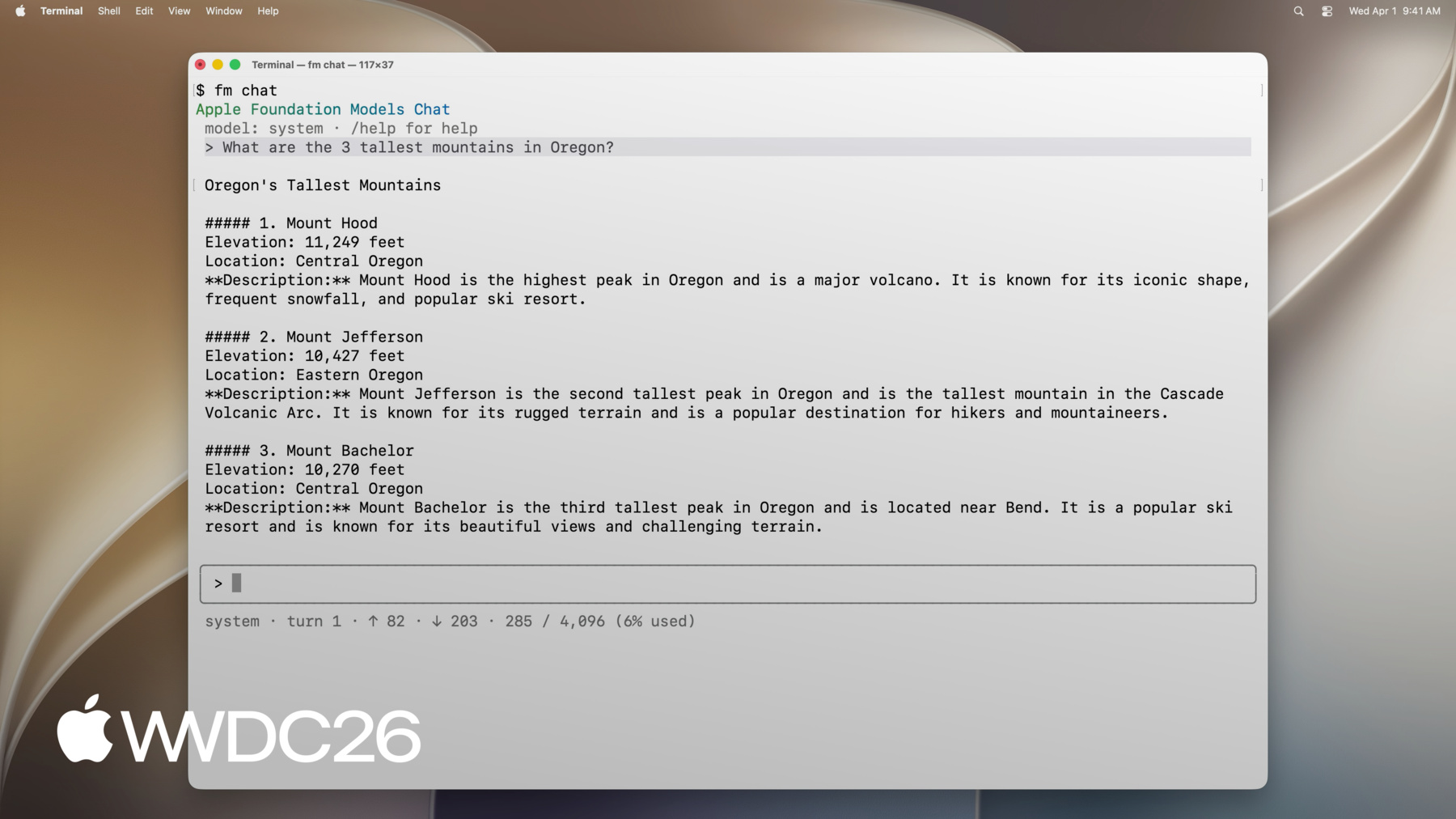
사용 가능한 명령어 목록을 확인할 수 있습니다 예를 들어 respond로 모델을 프롬프트하고 응답을 반환받을 수 있으며 chat으로 대화형 인터페이스를 시작하고 schema로 스키마를 만드는 등 다양합니다 fm의 기능을 보여드리기 위해 fm chat을 사용해 보겠습니다
이 새로운 터미널 인터페이스로 대화를 시작할 수 있으며 터미널에서 바로 온디바이스 모델과 대화할 수 있습니다 첫 번째 질문으로 시작하면
추가 질문도 할 수 있습니다
fm chat에는 다양한 명령어가 있습니다 예를 들어 /model을 사용하면 Private Cloud Compute 모델을 사용하도록 대화를 전환할 수 있습니다
또는 /save를 사용하면 나중에 재개할 수 있도록 현재 대화를 저장할 수 있습니다
fm chat의 대화형 세션은 모델의 첫 번째 반응을 확인하기에 좋습니다 새로운 아이디어를 탐색할 때 모델을 테스트하여 프롬프트 성능을 확인할 수 있습니다 스크립트처럼 인라인 응답이 필요할 때는 fm respond 명령어를 사용하세요 터미널에서 프롬프트와 함께 fm respond를 실행하면 모델의 응답을 출력으로 받을 수 있습니다
fm respond에는 다양한 옵션이 있으며 model 옵션으로 Private Cloud Compute 모델에 프롬프트할 수 있습니다 또는 image 옵션으로 프롬프트에 이미지를 포함할 수 있습니다 Swift 프레임워크와 마찬가지로 모델을 사용하여 구조화된 출력을 생성할 수 있습니다 fm schema object 명령어로 스키마를 만들고 schema 옵션과 함께 fm respond에서 사용할 수 있습니다
유용하게 활용할 수 있는 옵션이 더 있습니다 모든 옵션을 확인하려면 help 옵션을 사용하세요 지금까지 살펴본 것처럼 fm 명령줄 도구로 온디바이스 모델이나 Private Cloud Compute의 Apple Foundation Model을 사용할 수 있습니다 기본적으로 macOS와 함께 제공되는 온디바이스 모델을 사용하며 항상 사용 가능합니다
Private Cloud Compute의 Apple Foundation Model도 사용할 수 있으며 사용 제한이 있습니다 온디바이스 모델보다 훨씬 큰 모델이라 복잡한 문제에서 더 나은 성능을 발휘합니다
배운 내용을 활용하여 실제 문제를 해결해 보겠습니다 Mac에서 방금 프레젠테이션 프로젝트를 완료했습니다 에셋을 저장하던 폴더가 초안들로 가득 차 있어서 디스크 공간을 확보하고 싶습니다 이 폴더를 정리하여 에셋의 최종 버전만 남기고 싶습니다 Foundation Models를 사용하여 파일을 분류하고 필수 파일만 남긴 뒤 백업하고 오래된 파일은 아카이브 디스크로 이동시키겠습니다 나중에 같은 상황이 생길 때를 위해 스크립트로 자동화하고 싶습니다 이 스크립트를 다시 실행하면 됩니다 여기서 fm을 사용하면 언어 모델을 호출할 수 있어 스크립트에서 초안 파일과 최종 파일을 분류할 수 있습니다 파일 이름이 불규칙하더라도 스크립트가 작동하므로 예측하기 어려운 이름도 정렬할 수 있습니다
fm을 사용하여 초안 파일과 최종 파일을 구분하는 스크립트를 준비했으며 파일을 그에 맞게 이동합니다 작업 폴더를 정리할 것입니다
현재 이 폴더에는 초안 파일과 최종 파일이 함께 있습니다 스크립트를 실행해 보겠습니다
완료되었습니다 이전 파일이 폴더에서 올바르게 이동된 것을 확인할 수 있습니다 이제 아카이브 폴더를 열겠습니다
초안 파일이 그곳으로 이동되었고 백업 디렉토리를 열어보겠습니다
최종 파일도 백업으로 복사된 것을 확인할 수 있습니다 스크립트를 함께 살펴보며 fm을 사용하여 파일을 분류한 방법을 이해해 보겠습니다 먼저 작업 디렉토리의 파일 목록을 로드합니다 다음으로 모델에 이 목록 정렬을 요청하여 초안 파일 목록과 최종 파일 목록을 받습니다 fm respond 명령어로 지침과 프롬프트를 전달하면 됩니다 모델에서 구조화된 결과를 얻기 위해 위에서 fm schema object 명령어로 스키마를 정의합니다 구조화된 출력에는 두 개의 필드가 있습니다 최종 파일 목록과 초안 파일 목록입니다 그런 다음 fm respond의 schema 옵션으로 이 스키마를 사용하여 출력을 생성합니다
fm respond의 출력에는 모델이 생성한 JSON 형태의 결과가 포함됩니다 이 결과를 사용하여 먼저 최종 파일을 백업으로 복사하고 초안 파일을 아카이브로 이동합니다 fm에는 더 많은 기능이 있으니 오늘 macOS 27에서 도구를 확인해 보시고 자동화에 활용해 보세요 이제 Python SDK에 대해 이야기하겠습니다 Python SDK를 사용하면 Python 코드에서 Apple Foundation Models에 바로 액세스할 수 있습니다 Mac의 Python 환경에 설치할 수 있으며 Python 버전이 최소 Python 3.10 이상이고 Xcode가 설치되어 있으며 Apple Silicon Mac을 사용해야 합니다 pip 또는 원하는 다른 패키지 매니저로 설치할 수 있습니다 Python SDK는 프레임워크의 핵심 기능을 포함합니다 Swift에서 이미 사용해 보셨다면 API와 추상화가 빠르게 익숙하게 느껴질 것입니다 텍스트 입력 및 이미지 입력으로 모델에 프롬프트를 전달할 수 있고 응답 스트리밍도 가능합니다 Swift와 마찬가지로 guided generation을 사용하여 모델이 구조화된 출력을 생성하도록 할 수 있습니다 그리고 tool calling으로 모델이 코드와 상호작용하도록 할 수 있습니다 실제 예시를 살펴보겠습니다 식료품 주문 앱을 개발 중이며 사용자가 온디바이스 모델을 통해 앱에 프롬프트를 보낼 수 있게 하고 싶습니다 기능을 추가하기 시작하면서 프롬프트의 정확도를 평가하고 싶습니다 그래서 Swift로 구현하기 전에 Python으로 프로토타입을 만들겠습니다 모델 프롬프팅은 Swift와 동일하게 진행됩니다 먼저 LanguageModelSession을 생성합니다 원하는 경우 지침을 전달할 수 있습니다 그런 다음 session.respond를 호출하여 프롬프트를 인수로 전달합니다 메서드의 결과에는 모델의 출력이 포함됩니다
Swift 프레임워크와 마찬가지로 모델에 도구를 제공하여 사용자의 컨텍스트와 상호작용하게 할 수 있습니다 예를 들어 모델이 호출할 수 있는 도구를 정의하여 최근 주문 내역을 가져올 수 있으며 더 맞춤화된 정보를 제공할 수 있습니다 Swift 프레임워크 및 명령줄 도구와 마찬가지로 모델이 구조화된 출력을 생성하도록 제한할 수도 있습니다 예를 들어 이 코드에서는 guided generation을 사용하여 모델의 출력이 ItemsSuggestion 객체에 캡처되도록 합니다 여기서 fm.generable 데코레이터를 사용하여 원하는 출력 구조를 정의하고 generating 인수로 fm.respond에 전달합니다 Python SDK의 주요 이점 중 하나는 Python 생태계와의 쉬운 통합입니다 이를 활용 사례로 설명해 드리겠습니다 오픈 소스 Python 패키지를 사용하여 평가 파이프라인을 구축하겠습니다 식료품 주문 앱을 설계하면서 사용자의 다음 주문을 준비하는 기능을 개발하고 있습니다 언어 모델을 사용하여 이전 주문을 기반으로 사용자가 장바구니에 추가하고 싶은 항목을 예측하고자 합니다 이 기능을 설계하면서 출력이 이전 주문을 기반으로 안정적으로 작동하는지 확인하고 또한 예측이 이미 장바구니에 있는 항목도 고려하는지 확인하고 싶습니다 이 기능에 대해 서로 다른 프롬프트를 가진 여러 구현을 준비했습니다 각각 다른 프롬프트를 사용합니다 정확도를 정량화하여 최적의 구현을 선택하고 성능을 확인하고 싶습니다 프롬프트를 평가하고 반복 작업하기 위해 Swift 개발자는 Evaluations 프레임워크를 활용할 수 있습니다 Xcode 27과 함께 제공되며 평가를 쉽게 만들고 여러 반복에 걸쳐 기능의 정확도를 추적할 수 있습니다 하지만 많은 데이터 과학자들은 Swift보다 Python에 더 익숙할 수 있습니다 이런 경우라면 Jupyter Notebook에서 Python SDK를 사용하여 Python으로 분석을 수행하는 방법을 보여드리겠습니다
먼저 대형 서버 모델을 사용하여 평가 데이터를 생성했습니다 이제 일부 입력 데이터와 각각에 대한 출력에서 기대하는 데이터가 있습니다
서로 다른 프롬프트를 사용하는 여러 구현을 작성하겠습니다 그런 다음 각 평가 입력에 대해 서로 다른 구현을 사용하여 출력을 생성합니다 이 데이터를 Pandas DataFrame의 행으로 저장합니다 다음으로 서버 모델을 활용하는 판단 함수를 설계했습니다 선택한 기준에 따라 각 출력을 점수화합니다 그런 다음 이 지표를 Pandas DataFrame에 저장합니다 이제 차트를 생성하여 시각적으로 확인할 수 있습니다 실제로 확인해 보겠습니다
노트북에는 입력과 예상 출력이 담긴 평가 데이터가 포함되어 있습니다 사용자의 장바구니를 완성하는 세 가지 구현을 준비했습니다 각 구현은 서로 다른 방식으로 온디바이스 모델에 프롬프트를 전달합니다 첫 번째 방법은 매우 간단한 프롬프트를 사용합니다
두 번째는 더 자세한 설명이 있는 프롬프트를 사용하며 작업을 더 구체적으로 설명합니다
세 번째는 가장 포괄적인 프롬프트를 가지며 모델에 규칙 목록을 설명합니다
평가 데이터셋의 각 행에 대해 각 구현의 출력을 생성했습니다 그런 다음 이 입력과 출력을 Pandas DataFrame에 저장했습니다 이 데이터를 판단 모델로 사용하는 서드파티 모델에 전달했습니다 판단 모델은 일련의 기준에 따라 각 결과를 점수화합니다 평가가 생성되면 matplotlib을 사용하여 차트를 생성할 수 있습니다 각 프롬프트 세트의 성능을 빠르게 확인할 수 있습니다 데이터가 이미 생성되고 평가되었으므로 이 셀과 아래 셀을 실행하여 차트를 생성할 수 있습니다
차트를 살펴보겠습니다
먼저 설정별 오류를 보면 자세한 프롬프트에서 생성 오류 비율이 높게 나타납니다 이는 예를 들어 모델의 최대 컨텍스트 창 크기에 도달했을 때 발생할 수 있습니다 다음으로 덜 자세한 두 프롬프트는 과도한 항목이 장바구니에 추가되는 경향이 있고 더 자세한 프롬프트는 초과 항목이 더 적습니다 그러나 더 자세한 프롬프트에서는 예상했던 항목이 누락되는 경우가 더 많습니다
첫 번째 프롬프트는 또한 더 많은 환각 항목이 장바구니에 추가되는 경향이 있습니다 이 인사이트를 활용하여 프롬프트를 반복 개선할 수 있습니다 Python을 사용하면 전체 프로젝트를 재빌드하지 않고도 노트북에서 바로 빠르게 반복할 수 있습니다 테스트하고 변경하기가 정말 편리합니다 이 예시에서 출력을 생성하고 평가하고 Python SDK로 차트를 만드는 방법을 살펴봤습니다 Python은 강력한 오픈 소스 생태계를 보유하고 머신 러닝 및 데이터 과학 패키지가 풍부합니다 오늘 자동화에서 그 중 일부를 활용했습니다 Python으로 자동화를 개발한다면 생태계를 탐색하여 기존 패키지를 재사용할 수 있는지 확인해 보세요 정리해 보겠습니다 Apple Foundation Models와 상호작용하는 새로운 방법을 살펴봤습니다 오늘 macOS 27에서 직접 시도해 보시길 권장합니다 이 도구들을 Xcode 프로젝트와 함께 사용하여 프롬프트를 프로토타입하고 평가하는 방법으로 활용할 수 있습니다 또는 단독으로 사용하여 새로운 방식으로 모델을 활용할 수 있습니다 이 도구들에 더 익숙해지려면 다음 단계를 권장합니다
먼저 터미널 앱에서 명령줄 도구를 탐색해 보세요 다양한 옵션과 기능을 살펴보고 직접 시도해 보세요 다음으로 Python SDK 사용 방법에 대해 더 자세히 알아보려면 GitHub 저장소를 방문하세요 예제 코드 조각과 문서를 찾을 수 있으며 고급 워크플로우 구축 방법에 대한 참고 자료로 활용할 수 있습니다 Python SDK를 익혔다면 이 새로운 지식을 활용하여 평가 파이프라인을 구축하세요 모델을 활용할 방법을 생각해보고 작동하는 프롬프트를 찾은 후 평가 데이터셋을 기준으로 모델 결과를 정량화하여 프롬프트의 효과를 측정해 보세요 이 새로운 도구들을 사용하면서 언어 모델을 새롭고 흥미로운 방식으로 활용하는 영감을 얻으시길 바랍니다 즐거운 개발 되세요!
-
-
5:07 - Prompt the on-device model with fm respond
$ fm respond "Provide a basic regex in Swift to parse an email address" # Here is a basic regex to parse an email address in Swift: [...] $ fm respond "Provide a comprehensive regex in Swift to parse an email address" --model pcc # [...] Here's a robust Swift implementation using 'NSRegularExpression' to validate a typical email address: $ fm respond "What app is the user using in this screenshot?" --model pcc \ --image Screenshot.png # The user is using the Mail app. $ fm schema object --name AppsIdentified --string app_names --array > schema.json $ fm respond "What apps are the user actively using in this screenshot?" \ --image Screenshot.png --model pcc --schema schema.json # {"app_names": ["Messages", "Mail", "Calendar"]} $ fm respond --help -
7:55 - Sort files with fm respond and a schema
fm schema object --name "TriagedFileList" \ --string 'final_files' --array \ --string 'draft_files' --array > /tmp/schema.json output=$(fm respond \ --instructions "I just completed a project, and I need help triaging the latest version of the files from the previous versions. I will give you a list of files. Return a list of the latest files (i.e., all files that, you can infer from their name in the list, are the latest versions), and then return separately a list of all draft files (i.e., all files that weren't considered final)." \ "This is the list of all files:\n\n${files_list}" \ --schema /tmp/schema.json ) echo "${output}" | jq -r '.final_files[]' | while read -r file; do cp "${DIRECTORY_TO_TRIAGE}/${file}" "${FINAL_FILES_STORAGE_DIRECTORY}" done echo "${output}" | jq -r '.draft_files[]' | while read -r file; do mv "${DIRECTORY_TO_TRIAGE}/${file}" "${DRAFT_FILES_STORAGE_DIRECTORY}" done -
8:54 - Install the Foundation Models Python SDK
pip install apple_fm_sdk -
10:00 - Create a session and respond to a prompt
import apple_fm_sdk as fm INSTRUCTIONS = "You're an AI assistant for Cupertino Mart, a grocery store with in-app ordering." async def answer_question(prompt: str) -> str: session = fm.LanguageModelSession(instructions=INSTRUCTIONS) return await session.respond(prompt) -
10:21 - Define a Tool for the language model
class GetPastOrdersTool(fm.Tool): name = "get_past_orders" description = "Retrieves information about this user's past orders." @fm.generable("Past orders query parameter") class Arguments: number_orders: str = fm.guide("How many of the last orders to retrieve") @property def arguments_schema(self) -> fm.GenerationSchema: return self.Arguments.generation_schema() async def call(self, args: fm.GeneratedContent) -> str: number_orders = args.value(int, for_property="number_orders") return await Orders.load_last_orders(user_id=user_id, amount=number_orders) -
10:35 - Generate structured output with @fm.generable
@fm.generable("Suggested items")
class ItemsSuggestion:
	item_names: list[str] = fm.guide("Names of the suggested items")

INSTRUCTIONS = "You're an AI assistant tasked with returning potential grocery items that the user might be interested in."

async def generate_suggested_cart_items(user_input: Optional[str]) -> ItemsSuggestion:
	session = fm.LanguageModelSession(instructions=INSTRUCTIONS, tools=load_tools())
	prompt = """Using the tools to load the user's previous orders, \
              return a list of items the user has already ordered \
              and that they might be interested in again \
              as they're getting ready to place a new grocery order."""
	if user_input is not None:
    prompt += f"\nAccount for the following request from the user: {user_input}"
    return await session.respond(prompt, generating=ItemsSuggestion)
-