

-
Bluetooth Channel Sounding으로 액세서리 찾기
Channel Sounding을 시작하여 Bluetooth 액세서리에 거리 및 방향 인식 기능을 적용해 보세요. 새로운 Nearby Interaction 및 Core Bluetooth API를 자세히 살펴보고, 필요한 액세서리 측 변경 사항을 안내합니다. 원활하고 반응성이 뛰어난 경험을 보장하면서 전력 소모를 최적화하세요.
챕터
- 0:00 - 소개
- 0:50 - 개요
- 3:17 - Core Bluetooth API
- 4:34 - Nearby Interaction API
- 7:05 - 하드웨어 팁
리소스
- Measuring distance between devices using Channel Sounding
- AccessorySetupKit
- Nearby Interaction
- Core Bluetooth
관련 비디오
WWDC24
WWDC21
-
비디오 검색…
안녕하세요! 저는 Gretchen이고, Core Bluetooth 팀에서 일하고 있습니다. 오늘은 Channel Sounding을 사용하여 주변 Bluetooth 액세서리를 찾는 새로운 방법을 소개하게 되어 기쁩니다. 먼저, Channel Sounding을 활용할 수 있는 몇 가지 아이디어와, 작동 방식을 설명하겠습니다. 그런 다음 앱에서 구현하는 방법을 설명하겠습니다. Core Bluetooth를 사용하여 거리를 측정하거나, Nearby Interaction을 사용하여 액세서리까지의 거리와 방향을 측정하는 방법입니다.
다음으로, Channel Sounding을 지원하는 하드웨어 구축 팁을 드리겠습니다. 그리고 다음 단계로 마무리하겠습니다.
개요부터 시작하겠습니다.
파티를 주최한다고 상상해 보세요.
집 안에서는 오븐으로 요리 중이고, 뒷마당에서는 훈연기를 돌리고 있습니다.
두 곳 모두에 Bluetooth 온도계가 있어서, 모든 요리를 완벽하게 할 수 있습니다. 알림이 옵니다. 온도계 중 하나가 설정한 온도에 도달했다는 알림입니다.
앱을 열면, 프로브가 제 오른쪽 8미터 지점에 있다고 표시됩니다. 훈연기가 분명합니다!
Channel Sounding을 사용하면 온도 프로브를 혼동하지 않을 수 있습니다. 각 프로브까지의 거리를 측정할 수 있으니까요!
iOS에서 서드파티 액세서리까지 거리와 방향을 측정하는 방법이 몇 가지 있습니다.
최상의 정확도를 위해서는, Ultra Wideband 칩셋을 액세서리에 추가하고 앱에서 Nearby Interaction 프레임워크를 사용할 수 있습니다.
이에 대한 자세한 정보는, "Explore Nearby Interaction with third-party accessories" 영상을 시청하세요. 하지만 액세서리에 Bluetooth 칩셋만 있다면, Bluetooth Channel Sounding이 최선의 선택입니다.
과거에 거리 추정을 위해 RSSI를 사용했을 수 있지만, Channel Sounding을 사용하면 실제로 거리를 측정할 수 있습니다. Channel Sounding을 사용해 보시기를 권장합니다. 더 높은 정확도가 앱에 도움이 되는 경우라면 특히요. 그렇다면 Channel Sounding은 정확히 어떻게 작동할까요?
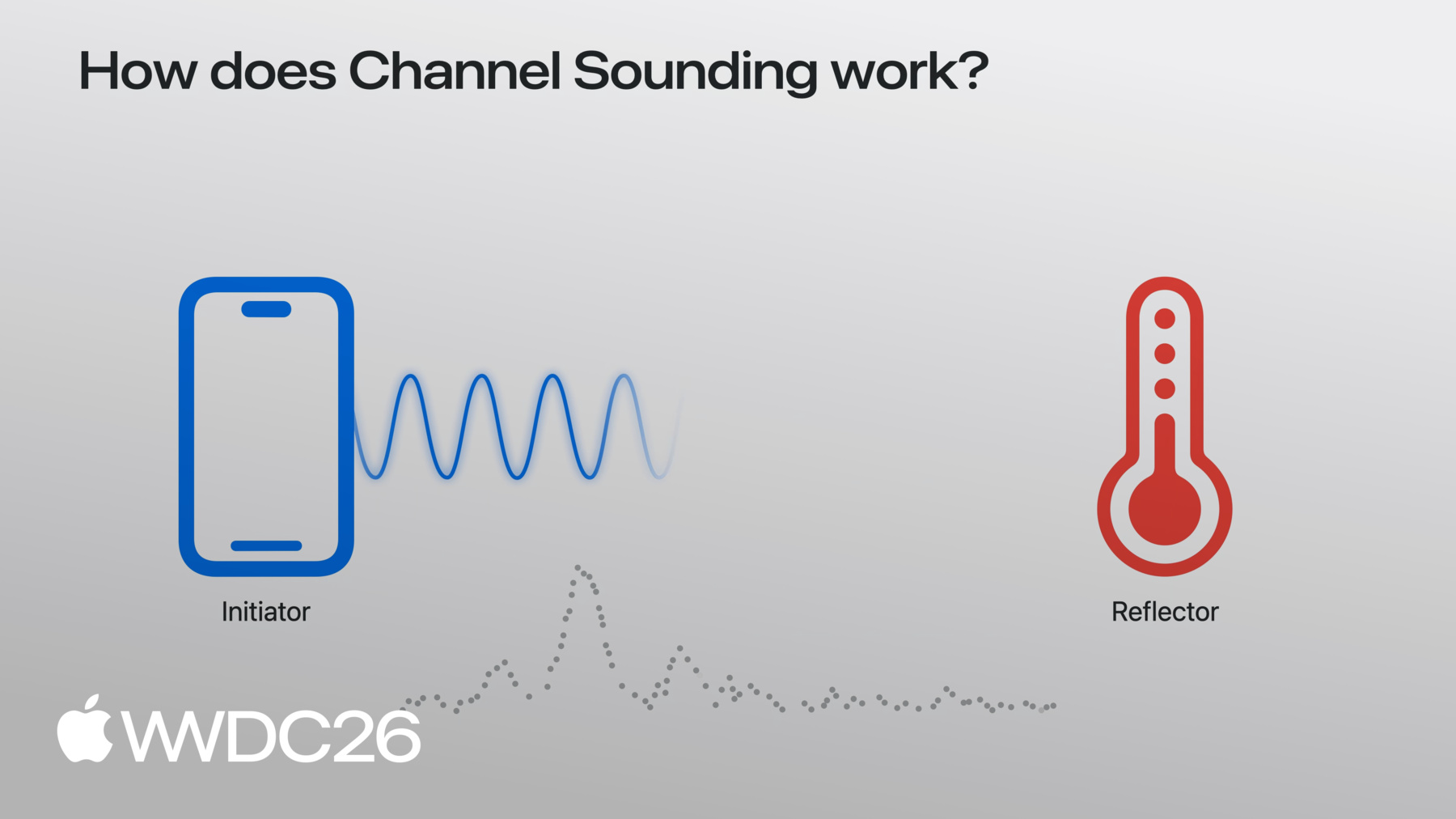
iPhone이 Bluetooth 액세서리와 페어링되어 연결된 상황을 가정해 보겠습니다.
이 시나리오에서 iPhone은 initiator라고 불리고, 액세서리는 reflector라고 불립니다.
iPhone이 신호, 즉 톤을 액세서리에 전송하면, 액세서리가 그 톤을 반사합니다.
iPhone은 신호가 전송 중에 어떻게 변하는지 측정합니다. 한쪽에서 다른 쪽으로, 그리고 다시 돌아오면서요.
이 과정을 2.4GHz 대역의 채널에 걸쳐 반복함으로써, iPhone은 반사된 톤의 채널 간 변화율을 관찰하고, 한 채널에서 다음 채널로, 이를 사용하여 initiator와 reflector 사이의 거리를 추정합니다. 이 거리 측정 과정을 procedure라고 합니다.
그렇다면 앱에서 Channel Sounding을 어떻게 수행할까요? 거리만 필요하다면 Core Bluetooth를 사용할 수 있습니다. 시작하기 전에, 액세서리가 페어링되고 설정되어 있는지 확인해야 합니다. AccessorySetupKit을 사용하고 Core Bluetooth로 연결합니다. 자세한 방법은 문서를 참조하세요. 이제 거리를 측정하는 코드를 살펴보겠습니다.
먼저, 로컬 iOS 기기에서 Channel Sounding이 지원되는지 확인하세요. CBCentralManager.supportsFeatures 메서드를 사용합니다.
연결된 CBPeripheral을 확인한 후, startChannelSoundingSession을 호출합니다. CBPeripheral 객체에서 호출합니다.
iOS가 반복적으로 Channel Sounding procedure를 수행합니다. 각 procedure가 완료되면,
delegate 메서드인 peripheral didReceive results가 측정된 거리(미터)와 함께 호출됩니다.
Channel Sounding 세션을 완료할 준비가 되면, cancelChannelSoundingSession을 호출하세요.
세션이 종료되면, delegate 메서드인 peripheral didCompleteChannelSoundingSession이 호출됩니다.
다음으로, Nearby Interaction을 사용하여 거리와 방향을 측정하는 방법을 알려드리겠습니다.
다시 말씀드리지만, AccessorySetupKit을 통해 액세서리가 페어링되고 설정되었는지 확인하세요. CoreBluetooth로 연결도 확인합니다. Channel Sounding 세션을 생성하기 전에, 로컬 iOS 기기에서 지원 여부를 확인하세요. supportsBluetoothChannelSounding 메서드를 사용합니다.
그런 다음 configuration 객체를 생성하고, CoreBluetooth에서 peripheral.identifier를 전달합니다. bluetoothChannelSoundingIdentifier로 전달합니다.
방향을 얻으려면 CameraAssistance가 필요합니다. 필요하다면 반드시 활성화하세요.
마지막으로, NISession을 생성하고, delegate를 설정한 후, 방금 생성한 새 accessory configuration으로 실행합니다.
앱이 액세서리가 이동 중인지 고정되어 있는지 알고 있다면, Nearby Interaction에 알릴 수 있으며, 그 정보를 사용하여 더 나은 방향 추정치를 제공합니다. accessory 객체의 discoveryToken과 함께 updateMotionState를 세션에서 호출합니다.
예를 들어, 액세서리가 벽에 고정된 태그라면, .stationary를 전달합니다. 움직이는 물체에 부착되어 있다면, .moving을 전달합니다.
delegate 콜백은 UWB와 동일합니다.
거리와 방향이 포함된 NINearbyObjects 업데이트를 받게 됩니다.
거리와 방향 결과 모두 원시 Bluetooth Channel Sounding 측정값과 카메라 입력의 융합으로 향상됩니다.
거리와 방향 모두 optional임을 기억하세요. Channel Sounding 측정이 실패하면 거리가 nil일 수 있습니다.
iOS는 자동으로 이상값을 필터링하고 결과를 스무딩하여 더 나은 사용자 경험을 제공합니다. iOS 27에서는 앱이 포어그라운드에 있을 때 Channel Sounding을 사용하세요. 앱이 백그라운드로 이동하면, Channel Sounding 세션이 일시정지됩니다.
또한 주의하세요. iOS가 Channel Sounding 측정 빈도를 줄일 수 있습니다. 다른 Bluetooth나 Wi-Fi 활동이 증가하는 경우에요. Channel Sounding은 N1 칩이 탑재된 iPhone에서 사용 가능합니다.
이제 액세서리가 잘 작동하도록 만드는 방법을 설명하겠습니다. iOS의 Channel Sounding과 함께요.
액세서리는 Bluetooth 6.3을 지원해야 하며, inline PCT 기능이 필요합니다.
iOS는 위상 기반 레인징을 사용하므로, 칩셋은 mode-0과 mode-2도 지원해야 합니다. Bluetooth 사양에 따라요.
T_FCS는 톤 간의 인터스페이스 타이밍입니다. 액세서리가 최소 100µs의 T_FCS를 지원하는지 확인하세요.
자, Channel Sounding에 대해 모두 들었으니, 다음 단계는 무엇일까요? 호환되는 액세서리로 API를 사용해 보세요. 거리 측정이 사람들이 앱과 상호작용하는 방식을 어떻게 향상시킬지 상상해 보세요. Developer Forums에 질문을 올리고, Feedback Assistant를 사용하여 피드백을 보내 주세요. 감사합니다!
-
-
3:43 - Start a Core Bluetooth Channel Sounding session
import CoreBluetooth func isChannelSoundingSupported() -> BOOL { guard centralManager.state == .poweredOn else { return } if #available(iOS 27.0, *) { // Check current device supports Bluetooth Channel Sounding return CBCentralManager.supportsFeatures(.channelSounding) } } func startChannelSounding(_ peripheral: CBPeripheral) { guard peripheral.isConnected else { return } if #available(iOS 27.0, *) { // Step 1: Create a CBChannelSoundingSessionConfiguration let config = CBChannelSoundingSessionConfiguration(role: .initiator) // Step 2: Start the channel sounding session peripheral.startChannelSoundingSession(config) } } -
4:09 - Receive distance results and cancel a session
import CoreBluetooth // Receive distance results func peripheral(_ peripheral: CBPeripheral, didReceive results: CBChannelSoundingProcedureResults?, error: Error?) { guard let results = results else { return } let distance = results.distance // Do something with distance } // Cancel a Channel Sounding session func cancelChannelSounding(_ peripheral: CBPeripheral) { guard peripheral.isConnected else { return } if #available(iOS 27.0, *) { // Cancel the channel sounding session peripheral.cancelChannelSoundingSession(config) } } func peripheral(_ peripheral: CBPeripheral, didCompleteChannelSoundingSession error: Error?) { // Session is complete } -
4:41 - Start a Nearby Interaction Channel Sounding session
import CoreBluetooth import NearbyInteraction // Configure a Nearby Interaction Channel Sounding session func startChannelSoundingThroughNearbyInteraction(_ peripheral: CBPeripheral) { if #available(iOS 27.0, *) { // Step 1: Check current device supports Bluetooth Channel Sounding guard NISession.deviceCapabilities.supportsBluetoothChannelSounding else { return } // Step 2: Create an NINearbyAccessoryConfiguration let config = NINearbyAccessoryConfiguration( bluetoothChannelSoundingIdentifier: peripheral.identifier, previousChannelSoundingIdentifier: nil) // Step 3: Enable camera assistance for direction support if NISession.deviceCapabilities.supportsCameraAssistance { config.isCameraAssistanceEnabled = true } } } -
5:19 - Run a Nearby Interaction Channel Sounding session
import CoreBluetooth
import NearbyInteraction

// Run a Nearby Interaction Channel Sounding session
func runChannelSoundingThroughNearbyInteraction(_ config: NINearbyAccessoryConfiguration) {
    // Create an NISession
    let session = NISession()
    session.delegate = self
    // Run the NISession with the accessory configuration
    session.run(config)
}

// Improve Nearby Interaction direction outputs
func updateAccessoryMotionState(_ isMoving: Bool) {
    NIMotionActivityState motionState = isMoving ? .moving : .stationary

    // Tell NISession about.the accessory's motion state
    session.updateMotionState(motionState, forObjectWithToken: object.discoveryToken)
}

// Receive NISession updates
func session(_ session: NISession, didUpdate nearbyObjects: [NINearbyObjects]) {
    guard let object = nearbyObjects.first else { return }

    if let distance = object.distance {
        // Do something with distance
    }

    if let direction = object.horizontalAngle {
        // Do something with horizontal angle
    }
}
-