

-
TextKit으로 앱의 텍스트 경험 향상하기
내장 텍스트 뷰의 편리함과 TextKit의 제어 항목을 결합하는 방법을 알아보세요. 새로운 API를 사용하면 어떻게 줄 번호와 축소 가능한 섹션 같은 맞춤형 동작으로 UITextView와 NSTextView를 쉽게 확장할 수 있는지 안내합니다. 또한 TextKit 아키텍처를 살펴보고 텍스트 첨부 파일에 대한 새로운 캐싱 및 재사용 정책을 알아봅니다. 이 세션을 최대한 활용하려면 WWDC21의 ‘TextKit 2 소개'와 WWDC22의 ‘TextKit 및 텍스트 보기의 새로운 기능'을 시청하세요.
챕터
- 0:00 - 소개
- 3:09 - TextKit 아키텍처
- 9:17 - TextKit의 새로운 기능
- 11:27 - 프레임워크 텍스트 뷰 확장하기
- 12:58 - 예시: 줄 번호가 표시되는 코드 편집기
- 17:52 - 예시: 축소 가능한 레시피 섹션
- 19:56 - 텍스트 첨부 파일 및 뷰 프로바이더 재사용
- 23:00 - 다음 단계
리소스
관련 비디오
WWDC26
WWDC22
WWDC21
-
비디오 검색…
안녕하세요, "TextKit으로 앱의 텍스트 경험을 향상시키기"에 오신 것을 환영합니다. 저는 Tarun Uday이며, TextKit 팀의 엔지니어입니다. TextKit은 Apple의 차세대 텍스트 엔진으로, 텍스트 레이아웃의 기반입니다. Apple의 모든 플랫폼에서 렌더링을 담당합니다. SwiftUI, UIKit, AppKit의 텍스트 컨트롤은 모두 TextKit을 사용하여 텍스트 콘텐츠를 레이아웃하고 렌더링합니다. 이 영상에서 저는 한 가지에 대해 이야기하고 싶습니다. 개발자들로부터 한동안 들어온 이야기인데요, 편의성과 제어권 사이의 긴장감과, 이를 해결하기 위해 개발한 새로운 API입니다. Apple 플랫폼에서 텍스트 편집 경험을 구축하고 있다면, 두 가지 경로가 있습니다. 첫 번째 경로는 프레임워크 텍스트 뷰를 사용하는 것입니다. AppKit의 NSTextView, UIKit의 UITextView, SwiftUI의 TextEditor가 있습니다. 이것들을 사용하면 놀라운 양의 기능을 무료로 얻습니다. 텍스트 입력, 선택, 접근성, 실행 취소 및 다시 실행, 받아쓰기, 인라인 예측 등이 있습니다. 이러한 텍스트 뷰는 내부적으로 TextKit을 사용하지만, 그 내부 구현은 대부분 숨겨져 있습니다. 텍스트가 그려지는 방식을 커스터마이징할 수 있는 능력이 제한되어 있고, 뷰포트가 시각적 요소를 관리하는 방식도 제한됩니다. 두 번째 경로는 TextKit을 텍스트 엔진으로 사용하고, 뷰나 레이어에서 직접 텍스트를 렌더링하는 것입니다. 우리는 이것을 커스텀 텍스트 뷰라고 부르며, 이를 통해 구분합니다. 사전 패키지된 프레임워크 텍스트 뷰와 구분하기 위해서입니다. NSTextLayoutManager를 설정하고, 자신의 뷰나 레이어에서 뷰포트 레이아웃을 직접 구현하며, 모든 렌더링을 직접 처리합니다. 커스텀 텍스트 뷰를 구축하면 저장소, 레이아웃에 대한 완전한 제어권을 얻지만, 뷰포트 레이아웃 프로세스에 대해서도 그렇습니다. 하지만 프레임워크 텍스트 뷰가 제공하는 모든 것을 포기하게 됩니다. 처음부터 프로덕션 수준의 텍스트 편집 경험을 구축하는 것은 많은 작업이 필요합니다. 일부 시나리오에서는, 프레임워크 텍스트 뷰의 편의성과 커스텀 텍스트 뷰의 제어권 중 선택하기가 어려웠습니다. 오늘은 두 가지 장점을 모두 얻는 방법을 살펴보겠습니다. TextKit 아키텍처에 대한 심층적인 소개와 커스텀 텍스트 뷰에 대해서는 WWDC21의 "Meet TextKit 2"를 시청하세요. 프레임워크 텍스트 뷰가 TextKit을 채택하는 방법에 대한 세부 사항은 WWDC22의 "What's new in TextKit and text views"를 시청하세요. 이 발표는 독립적으로 구성되어 있지만, 이 두 세션은 오늘 다루는 모든 것에 대해 더 깊은 기반을 제공할 것입니다. TextKit의 아키텍처에 대한 요약으로 시작하겠습니다. 이후에는 TextKit에서 도입한 새로운 API에 대해 이야기하겠습니다. 마지막에는 몇 가지 예시를 사용하여 텍스트 뷰를 확장하는 새로운 방법을 보여드리겠습니다.
TextKit 아키텍처를 이해하는 것은 훌륭한 커스텀 텍스트 경험을 만드는 데 매우 중요합니다. 거기서부터 시작해봅시다.
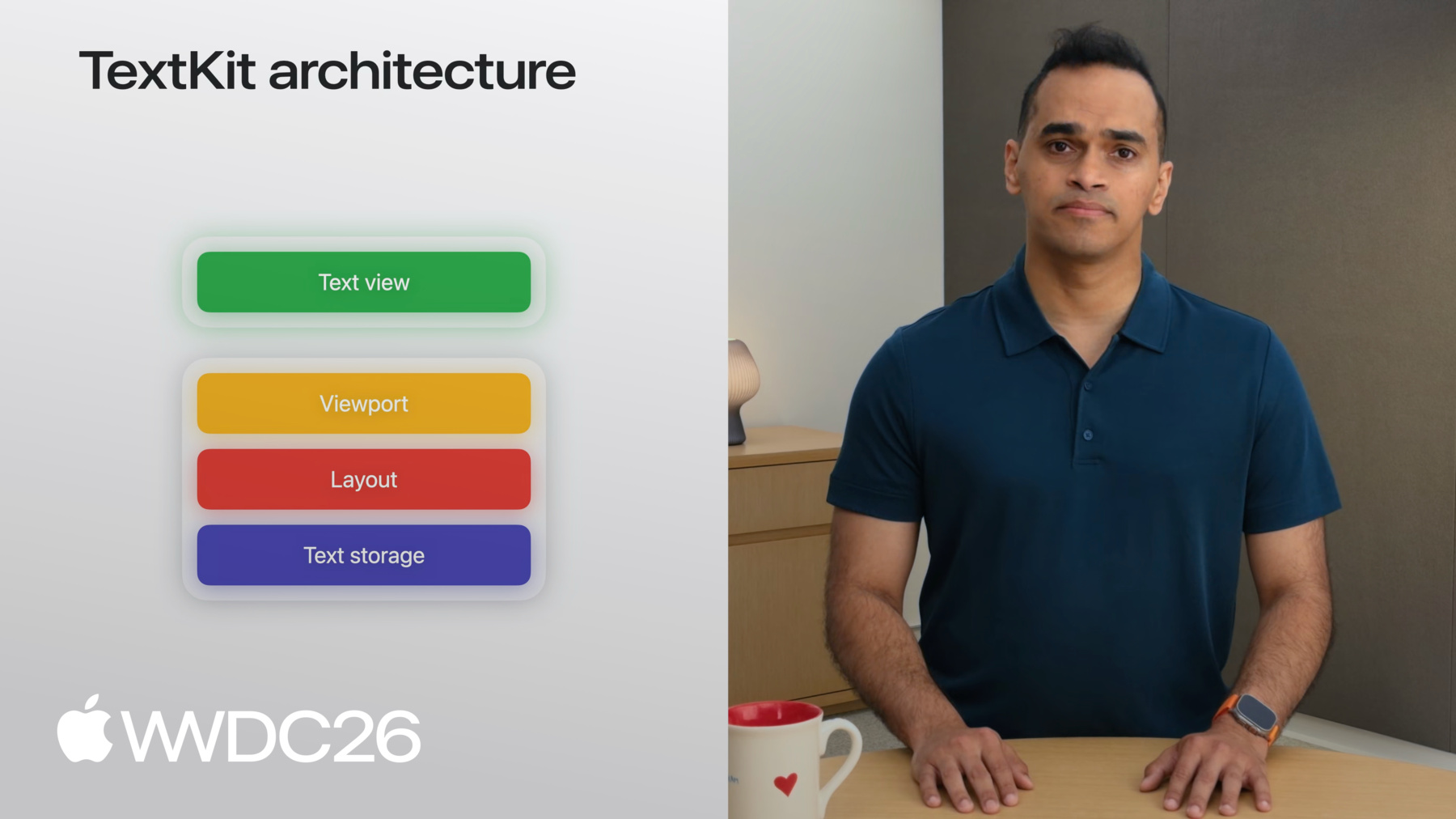
TextKit은 텍스트 렌더링을 위해 4계층 아키텍처를 사용합니다. 기반에는 텍스트 저장소 계층이 있습니다. 이것은 렌더링될 모든 텍스트 데이터를 캡슐화합니다. 레이아웃 계층은 텍스트 저장소 위에 있습니다. 렌더링을 위해 텍스트를 청크로 분리하는 역할을 합니다. 다음은 뷰포트 계층입니다. 레이아웃에서 어떤 청크가 표시되는지 추적합니다. 맨 위에는 뷰 계층이 있습니다. 이곳에서 텍스트가 앱에 나타납니다. 저장소, 레이아웃, 뷰포트 계층은 Apple의 모든 UI 프레임워크에서 공유됩니다. 이러한 공유 계층을 사용하여 모든 뷰에서 텍스트를 렌더링할 수 있습니다. 또는 UI 프레임워크가 제공하는 뷰와 유사한 드로어블 시각적 요소에서도 가능합니다. 다음으로, 각 계층이 어떻게 작동하는지 살펴보겠습니다. 각 계층을 구성하는 요소들을 이해함으로써, TextKit을 커스터마이징하여 앱에서 독특한 경험을 만들 수 있습니다! 이를 위해, 긴 NSAttributedString을 커스텀 텍스트 뷰에 렌더링하는 예시를 사용하겠습니다. 커스텀 텍스트 뷰에서입니다. 텍스트 콘텐츠 저장소는 이 attributed string을 단락으로 분리하는 역할을 합니다. 이 예시에서는, 텍스트 콘텐츠 저장소가 NSTextParagraph 객체를 생성합니다. 기본 attributed string의 각 단락에 대해서입니다. NSTextContentStorage와 NSTextParagraph는 NSAttributedString과 함께 작동하는 구체적인 타입입니다. 다른 백킹 저장소 타입이 있다면, 해당 추상 클래스의 자체 서브클래스를 작성할 수 있습니다 NSTextContentManager와 NSTextElement입니다.
네, 이것이 텍스트 저장소 계층이었습니다. 예시를 계속하여, 다음으로 레이아웃을 살펴보겠습니다. 텍스트 콘텐츠 저장소가 attributed string을 단락으로 분리한 후, NSTextLayoutManager는 렌더링을 위해 단락을 준비하는 작업을 수행합니다. 텍스트 레이아웃 관리자는 표현된 텍스트를 구성하는 글리프의 메트릭을 효율적으로 측정하고, 표현된 텍스트를 구성합니다. 그리고 동적으로 NSTextLayoutFragment를 생성합니다. 단락의 계산된 레이아웃 정보를 저장합니다. 이러한 객체들은 불변입니다. 즉, 단락이 편집되면, NSTextParagraph와 NSTextLayoutFragment가 재생성됩니다. 예를 들어, "sandwich"라는 단어를 "slider"로 교체하면 해당 단락에 대한 새로운 NSTextParagraph가 생성되고, 새로운 레이아웃 정보와 함께 새로운 NSTextLayoutFragment가 생성됩니다. 다음으로 상위 두 계층, 뷰포트와 뷰가 어떻게 함께 작동하여 대량의 텍스트를 효율적으로 렌더링하는지 보여드리겠습니다! 텍스트 뷰는 동적으로 크기가 조정되는 뷰로, 텍스트가 레이아웃되고 그려지면서 커질 수 있고, 텍스트가 제거되면 줄어들 수 있습니다. 뷰포트는 사용자에게 보이는 텍스트 뷰의 부분입니다. TextKit은 뷰포트를 중심으로 모든 작업을 구성하여 사용자가 볼 수 있는 텍스트만 렌더링합니다. 이는 TextKit으로 작업할 때 핵심 작업 중 하나가 사용자의 상호작용을 향상시키는 것임을 의미합니다. 뷰포트가 제공하는 레이아웃 정보를 기반으로 합니다. 레이아웃 프래그먼트를 텍스트 뷰에 렌더링하는 것을 용이하게 하기 위해, TextKit은 전용 클래스를 제공합니다: NSTextViewportLayoutController입니다. NSTextViewportLayoutController는, 그냥 뷰포트 컨트롤러라고 부르겠습니다. 뷰포트 컨트롤러는 텍스트 레이아웃 관리자와 조율하며, 텍스트 뷰와 함께 텍스트 단락을 효율적으로 레이아웃하고 렌더링합니다. 어떻게 작동하는지 보여드리겠습니다.
텍스트 뷰는 스크롤 위치를 알고 있으며, 전체 문서에 대한 뷰포트의 크기를 파악하고 있습니다. 이것을 뷰포트 컨트롤러에 제공합니다. 그런 다음 뷰포트 컨트롤러는 텍스트 레이아웃 관리자에게 요청합니다. 뷰포트와 교차하는 모든 레이아웃 프래그먼트를 제공하도록, 그것들을 렌더링을 위해 텍스트 뷰로 보냅니다. 뷰포트 컨트롤러에 의해 촉진되는 이 조율은 뷰포트 상태가 변경될 때마다 반복됩니다. 즉, 스크롤, 편집, 또는 선택 이벤트가 있을 때마다, 뷰포트 레이아웃 프로세스라고 불립니다. 뷰포트 레이아웃 프로세스는 TextKit의 효율적인 레이아웃과 렌더링의 핵심입니다. 이것이 전부입니다! 자신만의 커스텀 텍스트 뷰를 구축하려면, NSTextContentStorage를 인스턴스화하고, NSTextLayoutManager와, NSTextViewportLayoutController를 사용하여 텍스트를 렌더링합니다. 델리게이트로, UI 프레임워크가 제공하는 뷰에 렌더링합니다. 텍스트 뷰를 뷰라고 부르긴 하지만, 이것은 어떤 드로어블 시각적 요소도 될 수 있습니다. UI 프레임워크가 제공하는 것이라면요. 예를 들어, UIKit에서는 UIView를 선택할 수 있고, 또는 CALayer를 커스텀 텍스트 뷰에 텍스트를 렌더링하는 데 사용할 수 있습니다. UI 프레임워크는 또한 자체 유형의 텍스트 뷰를 패키지화하여 이러한 TextKit 계층들로 편의를 제공합니다. UIKit에서는 UITextView를 사용하여 구현할 수 있습니다. 기성 텍스트 편집 경험을 구현하는 데 사용합니다. AppKit과 SwiftUI도 유사한 뷰를 가지고 있습니다. 때로는 프레임워크 텍스트 뷰가 앱의 요구사항을 충족하지 못할 수 있습니다. 아마도 여러분은 앱을 구축하고 있을 수 있습니다. 동일한 텍스트의 여러 프레젠테이션이 있는 앱을요. 동일한 텍스트입니다. 여러 텍스트 레이아웃 관리자를 연결하면 동일한 텍스트 콘텐츠 저장소에, 한 뷰에서의 편집이 공유 콘텐츠 저장소를 통해 다른 뷰로 전파됩니다. 이는 동일한 문서를 표시할 수 있음을 의미합니다. 두 개의 다른 뷰에서 자동으로 동기화된 상태로 유지됩니다. TextKit이 제공하는 유연성으로, 커스텀 텍스트 뷰를 구축할 수 있습니다. 여러분의 시나리오에 맞는 레이어링 구성으로요.
이제 새로운 API 몇 가지를 살펴보겠습니다. TextKit에서 소개하고 있는 API들입니다. 이전 섹션에서 우리는 레이아웃 프래그먼트에서 텍스트를 렌더링하는 것에 대해 이야기했습니다. 뷰포트에 렌더링하는 것이었습니다. 그것이 뷰포트 레이아웃 프로세스입니다. 2027 릴리즈 이전에는, 대상 뷰를 참조하는 방법이 없었습니다. TextKit 전반에 걸쳐 텍스트가 렌더링되는 뷰 말입니다. 이는 TextKit이 레이아웃 프래그먼트를 추적하는 데는 도움이 되었지만, 그것들이 그려지는 뷰를 추적하는 데는 도움이 되지 않았음을 의미합니다. 먼저, NSTextViewportRenderingSurface를 소개합니다. 이것은 뷰포트 내의 시각적 요소를 표현하는 새로운 프로토콜입니다. 그 안에 그릴 수 있는 요소를 표현합니다: 레이아웃 프래그먼트의 텍스트를 실제로 렌더링하는 뷰이며, 공통 추상화를 제공하여 작업할 수 있게 합니다. UIView, NSView 또는 CALayer를 이 프로토콜에 준수하도록 하고, 뷰포트 컨트롤러의 델리게이트 메서드에서 사용할 수 있습니다. 뷰포트에서 어떤 뷰가 표시되는지 추적하는 데 사용합니다. 렌더링 서피스는 함께 제공되는 키 프로토콜과 함께 제공됩니다: NSTextViewportRenderingSurfaceKey입니다. 렌더링 서피스 키는 렌더링 서피스를 고유하게 식별할 수 있는 클래스입니다. 뷰포트 레이아웃 프로세스 사이클 전반에 걸쳐, NSTextLayoutFragment와 같이요. 이는 NSTextLayoutFragment를 사용할 수 있음을 의미합니다. 맵 테이블이나 딕셔너리에서 렌더링 서피스를 캐시하는 키로 사용할 수 있습니다.
뷰포트 레이아웃 프로세스는 렌더링 서피스 키를 광범위하게 사용합니다. 내부적으로 렌더링 서피스 매핑에 사용합니다.
렌더링 서피스를 키에 할당할 수 있습니다. 뷰포트 레이아웃 프로세스 중에 renderingSurfaceFor 델리게이트 메서드를 사용하여. 이것들은 뷰포트 레이아웃 프로세스의 시작 시에 지워집니다. 특정 키에 대한 렌더링 서피스를 조회할 수 있습니다. didLayout 프로세스 내에서 뷰포트 컨트롤러의 renderingSurfaceFor 메서드를 사용하여. 이러한 새로운 API는 여러분이 사용할 수 있게 합니다. 자신만의 렌더링 서피스를 커스터마이징하여 TextKit을 사용하여 커스텀 텍스트 뷰를 구축할 때 활용할 수 있습니다.
이제 2027 릴리즈에서 TextKit이 어떻게 작동하는지 살펴봤으니, 텍스트 뷰가 어떻게 작동하는지 살펴보겠습니다. Apple의 기본 텍스트 경험을 지원하는 텍스트 뷰입니다. UIKit의 UITextView와 AppKit의 NSTextView는 Apple 플랫폼에서 수천 가지의 긴 형식 텍스트 경험을 지원합니다. Messages, TextEdit, Notes, Journal이 포함됩니다. SwiftUI 앱이 있다면, 가장 편리한 구현 방법은 TextEditor를 사용하여 긴 형식의 텍스트 경험을 구현하는 것입니다. 하지만 UITextView를 포함할 수도 있습니다. 또는 NSTextView를 ViewRepresentable을 사용하여 앱에 포함할 수 있습니다. 보여드리겠습니다.
시작하기 위해, MyTextView라는 뷰를 만들겠습니다. MyTextView의 body를 채우겠습니다. TextViewRepresentable이라고 부를 ViewRepresentable로요.
TextViewRepresentable은 조건부로 될 것입니다. macOS에서는 NSViewRepresentable이고, 그 외에는 UIViewRepresentable이 됩니다. NSViewRepresentable 내부에서, NSTextView의 이니셜라이저를 간단히 호출합니다. 또는 makeNSView 메서드에서 NSTextView 서브클래스의 이니셜라이저를 호출합니다. 그리고 UIViewRepresentable 내부에서 UITextView에 대해서도 동일하게 합니다. 이것의 구체적인 예시는 첨부된 샘플 앱에서 볼 수 있습니다. TextKit 훅을 사용하여 UITextView를 확장하는 방법을 보여드리기 위해, 몇 가지 다른 예시 앱을 만들겠습니다.
첫 번째 예시에서는 iPad용 코드 에디터를 구축하고 싶습니다. Mac에서 멀리 있을 때 빠른 코드를 작성하기 위해서입니다. UITextView 서브클래스로 시작하겠습니다. 초기화하고, 폰트를 등폭 시스템 폰트로 설정하겠습니다.
네, 시작이 되었습니다! 하지만, 줄 번호를 볼 수 없으면 정말 좋은 코드 에디터 경험이 아닙니다. 그럼 구축을 시작해봅시다. 먼저, TextView와 lineNumberView를 담을 수 있는 뷰를 만들겠습니다. 이것을 ContainerView라고 부르겠습니다. ContainerView는 UITextView 서브클래스를 보관할 것입니다. 그리고 줄 번호를 표시하기 위한 UIView도 보관합니다. 기본 설정이 되어 있습니다. 이제 제가 원하는 것은 다시 계산하는 것입니다. 뷰포트의 레이아웃 프래그먼트에 대한 NSTextParagraph 인덱스를 표시하고 싶습니다. 뷰포트에 변경이 있을 때마다요. 그렇게 하기 위해서, 텍스트 뷰가 뷰포트 컨트롤러가 있을 때마다 알림을 받아야 합니다. 뷰포트 레이아웃 프로세스를 완료했을 때 말입니다. 이제 가능합니다! 2027 릴리즈부터, UITextView와 NSTextView가 이제 NSTextViewportLayoutControllerDelegate에 준수합니다. 이는 UITextView 또는 NSTextView를 서브클래스화할 수 있음을 의미합니다. 델리게이트 메서드를 오버라이드하여 자신의 동작을 추가할 수 있습니다. 다음에 그렇게 해보겠습니다! TextView 서브클래스에서 델리게이트 메서드를 오버라이드하겠습니다. 먼저, 일부 설정 작업을 위해 WillLayout 메서드를 오버라이드하겠습니다. 세부 사항은 잠시 후에 보여드리겠습니다. configureRenderingSurface 메서드를 오버라이드하겠습니다. 렌더링될 단락의 경계를 캡처하기 위해서입니다. 마지막으로, DidLayout 메서드를 오버라이드하겠습니다. 축적된 정보를 ContainerView로 다시 공유하기 위해서입니다. 줄 번호를 렌더링할 수 있도록 합니다. 이러한 메서드를 보여주기 전에, 서브클래스에 상태를 추가하겠습니다. 각 단락의 경계를 축적하기 위한 배열로 시작하겠습니다. 텍스트 뷰가 레이아웃하는 단락들의 경계입니다. 시작 줄 번호를 추적하기 위한 정수, 그리고 클로저입니다. 축적된 정보를 ContainerView로 보내는 데 사용할 클로저입니다. 줄 번호를 렌더링할 수 있도록요. 뷰포트 컨트롤러 델리게이트 메서드는 텍스트 뷰가 스크롤이 발생했을 때 알 수 있게 도와줍니다. 또는 편집이 발생했을 때도요. 그래서 줄 번호를 다시 그릴 수 있습니다. 다음으로 WillLayout부터 시작하여 메서드를 구현하겠습니다. super를 호출하는 것으로 시작하겠습니다. 이러한 모든 델리게이트 메서드에서 그렇게 하는 것을 기억하세요. lines 변수를 지워서 준비하겠습니다. 레이아웃 프래그먼트의 경계를 저장할 준비를 합니다. 시작 LineNumber도 필요합니다. 기본적으로 모든 단락의 개수입니다. 뷰포트가 시작되기 전의 단락들입니다.
별도의 함수에서 그렇게 하겠습니다. willLayout 메서드 내에서 호출하겠습니다.
간단한 nil 체크와 변수 명명으로 시작하겠습니다. enumerateTextElementsFromTextLocation 메서드를 사용하겠습니다. 요소들을 열거하기 위해서입니다. 그리고 viewportRange에 도달할 때까지 카운트를 증가시킵니다. 이것이 전부입니다! 샘플 코드는 캐싱으로 이를 개선합니다. 따라서 모든 레이아웃 패스마다 이 비용을 지불하지 않아도 됩니다. 델리게이트 메서드로 돌아가서 각 단락의 경계를 얻는 방법을 살펴보겠습니다.
다음 델리게이트 메서드를 사용하여 그렇게 하겠습니다: textLayoutFragment에 대한 configureRenderingSurface입니다. 다시 super를 호출하여 시작하겠습니다. 기본 텍스트 뷰 동작을 얻기 위해서입니다. 그런 다음 lines 배열에 추가합니다. 레이아웃 프래그먼트의 layoutFragmentFrame 변수와 함께요. configureRenderingSurfaceFor에 대한 설명이 끝났습니다. textLayoutFragment 메서드입니다. 이 메서드는 뷰포트의 모든 단락에 대해 트리거됩니다. DidLayout 메서드를 살펴보겠습니다. 이 시점에서, 뷰포트의 모든 단락에 대한 경계 정보를 가지고 있습니다. 이것을 ContainerView에 전달하고 싶습니다. 클로저를 실행하기 전에, 텍스트 컨테이너 좌표에서 프래그먼트 프레임을 변환해야 합니다. 뷰포트 좌표로 변환합니다. 뷰포트 원점을 빼서 그렇게 합니다. 그런 다음, 시작 줄 번호를 전달합니다. 조정된 프레임과 함께 ContainerView에 전달합니다. ContainerView로 돌아가서, 클로저를 설정합니다. 각 프레임에 대해 실제 줄 번호를 계산합니다. 인덱스를 시작 줄 번호에 더함으로써, 줄 번호 뷰의 올바른 위치에 그립니다. 이것이 전부입니다. 변수를 설정하고, 텍스트 뷰의 각 단락에 대한 경계를 수집하고, ContainerView에 전달하여 표시합니다. 앱을 실행하여 어떻게 되었는지 살펴보겠습니다. 완벽합니다. 몇 줄의 코드만으로 UITextView에 줄 번호를 추가했습니다. 더 해야 할 작업이 있지만 이것은 코드 에디터 구축을 위한 훌륭한 첫 번째 단계입니다.
프레임워크 텍스트 뷰의 뷰포트 레이아웃 프로세스를 사용하는 것은 접근하는 강력한 방법입니다. 개별 단락 정보를 표시하는 방법입니다. 한 가지 예시를 더 보여드리겠습니다. 이번에는 여러 단락의 레이아웃을 수정하는 것과 관련됩니다. 여기서는 제가 좋아하는 레시피들을 보여주기 위해 UITextView를 설정했습니다. 하지만 한 번에 하나의 레시피만 보고 싶습니다. 즉, 각 여러 단락으로 구성된 레시피를 접고 싶습니다. 제목만 보이도록요. 이를 위해, 이전 예시와 동일한 세 가지 뷰포트 델리게이트 메서드로 시작하겠습니다. 이전 예시에서 사용한 것들입니다. 하지만 이에 더하여, 단락이 접혀 있다면, 그것에 대한 레이아웃을 피하고 싶습니다. 그렇게 하기 위해, TextView를 NSTextContentStorageDelegate에 준수하도록 하겠습니다.
이 준수를 통해, textContentManager: shouldEnumerate에 접근할 수 있습니다. 이는 textElement를 접힌 상태 또는 아닌 상태로 표시하는 데 도움을 줍니다. NSTextContentManager는 NSTextContentStorage의 추상 버전입니다. 그리고 NSTextElement는 NSTextParagraph의 추상 버전입니다.
어떤 섹션이 접혀 있는지 파악하기 위한 상태가 필요합니다. 정수 집합을 사용하여 단락 오프셋을 추적하겠습니다. 각 단락을 고유하게 식별하기 위해서입니다.
또한, 사용자가 토글 버튼을 탭할 때 처리하는 메서드를 추가합니다.
필요한 모든 요소가 갖춰졌습니다. 텍스트 콘텐츠 저장소 델리게이트 메서드를 사용하여 레이아웃을 건너뜁니다. 뷰포트에서 레이아웃을 수행하는 모든 단락을 처리합니다. 뷰포트 컨트롤러 델리게이트 메서드를 사용하여, 사용자 상호작용을 처리합니다. 사용자가 섹션의 공개 버튼을 탭할 때를 위해서입니다. 세부 사항은 샘플 코드에서 확인하실 수 있습니다. 어떤 결과를 얻었는지 살펴보겠습니다. 옆의 삼각형을 탭하면 레시피를 제목만 남기고 접을 수 있습니다. 옆의 삼각형을 탭하여, UITextView에서 바로 실행했습니다.
자, 한 발짝 물러서 봅시다. 지금까지 우리의 예시들은 텍스트에 관한 것이었습니다. 단락, 줄 번호, 섹션 제목에 관한 것들이었습니다. 하지만 텍스트 뷰는 텍스트보다 훨씬 더 많은 것을 표시합니다. 인라인 사진과 스티커가 있는 Messages를 생각해보세요. 또는 그림과 문서 스캔이 있는 Notes도요. 그 모든 비텍스트 콘텐츠는 텍스트 뷰 안에 있습니다. TextKit으로 관리됩니다. 이것들을 텍스트 첨부 파일이라고 합니다. 텍스트 첨부 파일은 일반 텍스트와 동일한 아키텍처를 따릅니다. 하나의 단락에 집중해보겠습니다. 클립 기호를 사용하여 첨부 파일을 표현하겠습니다. 간단히 하기 위해서입니다. 텍스트 첨부 파일은 텍스트 저장소에 저장됩니다. 다른 문자와 마찬가지로, NSTextAttachment 객체를 사용하여 처리됩니다. 레이아웃 관리자가 텍스트 첨부 파일을 만나면, NSTextAttachmentViewProvider를 요청합니다. 레이아웃 계층의 해당 객체가 그것입니다. 뷰 프로바이더는 필요한 정보를 제공합니다. 첨부 파일을 텍스트 뷰에 렌더링하기 위해서입니다. 이로 인해 하나의 문제가 발생합니다. 이러한 객체들은 불변이기 때문에, 단락의 텍스트를 편집하면 모든 인스턴스를 폐기하고 다시 생성해야 합니다. 구체적인 예시를 보여드리겠습니다. 인라인 애니메이션이 있는 메시징 앱을 구축한다고 가정해봅시다. 편집할 때 주의 깊게 지켜보세요. 해당 단락의 모든 편집마다 애니메이션이 다시 시작됩니다. 뷰 프로바이더는 모든 편집 시 다시 생성됩니다. 그로 인해 애니메이션이 다시 시작됩니다. 이를 해결하기 위해, UITextView에 새로운 API를 추가했습니다. 텍스트 뷰를 초기화하면, register forTextAttachmentViewProviderType 메서드를 사용합니다. 뷰 프로바이더 재사용 정책을 등록하기 위해서입니다. NSTextAttachmentViewProvider의 특정 서브클래스에 대해서입니다. 첫 번째 인수로, onEditingInlineParagraphs를 추가합니다. 재사용 정책입니다. 이것은 단락 편집 전반에 걸쳐 뷰 프로바이더를 보존합니다. 따라서 키 입력이 뷰 프로바이더를 해제하지 않습니다. 두 번째 인수로, 뷰 프로바이더 서브클래스 타입을 제공합니다. 텍스트 뷰가 해당 클래스의 모든 객체를 처리할 것입니다! 샘플 코드에서 두 번째 유형의 재사용 정책을 볼 수 있습니다: onScrollingOutOfViewport입니다. 이것은 첨부 파일의 렌더링 서피스를 캐시합니다. 화면 밖으로 스크롤될 때 다시 돌아올 때 복원합니다. 시나리오에 따라 두 가지 재사용 정책을 결합할 수 있습니다. 이제, 편집 시 UITextView는 뷰 프로바이더를 재사용하여, 상태를 유지하고 애니메이션 결함을 방지합니다.
바로 이것입니다! UITextView에서 TextKit을 사용하는 세 가지 예시: 텍스트 에디터를 위한 줄 번호, 레시피 앱의 접을 수 있는 섹션, 간단한 텍스트 뷰의 인라인 텍스트 첨부 파일 재사용. 세부 사항을 보려면 샘플 앱을 다운로드하세요.
요약하자면, 편리하지만 강력한 서식 있는 텍스트 에디터 경험을 만들기 위해, UIKit에서는 UITextView, AppKit에서는 NSTextView로 앱을 시작하세요. SwiftUI 앱이 있다면, ViewRepresentable을 사용하여 이러한 텍스트 뷰를 앱에 포함하세요. 텍스트 렌더링에 대해 훨씬 더 많은 제어권을 원하는 분들은, TextKit을 사용하여 커스텀 텍스트 뷰를 만드세요. 새로운 Rendering Surface API를 사용하세요. 샘플 코드를 통해 접을 수 있는 섹션, 줄 번호, 인라인 첨부 파일 재사용을 확인해보세요. 시청해 주셔서 감사합니다!
-
-
9:47 - NSTextViewportRenderingSurface conformance
class MyView: UIView, NSTextViewportRenderingSurface {} -
10:25 - NSTextViewportRenderingSurfaceKey and NSMapTable
class MyView: UIView, NSTextViewportRenderingSurface {} var cache: NSMapTable<NSTextLayoutFragment, MyView> -
12:39 - UITextView/NSTextView in SwiftUI via ViewRepresentable
// Using a TextView in SwiftUI import SwiftUI struct MyTextView: View { var body: some View { TextViewRepresentable() } } #if os(macOS) struct TextViewRepresentable: NSViewRepresentable { func makeNSView(context: Context) -> NSTextView { NSTextView() } func updateNSView(_ nsView: NSTextView, context: Context) { } } #else struct TextViewRepresentable: UIViewRepresentable { func makeUIView(context: Context) -> UITextView { UITextView() } func updateUIView(_ uiView: UITextView, context: Context) { } } #endif -
13:33 - ContainerView with TextView and line number view
// Create a text view subclass for a code editor import UIKit class TextView: UITextView {} class ContainerView: UIView { let textView = TextView() let lineNumberView = UIView() textView.font = UIFont.monospacedSystemFont } -
14:42 - Three NSTextViewportLayoutControllerDelegate overrides
// Override viewport controller delegate methods class TextView: UITextView { // Set up override func textViewportLayoutControllerWillLayout(_ textViewportLayoutController: NSTextViewportLayoutController) { super.textViewportLayoutControllerWillLayout(textViewportLayoutController) //... } // Get paragraph bounds override func textViewportLayoutController (_ textViewportLayoutController: NSTextViewportLayoutController, configureRenderingSurfaceFor textLayoutFragment: NSTextLayoutFragment) { super.textViewportLayoutController(textViewportLayoutController, configureRenderingSurfaceFor: textLayoutFragment) //... } // Share accumulated info back to ContainerView override func textViewportLayoutControllerDidLayout (_ textViewportLayoutController: NSTextViewportLayoutController) { super.textViewportLayoutControllerDidLayout(textViewportLayoutController) //... } } -
15:59 - startingLineNumber(for:) using enumerateTextElements
func startingLineNumber(for viewportRange: NSTextRange?) -> Int { guard let viewportRange, let storage = textLayoutManager?.textContentManager as? NSTextContentStorage else { return 0 } let startLocation = storage.documentRange.location var count = 1 storage.enumerateTextElements(from: startLocation) { element in guard let range = element.elementRange else { return true } if range.location.compare(viewportRange.location) != .orderedAscending { return false } count += 1 return true } return count } -
17:02 - DidLayout: convert frames to viewport coordinates
// Override viewport controller delegate methods class TextView: UITextView { private var lines: [CGRect] = [] private var startingLineNumber = 0 var onDidLayout: ((Int, [CGRect]) -> Void)? // Share accumulated info back to ContainerView override func textViewportLayoutControllerDidLayout (_ textViewportLayoutController: NSTextViewportLayoutController) { super.textViewportLayoutControllerDidLayout(controller) let origin = controller.viewportBounds.origin onDidLayout?(startingLineNumber, lines.map {$0.offsetBy(dx: 0, dy: -origin.y) }) } } -
17:16 - Draw line numbers in ContainerView closure
// Draw line numbers in the ContainerView class ContainerView: UIView { let textView = TextView() let lineNumberView = UIView() func setup() { textView.onDidLayout = {startingLineNumber, lines in let attributes: [NSAttributedString.Key: Any] = [ .font: UIFont.monospacedSystemFont(ofSize: 11, weight: .regular), .foregroundColor: UIColor.secondaryLabel ] for (i, frame) in lines.enumerated() { let number = "\(startingLineNumber + i)" as NSString number.draw(at: CGPoint(x: 8, y: frame.minY), withAttributes: attributes) } } } } -
19:22 - Collapsible sections: full TextView class
// Add collapsible sections to your text view class TextView: UITextView, NSTextContentStorageDelegate { var collapsedSections: Set<Int> = [] // Set up override func textViewportLayoutControllerWillLayout(_ textViewportLayoutController: NSTextViewportLayoutController) { super.textViewportLayoutControllerWillLayout(textViewportLayoutController) //... } // Get paragraph bounds override func textViewportLayoutController (_ textViewportLayoutController: NSTextViewportLayoutController, configureRenderingSurfaceFor textLayoutFragment: NSTextLayoutFragment) { super.textViewportLayoutController(textViewportLayoutController, configureRenderingSurfaceFor: textLayoutFragment) //... } // Share accumulated info back to ContainerView override func textViewportLayoutControllerDidLayout (_ textViewportLayoutController: NSTextViewportLayoutController) { super.textViewportLayoutControllerDidLayout(textViewportLayoutController) //... } // Skip layout for paragraphs marked as collapsed func textContentManager(shouldEnumerate textElement: NSTextElement, options: NSTextContentManager.EnumerationOptions) -> Bool { //... } // Handle section collapse toggling func toggleSection(headerOffset: Int) { if collapsedSections.contains(headerOffset) { collapsedSections.remove(headerOffset) } else { collapsedSections.insert(headerOffset) } guard let textLayoutManager = textLayoutManager else { return } let textViewportLayoutController = textLayoutManager.textViewportLayoutController textViewportLayoutController.delegate?.textViewportLayoutControllerReceivedSetNeedsLayout?(textViewportLayoutController) } } -
22:06 - Text attachment view provider reuse policy
// Cache text attachment view providers

import UIKit

class ViewController: UIViewController {

    var textView: UITextView

    func setupTextView() {
        textView = UITextView()
        textView.register(
            [.onEditingInlineParagraphs],
            forTextAttachmentViewProviderType: AnimatedAttachmentViewProvider.self
        )
    }
}
-