

-
探索 RealityKit 的新进展
了解 RealityKit 的最新进展,让 App 和游戏的沉浸感和真实感更胜以往。探索一众强大的新功能,包括交互式布料模拟、NavMesh 寻路、混合现实光照,以及让空间音频更出彩的自定混响网格。借助改进的阴影效果、角色渲染增强功能以及对高斯泼溅技术的支持,提升视觉保真度。
章节
- 0:00 - 简介
- 2:00 - 照明和阴影
- 7:44 - 导航网格
- 11:01 - 布料模拟
- 13:42 - 性能
- 17:09 - 3D 高斯斑点
- 19:08 - 沉浸式音效
- 22:42 - 后续步骤
资源
相关视频
WWDC26
-
搜索此视频…
大家好 我叫Dennis 我是RealityKit团队的 软件工程师 欢迎收看本节课 "探索RealityKit的新进展" 我将为你介绍RealityKit 今年的最新进展 2019年 我们推出了RealityKit 这一框架让你能够轻松构建 跨多款Apple平台的 3D空间体验 借助RealityKit 你可以 一次构建App和游戏 并将其部署到 visionOS iOS iPadOS macOS 以及Apple tvOS
今年 我们将推出一种更好的方式 来构建这些App和游戏 那就是Reality Composer Pro 3 请查看以下这些课程 了解更多关于 Reality Composer Pro 3的内容 从快速迭代的场景编辑工具 到强大的图形界面 用于建模复杂的粒子 和角色行为 感谢你们提供的宝贵反馈 今年我们将为RealityKit 加入令人兴奋的新功能 这些功能将让你 比以往更轻松地 打造高保真的 沉浸式体验 首先 我将介绍 RealityKit的光照与阴影 方面的改进 让更逼真的效果能够 无缝融入你的世界 接着 我将介绍RealityKit的 导航网格 它可以帮助 你的玩家和NPC 在你构建的世界中导航 我还会展示如何构建 复杂的布料模拟 用于装扮你的 虚拟家具和角色
如果使用不当 这些功能可能影响性能 为了帮你解决这个问题 我将介绍可用的工具 来帮你缓解和监控此类问题 掌握性能优化之后 我将演示 如何将真实世界的一部分 带入 你的App和游戏中 借助RealityKit渲染 3D高斯溅射的能力 最后 我将讲解RealityKit的 沉浸式音频功能 以及它们如何提升 虚拟世界的空间真实感 让我们马上开始 了解RealityKit光照与阴影的新特性 通过我们构建的新游戏 Chaparral Village来展示 在这个游戏中 一个神秘村庄 被传送到玩家的世界 玩家随后被一只猫头鹰 缩小 必须找到路 穿越这个村庄 到达炼金区域 在那里 他们将在猫头鹰 的指引下炼制各种药水 让我们来看看 Chaparral Village的炼金区域 嗯 这看起来不错 但某些角落似乎有点暗 在这里 我们可以利用 RealityKit对 光照贴图的支持 来增强区域内部的光照 使用Reality Composer Pro 3 中的光照烘焙工具 我将创建一张间接光照贴图 并将其应用到场景中 好了 角落和阴影 都变亮了 因为它们现在能正确 接收反射光的贡献 RealityKit的API支持 附加你自己的光照贴图纹理 用于 间接光照 环境光遮蔽 以及美化效果 但为了获得最佳体验 我建议使用 Reality Composer Pro 3的光照烘焙工具 来生成这些内容 要了解更多关于 Reality Composer Pro 3 中光照烘焙的内容 请查看以下课程 "使用Reality Composer Pro 3 更快速地迭代你的空间场景" 光照贴图有助于渲染 复杂的光照效果 但仅适用于静态光照 不过 我们可以将其中 一种复杂效果应用于动态光照 那就是RealityKit的柔和阴影 默认情况下 RealityKit中的 阴影具有硬边缘 在某些场景下这是准确的 例如 当光源无限小时 但当光源有一定面积时 这就不再准确了 此时投射的阴影会呈现 更柔和的边缘 因为只有部分光线 在这些区域被遮挡 这也称为阴影的半影区域 半影的大小 受光源面积的影响 光源面积越大 半影越大 这是炼金区域的壁炉 我目前使用聚光灯来 模拟壁炉发出的光 让我们把这个聚光灯 投射的阴影变柔和 首先 获取壁炉聚光灯的阴影 然后更新 阴影的lightSize变量 这代表光源的直径 单位为米 默认值为0 产生硬阴影 我将其更新为0.7米 以产生漂亮的柔和阴影 我还需要设置阴影的质量 此变量控制用于计算 柔和阴影的采样数量 将质量设置为高 可以产生更好的效果 但会带来更大的性能开销 因此 我将保持中等质量 因为在此观看距离下 效果依然很好 注意 如果我将质量设为低 无论光源大小如何 阴影都将是硬边缘的 质量必须设置为中等或高 才能实现柔和阴影 最后 我将阴影 添加回hearthSpotLight实体 现在 如果我应用阴影的更改 可以看到阴影已经变柔和 尤其是大锅 投射的阴影 到目前为止 我展示的 所有光照都是投射到虚拟物体上的 但如果我们想让光照 延伸到虚拟世界之外呢 将光照投射到真实世界中 这是我用RealityKit 构建的一个天文馆投影仪 随着投影仪旋转 我的真实环境被 虚拟星空和星云点亮 注意它们如何真实地 贴合房间的墙壁 我通过两个RealityKit功能 实现了这个效果 投影纹理 和物理空间光照 让我们先来看看 投影纹理 想象一下拿着手电筒 和一张胶片 如果我将光线照射穿过胶片 胶片上的图像就会出现 在手电筒所指向的 任何表面上 这个效果正是RealityKit 投影纹理功能所模拟的 借助投影纹理 你可以渲染各种效果 从光线穿过精美窗户 形成的图案 到动画形式呈现的 海底明亮波动焦散效果 在我的虚拟天文馆中 星空和星云作为投影纹理 附加到旋转的聚光灯上 为了构建其中一个聚光灯 我首先创建 一个Entity并附加 一个SpotLightComponent 我会确保颜色为白色 这样就不会对 投影纹理添加色调 我将根据所在房间的需要 调整其他参数 例如 更大的房间 可能需要更高的强度 才能使投影纹理 在墙上可见 然后我将生成 一张星空和星云纹理 这将是我从 天文馆投影出的纹理 最后 我将创建并附加 SpotLight的projectiveTexture组件 并附加我刚生成的纹理 现在我们可以看到星空和星云 投影到虚拟墙壁上 但如何让它们 投影到真实房间的墙壁上呢 为此 我们必须启用 物理空间光照 此功能使虚拟光源能够 与系统环境进行交互 或通过RealityKit的 场景理解网格与你周围的世界交互 目前 物理空间光照仅 支持聚光灯和点光源
让我们在天文馆的 聚光灯上启用此功能 这是之前的 spotLightEntity 要启用物理空间光照 我们只需要 添加SpotLight的 SurroundingsLight组件 就这么简单 现在星空和星云 投影到我真实的房间里了
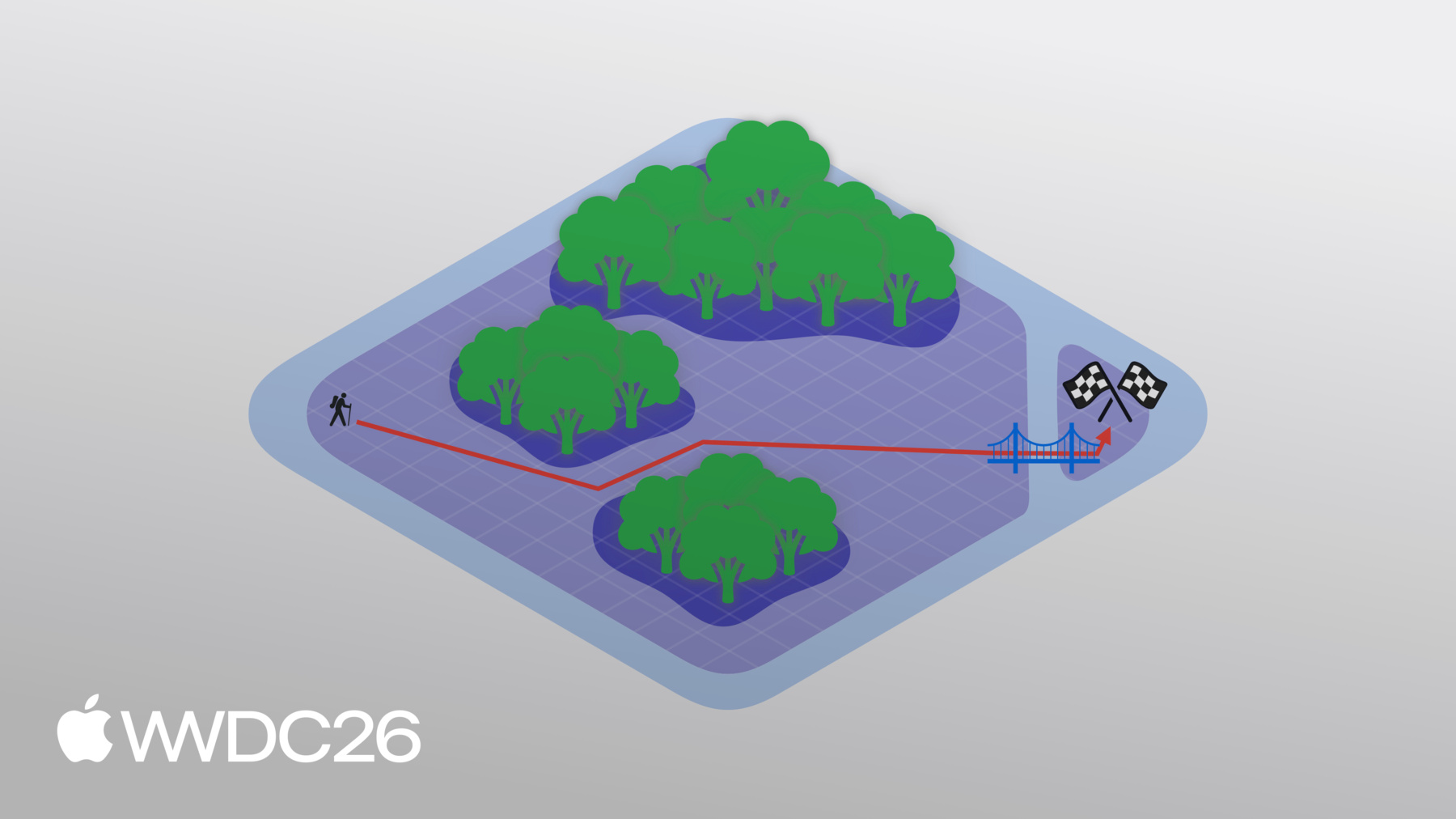
我们也在Chaparral Village 的炼金区域 启用了这个 物理空间光照效果 说到这里 玩家的角色如何 选择前往炼金区域 的路径呢 这条路径是使用 RealityKit的导航网格来确定的 让我通过一个简单的示例 来说明这种网格的工作原理 想象一个场景 我从地图 的一侧出发 目标是到达另一侧的旗帜 听起来很简单 但糟了 前方出现了一些障碍物 我可以使用导航网格来定义 场景中可通行的区域 避开茂密的森林 RealityKit随后可以利用 此导航网格计算到达旗帜的路径 但如果我不想 完全排除森林呢 我可以穿越森林 只是速度会慢一些 我们可以在导航网格中 反映这一点 为这些区域设置 不同的通行成本 这将反映穿越森林时 速度降低的情况 现在 如果我计算路径 它将考虑这个成本 并为我选择新路线 但这是什么情况 一道裂缝破坏了我的场景 让旗帜被困住了 这导致两个区域 用两个断开的导航网格表示 不用担心 我可以使用 网格外连接将它们连接起来 在本例中是一座桥 然而 这个连接的位置 意味着需要重新计算路径
要使用RealityKit的导航网格 首先需要定义一个 NavigationMeshResource 它保存导航网格的几何数据 包括标记的区域 这些区域的自定义标志 以及区域之间的连接 可以使用Swift API 或在Reality Composer Pro 3中定义 要了解如何在 Reality Composer Pro 3中 构建导航网格 请查看以下课程 "使用Reality Composer Pro 3 强化你的空间工作流程" 然后将此NavigationMeshResource 输入到NavigationComponent中 这个组件有一个过滤器 用于定义区域的成本 以及根据区域标志 包含或排除哪些区域 然后NavigationComponent 被NavigationController 用于计算路径 同步或异步方式均可
在Chaparral Village中 导航网格通过 navigate实体扩展函数进行查询 在navigate内部 我首先创建一个NavigationController 该控制器需要一个 带有导航组件的实体 我将从实体本身获取它 然后我将使用 async computePath函数获取路径 从实体的当前位置 到玩家点击的 目标位置 如果结果为nil 则NavigationController 无法找到有效路径 我们直接返回 如果这个数组为空 则说明我们已到达目的地 同样直接返回 否则 这个数组中 包含一系列路径节点 代表NavigationController 计算出的路径
我将遍历这些节点 以确定 实体应采取的最终路径 如果是导航网格 本身上的节点 我只需将其位置 添加到路径中 如果是网格外连接 则需要穿越一段梯子 我将单独处理这种情况 在这里 我们可以看到玩家的 角色在RealityKit导航网格的 引导下穿越村庄 到达顶部后 他们必须穿过两道帷幔 装饰着炼金区域 入口的帷幔 这些帷幔是用RealityKit的 高级布料模拟构建的 在RealityKit的布料模拟中 布料通过网格来描述 其中顶点代表粒子 连接顶点的边 代表弹簧
只要网格顶点足够多 RealityKit就能精确 模拟各种效果 从这件金色长裙的流动 到这些床罩
看 当我拉开这些被子时 它们真实地起皱折叠 全部实时呈现 要使用RealityKit的布料模拟 你需要在场景中 添加一个布料体组件 这个组件代表 布料本身 它包含对其 材质属性的引用 以及一个描述粒子和弹簧 布局的布料网格资源 你还可以添加布料碰撞体组件 它代表布料可以碰撞的刚性物体 例如之前展示的 床或人体模型 与布料体组件类似 它也包含对其 材质属性的引用 以及碰撞体本身的几何形状 要运行模拟 你需要 添加布料模拟组件 这个组件包含 一个材质数组 被布料体和碰撞体 所引用 每个材质都有一组属性 如弹簧刚度和摩擦系数 具体属性取决于 它描述的是布料 还是布料碰撞体材质 模拟本身也有 许多属性 这些属性影响参与 布料模拟的所有子实体 其中一些属性包括 使用哪种求解器 施加的重力 以及 模拟中的时间步长 在Chaparral Village中 RealityKit的布料模拟 被用于装饰炼金区域 入口的帷幔 但我们如何实现 防止帷幔下垂的挂钩呢 为此 我们使用 自定义帷幔固定组件 这里我们遍历pins数组 它包含一个元组 这些自定义组件 及其对应实体 我们使用这个实体的位置 作为我们固定帷幔 的位置 然后构建一个球体 来表示固定点本身的大小 大小通过 自定义组件控制 我们使用这个位置 以及刚刚创建的球体 获取所有应被固定 或设为不可移动的顶点数组 然后将这些顶点设为运动学模式 运动学顶点只能 通过实体的变换移动 而不受布料模拟本身的影响 这将使它们保持在原位 这样 我们就可以将 帷幔固定在炼金区域 挂钩所在的位置 防止其下垂 至此 我已经介绍了 许多功能 如果使用不当 可能会带来性能开销 为了帮你应对这个问题 我将首先介绍一种技术 可用于提升性能 然后介绍如何追踪 你的App和游戏的 性能指标 以便它们能够相应地适配 网格细节层次是指 以较低精度渲染几何体 使得视觉影响 可以忽略不计的过程 为了演示这一点 我将使用大锅 来自Chaparral Village 的炼金区域 按照惯例 这些所谓的 "细节层次"(LOD) 从索引0开始 注意大锅的几何复杂度 如何随着我切换到 而降低 LOD 1 2 3 4 最后是5 在LOD 5时 大锅看起来很差 但如果我将其缩小 模拟大锅在很远处的样子 就可以将其与LOD 0进行比较 差异可忽略不计 且渲染大锅所需的计算量更少 让我们看看如何在 RealityKit中设置LOD 不同的LOD以 实体数组的形式指定 在此示例中 我将有3个不同的LOD 每个由一个实体组成 然后我将创建一个实体 来持有LOD本身 并在它们之间切换
但RealityKit如何知道 使用哪个LOD呢 为此 我需要选择 一个切换算法 我将带你了解RealityKit的 两种切换算法 第一种基于 与相机的距离 实体距相机越远 我们可以选择越高的LOD 第二种基于实体 在屏幕上占据的面积 实体在屏幕上 占据的面积越小 我们可以选择越高的LOD 这里 我使用 LevelOfDetailComponent的 addByCameraDistance便利函数 来设置基于相机距离的LOD 对于每个LOD 我指定 使用该LOD的最大距离 一旦实体超出 这个距离 就会切换到下一个LOD 对于最后一个LOD 我想将最大距离设为无穷大 表示无论实体超出 上一个阈值多远 都将使用此LOD 如果我想根据屏幕面积 来切换LOD 则使用addByScreenArea 便利函数 这里 我指定一个最小面积 作为屏幕面积的比例 如果实体占据的屏幕面积 小于此指定值 就会切换到下一个LOD 在App和游戏中使用LOD 是提升性能的好方法 不过 在App和游戏中 对性能问题做出响应 同样很重要 可以通过注册观察者 来监听thermalStateDidChange通知 这样我就能知道设备的 处理器是否过热 如果热状态发生变化 我可以查询当前状态 如果是nominal或fair 说明我的优化措施已见效 App或游戏可以 继续正常运行 但如果是serious或critical 我应该采取措施 来提升性能 比如将LOD切换阈值 设置得更激进 或降低阴影质量 掌控App和游戏的性能非常重要 这能确保用户的使用体验 并让你能够利用 其他RealityKit高级功能 其中一个功能是 RealityKit渲染3D高斯溅射的能力 3D高斯溅射是一种 高性能 高质量的技术 用于渲染体积数据 从真实世界中采集 借助这项技术 3D场景以 一系列3D高斯的形式表示
你可以将它们视为 具有不同透明度的椭球体 要渲染这样的场景 我们需要在 每个像素处 对所有高斯沿射线求值 在执行此操作时 可以进行许多优化 如果你使用RealityKit的API 它将为你处理这些优化 要查看此API的实际效果 请从developer.apple.com 下载高斯溅射示例 这是在Apple Vision Pro上 运行的示例 注意盆栽多肉植物 的精细细节 我们能够捕捉 植物的几何复杂性 以及它们所在的土壤 RealityKit能够完美渲染这两者 RealityKit API不限定 高斯溅射的特定文件格式 你需要提供缓冲区 来描述捕捉中 溅射的属性 具体包括 位置 缩放 旋转 透明度 以及球谐函数 球谐函数让你能够 根据观察方向 控制椭球体的颜色 我们还需要为 球谐函数指定阶数 这描述了颜色变化的数量 当你绕椭球体移动时 例如 阶数为0意味着 在所有观察方向上颜色恒定 然后我可以将所有这些 缓冲区整合为一个BufferResource 并创建一个GaussianSplatResource 从这个资源 我将创建 一个GaussianSplatComponent 然后 要渲染3D高斯溅射 我将把该组件附加到 场景中的一个实体 这样 你就能将3D高斯溅射 带入你的虚拟体验 让用户看到 真实世界物体的高保真捕捉 最后 让我们介绍RealityKit的 新沉浸式音频功能 通过声音实现增强的真实感 用于你的Apple Vision Pro App和游戏 空间音频渲染 是空间计算 声音设计的重要方面 直达路径和反射路径的 精确方向和时序 是实现真实空间音频体验 所必须的 随着人和音频源 在环境中移动 必须相应地更新时序 和方向以保持真实感 环境的几何形状和材质 对音频源的声音 有很大影响 例如 同一个音频源 在小客厅和大型博物馆中 听起来会截然不同 我们可以使用RealityKit 来模拟环境的反射 和混响 使用光线追踪几何声学 例如 在这个厨房 和餐厅场景中 我们可以使用RealityKit的 自定义混响网格 对木地板 石膏墙 和石质台面进行声学建模 根据人和音频源 在场景中的位置 他们将获得 与其位置相符的混响效果 为了展示此功能的实际效果 我们正在发布一个示例 利用了自定义混响网格 在这个示例中 你可以听到 一支虚拟乐队演奏 同时在大型博物馆环境中 自由移动 你甚至可以独立控制 每种乐器发出的声音 感谢RealityKit的 自定义混响网格 这些乐器发出的声音 在博物馆中真实地散射 然后才传入你的耳中 这种体验只有在 Apple Vision Pro上才能真正感受到 从developer.apple.com下载示例 来亲身体验吧 要创建自定义混响网格 首先通过ReverbMeshResource 定义场景的几何形状 使用ReverbMeshResource 这可以从网格描述器 或网格资源创建 但最简单的入门方式 是使用shoebox 即一个面朝内的盒子 我将其设为宽5米 高4米 深6米 然后我将把此网格与 dryWall预设音频材质结合 来创建 模拟混响效果 最后 我将使用此混响 创建一个混响组件 并将其附加到场景中的一个实体 这将使混响网格 生效 但我不仅限于使用 内置预设材质 让我们看看如何为 自定义混响网格创建自定义材质 我首先定义一个 thickCarpet材质 我希望这个材质比 预设地毯材质具有更强的吸声性 所以我调用scalingAbsorption 并对所有频率的吸声系数 稍作提升 接下来 我将创建一个 bookshelf材质 这次从零开始 这意味着我们需要 同时定义吸声系数 和散射系数 这些定义了 声音能量被吸收的程度 或在不同频率下的散射情况 我首先设置 吸声系数 用于10频段中心频率 但如果我只知道 特定频率的系数呢 那么 我为几个特定频率 定义散射系数 然后RealityKit将进行推算 覆盖整个 可听频率范围 最后 我通过组合 吸声 和散射数据 请注意 这只在 沉浸式空间中有效 如果你在共享空间中 系统的room-sense混响几何 将被使用 这是Apple Vision Pro根据 你的真实环境 构建的混响网格 本节课我介绍了大量内容 但这只是RealityKit今年 所提供功能的冰山一角 今年我们还将发布 许多其他功能 例如协调多源音频 可实现跨多个实体的 精确同步音频播放 高质量角色渲染 提供次表面散射 和高级头发着色器 让角色栩栩如生 Portal自定义 让你可以 创建自定义portal材质 来改变portal的 透明度和形状 以及更多功能 我建议你访问Apple 开发者门户developer.apple.com 下载本节课的示例 体验这些令人兴奋的 RealityKit新功能 同时 别忘了了解 Reality Composer Pro 3 这是Reality Composer Pro 的重大新版本 让你能够更好地 充分利用RealityKit的功能 你可以查看以下课程 了解更多关于 Reality Composer Pro 3的内容 以及它的所有新功能 我迫不及待地想看到你 用RealityKit构建出的精彩空间体验 感谢观看!
-
-
4:02 - Soft shadows
// Enable soft shadows for the hearth spotlight guard var shadow = hearthSpotlight.components[SpotLightComponent.Shadow.self] else { // handle error } shadow.lightSize = 0.7 // meters shadow.quality = .medium // or .high // shadow.quality = .low // will result in hard shadows hearthSpotlight.components.set(shadow) -
6:13 - Projective textures
// Create one of the planetarium spotlights let spotLightEntity = Entity() spotLightEntity.components.set(SpotLightComponent( color: .white, intensity: intensity, innerAngleInDegrees: innerAngle, outerAngleInDegrees: outerAngle, attenuationRadius: attenuationRadius, )) let projectiveTexture: TextureResource = generateStarsAndNebulaeTexture() spotLightEntity.components.set(SpotLightComponent.ProjectiveTexture( texture: projectiveTexture )) -
7:13 - Physical space lighting
// Enable physical space lighting spotLightEntity.components.set(SpotLightComponent.SurroundingsLight()) -
9:46 - Querying the navigation mesh
// Querying the navigation mesh in Chaparral Village extension Entity { public func navigate(/* ... */) async { let navigator = try! NavigationController(entity: self) guard let result = await navigator.computePath(from: fromPosition, to: toPosition) else { return } if result.isEmpty { return } for node in result { switch node.category { case .meshPoint: finalPath.append(node.position) case .offMeshConnection: // handle ladders } } } } -
12:51 - Pinning cloth to anchor points
// Pin the curtains to the Alchemist's lab for (pin, pinComponent) in pins { let position = pin.position(relativeTo: event.entity) let selectionSphere = ClothSphereShape(radius: pinComponent.radius) let vertices = clothMesh.vertices(in: .sphere(selectionSphere), center: position) clothBody.motionTypes.set(vertexIndices: vertices, value: .kinematic) } -
14:42 - LOD by camera distance
// Create entity with LODs let lod0 = [ModelEntity(mesh: lodMesh0)] let lod1 = [ModelEntity(mesh: lodMesh1)] let lod2 = [ModelEntity(mesh: lodMesh2)] let entity = Entity() LevelOfDetailComponent.addByCameraDistance(to: entity, levels: [ (entities: lod0, maxDistance: 1.0 /* meters */), // highest detail (entities: lod1, maxDistance: 5.0), // medium detail (entities: lod2, maxDistance: .infinity), // lowest detail ]) -
15:58 - LOD by screen area
// Create entity with LODs let lod0 = [ModelEntity(mesh: lodMesh0)] let lod1 = [ModelEntity(mesh: lodMesh1)] let lod2 = [ModelEntity(mesh: lodMesh2)] let entity = Entity() LevelOfDetailComponent.addByScreenArea(to: entity, levels: [ (entities: lod0, minArea: 0.2 /* fraction of screen area */), // highest detail (entities: lod1, minArea: 0.1), // medium detail (entities: lod2, minArea: 0.01), // lowest detail ]) -
16:26 - Responding to thermal state changes
// Respond to changes in device thermal state NotificationCenter.default.addObserver(of: ProcessInfo.self, for: .thermalStateDidChange) {_ in switch ProcessInfo.processInfo.thermalState { case .nominal, .fair: // Stay the course case .serious, .critical: // Improve performance by: // More aggressive LOD switching // Lower shadow quality } } -
18:44 - Creating a Gaussian splat
// Create Gaussian splat resource and component let resource = try GaussianSplatResource.BufferResource(count: splatCount, position: positionBuffer, scale: scaleBuffer, rotation: rotationBuffer, opacity: opacityBuffer, sphericalHarmonics: (sphericalHarmonicsBuffer, degree)) let splatResource = GaussianSplatResource(resource) let splatComponent = GaussianSplatComponent(splatResource) splatEntity.components.set(splatComponent) -
20:49 - Creating a custom reverb mesh
// Create and use custom reverb mesh let mesh: ReverbMeshResource = .shoebox(size: [5, 4, 6]) let reverb: Reverb = .simulated(mesh: mesh, materials: [.dryWall]) entity.components.set(ReverbComponent(reverb: reverb)) -
21:33 - Creating custom reverb materials
// Create custom materials for custom reverb mesh

let thickCarpet: Audio.Material = .carpet.scalingAbsorption {freq in 0.1 }

let bookshelf: Audio.Material

// Absorption coefficients by center frequency:
// 31.5Hz, 63Hz, 125Hz, 250Hz, 500Hz, 1kHz, 2kHz, 4kHz, 8kHz, 16kHz
let bookshelfAbsorption = Audio.Absorption(
    [0.10, 0.15, 0.28, 0.20, 0.15, 0.10, 0.10, 0.07, 0.07, 0.05])

// Scattering coefficients for: 500Hz, 1000Hz, 4000Hz
let bookshelfScattering = Audio.Scattering([500: 0.5, 1000: 0.6, 4000: 0.7])

bookshelf = .init(absorption: bookshelfAbsorption,
              scattering: bookshelfScattering)
-