

-
探索 visionOS 对象追踪的增强功能
了解 visionOS 如何提升对象追踪和空间配件输入能力。探索追踪动态手持对象的新方法,巧妙地连接物理世界和数字世界。了解新增的空间配件支持类别,以及构建专属自定配件需要什么,以便在你的 App 中实现独一无二的交互模式。
章节
资源
- Implementing object tracking in your app
- Working with generic spatial accessories
- Preparing spatial accessories for tracking in your visionOS app
- Spatial accessory design guidelines for Apple devices (check section 20)
- Exploring object tracking with ARKit
相关视频
WWDC25
WWDC24
-
搜索此视频…
你好 欢迎探索 visionOS 物体追踪的新功能 我是Nathan Kong visionOS团队的 战略合作经理 在本节课程中 我们将介绍全新的物体追踪 和空间配件功能 这些功能基于之前 课程中介绍的特性 回顾一下 visionOS 2.0 引入了物体追踪 让你将现实世界中的物体 转换为虚拟锚点 只需要所追踪物体 的USDZ模型 就能创建参考物体 通过Mac上Create ML 的机器学习训练实现 通过将参考物体传入API 你的App可获取 物理物体的位置和方向 以创建沉浸式空间体验 在visionOS 27中 我们扩展了物体追踪 赋予你追踪 运动物体的能力 包括手持物品 及其他增强功能 例如 你现在可以精确追踪 并使用医疗探头等手持设备 来测量物理空间 我们可以精确测量 这个物理脊柱模型上 椎骨之间的距离 这将带来令人期待的应用场景 如手术培训 家庭装修 或引导式组装 接下来介绍空间配件 在visionOS 26中 我们推出了 首批空间配件 包括Logitech Muse 和PSVR2 Sense控制器 空间配件是与Apple Vision Pro 通信的电子设备 它实时追踪配件 在现实世界中的位置和方向 这些设备还能增强交互性 通过按钮和触感反馈 提升App的沉浸感 现在 在visionOS 27中 我们扩大支持范围 让任何人都能制作自己的配件
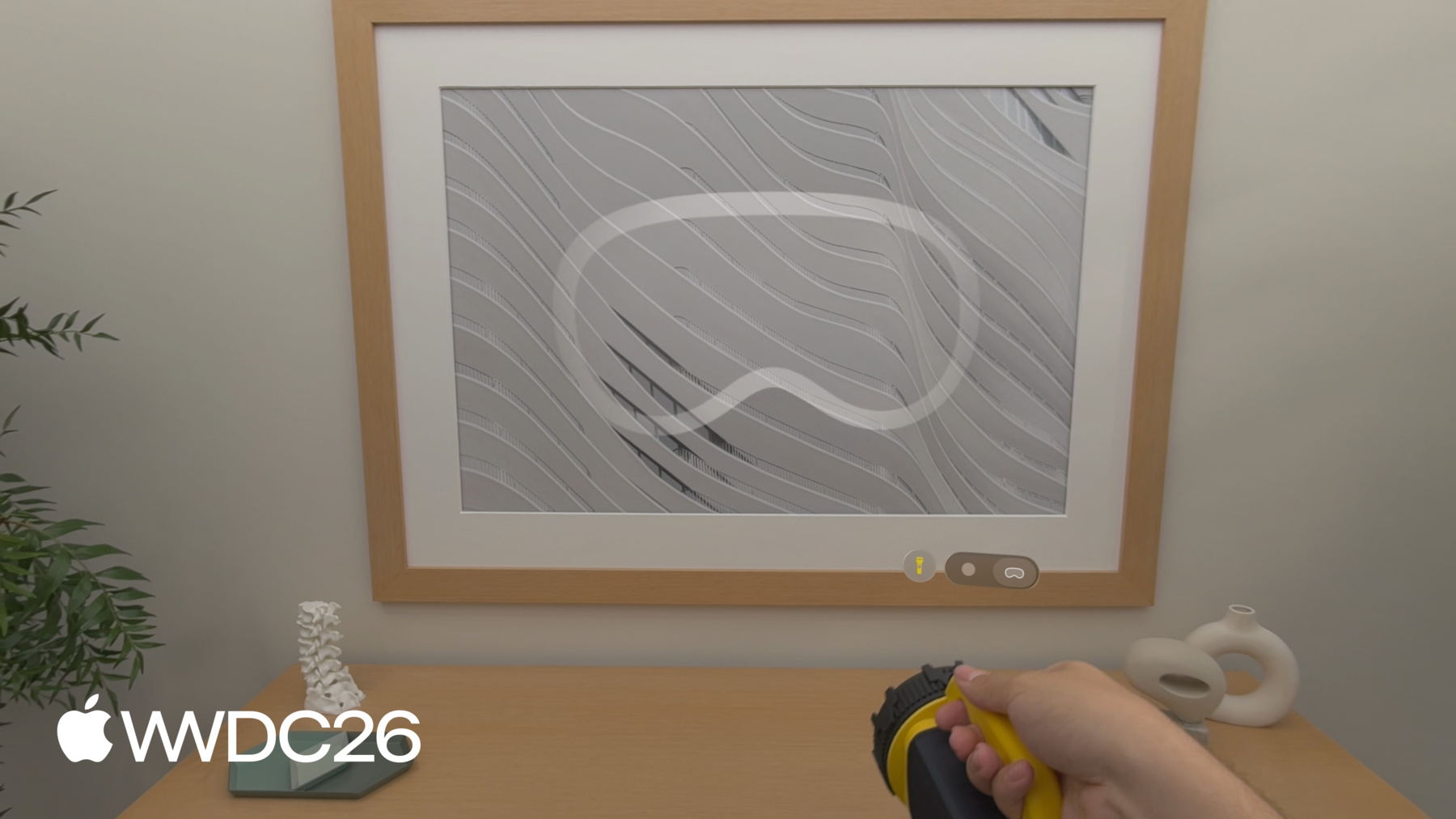
例如 我们可以安装一个配件 如这个Spatial Anchor 安装在物理方向盘内 以无缝对齐 一辆完整尺寸的数字车辆 当我伸手 抓住方向盘时 我真的感觉自己在车内 这一功能带来令人惊叹的体验 如沉浸式赛车 飞行模拟或 车辆内饰设计 在本课程的剩余部分 我们将介绍物体追踪的改进 展示如何创建空间配件 并总结你需要考虑的因素 以便为visionOS App 选择最佳方案 现在让我们深入了解物体追踪 物体追踪现已支持 高帧率追踪 这让你的App更好地 掌握物体的位置 当它们在空间中移动时 与此同时 我们在Create ML中 新增了扩展训练模式 以提升追踪精度和鲁棒性 尤其是手持物体时 为了支持更精确的追踪场景 我们引入API以获取 物体在度量空间中的姿态 不受任何显示校正影响 这对于实现测量类应用至关重要 如之前的医疗探头示例 最后 今年我们将把 物体追踪带到iOS 让我们用这个手电筒 演示这些更新 如果我有手电筒的 逼真3D模型 我可以将它用作 物体追踪的参考物体 由于App了解手电筒的位置 我可以利用RealityKit中 全新的Physical Surroundings Light 实时为这个房间重新打光 我还可以切换投影到 周围表面的数字图案 即使我的手遮挡了 手电筒的一部分 我的App仍能稳健地 追踪物体位置 或者 我可以3D打印 这样一个标记 作为参考物体并 安装到手电筒上 这是追踪任何手持物体 的简便方法 即使你无法获取 设备的逼真3D模型 现在 让我们讨论具体更新 展示如何升级 现有的物体追踪体验 或从头开始构建新体验 首先我将介绍如何启用 全新的高帧率追踪
我们新增了 Reference Object Configuration API 在visionOS的ARKit中 它让你启用高帧率追踪 针对单个参考物体 在创建物体追踪 会话之前 配置完成后 你可以传入此配置对象 作为加载参考物体时 的附加参数 由于这不是训练设置 它可应用于任何参考物体 取决于应用需求 接下来讨论我们为 Create ML新增的扩展训练模式 在Create ML中 训练参考物体时 你现在可以选择 标准或扩展训练模式 新的扩展训练设置 提升了精度 和追踪的鲁棒性 建议与 高帧率追踪结合使用 请注意 扩展训练 所需时间明显长于标准模式
你可以在Object Tracking模板中 找到训练模式设置 在Create ML App中 就在查看角度设置下方 其他所有内容保持不变 在训练参考物体方面 如果你倾向于通过命令行界面 训练参考物体 也可以在那里配置训练模式 这让你可以灵活地 在远程机器上运行训练 现在我们来了解在度量空间中 获取物体姿态的新优势 默认情况下 物体锚点变换经过优化 用于放置与被追踪物体 对齐的虚拟内容 采用混合沉浸风格 为此 物体姿态会略微调整 以匹配所显示的摄像头图像 这影响了绝对世界 坐标中的精度 这可能会限制 物体追踪的使用 应用于空间测量任务时 在visionOS 27中 我们新增了 ARKit Coordinate Space Correction API 让你可以获取 经过或未经校正的锚点变换 查询被追踪物体的姿态时 提供两个选项 rendered 返回 应用了显示校正的姿态 以保持虚拟内容 与现实物体视觉对齐 none 返回物体在 度量空间中的姿态 不含任何校正 这对于测量 被追踪物体之间的距离很有用 或确定物体在 物理空间中的位置 如之前医疗探头 演示中所示 最后同样重要的是 今年我们将物体追踪带到iOS! 但首先 让我们重温 WWDC24中的地球仪!
在iOS 27中 我们为 ARKit API添加了对参考物体的支持
机器学习训练 不限特定平台 因此 一旦完成训练 所有参考物体将同时支持 iOS和visionOS App
以下是在iOS上 运行物体追踪所需的一切 你加载参考物体并创建 世界追踪配置 这些是你在visionOS上 使用的相同参考物体文件 你将物体分配给 detectionObjects 用于基本静止的物体 或trackingObjects 用于对 运动物体的高帧率追踪 然后运行会话 并在代理中处理锚点 当ARKit识别到物体时 调用didAdd 你会获得一个ARObjectAnchor 你可以将内容附加到上面 在追踪物体期间 didUpdate提供最新姿态 你可以将其用于 自定义App行为 如果物体从场景中移除 didRemove让你清理并删除 在didAdd中创建的锚点实体
这些就是visionOS 27中 物体追踪的全部更新 要了解更多关于使用 物体追踪API开发App的信息 你可以观看WWDC课程 "探索visionOS物体追踪" 或查阅相关文档 接下来 我们将探讨 如何将你感兴趣的物体 转变为空间配件 我将先定义空间配件 并介绍其部分优势 然后我将介绍 你应牢记的设计注意事项 在创建配件时 我将说明验证设计的流程 并为visionOS做好准备 分享一些即插即用的配件 最后展示如何准备 你的visionOS App 以充分利用这些设备 现在让我们从基础开始 空间配件是 一种电子设备 必须包含具备 以下组件的电路板 一组Apple Vision Pro可见的 LED阵列 用于追踪 一个IMU 用于捕捉 配件的方向和加速度 以及蓝牙芯片 向Vision Pro发送信号 空间配件还可搭载 各种输入设备 包括按钮或触控板 以及触感反馈等输出 具备这些关键组件的配件 均与visionOS兼容 让我们看看 空间配件的实际效果 通过安装上述组件 到之前的手电筒中 我们可以将设备本身 变成空间配件 即使我快速摇动手电筒 数字光束也能平滑跟随 这得益于内置IMU 实现的低延迟追踪 使用我添加到 配件上的物理按钮 我可以开关数字灯光 让体验更加具有互动性 Vision Pro能够追踪 这个空间配件 通过看到安装在 手电筒内部的LED 现在我们来介绍 空间配件的一些优势 这些设备可以 高频率地被追踪 达到完整显示刷新率 并保持低延迟 支持需要快速运动的使用场景 空间配件将持续 稳健地被追踪 即使暂时被遮挡时也不例外 你可以在低光条件下 追踪配件 最后 物理按钮和触感反馈 让你能够 使体验更具 互动性和沉浸感 在开始创建 自己的配件之前 有一些重要的 设计注意事项需要牢记 重要的是将LED 分布在设备周围 以形成独特的 从各角度观察时 呈现唯一的图案 LED和IMU 都应牢固固定 在电路板上以确保准确追踪 最后同样重要的是 你应考虑用户与 配件交互的主要方式 例如 手持配件应将 大多数LED布置在 用户不会抓握 设备的区域 你还应考虑 电池的尺寸和位置 以确保配件符合人体工学 对于在手臂触及 范围之外使用的大型配件 你应考虑LED数量 大小及其间距 确保配件即使在远处 也能被精确追踪 有关具体要求 和参考设计的更多信息 请查阅 "Spatial Accessories"章节 来自Apple设备的 "Accessory Design Guidelines" 现在你已经设计了空间配件 让我们了解如何验证 它是否按预期运行 并为visionOS App做好准备 第一步是连接你的配件 通过蓝牙连接到Vision Pro 并验证从设备发送的信号 使用ARKit配件 追踪调试视图 此工具让你检查 Vision Pro如何看到配件 可在设备处于开发者模式时 在设置中找到 它在三方面提供帮助 一 通过头显的IR摄像头 验证你的LED 以确认它们明亮 清晰且同步正确 二 通过频率的 实时指标验证你的IMU 延迟和每轴数值 以检查比例 对齐 和运动响应 三 调试配件与 头显之间的时序 以设备的IR照明器作为同步参考
接下来 为了让visionOS App 追踪空间配件 你需要使用 CreateML捆绑包对其进行训练
此工作流程使用 设备物理外观的信息 以及LED位置 来创建参考配件文件 首先 创建你设计的USDZ 包含逼真3D模型 标注了IMU和LED 位置的设备 使用这个标注的USDZ 你可以使用命令行界面 生成参考配件文件 并添加到App中 作为配件的制造商 你将此文件捆绑在App中 并在Info.plist中 将其声明为导出的UTType 这将在全系统注册你的配件 让Apple Vision Pro上的 任何App都可以使用它 如果你是使用 第三方配件的开发者 你也可以自行捆绑文件 并将其声明为导入类型 使你的App独立运行
在从头构建 空间配件之前 你也可以先开始测试 并使用即插即用配件开发App 像DFRobot和MIKROE 这样的制造商 将发布现成的参考硬件 以及今年晚些时候的开发套件 这些配件可以立即用于测试 或集成到你的visionOS App中 让我们看看其中一个 即插即用配件的实际效果
如你所见 我只需将空间配件如seeMote Cap 安装到手电筒上 并使用Spatial Accessories API 实现与之前相同的 数字重新打光体验 现在你有了空间配件 让我们了解 如何将其连接到App 你使用新的GCSpatialAccessory类 发现配件 这适用于任何拥有 参考配件捆绑包的设备 当你调用Accessory(device)时 ARKit会自动解析它 然后 你可以运行 AccessoryTrackingProvider 与之前一样 我们还在新增 新的updateAccessories方法 在会话运行时切换配件 以避免追踪中断 这样你就可以 创建自己的空间配件 并将其连接到visionOS App 要了解更多关于在App中 启用输入和触感追踪的信息 你可以观看 "探索visionOS上的空间配件输入"课程
让我们做个总结 今天你看到了四种不同的方法 在App中追踪物体 让我们回顾一些 需要牢记的考量 在选择使用哪种方法时 物体追踪在需要 精确追踪的场景中表现出色 如测量类应用 如果你无法获取 逼真的3D模型 你可以训练你的referenceObject 基于你安装在 感兴趣物体上的标记 空间配件提供更高的 刷新率和更低的延迟 非常适合需要 快速移动物体的体验 如果你想创造 更具互动性的 和沉浸式的物理物体体验 你可以设计带有 自定义按钮和触感反馈的配件 这些新的物体追踪功能 带来了无限可能 我们期待看到你创造的 颠覆性工作 和娱乐体验 祝WWDC26愉快!
-
-
3:50 - Enable high frame rate tracking
// Enable high frame rate tracking // Create reference object configuration var configuration = ReferenceObject.Configuration() configuration.highFrameRateTrackingEnabled = true // Load the reference object with ARKit API let refObjURL = Bundle.main.url(forResource: "flashlight", withExtension: ".referenceobject") let refObject = try? await ReferenceObject(from: refObjURL!, configuration: configuration) -
4:50 - Extended training mode via command-line
// Extended training mode on Mac using command-line interface % xrun createml objecttracker --source flashlight.usdz --output flashlight.referenceobject --training-mode extended --all-angles -
5:25 - Object pose coordinate spaces
// Different object pose spaces // Obtain anchor transform with display corrections let renderingPose = myObjectAnchor.coordinateSpace(correction: .rendered) // Obtain anchor transform in metric space let metricPose = myObjectAnchor.coordinateSpace(correction: .none) -
6:22 - Implement object tracking in iOS
// Implement object tracking in iOS import ARKit import RealityKit class ObjectTrackingARSessionDelegate: NSObject, ARSessionDelegate { let arView = ARView(frame: .zero) var entities: [UUID: AnchorEntity] = [:] func start() throws { let stationaryObject = try ARReferenceObject(archiveURL: Bundle.main.url(forResource: "stationary", withExtension: "referenceobject")!) let movingObject = try ARReferenceObject(archiveURL: Bundle.main.url(forResource: "moving", withExtension: "referenceobject")!) let configuration = ARWorldTrackingConfiguration() configuration.detectionObjects = [stationaryObject] // Low frame rate configuration.trackingObjects = [movingObject] // High frame rate arView.session.delegate = self arView.session.run(configuration) } func session(_ session: ARSession, didAdd anchors: [ARAnchor]) { for case let anchor as ARObjectAnchor in anchors { let entity = AnchorEntity(anchor: anchor) entities[anchor.identifier] = entity arView.scene.addAnchor(entity) } } func session(_ session: ARSession, didUpdate anchors: [ARAnchor]) { for case let anchor as ARObjectAnchor in anchors { entities[anchor.identifier]?.isEnabled = anchor.isTracked } } func session(_ session: ARSession, didRemove anchors: [ARAnchor]) { for case let anchor as ARObjectAnchor in anchors { if let entity = entities.removeValue(forKey: anchor.identifier) { arView.scene.removeAnchor(entity) } } } } -
12:26 - Discover and connect a spatial accessory
import ARKit
import GameController

// Generic accessory discovery

if let device = GCSpatialAccessory.spatialAccessories.first {

        // Resolves the .referenceaccessory bundle automatically

        let accessory = try await Accessory(device: device)
        let provider = AccessoryTrackingProvider(accessories: [accessory])
        try await arkitSession.run([provider])
}

// Update tracked accessories without restarting the session

try await provider.updateAccessories([newAccessory])
-