

-
深入探索 Core AI 模型编写与优化
深入探索适用于 Apple 芯片的自定模型部署流程,同时充分发挥全新 Core AI 框架的优势。了解使用自定 Metal 内核编写模型的超实用技巧,以及平台感知压缩策略。全新的 Core AI 调试器可提供深度内在分析;还有 AI 辅助的工作流程引导你逐步完善,从最初的概念构思到优化后的设备端执行,全称助你一臂之力。
章节
- 0:00 - 简介
- 1:49 - 模型和技能
- 3:27 - Python 工作流程
- 5:54 - 模型优化
- 10:40 - Core AI 调试器
- 19:27 - 高级编写
- 20:43 - 自定 Metal 内核
- 23:01 - 模型重新编写
- 28:46 - 后续步骤
资源
- Core AI PyTorch Extensions
- Core AI Python
- Core AI Optimization
- Inspecting, debugging, and profiling Core AI models
- Inspecting Core AI models with Core AI Debugger
- Core AI
相关视频
WWDC26
-
搜索此视频…
大家好 我是Sachin Core AI团队的工程师 稍后我的同事Nicole 也会加入我们 今天 我们很高兴向你展示 Core AI如何简化流程 让你的模型在Apple Silicon上 高效运行 从基础知识 到更高级的方法
正如你在《Meet Core AI》 讲座中所看到的 Core AI是一套完整的技术 涵盖模型部署的完整生命周期 从模型优化和转换 到调试和集成到你的App
在本次演讲中 我们将深入了解Core AI的Python生态系统 你将了解Core AI提供的 各种库和工具 帮助你在Apple Silicon上 部署模型
你还将了解Core AI Debugger 它可以成为你工作流程的 重要组成部分 帮助你理解并调试关键问题 让我们开始吧
这是我们的议程 我将首先介绍 Core AI模型仓库 以及Core AI Skills 帮助你快速入门的强大工具 然后 我将展示 基本的转换和验证流程 Core AI基于你已熟悉的 Python和PyTorch工作流程 如果你用过Core ML 很多内容会让你倍感亲切
接下来 我将介绍模型优化 并展示如何做出正确的选择 以适应你的使用场景和目标平台
为了帮助你深入了解模型 Nicole将向你介绍 Core AI Debugger 最后 我将介绍关键方法 使Core AI能够在模型创作 和转换过程中实现深度定制 好的 让我们从模型和Skills开始
Core AI生态系统的核心 是coreai-models仓库 它包含一个Swift Package 用于在App中运行LLM 但其核心是一个 即用型开源模型仓库 包含生成式架构 如前沿的大语言模型
我们提供了针对各种使用场景 和限制条件设计的示例 以及可用于将自己的模型 接入Core AI的组件 最后同样重要的是 Core AI Models附带 一套Agent Skills 你可以将这些Skills 安装到你喜欢的编程助手中 从第一天起就能像专家一样 使用Core AI Core AI Skills与你协作 将你的高层次想法 转化为清晰的 下游任务部署方案 它们可能会向你确认 你感兴趣的模型 目标硬件系列 以及应用的限制条件 这些需求决定了 你所需的Core AI功能 从PyTorch模型代码的 任何修改 到转换 优化和运行模型 AI Skills让你的编程Agent 获得最佳实践 以及我们工程师的领域知识 这让你能像专业人士一样 使用Core AI 甚至借助编程助手 更深入地理解它
事实上 本次演讲中 你将看到的大部分代码 都是与积极运用这些Skills的 Agent共同开发的 现在 让我们深入了解 如何用Python在Core AI中转换和运行模型
Core AI Python库 主要是Core AI PyTorch Extensions 是进入该生态系统的入口 安装很简单 执行pip install coreai-torch 这将安装Core AI 包 以及在其基础上构建的 coreai-torch库
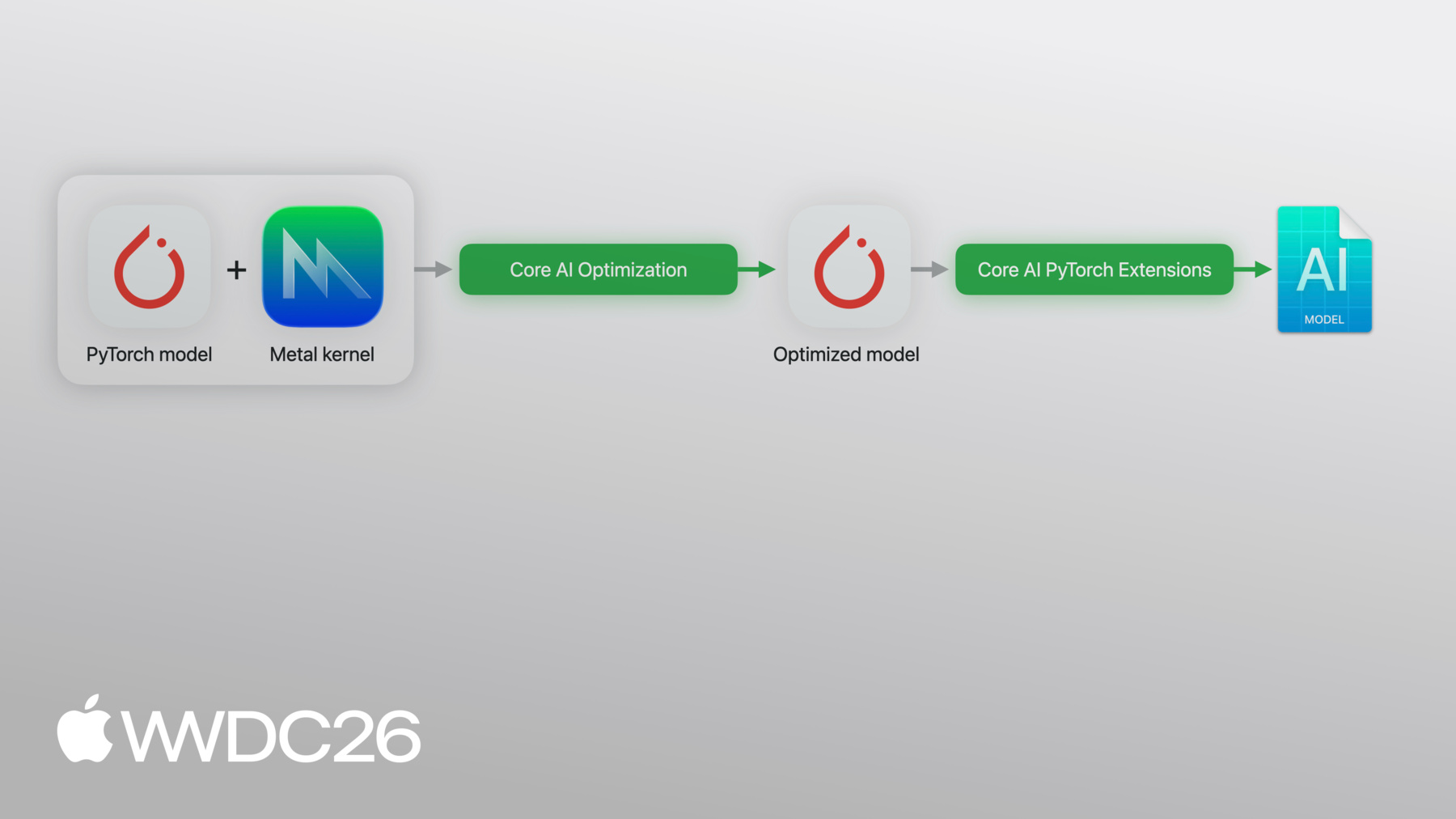
你将PyTorch导出的程序 传给coreai-torch 它会直接转换为 Core AI模型 它支持高级功能 让你定制Core AI程序 以精确适配你的使用场景 例如 你可以将多个模型 组合成单个Artifact 为特定操作注册自定义Lowering 并将Metal 4内核直接内联 到转换后的模型中 最后 你可以将模型 专化为优化后的Asset 并完全在Python中 原生运行于Apple Silicon
这就是我刚才描述的流水线 现在 让我们看看实际操作
我将带你了解一个简单示例 这是一个神经网络 两个线性层加relu激活函数 标准PyTorch
然后 我运行torch.export 传入模型和example_input 得到exported_program 这个exported_program 是起点 用于Core AI转换 它捕获完整的计算图 包括权重 操作和形状 以coreai-torch可处理的格式
现在看Core AI这边
Core AI的TorchConverter 接受我的导出程序 连同输入输出名称 将其转换为core_ai_program 如果你用过CoreML Tools 这会让你感到熟悉
转换后的模型经过优化 并保存为aimodel Asset 这是一种可在Apple Silicon上 运行的本地格式
有了专化的Asset 我可以从程序中加载函数 直接在Python中进行推理 你还可以传入专化选项 来自定义此过程 实际运行推理时 你只需提供一个字典 将输入名称映射 到对应的numpy张量
就这样 整个工作流程完成了 转换 优化和执行 全部在Python中完成 现在来谈谈如何缩小模型 使用Core AI的优化库 为展示Core AI的优化功能 我将以Segment Anything Model SAM3作为示例
SAM3是一个拥有8.5亿参数的模型 用于执行基于提示词的图像分割 在优化模型之前 关键是要从高层次 了解其内部结构 SAM3有三个主要部分 一个处理图像的图像编码器 一个处理用户Prompt 的文本编码器 这两个组件合计占 模型参数的96% 因此正确处理它们至关重要 为了完整呈现 一个封装了DEtection TRansformer 的Detector模块 结合Mask Decoder 生成最终输出 即分割掩码
如你所见 SAM3执行的是 一个复杂的端到端任务 这正是开发者越来越希望 在设备上执行的使用场景
为此 我将使用Core AI的 优化库coreai-opt Coreai-opt支持 配置驱动的模型压缩 你描述要压缩哪些内容 以及保留哪些内容 它支持多种优化方案 你可以从中选择 例如针对macOS和iOS 采用不同的优化方式
它还支持int4 int8 FP4 以及FP8权重压缩 具有灵活的粒度
最后 coreai-opt包含量化API 你可以使用少量校准数据 或在更大数据集上 执行量化感知训练
这是我之前展示的简单流水线
现在我增加一个步骤 在转换之前 我使用压缩配置 通过coreai-opt运行模型 或者使用其中一个 便捷的预设 这会生成一个较小的模型 仍然经过相同的导出流水线 让我们在SAM3上试试 看看效果如何
我首先为SAM3创建导出封装 这个封装定义了torch export 捕获所用的接口 即模型的完整计算图
这是来自幻灯片的转换流水线 封装成可复用的Helper 有几个有趣的点值得注意
首先 它在PyTorch exported_program中 运行分解 使用Core AI的自定义表 这确保了Core AI支持的 高级语义如Attention 在图中得以保留
其次 它还支持 对程序进行类型转换 使用coreai-opt的Helper 转换为16位浮点数
完整转换需要几分钟 所以我预先计算了基准Asset
我在这里加载基准的 32位转换模型并运行它
如你所见 它超过了3GB 运行时 默认专化会启动 对模型进行专化和运行
这是我的基准 在这张图像中 我请求对所有花朵 进行分割掩码 基于默认阈值 所有花朵都被成功检测到 在设备上运行 这是我压缩后 需要保留的效果
现在来看压缩 coreai-opt附带 预设配置 presets.w4只需一行代码 即可实现4位逐通道对称量化
我将ExecutionMode设置为EAGER 这对权重压缩非常有效 对于激活值 我会使用GRAPH模式
然后使用配置初始化 Coreai-opt的Quantizer 传入示例输入并完成最终处理 模型随即被压缩
和之前一样 我加载模型 并在设备上运行
模型现在大约430MB
看看结果 其中一朵被遮挡的花 不再被检测到
我对每一层都应用了 同等激进的压缩 很可能不是每一层都能 同等良好地处理这种压缩 问题是 哪些层导致了这个问题 这类问题仅从输出结果 很难诊断 我需要深入查看模型内部 让我把它交给Nicole 向你展示如何操作 谢谢 Sachin!
我很高兴向你介绍 Core AI Debugger 我们已经了解了如何创建 和优化Core AI模型 但如果你需要更深入了解 你的模型及其行为 可以使用Core AI Debugger Core AI Debugger是一个 全新的独立应用 可以帮助你在Apple平台上 检查模型
使用Debugger 你可以 可视化模型的结构 以易于理解的图形格式呈现 在特定硬件上执行模型 获得真实的运行时结果 并验证推理正确性 与参考运行对比 全部在一处完成 我很高兴向你展示 Core AI Debugger的实际效果 并找出SAM3模型量化后 发生了什么 我先打开原始模型
点击Inspect开始操作
模型打开后 我可以看到Debugger工作区 左侧是导航器 包含模型中操作的结构化列表
这些操作按PyTorch模块分组 这对像SAM3这样的大型模型 尤为强大 让你以熟悉的方式 导航你的模型
在导航器中选择一个 PyTorch模块 比如Detector Decoder 将高亮显示所有对应节点 在工作区顶部的 结构查看器中 此视图以图形方式 展示你的模型 清晰呈现操作连接关系 执行顺序和数据依赖关系
底部的源代码查看器 让我始终与模型的 原始Python代码保持关联 精确到具体代码行
最后 通过选择一个操作 我可以了解更多信息
并打开右侧的检查器 在这里 我可以找到描述信息 以及操作输入输出的 更多详细信息
这些视图结合在一起 让你流畅地切换 图形结构 源代码 以及执行细节之间 大幅降低 调试SAM3等复杂模型的 认知负担 除静态分析外 Debugger还支持运行时分析 了解你的模型在设备上 实际如何执行 这对于追踪 量化导致问题的位置 尤为有帮助 要运行模型 我点击 工作区顶部的Device 在Scheme设置中 从目标列表中选择我的Mac 然后指定我要提供给模型的输入 从像素值开始
然后是input_IDs
以及attention_mask
最后 点击Run
SAM3正在进行专化 以在我的设备上运行 准备好后 结构查看器已更新 向我展示模型 与在我的Mac上运行 完全一致 我现在可以点击任意操作 直接在检查器中 查看其输出张量 无需修改任何内容 回到当前问题 我首先要验证 最终的检测掩码 所以我将滚动到模型末尾
并选择最后一个操作
在检查器中 我点击张量预览 仔细查看掩码 我能看到花朵 但和笔记本中一样 有一朵缺失了
现在我想了解这些结果 与原始PyTorch运行的对比情况 我将返回笔记本 使用新的save intermediates API 该API执行PyTorch模型 并在每个操作处 捕获中间张量值 我想将量化结果 与Sachin之前展示的基准对比 所以我传入int4模型 以及原始SAM3
让它运行
现在中间结果已保存 我将返回Debugger 对比结果 我首先点击工作区顶部的 对比图标 初始化新的对比会话 左侧是我之前指定的 现有配置 右侧 我可以选择另一种 配置进行对比 例如不同的Target 或Compute Unit 在这里 我点击Target 并从Intermediates文件 加载参考运行
我使用刚才导出的文件 开始对比
导航器现在填充了操作对 每对结合了专化模型的操作 和PyTorch模型的操作
这些对称为同步点 即专化模型的输出 预期与原始PyTorch结果 相匹配的位置 Debugger自动识别 模型中的这些点 使对比过程变得简单
每个同步点配有一个指标 表明两个输出的相似程度 使得找到差异所在 变得很简单 默认指标是峰值 信噪比即PSNR 但可以更改 选择最适合你模型的 相似度指标 对于SAM3 我继续使用PSNR
相似度指标的值 也可以从右侧的状态指示器 快速获取 或从图形本身获取 绿色节点表示相似的张量 红色节点表示存在显著差异
滚动浏览操作时 我看到几个黄色同步点 表明模型的某些部分 已有中等程度的偏差 与预期结果不符 我将按相似度排序 并调查差异最大的同步点
当我点击导航器中的 同步点时 源代码查看器更新 显示该操作的PyTorch模块层级 例如 这个操作 来自Detector Decoder
我将使用向上箭头键 逐一导航低PSNR同步点 看是否出现规律
我注意到绝大多数 低PSNR同步点 实际上都来自Detector Decoder 这告诉我之前应用的 量化方案 对检测结果造成了轻微损坏 我们之前发现 Detector模块 仅占模型参数的4% 因此压缩它并没有 带来太多收益 所以 我回到Jupyter笔记本 尝试修改量化方案 跳过Detector
新方案应用后 我重新导出模型
验证更改是否有效
太好了 我可以看到我们再次 达到了基准质量 所有花朵都被检测到 而模型的大小 只有之前的一小部分 Core AI Debugger将数小时的 手动张量对比转化为可视化诊断 我从检测缺失开始 在几分钟内就得出了 修订后的量化方案 除今天展示的内容之外 Core AI Debugger还能够 解决越来越复杂的问题 它让你深入了解 模型的行为 在将模型带到Apple平台时 增强你的信心 现在 回到Sachin
谢谢 Nicole! 现在让我们更进一步 到目前为止 我一直在将模型 作为单一的端到端单元进行转换 对于很多模型 这种方式完全有效 但它并不总是足够的 取决于你的使用场景 尤其是你的约束条件 这正是Core AI真正 让你深入探索的地方 具体来说 我现在将深入 PyTorch源代码本身 它定义了从输入到输出 的计算图 高级模型创作意味着 深入这个计算图内部 真正调整它在硬件上 的运行方式 举个简单例子 考虑这一系列操作 你可以将这些操作分组 并融合成一个单一操作 这将多个步骤替换 为图中的单个内核调度 Core AI已预装了 快速内核 以及处理Scaled Dot Product Attention 等重型操作的基元 这在Transformer中 十分常见 你可以找到如何利用 这些操作的示例 在coreai-models仓库中 但如果你处于前沿 想要更多定制 我们还 支持自定义Metal 4内核
回到我的流水线 以下是自定义Metal内核 带来的变化 我为coreai-torch 添加了第二个输入 即用Metal Shading Language 即MSL编写的内核源代码 转换器同时接受 我的PyTorch模型和自定义内核 并将它们捆绑成 单个Asset MSL直接嵌入其中 随模型一起分发 让我向你展示 代码中的样子 首先 我为示例定义 一个PyTorch参考 标准的Sigmoid Linear Unit即SiLU 这是生成式Transformer模型中 常用的激活函数 这是torch.export 在追踪时看到的内容 在其下方 我用MSL实现 实际的Metal内核 这是一个简单的逐元素内核 每个元素一个线程 直接在GPU上计算融合激活 仅凭这两个部分 我现在可以注册 一个Core AI TorchMetalKernel 为其提供Metal源代码 PyTorch参考 以及输入和输出名称 在这里 输入和输出名称 分别是"x"和"y" 你可以看到这些名称 在上面的MSL内核中使用 所以你编写Metal代码 编写PyTorch参考 Core AI将它们绑定在一起 在模型中使用时 就像调用其他Python函数一样 传入输入 指定线程网格 完成 有一点需要注意 我将结果形状传入 自定义内核的每次实例化 在PyTorch源代码中 这让Core AI能够 内置计算 从输入形状推导 内核输出形状 当你的模型具有动态形状输入时
使用TorchConverter进行转换时 我向转换器注册 自定义内核 然后像之前一样 添加导出程序 Metal源代码直接嵌入 到Asset中 形成单一Artifact 内核随模型一起传递
有关如何为Core AI 编写高效Metal内核的更多详情 以及在SAM3模型中 观看优化内核的实际效果 请参阅 "Optimize custom machine learning operations with Metal tensors"演讲 到目前为止 我展示了如何 将图中的多个操作 融合成一个 但对于更高级的优化 尤其是针对iOS 你需要更进一步 重写 以特定目标为导向 的整个模型 我们将这个过程称为 模型重创作 回到我们简单的操作序列 重创作通常涉及 替换计算图的许多方面 这可能意味着使用不同的操作 新颖的张量布局 甚至修改模型的接口 本质上 这是一种完全不同的 源代码实现
更深入地说 这种创作涉及什么? 一个例子是在PyTorch代码中 使用预定义模式 告知Core AI关于 特定概念的信息 这让框架能够将这些语义 映射到运行时的优化实现 一个例子是Key-Value缓存 的原地更新 在大语言模型中广泛使用 另一种使用的机制 尤其针对iOS 是使用静态张量形状 通道优先张量布局 和卷积操作模式 这些让Core AI能够利用 强大的底层基元 满足你的设备端约束 当你以这种方式设计 新颖的PyTorch实现时 进行严格测试至关重要 包括模块级别 和模型级别 这确保各个构建块 以及整个模型 按预期工作 这种测试可以采用 单元测试或集成测试的形式 为了帮助你入门 Core AI Models 仓库包含多个示例 此类可复用组件 以及跨不同模型的 最佳实践 Core AI Skills还让 你的编程助手 从第一天起就能编写 针对Apple Silicon优化的PyTorch代码 让我们继续使用SAM3 我不直接转换现有模型 而是创作一个 专为目标定制的新PyTorch实现 我做的最大改变是 在Core AI模型中 设置三个独立函数而非一个 Coreai-torch提供了 实现这一点的API Image Encode处理图像 Text Encode处理Prompt Detect封装最终的后处理 生成输出 这种拆分方式让我能够 以不同的频率 运行每个部分 例如 我可能只处理 一次Prompt 并在应用中 将其用于多种图像 它还为每个函数 提供了清晰的接口 让我可以独立压缩 和创作每个函数 让我们在实践中看看 这是图像编码器Transformer的 注意力模块 针对iOS上的 低功耗执行重新编写
我没有使用标准线性层 而是使用卷积投影 这是让Core AI利用 底层硬件基元的模式之一 在正确的计算单元上 文本编码器 采用类似的处理方式 较小的解码器 基本保持不变 它占用的计算量很小 因此重创作的收益很小
我将重创作的模型 构建为三个独立模块 ImageEncoder
TextEncoder 以及Detector 如前所述 这种分离让我能够 独特地使用模型的不同方面
在压缩方面 我对两个编码器应用 带逐通道缩放的 4位调色板量化 有一个可用的预设 但我在这里使用低级别表示 展示API用法 这种基于查找表的压缩 非常适合iOS上的 低功耗运行
和之前一样 我构建KMeansPalettizer 类似于Quantizer 传入模型和配置 然后进行准备和最终处理 还要注意 我将输入图像大小 从1008像素改为336 以便在iPhone上运行
Detector保持未压缩 通过之前的练习 我知道它对压缩敏感
然后我对每个模型 运行torch export 所有模型都转换为半精度
以下是汇聚的地方 单个TorchConverter 三个导出程序 各有其入口点名称
首先是image_encode 然后是text_encode 最后是detect
保存后 我得到一个模型Asset
其中包含三个可调用的函数
现在 让我们加载并运行 预先计算的Asset
首先 我看到所有花朵 都按预期被分割
这就是三函数拆分 带来的回报
我将Prompt换成了"butterfly" 只重新运行了 文本编码器和检测器
结果 第二次推理 即使在预热后也快了76% 这体现了重创作的优势 以下是你今天可以做的事情 使用Core AI的Python库 转换你的PyTorch模型 使用coreai-opt进行优化 当需要了解内部情况时 使用Debugger 在coreai-models的 示例基础上构建 将Core AI Skills接入 你喜欢的AI智能体 像专家一样使用 这个新框架 期待看到你带到平台上的 各种模型 谢谢!
-
-
3:27 - Define and export a PyTorch model
import torch import torch.nn as nn # Define a simple model class MLP(nn.Module): def __init__(self): super().__init__() self.fc1 = nn.Linear(256, 512) self.fc2 = nn.Linear(512, 10) def forward(self, x): return self.fc2(torch.relu(self.fc1(x))) # Export with torch.export model = MLP().eval() example_input = (torch.randn(1, 256),) exported_program = torch.export.export(model, example_input) -
4:02 - Convert, optimize and run inference with Core AI
import coreai import coreai_torch from coreai.runtime import NDArray # Convert to Core AI converter = coreai_torch.TorchConverter() converter.add_exported_program( exported_program, input_names=["features"], output_names=["logits"]) core_ai_program = converter.to_coreai() # Optimize and save to .aimodel core_ai_program.optimize() asset = core_ai_program.save_asset("mlp.aimodel") # Run inference specialized_model = await AIModel.load("mlp.aimodel") specialized_function = specialized_model.load_function("main") result = await specialized_function({"features": NDArray(example[0].numpy())}) -
21:12 - Define a SiLU Metal kernel with PyTorch reference
import torch from coreai_torch.dsl import TorchMetalKernel, MetalParameter def silu_torch(x): return x * torch.sigmoid(x) SILU_MSL = """ float val = float(x[gid]); float sig = 1.0f / (1.0f + exp(-val)); y[gid] = TYPE(val * sig); """ silu_kernel = TorchMetalKernel( name="fused_silu", input_names=["x"], result_names=["y"], src=SILU_MSL, torch_defn=silu_torch, metal_params=[MetalParameter("gid", "uint", "thread_position_in_grid")], template_dtypes={"x": "TYPE"}, ) -
22:09 - Use a custom Metal kernel and convert with TorchConverter
class MyModel(torch.nn.Module):
    def __init__(self):
        super().__init__()
        self.linear = torch.nn.Linear(256, 256)

    def forward(self, x):
        h = self.linear(x)
        n = h.numel()
        return silu_kernel(
            h,
            threads_per_grid_size=(n, 1, 1),
            threads_per_thread_group=(min(n, 256), 1, 1),
            result_shapes=[h.shape],
        )

exported_program = torch.export.export(MyModel(), (torch.randn(1, 256),))

converter = coreai_torch.TorchConverter()
converter.register_custom_kernels([silu_kernel])
converter.add_exported_program(exported_program,
                               input_names=["x"], output_names=["y"])
deployable = converter.to_coreai()  # MSL integrated into asset
-