

-
Faster and simpler notarization for Mac apps
Notarization works in tandem with macOS to help people safely download software for their Mac outside of the App Store. Discover how notarytool can help you quickly and easily notarize your Mac app for distribution. We'll show you how you can now notarize your apps with just a single command, and how to bring notarization into your continuous integration workflows.
To learn about the notarization workflow, watch the 2019 video "All About Notarization."리소스
관련 비디오
WWDC22
WWDC21
WWDC19
-
비디오 검색…
♪ Bass music playing ♪ ♪ Olivia Hillman: Hi, I'm Olivia Hillman, and I'm a security engineer working on Apple's Notary service.
I'm going to talk to you about some exciting work we've been doing to make notarizing Mac apps faster and simpler.
I'll start with a brief overview of what the Notary service is.
Then I'll dive into our new tool and I'll share how you can get started using it.
So, let's begin! Notarization is for Mac developers that distribute their software outside of the App Store, and this talk specifically is for those of you that use the existing command-line tool, altool to interact with Notary.
If you're notarizing with Xcode only, your workflow isn't changing.
Mac developers submit their software to be notarized before it's distributed, so it can run on a user's Mac.
This notarization process gives users confidence that software running on their machines has been checked by Apple for malicious components.
Notarization has been helping to protect customers since macOS 10.14.
And now, we've made it faster and simpler to use.
For more background about Notary, check out our in-depth 2019 talk "All about Notarization".
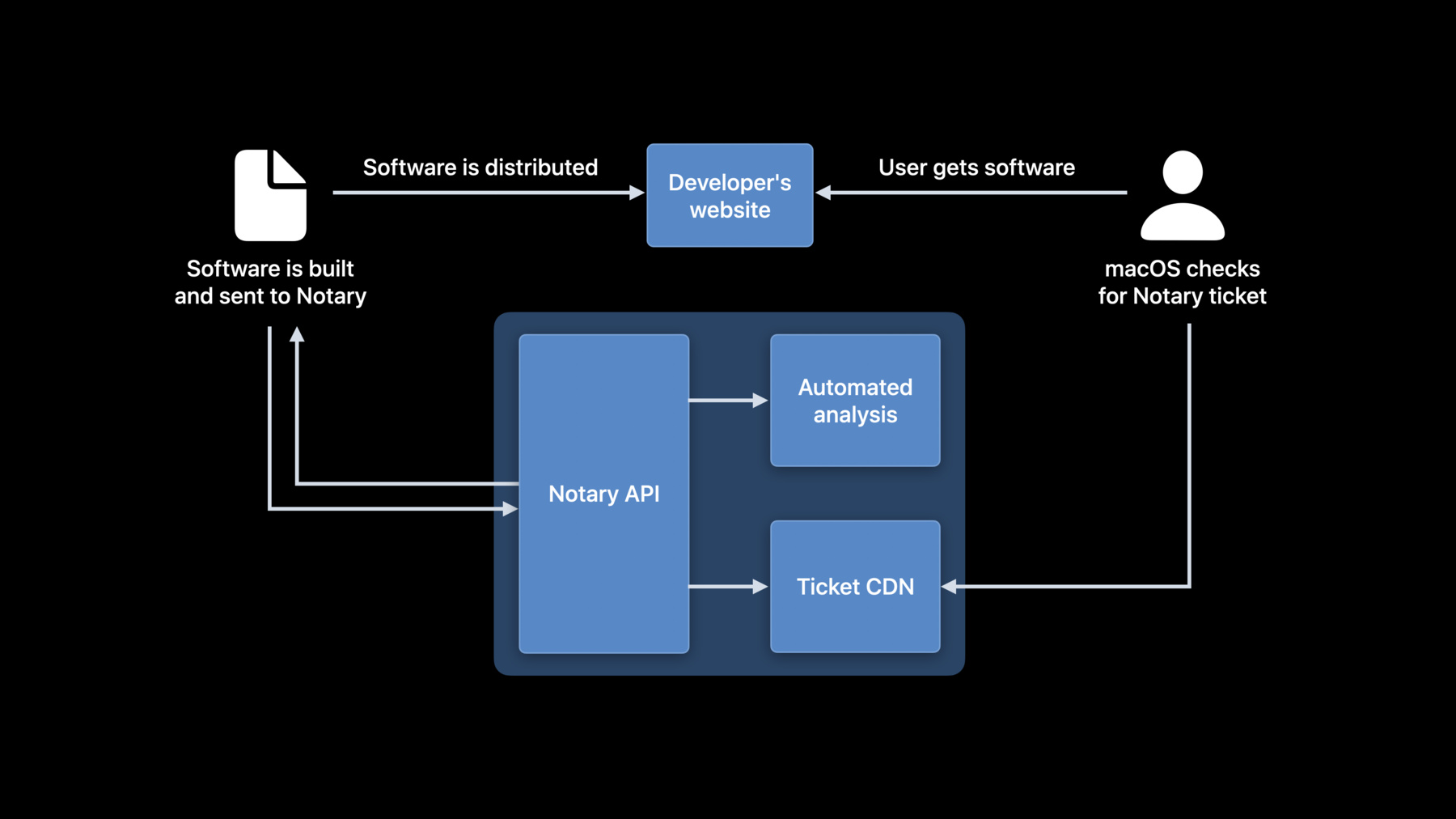
Let's take a look at the Notary workflow.
Developers build their software and send it to us for notarization.
The Notary service runs automated analysis that scans the software for malicious content and checks for code signing issues.
If there are no issues, Notary publishes a ticket to be retrieved by users’ Macs when they launch the software.
And then we return the result to your developer team.
We're committed to completing this process within 15 minutes for 98 percent of Notary submissions, and most complete in under five.
You can then provide your app for users to download, and macOS checks the software before it can run on a user's machine.
We care about protecting customers from malware and making it easier for developers to submit to Notary and even faster for users to get access to new software.
And with that mission in mind, I'm thrilled to share with you the new way to notarize.
Introducing notarytool.
notarytool provides a one-line command for submitting your software and waiting for your result.
We've introduced targeted enhancements focused specifically on the needs of Mac developers that are notarizing software independently without the need for altool's App Store support.
These improvements make notarization faster and easier, all while we continue to protect customers from malware.
Developers depend on the Notary service, so we want it to be as reliable as possible and available whenever developers need it.
In addition to the changes to the client software, we've also streamlined the service.
In fact, we've built a new dedicated service backend that's focused on reliability just for Notary.
The new service is designed to bring you improvements in end-to-end processing speed, and we're excited for you to try it out.
We know you may be waiting as your submission uploads, so we've worked hard to make upload speed up to four times faster for most developers.
To take advantage of these incredible performance and reliability gains, be sure to transition from altool to notarytool.
notarytool is easy to use and carefully designed with your notarization workflow in mind.
We've heard your feedback and we wanted to improve the developer interaction with a simpler client and a single line to get things done.
So let's say I'm a developer and I've just finished building the latest bug fix to my app.
I want to get this published as soon as possible.
The quickest way for me to accomplish this with altool on the command line is with a polling loop, like this.
I first submit my application, and when that's done, I start to continuously poll for status until processing is complete.
Now, with notarytool, we've added a wait flag to the client that allows you to submit and wait for your notarization result all in one command.
As soon as your job completes, the program will display the results of your submission.
Once you receive your submission result, you're only one command away from viewing your Notary log using the new client.
You'll be able to view details about your result directly from notarytool, including any reasons why your application may not be notarized.
We've also added a brand-new feature that's accessible to you when you submit to Notary: webhook notifications.
This feature allows you to specify a URL for a server callback as soon as we finish processing your software.
By specifying a webhook URL when you submit, you can seamlessly add notarization into your continuous integration workflows by automatically retrieving your result and your Notary log when you receive a notification.
We can't wait for you to start using this powerful new tool, and we look forward to receiving your feedback about notarytool and this new developer experience.
notarytool is the new client for interacting with the Notary service and is distributed with Xcode.
altool isn't going away, but is now deprecated for use with Notary.
notarytool makes your workflow faster and simpler with a client that's dedicated to the Notary service.
You'll be able to find more details about the latest features and performance improvements in the documentation linked to this talk in the coming weeks.
Access to the tool is available with the latest Xcode build, with information to help you get started in the tool's man pages.
So make the switch today to start distributing software more quickly and seamlessly than ever before.
Thank you.
♪
-
-
4:10 - altool example
// with altool xcrun altool --notarize-app -f path/to/submission.zip --primary-bundle-id "$BUNDLE_ID" --apiKey "$KEY_ID" --apiIssuer "$ISSUER" while true; do INFO_OUT=$(2>&1 xcrun altool --notarization-info "$SUBMISSION_ID" -u "$USER" --apiKey "$KEY_ID" --apiIssuer "$ISSUER") STATUS=$(echo "$INFO_OUT" | grep "Status:" | sed -Ee "s|.*: (.*)$|\1|" ) if [[ "$STATUS" != "in progress" ]]; then break fi sleep 30 done -
4:19 - notarytool example
// with notarytool
notarytool submit path/to/submission.zip --wait
    --key "$KEY_PATH" --key-id "$KEY_ID" --issuer "$ISSUER"
-