

-
visionOS 객체 추적 관련 개선 사항 살펴보기
visionOS가 객체 추적 및 공간 액세서리 입력을 어떻게 발전시키고 있는지 알아보세요. 움직이거나 손에 들고 있는 객체를 추적하여 물리적 환경과 디지털 환경을 연결할 수 있도록 해 주는 새로운 방법을 살펴보세요. 지원되는 새로운 공간 액세서리 클래스와 앱에서 고유한 상호작용 모델을 구현하기 위한 맞춤형 액세서리 제작에 필요한 사항에 대해 알아보세요.
챕터
- 0:00 - 서론
- 2:20 - 객체 추적
- 7:20 - 공간 액세서리
- 7:47 - 공간 액세서리 만들기
- 11:48 - 플러그 앤 플레이 액세서리
- 12:22 - 앱에 구현하기
- 13:03 - 다음 단계
리소스
- Implementing object tracking in your app
- Working with generic spatial accessories
- Preparing spatial accessories for tracking in your visionOS app
- Spatial accessory design guidelines for Apple devices (check section 20)
- Exploring object tracking with ARKit
관련 비디오
WWDC25
WWDC24
-
비디오 검색…
안녕하세요, visionOS 오브젝트 트래킹 향상 기능 탐구에 오신 것을 환영합니다 저는 Nathan Kong입니다 visionOS 팀의 전략적 파트너십 매니저입니다 이 세션에서는 새로운 오브젝트 트래킹 및 공간 액세서리 기능을 소개합니다 이전 세션에서 소개한 기능을 기반으로 합니다 참고로, visionOS 2.0에서 오브젝트 트래킹을 도입했습니다 이를 통해 실제 물체를 가상 앵커로 전환할 수 있습니다 추적하려는 항목의 USDZ 모델만 있으면 레퍼런스 오브젝트를 생성할 수 있습니다 Mac의 Create ML에서 머신 러닝 훈련을 통해서요 레퍼런스 오브젝트를 API에 전달하면 앱이 물리적 오브젝트의 위치와 방향을 파악할 수 있습니다 몰입형 공간 경험을 만들기 위해서죠 visionOS 27에서는 오브젝트 트래킹 범위를 확장합니다 움직이는 오브젝트를 추적하는 기능이 추가됩니다 손에 쥔 물체를 포함해 다양한 개선 사항이 적용됩니다 예를 들어 이제 정확하게 추적하고 이 의료용 프로브처럼 손에 쥔 물체로 공간을 측정할 수 있습니다 여기서 정밀하게 거리를 측정할 수 있는데요 이 실제 척추 모델에서 척추 뼈 사이 거리를 측정하는 겁니다 흥미로운 활용 사례를 가능하게 합니다 수술 훈련, 주거 리모델링 또는 조립 가이드 같은 사례들이죠 공간 액세서리로 넘어가겠습니다 visionOS 26에서는 첫 번째 공간 액세서리를 선보였습니다 Logitech Muse와 PSVR2 Sense 컨트롤러 등이 있습니다 공간 액세서리는 Apple Vision Pro와 통신하는 전자 기기입니다 실제 세계에서 실시간으로 위치와 방향을 추적합니다 이러한 기기는 상호 작용성도 향상시킵니다 버튼과 햅틱을 통해 앱의 몰입도를 높여줍니다 이제 visionOS 27에서는 누구나 자신만의 액세서리를 직접 만들 수 있도록 지원을 확장합니다
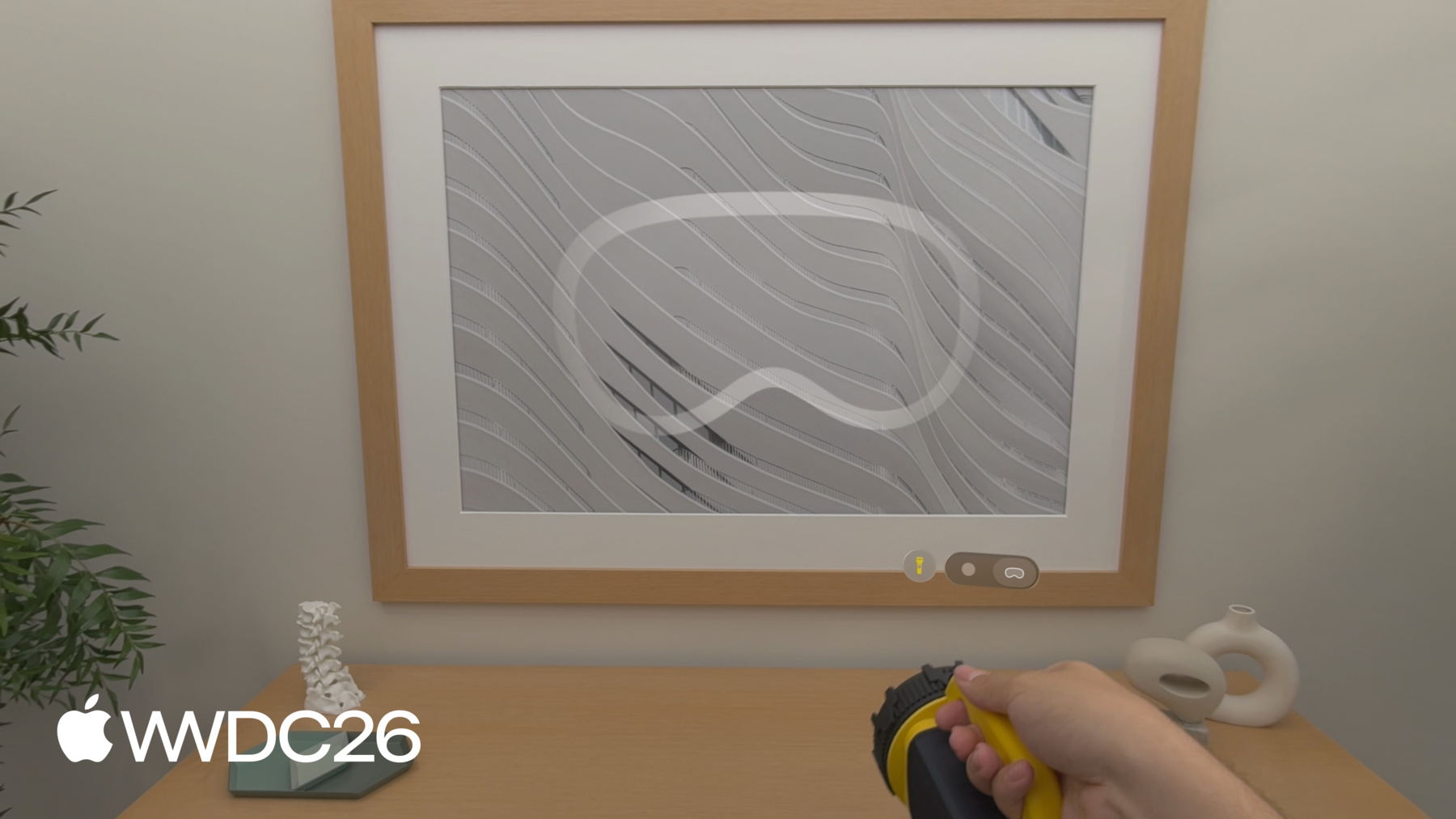
예를 들어 액세서리를 장착할 수 있습니다 이 Spatial Anchor처럼 물리적 핸들 안에 장착해 실물 크기의 디지털 차량을 원활하게 정렬할 수 있습니다 핸들에 손을 뻗어 잡으면 실제로 차 안에 있는 것 같은 느낌이 납니다 몰입형 레이싱 같은 놀라운 경험을 가능하게 합니다 비행 시뮬레이션이나 자동차 실내 디자인도 마찬가지죠 이 세션의 나머지 시간에는 오브젝트 트래킹 개선 사항을 살펴보고 공간 액세서리 제작 방법을 안내하겠습니다 그리고 고려해야 할 사항들로 마무리합니다 visionOS 앱에 어떤 방식이 최선인지 결정할 때 참고하세요 이제 오브젝트 트래킹을 살펴보겠습니다 오브젝트 트래킹에 높은 프레임 레이트 추적이 지원됩니다 앱이 오브젝트의 위치를 더 잘 파악할 수 있습니다 오브젝트가 공간에서 움직일 때 특히요 더불어 Create ML에 새로운 확장 훈련 모드를 추가했습니다 트래킹 정확도와 견고성을 높이기 위해서입니다 특히 물체를 손에 쥐고 있을 때 유용합니다 더욱 정확한 트래킹 사례를 지원하기 위해 오브젝트 포즈를 미터 공간에서 얻는 API를 도입합니다 디스플레이 보정에 영향받지 않습니다 이는 측정 앱 활성화에 필수적입니다 앞서 소개한 의료용 프로브 예시처럼요 마지막으로 올해 iOS에도 오브젝트 트래킹을 도입합니다 이 손전등을 사용해 이러한 업데이트를 실제로 살펴볼게요 손전등의 사실적인 3D 모델을 갖고 있다면 오브젝트 트래킹의 레퍼런스 오브젝트로 사용할 수 있습니다 앱이 손전등 위치를 파악하므로 RealityKit의 새로운 Physical Surroundings Light를 활용해 이 공간을 실시간으로 다시 조명할 수 있습니다 주변 표면에 투영되는 디지털 패턴도 바꿀 수 있습니다 손이 손전등 일부를 가리더라도 앱은 오브젝트 위치를 안정적으로 추적합니다 또 다른 방법으로 이런 마커를 3D 프린트해 레퍼런스 오브젝트로 삼고 손전등에 부착할 수 있습니다 이 방법으로 손에 쥔 물체를 쉽게 추적할 수 있습니다 기기의 사실적인 3D 모델을 구하기 어려운 경우에도 가능합니다 이제 구체적인 업데이트를 살펴보겠습니다 기존 오브젝트 트래킹 경험을 업그레이드하거나 처음부터 새로 시작하는 방법입니다 먼저 새로운 높은 프레임 레이트 트래킹을 활성화하는 방법을 설명하겠습니다
새로운 Reference Object Configuration API를 visionOS의 ARKit에 추가합니다 높은 프레임 레이트 트래킹을 활성화합니다 개별 레퍼런스 오브젝트에 대해 오브젝트 트래킹 세션을 만들기 전에요 설정 후 이 구성 오브젝트를 전달합니다 기존처럼 레퍼런스 오브젝트를 로드할 때 추가 파라미터로 사용합니다 훈련 설정이 아니므로 모든 레퍼런스 오브젝트에 적용 가능합니다 앱의 필요에 따라 달라집니다 다음으로 Create ML에 추가한 새로운 확장 훈련 모드를 살펴보겠습니다 Create ML에서 레퍼런스 오브젝트를 훈련할 때 이제 표준 훈련 모드와 확장 훈련 모드 중 선택할 수 있습니다 새로운 확장 훈련 설정은 정확도를 높여줍니다 트래킹의 견고성도 향상됩니다 사용을 권장합니다 높은 프레임 레이트 트래킹과 함께 사용하는 것을 권장합니다 확장 훈련은 시간이 많이 걸립니다 표준 모드보다 훨씬 오래 걸린다는 점을 참고하세요
Object Tracking 템플릿에서 훈련 모드 설정을 찾을 수 있습니다 Create ML 앱의 시야각 설정 바로 아래에 있습니다 나머지는 모두 그대로입니다 레퍼런스 오브젝트 훈련 방식이 동일합니다 커맨드 라인 인터페이스로 레퍼런스 오브젝트를 훈련하려면 훈련 모드를 설정할 수 있습니다 원격 머신에서 훈련을 실행할 수 있는 유연성을 제공합니다 이제 오브젝트 포즈를 미터 공간에서 얻는 새로운 이점을 살펴보겠습니다 기본적으로 오브젝트 앵커 변환은 최적화됩니다 추적된 오브젝트에 맞게 가상 콘텐츠를 배치하기 위해서입니다 혼합 몰입 스타일에서요 이를 위해 오브젝트 포즈를 약간 수정합니다 표시된 카메라 이미지와 맞추기 위해서입니다 절대 세계 좌표의 정확도에 영향을 미칩니다 오브젝트 트래킹을 사용할 때 제한이 될 수 있습니다 공간 측정 작업에서 특히요 visionOS 27에서는 ARKit Coordinate Space Correction API를 추가합니다 이 보정을 적용하거나 제외하고 앵커 변환을 얻을 수 있습니다 추적된 오브젝트의 포즈를 쿼리하면 두 가지 옵션이 제공됩니다 rendered는 디스플레이 보정이 적용된 포즈를 반환합니다 실제 오브젝트와 가상 콘텐츠를 시각적으로 정렬하기 위해서입니다 none은 보정 없이 미터 공간에서 오브젝트 포즈를 반환합니다 추적된 오브젝트 간의 거리를 측정할 때 유용합니다 오브젝트가 물리적 공간 어디에 있는지 파악할 때도 유용하고요 앞서 보여드린 의료용 프로브 데모처럼요 마지막으로 올해 오브젝트 트래킹을 iOS에 도입합니다! 그 전에 WWDC24의 지구본을 다시 불러오겠습니다!
iOS 27에서는 ARKit API에 레퍼런스 오브젝트 지원을 추가합니다
머신 러닝 훈련은 플랫폼에 종속되지 않습니다 한 번 훈련하면 iOS와 visionOS 앱 모두에서 모든 레퍼런스 오브젝트를 지원합니다
iOS에서 오브젝트 트래킹을 실행하는 데 필요한 것을 알아보겠습니다 레퍼런스 오브젝트를 로드하고 월드 트래킹 구성을 만듭니다 visionOS에서 사용하는 것과 동일한 레퍼런스 오브젝트 파일입니다 오브젝트를 detectionObjects에 할당합니다 대부분 정적인 오브젝트에 사용합니다 움직이는 오브젝트의 높은 프레임 레이트 트래킹에는 trackingObjects를 사용합니다 세션을 실행하고 델리게이트에서 앵커를 처리합니다 ARKit이 오브젝트를 인식하면 didAdd가 호출되어 ARObjectAnchor를 받습니다 콘텐츠를 연결할 수 있습니다 오브젝트가 추적되는 동안 didUpdate로 최신 포즈를 받습니다 앱의 커스텀 동작에 활용할 수 있습니다 오브젝트가 씬에서 제거되면 didRemove로 정리하고 didAdd에서 만든 앵커 엔티티를 삭제합니다
이것이 visionOS 27의 오브젝트 트래킹 업데이트 전부입니다 오브젝트 트래킹 API로 앱을 개발하는 방법은 "visionOS용 오브젝트 트래킹 탐구" WWDC 세션을 시청하세요 또는 문서를 참조하세요 다음으로 관심 오브젝트를 공간 액세서리로 전환하는 방법을 살펴봅니다 공간 액세서리를 정의하고 장점을 살펴보겠습니다 액세서리를 만들 때 염두에 둘 디자인 고려 사항도 다룹니다 액세서리를 만들 때요 디자인 유효성 검사 과정을 설명하고 visionOS에 맞게 준비하는 방법도요 간편하게 사용 가능한 플러그 앤 플레이 액세서리와 visionOS 앱을 준비하는 방법을 이 기기를 활용할 수 있도록 소개합니다 기초부터 시작해 보겠습니다 공간 액세서리는 전자 기기입니다 다음 구성 요소가 포함된 보드를 갖춰야 합니다 Apple Vision Pro가 추적할 수 있는 LED 배열 액세서리의 방향과 가속도를 캡처하는 IMU Vision Pro에 신호를 전송하는 Bluetooth 칩 공간 액세서리는 다양한 입력도 지원할 수 있습니다 버튼이나 터치패드, 그리고 햅틱 같은 출력을요 이러한 핵심 구성 요소를 갖춘 모든 액세서리는 visionOS와 호환됩니다 공간 액세서리가 실제로 작동하는 모습을 살펴보겠습니다 앞서 언급한 구성 요소를 설치하면 앞서 소개한 손전등에 기기 자체를 공간 액세서리로 만들 수 있습니다 이 손전등을 빠르게 흔들어도 디지털 빛줄기가 부드럽게 따라옵니다 내장 IMU로 가능한 저지연 추적 덕분입니다 그리고 액세서리에 추가한 이 물리적 버튼으로 디지털 조명을 켜고 끌 수 있습니다 경험을 훨씬 더 인터랙티브하게 만들어 줍니다 Vision Pro는 이 공간 액세서리를 추적할 수 있습니다 손전등 안에 설치된 LED를 통해서입니다 이제 공간 액세서리의 장점을 살펴보겠습니다 이 기기는 높은 주파수로 추적됩니다 전체 디스플레이 레이트까지 낮은 지연으로 빠른 움직임이 필요한 사례를 지원합니다 공간 액세서리는 견고하게 추적됩니다 일시적으로 가려지더라도요 낮은 조도 조건에서도 액세서리를 추적할 수 있습니다 마지막으로 물리적 버튼과 햅틱을 통해 경험을 더욱 인터랙티브하고 몰입감 있게 만들 수 있습니다 자신만의 액세서리를 만들기 전에 염두에 두어야 할 중요한 디자인 고려 사항이 있습니다 기기 주변에 LED를 적절히 분산시키는 것이 중요합니다 다양한 각도에서 볼 때 뚜렷하고 고유한 패턴이 만들어지도록 해야 합니다 정확한 추적을 위해 LED와 IMU 모두 보드에 단단히 고정해야 합니다 마지막으로 사용자가 액세서리와 상호 작용하는 주요 방식을 고려하세요 예를 들어 손에 쥐는 액세서리의 경우 LED 대부분을 사용자가 기기를 쥐지 않는 위치에 배치해야 합니다 배터리의 크기와 위치도 고려해야 합니다 액세서리가 인체공학적인지 확인하세요 팔 뻗는 거리 밖에서 사용하는 대형 액세서리의 경우 LED 수, LED 크기, LED 간격을 고려해야 합니다 멀리서도 정확하게 추적되는지 확인하기 위해서입니다 구체적인 요구 사항과 레퍼런스 디자인에 대한 자세한 정보는 "Accessory Design Guidelines" for Apple Devices의 "Spatial Accessories" 장을 확인하세요 공간 액세서리를 설계했다면 예상대로 작동하는지 유효성 검사하고 visionOS 앱을 준비하는 방법을 살펴보겠습니다 첫 번째 단계는 액세서리를 연결하는 것입니다 Bluetooth를 통해 Vision Pro에 기기에서 보내는 신호를 검증합니다 ARKit 액세서리 트래킹 디버그 뷰를 사용하세요 이 도구로 Vision Pro가 액세서리를 어떻게 인식하는지 확인할 수 있습니다 기기가 개발자 모드일 때 설정에서 찾을 수 있습니다 세 가지를 도와줍니다 첫째, 헤드셋의 IR 카메라를 통해 LED를 확인합니다 밝고 뚜렷하며 동기화가 제대로 됐는지 확인할 수 있습니다 둘째, 실시간 메트릭으로 IMU 주파수를 검증합니다 지연 시간과 축별 값으로요 스케일, 정렬, 모션 응답을 확인하기 위해서입니다 셋째, 액세서리와 헤드셋 간의 타이밍을 디버그합니다 기기의 IR 조명을 동기화 레퍼런스로 사용해서요
다음으로 visionOS 앱이 공간 액세서리를 추적하려면 CreateML 번들로 훈련해야 합니다
이 워크플로우는 기기의 물리적 외관과 LED 위치 정보를 사용해 레퍼런스 액세서리 파일을 만듭니다 시작하려면 디자인의 USDZ를 만드세요 사실적인 3D 모델을 담아야 합니다 IMU와 LED 위치가 주석으로 표시된 기기 모델이어야 합니다 이 주석이 달린 USDZ를 사용해 커맨드 라인 인터페이스를 사용해 레퍼런스 액세서리 파일을 생성하고 앱에 추가할 수 있습니다 액세서리 제조업체로서 이 파일을 앱에 번들로 포함하고 Info.plist에 내보낸 UTType으로 선언합니다 액세서리를 시스템 전체에 등록합니다 Apple Vision Pro의 모든 앱이 사용할 수 있도록요 서드 파티 액세서리를 사용하는 개발자라면 파일을 직접 번들하고 가져온 타입으로 선언할 수도 있습니다 앱이 독립적으로 작동하도록요
공간 액세서리를 처음부터 만들기 전에 테스트를 시작할 수도 있습니다 플러그 앤 플레이 액세서리로 앱을 개발해 보세요 DFRobot과 MIKROE 같은 제조업체들이 기성품 레퍼런스 하드웨어를 출시합니다 올해 말 개발 키트와 함께요 이 액세서리들은 즉시 테스트에 활용하거나 visionOS 앱에 바로 구현할 수 있습니다 플러그 앤 플레이 액세서리 중 하나가 작동하는 모습을 보겠습니다
보시다시피 seeMote Cap 같은 공간 액세서리를 손전등에 장착하기만 하면 됩니다 Spatial Accessories API를 사용해 이전과 동일한 디지털 조명 재설정 경험을 활성화합니다 이제 공간 액세서리를 갖췄으니 앱에 연결하는 방법을 살펴보겠습니다 새로운 GCSpatialAccessory 클래스를 사용해 액세서리를 검색합니다 레퍼런스 액세서리 번들이 있는 모든 기기에서 작동합니다 Accessory(device)를 호출하면 ARKit이 자동으로 해석합니다 그러면 AccessoryTrackingProvider를 실행할 수 있습니다 기존과 동일하게요 또한 추가되는 것은 새로운 updateAccessories 메서드입니다 세션이 실행되는 동안 액세서리를 전환합니다 트래킹이 중단되지 않도록요 이를 통해 자신만의 공간 액세서리를 만들고 visionOS 앱에 연결할 수 있습니다 앱에서 트래킹, 입력, 햅틱을 활성화하는 방법은 "visionOS의 공간 액세서리 입력 탐구" 세션을 시청하세요
이제 마무리하겠습니다 오늘 오브젝트를 추적하는 네 가지 방식을 살펴봤습니다 앱에서 사용 가능한 방식들입니다 어떤 방식을 선택할지 결정할 때 고려할 사항을 살펴보겠습니다 어떤 방식을 사용할지 선택할 때요 오브젝트 트래킹은 정확한 추적이 필요한 시나리오에 탁월합니다 측정 앱이 대표적인 예입니다 사실적인 3D 모델에 접근할 수 없다면 referenceObject를 훈련할 수 있습니다 관심 오브젝트에 장착한 마커로 훈련합니다 공간 액세서리는 더 높은 새로 고침 빈도와 낮은 지연을 제공합니다 빠르게 움직이는 오브젝트가 필요한 경험에 최적입니다 더 인터랙티브한 경험을 원하거나 물리적 오브젝트로 몰입감 있는 경험을 만들고 싶다면 커스텀 버튼과 햅틱을 갖춘 나만의 액세서리를 설계하세요 이 새로운 오브젝트 트래킹 기능으로 가능한 것들은 무궁무진합니다 업무와 놀이를 위한 혁신적인 경험이 기대됩니다 여러분이 만들어낼 것들이요 멋진 WWDC26 되세요!
-
-
3:50 - Enable high frame rate tracking
// Enable high frame rate tracking // Create reference object configuration var configuration = ReferenceObject.Configuration() configuration.highFrameRateTrackingEnabled = true // Load the reference object with ARKit API let refObjURL = Bundle.main.url(forResource: "flashlight", withExtension: ".referenceobject") let refObject = try? await ReferenceObject(from: refObjURL!, configuration: configuration) -
4:50 - Extended training mode via command-line
// Extended training mode on Mac using command-line interface % xrun createml objecttracker --source flashlight.usdz --output flashlight.referenceobject --training-mode extended --all-angles -
5:25 - Object pose coordinate spaces
// Different object pose spaces // Obtain anchor transform with display corrections let renderingPose = myObjectAnchor.coordinateSpace(correction: .rendered) // Obtain anchor transform in metric space let metricPose = myObjectAnchor.coordinateSpace(correction: .none) -
6:22 - Implement object tracking in iOS
// Implement object tracking in iOS import ARKit import RealityKit class ObjectTrackingARSessionDelegate: NSObject, ARSessionDelegate { let arView = ARView(frame: .zero) var entities: [UUID: AnchorEntity] = [:] func start() throws { let stationaryObject = try ARReferenceObject(archiveURL: Bundle.main.url(forResource: "stationary", withExtension: "referenceobject")!) let movingObject = try ARReferenceObject(archiveURL: Bundle.main.url(forResource: "moving", withExtension: "referenceobject")!) let configuration = ARWorldTrackingConfiguration() configuration.detectionObjects = [stationaryObject] // Low frame rate configuration.trackingObjects = [movingObject] // High frame rate arView.session.delegate = self arView.session.run(configuration) } func session(_ session: ARSession, didAdd anchors: [ARAnchor]) { for case let anchor as ARObjectAnchor in anchors { let entity = AnchorEntity(anchor: anchor) entities[anchor.identifier] = entity arView.scene.addAnchor(entity) } } func session(_ session: ARSession, didUpdate anchors: [ARAnchor]) { for case let anchor as ARObjectAnchor in anchors { entities[anchor.identifier]?.isEnabled = anchor.isTracked } } func session(_ session: ARSession, didRemove anchors: [ARAnchor]) { for case let anchor as ARObjectAnchor in anchors { if let entity = entities.removeValue(forKey: anchor.identifier) { arView.scene.removeAnchor(entity) } } } } -
12:26 - Discover and connect a spatial accessory
import ARKit
import GameController

// Generic accessory discovery

if let device = GCSpatialAccessory.spatialAccessories.first {

        // Resolves the .referenceaccessory bundle automatically

        let accessory = try await Accessory(device: device)
        let provider = AccessoryTrackingProvider(accessories: [accessory])
        try await arkitSession.run([provider])
}

// Update tracked accessories without restarting the session

try await provider.updateAccessories([newAccessory])
-