

-
Core AI 모델 제작 및 최적화 자세히 살펴보기
새로운 Core AI 프레임워크를 사용한 Apple Silicon용 완전한 맞춤형 모델 배포 워크플로를 자세히 살펴보세요. 맞춤형 Metal 커널을 사용한 모델을 제작하기 위한 강력한 기법과 플랫폼 인식 압축 전략을 알아보세요. 새로운 Core AI Debugger는 심층적인 고유 분석을 제공하며, AI 지원 워크플로가 초기 개념부터 최적화된 온디바이스 실행까지 안내합니다.
챕터
- 0:00 - 소개
- 1:49 - 모델 및 스킬
- 3:27 - Python 워크플로
- 5:54 - 모델 최적화
- 10:40 - Core AI Debugger
- 19:27 - 고급 제작
- 20:43 - 사용자 지정 Metal 커널
- 23:01 - 모델 재작성
- 28:46 - 다음 단계
리소스
- Core AI PyTorch Extensions
- Core AI Python
- Core AI Optimization
- Inspecting, debugging, and profiling Core AI models
- Inspecting Core AI models with Core AI Debugger
- Core AI
관련 비디오
WWDC26
-
비디오 검색…
안녕하세요, 저는 Sachin이고 Core AI 팀 엔지니어입니다 나중에 동료 Nicole도 함께할 예정입니다 오늘은 Core AI가 어떻게 쉽게 만들어 주는지 보여드릴게요 모델을 Apple Silicon에서 효율적으로 실행하는 방법을 기초부터 고급 방법까지 소개해 드리겠습니다
"Meet Core AI" 세션에서 보셨듯이 Core AI는 완전한 기술 패키지로 모델 배포 생명주기를 포괄합니다 모델 최적화 및 변환부터 디버깅, 앱 통합까지 모두 포함해요
이 세션에서는 Core AI의 Python 생태계를 자세히 살펴볼게요 Core AI가 제공하는 다양한 라이브러리와 도구를 만나고 Apple Silicon에 모델을 배포하는 방법을 알아보겠습니다
Core AI Debugger도 소개해 드릴 거예요 이 도구는 작업 흐름의 핵심 부분이 될 수 있으며 주요 문제를 이해하고 디버깅하는 데 도움이 됩니다 그럼 시작해 볼게요
오늘 순서를 안내해 드릴게요 먼저 Core AI 모델 저장소를 소개하고 시작을 도와줄 강력한 도구인 Core AI 스킬도 소개할 거예요 그다음, 기본적인 변환 및 검증 과정을 보여드릴게요 Core AI는 이미 익숙한 Python과 PyTorch 워크플로를 기반으로 해요 Core ML을 사용해 보셨다면 많은 부분이 익숙하게 느껴질 거예요
그다음은 모델 최적화에 대해 다루고 올바른 선택을 하는 방법을 보여드리겠습니다 사용 사례와 대상 플랫폼에 맞는
모델에 대한 더 깊은 통찰을 얻을 수 있도록 Nicole이 Core AI Debugger를 소개해 드릴 거예요 마지막으로, 주요 방법들을 살펴보겠습니다 Core AI가 모델 제작 및 변환 시 깊은 커스터마이징을 지원하는 좋아요 모델과 스킬부터 시작해 볼게요
Core AI 생태계의 최전선에는 coreai-models 저장소가 있습니다 앱에서 LLM을 실행하기 위한 Swift 패키지가 포함되어 있어요 하지만 핵심은 바로 사용 가능한 모델들의 오픈 소스 저장소로 최신 대형 언어 모델 같은 생성형 아키텍처를 포함합니다
다양한 사용 사례와 제약 조건에 맞게 설계된 예제들과 모델을 Core AI에 가져올 수 있는 구성 요소도 있어요 마지막으로 중요한 것은 Core AI 모델에는 에이전트 스킬 세트가 함께 제공됩니다 이 스킬들을 좋아하는 코딩 어시스턴트에 설치하면 첫날부터 전문가처럼 Core AI를 시작할 수 있어요 Core AI 스킬은 여러분과 함께 고수준 아이디어를 후속 작업을 위한 명확한 배포 계획으로 변환해 줍니다 관심 있는 모델에 대해 추가 정보를 요청할 수도 있고 대상 하드웨어 패밀리와 앱의 제약 조건도 파악합니다 이러한 요구 사항을 통해 필요한 Core AI 기능을 파악하고 PyTorch 모델 코드 변경부터 변환, 최적화, 모델 실행까지 전 과정을 안내합니다 AI 스킬은 코딩 에이전트에게 모범 사례에 대한 접근을 제공하여 엔지니어의 도메인 지식을 활용할 수 있게 해줍니다 덕분에 Core AI를 전문가처럼 활용하고 코딩 어시스턴트로 더 잘 이해할 수 있어요
실제로 이 세션 전반에서 볼 코드의 대부분은 이 스킬을 적극 활용한 에이전트와 함께 개발된 것입니다 이제 Python으로 Core AI에서 모델을 변환하고 실행하는 방법을 알아볼게요
Core AI Python 라이브러리, 특히 Core AI PyTorch 확장은 생태계로 진입하는 시작점입니다 pip install coreai-torch로 간단하게 설치할 수 있습니다 이렇게 하면 coreai 패키지와 그 위에 구축된 coreai-torch 라이브러리가 모두 설치됩니다
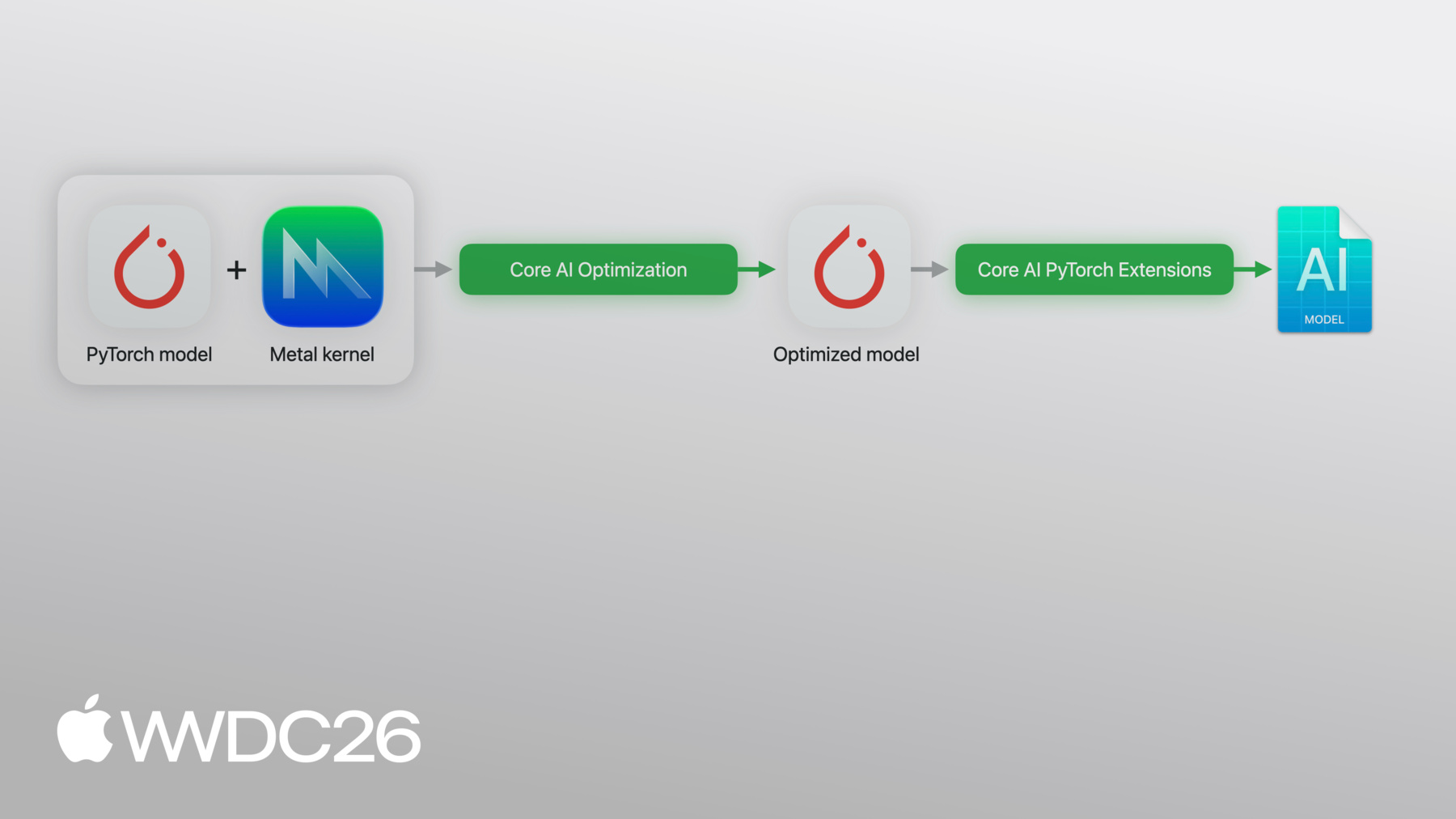
coreai-torch에 PyTorch 내보낸 프로그램을 전달하면 Core AI 모델로 직접 변환됩니다 Core AI 프로그램을 맞춤화할 수 있는 고급 기능도 지원하는데 정확한 사용 사례에 맞게 조정할 수 있어요 예를 들어, 여러 모델을 하나의 아티팩트로 조합하거나 특정 연산에 대한 커스텀 로우어링을 등록하거나 Metal 4 커널을 변환된 모델에 직접 인라인할 수도 있어요 마지막으로, 모델을 최적화된 에셋으로 특수화하여 Python만으로 Apple Silicon에서 네이티브로 실행할 수 있습니다
방금 설명한 파이프라인이 이것입니다 이제 실제로 어떻게 작동하는지 살펴볼게요
간단한 예제를 함께 살펴보겠습니다 여기 두 개의 선형 레이어와 relu 활성화를 가진 신경망이 있습니다 일반적인 PyTorch입니다
그다음, torch.export를 실행하고 모델과 example_input을 전달하면 exported_program을 얻습니다 이 exported_program이 시작점입니다 Core AI 변환을 위한 가중치, 연산, 형태를 포함한 전체 계산 그래프를 캡처합니다 coreai-torch가 작업할 수 있는 형식으로요
이제 Core AI 측면을 볼게요
Core AI의 TorchConverter가 내보낸 프로그램을 가져가 입출력 이름과 함께 core_ai_ 프로그램으로 변환합니다 CoreML tools를 사용해 보셨다면 익숙하게 느껴질 거예요
변환된 모델은 최적화된 후 aimodel 에셋으로 저장됩니다 Apple Silicon에서 실행 준비가 된 온디바이스 형식으로요
특수화된 에셋이 준비되면 프로그램에서 함수를 로드하고 Python에서 바로 추론을 수행할 수 있습니다 이 시점에 특수화 옵션을 전달하여 프로세스를 커스터마이즈할 수도 있어요 실제로 추론을 실행하려면 입력 이름을 매핑하는 딕셔너리를 제공하기만 하면 됩니다 해당 numpy 텐서에
이게 전부예요, 전체 워크플로입니다 변환, 최적화, 실행 — 모두 Python으로 이제 모델을 더 작게 만드는 방법을 Core AI의 최적화 라이브러리를 사용하여 이야기해 볼게요 Core AI의 최적화 기능을 소개하기 위해 Segment Anything Model — SAM3를 주요 사용 사례로 활용할 거예요
SAM3는 8억 5천만 개의 파라미터를 가진 모델로 프롬프트 기반 이미지 분할을 수행합니다 모델을 최적화하기 전에 내부 구조를 높은 수준에서 이해하는 것이 중요합니다 SAM3는 세 가지 주요 구성 요소가 있습니다 이미지를 처리하는 이미지 인코더 사용자 프롬프트를 처리하는 텍스트 인코더 이 두 구성 요소를 합치면 모델 파라미터의 96%를 차지하므로 이 부분을 제대로 최적화하는 것이 핵심입니다 전체 그림을 완성하기 위해 DEtection TRansformer를 감싸는 Detector 모듈을 합치면 마스크 디코더와 결합하여 최종 출력을 만들어냅니다 바로 분할 마스크입니다
보시다시피 SAM3는 복잡한 엔드투엔드 작업을 수행합니다 이것이 바로 개발자들이 온디바이스로 실행하고 싶어하는 사용 사례의 대표적인 예입니다
이를 최적화하기 위해 Core AI의 최적화 라이브러리 coreai-opt를 활용할게요 coreai-opt는 구성 기반의 모델 압축을 지원하여 무엇을 압축하고 무엇을 그대로 둘지 설명할 수 있어요 다양한 최적화 방식을 지원하며 그 중에서 선택할 수 있습니다 예를 들어 macOS와 iOS에 대해 다르게 최적화할 수 있어요
int4, int8, FP4도 지원하고 FP8 가중치 압축도 유연한 세분화로 지원합니다
마지막으로 coreai-opt에는 양자화 API가 포함되어 있어 소량의 보정 데이터와 함께 사용하거나 더 큰 데이터셋으로 양자화 인식 훈련을 수행할 수도 있습니다
이것은 제가 이전에 사용한 간단한 파이프라인입니다
이제 단계를 하나 추가할게요 변환 전에 압축 구성을 사용하여 coreai-opt로 모델을 실행하거나 편리한 프리셋 중 하나를 사용할 수 있어요 이렇게 하면 동일한 내보내기 파이프라인을 거치는 더 작은 모델을 얻을 수 있습니다 SAM3에 적용해보고 어떻게 되는지 살펴볼게요
먼저 SAM3를 내보내기 위해 래핑합니다 이 래퍼는 torch export가 캡처할 인터페이스를 정의합니다 모델의 전체 계산 그래프를요
슬라이드에서 보여준 변환 파이프라인이 여기 있습니다 재사용 가능한 헬퍼로 감쌌어요 몇 가지 흥미로운 점이 있어요
첫째, PyTorch exported_program에서 분해를 실행합니다 Core AI의 커스텀 테이블로요 이렇게 하면 Core AI가 지원하는 어텐션 같은 고수준 의미가 그래프에서 보존됩니다
둘째, 프로그램을 캐스팅하는 것도 지원합니다 필요한 경우 coreai-opt의 헬퍼를 사용하여 16비트 부동소수점으로
전체 변환은 몇 분 정도 걸리므로 베이스라인 에셋을 미리 계산해 두었습니다
여기서 하는 것은 베이스라인 32비트 변환 모델을 로드하고 실행하는 것입니다
보시다시피 크기가 3GB를 넘습니다 실행하면 기본 특수화가 작동하여 모델을 특수화하고 실행합니다
이것이 제 베이스라인입니다 이 이미지에서 모든 꽃에 대한 분할 마스크를 요청합니다 기본 임계값을 기준으로 모두 성공적으로 감지됩니다 온디바이스로 실행되면서요 이것이 압축 후에도 유지해야 할 결과입니다
이제 압축을 살펴볼게요 coreai-opt에는 프리셋 구성이 포함되어 있습니다 presets.w4는 한 줄로 채널당 4비트 대칭 양자화를 제공합니다
ExecutionMode를 EAGER로 설정하면 가중치 압축에 매우 효과적입니다 활성화의 경우에는 GRAPH 모드를 사용하겠습니다
그다음 구성으로 coreai-opt의 Quantizer를 초기화하고 예제 입력을 전달하고 마무리하면 모델이 압축됩니다
이전과 마찬가지로 모델을 로드하고 온디바이스로 실행합니다
모델 크기가 이제 약 430메가바이트입니다
결과를 보세요 가려진 꽃 중 하나가 더 이상 감지되지 않습니다
모든 레이어에 동일하게 공격적인 압축을 적용했는데 모든 레이어가 이를 동일하게 잘 처리하지는 못할 것입니다 문제는 어떤 레이어가 이 문제를 일으키느냐는 것입니다 이런 종류의 문제는 출력만으로는 진단하기 어렵습니다 모델 내부를 살펴봐야 합니다 Nicole에게 그 방법을 보여달라고 할게요 감사합니다, Sachin!
Core AI Debugger에 대해 이야기하게 되어 기쁩니다 Core AI 모델을 만들고 최적화하는 방법을 살펴봤습니다 하지만 모델과 그 동작에 대해 더 깊이 이해해야 한다면 Core AI Debugger를 사용하실 수 있어요 Core AI Debugger는 새로운 독립 실행형 애플리케이션으로 Apple 플랫폼에서 모델을 검사하는 데 도움을 줍니다
디버거를 통해 모델 구조를 시각화할 수 있습니다 이해하기 쉬운 그래프 형식으로 특정 하드웨어에서 모델을 실행하여 실제 런타임 결과를 얻고 기준 실행과 추론 정확도를 검증할 수 있습니다 모두 한 곳에서요 Core AI Debugger가 실제로 작동하는 모습을 보여드리고 SAM3 모델이 양자화될 때 무슨 일이 일어났는지 알아보겠습니다 원본 모델을 열어서 시작할게요
Inspect를 클릭하여 시작합니다
모델이 열리면 디버거 작업 공간을 볼 수 있습니다 왼쪽에는 탐색기가 있고 모델의 연산들이 구조화된 목록으로 포함되어 있습니다
이 연산들은 PyTorch 모듈별로 그룹화되어 있으며 SAM3 같은 대형 모델에 특히 강력한 기능입니다 익숙한 방식으로 모델을 탐색할 수 있게 해줍니다
탐색기에서 PyTorch 모듈을 선택하면 detector decoder와 같은 모듈을 해당하는 모든 노드를 강조 표시합니다 작업 공간 상단의 구조 뷰어에서요 이 뷰는 모델의 그래픽 표현을 보여주며 연산 연결성을 명확하게 보여줍니다 실행 순서와 데이터 의존성도요
아래의 소스 뷰어를 통해 항상 모델의 원본 Python 코드를 기반으로 작업할 수 있습니다 특정 라인까지 추적하며
마지막으로 연산을 선택하면 더 많은 정보를 얻을 수 있습니다
오른쪽의 인스펙터를 열어서요 여기서 설명을 찾을 수 있고 연산의 입력과 출력에 대한 추가 세부 정보도 있습니다
이 뷰들을 함께 활용하면 유연하게 이동할 수 있습니다 그래프 구조, 소스 코드 실행 세부 정보 간의 이동이 쉬워져서 SAM3 같은 복잡한 모델 디버깅의 인지적 부담을 크게 줄여줍니다 정적 분석 외에도 디버거는 런타임 분석을 지원합니다 모델이 온디바이스에서 실제로 어떻게 실행되는지에 대한 이 기능은 특히 도움이 될 거예요 양자화가 어디서 문제를 일으켰는지 찾아낼 때 모델을 실행하려면 작업 공간 상단의 device를 클릭하세요 scheme 설정에서 대상 목록에서 Mac을 선택하고 모델에 제공할 입력을 지정합니다 픽셀 값부터 시작하여
input_IDs를 입력하고
attention_mask도 입력합니다
마지막으로 Run을 클릭합니다
SAM3가 이제 제 기기에서 실행할 수 있도록 특수화되고 있습니다 이제 준비가 되면 구조 뷰어가 업데이트되어 모델을 보여줍니다 제 Mac에서 실행되는 것과 정확히 같은 모습으로요 이제 어떤 연산이든 클릭하면 인스펙터에서 출력 텐서를 직접 볼 수 있습니다 아무것도 수정하지 않고도요 현재 문제로 돌아가서 먼저 최종 감지 마스크를 확인하고 싶습니다 모델 끝으로 스크롤하겠습니다
그리고 마지막 연산을 선택합니다
인스펙터에서 텐서 미리보기를 클릭하여 마스크를 자세히 살펴볼게요 꽃들이 보이는데 노트북에서처럼 하나가 없습니다
이제 이 결과가 원본 PyTorch 실행과 어떻게 비교되는지 알고 싶습니다 노트북으로 돌아가서 새로운 save intermediates API를 사용할게요 이 API는 PyTorch 모델을 실행하며 각 연산에서 중간 텐서 값을 캡처합니다 양자화된 결과를 Sachin이 앞서 보여준 베이스라인과 비교하고 싶으므로 int4 모델을 전달하겠습니다 원본 SAM3와 함께요
실행되도록 놔두겠습니다
중간 결과가 저장되면 디버거로 돌아가서 결과를 비교할게요 작업 공간 상단의 비교 아이콘을 클릭하여 시작합니다 새 비교 세션을 초기화하기 위해서요 왼쪽에는 제가 앞서 지정한 기존 구성이 있습니다 오른쪽에서는 비교할 다른 구성을 선택할 수 있습니다 다른 Target이나 Compute Unit처럼요 이 경우에는 Target을 클릭하여 Intermediates File에서 기준 실행을 로드하겠습니다
방금 내보낸 파일을 사용하고 비교를 시작합니다
탐색기에 이제 연산 쌍이 표시됩니다 특수화된 모델의 연산과 PyTorch 모델을 결합한 것입니다
이 쌍들을 동기 지점이라고 합니다 특수화된 모델의 출력이 원본 PyTorch 결과와 일치해야 하는 위치입니다 디버거는 모델 전반에 걸쳐 이러한 지점을 자동으로 식별하여 비교 과정을 쉽게 만들어줍니다
각 동기 지점에는 두 출력이 얼마나 유사한지 나타내는 지표가 있어 어디서 차이가 생기는지 쉽게 찾을 수 있습니다 기본 지표는 최대 신호 대 잡음 비인 PSNR이지만 이를 변경할 수 있습니다 모델에 가장 적합한 유사성 지표로요 SAM3에는 PSNR을 그대로 사용하겠습니다
유사성 지표 값은 오른쪽의 상태 표시기에서 빠르게 파악할 수 있습니다 또는 그래프 자체에서도요 녹색 노드는 유사한 텐서를 나타내며 빨간 노드는 상당한 차이가 있음을 나타냅니다
연산들을 스크롤하면서 여러 노란색 동기 지점이 보이는데 모델의 일부가 예상 결과에서 적당히 벗어났음을 나타냅니다 예상 결과에서요 유사성을 기준으로 정렬하고 가장 유사하지 않은 동기 지점을 조사해 보겠습니다
탐색기에서 동기 지점을 클릭하면 소스 뷰어가 업데이트되어 연산의 PyTorch 모듈 계층 구조를 보여줍니다 예를 들어 이 연산은 detector decoder에서 왔습니다
위 화살표 키를 사용하여 낮은 PSNR 동기 지점을 하나씩 탐색하겠습니다 패턴이 나타나는지 보기 위해서요
낮은 PSNR 동기 지점의 대다수가 실제로 detector decoder에서 오고 있음을 알 수 있습니다 이는 앞서 적용한 양자화 방식이 detector 결과를 약간 손상시켰음을 알려줍니다 이전에 detector 블록이 모델 파라미터의 4%만 차지한다고 확인했으므로 어차피 이를 압축해도 큰 이익이 없습니다 그래서 Jupyter 노트북으로 돌아가서 detector를 무시하도록 양자화 방식을 변경해 보겠습니다
새 방식이 적용되면 모델을 다시 내보내고
변경 사항이 효과가 있는지 확인합니다
좋아요! 베이스라인 품질을 다시 회복했습니다 모든 꽃이 감지되고 모델은 원래 크기의 일부에 불과합니다! Core AI Debugger는 수 시간이 걸리던 수동 텐서 비교를 시각적 진단으로 바꿔줬습니다 감지 누락으로 시작해서 수 분 만에 개선된 양자화 방식에 도달했습니다 오늘 보여드린 것 외에도 Core AI Debugger는 점점 더 복잡한 문제를 해결할 수 있습니다 모델이 어떻게 동작하는지 깊은 가시성을 제공하여 Apple 플랫폼에 모델을 가져올 때 더 큰 자신감을 갖게 해줍니다 이제 Sachin에게 돌려드리겠습니다
감사합니다, Nicole! 이제 한 단계 더 나아가 볼게요 지금까지 모델을 단일 엔드투엔드 단위로 변환했습니다 많은 모델에서 이 방법으로도 충분히 잘 작동합니다 하지만 항상 충분하지는 않을 수 있습니다 사용 사례에 따라 특히 제약 조건에 따라서는요 이 부분에서 Core AI가 더 깊이 파고들 수 있는 힘을 제공합니다 구체적으로, 이제 PyTorch 소스 자체를 자세히 살펴볼 거예요 입력에서 출력까지 계산들의 그래프를 정의하는 고급 모델 제작이 의미하는 것은 이 계산 그래프 내부를 들여다보고 하드웨어에서 실행되는 방식을 정말로 조정하는 것입니다 간단한 예로 이 일련의 연산들을 생각해 보세요 그 연산들의 그룹을 가져다가 단일 연산으로 융합할 수 있습니다 이렇게 하면 여러 단계가 그래프 내의 단일 커널 디스패치로 대체됩니다 Core AI는 이미 사전 패키징된 고속 커널과 Scaled Dot Product Attention 같은 무거운 연산을 위한 프리미티브를 제공합니다 Transformer에서 흔히 볼 수 있는 이러한 연산을 활용하는 방법에 대한 예제를 찾아볼 수 있습니다 coreai-models 저장소에서요 하지만 최첨단을 추구하고 더 많은 커스터마이징을 원한다면 커스텀 Metal 4 커널도 지원합니다
제 파이프라인으로 돌아가서 커스텀 Metal 커널을 사용하면 무엇이 달라지는지 살펴볼게요 coreai-torch에 두 번째 입력을 추가합니다 Metal Shading Language, 즉 MSL로 작성된 커널의 소스 코드를요 변환기는 PyTorch 모델과 커스텀 커널을 모두 가져가서 하나의 에셋으로 묶어줍니다 MSL이 바로 내부에 내장됩니다 모델과 함께 배포됩니다 코드에서 어떻게 보이는지 보여드릴게요 먼저 예제를 위한 PyTorch 참조를 정의합니다 표준 Sigmoid Linear Unit, SiLU입니다 생성형 트랜스포머 모델에서 사용되는 일반적인 활성화 함수입니다 트레이싱 중에 torch.export가 보는 내용입니다 그 아래에서 실제 Metal 커널을 MSL로 구현합니다 이것은 간단한 요소별 커널로 요소당 하나의 스레드가 GPU에서 직접 융합 활성화를 계산합니다 이 두 가지만 있으면 이제 등록할 수 있습니다 Core AI TorchMetalKernel을요 Metal 소스를 전달하고 PyTorch 참조와 입출력 이름도 전달합니다 이 경우 입력과 출력 이름은 각각 "x"와 "y"이며 위의 MSL 커널에서 이 이름들이 사용되는 것을 볼 수 있습니다 이렇게 Metal을 작성하고 PyTorch 참조를 작성하면 Core AI가 이 둘을 묶어줍니다 모델에서 사용할 때는 다른 Python 함수처럼 그냥 호출하면 됩니다 입력을 전달하고 스레드 그리드를 지정하면 완료됩니다 한 가지 주목할 점은 커스텀 커널의 모든 인스턴스화에 결과 형태를 전달한다는 것입니다 PyTorch 소스에서요 이를 통해 Core AI가 계산을 내장할 수 있습니다 입력 형태에서 커널의 출력 형태를 계산하는 모델에 동적 형태 입력이 있는 경우를 위해서요
TorchConverter로 변환할 때 커스텀 커널을 변환기에 등록하고 이전과 같이 내보낸 프로그램을 추가합니다 Metal 소스는 에셋에 직접 내장됩니다 단일 아티팩트로요 커널이 모델과 함께 이동합니다
Core AI를 위한 효율적인 Metal 커널 작성 방법에 대한 자세한 내용과 SAM3 모델에서 최적화된 커널이 실제로 작동하는 모습을 보시려면 "Optimize custom machine learning operations with Metal tensors" 세션을 참고하세요 지금까지 그래프에서 여러 연산을 가져다가 하나로 융합하는 방법을 보여드렸습니다 하지만 더 고급 최적화를 위해서는 특히 iOS를 대상으로 할 때 더 나아가 재작성해야 합니다 특정 목표를 염두에 두고 전체 모델을요 이 과정을 모델 재제작이라고 합니다 간단한 연산 시퀀스로 돌아가서요 재제작은 일반적으로 이 계산 그래프의 많은 측면을 교체하는 것을 포함합니다 이는 다른 연산 사용을 의미할 수 있고 새로운 텐서 레이아웃 심지어 모델의 인터페이스 수정까지 포함될 수 있습니다 본질적으로 이것은 완전히 다른 구현입니다 소스 코드의요
더 깊이 들어가면 이런 종류의 제작에는 어떤 것이 포함될까요? 하나의 예로, PyTorch 코드에서 미리 정의된 패턴을 사용하는 것입니다 Core AI에게 특정 개념에 대해 알려주는 이를 통해 프레임워크가 이러한 의미론을 매핑할 수 있습니다 런타임에 최적화된 구현으로요 이의 예로는 Key-Value 캐시의 인플레이스 업데이트가 있습니다 대형 언어 모델에서 흔히 사용되는 또 다른 사용 메커니즘은 특히 iOS를 대상으로 할 때 정적 텐서 형태 사용입니다 채널 우선 텐서 레이아웃과 합성곱 연산 패턴도 포함됩니다 이를 통해 Core AI가 강력한 기본 프리미티브를 활용하고 온디바이스 제약 조건을 충족할 수 있습니다 이런 방식으로 새로운 PyTorch 구현을 설계할 때는 철저한 테스트를 수행하는 것이 매우 중요합니다 모듈 수준과 모델 수준 모두에서요 이렇게 하면 개별 빌딩 블록이 전체 모델도 의도대로 작동하는지 확인할 수 있습니다 이 테스트는 단위 테스트 또는 통합 테스트의 형태를 취할 수 있습니다 시작을 돕기 위해 Core AI 모델 저장소에는 여러 예제가 포함되어 있습니다 이러한 재사용 가능한 구성 요소와 다양한 모델에 걸친 모범 사례들이요 Core AI 스킬도 코딩 어시스턴트가 첫날부터 Apple Silicon에 최적화된 PyTorch 코드를 작성할 수 있게 해줍니다 SAM3로 계속해 볼게요 모델을 있는 그대로 변환하는 대신 목표에 맞게 직접 제작한 새로운 PyTorch 구현을 만들 수 있습니다 제가 하는 가장 큰 변화는 세 가지 별도 함수를 갖는 것입니다 하나 대신 Core AI 모델에서요 coreai-torch에는 이를 위한 API가 있습니다 Image Encode는 이미지를 처리하고 Text Encode는 프롬프트를 처리하며 Detect는 최종 후처리를 감싸서 출력을 생성합니다 이렇게 작업을 분리하면 각 부분을 다른 주기로 실행할 수 있습니다 다른 주기로요 예를 들어 단일 프롬프트를 한 번만 처리하고 앱에서 다양한 이미지에 활용할 수 있습니다 또한 각 함수에 깔끔한 인터페이스를 제공하고 각각을 독립적으로 압축하고 제작할 수 있게 해줍니다 실제로 어떻게 되는지 살펴볼게요 Image Encoder 트랜스포머의 어텐션 블록입니다 iOS에서 전력 효율적인 실행을 위해 재작성된 것입니다
표준 Linear 레이어 대신 합성곱 투영을 사용합니다 이것은 Core AI가 올바른 컴퓨트 유닛에서 네이티브 하드웨어 프리미티브를 활용할 수 있게 하는 패턴 중 하나입니다 텍스트 인코더도 비슷하게 처리됩니다 더 작은 디코더는 대부분 그대로 유지됩니다 계산의 작은 부분을 차지하기 때문에 재제작의 이점이 미미합니다
재제작된 모델을 세 가지 독립적인 모듈로 구성합니다 ImageEncoder,
TextEncoder 그리고 Detector입니다 앞서 말씀드렸듯이 이 분리를 통해 모델의 각 측면을 고유하게 사용할 수 있습니다
압축을 위해 4비트 팔레타이제이션을 적용합니다 채널별 스케일로 두 인코더에요 이를 위한 프리셋이 있지만 API를 보여드리기 위해 여기서는 하위 수준 표현을 사용합니다 이 룩업 테이블 기반 압축은 iOS에서의 전력 효율성에 잘 맞습니다
이전과 마찬가지로 KMeansPalettizer를 구성합니다 Quantizer와 유사하게 모델과 구성을 전달합니다 그다음 준비하고 마무리합니다 또한 입력 이미지 크기를 변경했다는 점에 주목하세요 1008픽셀에서 336픽셀로 iPhone에서 실행하기 위해서요
detector는 압축하지 않습니다 이전 실습에서 압축에 민감하다는 것을 알고 있으니까요
그런 다음 각 모델을 torch export로 실행합니다 모두 반정밀도로 캐스팅됩니다
그리고 여기서 모든 것이 합쳐집니다 단일 TorchConverter, 세 개의 내보낸 프로그램 각자 고유한 진입점 이름을 가진
먼저 image_encode입니다 그다음 text_encode 그리고 마지막으로 detect입니다
저장하면 하나의 모델 에셋을 얻습니다
내부에 세 가지 호출 가능한 함수가 있는
이제 미리 계산된 에셋을 로드하고 실행해 볼게요
먼저 모든 꽃이 예상대로 분할된 것이 보입니다
그리고 여기에 세 함수 분리의 이점이 있습니다
프롬프트를 butterfly로 바꾸고 텍스트 인코더와 detector만 다시 실행했습니다
결과적으로 두 번째 추론이 워밍업 후에도 76% 더 빠릅니다 이것이 재제작의 이점을 보여줍니다 오늘 바로 할 수 있는 것들입니다 Core AI의 Python 라이브러리를 사용하여 PyTorch 모델을 변환하세요 coreai-opt로 최적화하고 내부에서 무슨 일이 일어나는지 이해해야 할 때 디버거를 사용하세요 coreai-models의 예제를 기반으로 구축하세요 그리고 좋아하는 AI 에이전트에 Core AI 스킬을 추가하여 전문가처럼 새로운 프레임워크를 활용하세요 여러분이 플랫폼에 가져올 모델들이 기대됩니다! 감사합니다!
-
-
3:27 - Define and export a PyTorch model
import torch import torch.nn as nn # Define a simple model class MLP(nn.Module): def __init__(self): super().__init__() self.fc1 = nn.Linear(256, 512) self.fc2 = nn.Linear(512, 10) def forward(self, x): return self.fc2(torch.relu(self.fc1(x))) # Export with torch.export model = MLP().eval() example_input = (torch.randn(1, 256),) exported_program = torch.export.export(model, example_input) -
4:02 - Convert, optimize and run inference with Core AI
import coreai import coreai_torch from coreai.runtime import NDArray # Convert to Core AI converter = coreai_torch.TorchConverter() converter.add_exported_program( exported_program, input_names=["features"], output_names=["logits"]) core_ai_program = converter.to_coreai() # Optimize and save to .aimodel core_ai_program.optimize() asset = core_ai_program.save_asset("mlp.aimodel") # Run inference specialized_model = await AIModel.load("mlp.aimodel") specialized_function = specialized_model.load_function("main") result = await specialized_function({"features": NDArray(example[0].numpy())}) -
21:12 - Define a SiLU Metal kernel with PyTorch reference
import torch from coreai_torch.dsl import TorchMetalKernel, MetalParameter def silu_torch(x): return x * torch.sigmoid(x) SILU_MSL = """ float val = float(x[gid]); float sig = 1.0f / (1.0f + exp(-val)); y[gid] = TYPE(val * sig); """ silu_kernel = TorchMetalKernel( name="fused_silu", input_names=["x"], result_names=["y"], src=SILU_MSL, torch_defn=silu_torch, metal_params=[MetalParameter("gid", "uint", "thread_position_in_grid")], template_dtypes={"x": "TYPE"}, ) -
22:09 - Use a custom Metal kernel and convert with TorchConverter
class MyModel(torch.nn.Module):
    def __init__(self):
        super().__init__()
        self.linear = torch.nn.Linear(256, 256)

    def forward(self, x):
        h = self.linear(x)
        n = h.numel()
        return silu_kernel(
            h,
            threads_per_grid_size=(n, 1, 1),
            threads_per_thread_group=(min(n, 256), 1, 1),
            result_shapes=[h.shape],
        )

exported_program = torch.export.export(MyModel(), (torch.randn(1, 256),))

converter = coreai_torch.TorchConverter()
converter.register_custom_kernels([silu_kernel])
converter.add_exported_program(exported_program,
                               input_names=["x"], output_names=["y"])
deployable = converter.to_coreai()  # MSL integrated into asset
-