

-
MLX로 Swift에서 수치 컴퓨팅 살펴보기
MLX Swift를 사용하여 Swift에 네이티브 방식으로 NumPy 스타일 컴퓨팅을 적용해 보세요. 이미지 처리, 텐서 연산, 신경망 학습을 단일 타입 세이프 환경에서 처리하여 머신 러닝 워크플로에서 언어 간 마찰을 제거하는 방법을 알아보세요. 개발자가 이미 알고 있는 컴파일러, 도구, 디버깅 경험을 즐기면서 GPU 가속을 활용할 수 있도록 해 주는 API를 살펴보세요.
챕터
- 0:00 - 소개
- 0:57 - MLX Swift 및 Apple 생태계
- 3:04 - MLX Swift
- 4:28 - 만델브로트
- 6:34 - 열 배포
- 8:12 - SOR을 통한 더 신속한 수렴
- 10:17 - 곡선 피팅
- 12:17 - 전체 MLX 툴킷과 생태계
- 13:47 - 다음 단계
리소스
- MLX Swift LM on GitHub
- MLX Swift Examples
- MLX Examples
- MLX Swift
- MLX LM - Python API
- MLX Explore - Python API
- MLX Framework
- MLX
관련 비디오
WWDC26
WWDC25
-
비디오 검색…
안녕하세요! 저는 David Koski이고 MLX Swift를 개발하고 있어요 수치 컴퓨팅은 수치 해석이라고도 하며 과학적 컴퓨팅이라고도 해요 수학적 문제를 해결하기 위한 기법과 알고리즘의 집합이에요 이런 문제들은 대부분 비현실적인 경우가 많아요 기호로나 손으로는 풀기 어려운 문제들이에요 방대한 양의 연산이 필요해요 응용 분야로는 화학 시뮬레이션이 있고 생물학, 물리학, 금융 시스템도 포함돼요 오디오와 신호 처리 같은 다른 분야에도 활용돼요 시각적 응용 분야에는 렌더링, 레이 트레이싱, 프랙탈이 있어요 대규모 경사 하강법으로 임의의 곡선 피팅을 할 수 있어요 이것이 머신 러닝 모델을 학습시키는 기초예요 오늘은 MLX Swift를 사용한 수치 컴퓨팅에 대해 알아볼게요 Apple 플랫폼에는 풍부한 수치 컴퓨팅 생태계가 있어요 각 프레임워크는 설계된 용도에 최적화되어 있어요 Accelerate는 CPU에서 직접 최적화된 벡터 기본 연산을 제공해요 BNNS는 신경망을 위한 기본 레이어를 제공해요 Metal Performance Shaders는 GPU 커널에 직접 접근을 제공해요 Swift Numerics는 Complex 타입과 범용 수치 프로토콜을 추가해요 그럼 MLX Swift는 언제 사용하나요? 수학적 코드를 작성하는 것이 주요 목표라면 성능을 고려하면서 MLX Swift가 훌륭한 해결책이에요 작성하는 코드가 구현하는 수학처럼 보여요 저수준 라이브러리의 복잡한 프로그래밍 오버헤드 없이 순수 Swift에서 배열을 다룰 때 필요한 세부적인 처리도 없이요 어떻게 수학처럼 보일까요? 핵심 아이디어는 간단해요 수학자와 수치 해석가들은 벡터와 행렬로 작업해요 단일 값에 연산을 수행하는 대신 행렬 전체에 한 번에 수행해요 MLX Swift는 n차원 배열을 핵심 추상화로 사용해요 NumPy 및 다른 라이브러리들처럼요 NumPy를 사용해본 적 있다면 API가 매우 친숙하게 느껴질 거예요 대부분의 NumPy 코드를 최소한의 변경으로 MLX Swift로 변환할 수 있어요 복잡하지 않으면서도 매우 표현력이 뛰어나요 코드를 작성할 때도 나중에 읽을 때도 이해하기 쉬워요 배열 컴퓨팅과 지연 평가로 두 가지가 가능해져요 자동 GPU 실행과 자동 미분이에요 무엇보다도 mlx-swift와 전체 MLX 생태계는 MIT 라이선스로 모두 오픈 소스예요 이슈와 PR을 환영하며 매우 활발한 커뮤니티가 있어요 질문하고, 버그를 수정하고 함께 발전시켜 나가요! 계획을 말씀드릴게요 먼저 기본 행렬-벡터 연산으로 MLX Swift를 소개할게요 그런 다음 세 가지 예시를 자세히 살펴볼게요 MLX Swift로 수학을 코드로 변환하는 방법에 대해서요 Mandelbrot 집합 계산 열 분포의 정상 상태 찾기 마지막으로 곡선 피팅이에요 먼저 MLX Swift에 대해 알아볼게요 여기서는 MLX Swift 연산을 보여드려요 거듭제곱 반복법을 예시로 사용해요 단계별로 살펴볼게요 MLX를 임포트하고 행렬 크기와 반복 횟수를 설정해요 그리고 정규 분포에서 무작위 행렬과 벡터를 샘플링해요 다음으로 B와 전치 행렬을 더해 대칭 행렬을 만들어요 이것이 수학과 얼마나 가까운지 보세요 .T는 전치 행렬을 반환하고 더하기는 행렬 덧셈을 수행해요 루프 안에서 matmul은 행렬-벡터 곱셈을 수행하고 norm은 L2 노름을 반환해요 다시 말하지만 코드가 수학처럼 읽혀요 여기서 MLX의 핵심 기능도 볼 수 있어요 바로 지연 평가예요 MLX 배열 객체에 대한 연산은 계산 그래프를 구축해요 eval을 호출하거나 값을 읽을 때까지 아무것도 실행되지 않아요 이런 루프에서 매 단계마다 eval을 호출해 그래프를 작게 유지해요 지연 평가는 MLX 함수 변환을 가능하게 하는 핵심이에요 자동 미분을 위한 grad처럼요
마지막으로 고유값을 복원하고 값을 읽으면 계산이 강제로 실행돼요 다른 배열 프레임워크처럼 MLX Swift 코드는 수학과 거의 같이 읽혀요 모든 고유값이 실제로 필요하다면 행렬의 고유벡터까지 MLX Swift 선형 대수 패키지에 그 함수들도 있어요 다음 예시로 넘어갈게요 다음은 Mandelbrot 집합이에요 고전적인 프랙탈이고 배열 컴퓨팅의 완벽한 예시이기도 해요 대규모 점 격자에 함수를 적용하는 경우에요 정의는 놀랍도록 간단해요 복소 평면의 모든 점 c에 대해 z = z² + c를 반복해요 크기가 2를 초과하지 않으면 점은 집합에 속하고 검정으로 색칠해요 발산하면 얼마나 빨리 탈출하는지에 따라 색칠해요 프랙탈의 아름다움은 자기 유사성과 무한한 세부 묘사에 있어요 계속 이동하고 확대해도 패턴이 반복되지 않아요 스칼라를 사용한 일반 Swift 구현부터 시작할게요 모든 픽셀을 반복하고 Mandelbrot 반복을 실행하고 발산 여부를 확인해요 작동은 해요 Swift다운 코드예요 하지만 문제와 관계없는 많은 처리를 관리해야 해요 CPU에서 한 번에 하나씩 처리해요 MLX Swift를 살펴볼게요
MLX Swift로 구현한 코드예요 복소수 격자를 설정해요 이것이 c예요 그리고 루프는 단 두 줄이에요 z = z * z + c 모든 점에 한 번에 적용돼요 각 점이 경계 안에 머무는 반복 횟수를 세어요 끝이에요 코드가 수학의 직접적인 변환이에요 계산은 전체 점 격자에 걸쳐 수행돼요 단일 점과 마찬가지로 쉽게요 기본적으로 GPU가 사용되어 빠른 성능을 제공해요
일반 Swift는 표현력이 좋아요 수치 컴퓨팅 코드를 자연스럽게 작성할 수 있어요 하지만 스칼라 단위로 처리해요 모든 점을 직접 반복해야 해요 처리 코드가 수학을 가릴 수 있어요
MLX Swift는 수치 컴퓨팅을 위해 설계되었어요 스칼라가 아닌 배열 단위로 연산해요 표현하려는 수학처럼 코드가 보여요 GPU에서 더 빠르게 실행되어 모든 점을 병렬로 처리해요 얼마나 빠른지는 알고리즘에 따라 다르지만 10배 빠르게도 가능해요 더 작고 간단한 코드로 이 모두가 가능해요 Mandelbrot는 완전히 병렬이었어요 모든 점이 독립적이에요 다음 예시는 달라요 각 셀이 이웃과 통신해요 이 패턴은 물리학, 이미지 처리, 신경망 전반에 걸쳐 나타나요 MLX는 단일 연산으로 처리해요 바로 컨볼루션이에요 벽과 열원이 있는 방을 상상해보세요 내부 전체의 정상 상태 온도를 알고 싶어요 이를 해결하는 가장 간단한 방법은 야코비 반복법이에요 온도를 2D 격자로 모델링해요
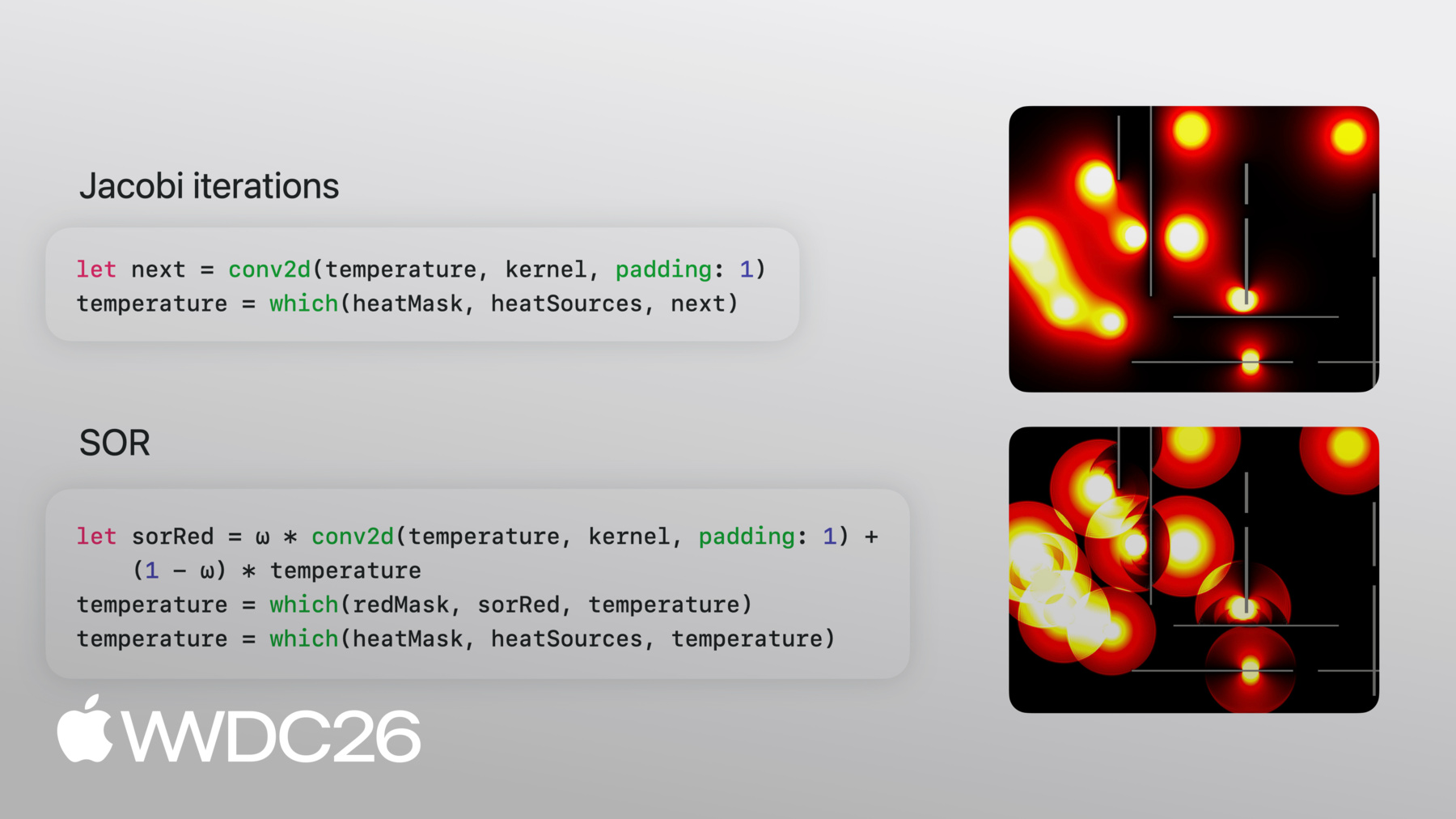
새 반복마다 이웃 값을 이런 스텐실로 평균해요 이런 스텐실로요 이를 반복하면 열이 퍼져요 정상 상태에 도달할 때까지요 업데이트는 작은 이웃만 보고 모든 점에서 같은 방식을 사용해요 이것이 바로 컨볼루션이에요 코드로 살펴볼게요 MLX Swift로 구현한 솔버의 핵심 부분이에요 단계별로 살펴볼게요 커널은 이전 슬라이드의 스텐실로 그대로 작성돼 있어요 이웃에 1/4씩, 중앙과 모서리는 0이에요 온도 격자는 열원으로 초기화돼요 합리적인 초기 값이에요 루프 안에는 두 줄이에요 첫 번째는 물리학이에요 conv2d가 단 한 번의 호출로 전체 격자에 스텐실을 적용해요 두 번째 줄은 경계 조건을 처리해요 요소별 삼항 연산자예요 마스크가 열원이나 벽으로 표시한 곳은 고정 값을 유지하고 나머지는 컨볼루션에서 새 값을 가져와요 끝이에요 수학에서 네 이웃의 평균을 구하라 했고 conv2d 한 번의 호출로 구현했어요 야코비 반복법은 계산은 빠르지만 수렴이 느려요 열은 한 번에 한 셀씩 이동하고 일반적으로 정상 상태까지 N² 반복이 필요해요 N은 격자의 한 변이에요 퀵 정렬이 버블 정렬보다 적은 작업을 하듯이 더 적은 작업으로 정상 상태에 도달하는 알고리즘이 있어요 그 중 하나가 연속 과완화(SOR)예요 방정식이 야코비 반복과 비슷하게 보여요 사실 같은 컨볼루션 커널을 사용해요 매개변수 omega를 사용해요 각 업데이트를 변화 방향으로 더 멀리 밀어요 약간 지나쳐서 더 빨리 도달해요 반복하면서 지나침이 회복돼요 omega 매개변수는 배열 크기에 따라 계산할 수 있어요 최적값을 사용하면 N번의 반복으로 수렴해요 이 기법의 또 다른 핵심은 제자리 업데이트예요 MLX는 일반적으로 제자리 업데이트 대신 새 배열을 생성해요 하지만 빨간/검정 체커보드 패턴으로 교대 셀을 처리해 새 값을 계산할 수 있어요 같은 효과를 내요 코드로 가볼게요! 먼저 격자 크기에 따라 최적 omega를 계산해요 여기서 omega를 어떻게 사용하는지 보세요 방정식과 정확히 일치해요 체커보드 마스크를 사용해요 배열에서 교대 셀을 업데이트해요 이제 검정 셀도 같은 업데이트를 실행해요 이번엔 빨간 이웃 셀에 이미 새 값이 있어요 이것이 바로 필요했던 제자리 업데이트 효과예요 이전처럼 루프에서 반복해요 차이를 살펴볼게요 야코비와 SOR 코드는 거의 동일하고 수학과 밀접하게 일치해요 실행 결과를 볼게요 위의 야코비가 천천히 퍼지는 동안 아래의 SOR는 빠르게 영역을 채워요 SOR는 실행 시 눈에 띄는 물결 패턴이 보여요 실시간으로 지나침과 수정이 이루어져요 결국 둘 다 같은 상태로 수렴해요 한 가지 더요 SOR를 100배 늦춰야 볼 수 있었어요 올바른 알고리즘 선택의 힘이에요!
처음 두 예시는 순방향 계산이었어요 입력으로 시작해 출력을 계산해요 마지막 예시는 반대예요 출력, 즉 데이터 포인트가 있고 그것을 생성하는 매개변수를 찾아야 해요 여기서 핵심 함수 변환을 적용할 거예요 MLX Swift가 제공하는 자동 미분을 위한 'grad'예요 데이터 포인트가 있다고 해볼게요 그 점들을 근사하는 함수를 찾고 싶어요 원하는 함수의 구조를 결정해요 다항식, 사인 합, 또는 원하는 것 무엇이든 가능해요 이 예시에서는 다항식을 사용해요 포물선을 만드는 이차식이에요 손실을 최소화하고 싶어요 함수 출력과 실제 데이터 사이의 제곱 차이 평균이에요 그리고 실제 데이터요 이것이 모든 ML 모델 학습의 핵심 아이디어와 같아요 더 작은 규모일 뿐이에요
손실을 최소화하려면 매개변수에 대한 그래디언트가 필요해요 그리고 매개변수를 업데이트하는 최적화 루프도 필요해요 함수 f를 정의해요 그리고 손실도요 평균 제곱 오차예요 다음으로 theta, 즉 피팅할 계수를 만들어요 그리고 손실 함수를 변환해요 매개변수에 대한 정확한 그래디언트를 생성하는 함수로요 매개변수에 대해 미분을 직접 작성하지 않았어요 MLX가 유도해줬어요 최적화 루프에서 현재 매개변수에서 그래디언트를 평가해요 작은 스텝을 취하고 eval을 호출해 계산 그래프를 플러시해요 무한히 커지지 않도록 각 반복마다요 이것이 경사 하강법이에요
어떻게 보이는지 볼게요 포물선이 빠르게 가까워지다가 데이터를 지나쳐요 하지만 점점 더 가까운 근사값으로 안정돼요 이 예시는 간단한 다항식이었어요 선형 대수 패키지의 QR로 곡선을 직접 피팅할 수도 있었어요 그래디언트는 임의로 복잡한 함수에도 작동해요 그래디언트 이상이 필요하다면 MLX에는 SGD 같은 최적화 알고리즘이 있어요 Adam, RMSprop 등이요
오늘은 배열 컴퓨팅, 컨볼루션, grad를 소개했어요 하지만 MLX에는 전체 수치 컴퓨팅 툴킷이 포함돼요 샘플을 보여드릴게요 선형 대수 FFT N차원 컨볼루션 리덕션 스캔 인덱싱 난수 생성 그 외 많은 기능이 있어요 MLX Swift 위에 구축된 건전한 패키지 생태계가 있어요 core mlx-swift 저장소가 이 세션에서 보여드린 프레임워크예요 mlx-swift-lm에는 Swift 언어 모델 구현이 있어요 mlx-swift-examples에는 시작하는 데 참고할 수 있는 예시 프로그램이 있어요 이 세션 기반 예시들도 거기에 게시될 거예요 모두 오픈 소스이고 몇 줄로 설치 가능해요 Swift Package Manager로요 MLX는 Swift만이 아니에요 Swift, Python, C++, C의 네 가지 프론트엔드를 가진 하나의 프레임워크예요 그 이상의 요구가 있다면 서드 파티에서 더 많은 프론트엔드를 구축했어요 같은 개념을 공유하고 같은 연산을 공유해요 그리고 같은 지연 평가 모델을 공유해요 개념과 패턴이 최소한의 변경으로 서로 전달돼요 Python으로 프로토타입을 만들고 Swift로 출시할 수 있어요 Python에는 더 넓은 연구 생태계가 있어요 mlx-lm과 mlx-vlm 같은 프로젝트가 볼 만해요 Python 측에서 무엇이 구축됐는지 보고 싶다면요 모두가 mlx-swift와 mlx-swift-examples를 살펴보길 권해요 mlx-swift에는 문서가 있고 작동 방식을 볼 수 있는 테스트도 있어요 mlx-swift-examples에는 다양한 예시 앱이 있어요 LLM 통합을 보여주는 stable diffusion 모델 학습 및 파인 튜닝 그리고 물론 이 발표에서 보여드린 예시들도요 수치 컴퓨팅 요구 사항이 있으신가요?
또는 그냥 즐겨보고 싶으신 분도 흥미로운 시뮬레이션과 시각화를 가지고 놀아보세요 한번 해보세요! 아이디어가 떠오른다면 모두 참여하고 기여하길 권해요 해결할 수 있는 오픈 이슈가 있거나 새로운 예시 프로그램을 만들어보세요 시청해 주셔서 감사합니다!
-
-
3:04 - Power iteration with MLX Swift arrays
import MLX let n = 100 let steps = 10 let B = MLXRandom.normal([n, n]) var v = MLXRandom.normal([n]) // get symmetric matrix A = Bᵀ + B let A = B.T + B // Power iteration → top eigenvector of A. // v ← A v / ‖A v‖ for _ in 0 ..< steps { let Av = matmul(A, v) v = Av / norm(Av) eval(v) } // recover the eigenvalue. // λ = vᵀ A v let lambda = matmul(matmul(v.T, A), v) print(lambda) -
5:09 - Mandelbrot set in plain Swift (scalar)
// Plain Swift, scalar-at-a-time var counts = Array2D<Int>(width: w, height: h) for y in 0 ..< h { for x in 0 ..< w { let c = Complex(xMin + Float(x) * xStep, yMin + Float(y) * yStep) var z = Complex<Float>.zero var limit = maxIterations for i in 0 ..< maxIterations { z = z * z + c if z.lengthSquared > radiusSquared { limit = i break } } counts[x, y] = limit } } -
5:27 - Mandelbrot set in MLX Swift (array)
// Compute the Mandelbrot set on a grid of complex numbers import MLX let x = linspace(Float(-2.0), 0.5, count: w) let y = linspace(Float(-1.25), 1.25, count: h).reshaped(h, 1) let c = x + y.asImaginary() var z = MLXArray.zeros(like: c) var counts = MLXArray.zeros(c.shape, dtype: .int16) for _ in 0 ..< maxIterations { z = z * z + c // iterate z ← z² + c counts = counts + (abs(z) .< 2) // count bounded iterations } -
7:27 - Jacobi iteration with conv2d
// Jacobi iteration: average the four neighbors // Convolution weights let kernel = MLXArray(converting: [ 0, 0.25, 0, 0.25, 0, 0.25, 0, 0.25, 0, ]).reshaped(1, 3, 3, 1) // Initial value var temperature = heatSources // Run this in a loop until convergence let next = conv2d(temperature, kernel, padding: 1) temperature = which(heatMask, heatSources, next) -
9:17 - Successive Over-Relaxation (SOR)
// Successive Over-Relaxation: blend the previous and next state let ω: Float = 2.0 / (1.0 + sin(Float.pi / Float(max(M, N)))) let redMask = checkerboard(rows: M, cols: N, phase: 0) let blackMask = checkerboard(rows: M, cols: N, phase: 1) // Update red cells using black neighbors let sorRed = ω * conv2d(temperature, kernel, padding: 1) + (1 - ω) * temperature temperature = which(redMask, sorRed, temperature) temperature = which(heatMask, heatSources, temperature) // Update black cells using (now-updated) red neighbors let sorBlack = ω * conv2d(temperature, kernel, padding: 1) + (1 - ω) * temperature temperature = which(blackMask, sorBlack, temperature) temperature = which(heatMask, heatSources, temperature) -
11:13 - Curve fitting with automatic differentiation
// Define a loss, then optimize it with autodiff
// x, y: data points as MLXArrays
func f(_ θ: MLXArray) -> MLXArray {
    θ[0] + θ[1] * x + θ[2] * x ** 2
}

func loss(_ θ: MLXArray) -> MLXArray {
    mean((f(θ) - y) ** 2)
}

var θ = zeros([numParams])
let gradLoss = grad(loss)

for _ in 0 ..< steps {
    let g = gradLoss(θ)         // ∇L(θ)
    θ = θ - learningRate * g    // parameter update
    eval(θ)                     // force evaluation
}
-