

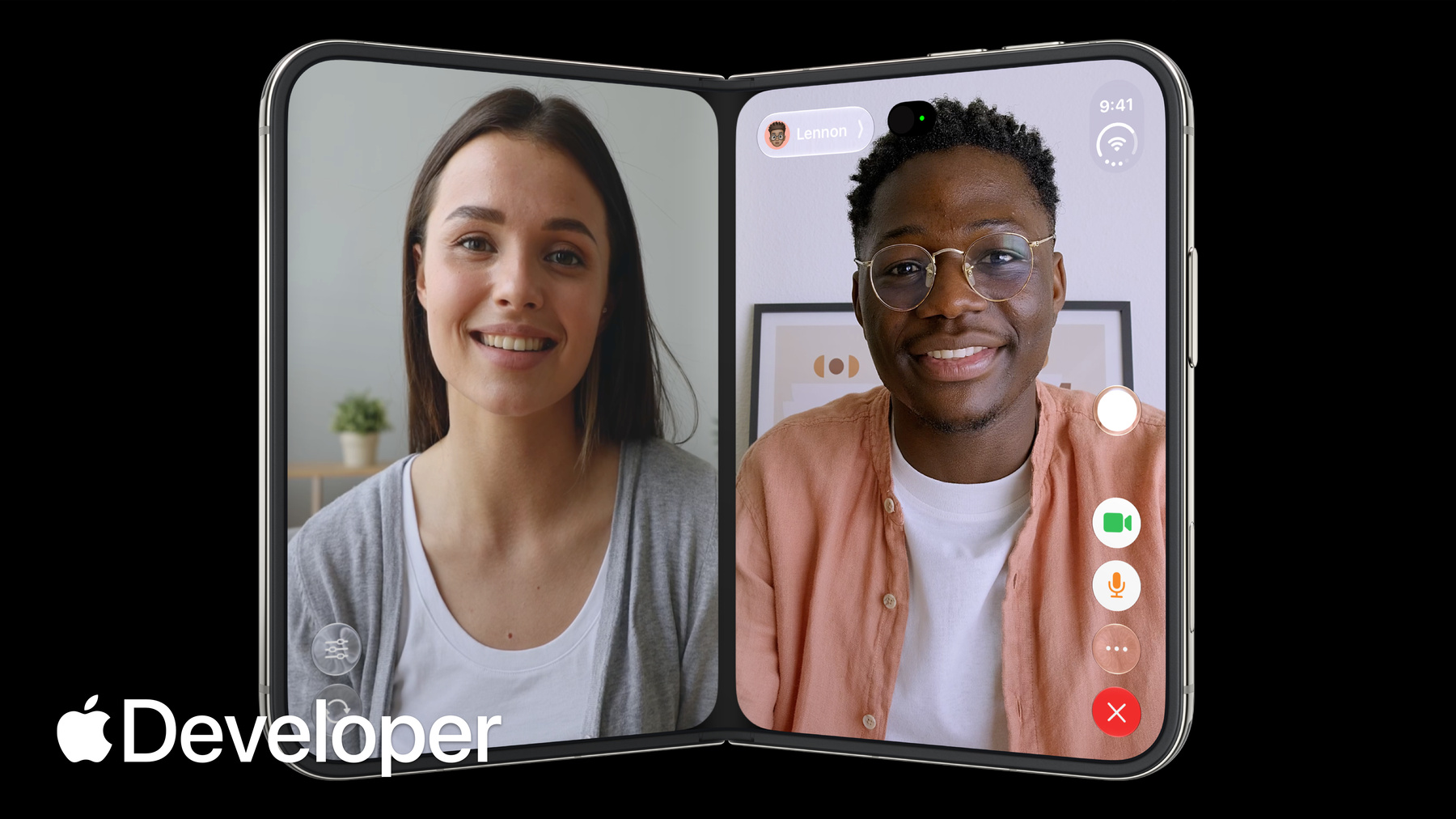
-
为 iPhone Duo 进行设计
iPhone Duo 是首款折叠屏 iPhone,搭载了重新构想的 iOS。了解更新后软件背后的设计原则,探索控件如何在不同折叠姿态之间移动,并学习你的布局需要适应哪些变化及其原因。
章节
- 0:00 - Introduction
- 0:28 - Design principles
- 3:42 - Adapting your design
- 5:07 - Positioning controls
- 6:33 - Designing for the outer display
- 7:34 - Designing for the inner display
- 8:36 - Sheet behavior
- 9:28 - Fold avoidance
- 10:01 - Conclusion
资源
相关视频
Tech Talks
-
搜索此视频…
大家好,欢迎参加“ iPhone Duo 设计”课程。 我是马科斯。 我是文斯。 我们都是 Apple 设计团队的设计师。 在本节课中, 我们将向大家展示如何设计出 在 iPhone Duo 上体验出色的应用。 首先,我们将介绍这款设备背后的设计原则。 随后,我将向大家展示如何调整应用, 使其在 iPhone Duo 的各种 配置下都能呈现出最佳效果。
当 iPhone Duo 处于 闭合状态时,它小巧紧凑、 造型熟悉,握在手中非常舒适。 展开后,它将呈现 iPhone 有史以来最大、最具沉浸感的显示屏, 这为你们喜爱的应用 和内容提供了最佳的展示空间, 而整台设备依然可以轻松放入口袋。
iPhone Duo 支持多 种不同的握持和放置方式。 它可以像书本一样部分折叠使用; 像笔记本电脑一样放 在桌上,内屏朝向用户; 或者靠着边缘 自行竖立。
iPhone Duo 为您 提供了极大的灵活性, 无论身处何种场景,都能让您以自己 喜欢的方式使用这款设备。 闭合时, 其显示屏比传统 iPhone 更宽、更短。 通常位于顶部和底部的按钮及 控制项移至显示屏右侧, 以最大化垂直空间, 并方便您用右手拇指触控。 从而在显示屏左侧为您的内容 创造了一个无干扰的区域, 其效果类似于采用 更传统显示比例的 iPhone。 侧边的新区域用于放置应用控制项。 其中包括标签栏、应用工具栏, 以及“返回”按钮等导航控件, 还有全新设计的状态栏和“灵动岛”—— 当“实时活动”出现时, “灵动岛”会沿垂直方向扩展。
这种高效的空间利用也延伸到了内屏。 控件同样移至内屏侧边, 既最大限度地为内容腾出垂直空间, 又确保用户触手可及。 当您像翻书一样将 iPhone Duo 部分折叠使用时, 屏幕会自然地从中心处弯曲。 此时, 内容会自动远离中心区域。 文字和图片会避开弯曲处, 以便于阅读。 按钮和交互元素也会移至两侧, 这样更容易点击。 这样 一来,弯曲处便成为应用布局的自然分隔线。
纵向模式下也是如此。 当设备部分折叠时, 交互元素会移至屏幕下半部分,既便于操作, 又能确保设备 在桌面上保持稳定。
iPhone Duo 推出了一 种全新的并排运行两个应用程序的方式。 它基于 iPhone 的主屏幕手势, 操作流畅且令人熟悉。
只需将应用程序拖动到一侧,即可创建分屏视图。 这种全新的 50/50 分割将屏幕分为两个独立运行的区域, 因此你可以一边处理一侧的任务, 一边使用另一侧。 在分屏视图 中,控制按钮位于屏幕外缘。 当应用位于左侧时, 控制按钮也会移动到屏幕左边缘, 既方便拇指触控, 又避免了干扰屏幕中央区域。 当视频以画中画模式播放时, 您现在可以将其固定在屏幕顶部,以便继续观看。 当前应用会垂直调整大小,以适应剩余的空间。 如果将设备部分折叠, 视频会扩展以填满屏幕的一半。 因此,应用会根据 不同的视频尺寸实时调整垂直尺寸。
文斯,请详细介绍一下如何让 应用适配 iPhone Duo。 没问题。 让我们来谈谈如何调整设计。
用户会以多种不同的姿势 使用 iPhone Duo, 而您希望应用在所有姿势下都呈现出色的外观。 但这并不意味着要为每种 姿势设计一个自定义布局。 相反,请专注模式, 专注于两个尺寸类别 :外屏的紧凑宽度与内屏的标准宽度。 避免使用固定宽度、 断点或与特定屏幕相关的任何度量标准。 相反,请始终针对这些尺寸类进行设计。
在构建布局时,请使用布局 边距和水平安全区域内边距。 如果你已经在使用这些工具, 那么你已经有了一个很好的开端。 你的应用应该已经能够适应 iPhone Duo 了。 换个角度思考:设计 一个可以自由调整大小的应用, 这样你就万无一失了。 虽然我刚才提到无 需为每种姿态设计专用布局, 但有一种可选布局值得考虑。 当用户将 iPhone Duo 放在桌子上使用时, 它非常适合实现免提体验。 媒体内容可以置于顶部, 而可点击的控件 则位于底部的稳定区域。
如果你决定为这种姿态设计特殊布局, 请确保它与其他姿态 具有相同的控件和整体层级结构。 毕竟你不会希望将功能与特定姿势绑定在一起。
因此,在大多数此类布局中, 控件都会移至侧边。 能详细说明一下吗? 好的。 正如你之前提到的, 这是一种能释放垂直空间的新设计。 让我们来看看它是如何运作的。 在 iPhone Duo 上,控件位于设备侧边, 便于用户操作。
我们仅在竖屏模式下的内屏保留了水平控制栏, 因为这里有充足的垂直空间用于展示应用内容。 请注意, 移至侧边的不仅仅是你的应用控件。 它们将与系统中的动态 元素(包括实时活动和状态 栏)共享这部分垂直空间。 如果空间不足, 应用控件会自动折叠到溢出菜单中。 这看起来可能需要处理很多内容, 但如果你已经有一个 iPhone 应用,将现有的控件映射 到 iPhone Duo 上非常简单, 而且其中大部分操作都是自动处理的。 应用顶部的工具栏按钮 会移到这个垂直空间的顶部,
而底部的工具栏按钮则 会移到 iPhone Duo 的底部。
如果你有标签栏,它会保持底部对齐。 不过,也有一些例外情况。 并非所有内容都会移到侧边。 对于宽度超过右侧空间的工具栏项目 (例如文本按钮或分段控件), 在 iPhone Duo 上应保持在导航栏原位。
随着控件移至侧边, 许多界面层现在呈现出不对称的布局。 设计师需要了解哪些相关知识? 是的, 我们在将自家应用适配到 iPhone Duo 的过程中学到了很多。 根据内容风格的不同, 有几种行之有效的方法。 现在,你可能已经习惯在全屏显示时将内容居中。 但在 iPhone Duo 上,大多数内容 需要进行偏移,以免被控件遮挡。
如果你的应用对齐于水平安全区域的内边距, 这种偏移会自动实现。
不过,某些 UI 仍应在全屏 显示时居中,无需偏移。 对于无需滚动、 沉浸式且高度视觉化的界面, 这种做法效果很好,只要确保交互元素不会 被右侧的控件遮挡即可。 你也可以混合使用这 两种方法:全宽 背景图片或标题栏, 搭配带有内缩的可滚动前景内容。 只需确保每个交互元素都位于 该可滚动区域内,以免被遮挡。
好了,这涵盖了外屏的情况, 那么内屏呢? 啊,问得好。 你肯定不希望应用只是简单地被拉伸。
让我们来谈谈一些最佳方案。 分屏视图是一个绝佳的选择。 它允许你同时展示应用 层级结构中的多个层次。 只需确保外层和内层显示 之间的层级结构保持一致。 不要将功能局限于某种特定状态。 用户在使用应用时可能会频繁地打开和关闭设备, 因此应用内外都 应保持可预测性和一致性。 另一种方案是针对 宽大的内屏优化内容。 参考“音乐”应用的这个示例, 你可以采用垂直堆叠的布局, 当水平空间充足时, 该布局会自动调整为双栏布局。
对于带有标签栏的应用, 还有第三种方案:你可以在内 屏上将标签栏作为侧边栏显示。 不过,这种方案并不适用于所有应用。 它最适合信息 密集型应用,例如“健康”应用中的这个示例。 浮动面板在此设备上也有一些新的行为表现。
它们会根据设备姿态以几 种不同的方式进行自适应调整, 这一点你需要了解。
在外屏上,浮动面板 中的控件默认也会移至侧边。
但如果你觉得不移动更符合内容布局, 可以禁用浮动面板中的垂直条来阻止它们移动。
对于仅含一个工具 栏按钮的弹出视图,这种做法效果很好。
如果使用此选项, 弹出视图会在距离前置摄像头稍远处停止, 状态栏也会重新定位。 在内屏上,无论横屏还是竖屏, 弹出视图都使用标准的水平条。
当 iPhone Duo 部分折叠时, 弹出窗格会向 一侧滑动,以避免停留在折痕处。 实际上,许多其他组件也会如此。
我们发现,当按钮正好位于折痕处时, 用户很难点击它们。 因此,我们设计了一种行为:每当 iPhone Duo 部分折叠时, 就会将交互式元素轻轻推向一侧。 该行为已集成到众多系统组件中, 包括弹出窗口、提示、菜单、 工具栏按钮等。 请尽可能在应用中使用这些组件, 以实现相同的避开折痕行为。
所以核心思想是尽可能让交互 元素远离弯曲区域。 没错。 可滚动内容则无需避开该区域。
好的,让我们总结一下。 这将是您的 iOS 应用首次 在可折叠 iPhone 上亮相。 应用应提供统一的使用体验, 并能适应不同的屏幕尺寸和形态。
通过将界面适配这种新的形态—— 包括将控件移至侧边并支持尺寸调整— —您的应用将在 iPhone Duo 上展现出如鱼得水的体验。
我们非常享受为 iPhone Duo 进行设计的过程。 希望您也能乐在其中。 感谢观看。
-
-
- 0:00 - Introduction
Marcos and Vince from the Apple Design team introduce the design principles behind the device and how to design apps that look and feel great across all the various configurations of iPhone Duo.
- 0:28 - Design principles
iPhone Duo can be used, held and sat down in many different poses. Buttons and controls have been moved to the outer edge of the display to maximize vertical space. When folded, content automatically moves away from the center. Split View multitasking and video PiP mean that apps and their controls can appear at different aspect ratios and should support resizability.
- 3:42 - Adapting your design
Don't design a custom layout for each pose, instead focus on two sizes classes: compact and regular. Build your interface using layout margins and safe area insets to avoid having your UI obscured. If you're considering a bespoke layout for a specific pose, make sure functionality and general hierarchy is preserved.
- 5:07 - Positioning controls
On iPhone Duo, you should position your toolbars, tab bars and controls along the side of the device so they're easier to reach. Controls share this vertical space with dynamic elements like live activities and the status bar. If there's not enough room, controls will collapse into an overflow menu. Exceptions to this rule are controls that are too wide to fit in this vertical space.
- 6:33 - Designing for the outer display
On iPhone Duo, most content needs an offset so it isn't hidden behind controls. Safe area inserts provide this functionality automatically. However, Immersive, highly visual interfaces that don't scroll may still benefit from centering on the full display. You can also mix approaches, like using a full-width background image with written content that's inset.
- 7:34 - Designing for the inner display
Take advantage of the wide inner display to show more content. Split views are a great option to surface more of your app hierarchy. You can also rearrange your UI into a two column layout.
- 8:36 - Sheet behavior
On iPhone Duo, sheets adapt in different ways depending on the pose. On the outer display, they can be presented with vertical controls. On the inner display, they use horizontal bars. When the device is folded, sheets slide over to avoid resting in the fold.
- 9:28 - Fold avoidance
Built into system components is a behavior that nudges interactive elements away from the center when iPhone Duo is partially folded. Except for scrollable content, keep interactive elements away from the hinge as much as possible.
- 10:01 - Conclusion
Your app should feel like a single experience that adapts different display sizes and poses. By supporting resizability, your app will feel at home on iPhone Duo.