

View in English

  • Apple Developer
    • 시작하기

    시작하기 탐색

    • 개요
    • 알아보기
    • Apple Developer Program

    알림 받기

    • 최신 뉴스
    • Hello Developer
    • 플랫폼

    플랫폼 탐색

    • Apple 플랫폼
    • iOS
    • iPadOS
    • macOS
    • tvOS
    • visionOS
    • watchOS
    • App Store

    피처링

    • 디자인
    • 배포
    • 게임
    • 액세서리
    • 웹
    • 홈
    • CarPlay
    • 기술

    기술 탐색

    • 개요
    • Xcode
    • Swift
    • SwiftUI

    피처링

    • 손쉬운 사용
    • 앱 인텐트
    • Apple Intelligence
    • 게임
    • 머신 러닝 및 AI
    • 보안
    • Xcode Cloud
    • 커뮤니티

    커뮤니티 탐색

    • 개요
    • Apple과의 만남 이벤트
    • 커뮤니티 주도 이벤트
    • 개발자 포럼
    • 오픈 소스

    피처링

    • WWDC
    • Swift Student Challenge
    • 개발자 이야기
    • App Store 어워드
    • Apple 디자인 어워드
    • 문서

    문서 탐색

    • 문서 라이브러리
    • 기술 개요
    • 샘플 코드
    • 휴먼 인터페이스 가이드라인
    • 비디오

    릴리즈 노트

    • 피처링 업데이트
    • iOS
    • iPadOS
    • macOS
    • watchOS
    • visionOS
    • tvOS
    • Xcode
    • 다운로드

    다운로드 탐색

    • 모든 다운로드
    • 운영 체제
    • 애플리케이션
    • 디자인 리소스

    피처링

    • Xcode
    • TestFlight
    • 서체
    • SF Symbols
    • Icon Composer
    • 지원

    지원 탐색

    • 개요
    • 도움말
    • 개발자 포럼
    • 피드백 지원
    • 문의하기

    피처링

    • 계정 도움말
    • 앱 심사 지침
    • App Store Connect 도움말
    • 새로 추가될 요구 사항
    • 계약 및 지침
    • 시스템 상태
  • 빠른 링크

    • 이벤트
    • 뉴스
    • 포럼
    • 샘플 코드
    • 비디오
 

비디오

메뉴 열기 메뉴 닫기
  • 컬렉션
  • 주제
  • 전체 비디오
  • 소개

WWDC23 컬렉션으로 돌아가기

  • 소개
  • 코드
  • ScreenCaptureKit의 새로운 기능

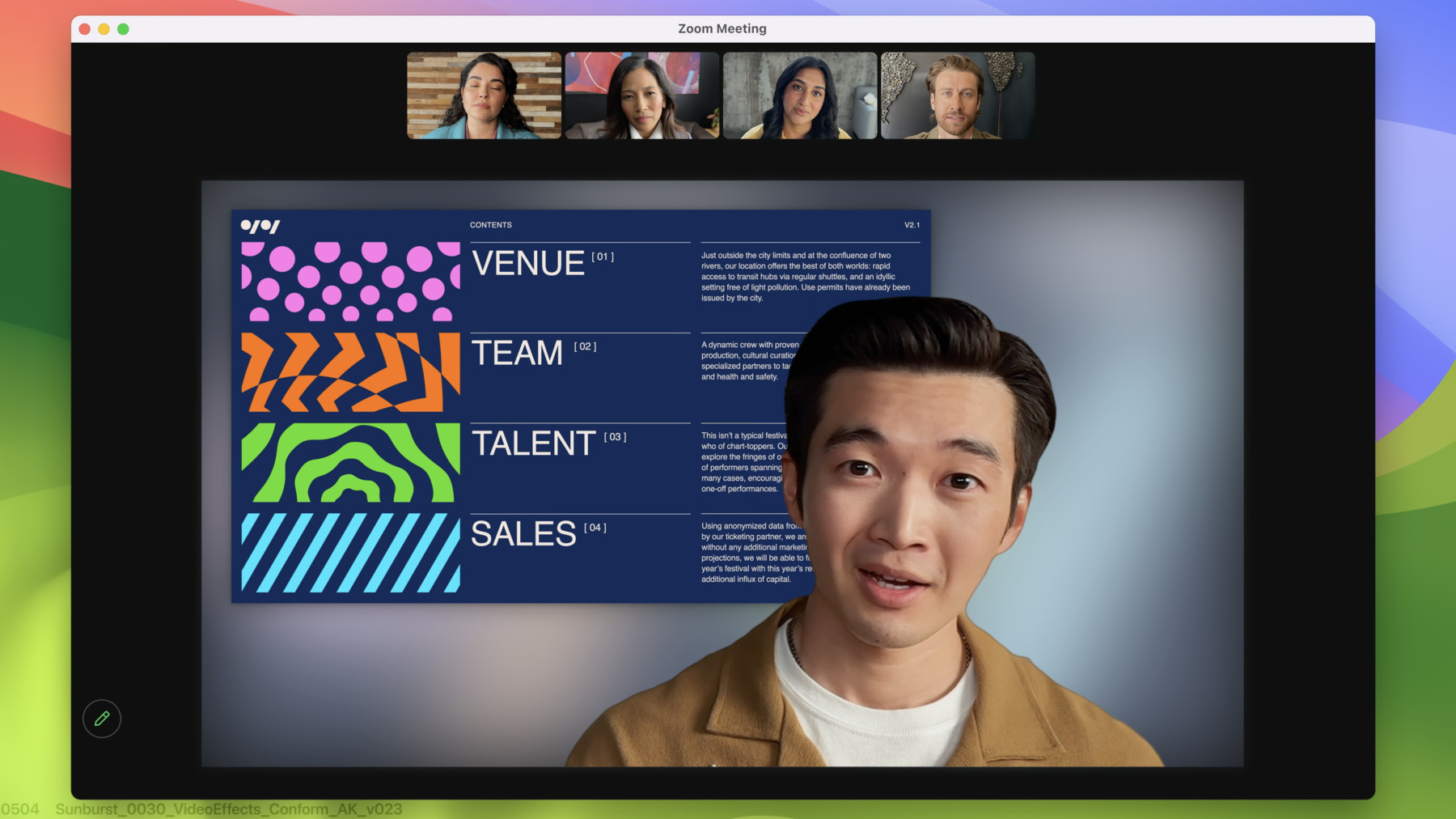
    ScreenCaptureKit의 최신 기능을 활용해 다양한 방식으로 화면을 공유해 보세요. 내장된 시스템 피커, 프레젠터 오버레이, 스크린샷 기능을 살펴보고, 이 기능들을 기존의 ScreenCaptureKit 앱 및 게임에 통합하는 방법을 알아보세요.

    챕터

    • 0:08 - Intro
    • 1:36 - Presenter Overlay
    • 4:36 - Screen sharing picker
    • 9:46 - Screenshot API
    • 13:01 - Wrap-Up

    리소스

    • ScreenCaptureKit
      • HD 비디오
      • SD 비디오

    관련 비디오

    WWDC23

    • 개인정보 보호의 새로운 기능

    WWDC22

    • 한 차원 높은 ScreenCaptureKit 구현하기
    • ScreenCaptureKit 소개
  • 비디오 검색…
    • 3:32 - Set up delegate for stream

      // Set up delegate for stream
      let stream = SCStream(filter: filter, configuration: config, delegate: self)
      
      // delegate method for Presenter Overlay applied
      func stream(_ stream: SCStream, outputEffectDidStart didStart: bool) {
          // if Presenter Overlay is on, present banner in app to notify
          if didStart == true {
              presentBanner()
              turnOffCamera()
          } else {
              turnOnCamera()
          }
      }
    • 6:48 - Set up content sharing picker instance

      // Set up content sharing picker instance
          let picker = SCContentSharingPicker.shared()
          picker.addObserver(self)
          picker.active = true
          
          // show system level picker button
          func showSystemPicker(sender: UIButton!) {
              picker.present(for stream: nil, using contentStyle:.window)
          }
          
          // observer call back for picker
          func contentSharingPicker(_ picker: SCContentSharingPicker, didUpdateWith filter:                                          
          SCContentFilter, for stream: SCStream?) {
             if let stream = stream {
                  stream.updateContentFilter(filter)
              } else {
                  let stream = SCStream(filter: filter, configuration: config, delegate: self)
              }
          }
    • 7:41 - Observer call back for picker did fail and did cancel

      // Set up content sharing picker instance
          let picker = SCContentSharingPicker.shared()
          picker.addObserver(self)
          picker.active = true
      
          // show system level picker button
          func showSystemPicker(sender: UIButton!) {
              picker.present(for stream: nil, using contentStyle:.window)
          }
      
          // observer call back for picker did fail
          func contentSharingPicker(contentSharingPickerStartDidFailWith error:NSError) {
              if error {
                  presentNotifications(error: error)
              }
          }
      
          // observer call back for picker did cancel
          func contentSharingPicker(_ picker: SCContentSharingPicker, didCancel for stream: SCStream?) {
             if stream {
                 resetStateForStream(stream: stream)
             }
          }
    • 8:41 - Per-stream configuration

      // Set up content sharing picker instance
          let picker = SCContentSharingPicker.shared()
          picker.addObserver(self)
          picker.active = true
          
          // Create configurations
          let pickerConfig = SCContentSharingPickerConfiguration()
          
          // Set Picker configuration
          pickerConfig.excludedBundleIDs = [“com.foo.myApp”,”com.foo.myApp2”]
          pickerConfig.allowsRepicking = true
          
          // Create configurations
          picker.setConfiguration(pickerConfig, for: stream)
      
          func showSystemPicker(sender: UIButton!) {
              picker.present(for stream: nil, using contentStyle:.window)
          }
    • 12:26 - Call the screenshot API

      // Call the screenshot API
      
      class SCScreenshotManager : NSObject {
      
      class func captureSampleBuffer(contentFilter: SCContentFilter, 
                                     configuration: SCStreamConfiguration)
        															async throws -> CMSampleBuffer
      
      class func captureImage(contentFilter: SCContentFilter,
                              configuration: SCStreamConfiguration)
        											async throws -> GImage
      }
    • 12:44 - Take a screenshot with ScreenCaptureKit

      // Don't forget to customize the content you want in your screenshot
      // Use SCShareableContent or SCContentSharingPicker to pick your content
      let display = nil;
      
      // Create your SCContentFilter and SCStreamConfiguration
      // Customize these lines to use the content you want and desired config options
      let myContentFilter = SCContentFilter(display: display,
                                   excludingApplications: [],
                                   exceptingWindows: []);
      let myConfiguration = SCStreamConfiguration();
      
      // Call the screenshot API and get your screenshot image
      if let screenshot = try? await SCScreenshotManager.captureSampleBuffer(contentFilter: myContentFilter, configuration:
                                                             myConfiguration) {
          print("Fetched screenshot.")
      } else {
          print("Failed to fetch screenshot.")
      }

Developer Footer

  • 비디오
  • WWDC23
  • ScreenCaptureKit의 새로운 기능
  • 메뉴 열기 메뉴 닫기
    • iOS
    • iPadOS
    • macOS
    • tvOS
    • visionOS
    • watchOS
    메뉴 열기 메뉴 닫기
    • Swift
    • SwiftUI
    • Swift Playground
    • TestFlight
    • Xcode
    • Xcode Cloud
    • SF Symbols
    메뉴 열기 메뉴 닫기
    • 손쉬운 사용
    • 액세서리
    • Apple Intelligence
    • 앱 확장 프로그램
    • App Store
    • 오디오 및 비디오(영문)
    • 증강 현실
    • 디자인
    • 배포
    • 교육
    • 서체(영문)
    • 게임
    • 건강 및 피트니스
    • 앱 내 구입
    • 현지화
    • 지도 및 위치
    • 머신 러닝 및 AI
    • 오픈 소스(영문)
    • 보안
    • Safari 및 웹(영문)
    메뉴 열기 메뉴 닫기
    • 문서(영문)
    • 튜토리얼
    • 다운로드
    • 포럼(영문)
    • 비디오
    메뉴 열기 메뉴 닫기
    • 지원 문서
    • 문의하기
    • 버그 보고
    • 시스템 상태(영문)
    메뉴 열기 메뉴 닫기
    • Apple Developer
    • App Store Connect
    • 인증서, 식별자 및 프로파일(영문)
    • 피드백 지원
    메뉴 열기 메뉴 닫기
    • Apple Developer Program
    • Apple Developer Enterprise Program
    • App Store Small Business Program
    • MFi Program(영문)
    • Mini Apps Partner Program
    • News Partner Program(영문)
    • Video Partner Program(영문)
    • Security Bounty Program(영문)
    • Security Research Device Program(영문)
    메뉴 열기 메뉴 닫기
    • Apple과의 만남
    • Apple Developer Center
    • App Store 어워드(영문)
    • Apple 디자인 어워드
    • Apple Developer Academy(영문)
    • WWDC
    최신 뉴스 읽기 Apple Developer 앱 받기
    Copyright © 2026 Apple Inc. 모든 권리 보유.
    약관 개인정보 처리방침 계약 및 지침