Ok, so the same problem is also with the simulator (iPhone 17). Sorry for that.
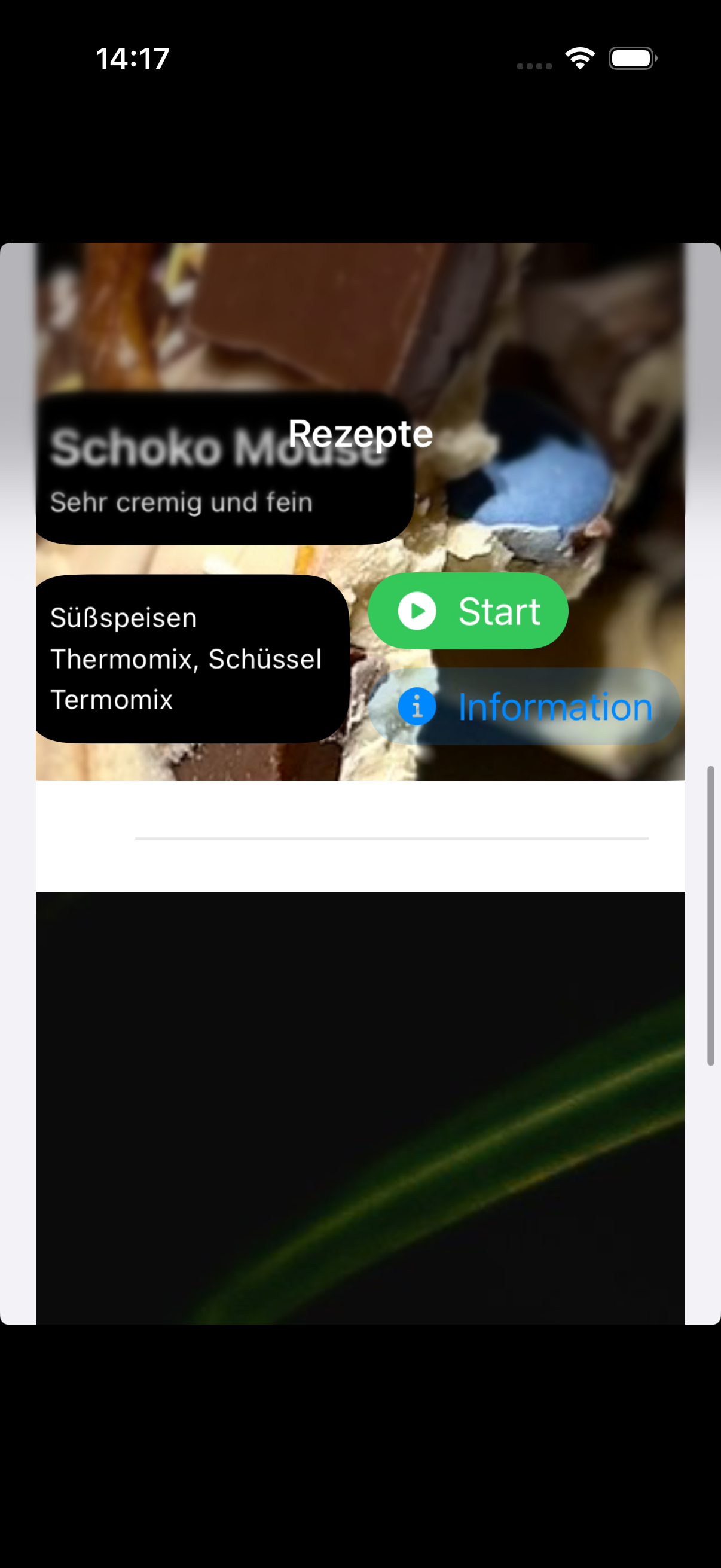
Here is the Code for the ListItem:
import SwiftUI

struct RecipeListItem: View {
    let image: Image
    let title: String
    let subtitle: String
    let category: String
    let kitchenDevice: String
    let istTermomix: Bool
    var body: some View {
        ZStack {
            VStack(alignment: .leading, spacing: 16) {
                image
                    .frame(width: 300, height: 300)

                VStack(alignment: .leading, spacing: 12) {
                    // Title & Subtitle block with rounded background
                    VStack(alignment: .leading, spacing: 4) {
                        Text(title)
                            .foregroundStyle(.background)
                            .font(.title2.bold())
                        Text(subtitle)
                            .foregroundStyle(.background)
                            .font(.caption)
                    }
                    .padding(12)
                    .background(
                        RoundedRectangle(cornerRadius: 20, style: .continuous)
                            .fill(Color.primary)
                    )

                    HStack {

                        // Details block with rounded background
                        VStack(alignment: .leading, spacing: 4) {
                            Text(category)
                                .foregroundStyle(.background)
                                .font(.caption)
                            Text(kitchenDevice)
                                .foregroundStyle(.background)
                                .font(.caption)
                            if istTermomix {
                                Text("Termomix")
                                    .foregroundStyle(.background)
                                    .font(.caption)
                            } else {
                                Text("Kein Termomix notwendig")
                                    .foregroundStyle(.background)
                                    .font(.caption)
                            }
                        }
                        .padding(12)
                        .background(
                            RoundedRectangle(cornerRadius: 20, style: .continuous)
                                .fill(Color.primary)
                        )
                        VStack(alignment: .leading) {
                            Button {

                            } label: {
                                Image(systemName: "play.circle.fill")
                                Text("Start")
                            }
                            .buttonStyle(.borderedProminent)
                            .buttonBorderShape(.capsule)
                            .tint(.green)

                            Button {

                            } label: {
                                Image(systemName: "info.circle.fill")
                                Text("Information")
                            }
                            .buttonStyle(.bordered)
                            .buttonBorderShape(.capsule)
                            .tint(.blue)
                        }
                    }

                }
            }
            .padding()
        }
        .background(.secondary.opacity(0.20))
        .cornerRadius(20)
    }
}

#Preview {
    RecipeListItem(image: Image("Recipe-Placeholder-Picture"), title: "Bruchschokolade", subtitle: "Die beste Bruchschokolade der Welt", category: "Süßes", kitchenDevice: "Ofen", istTermomix: false)
}
And here is the ListView:
import SwiftUI

struct RecipeView: View {
    var body: some View {
        NavigationStack {
            VStack {
                List {
                    RecipeListItem(image: Image("Recipe-Placeholder-Picture"), title: "Schoko Mouse", subtitle: "Sehr cremig und fein", category: "Süßspeisen", kitchenDevice: "Thermomix, Schüssel", istTermomix: true)

                    RecipeListItem(image: Image("Nature-Placeholder"), title: "Salat mit Tomaten", subtitle: "Sehr fruchtig!", category: "Salate und Bowls", kitchenDevice: "Schüssel", istTermomix: false)
                }
            }
            .navigationTitle("Rezepte")
        }
    }
}

#Preview {
    RecipeView()
}
