Placing Metal 3d objects on detected arKit planes

I am developing an arKit app and rendering a model using metal. I played around with the starter arkit template and put the metal code for my 3d model in place of the cubes that it renders on touching the screen. I have some experience with openGL and a little with metal so I know about matrices and transforms. I am trying to figure out how to place my rendered object on a plane when it is detected by the arKit session.
My first inclination was to just use the camera frame and translate the image to the coordinates of where the plane is on the function provided by the ARSessionDelegate

func session(_ session: ARSession, didAdd anchors: [ARAnchor]) 

as it gives you the information about the plane like translation, rotation, etc. That did not quite work. I will attach my code. Thanks in advance for the help.

Here is my current state when I just render my object with the arKit template. I was trying to render it on the table behind when that plane is detected.

Hello,

I am trying to figure out how to place my rendered object on a plane when it is detected by the arKit session.

The way that this template project is written (specifically the updateAnchors(frame:) method), a virtual object will be added at the transform of every anchor in the scene (up to a maximum of kMaxAnchorInstanceCount). ARKit automatically adds anchors to this set for things like planes, so you don't actually need to do anything extra in session(_:didAdd:) to get an instance of your model to render at the transform provided by the plane anchor.

Edit: You also have planeDetection commented out on your world tracking configuration in the code you posted, this should be enabled for ARKit to detect planes.

Please let me know if there was something I missed in your question!

Thank you for the response. So I took out that code here

func session(_ session: ARSession, didAdd anchors: [ARAnchor]) {
    print(anchors)
  }
    

and when it detects this dog bed as a plane it renders my model but I'm inside R2. hahah. So on the apple example for arkit onTap I did the appropriate translations and scales as my model was a lot bigger than the little cube that gets rendered on the example code. So I was trying to do the same with the plane anchor in the above function. However, it seems it is not rendering it on the plane quite right.

 @objc
  func handleTap(gestureRecognize: UITapGestureRecognizer) {
    // Create anchor using the camera's current position
    if let currentFrame = session.currentFrame {

      // Create a transform with a translation of 0.2 meters in front of the camera
      var translation = matrix_identity_float4x4
      var scale = matrix_identity_float4x4
      translation.columns.3.z = -2
       
      scale.columns.0.x = 0.1
      scale.columns.1.y = 0.1
      scale.columns.2.z = 0.1

      let rotationY = float4x4().rotateYAxis(by: 180)
      let rotationZ = float4x4().rotateZAxis(by: 270)
      let rotation = rotationY * rotationZ
      let tranformation = translation * scale * rotation
      let transform = simd_mul(currentFrame.camera.transform, tranformation)

      // Add a new anchor to the session
      let anchor = ARAnchor(transform: transform)
      session.add(anchor: anchor)
    }
  }

I also noticed in the template code that there is the part that updates the anchors and it updates the coordinate transform. Do I need to maybe apply translation and scale here?

func updateAnchors(frame: ARFrame) {
    // Update the anchor uniform buffer with transforms of the current frame's anchors
    anchorInstanceCount = min(frame.anchors.count, kMaxAnchorInstanceCount)
     
    var anchorOffset: Int = 0
    if anchorInstanceCount == kMaxAnchorInstanceCount {
      anchorOffset = max(frame.anchors.count - kMaxAnchorInstanceCount, 0)
    }
     
    for index in 0..<anchorInstanceCount {
      let anchor = frame.anchors[index + anchorOffset]
       
      // Flip Z axis to convert geometry from right handed to left handed
      var coordinateSpaceTransform = matrix_identity_float4x4
      coordinateSpaceTransform.columns.2.z = -1.0
       
      let modelMatrix = simd_mul(anchor.transform, coordinateSpaceTransform)
      let anchorUniforms = anchorUniformBufferAddress.assumingMemoryBound(to: InstanceUniforms.self).advanced(by: index)
      anchorUniforms.pointee.modelMatrix = modelMatrix
    }
  }

Here is what it looks like when it detects the dog bed plane and then renders R2.
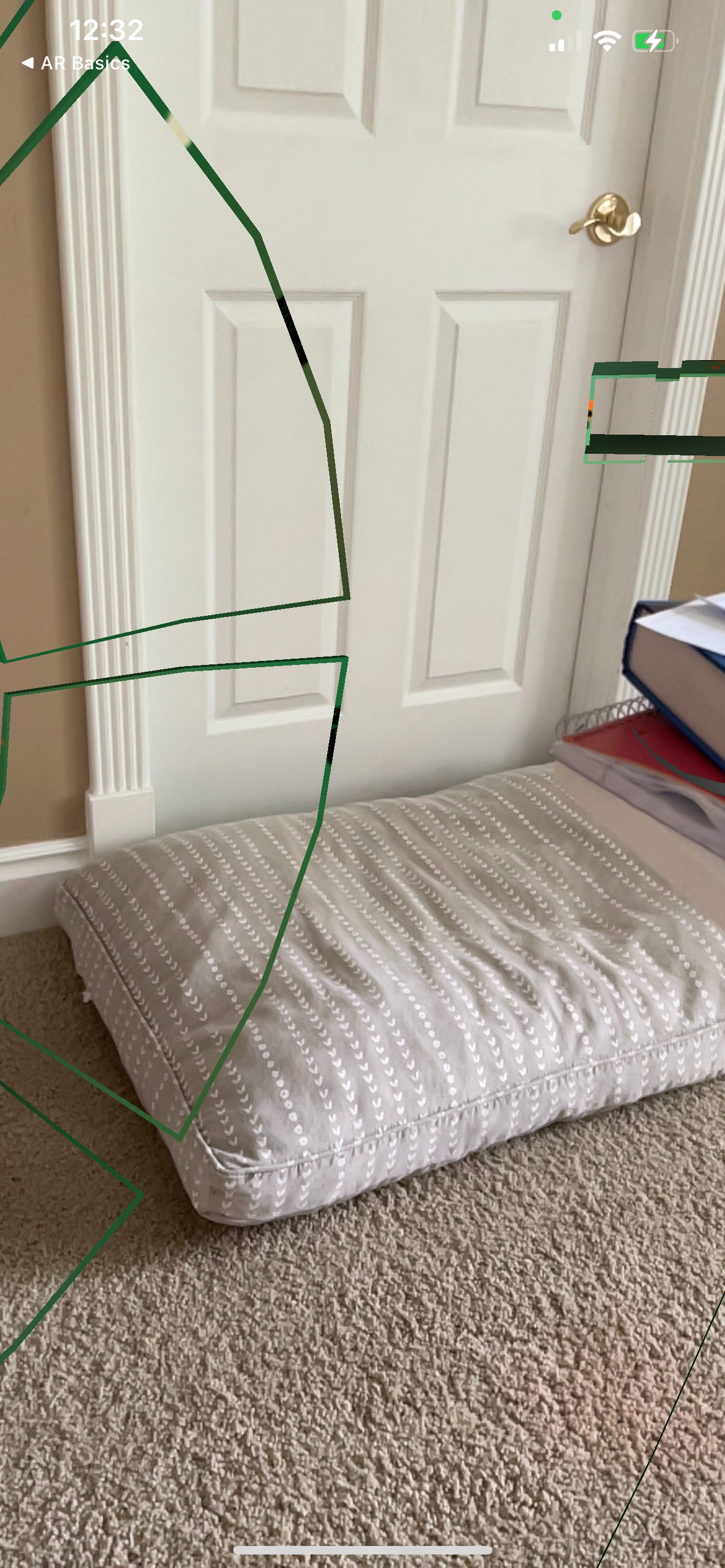
I also noticed in the template code that there is the part that updates the anchors and it updates the coordinate transform. Do I need to maybe apply translation and scale here?

That method does not actually update the ARAnchors, but rather it updates the anchor uniforms buffer which is storing model matrices derived from the current ARAnchor transforms. This buffer of model matrices is what is ultimately used by the Renderer to determine where (and at what scale) each instance of your geometry should be rendered at in the scene.

If you wanted to scale your model down (at runtime), you could scale the model matrix with something like this:

// A matrix that scales x,y,z down by a factor of 10.

let scaleMatrix = simd_float4x4(diagonal: SIMD4(0.1, 0.1, 0.1, 1))

// Applying the scaling matrix to the modelMatrix.

let scaledModelMatrix = modelMatrix * scaleMatrix

Ok so you would do that in this function

func updateAnchors(frame: ARFrame) {
    // Update the anchor uniform buffer with transforms of the current frame's anchors
    anchorInstanceCount = min(frame.anchors.count, kMaxAnchorInstanceCount)
     
    var anchorOffset: Int = 0
    if anchorInstanceCount == kMaxAnchorInstanceCount {
      anchorOffset = max(frame.anchors.count - kMaxAnchorInstanceCount, 0)
    }
     
    for index in 0..<anchorInstanceCount {
      let anchor = frame.anchors[index + anchorOffset]
       
      // Flip Z axis to convert geometry from right handed to left handed
      var coordinateSpaceTransform = matrix_identity_float4x4
      coordinateSpaceTransform.columns.2.z = -1.0
       
      let modelMatrix = simd_mul(anchor.transform, coordinateSpaceTransform)
      let anchorUniforms = anchorUniformBufferAddress.assumingMemoryBound(to: InstanceUniforms.self).advanced(by: index)
      anchorUniforms.pointee.modelMatrix = modelMatrix
    }
  }

I know it is hard to tell, but does it seem like my model is getting place on the plane anchor and it is just scaled too big? If I use the template code, in theory it should just put my model on that anchor correct with the below function as it does from the onTap example?

Ok so you would do that in this function 

Yes you could do the scaling in this function, keep in mind that you don't have to do things in the way that this template project has demonstrated though. A different architecture may make more sense for your app. 

I know it is hard to tell, but does it seem like my model is getting place on the plane anchor and it is just scaled too big? If I use the template code, in theory it should just put my model on that anchor correct with the below function as it does from the onTap example? 

Correct, it seems like your model is likely designed in centimeters, but this renderer is expecting geometry to be in meters, and so the scale is likely off by a factor of 100. It is also possible that your model has its origin defined at its centroid, as opposed to being at its base. So it is possibly that placing it directly at the location of the plane will result in your model being displayed as being bisected by the plane. This can be corrected by either a runtime translation of the model matrix, or a translation to the model's origin in a 3D model editing tool.

Ok great. Thank you so much. You have been incredibly helpful. Maybe I will try some of apple's usdz models on the arkit and see if they are placed better.

Placing Metal 3d objects on detected arKit planes
 
 
Q