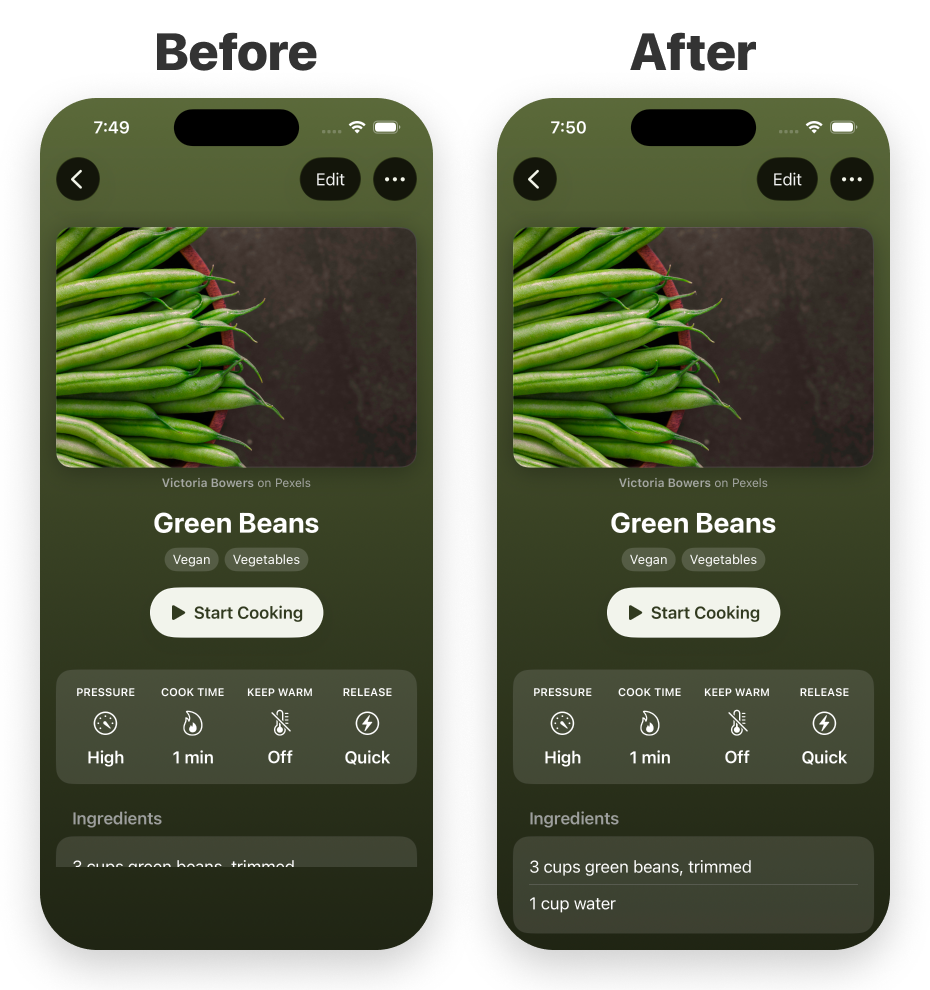
I just ran into this issue in one of my apps. With Reduce Transparency enabled on iOS 26, hiding a SwiftUI tab bar could leave its opaque background and safe-area reservation behind.
The good news is that it appears to be fixed in iOS 27 (24A5390f). But while iOS 27 is just around the corner, many people typically take a while to upgrade, so I wanted a workaround.
I mainly work in SwiftUI, so got help from an LLM to build this UIKit bridge. It solves the issue in my app for both zoom and push/pop transitions (parent view has both grid and list layouts).
The app still uses SwiftUI as the source of truth for tab bar visibility. In simplified form:
NavigationStack(path: $path) {
    // Root content and navigation destinations
}
.toolbarVisibility(
    path.count == 0 ? .automatic : .hidden,
    for: .tabBar
)
I then apply the workaround to the destination where the tab bar should remain hidden:
DetailView()
    .applyIOS26TabBarVisibilityWorkaround()
The helper only reasserts the hidden state through UIKit. It intentionally does not show the tab bar during teardown, because that can conflict with another destination or an unchanged SwiftUI visibility preference. The parent-owned .toolbarVisibility modifier remains responsible for restoring the bar.
import SwiftUI
import UIKit

extension View {
    /// Works around the iOS 26 tab-bar safe-area bug when Reduce Transparency is enabled.
    func applyIOS26TabBarVisibilityWorkaround() -> some View {
        background(IOS26TabBarVisibilityWorkaround())
    }
}

/// Uses UIKit because SwiftUI can leave the iOS 26 tab-bar safe area behind after hiding the bar.
private struct IOS26TabBarVisibilityWorkaround: UIViewControllerRepresentable {
    func makeUIViewController(context: Context) -> Controller {
        Controller()
    }

    func updateUIViewController(_ uiViewController: Controller, context: Context) {
        uiViewController.hideTabBar()
    }

    static func dismantleUIViewController(
        _ uiViewController: Controller,
        coordinator: ()
    ) {
        uiViewController.stopApplyingWorkaround()
    }

    final class Controller: UIViewController {
        private weak var trackedTabBarController: UITabBarController?
        private var shouldApplyWorkaround = false

        override func loadView() {
            let view = UIView()
            view.backgroundColor = .clear
            view.isUserInteractionEnabled = false
            self.view = view
        }

        func hideTabBar() {
            shouldApplyWorkaround = true
            applyHiddenTabBarVisibility()
        }

        override func viewDidAppear(_ animated: Bool) {
            super.viewDidAppear(animated)
            applyHiddenTabBarVisibility()
        }

        override func didMove(toParent parent: UIViewController?) {
            super.didMove(toParent: parent)
            guard parent != nil else { return }
            applyHiddenTabBarVisibility()
        }

        func stopApplyingWorkaround() {
            shouldApplyWorkaround = false
            trackedTabBarController = nil
        }

        private func applyHiddenTabBarVisibility() {
            guard shouldApplyWorkaround, parent != nil else { return }
            guard #available(iOS 26.0, *) else { return }
            if #available(iOS 27.0, *) { return }

            guard let tabBarController = resolveTabBarController() else {
                return
            }

            trackedTabBarController = tabBarController

            // Deliberately call this even if isTabBarHidden is already true.
            // Reasserting the state is what corrects the stale iOS 26 layout.
            tabBarController.setTabBarHidden(true, animated: false)
        }

        private func resolveTabBarController() -> UITabBarController? {
            if let tabBarController {
                return tabBarController
            }

            if let tabBarController = parent?.tabBarController {
                return tabBarController
            }

            var ancestor = parent
            while let current = ancestor {
                if let tabBarController = current as? UITabBarController {
                    return tabBarController
                }
                ancestor = current.parent
            }

            var responder: UIResponder? = viewIfLoaded
            while let current = responder {
                if let tabBarController = current as? UITabBarController {
                    return tabBarController
                }
                responder = current.next
            }

            return trackedTabBarController
        }
    }
}
I can’t say this is the cleanest solution, but it fixes the issue for me while leaving the normal SwiftUI navigation transitions intact.
And here's the resulting detail view before and after the workaround on iOS 26: