iOS9's App Transport Security states that connections that do not meet certain requirements will fail. Below are the requirements quoted from Apple's document (https://developer.apple.com/library/prerelease/ios/technotes/App-Transport-Security-Technote/index.html)
* The server must support at least Transport Layer Security (TLS) protocol version 1.2.
* Connection ciphers are limited to those that provide forward secrecy (see the list of ciphers below.)
* Certificates must be signed using a SHA256 or greater signature hash algorithm, with either a 2048-bit or greater RSA key or a 256-bit or greater Elliptic-Curve (ECC) key.
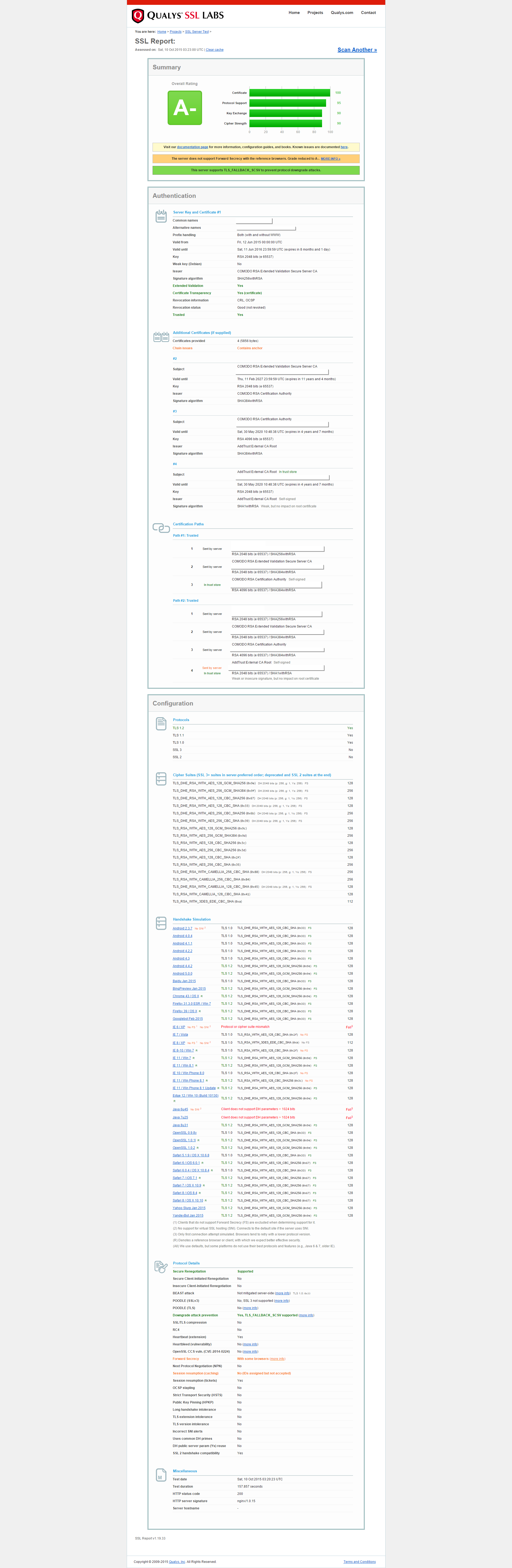
I've checked that my server is indeed using a certificate with 2048-bit RSA key and signed using SHA256 hash algorithm. Anyhow, my Xcode7-built app failed to connect to my server with default ATS setting. After I set `NSExceptionRequiresForwardSecrecy` to `NO` in the app's `Info.plist`, however, the connection succeeded. So it looks like that my server isn't correctly configured with forward secrecy ciphers. Below is my current setting in nginx.conf:
    ssl_protocols             TLSv1 TLSv1.1 TLSv1.2;
    ssl_prefer_server_ciphers on;
    ssl_ciphers               'ECDHE-RSA-AES128-GCM-SHA256:ECDHE-ECDSA-AES128-GCM-SHA256:ECDHE-RSA-AES256-GCM-SHA384:ECDHE-ECDSA-AES256-GCM-SHA384:DHE-RSA-AES128-GCM-SHA256:DHE-DSS-AES128-GCM-SHA256:kEDH+AESGCM:ECDHE-RSA-AES128-SHA256:ECDHE-ECDSA-AES128-SHA256:ECDHE-RSA-AES128-SHA:ECDHE-ECDSA-AES128-SHA:ECDHE-RSA-AES256-SHA384:ECDHE-ECDSA-AES256-SHA384:ECDHE-RSA-AES256-SHA:ECDHE-ECDSA-AES256-SHA:DHE-RSA-AES128-SHA256:DHE-RSA-AES128-SHA:DHE-DSS-AES128-SHA256:DHE-RSA-AES256-SHA256:DHE-DSS-AES256-SHA:DHE-RSA-AES256-SHA:AES128-GCM-SHA256:AES256-GCM-SHA384:AES128-SHA256:AES256-SHA256:AES128-SHA:AES256-SHA:AES:CAMELLIA:DES-CBC3-SHA:!aNULL:!eNULL:!EXPORT:!DES:!RC4:!MD5:!PSK:!aECDH:!EDH-DSS-DES-CBC3-SHA:!EDH-RSA-DES-CBC3-SHA:!KRB5-DES-CBC3-SHA';
I also regenerate a new DH group with the following command:
openssl dhparam -out dhparams.pem 2048and added it in my nginx configuration:
ssl_dhparam dhparams.pem;According to Apple's document, with default ATS settings, accepted ciphers include:
- TLS_ECDHE_ECDSA_WITH_AES_256_GCM_SHA384
- TLS_ECDHE_ECDSA_WITH_AES_128_GCM_SHA256
- TLS_ECDHE_ECDSA_WITH_AES_256_CBC_SHA384
- TLS_ECDHE_ECDSA_WITH_AES_256_CBC_SHA
- TLS_ECDHE_ECDSA_WITH_AES_128_CBC_SHA256
- TLS_ECDHE_ECDSA_WITH_AES_128_CBC_SHA
- TLS_ECDHE_RSA_WITH_AES_256_GCM_SHA384
- TLS_ECDHE_RSA_WITH_AES_128_GCM_SHA256
- TLS_ECDHE_RSA_WITH_AES_256_CBC_SHA384
- TLS_ECDHE_RSA_WITH_AES_128_CBC_SHA256
- TLS_ECDHE_RSA_WITH_AES_128_CBC_SHA
(It seems that my nginx's ssl_ciphers setting has these ciphers.)
And if `NSExceptionRequiresForwardSecrecy` is set to `NO` in the app's settings, following ciphers will also be accepted:
- LS_RSA_WITH_AES_256_GCM_SHA384
- TLS_RSA_WITH_AES_128_GCM_SHA256
- TLS_RSA_WITH_AES_256_CBC_SHA256
- TLS_RSA_WITH_AES_256_CBC_SHA
- TLS_RSA_WITH_AES_128_CBC_SHA256
- TLS_RSA_WITH_AES_128_CBC_SHA
With this set to `NO`, my app connects successfully to my server, though the reason remains unknown to me.
(Running `nsurl --ats-diagnostics` indicates the same thing.)
So my question is, how should I setup nginx for forward secrecy ciphers so that iOS9 (Xcode7) app with default ATS settings can connect successfully?
For diagnosis purpose, below is the **ssltest** result page screenshot of my server given by ssllabs: