Adding to the original post. No positive progress, just more detail and things I've tried that don't work.
	<body>
		<!-- Does not work, datadetectors still on, overlaying/hiding the .png map links
			<div datadetectors="off" x-apple-data-detectors="false" class="NoDDs">
				<a datadetectors="off" x-apple-data-detectors="false" style="display: inline">
					<img src="./GroundContact_W7_Bubbles.png" datadetectors="off" x-apple-data-detectors="false"  class="inline" alt="./GroundContact_W7_Bubbles.png: not found" usemap="#html">
				</a>
			</div>
		-->
		<!-- Does not work, datadetectors still on, overlaying/hiding the .png map links
			<img src="./GroundContact_W7_Bubbles.png" datadetectors="off" x-apple-data-detectors="false"  class="inline" alt="./GroundContact_W7_Bubbles.png: not found" usemap="#html">
		-->
		<!-- Does not work, datadetectors still on, overlaying/hiding the .png map links
			<h1 datadetectors="off">
				<img src="./GroundContact_W7_Bubbles.png" datadetectors="off" x-apple-data-detectors="false"  class="inline" alt="./GroundContact_W7_Bubbles.png: not found" usemap="#html">
			</h1>
		-->
		<!-- Does not work, datadetectors still on, overlaying/hiding the .png map links
			<a href="#" datadetectors="off" x-apple-data-detectors="false">
				<img src="./GroundContact_W7_Bubbles.png" class="inline" alt="./GroundContact_W7_Bubbles.png: not found" usemap="#html">
			</a>
		-->
			<!-- Does not work, datadetectors still on, overlaying/hiding the .png map links
			<img src="./GroundContact_W7_Bubbles.png" datadetectors="off" x-apple-data-detectors="false"  class="inline" alt="./GroundContact_W7_Bubbles.png: not found" usemap="#html">
		-->
		<!-- Does not work, datadetectors are on, overlaying/hiding the .png map links.
			Definition order - map first, makes no difference. usemap before src also makes no difference.
			.gif vs .png makes no difference.
		-->
		<img src="./GroundContact_W7_Bubbles.png" alt="./GroundContact_W7_Bubbles.png: not found" usemap="#html">

		<map name="html">
			<area shape="circle" coords="73,250,30" href="./PassiveStrideRecovery_W12_Notes.html" alt="PassiveStrideRecovery_W12" target="_self">
			<area shape="circle" coords="174,250,30" href="./QuietFeet_W6_Notes.html" alt="QuietFeet_W6" target="_self">
			<area shape="circle" coords="63,350,30" href="./ArmSwing_W4_Notes.html" alt="ArmSwing_W4" target="_self">
			<area shape="circle" coords="133,350,30" href="./Breathing_W11_Notes.html" alt="Breathing_W11" target="_self">
			<area shape="circle" coords="205,350,30" href="./ForwardTilt_W8_Notes.html" alt="ForwardTilt_W8" target="_self">
			<area shape="circle" coords="286,350,30" href="./HeadPosture_W10_Notes.html" alt="HeadPosture_W10" target="_self">
			... (more map areas here. One for each circle in the image)
			...
		</map>
	</body>
Here's one of the 27 areas in my .png that "Data Detectors" creates, that block some of my own mapped areas. I create a linked map for each circle in the .png, each limited to the associated circle's size:
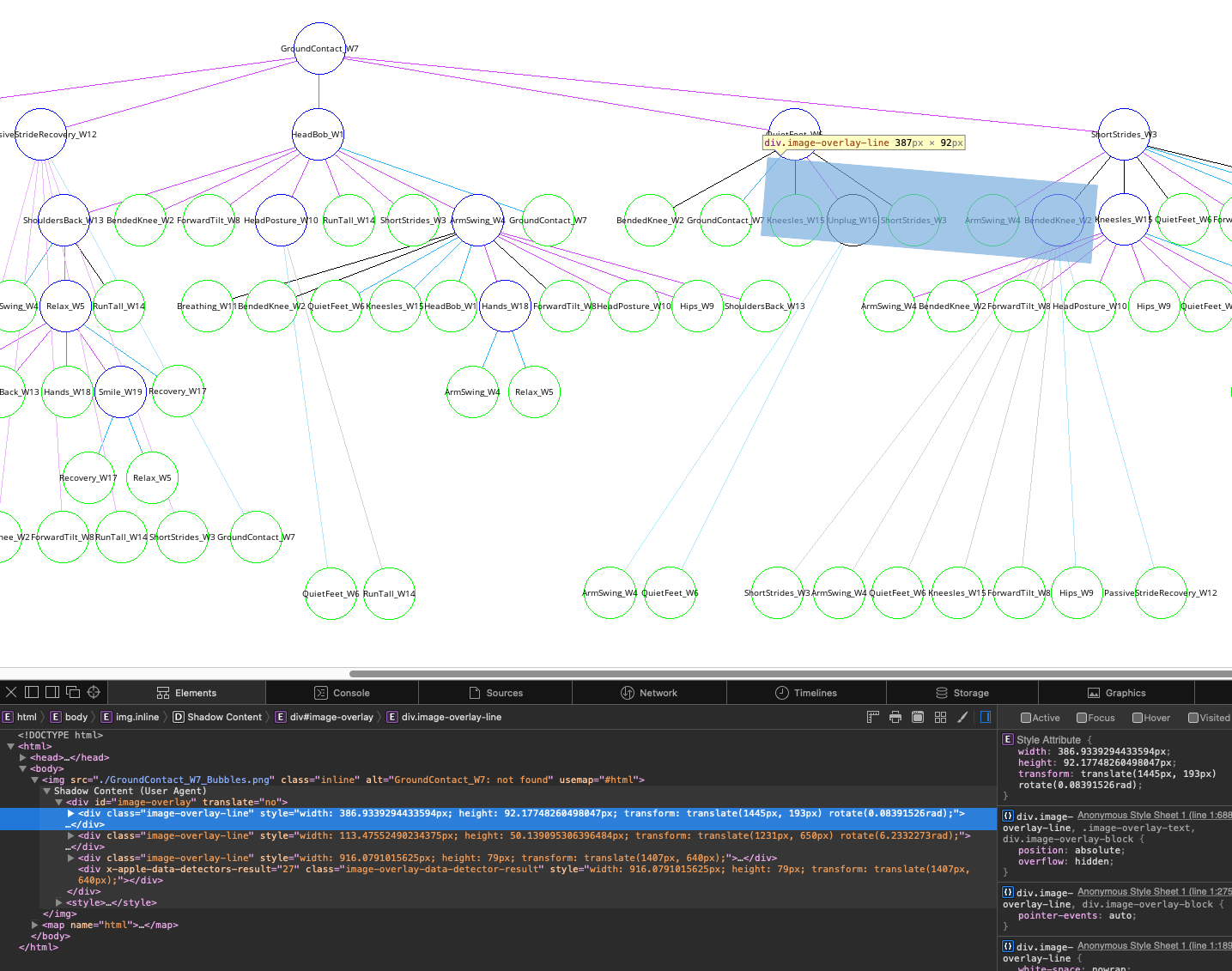
I don't know what Data Detectors is identifying or why. Whenever I refresh the URL the "x-apple-data-detectors-result" grows, though no additional blocks are identified.
I'm still trying to stop Data Detectors obscuring my created (mapped) links.
Any help appreciated.
