

View in English

  • Apple Developer
    • Get Started

    Explore Get Started

    • Overview
    • Learn
    • Apple Developer Program

    Stay Updated

    • Latest News
    • Hello Developer
    • Platforms

    Explore Platforms

    • Apple Platforms
    • iOS
    • iPadOS
    • macOS
    • tvOS
    • visionOS
    • watchOS
    • App Store

    Featured

    • Design
    • Distribution
    • Games
    • Accessories
    • Web
    • Home
    • CarPlay
    • Technologies

    Explore Technologies

    • Overview
    • Xcode
    • Swift
    • SwiftUI

    Featured

    • Accessibility
    • App Intents
    • Apple Intelligence
    • Games
    • Machine Learning & AI
    • Security
    • Xcode Cloud
    • Community

    Explore Community

    • Overview
    • Meet with Apple events
    • Community-driven events
    • Developer Forums
    • Open Source

    Featured

    • WWDC
    • Swift Student Challenge
    • Developer Stories
    • App Store Awards
    • Apple Design Awards
    • Apple Developer Centers
    • Documentation

    Explore Documentation

    • Documentation Library
    • Technology Overviews
    • Sample Code
    • Human Interface Guidelines
    • Videos

    Release Notes

    • Featured Updates
    • iOS
    • iPadOS
    • macOS
    • watchOS
    • visionOS
    • tvOS
    • Xcode
    • Downloads

    Explore Downloads

    • All Downloads
    • Operating Systems
    • Applications
    • Design Resources

    Featured

    • Xcode
    • TestFlight
    • Fonts
    • SF Symbols
    • Icon Composer
    • Support

    Explore Support

    • Overview
    • Help Guides
    • Developer Forums
    • Feedback Assistant
    • Contact Us

    Featured

    • Account Help
    • App Review Guidelines
    • App Store Connect Help
    • Upcoming Requirements
    • Agreements and Guidelines
    • System Status
  • Quick Links

    • Events
    • News
    • Forums
    • Sample Code
    • Videos
 

Vídeos

Abrir menu Fechar menu
  • Coleções
  • Todos os vídeos
  • Sobre

Mais vídeos

  • Sobre
  • Código
  • Meet the UIKit button system

    Every app uses Buttons. With iOS 15, you can adopt updated styles to create gorgeous buttons that fit effortlessly into your interface. We'll explore features that make it easier to create different types of buttons, learn how to provide richer interactions, and discover how you can get great buttons when using Mac Catalyst.

    Recursos

    • UIKit
      • Vídeo HD
      • Vídeo SD

    Vídeos relacionados

    WWDC21

    • Build interfaces with style
    • Qualities of a great Mac Catalyst app
    • Wednesday@WWDC21
    • What's new in Mac Catalyst
    • What's new in UIKit
  • Buscar neste vídeo...
    • 2:13 - Creating a button with a configuration

      // Create the Sign In button
      
      let signInButton = UIButton(type: .system)
      signInButton.configuration = .filled()
      signInButton.setTitle("Sign In", for: [])
    • 3:20 - Customizing a button configuration

      // Create the Add to Cart button
      
      var config = UIButton.Configuration.tinted()
      config.title = "Add to Cart"
      config.image = UIImage(systemName: "cart.badge.plus")
      config.imagePlacement = .trailing
      addToCartButton = UIButton(configuration: config,
                                 primaryAction: …)
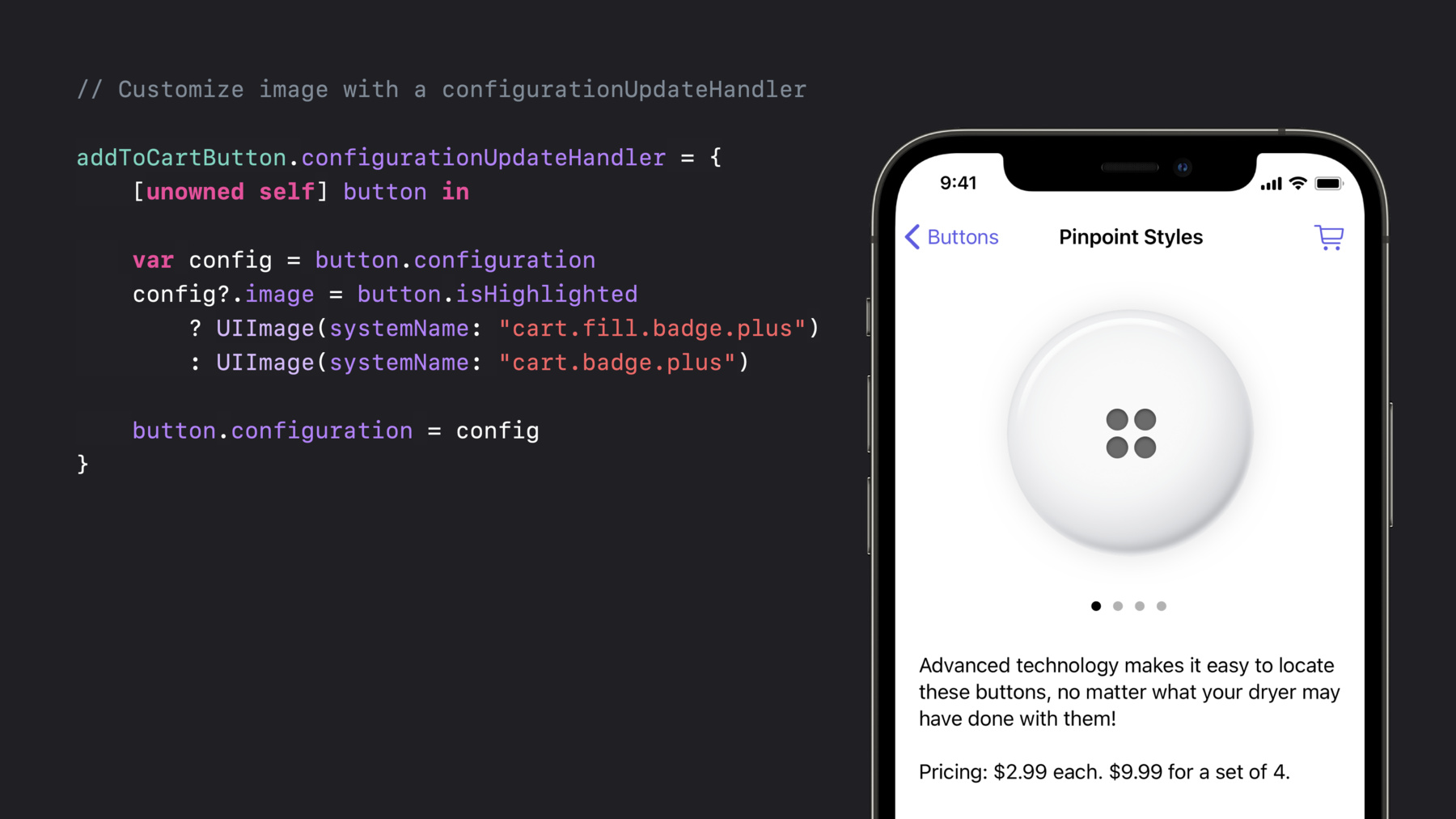
    • 4:45 - Customizing a button with a configuration update handler

      // Customize image and subtitle with a configurationUpdateHandler
      
      addToCartButton.configurationUpdateHandler = {
          [unowned self] button in
      
          var config = button.configuration
          config?.image = button.isHighlighted
              ? UIImage(systemName: "cart.fill.badge.plus")
              : UIImage(systemName: "cart.badge.plus")
          config?.subtitle = self.itemQuantityDescription
          button.configuration = config
      }
    • 5:59 - Indicating a configuration needs an update

      // Update addToCartButton when itemQuantityDescription changes
      
      private var itemQuantityDescription: String? {
          didSet {
              addToCartButton.setNeedsUpdateConfiguration()
          }
      }
    • 8:26 - A completely customized button

      // Configure the button background
      
      var config = UIButton.Configuration.filled()
      config.buttonSize = .large
      config.image = UIImage(systemName: "cart.fill")
      config.title = "Checkout"
      config.background.backgroundColor = .buttonEmporium
      
      let checkoutButton = UIButton(configuration: config
                                    primaryAction: …) 
      addToCartButton.configurationUpdateHandler = {
          [unowned self] button in
      
          var config = button.configuration
          config?.showsActivityIndicator = self.isCartBusy
          button.configuration = config
      }
    • 11:56 - Creating a toggle button

      // Toggle button
      
      // UIAction setup
      let stockToggleAction = UIAction(title: "In Stock Only") { _ in
          toggleStock()
      }
      
      // The button
      let button = UIButton(primaryAction: stockToggleAction)
      
      button.changesSelectionAsPrimaryAction = true
      
      // Initial state
      button.isSelected = showingOnlyInStock()
    • 14:30 - Creating a pop-up button

      // Pop-up button
      
      let colorClosure = { (action: UIAction) in
          updateColor(action.title)
      }
      
      let button = UIButton(primaryAction: nil)
      
      button.menu = UIMenu(children: [
          UIAction(title: "Bondi Blue", handler: colorClosure),
          UIAction(title: "Flower Power", state: .on, handler: colorClosure)
      ])
      
      button.showsMenuAsPrimaryAction = true
      
      button.changesSelectionAsPrimaryAction = true
      
      // Update to the currently set one
      updateColor(button.menu?.selectedElements.first?.title)
      
      // Update the selection
      (button.menu?.children[selectedColorIndex()] as? UIAction)?.state = .on
    • 18:18 - Creating a custom single selection menu

      // Single selection menu
      
      // The sort menu
      let sortMenu = UIMenu(title: "Sort By", options: .singleSelection, children: [
          UIAction(title: "Title", handler: sortClosure),
          UIAction(title: "Date", handler: sortClosure),
          UIAction(title: "Size", handler: sortClosure)
      ])
      
      // The top menu
      let topMenu = UIMenu(children: [
          UIAction(title: "Refresh", handler: refreshClosure),
          UIAction(title: "Account", handler: accountClosure),
          sortMenu
      ])
      
      let sortSelectionButton = UIBarButtonItem(primaryAction: nil, menu: topMenu)
      
      updateSorting(sortSelectionButton.menu?.selectedElements.first)

Developer Footer

  • Vídeos
  • WWDC21
  • Meet the UIKit button system
  • Open Menu Close Menu
    • iOS
    • iPadOS
    • macOS
    • tvOS
    • visionOS
    • watchOS
    • App Store
    Open Menu Close Menu
    • Swift
    • SwiftUI
    • Swift Playground
    • TestFlight
    • Xcode
    • Xcode Cloud
    • Icon Composer
    • SF Symbols
    Open Menu Close Menu
    • Accessibility
    • Accessories
    • Apple Intelligence
    • Audio & Video
    • Augmented Reality
    • Business
    • Design
    • Distribution
    • Education
    • Games
    • Health & Fitness
    • In-App Purchase
    • Localization
    • Maps & Location
    • Machine Learning & AI
    • Security
    • Safari & Web
    Open Menu Close Menu
    • Documentation
    • Downloads
    • Sample Code
    • Videos
    Open Menu Close Menu
    • Help Guides & Articles
    • Contact Us
    • Forums
    • Feedback & Bug Reporting
    • System Status
    Open Menu Close Menu
    • Apple Developer
    • App Store Connect
    • Certificates, IDs, & Profiles
    • Feedback Assistant
    Open Menu Close Menu
    • Apple Developer Program
    • Apple Developer Enterprise Program
    • App Store Small Business Program
    • MFi Program
    • Mini Apps Partner Program
    • News Partner Program
    • Video Partner Program
    • Security Bounty Program
    • Security Research Device Program
    Open Menu Close Menu
    • Meet with Apple
    • Apple Developer Centers
    • App Store Awards
    • Apple Design Awards
    • Apple Developer Academies
    • WWDC
    Read the latest news.
    Get the Apple Developer app.
    Copyright © 2026 Apple Inc. All rights reserved.
    Terms of Use Privacy Policy Agreements and Guidelines