

-
Build global apps: Localization by example
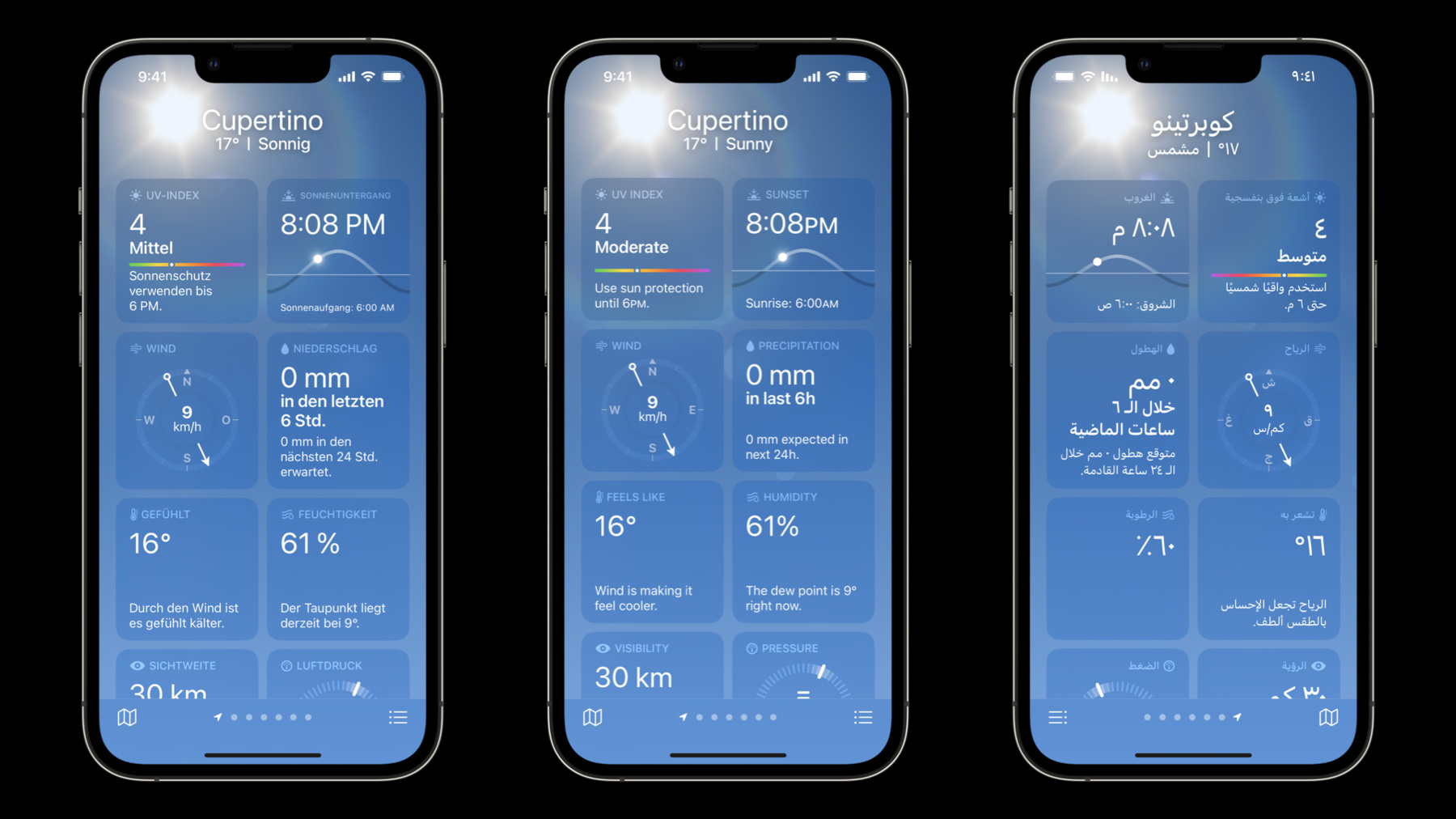
Learn how you can run your apps on devices around the world and help everyone have a great experience — regardless of the language they speak. We'll explore how Apple APIs can provide a solid foundation when creating apps for diverse audiences, and we'll share examples, challenges, and best practices from our own experiences.
Recursos
- Localizing package resources
- Localization
- Expanding Your App to New Markets
- Internationalization and Localization Guide
Vídeos relacionados
WWDC23
WWDC22
- Compose custom layouts with SwiftUI
- Design for Arabic
- Get it right (to left)
- Q&A: Internationalization and localization
- Q&A: Right-to-left
- What's new in Xcode
WWDC21
WWDC20
-
Buscar neste vídeo...
-
-
1:59 - Declare strings using String(localized)
let windPerceptionLabelText = String( localized: "Wind is making it feel cooler", comment: "Explains the wind is lowering the apparent temperature" ) -
2:46 - Translation example 1
let filter = String(localized: "Archive.label", defaultValue: "Archive", comment: "Name of the Archive folder in the sidebar") let filter = String(localized: "Archive.menuItem", defaultValue: "Archive", comment: "Menu item title for moving the email into the Archive folder") -
3:40 - Translation example 2
String(localized: "Show weather in \(locationName)", comment: "Title for a user activity to show weather at a specific city") String(localized: "Show weather in My Location", comment: "Title for a user activity to show weather at the user's current location") -
4:58 - Comment example
String(localized: "Show weather in \(locationName)", comment: "Title for a user activity to show weather at a specific city") -
6:40 - Localized remote content example
let allServerLanguages = ["bg", "de", "en", "es", "kk", "uk"] let language = Bundle.preferredLocalizations(from: allServerLanguages).first -
7:56 - Numbers in a string example 1
String(localized: "\(amountOfRain) in last \(numberOfHours) hour", comment: "Label showing how much rain has fallen in the last number of hours") String(localized: "\(amountOfRain) in last ^[\(numberOfHours) hour](inflect: true)", comment: "Label showing how much rain has fallen in the last number of hours") -
8:40 - Numbers in a string example 2
if selectedCount == 1 { return String(localized: "Remove this city from your favorites") } else { return String(localized: "Remove these cities from your favorites") } -
9:00 - Numbers in a string example 3
String(localized: "\(amountOfRain) in last ^[\(numberOfHours) hour](inflect: true).", comment: "Label showing how much rain has fallen in the last number of hours") -
9:29 - Formatter example
let humidity = 54 // In a SwiftUI view Text(humidity, format: .percent) // In Swift code humidity.formatted(.percent) -
10:03 - Formatter example 2
date.formatted( .dateTime.year() .month() ) // Jun 2022 whatToExpect.formatted() // New features, exciting API, and advanced tips amountOfRain.formatted( .measurement( width: .narrow, usage: .rainfall)) // 12mm (date...<later).formatted( .components( style: .wide ) ) // 24 minutes, 18 Seconds date.formatted( .relative( presentation: .numeric ) ) // 2 minutes ago let components = PersonNameComponents() … nameComponentsFormatter .string(from: components) // Andreas Neusüß or 田中陽子 excitementLevel.formatted( .number .precision( .fractionLength(2) ) ) // 1,001.42 price.formatted( .currency( code: "EUR" ) ) // $20.99 distance.formatted( .measurement( width: .wide, usage: .road) ) // 500 feet bytesCopied.formatted( .byteCount( style: .file )) // 42.23 MB -
11:10 - Combine a formatter with text
func expectedPrecipitationIn24Hours(for valueInMillimeters: Measurement<UnitLength>) -> String { // Use user's preferred measures let preferredUnit = UnitLength(forLocale: .current, usage: .rainfall) let valueInPreferredSystem = valueInMillimeters.converted(to: preferredUnit) // Format the amount of rainfall let formattedValue = valueInPreferredSystem .formatted(.measurement(width: .narrow, usage: .asProvided)) let integerValue = Int(valueInPreferredSystem.value.rounded()) // Load and use formatting string return String(localized: "EXPECTED_RAINFALL", defaultValue: "\(integerValue) \(formattedValue) expected in next \(24)h.", comment: "Label - How much precipitation (2nd formatted value, in mm or Inches) is expected in the next 24 hours (3rd, always 24).") } -
12:22 - Stringsdict examples in English and Spanish
Localizable.stringsdict English: <?xml version="1.0" encoding="UTF-8"?> <!DOCTYPE plist PUBLIC "-//Apple//DTD PLIST 1.0//EN" "http://www.apple.com/DTDs/PropertyList-1.0.dtd"> <plist version="1.0"> <dict> <key>EXPECTED_RAINFALL</key> <dict> <key>NSStringLocalizedFormatKey</key> <string>%#@next_expected_precipitation_amount_24h@</string> <key>next_expected_precipitation_amount_24h</key> <dict> <key>NSStringFormatSpecTypeKey</key> <string>NSStringPluralRuleType</string> <key>NSStringFormatValueTypeKey</key> <string>d</string> <key>other</key> <string>%2$@ expected in next %3$dh.</string> </dict> </dict> </dict> </plist> Localizable.stringsdict Spanish: <?xml version="1.0" encoding="UTF-8"?> <!DOCTYPE plist PUBLIC "-//Apple//DTD PLIST 1.0//EN" "http://www.apple.com/DTDs/PropertyList-1.0.dtd"> <plist version="1.0"> <dict> <key>EXPECTED_RAINFALL</key> <dict> <key>NSStringLocalizedFormatKey</key> <string>%#@next_expected_precipitation_amount_24h@</string> <key>next_expected_precipitation_amount_24h</key> <dict> <key>NSStringFormatSpecTypeKey</key> <string>NSStringPluralRuleType</string> <key>NSStringFormatValueTypeKey</key> <string>d</string> <key>one</key> <string>Se prevé %2$@ en las próximas %3$d h.</string> <key>other</key> <string>Se prevén %2$@ en las próximas %3$d h.</string> </dict> </dict> </dict> </plist> -
13:40 - Swift Package localization example
let package = Package( name: "FoodTruckKit", defaultLocalization: "en", products: [ .library( name: "FoodTruckKit", targets: ["FoodTruckKit"]), ], … ) -
14:41 - Loading a string in a Swift Package
let title = String(localized: "Wind", bundle: .module, comment: "Title for section that shows data about wind.") -
18:19 - Grid example
// Requires data types "Row" and "row" to be defined

struct WeatherTestView: View {
    var rows: [Row]
    var body: some View {
        Grid(alignment: .leading) {
            ForEach(rows) { row in
                GridRow {
                    Text(row.dayOfWeek)

                    Image(systemName: row.weatherCondition)
                        .symbolRenderingMode(.multicolor)

                    Text(row.minimumTemperature)
                        .gridColumnAlignment(.trailing)

                    Capsule().fill(Color.orange).frame(height: 4)

                    Text(row.maximumTemperature)
                }
                .foregroundColor(.white)
            }
        }
    }
}
-