

View in English

  • Apple Developer
    • Get Started

    Explore Get Started

    • Overview
    • Learn
    • Apple Developer Program

    Stay Updated

    • Latest News
    • Hello Developer
    • Platforms

    Explore Platforms

    • Apple Platforms
    • iOS
    • iPadOS
    • macOS
    • tvOS
    • visionOS
    • watchOS
    • App Store

    Featured

    • Design
    • Distribution
    • Games
    • Accessories
    • Web
    • Home
    • CarPlay
    • Technologies

    Explore Technologies

    • Overview
    • Xcode
    • Swift
    • SwiftUI

    Featured

    • Accessibility
    • App Intents
    • Apple Intelligence
    • Games
    • Machine Learning & AI
    • Security
    • Xcode Cloud
    • Community

    Explore Community

    • Overview
    • Meet with Apple events
    • Community-driven events
    • Developer Forums
    • Open Source

    Featured

    • WWDC
    • Swift Student Challenge
    • Developer Stories
    • App Store Awards
    • Apple Design Awards
    • Apple Developer Centers
    • Documentation

    Explore Documentation

    • Documentation Library
    • Technology Overviews
    • Sample Code
    • Human Interface Guidelines
    • Videos

    Release Notes

    • Featured Updates
    • iOS
    • iPadOS
    • macOS
    • watchOS
    • visionOS
    • tvOS
    • Xcode
    • Downloads

    Explore Downloads

    • All Downloads
    • Operating Systems
    • Applications
    • Design Resources

    Featured

    • Xcode
    • TestFlight
    • Fonts
    • SF Symbols
    • Icon Composer
    • Support

    Explore Support

    • Overview
    • Help Guides
    • Developer Forums
    • Feedback Assistant
    • Contact Us

    Featured

    • Account Help
    • App Review Guidelines
    • App Store Connect Help
    • Upcoming Requirements
    • Agreements and Guidelines
    • System Status
  • Quick Links

    • Events
    • News
    • Forums
    • Sample Code
    • Videos
 

Vídeos

Abrir menu Fechar menu
  • Coleções
  • Todos os vídeos
  • Sobre

Mais vídeos

  • Sobre
  • Resumo
  • Código
  • Entenda a criação e otimização de modelos com o Core AI

    Conheça o fluxo completo de implantação de modelos personalizados para Apple Silicon com o novo framework Core AI. Descubra técnicas poderosas para criar modelos usando kernels do Metal personalizados, além de estratégias de compactação adaptadas à plataforma. O novo Core AI Debugger oferece análise intrínseca profunda, e os fluxos de trabalho assistidos por IA orientam você do conceito inicial à execução otimizada no dispositivo.

    Capítulos

    • 0:00 - Introduction
    • 1:49 - Models and skills
    • 3:27 - Python workflow
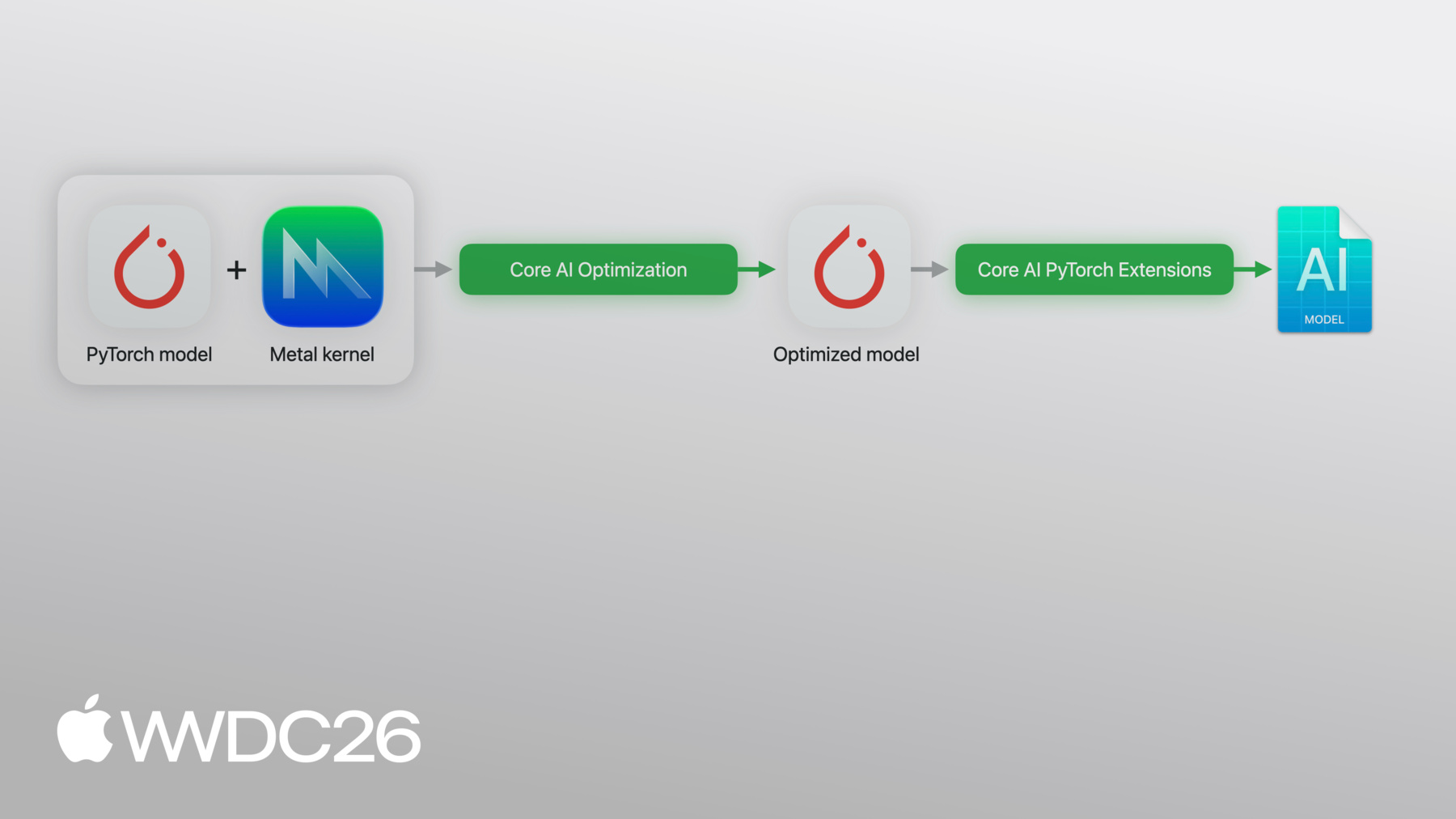
    • 5:54 - Model optimization
    • 10:40 - Core AI Debugger
    • 19:27 - Advanced authoring
    • 20:43 - Custom Metal kernels
    • 23:01 - Model re-authoring
    • 28:46 - Next steps

    Recursos

    • Core AI PyTorch Extensions
    • Core AI Python
    • Core AI Optimization
    • Inspecting, debugging, and profiling Core AI models
    • Inspecting Core AI models with Core AI Debugger
    • Core AI
      • Vídeo HD
      • Vídeo SD

    Vídeos relacionados

    WWDC26

    • Execute IA agêntica localmente no Mac usando o MLX
    • Explore a computação numérica em Swift com o MLX
    • Explore inferência e treinamento distribuído com o MLX
  • Buscar neste vídeo...
    • 3:27 - Define and export a PyTorch model

      import torch
      import torch.nn as nn
      
      # Define a simple model
      class MLP(nn.Module):
          def __init__(self):
              super().__init__()
              self.fc1 = nn.Linear(256, 512)
              self.fc2 = nn.Linear(512, 10)
      
          def forward(self, x):
              return self.fc2(torch.relu(self.fc1(x)))
      
      # Export with torch.export
      model = MLP().eval()
      example_input = (torch.randn(1, 256),)
      exported_program = torch.export.export(model, example_input)
    • 4:02 - Convert, optimize and run inference with Core AI

      import coreai
      import coreai_torch
      from coreai.runtime import NDArray
      
      # Convert to Core AI
      converter = coreai_torch.TorchConverter()
      converter.add_exported_program(
          exported_program,
          input_names=["features"], output_names=["logits"])
      core_ai_program = converter.to_coreai()
      
      # Optimize and save to .aimodel
      core_ai_program.optimize()
      asset = core_ai_program.save_asset("mlp.aimodel")
      
      # Run inference
      specialized_model = await AIModel.load("mlp.aimodel")
      specialized_function = specialized_model.load_function("main")
      result = await specialized_function({"features": NDArray(example[0].numpy())})
    • 21:12 - Define a SiLU Metal kernel with PyTorch reference

      import torch
      from coreai_torch.dsl import TorchMetalKernel, MetalParameter
      
      def silu_torch(x):
          return x * torch.sigmoid(x)
      
      SILU_MSL = """
      float val = float(x[gid]);
      float sig = 1.0f / (1.0f + exp(-val));
      y[gid] = TYPE(val * sig);
      """
      
      silu_kernel = TorchMetalKernel(
          name="fused_silu",
          input_names=["x"],
          result_names=["y"],
          src=SILU_MSL,
          torch_defn=silu_torch,
          metal_params=[MetalParameter("gid", "uint", "thread_position_in_grid")],
          template_dtypes={"x": "TYPE"},
      )
    • 22:09 - Use a custom Metal kernel and convert with TorchConverter

      class MyModel(torch.nn.Module):
          def __init__(self):
              super().__init__()
              self.linear = torch.nn.Linear(256, 256)
      
          def forward(self, x):
              h = self.linear(x)
              n = h.numel()
              return silu_kernel(
                  h,
                  threads_per_grid_size=(n, 1, 1),
                  threads_per_thread_group=(min(n, 256), 1, 1),
                  result_shapes=[h.shape],
              )
      
      exported_program = torch.export.export(MyModel(), (torch.randn(1, 256),))
      
      converter = coreai_torch.TorchConverter()
      converter.register_custom_kernels([silu_kernel])
      converter.add_exported_program(exported_program,
                                     input_names=["x"], output_names=["y"])
      deployable = converter.to_coreai()  # MSL integrated into asset
    • 0:00 - Introduction
    • Overview of Core AI's complete Python ecosystem for model deployment on Apple Silicon — covering the model lifecycle from optimization and conversion through debugging and app integration.

    • 1:49 - Models and skills
    • Introduction to the coreai-models open-source repository — ready-to-go model architectures, reusable components, and agent skills you can install into your coding assistant to leverage Core AI best practices from day one.

    • 3:27 - Python workflow
    • How to convert a PyTorch model to Core AI using coreai-torch — exporting a program with torch.export, running TorchConverter with input/output names, saving as an .aimodel asset, and performing inference from Python with numpy inputs.

    • 5:54 - Model optimization
    • How to compress models using coreai-opt's config-driven optimization library — demonstrated on SAM3 (850M parameters) using int4 per-channel symmetric quantization presets, reducing the model from 3GB to 430MB, and understanding the trade-offs of aggressive uniform compression.

    • 10:40 - Core AI Debugger
    • Introduction to Core AI Debugger — a standalone app for inspecting models on Apple platforms. Covers the navigator (PyTorch module hierarchy), structure viewer (operation graph), source viewer (original Python code), inspector (tensor details), and how to run a model on-device to inspect intermediate tensor outputs.

    • 19:27 - Advanced authoring
    • How advanced model authoring goes beyond end-to-end conversion — fusing multiple operations into a single kernel dispatch, and leveraging Core AI's pre-packaged fast kernels for heavy operations like Scaled Dot Product Attention.

    • 20:43 - Custom Metal kernels
    • How to embed custom Metal Shading Language kernels directly into a Core AI model asset — writing a PyTorch reference function alongside an MSL kernel, registering a TorchMetalKernel with TorchConverter, and shipping the kernel bundled inside the .aimodel file.

    • 23:01 - Model re-authoring
    • How to re-author a PyTorch model from scratch for power-efficient execution on iOS — demonstrated on SAM3 by splitting into three independent functions (image_encode, text_encode, detect), using convolutional projections and channels-first layouts, applying 4-bit palettization to the encoders, and achieving faster second inference by reusing cached image embeddings.

    • 28:46 - Next steps
    • Summary of the Core AI Python toolchain: convert with coreai-torch, optimize with coreai-opt, debug with Core AI Debugger, build on coreai-models examples, and use Core AI Skills in your coding agent.

Developer Footer

  • Vídeos
  • WWDC26
  • Entenda a criação e otimização de modelos com o Core AI
  • Open Menu Close Menu
    • iOS
    • iPadOS
    • macOS
    • tvOS
    • visionOS
    • watchOS
    • App Store
    Open Menu Close Menu
    • Swift
    • SwiftUI
    • Swift Playground
    • TestFlight
    • Xcode
    • Xcode Cloud
    • Icon Composer
    • SF Symbols
    Open Menu Close Menu
    • Accessibility
    • Accessories
    • Apple Intelligence
    • Audio & Video
    • Augmented Reality
    • Business
    • Design
    • Distribution
    • Education
    • Games
    • Health & Fitness
    • In-App Purchase
    • Localization
    • Maps & Location
    • Machine Learning & AI
    • Security
    • Safari & Web
    Open Menu Close Menu
    • Documentation
    • Downloads
    • Sample Code
    • Videos
    Open Menu Close Menu
    • Help Guides & Articles
    • Contact Us
    • Forums
    • Feedback & Bug Reporting
    • System Status
    Open Menu Close Menu
    • Apple Developer
    • App Store Connect
    • Certificates, IDs, & Profiles
    • Feedback Assistant
    Open Menu Close Menu
    • Apple Developer Program
    • Apple Developer Enterprise Program
    • App Store Small Business Program
    • MFi Program
    • Mini Apps Partner Program
    • News Partner Program
    • Video Partner Program
    • Security Bounty Program
    • Security Research Device Program
    Open Menu Close Menu
    • Meet with Apple
    • Apple Developer Centers
    • App Store Awards
    • Apple Design Awards
    • Apple Developer Academies
    • WWDC
    Read the latest news.
    Get the Apple Developer app.
    Copyright © 2026 Apple Inc. All rights reserved.
    Terms of Use Privacy Policy Agreements and Guidelines